Skip to content

[Web] Problems, Bugs and other Issues

610 Topics 4.4k Posts
  • 3D doesn't work

    9
    0 Votes
    9 Posts
    1k Views
    @Montorsi-Paolo-0 Could be it's simply not supported on Edge
  • Is it possible to drag a section of a route when editing?

    4
    0 Votes
    4 Posts
    935 Views
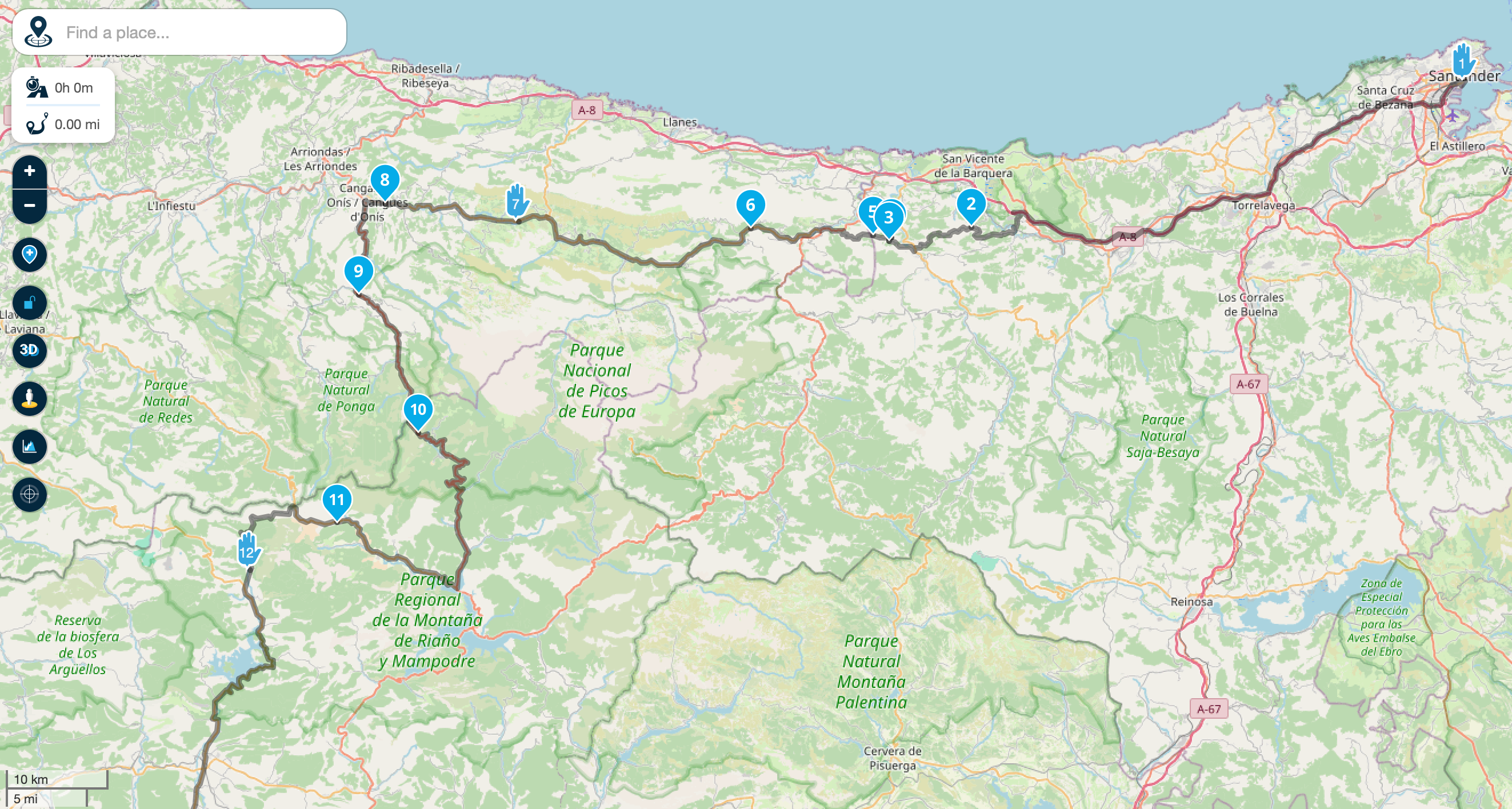
    @Barb-Miller I think I understand what you are asking: MRA planner on website has an option for waypoints that is a "4x4 car". This option draws a straight line from this point to previous one. This is useful for offroad tracks or others than Mra map in use does not knows nothing about. [image: 1726572396197-aac21a49-525a-4163-88d6-8f0f0e751437-image.png] In this route, point 4 has a straight line, because I know a secret track to use, but MRA not This only works on planner, nor in Next. Is this what you mean?
  • Transfer of route

    8
    0 Votes
    8 Posts
    827 Views
    @Tam-0 enjoy the ride and have fun
  • Online route not possible

    6
    0 Votes
    6 Posts
    753 Views
    @Rob-Verhoeff Thanks Rob. That seems to have done the trick
  • Ferry crossing

    17
    0 Votes
    17 Posts
    2k Views
    HERE should just skip all ferry time schedules for inland ferries, and add a 10 minute duration time or even set it to zero. For preventing navigation over ferries there already are features available.
  • My choice is not taken!

    6
    1 Votes
    6 Posts
    733 Views
    @Jörgen said in My choice is not taken!: Traffic „on“ will not be stored as default, just the map that is used for route calculation. ‍️ With that I can live, but please do not force the Logistic map to be displayed (or any other). The user should know best, which map is best for him, so please waive the dependency between any vehicle type and specific map overlays!
  • Zumo XT Cannot calculate the route

    16
    0 Votes
    16 Posts
    2k Views
    @Serge-4 Check the whole route and increase the via points to max 29
  • exporteren route naar zumo XT

    4
    0 Votes
    4 Posts
    459 Views
    @Cor-Theissling Even in een card-holder in de pc/laptop stoppen en een formatopdracht geven.
  • offline

    5
    0 Votes
    5 Posts
    878 Views
    @Nick-Carthew thanks i will do!
  • Google Maps Hybrid Overlay Not Showing

    9
    0 Votes
    9 Posts
    1k Views
    @Corjan-Meijerink fast fix - thats almost at the speed of light
  • Ist das Neu?

    2
    0 Votes
    2 Posts
    312 Views
    Hi, die Navi App reagiert anders auf plötzliche Sperrungen als die Web Planung. Teilweise muss man die Verkehrsfunktion einschalten, um Sperrungen zu sehen.
  • Snelweg punt

    3
    0 Votes
    3 Posts
    395 Views
    @Cor-Theissling, jij navigeert met de app? Zet dan de kaart op Here in de routes die je plant. Dan verdwijnt dit probleem.
  • Strange Route Issue

    12
    0 Votes
    12 Posts
    1k Views
    @Eric-de-Swart said in Strange Route Issue: @Angelo-Greco I have kind of the same. I can't get the route to go over the ferry between point 71 and 72. I made the route by using the scenic route tool, to create a route, afterwards I made some changes. Originally the route went over the ferry, but as I adjusted it (edit route, and ad waypoints) there's no way to get it over the ferry. Position route point 71 at the ferry. Your eyes will tell you that you are about to take the ferry. When you pass route point 72, all will be good again.
  • Crossing a ferry in a route

    3
    0 Votes
    3 Posts
    438 Views
    A Former User?
    @Marinus-van-Deudekom That helps, thank you
  • Expanding does not work

    20
    0 Votes
    20 Posts
    2k Views
    @Adam-Sobanski I am having the exact same issue, unable to expand using the tomtom map. the Here map works fine. The tomtom map has always expanded for me when I created routes in the past but, now has stopped. Did you ever find a solution? Thanks
  • Verdwenen routepunten Versie 4.3.0

    5
    0 Votes
    5 Posts
    1k Views
    Ik heb die ook gereden. Er werden enkel 4 tracks ter beschikking gesteld. Dus heb je geen routepunten als je de track naar een route in de gps converteert. De track, en dus ook de geconverteerde route liep helemaal niet over de N8. [image: 1725311623136-bachten-de-kupe-alveringem.png]
  • Route Off Line maken

    5
    0 Votes
    5 Posts
    617 Views
    @Michel-van-Hagen-MRA-Founder Ik las het net bij de update informatie....
  • help with Garmin Zumo XT

    31
    0 Votes
    31 Posts
    10k Views
    @Mzokk Great, thanks for those steps. When you set the properties of the track, to see both at once, do you have to Start the track, then back out and start the route? I looked at the route, and when I first looked at it I could see what looked like the track on the outside of the route, I made the track the widest and color in red. But, when I zoomed in, I couldn't see the track anymore. But, I guess the good news is the track was the same as the route. No deviation.
  • Route kopiëren duurt lang/gebeurd niks

    9
    0 Votes
    9 Posts
    818 Views
    Denk dat het ook een glitch was. Heb het weer geprobeerd en nu deed het wel.
  • This topic is deleted!

    1
    0 Votes
    1 Posts
    2 Views
    No one has replied
ACTIVE USERS POPULAR TOPICS MY GROUPS