Joining a planned route from a differant position.
-

Is it possible to join a planned route from a position that is not on the route?
Thanks. -
I'd like to add one more wish to my colleague's wish list:
For example… he designed a 5-point MRA route…
Start Point 1 (palm of hand) is my house
Point 2 (water droplet) a known point near home
Point 3 (water droplet) I am now in an unknown area of the route and therefore decide to open and use my NEXT navigator
Point 4 (water droplet) unknown point on the route
Point 5 (palm of hand) end point of the route
Now let's look at the navigation in this example:
Since it's a route with a known start, point 1 is my house and point 2 is near my house… (therefore I'm out riding and not using NEXT)… when I pass point 3 (I'm now in an unknown area) and therefore I open my NEXT navigator to guide me… so far so good. In the NEXT routing settings menu, I can activate the green checkmark with two options:
1 / Start the route from the nearest reference point (this works without a problem)
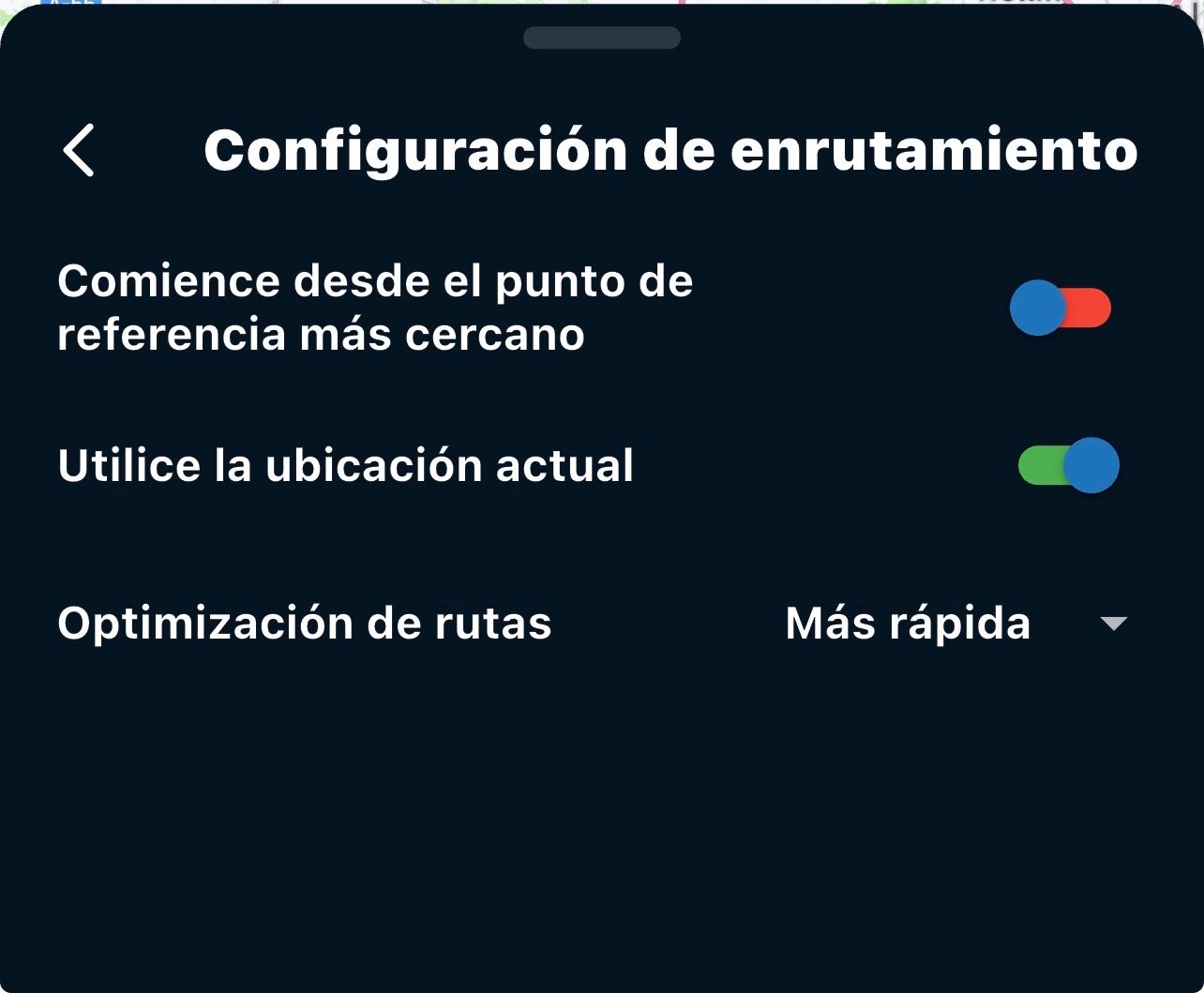
2 / Use the position Currently... (near point 3, the water droplet shape, which is unknown to me) and this is where the problem arises, in my opinion... because at this point, there are two possibilities if you decide to activate the routing option (start the route from the current position)...
-
If you are near point 3, the navigation recalculates and takes you back along the route (which is an error in my opinion)... since it forces you to pass through point 3, which you have already passed (and clarifying that this point 3 was designed as a water droplet shape, NOT as a mandatory stop). Therefore, here is the error... (Why does it make me navigate backward if my GPS position is past point 3 and I have activated the routing option to start from the current position?)
-
What can happen that allows you to navigate correctly forward... Possibility (correct): being very close to point 4, and therefore far from point 3, the navigation system does start the route correctly from your location. where you are and navigate you forward correctly on your planned route.
Therefore, I would like this error corrected because, depending on how close or far you are from the previous point when you start using "next" (midway through a route already known at the beginning)... it will navigate you correctly to the next point or incorrectly to the previous point, and the only solution is to manually skip the previous point (let's say point 3 in my example).
-
-
I'd like to add one more wish to my colleague's wish list:
For example… he designed a 5-point MRA route…
Start Point 1 (palm of hand) is my house
Point 2 (water droplet) a known point near home
Point 3 (water droplet) I am now in an unknown area of the route and therefore decide to open and use my NEXT navigator
Point 4 (water droplet) unknown point on the route
Point 5 (palm of hand) end point of the route
Now let's look at the navigation in this example:
Since it's a route with a known start, point 1 is my house and point 2 is near my house… (therefore I'm out riding and not using NEXT)… when I pass point 3 (I'm now in an unknown area) and therefore I open my NEXT navigator to guide me… so far so good. In the NEXT routing settings menu, I can activate the green checkmark with two options:
1 / Start the route from the nearest reference point (this works without a problem)
2 / Use the position Currently... (near point 3, the water droplet shape, which is unknown to me) and this is where the problem arises, in my opinion... because at this point, there are two possibilities if you decide to activate the routing option (start the route from the current position)...
-
If you are near point 3, the navigation recalculates and takes you back along the route (which is an error in my opinion)... since it forces you to pass through point 3, which you have already passed (and clarifying that this point 3 was designed as a water droplet shape, NOT as a mandatory stop). Therefore, here is the error... (Why does it make me navigate backward if my GPS position is past point 3 and I have activated the routing option to start from the current position?)
-
What can happen that allows you to navigate correctly forward... Possibility (correct): being very close to point 4, and therefore far from point 3, the navigation system does start the route correctly from your location. where you are and navigate you forward correctly on your planned route.
Therefore, I would like this error corrected because, depending on how close or far you are from the previous point when you start using "next" (midway through a route already known at the beginning)... it will navigate you correctly to the next point or incorrectly to the previous point, and the only solution is to manually skip the previous point (let's say point 3 in my example).

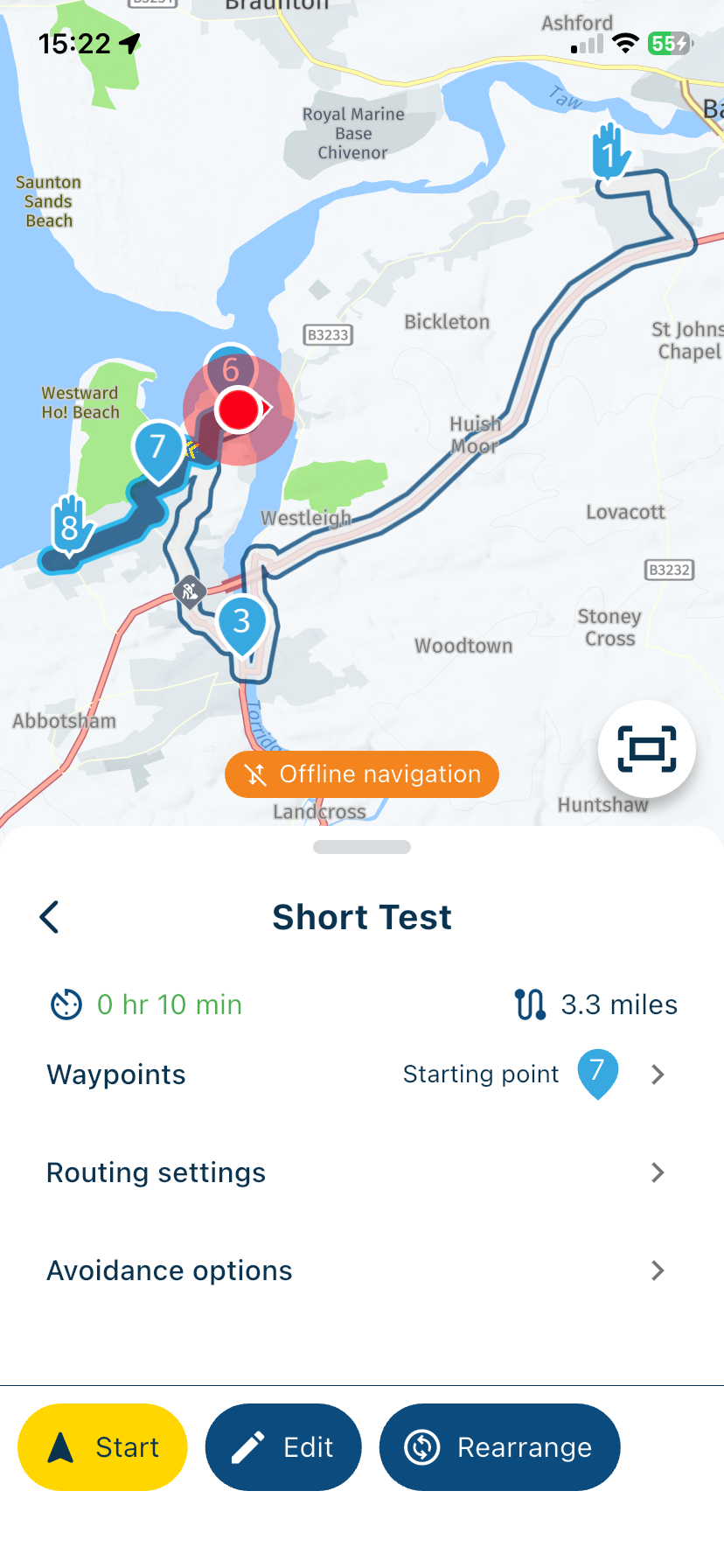
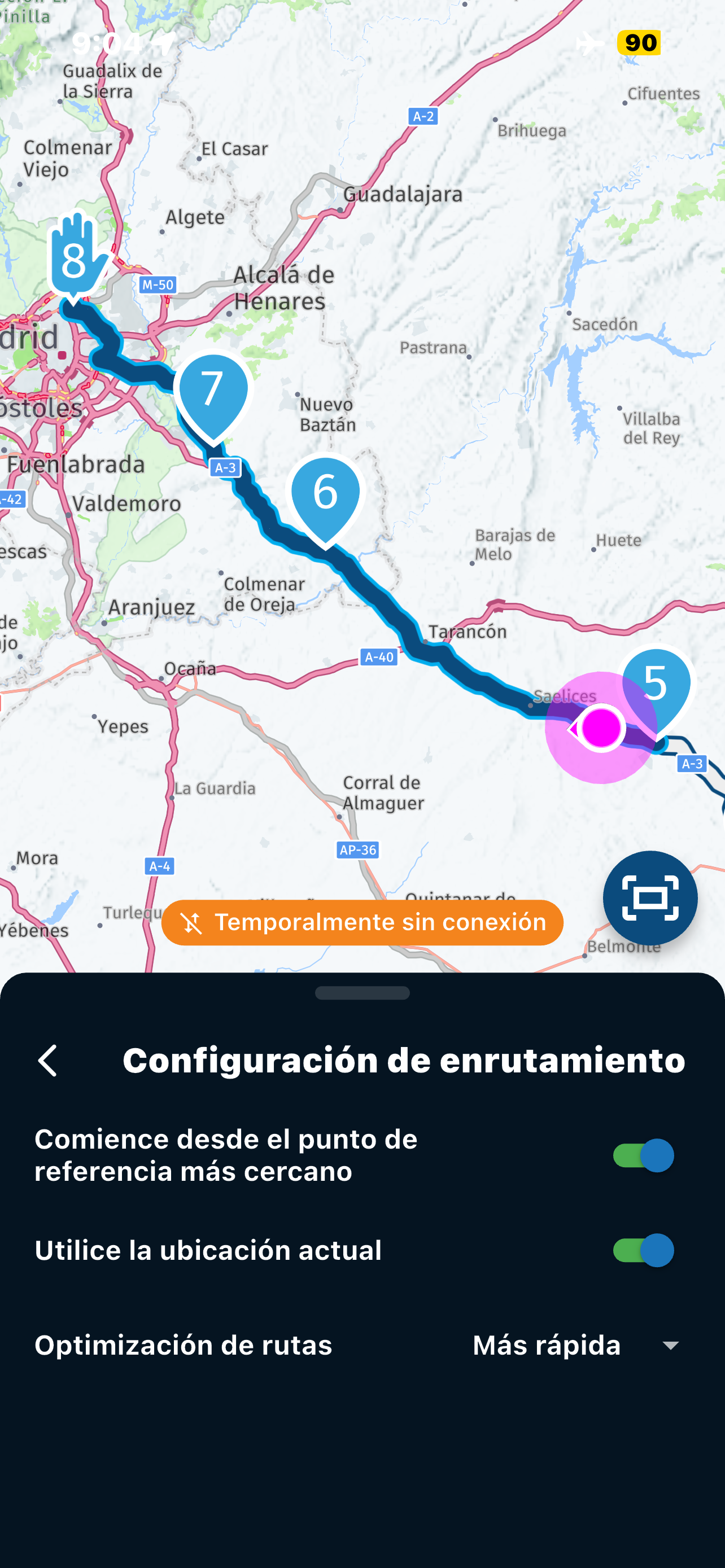
@Jose-antonio-marin-segura You’re not correct with your scenario. If you start a route and you are not at the beginning, the app knows your location and will therefore start from the nearest location that is in front of you not behind you. My two screenshots demonstrate this. The first screenshot is an overview of the whole route. The second screenshot shows my location, the white line and waypoints 4 and 5 are behind me, the app will start navigation from waypoint 6.
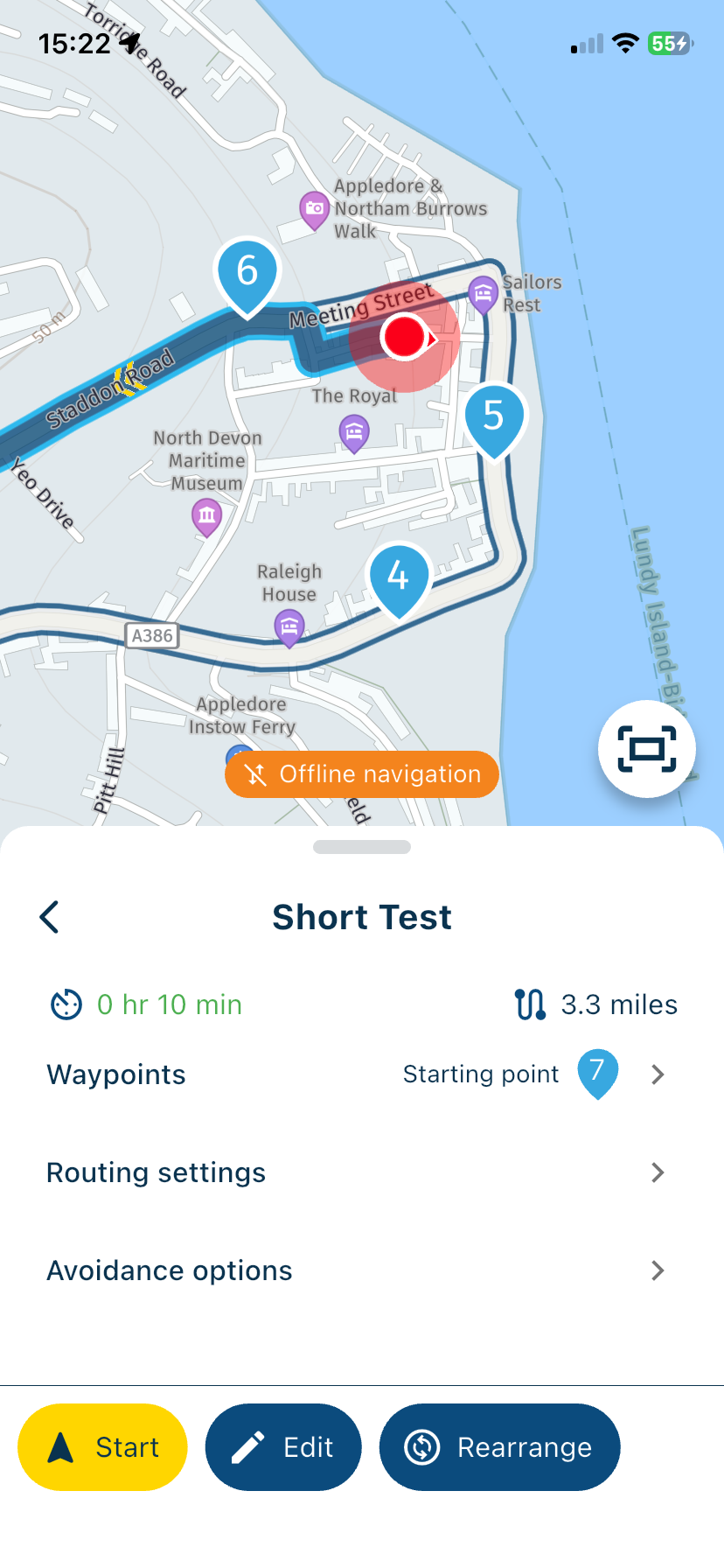
-
-
Is it possible to join a planned route from a position that is not on the route?
Thanks.
@Simon-James-Hancock said in Joining a planned route from a differant position.:
Is it possible to join a planned route from a position that is not on the route?
Thanks.If you open a route the app will guide you to the start from your location. If you do not want to join at the start, long press any waypoint to skip all previous waypoints and you’ll be directed from your location to your chosen waypoint.
So in short, the answer is yes.
-
Nick Carthew moved this topic from [App] Problems, Bugs and other Issues on
-
@Simon-James-Hancock said in Joining a planned route from a differant position.:
Is it possible to join a planned route from a position that is not on the route?
Thanks.If you open a route the app will guide you to the start from your location. If you do not want to join at the start, long press any waypoint to skip all previous waypoints and you’ll be directed from your location to your chosen waypoint.
So in short, the answer is yes.

@Nick-Carthew said in Joining a planned route from a differant position.:
If you open a route the app will guide you to the start from your location. If you do not want to join at the start, long press any waypoint to skip all previous waypoints and you’ll be directed from your location to your chosen waypoint.
Yes absolutely.
What annoys me: If I start riding a route, passing the start waypoint before the navigation starts, the app keeps directing me back to the starting point. This happens even if I pass the second, third, fourth shaping points etc, at which point it would be nice if the app would starts realizing, that this guy is actually following the route, so no need to go back and start over.
-
@Nick-Carthew said in Joining a planned route from a differant position.:
If you open a route the app will guide you to the start from your location. If you do not want to join at the start, long press any waypoint to skip all previous waypoints and you’ll be directed from your location to your chosen waypoint.
Yes absolutely.
What annoys me: If I start riding a route, passing the start waypoint before the navigation starts, the app keeps directing me back to the starting point. This happens even if I pass the second, third, fourth shaping points etc, at which point it would be nice if the app would starts realizing, that this guy is actually following the route, so no need to go back and start over.
@Makro The first waypoint is always a via point, hand shape. Via points are never automatically skipped. To avoid what you described, always position the first waypoint 100+ metres from the actual start point. The app will always guide you to the start point.
Always willing to help if I can.
Triumph Tiger 1200 XRT called Tina.
MRA Navigation Next and SilverFox BJ8 -
@Makro The first waypoint is always a via point, hand shape. Via points are never automatically skipped. To avoid what you described, always position the first waypoint 100+ metres from the actual start point. The app will always guide you to the start point.

@Nick-Carthew that's not the point Nick. Just if we do like you suggested - if there is a need of restart the navigation for a route - MyRoute-App doesn't realise we are just on the route and there is no need to start with route point 1 again.
Nothing is impossible ;-)
In past: GARMIN Zumo 210->GARMIN Zumo 395->GARMIN XT=> now: DMD T865-X + MyRoute-App, LocusMaps, OsmAnd.
In past: GARMIN MapSource ->GARMIN BaseCamp->Tyre->Kurviger->Calimoto=> now: MRA-Routplanner. -
@Nick-Carthew that's not the point Nick. Just if we do like you suggested - if there is a need of restart the navigation for a route - MyRoute-App doesn't realise we are just on the route and there is no need to start with route point 1 again.
@Guzzist Neither the original poster or Marko mentioned restarting the route, so I’m not sure why you say that but even if you do need to restart the route a long press on any waypoint will still work or if you have Start from nearest waypoint selected.
-
Thank you for your response. In your case, it's because your location (halfway) is very close to waypoint number 6. If your location (red dot) is slightly ahead of point 5 and therefore far from point 6, navigation starts from point 5 even though that point is behind you. I've attached my screenshots. I'm talking about Next on iOS 26... In my example screenshots from today, I start the route when I'm already between points 2 and 3 (see screenshots). I select the "Start from current location" option and it recalculates the route to go to point 2 (which I've already passed). I'm between points 2 and 3... Then, since I see that's not what I want, I select the "Start from home" option and it sends me to point 1 (as expected). Finally, in screenshot 3, I disable both options ("Start from home" and "Use current location") and once again it sends me to point 1.
In short, it never sends me to start at point 3, which is what it should do (like what happens to you in your post above).
-
Or Just use more waypoints when planning a route to cater for this type of eventuality.
If you keep pressing does go through all the waypoints, Or only the nearest one? -
Or Just use more waypoints when planning a route to cater for this type of eventuality.
If you keep pressing does go through all the waypoints, Or only the nearest one?
@Simon-James-Hancock said in Joining a planned route from a differant position.:
Or Just use more waypoints when planning a route to cater for this type of eventuality.
The amount of waypoints makes no difference to the original scenario, my first answer still stands if there are 15 waypoints or 150 waypoints.
If you keep pressing does go through all the waypoints, Or only the nearest one?
Not sure that you fully understood my reply. Long press on any Waypoint will skip all previous waypoints and then navigation starts from the waypoint that you long pressed.
-
Thank you for your response. In your case, it's because your location (halfway) is very close to waypoint number 6. If your location (red dot) is slightly ahead of point 5 and therefore far from point 6, navigation starts from point 5 even though that point is behind you. I've attached my screenshots. I'm talking about Next on iOS 26... In my example screenshots from today, I start the route when I'm already between points 2 and 3 (see screenshots). I select the "Start from current location" option and it recalculates the route to go to point 2 (which I've already passed). I'm between points 2 and 3... Then, since I see that's not what I want, I select the "Start from home" option and it sends me to point 1 (as expected). Finally, in screenshot 3, I disable both options ("Start from home" and "Use current location") and once again it sends me to point 1.
In short, it never sends me to start at point 3, which is what it should do (like what happens to you in your post above).
@Jose-antonio-marin-segura
I’m sorry, I’ll say it again, you are incorrect.
When you select Start from nearest waypoint, the app will choose the waypoint that is in front of you not behind. I have changed the example route to prove this.
Screenshot 1 shows the entire route.
Screenshot 2 shows the start point as waypoint 4 which is in front of my current location.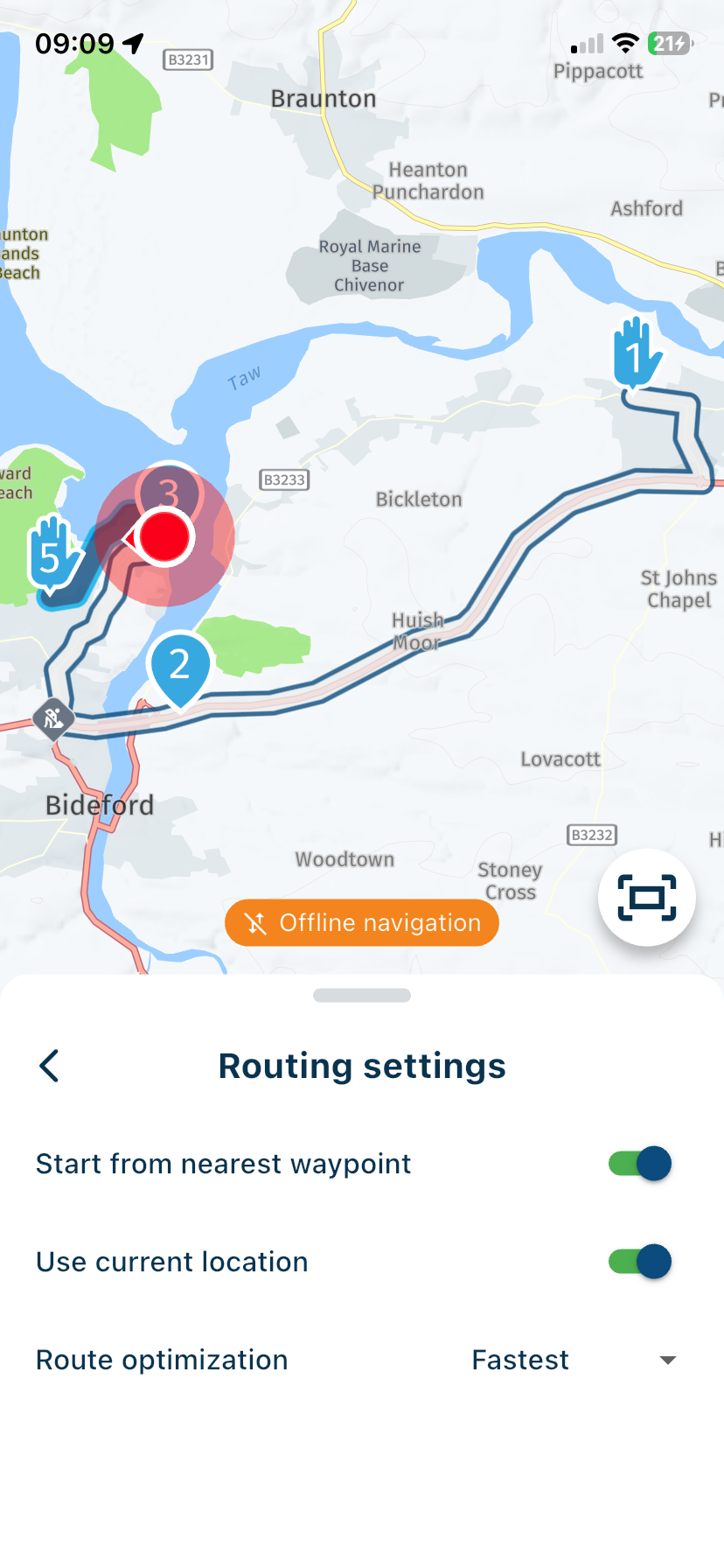
See the next waypoint icon top right of the navigation screen. Waypoint 3 is nearest but behind me on the route, waypoint 4 is further away than waypoint 3 but it is in front of my location.
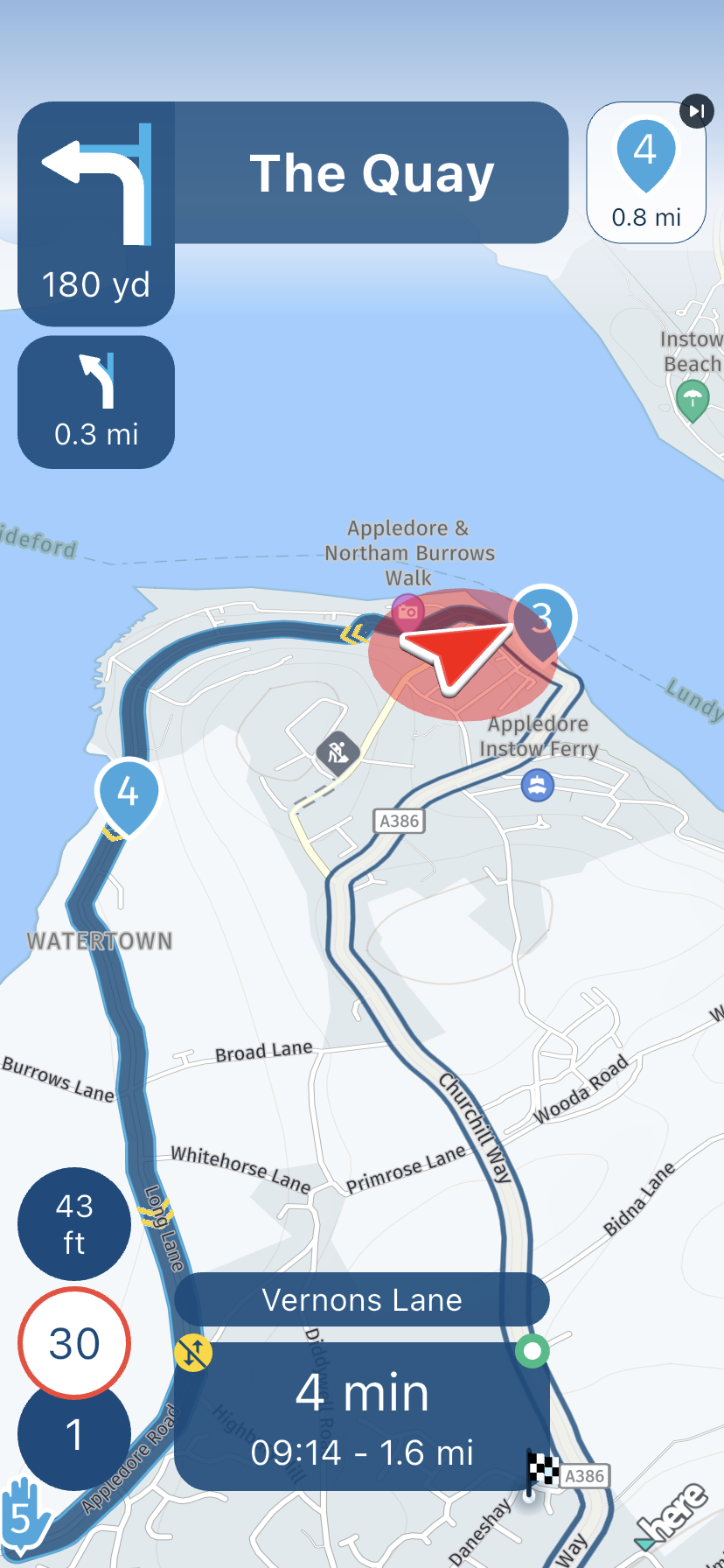
-
Here are photos from today showing that I've passed point 5 and am heading for point 6, but it sends me back to point 5 instead of the next point 6... Next navigation on iOS 2.6. I've tried both online and offline with downloaded maps and the same error occurs.
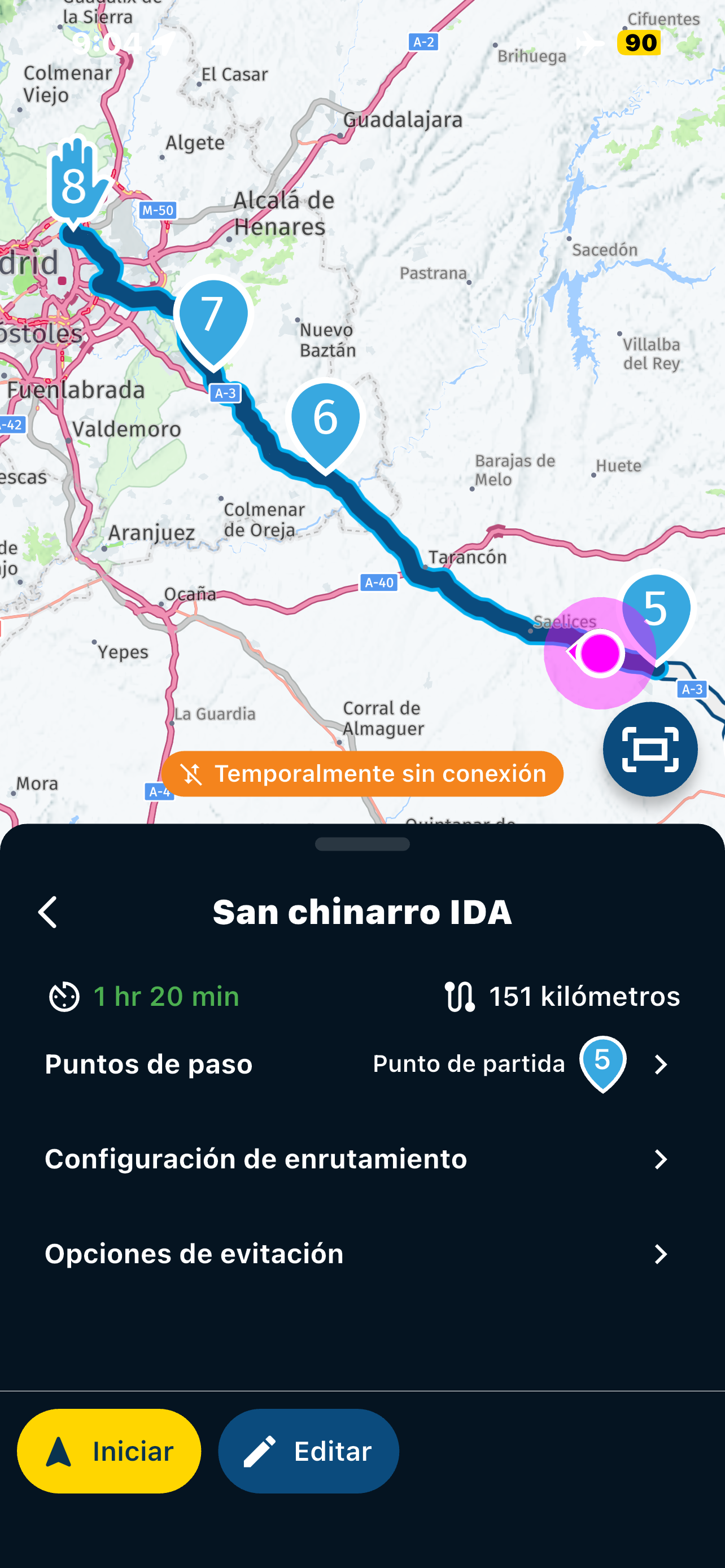
-
i see the same as @Jose-antonio-marin-segura . The app sends me back. I suspect that the app skips a point when you are very close to it and that this is why it works in @Nick-Carthew case (point 3 very close)
-
@Nick-Carthew said in Joining a planned route from a differant position.:
If you open a route the app will guide you to the start from your location. If you do not want to join at the start, long press any waypoint to skip all previous waypoints and you’ll be directed from your location to your chosen waypoint.
Yes absolutely.
What annoys me: If I start riding a route, passing the start waypoint before the navigation starts, the app keeps directing me back to the starting point. This happens even if I pass the second, third, fourth shaping points etc, at which point it would be nice if the app would starts realizing, that this guy is actually following the route, so no need to go back and start over.
That's right, exactly what you're describing is happening to me, and I've been asking about it these past few days... obviously, the solution other users have suggested is manually re-entering points already passed (we all know that). The idea is to suggest in the forum that it be implemented automatically so the navigator knows you're following the route correctly and automatically guides you to the next point (without having to manually re-enter previous points).
-
the other thing I noticed is that the app never sends you to the last point, which I find confusing. In @Nick-Carthew case : if point 4 was the last point the app would send you to 3.
-
the other thing I noticed is that the app never sends you to the last point, which I find confusing. In @Nick-Carthew case : if point 4 was the last point the app would send you to 3.
@Herman-Veldhuizen said in Joining a planned route from a differant position.:
the other thing I noticed is that the app never sends you to the last point, which I find confusing. In @Nick-Carthew case : if point 4 was the last point the app would send you to 3.
Waypoint 4 is not the last waypoint and even if it was the app would not send me to waypoint 3. My example shows that I have decided to start this route from somewhere that is not the start point. I have selected Start from nearest waypoint in Routing settings. Waypoint 3 is behind my location, this can be seen by the white line, if the app sent me to waypoint 3 I would have to travel back on the same road to reach the next waypoint number 4.
-
Nick Carthew, that's right, I totally agree with what you've described as help, but it simply doesn't work for me and several others like it does for you. It sends me back to the previous point (which we've already passed), and we don't know why. That's why we're asking here, since it should work for us like it does for you, Nick, but it doesn't! Is it something in our configuration? Or is it a bug in the app? That's the question...
-
Nick Carthew, that's right, I totally agree with what you've described as help, but it simply doesn't work for me and several others like it does for you. It sends me back to the previous point (which we've already passed), and we don't know why. That's why we're asking here, since it should work for us like it does for you, Nick, but it doesn't! Is it something in our configuration? Or is it a bug in the app? That's the question...
@Jose-antonio-marin-segura It may be because I am using the new 5.1.0 updated version from BETA testing. I will ask and come back to this topic with the answer.


Hello! It looks like you're interested in this conversation, but you don't have an account yet.
Getting fed up of having to scroll through the same posts each visit? When you register for an account, you'll always come back to exactly where you were before, and choose to be notified of new replies (either via email, or push notification). You'll also be able to save bookmarks and upvote posts to show your appreciation to other community members.
With your input, this post could be even better 💗
Register Login-
 0520
0520
-
 2481
2481
-
 0522
0522
-
 0311
0311
-
0312
-
 0746
0746
-
 126
126
-
036