6.0 UI in landscape needs pollishing
-

Had my first play with 6.0 app today. I'm very positive about most style and feature changes, but the UI has some big issues in landscape (on iPhone SE3). My bike mount (BMW connected cradle) does not allow me to use in portrait.
Examples:
-
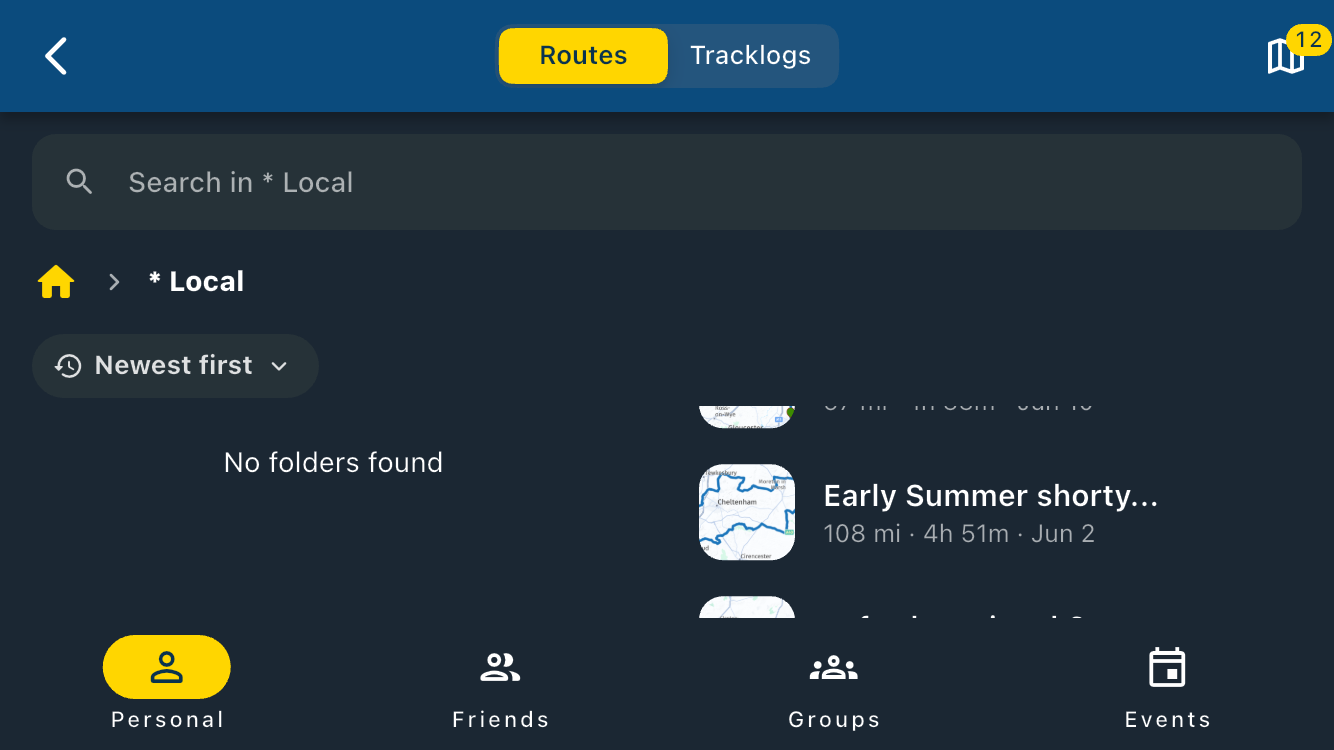
When attempting to select a route, the window with the scrollable list in takes less than 1/8th of the screen and can show less than two routes.
-
When navigating in landscape the amount of usefully visible map is far too small. I appreciate the larger font in the information overlays but in landscape they just don't leave enough actual map visible. On right bends the only useful bit of map is a tiny section on the bottom right of the display, and it only manages to show the bend entry.
-
Hello! It looks like you're interested in this conversation, but you don't have an account yet.
Getting fed up of having to scroll through the same posts each visit? When you register for an account, you'll always come back to exactly where you were before, and choose to be notified of new replies (either via email, or push notification). You'll also be able to save bookmarks and upvote posts to show your appreciation to other community members.
With your input, this post could be even better 💗
Register Login-
 711114
-
 17335.5k
-
 0730
0730
-
125244
-
 216127
-
 07196
07196
-
 0342
0342
-
 0228
0228