GPX Versions 1.1 vs 1.2 for Garmin Visually Explained
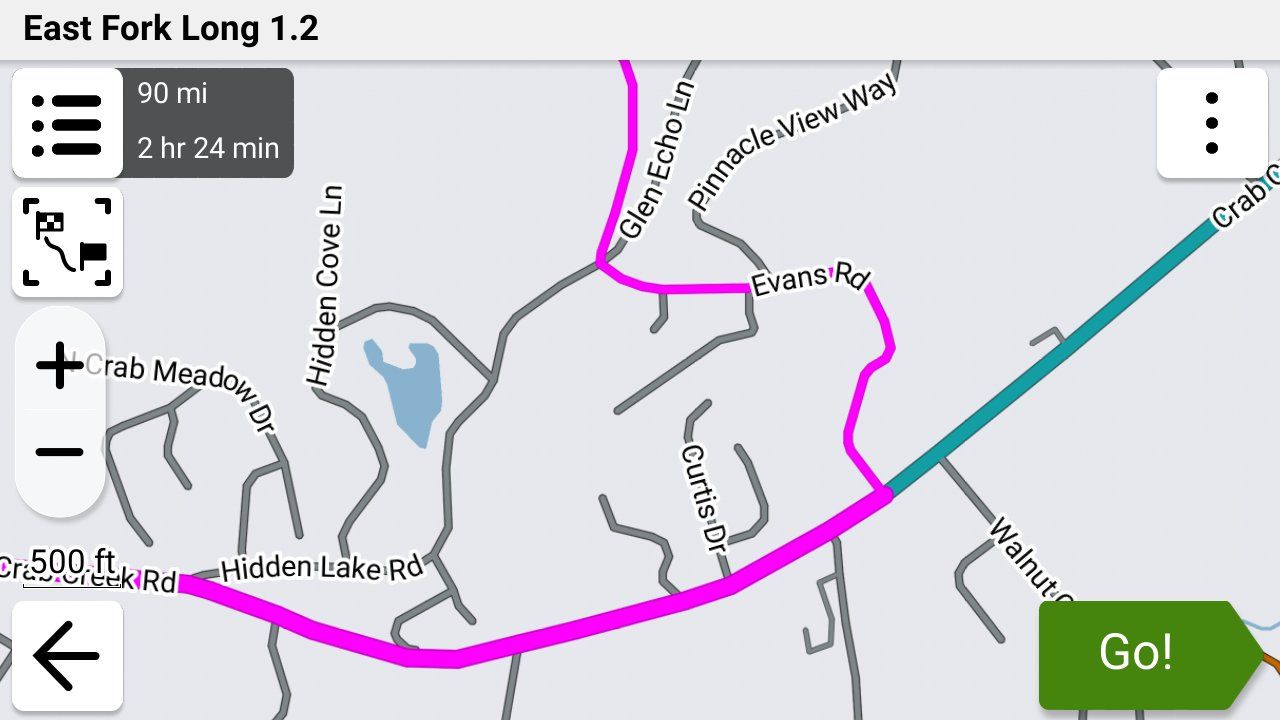
-
Thanks for that John its good to know that the XT is capable of navigating back to a GPX 1.2 route.
I tend to navigate in the opposite sort of way where I seek out the backroads and try to avoid the main roads and towns as much as possible. There's nothing I like more than riding up a road with grass growing up the Middle.

I had a look at the setup of my XT as stated earlier I haven't used it for actual navigation for over a year now preferring instead to use my phone connected to my Africa Twin's built in screen. The only thing that I can see that might have messed up the behaviour of the unit on test was the OSM mapping of Ireland I have on an SD card in the machine. This shouldn't mess up the rerouting if its disabled as it was on my XT but I think it should be eliminated from the inquiries.
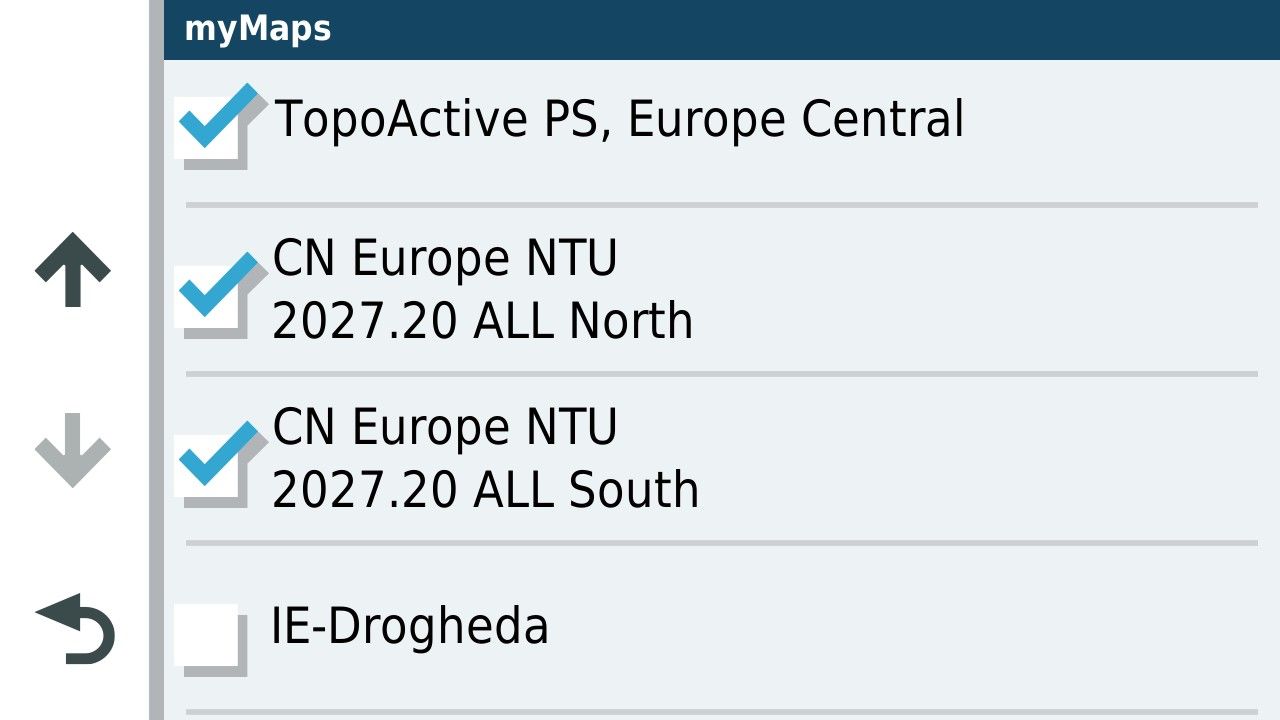
I'll delete the mapping from the SD card and have a go again with GPX 1.2. Unfortunately that might be a few weeks away as I go next week to have a cataract removed and will be off the road.....for everyone's safety

I had another go at simulating the route but obviously you can't simulate going off route just adding an element to the route before the first turn. As expected GPX 1.2 routed past the new addition directly to the next via point.
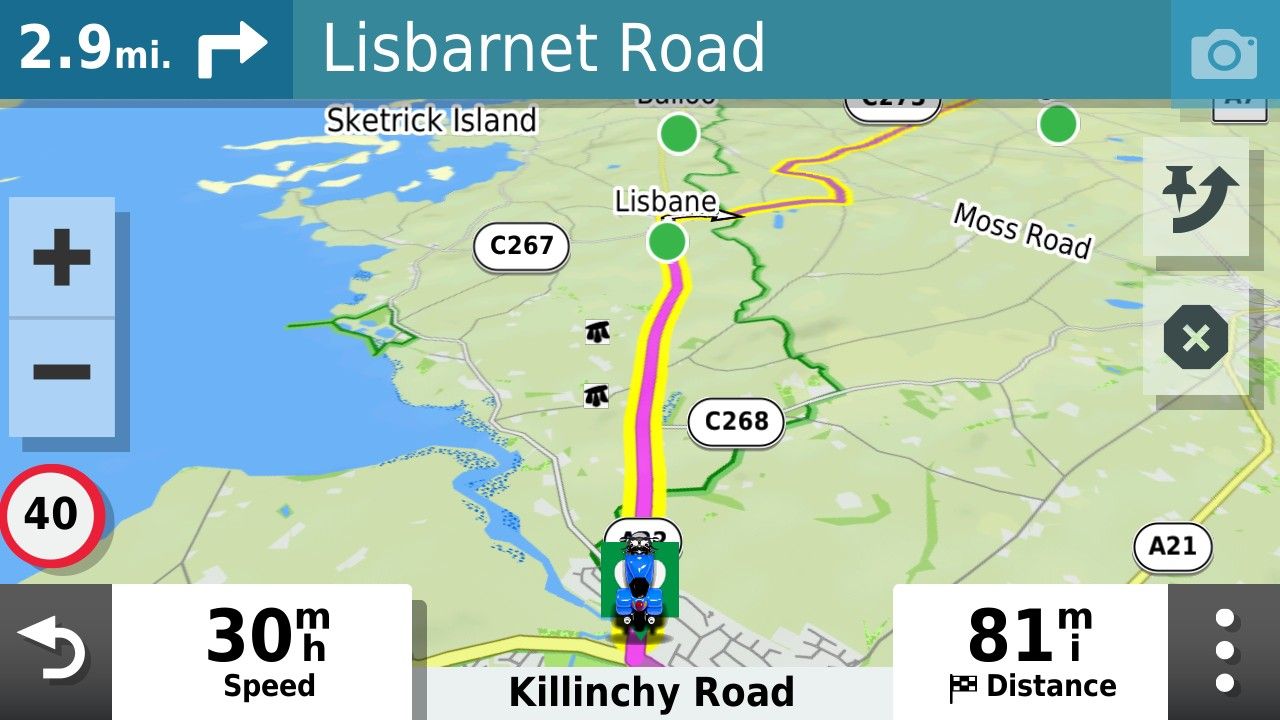
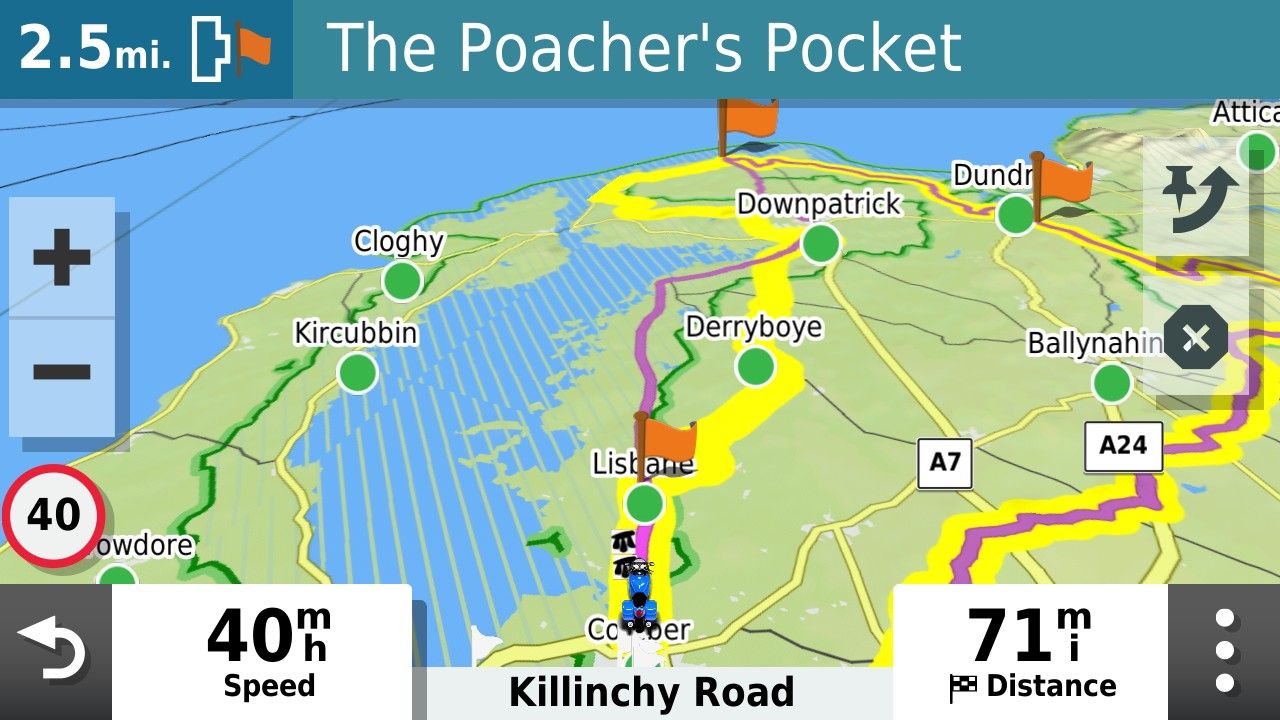
Whereas the GPX1.1 version of the file was able to deal with it.
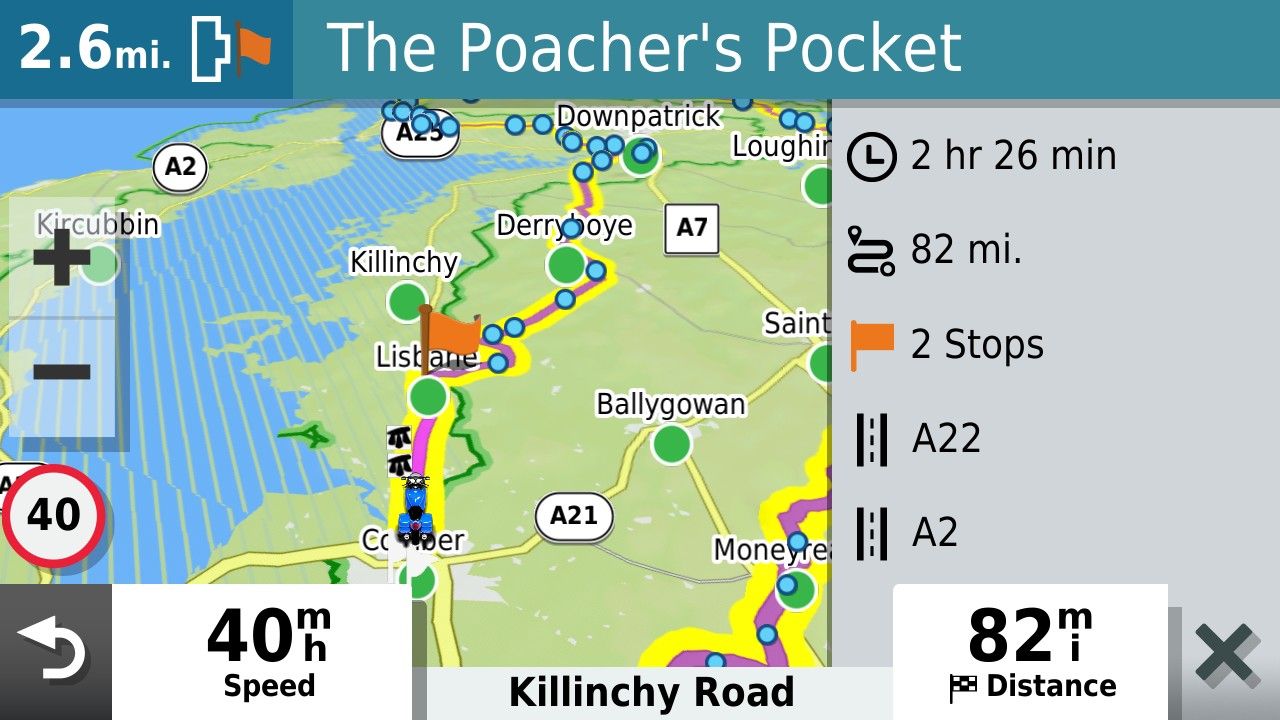
Thanks for checking that John. I look forward to having another go minus the OSM maps on the card......and when I'm safe to be let out!!

I had a look at the setup of my XT as stated earlier I haven't used it for actual navigation for over a year now preferring instead to use my phone connected to my Africa Twin's built in screen.
First of all, I wish for your eye procedure to go well.

After completing the XT 1.2 off-route recalculation and being returned to the route, I decided to go off-route further ahead, but this time chose not to recalculate when prompted, which triggered the route to pause. After meandering around for a couple of miles, I manually re-entered the route line further ahead and my XT route came back to life. This is my normal method for handling off-route situations.
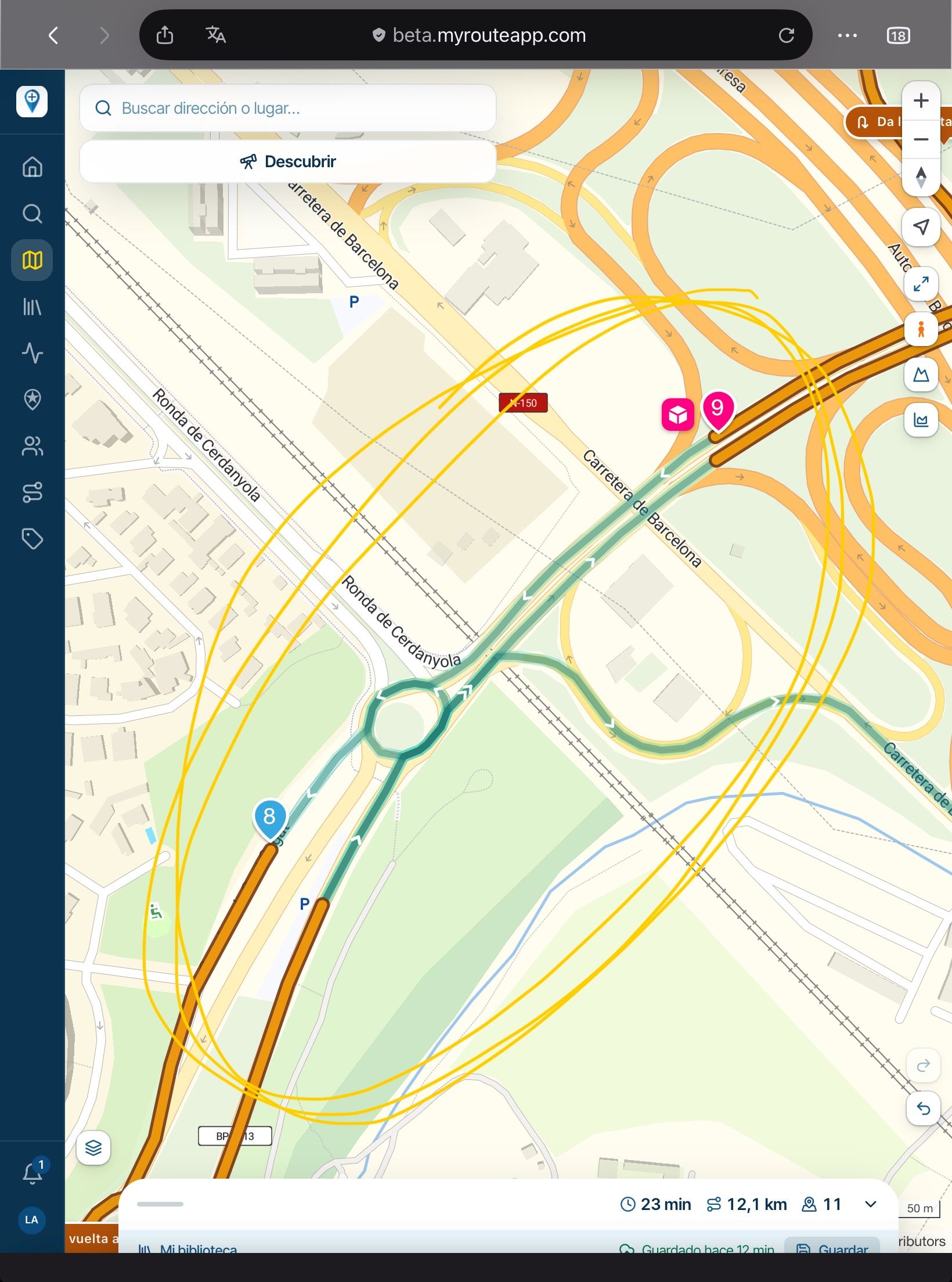
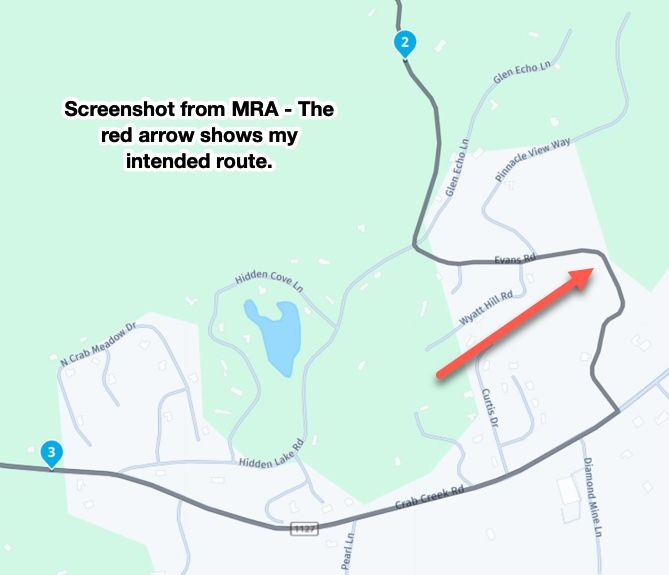
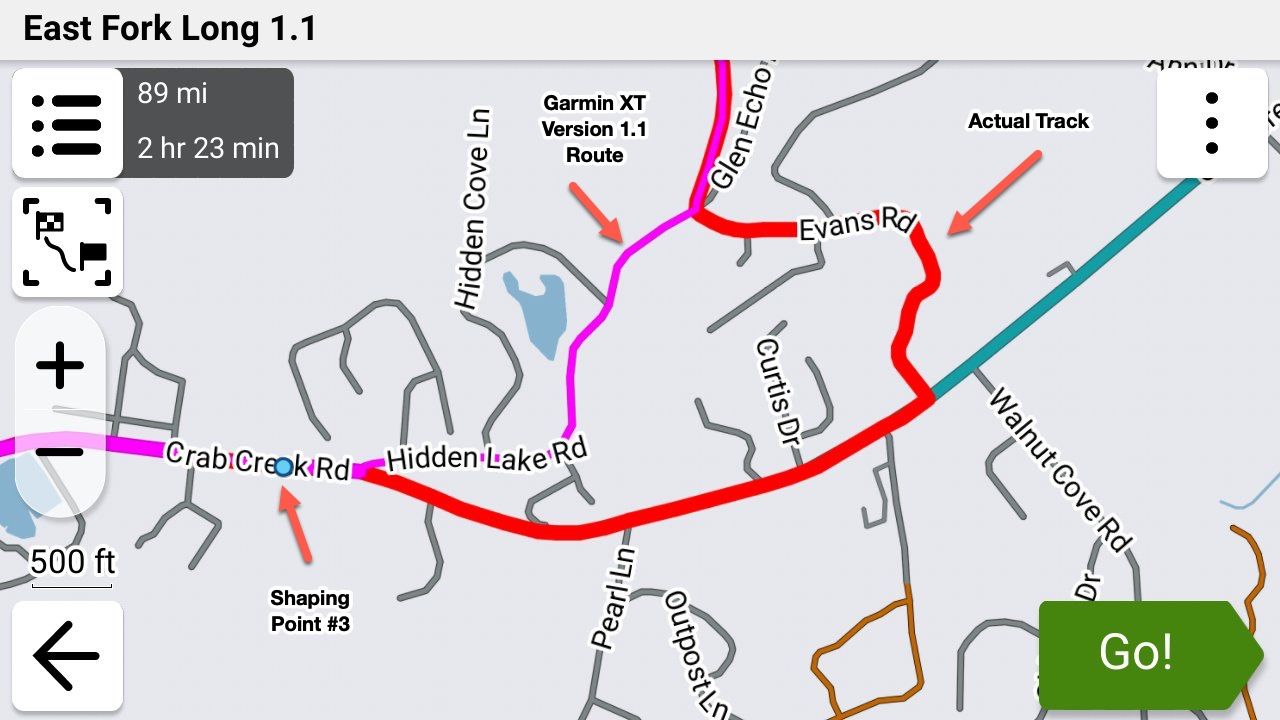
Then I hit the section of the route with the twisty section where HERE maps the road incorrectly.
 Because 1.2 is essentially following the Track of the MRA developed route, there was no alert for divergence. On the XT, it showed me riding the Track line where the road actually exists and then showed where the Track/Route converged up ahead. No drama, and no intervention. It's very slick.
Using 1.1 for this route in previous tests, this triggered an off-route alert that completely tripped up the MRA phone app running in parallel to my Garmin. The app tried to recalculate to the next waypoint but ended up in a loop where it was constantly trying to reroute me backwards. I had to stop and restart the app for it to continue.
When stuff like this happens, it just reinforces to me that the app is not yet ready for prime time. I admire the tenacity of the MRA Development team constantly chasing down errors and putting out fires, but it never seems to end. I'd like to feel that I have the option of using the phone app instead of my Garmin, but the confidence simply isn't there. I sincerely hope genuine app stability will somehow be achieved in the future.
-
I had a look at the setup of my XT as stated earlier I haven't used it for actual navigation for over a year now preferring instead to use my phone connected to my Africa Twin's built in screen.
First of all, I wish for your eye procedure to go well.
After completing the XT 1.2 off-route recalculation and being returned to the route, I decided to go off-route further ahead, but this time chose not to recalculate when prompted, which triggered the route to pause. After meandering around for a couple of miles, I manually re-entered the route line further ahead and my XT route came back to life. This is my normal method for handling off-route situations.
Then I hit the section of the route with the twisty section where HERE maps the road incorrectly.
Because 1.2 is essentially following the Track of the MRA developed route, there was no alert for divergence. On the XT, it showed me riding the Track line where the road actually exists and then showed where the Track/Route converged up ahead. No drama, and no intervention. It's very slick.Using 1.1 for this route in previous tests, this triggered an off-route alert that completely tripped up the MRA phone app running in parallel to my Garmin. The app tried to recalculate to the next waypoint but ended up in a loop where it was constantly trying to reroute me backwards. I had to stop and restart the app for it to continue.
When stuff like this happens, it just reinforces to me that the app is not yet ready for prime time. I admire the tenacity of the MRA Development team constantly chasing down errors and putting out fires, but it never seems to end. I'd like to feel that I have the option of using the phone app instead of my Garmin, but the confidence simply isn't there. I sincerely hope genuine app stability will somehow be achieved in the future.

@John-S-Parry Thanks very much for the update. You clearly showed the HUGE advantage that 1.2 has over 1.1. Quite simply the route is forced to follow the track.
Steve Jarrell
Western North Carolina USLifetime Routeplanner Gold & Navigation Next
2025 BMW R1300GS
2025 Can-Am Spyder
DMD T865-X 8" Tablet
Garmin XT3 -
@John-S-Parry Thanks very much for the update. You clearly showed the HUGE advantage that 1.2 has over 1.1. Quite simply the route is forced to follow the track.
Thanks very much for the update. You clearly showed the HUGE advantage that 1.2 has over 1.1. Quite simply the route is forced to follow the track.
It's been fun learning about 1.2, and understanding the pros/cons vs. 1.1
To your point, the advantages are many. Developing a route using MRA Routeplanner, and literally being guaranteed that it will import as designed into an XT device is gold. Much has been said about the Sync function in MRA providing WYSIWYG on the app. But that's not 100% true. Depending on off-line or on-line execution in the app, the route can recalculate differently. Ask me how I know.

If there is a notable downside to 1.2, it's that you no longer have shaping waypoints available for skipping during route execution. It seems many here are constantly skipping to change the original route during execution. And there are many posts about how users get in trouble using that function. It's not a downside for me personally, but for others.....
The other issue I've encountered is that 1.2 doesn't seem to be supported in Basecamp. Meaning, if I create a 1.2 GPX and import it into BC, it gets munched up. At least that was my early experience. I'll have to go back and try it again to be 100% sure.
Otherwise, 1.2 ahead....
-

It has been an interesting discussion, and thanks John for the good wishes.
Anyhow with regard to Garmin devices one thing I will say "and why I keep my XT mounted as a backup" is that the hardware itself is well made robust and reliable. These are all mine since 2004 and they are all in working order and all have been through some horrendously wet weather. Its unlikely that any of us will have a functional phone for that long.
![IMG_20260811_182836978_HDR_AE[1].jpg](/assets/uploads/files/1786470636876-img_20260811_182836978_hdr_ae-1.jpg)
The main reason I've ended up here is the disappointing software provided for the XT (Explore) by Garmin and the change to its routing algorithm which meant, that compared to the old devices, what you produced on Basecamp bears little relation to what you get on the XT unless you "pin" the route with lots of shaping points. I'm pretty happy with the MyRoute app routing program and navigation app with the exception of POI and track handling capabilities. But at least with phone based navigation you are not restricted to Garmin's poor software offering. A lesson I hope they learn before its too late.
-
Thanks very much for the update. You clearly showed the HUGE advantage that 1.2 has over 1.1. Quite simply the route is forced to follow the track.
It's been fun learning about 1.2, and understanding the pros/cons vs. 1.1
To your point, the advantages are many. Developing a route using MRA Routeplanner, and literally being guaranteed that it will import as designed into an XT device is gold. Much has been said about the Sync function in MRA providing WYSIWYG on the app. But that's not 100% true. Depending on off-line or on-line execution in the app, the route can recalculate differently. Ask me how I know.
If there is a notable downside to 1.2, it's that you no longer have shaping waypoints available for skipping during route execution. It seems many here are constantly skipping to change the original route during execution. And there are many posts about how users get in trouble using that function. It's not a downside for me personally, but for others.....
The other issue I've encountered is that 1.2 doesn't seem to be supported in Basecamp. Meaning, if I create a 1.2 GPX and import it into BC, it gets munched up. At least that was my early experience. I'll have to go back and try it again to be 100% sure.
Otherwise, 1.2 ahead....
@John-S-Parry "It's been fun learning about 1.2, and understanding the pros/cons vs. 1.1".
I agree completely. I think it's been a valuable learning experience for all of us that use MRA in conjunction with a Garmin device.
-
It has been an interesting discussion, and thanks John for the good wishes.
Anyhow with regard to Garmin devices one thing I will say "and why I keep my XT mounted as a backup" is that the hardware itself is well made robust and reliable. These are all mine since 2004 and they are all in working order and all have been through some horrendously wet weather. Its unlikely that any of us will have a functional phone for that long.
The main reason I've ended up here is the disappointing software provided for the XT (Explore) by Garmin and the change to its routing algorithm which meant, that compared to the old devices, what you produced on Basecamp bears little relation to what you get on the XT unless you "pin" the route with lots of shaping points. I'm pretty happy with the MyRoute app routing program and navigation app with the exception of POI and track handling capabilities. But at least with phone based navigation you are not restricted to Garmin's poor software offering. A lesson I hope they learn before its too late.
The main reason I've ended up here is the disappointing software provided for the XT (Explore) by Garmin and the change to its routing algorithm which meant, that compared to the old devices, what you produced on Basecamp bears little relation to what you get on the XT unless you "pin" the route with lots of shaping points. I'm pretty happy with the MyRoute app routing program and navigation app with the exception of POI and track handling capabilities. But at least with phone based navigation you are not restricted to Garmin's poor software offering. A lesson I hope they learn before its too late.
Wow, that's quite a collection of devices. Very nice.
Overall, your reasoning is fair. I personally did not enable Explore for either my XT or XT3 due to the disaster it creates for most users. It does nothing for you unless you want to buy into Garmin being an ecosystem across its devices. "Pinning" lots of shaping points is something I'm used to anyway since I lead rides and distribute GPX files to the other riders. You never know the routing preferences set up on other devices, so overloading shaping points is an absolute requirement.
MRA Routeplanner is the best route creation SW out there. I'm OK with BC, and it's remarkably capable for what it is. But Web based technology makes BC largely obsolete. The MRA Phone navigation piece?? I've tried to like it, but it doesn't speak to me the way an XT device does. It's another subject, but for me, phone HW isn't built for reliability in hot climates. I live/ride in the USA southwest, where phone overheating while running navigation is almost guaranteed 3-4 months of the year. Aside from phone HW limitations, an XT device is more capable than phone navigation SW at many levels. Again, another subject. What struck me most when going from my XT to an XT3 are the improvements to 3D Terrain map. The rendering is eye popping. It's looks like viewing from a Drone when riding through mountains and canyons. It's hard going back to the XT much less the MRA phone map.
Having said all this, I get that we all have different criteria and therefore end up with different setups. And there is nothing wrong with that.
-
Question for John.
when you create your routes in MRA do you save as 1.2 or 1.1 ?
As well as many shaping points do you add and via points? -
Question for John.
when you create your routes in MRA do you save as 1.2 or 1.1 ?
As well as many shaping points do you add and via points?
Question for John.
when you create your routes in MRA do you save as 1.2 or 1.1 ?
As well as many shaping points do you add and via points?Prior to this topic explaining 1.2, I used 1.1 exclusively. Now that I understand 1.2, I'll be using 1.2 moving forward. The only exception being when I create routes for others. Many of my riding friends use Basecamp for importing GPX files, and then transferring them to their devices. Basecamp doesn't work correctly with 1.2, so I'll use 1.1 for compatibility.
As far as shaping points, I add as many as are needed for the route to calculate correctly in a Garmin. I've found that in general, a moderately complex MRA route requires fewer shaping points to create than are needed on the Garmin side. Sometimes it's an iterative process of going back-and-forth between MRA and Garmin to make adjustments to get both in sync.
Via points are different. Because they're essentially stopping points, your route intent will dictate how many you create.
-
John S Parry referenced this topic on
-
@John-S-Parry "It's been fun learning about 1.2, and understanding the pros/cons vs. 1.1".
I agree completely. I think it's been a valuable learning experience for all of us that use MRA in conjunction with a Garmin device.
@John-S-Parry "It's been fun learning about 1.2, and understanding the pros/cons vs. 1.1".
I agree completely. I think it's been a valuable learning experience for all of us that use MRA in conjunction with a Garmin device.
Well, Well, Well. I wonder what sort of humble pie you'd recommend?
After having my right eye Cataract sorted last week and after several weeks without riding I thought I'd take a ride and try out my XT using GPX 1.2 without having alternative OSM maps loaded on the device (but not enabled). To my surprise, and delight, I was able to go off route and be routed back using prompted recalculation without the XT recalculating the remainder of the route, or recalculating the route to the next via point. As expected adding a detour to the route will force a recalculation to the next via point but a casual detour does not.
This makes the XT a bit more useful to me again as MRA routes will be displayed as designed rather than me having to check a GPX1.1 route against the track. Thanks folks for raising this subject and triggering me to revisit use of the XT.
-
@John-S-Parry "It's been fun learning about 1.2, and understanding the pros/cons vs. 1.1".
I agree completely. I think it's been a valuable learning experience for all of us that use MRA in conjunction with a Garmin device.
Well, Well, Well. I wonder what sort of humble pie you'd recommend?
After having my right eye Cataract sorted last week and after several weeks without riding I thought I'd take a ride and try out my XT using GPX 1.2 without having alternative OSM maps loaded on the device (but not enabled). To my surprise, and delight, I was able to go off route and be routed back using prompted recalculation without the XT recalculating the remainder of the route, or recalculating the route to the next via point. As expected adding a detour to the route will force a recalculation to the next via point but a casual detour does not.
This makes the XT a bit more useful to me again as MRA routes will be displayed as designed rather than me having to check a GPX1.1 route against the track. Thanks folks for raising this subject and triggering me to revisit use of the XT.
@Mzokk I have a LOT of favorites as I've had to eat a LOT of it over the years!

-
@John-S-Parry "It's been fun learning about 1.2, and understanding the pros/cons vs. 1.1".
I agree completely. I think it's been a valuable learning experience for all of us that use MRA in conjunction with a Garmin device.
Well, Well, Well. I wonder what sort of humble pie you'd recommend?
After having my right eye Cataract sorted last week and after several weeks without riding I thought I'd take a ride and try out my XT using GPX 1.2 without having alternative OSM maps loaded on the device (but not enabled). To my surprise, and delight, I was able to go off route and be routed back using prompted recalculation without the XT recalculating the remainder of the route, or recalculating the route to the next via point. As expected adding a detour to the route will force a recalculation to the next via point but a casual detour does not.
This makes the XT a bit more useful to me again as MRA routes will be displayed as designed rather than me having to check a GPX1.1 route against the track. Thanks folks for raising this subject and triggering me to revisit use of the XT.
To my surprise, and delight, I was able to go off route and be routed back using prompted recalculation without the XT recalculating the remainder of the route, or recalculating the route to the next via point. As expected adding a detour to the route will force a recalculation to the next via point but a casual detour does not.
Congratulations on getting back on the bike. I hope the Cataract surgery went as expected.
In my mind, prompted recalculation is one of the strengths of the XTs. I'm glad you were able to experience that yourself.
-
John S Parry referenced this topic on
-
John S Parry referenced this topic
-
John S Parry referenced this topic
Hello! It looks like you're interested in this conversation, but you don't have an account yet.
Getting fed up of having to scroll through the same posts each visit? When you register for an account, you'll always come back to exactly where you were before, and choose to be notified of new replies (either via email, or push notification). You'll also be able to save bookmarks and upvote posts to show your appreciation to other community members.
With your input, this post could be even better 💗
Register Login









-
 912612.1k
-
01336
-
 0626
0626
-
0622
-
01039
-
 0521
0521
-
 04132
04132
-
 0517
0517