New update 5.2 - Avoid roadblocks, persistent map items, POI management and share
-

When will it be available in Play store in the UK?
-

When is it actually going to be pushed onto devices?
-
I'll rephrase when will the update be available in the Play Store, no update available yet in the UK
-
I had to uninstall and re-install to get the latest version.
-

Voor zover ik nu na kan gaan werkt het allemaal prima. Ik ben nu op vakantie in Noorwegen. Gisteren al een mooie rit gemaakt met de laatste versie. Maar ik schat in dat de Beta versie die ik al een paar dagen heb overeenkomstig is (behalve het versienummer). En het gaat gewoon prima.
Corjan en team, hartelijk dank.
@corjan-meijerink Hoe was je vakantieAs far as I can tell, everything is working great. I’m currently on vacation in Norway. I already took a nice drive yesterday using the latest version. But I’m guessing that the beta version I’ve had for a few days is the same (except for the version number). And it’s working just fine.
Corjan and team, thank you very much. -
Hi everyone!

I'm off on a trip to the UK in 20 hours
 And I'll be away for 2 weeks.
Please don't expect any responses from me personally. If I do respond, my wife won't be amused.That said, I've been working my ass off to provide a very big update!
Because of my holiday, this is a public announcement but we still need to do Beta testing.
To all beta testers: please provide feedback as always (in the closed group) but if it's all minor feedback we won't delay public release. If critical issues are found preventing a public release, we will announce that the public update is delayed
Timeline
- Beta testing ASAP
- Public release aimed for June 18th (give or take approval times)
Now on to the fun stuff!

Avoid roadblocks
A much requested feature! Thanks for the elaborate discussion I had on the forum with some users. Especially a personal thank you to @Axel-Härtl for bringing it up. The topics can be found here and here.
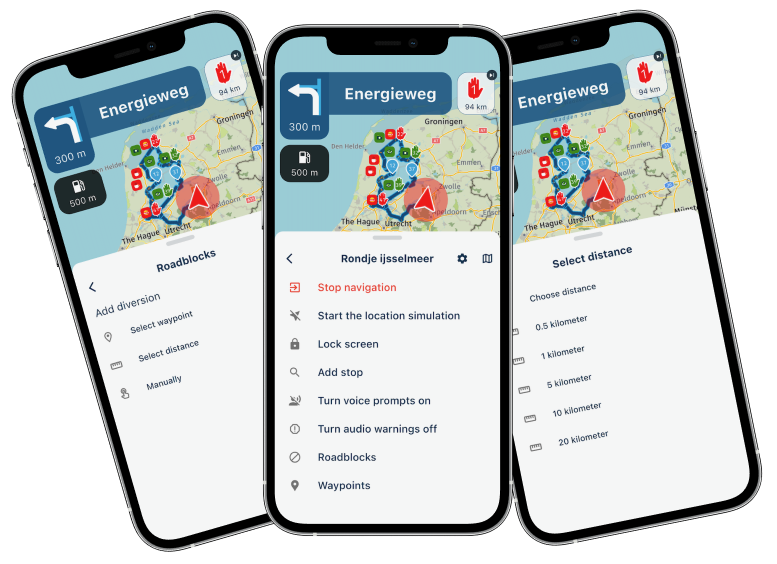
While navigating a route, you can choose to avoid a part of the route. This has 3 flavors:
- By waypoint
- By distance
- Manually adding
When selecting by waypoint to choose the waypoint till where we need to avoid.
The app will continue navigating towards the waypoint after that and creates a diversion for every part before that.Distance will be the most sensible one. Just quickly click one of the preset distances and that will be avoided. You can also select a custom distance. Obviously we try to take any skipped waypoints into account. This is a scenario where viapoints can be ignored.
The above two always create a diversion from your current location.
If you manually add an an avoidance you tap the route anywhere and choose if that's the beginning or end. When it's the end, you're done. Otherwise tap again to indicate the end.There is a distance restriction on how long the avoidance can be but that won't be a realistic use case anyway.
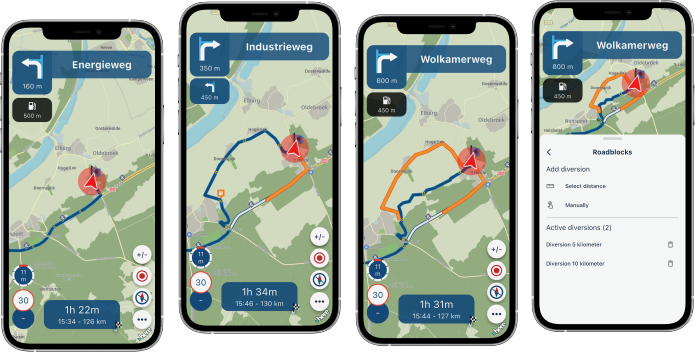
Persistent map items (favorites)
Why aren't we showing you where your favorites are all the time?
Now you can do so!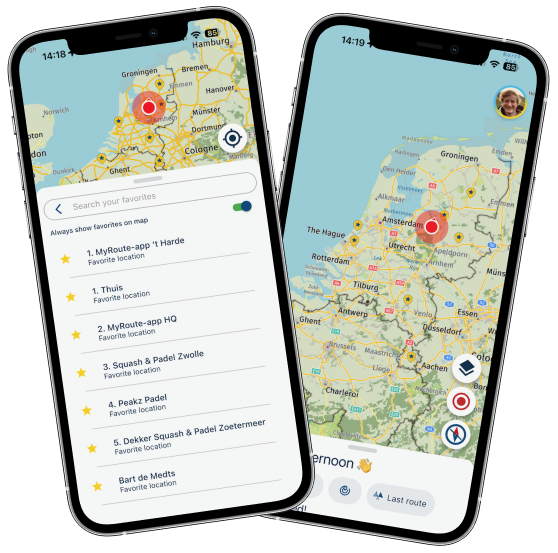
Simply enable the setting and your favorites are displayed all the time!
Even while navigating.Persistent map items (routes)
We always stimulate users to sync all their routes. Then everything happens automatically

If you have all your routes available offline, you can now show them permanently on the map!Note: this feature only works for routes that are offline available. So not for unsynced routes and not for any tracklog
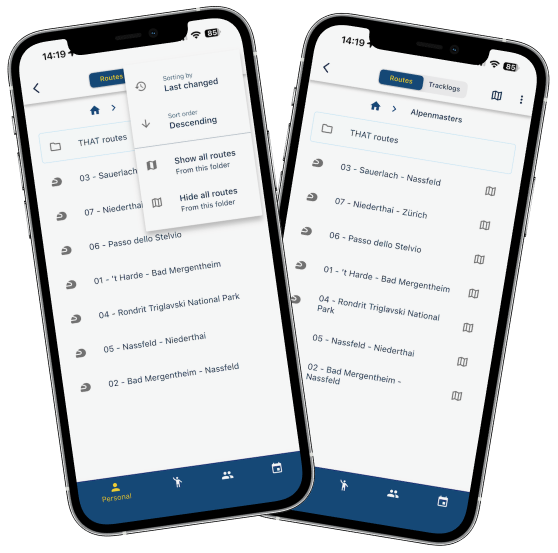
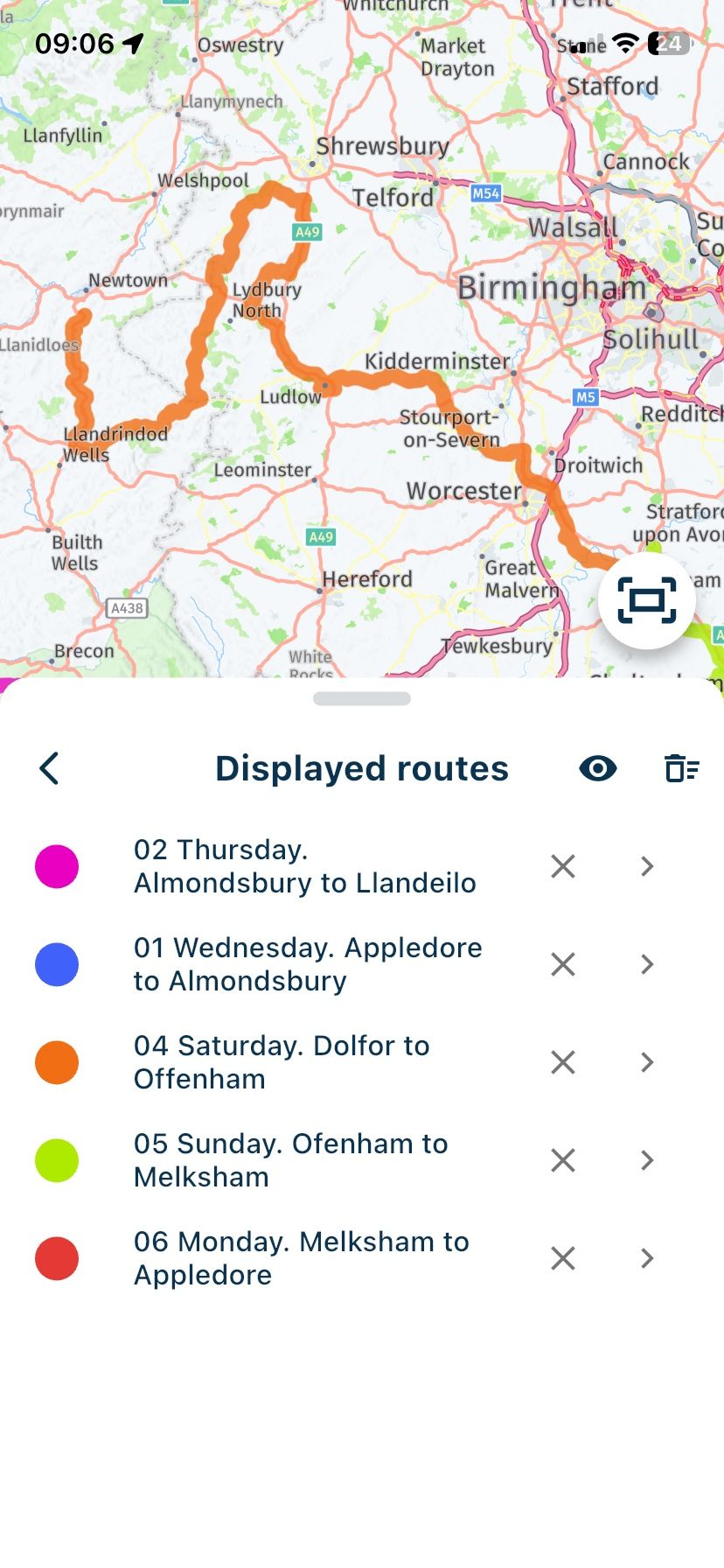
Easily add all routes in a folder to your map. We will show which routes are displayed.
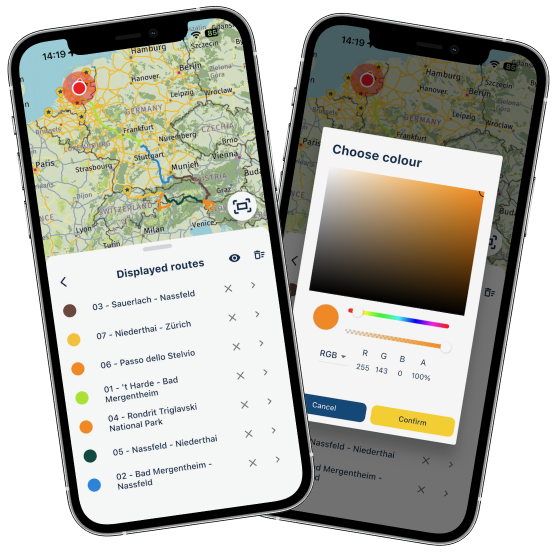
You will then see them and are able to change the color for each route.
From the menu you can remove them, open the route, remove them all or temporarily hide them all.
The options are endless
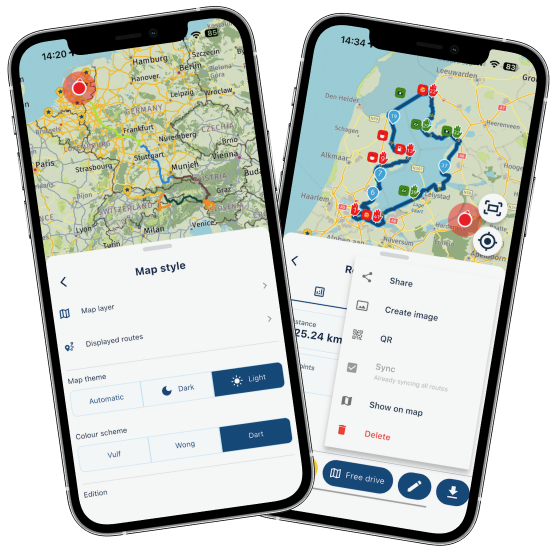
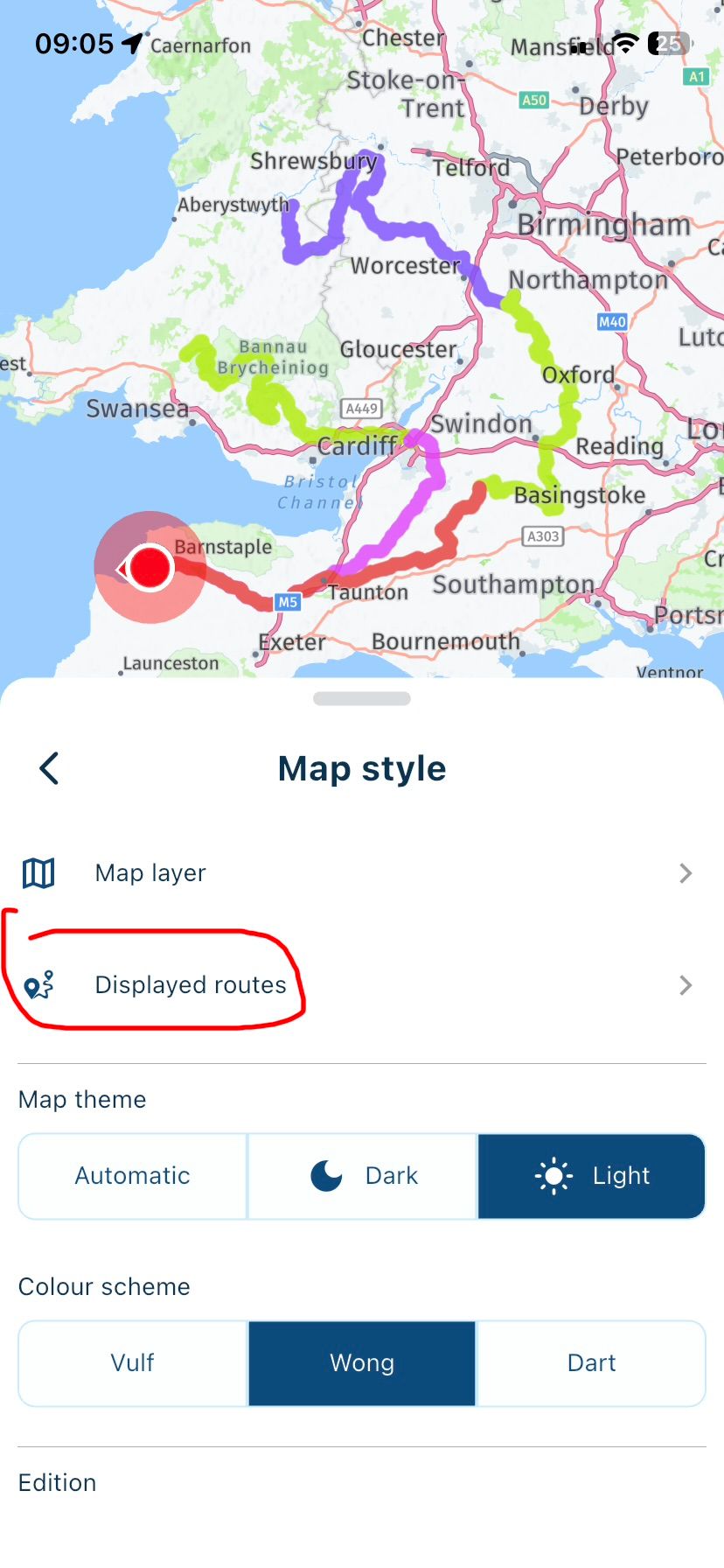
The menu to manage your displayed routes can be found from the routes page or using the map styles. Obviously you can also add a single route to be displayed.
This feature is very convenient for multi day trips and now mitigates one of the reasons that Garmin / TomTom users still used their navigation device.
POI management
Yes! Finally

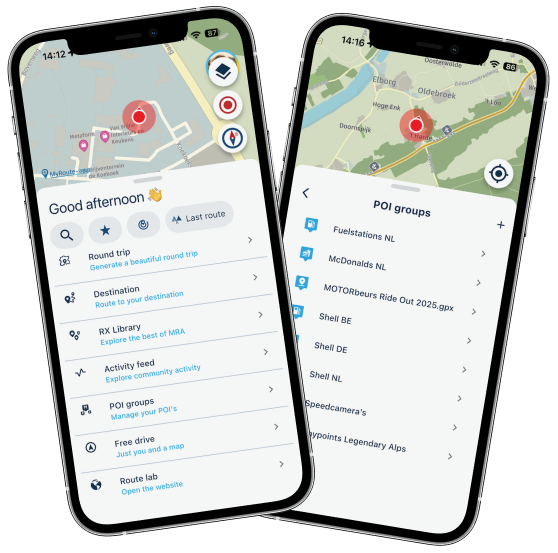
Open and view your POI's directly in the app.
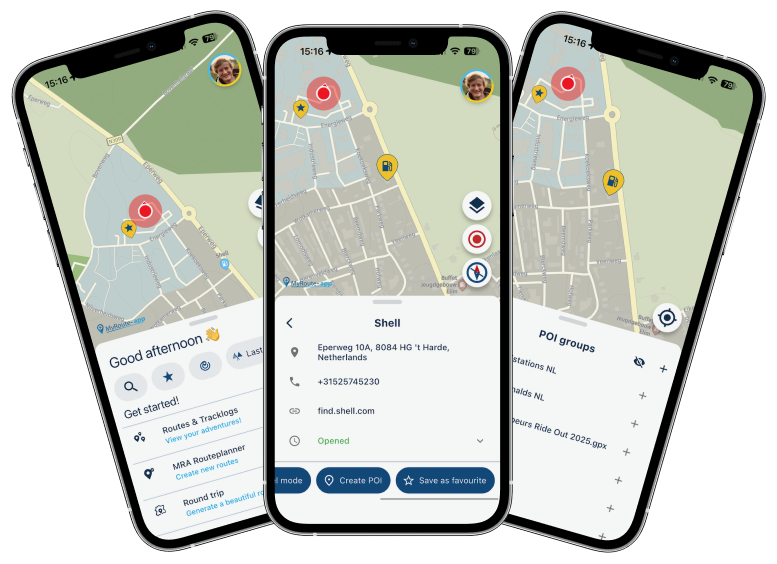
Easily add any search result as POI.
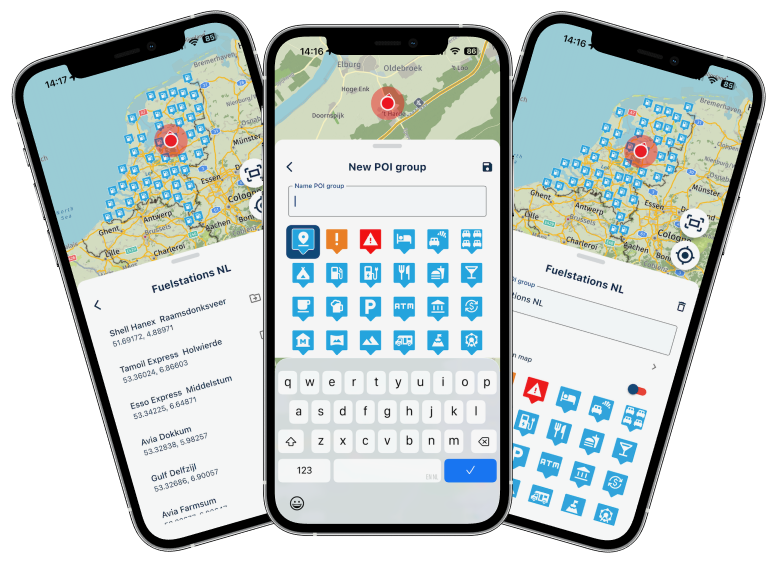
Create new groups and edit existing ones.
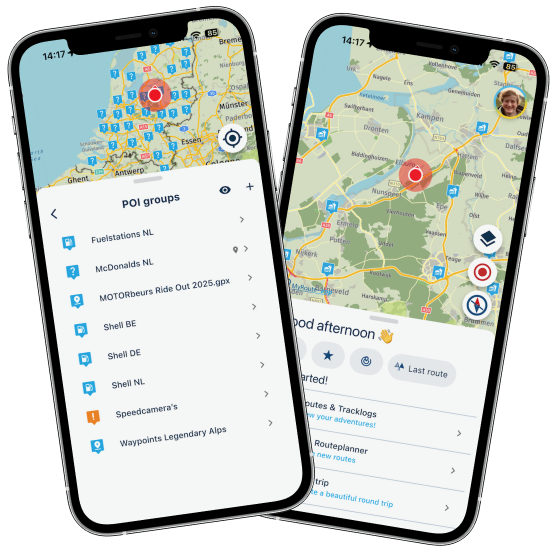
And obviously you can always show these POI's on the map. Because why not
Not much more to say! Just play around yourself.Social media share / image generator
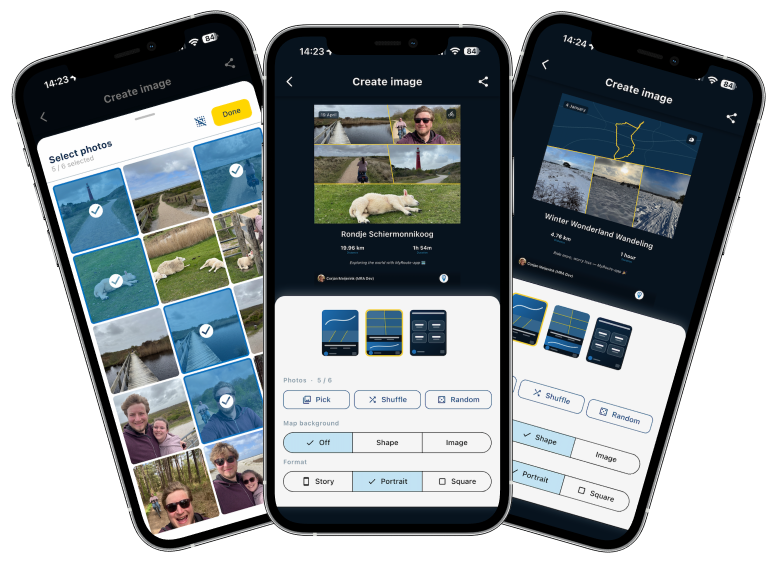
A deep desired feature I had myself

Every single time I completed a tracklog, I hated the fact that I could not share it properly.
When you now save a tracklog, we automatically show this new interface where you can create an image. For all your existing routes / tracklogs, just tap the "more options" (icon top right) and away you go.Note: this can only be done for your own routes / tracklogs.
Choose one of three beautiful layouts.
Pick, shuffle or randomize your images. You can even more / zoom the images itself.
Change the map background.
Share away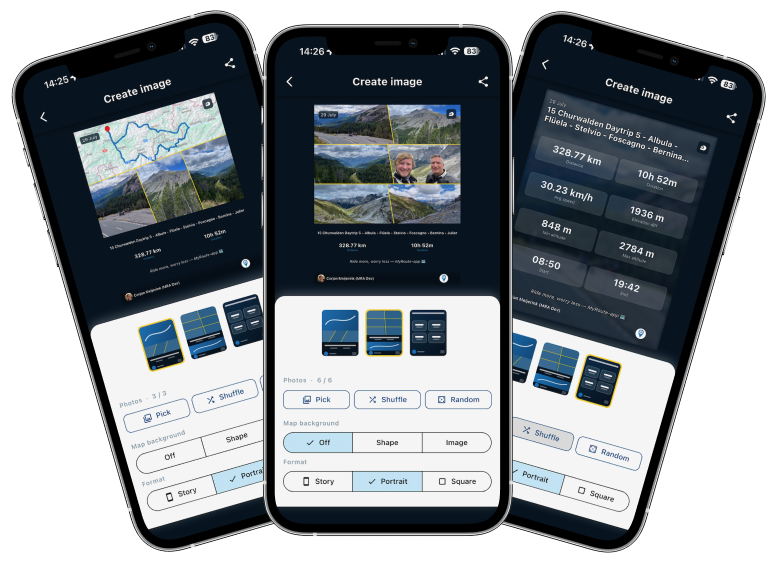
CarPlay / Android Auto current street
Yes, we now also show the current street name (when enabled) in CarPlay and Android Auto. We try to do this on as much resolutions as possible.
Change avoid options while navigating
When you are navigating, you can now change the avoid options on the fly.
If you decide highway is allowed / disallowed, just change it immediately without needing to restart everything.Note: this cannot be done from CarPlay / Android Auto, left that out due to limited time
Android altitude
Now shows the correct value relative to sealevel.
Minorities
I'm looking forward too much to my vacation that I cannot really bother writing this part. We fixed some small identified issues in the 5.1 release. Added some logging to find more complex issues that still exist but generally we are extremely happy with how 5.1 performs!
What's next
I honestly don't know for now. I'll clear my head in the coming two weeks and think of more nice stuff
Cheers,
Corjan
Absolutely great work!!!
Truely useful features that I know I’ll need many many times. Personally I most needed the “change route prioritization” so I could switch highway on and off dynamically. The avoid feature to bypass a section…. Yes I’ve needed that and POI management is a really nice thing to be able to do and see them permanently on the map.I hope you have the best trip and get some serious rest away from the keyboard.
-
Have a wonderful break!
One thing, on Car Play/Android Auto - pressing the gas station button that shows the nearest gas station should add the station to the route on the fly as a waypoint.
One thing, on Car Play/Android Auto - pressing the gas station button that shows the nearest gas station should add the station to the route on the fly as a waypoint.
That's how it works in the app, but not on AA/CP, since there it is no button (prohibited) but just an info tile. The intended gas station will be the first suggestion when you go into the menu to add a gasstation.
-
Great work!

One question: in one of the screenshots the color of the displayed routes can be changed.
I cannot find that option in the menu
@BertM Tap the Map style icon and you’ll see Added routes. Tap this and then tap the colour next to the route to choose another colour.
-
Great work!
One question: in one of the screenshots the color of the displayed routes can be changed.
I cannot find that option in the menu
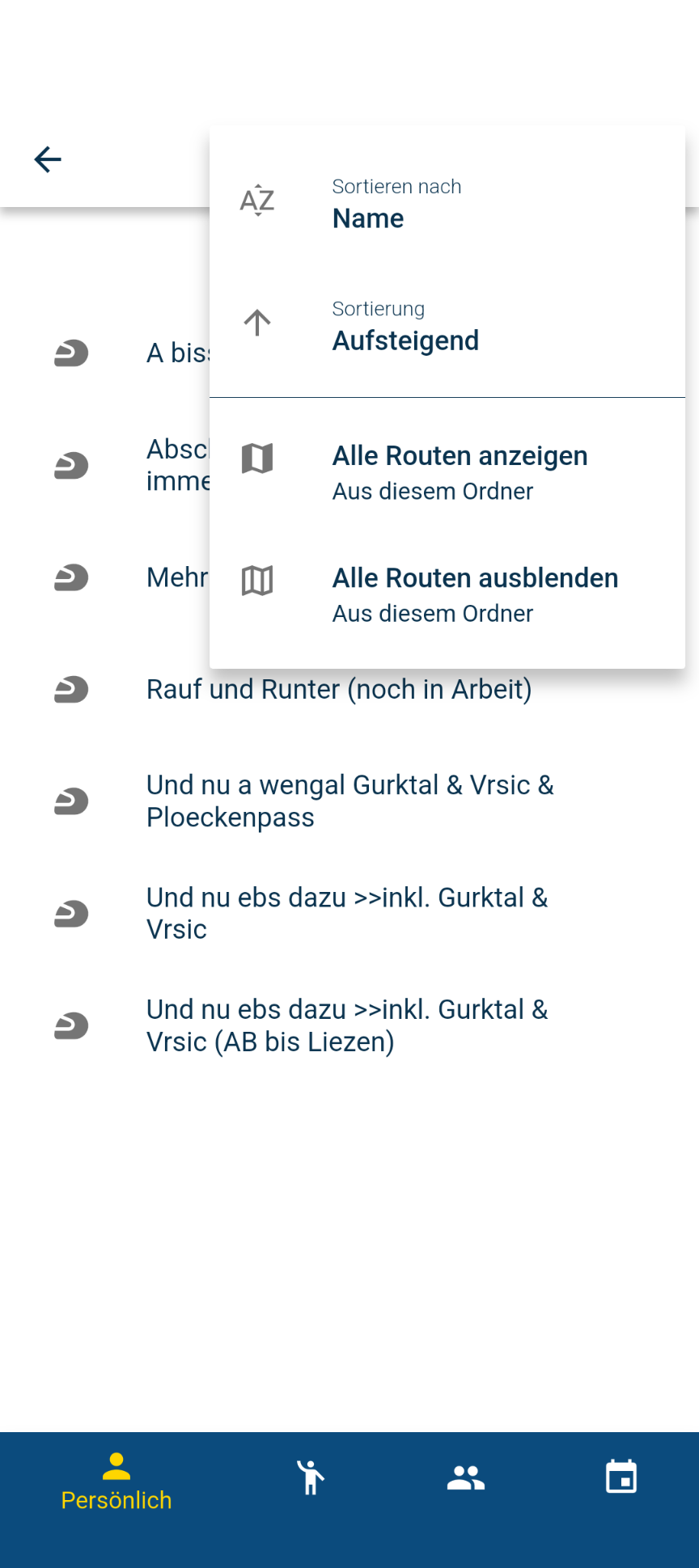
@BertM Go to a folder containing several routes.
Click on the three dots at the top and either select ‘Show all routes’, or manually select the routes you want to view from the list below.
To select routes manually, click on a route, then click the three dots in the top right-hand corner and select ‘Show on map’.
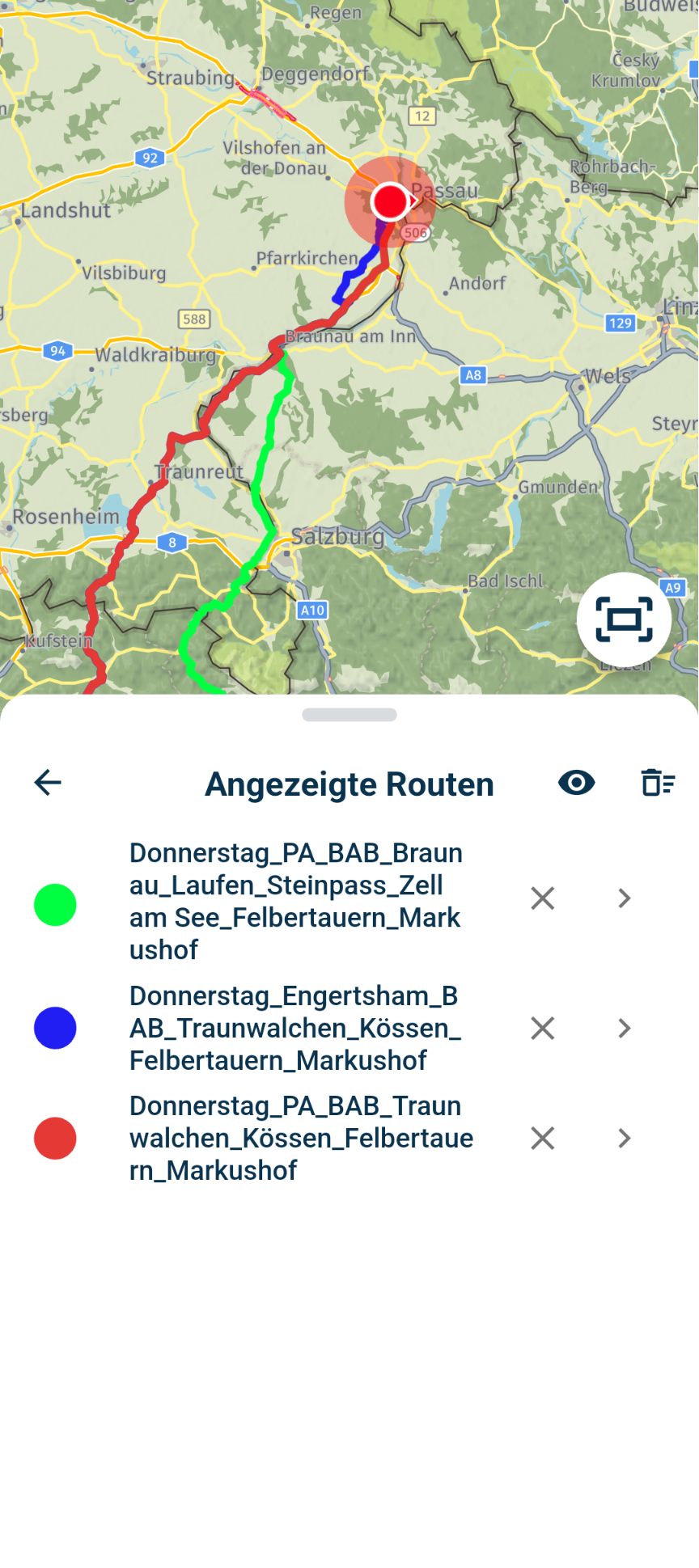
When you then open a route, you will also see the other routes.
Please note that you CANNOT change the colour of the route for navigation.
To change the colours, simply click on a colour dot and select the colour of your choice.
-
@nick-carthew-routexpert-senior
Ok, got it.
-

Vandaag een ritje van zo'n 160 kilometer gereden met laatste update 5.2 en was aangenaam verrast. Eindelijk werkt het zoals ik het voor ogen had in combinatie van mijn OPPO A79 telefoon en EKIY M4 7" scherm geen bevriezing meer als de verbinding tussen mijn telefoon en scherm wordt verbroken en daarna de verbinding weer is hersteld. Alleen de tracklog die wordt niet meer geactiveerd nadat de verbinding tussen telefoon en scherm is hersteld. Maar dat vindt ik eigenlijk maar bijzaak ben al blij met hoe het nu werkt en hopelijk blijft dit ook zo. Dat met de tracklog ga ik nog uitvogelen of ik dat via mijn EKIY scherm kan activeren, al wordt die niet weergegeven op mijn EKIY scherm zoals hij wel op het scherm van mijn telefoon wordt weergegeven. Maar in ieder geval mijn complimenten voor deze nieuwe update GA ZO DOORRRRRR !!!!!!!!

-
Absolutely great work!!!
Truely useful features that I know I’ll need many many times. Personally I most needed the “change route prioritization” so I could switch highway on and off dynamically. The avoid feature to bypass a section…. Yes I’ve needed that and POI management is a really nice thing to be able to do and see them permanently on the map.I hope you have the best trip and get some serious rest away from the keyboard.

@Jon-Hye-Knudsen
Hi John,
Could you explain me how to manage the "change route prioritization"?Thanks a lot
-
When navigating…. Push “…”-button. Then “Avoidance options”.
What I meant was being able to deselect highways as allowed on-the-fly, while navigating. Not so much fastest/shortest, if that is what you were looking for. -
One thing, on Car Play/Android Auto - pressing the gas station button that shows the nearest gas station should add the station to the route on the fly as a waypoint.
That's how it works in the app, but not on AA/CP, since there it is no button (prohibited) but just an info tile. The intended gas station will be the first suggestion when you go into the menu to add a gasstation.

Con-Hennekens said:
That's how it works in the app, but not on AA/CP, since there it is no button (prohibited) but just an info tile. The intended gas station will be the first suggestion when you go into the menu to add a gasstation.
Strange, why should that be prohibited??? There are already buttons to stop or change things. At Google Maps you also have buttons to report construction zones, accidents, there is a button to add another destination and more.
So a simple button, that would not even change the entire screen/interface, that would just add a stop behind the scene to the route should not be possible?
-

Ask Google or Apple; the restrictions in AA/CP are unbelievable. I believe the MRA team would make it possible if not restricted.
-
Nice update. First time I rode multiple days with a version which has the yellow arrows on the routeline. Very good idea/suggestion. A few times it helped me solving direction questions.
Stability wise. MRA has come a long way. But please keep pushing on the stability. There are still issues.
1.
Had it before.
Today I rode under bridge and on that exact moment MRA hangs. GPS loss. Restarting the route solved the issue.This is more though
After lunch MRA wouldn't start navigating. Map with route was visible. But current speed and altimeter stayed empty (--). Restarting the route or app did not solve the problem. I had to reboot the whole phone to get it solved. That shouldn't be a solution. Ideally restarting the app should be the most severe solution to solve problems.
It costed me 5-10 minutes to solve this problem today. -

With AA it seems to depend on your configuration. You have some serious problems. On the other hand I dont at all and that makes me wonder. I had a Skoda yeti with a Dutch brand screen in it witch was put in when I bought the car. No problems there. I recently bought a Kia Niro EV with the factory entertainment screen in it and that doesn't give me any problems either. To say it in Dutch, schiet mij maar lek. My phone stayed the same one the screens changed.
Hello! It looks like you're interested in this conversation, but you don't have an account yet.
Getting fed up of having to scroll through the same posts each visit? When you register for an account, you'll always come back to exactly where you were before, and choose to be notified of new replies (either via email, or push notification). You'll also be able to save bookmarks and upvote posts to show your appreciation to other community members.
With your input, this post could be even better 💗
Register Login








-
01331
-
 08125
08125
-
09239
-
0512
-
 0423
0423
-
032
-
0314
-
0326