Joining a planned route from a differant position.
-

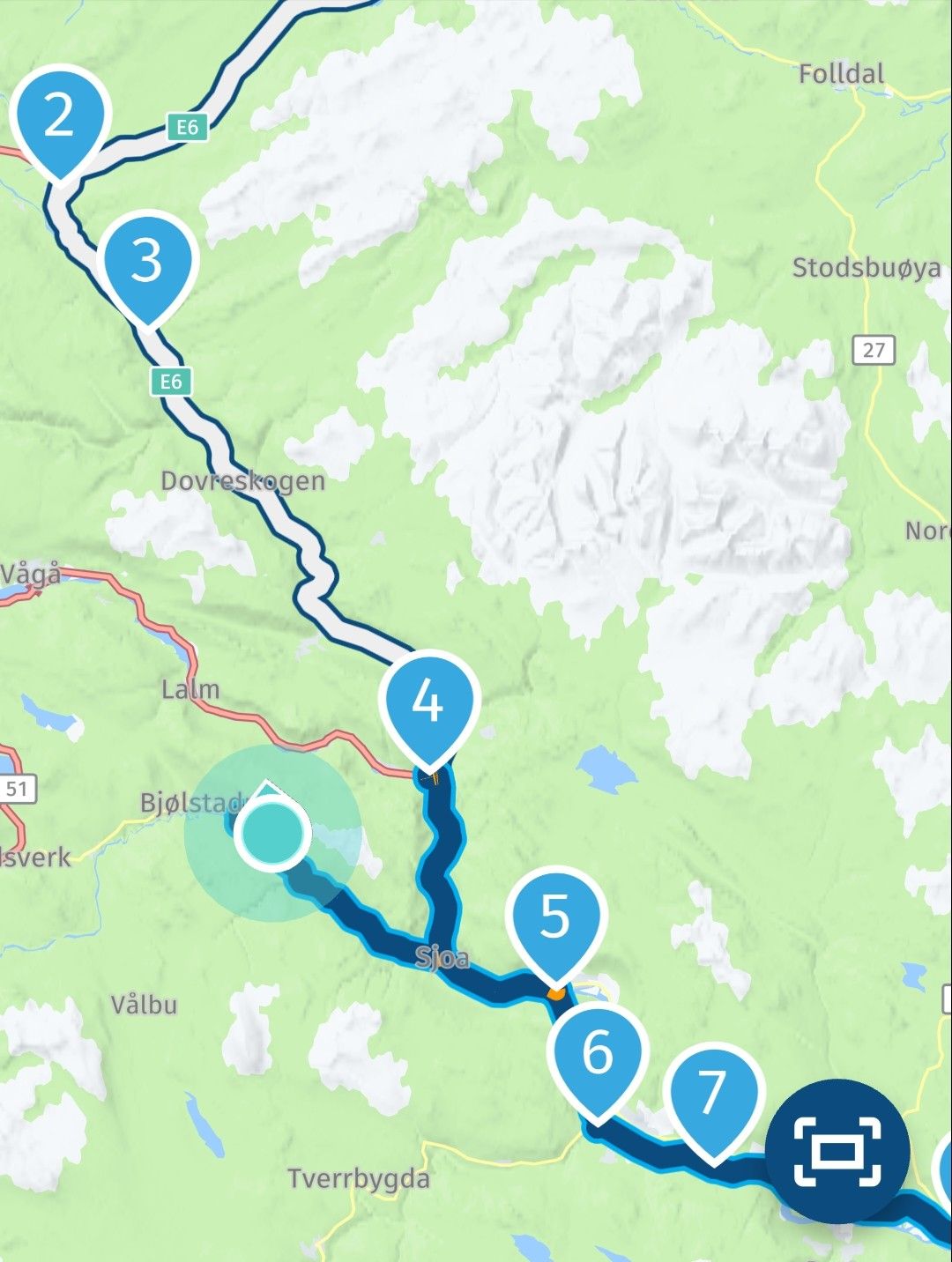
This is my example. Straight line distance is smallest to point 4 but it would send me back when entering the route. Point 5 should be the nearest point. This is with the latest version 5.0.4 on Android.
-
Nick Carthew, that's right, I totally agree with what you've described as help, but it simply doesn't work for me and several others like it does for you. It sends me back to the previous point (which we've already passed), and we don't know why. That's why we're asking here, since it should work for us like it does for you, Nick, but it doesn't! Is it something in our configuration? Or is it a bug in the app? That's the question...

@Jose-antonio-marin-segura of you keep following the route the shaping points that you've already passed will be skipped, just keep following the route. The system must try to get you back 3 times and then will finally give in
-
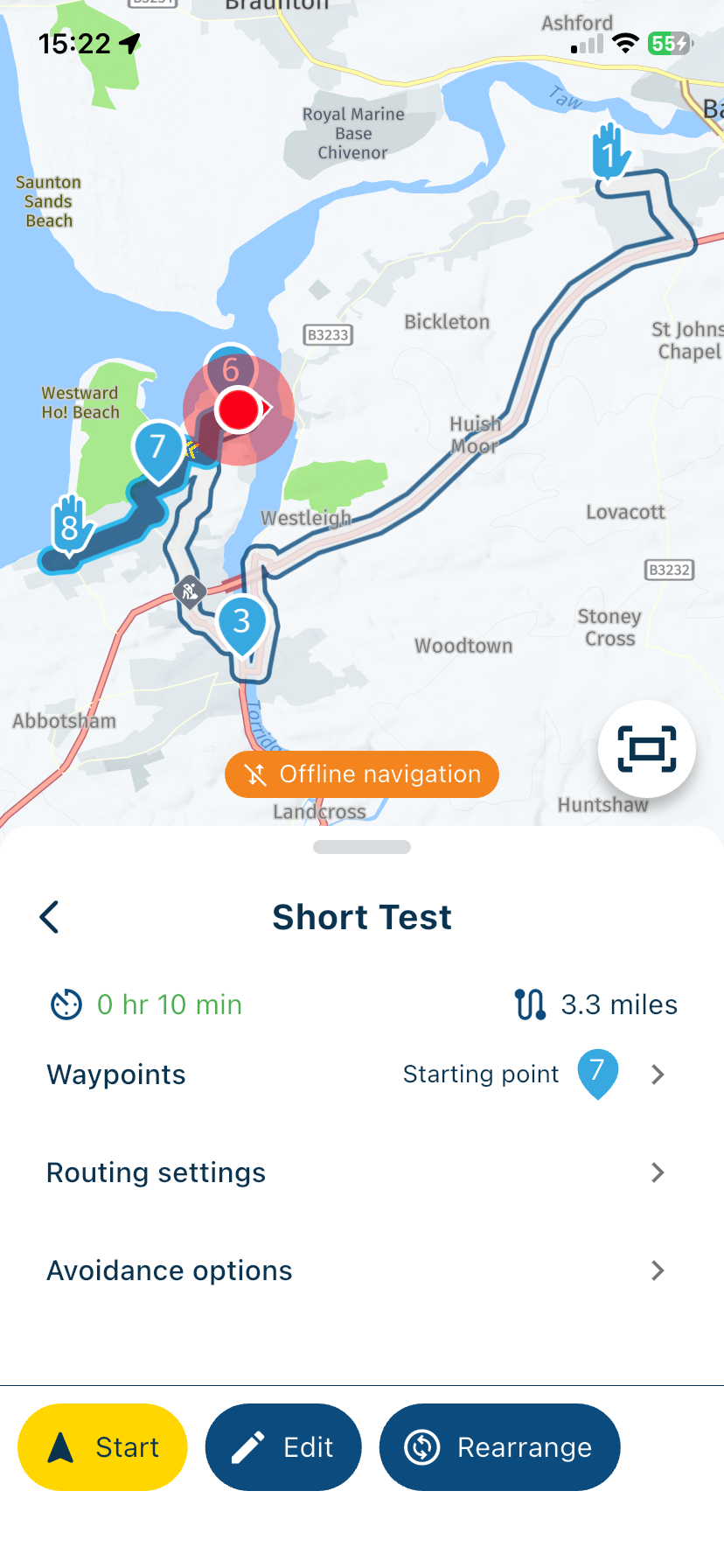
@Jose-antonio-marin-segura You’re not correct with your scenario. If you start a route and you are not at the beginning, the app knows your location and will therefore start from the nearest location that is in front of you not behind you. My two screenshots demonstrate this. The first screenshot is an overview of the whole route. The second screenshot shows my location, the white line and waypoints 4 and 5 are behind me, the app will start navigation from waypoint 6.
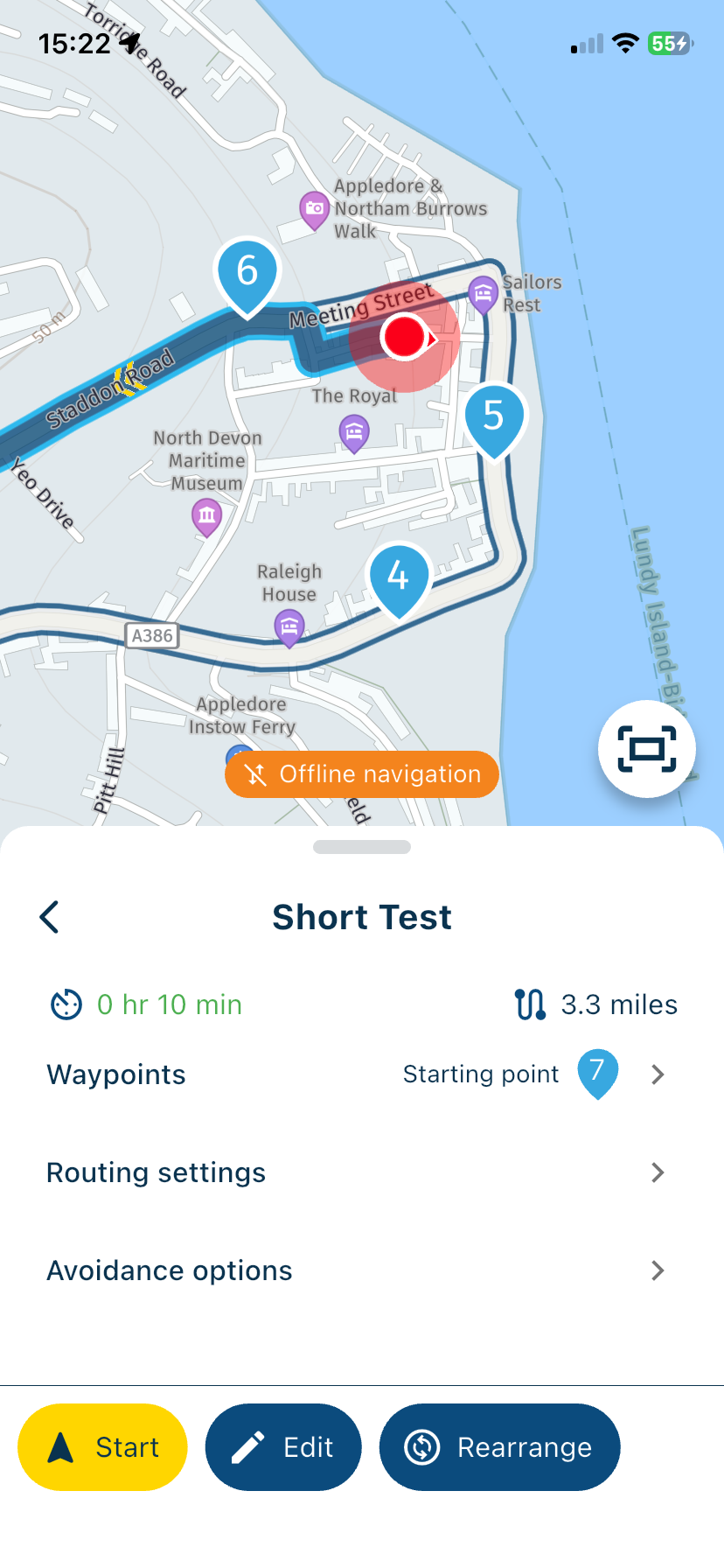

@Nick-Carthew so now we know where your house lives

Met andere apps maak je een route, met MRA componeer je een route!
Ducati Monster 1200 met Garmin Zümo XT
Fiat 124 Spider/Camper Dethleffs met Navigation-App op Samsung Tab Active4 Pro
MRA Lifetime Gold -
@Nick-Carthew so now we know where your house lives

@Lex.Kloet.RX It has never been a secret, ask any policeman

-
@Jose-antonio-marin-segura of you keep following the route the shaping points that you've already passed will be skipped, just keep following the route. The system must try to get you back 3 times and then will finally give in
@Marinus-van-Deudekom said in Joining a planned route from a differant position.:
@Jose-antonio-marin-segura of you keep following the route the shaping points that you've already passed will be skipped, just keep following the route. The system must try to get you back 3 times and then will finally give in
Only if you have selected Automatically skip waypoints
-
@Marinus-van-Deudekom said in Joining a planned route from a differant position.:
@Jose-antonio-marin-segura of you keep following the route the shaping points that you've already passed will be skipped, just keep following the route. The system must try to get you back 3 times and then will finally give in
Only if you have selected Automatically skip waypoints
No, I have "skip automatic points" ON and pressing it three times or even more keeps sending me back to the previous point (which I've already passed)... I'm using iOS 26, the latest version, and also the latest version of the official app (NOT BETA
-
Ok I think I have grasped the gist of it.
I can do a long press of my arrival waypoint and it will resume the correct direction.
Some of my routes do not have intermediate waypoints.
On the practical side of it, It is not easy to zoom out of the map view of the route and scroll to another waypoint to select it whilst riding.
It could be me being too lazy to stop and re configure.
Thanks for the help. -
@Marinus-van-Deudekom said in Joining a planned route from a differant position.:
@Jose-antonio-marin-segura of you keep following the route the shaping points that you've already passed will be skipped, just keep following the route. The system must try to get you back 3 times and then will finally give in
Only if you have selected Automatically skip waypoints
@Nick-Carthew of course Nick but would one complain that MRA is not skipping waypoints automaticly if you’ve Turner that of. Beats me
Honda Goldwing GL1500,
Honda Silverwing GL 650
DMD2 T865X 8 inch Android tablet using MRA next for navigation
Garmin XT sold
Samsung S24FE mounted on a Quadlock and using Android Auto in my car -
@Nick-Carthew of course Nick but would one complain that MRA is not skipping waypoints automaticly if you’ve Turner that of. Beats me
@Marinus-van-Deudekom Nobody is complaining that the app is not skipping, the subject of this topic is joining the route from somewhere that is not the start point. Nothing to do with automatic skipping.
-
No, I have "skip automatic points" ON and pressing it three times or even more keeps sending me back to the previous point (which I've already passed)... I'm using iOS 26, the latest version, and also the latest version of the official app (NOT BETA
@Jose-antonio-marin-segura said in Joining a planned route from a differant position.:
No, I have "skip automatic points" ON and pressing it three times or even more keeps sending me back to the previous point (which I've already passed)... I'm using iOS 26, the latest version, and also the latest version of the official app (NOT BETA
To be clear, it makes no difference which iOS version you are using, the iOS controls your phone not the app.
If you long press on waypoint 6 you will see that waypoint 6 will be your new start point. Please test this. -
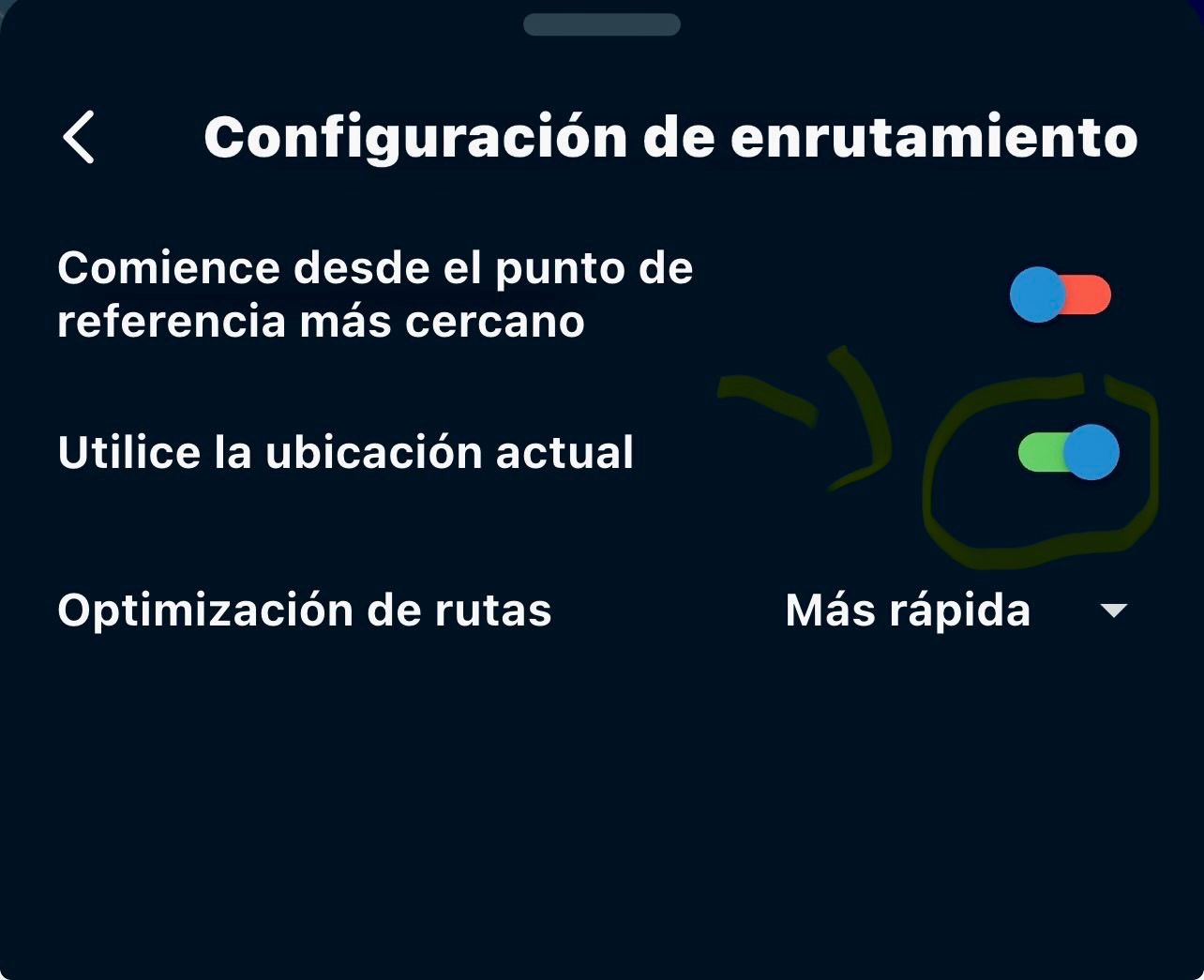
Nick, indeed, if I do what you suggest, it works... but don't you think the idea is to start a route you've previously designed... from a starting point (intermediate and different from the original starting point)? I've attached a photo --> routing settings --> start from nearest waypoint (don't activate it) and then activate (use current position ON) so the route starts (from that current position)... to do that, you activate that box to ON... in my opinion, it's the most logical thing since I want to start my navigation at that moment and from that position... (I don't want to be in the middle of a road skipping previous points or have the final point selected... ((this is simply a suggestion in case this option can be included in the next app update)) I think it could be useful to many users who find themselves in this situation of starting mid-route
-
Nick, indeed, if I do what you suggest, it works... but don't you think the idea is to start a route you've previously designed... from a starting point (intermediate and different from the original starting point)? I've attached a photo --> routing settings --> start from nearest waypoint (don't activate it) and then activate (use current position ON) so the route starts (from that current position)... to do that, you activate that box to ON... in my opinion, it's the most logical thing since I want to start my navigation at that moment and from that position... (I don't want to be in the middle of a road skipping previous points or have the final point selected... ((this is simply a suggestion in case this option can be included in the next app update)) I think it could be useful to many users who find themselves in this situation of starting mid-route
@Jose-antonio-marin-segura I understand what you are suggesting, personally I do not think it is too much effort to long press on the waypoint that you wish to start from, I am happy with the app the way it is. @Corjan-Meijerink is the developer so he will decide if any further development is required.
It’s been a good conversation, thanks
-
Nick Carthew, thank you so much for your contribution and invaluable help in this thread. It's a simple suggestion regarding a situation that, as a lifetime GOLD user of the navigation and route planner app, I and other users have encountered.
It would undoubtedly be a great improvement if this suggestion were included in the next version of the navigation app, bringing this fantastic app even closer to perfection and making it the world's top navigation app, if it isn't already!
Hello! It looks like you're interested in this conversation, but you don't have an account yet.
Getting fed up of having to scroll through the same posts each visit? When you register for an account, you'll always come back to exactly where you were before, and choose to be notified of new replies (either via email, or push notification). You'll also be able to save bookmarks and upvote posts to show your appreciation to other community members.
With your input, this post could be even better 💗
Register Login


-
 089
089
-
 1512
1512
-
0613
-
 0524
0524
-
 0412
0412
-
0419
-
 2492
2492
-
 0522
0522