Skip to content
  • Categories
  • Recent
  • Popular
  • Support
  • MyRoute-app
Collapse
Brand Logo

MRA Community Forum

  1. Home
  2. General Discussion
  3. Delete waypoints

Delete waypoints

Scheduled Pinned Locked Moved General Discussion
17 Posts 8 Posters 4.2k Views 2 Watching
  • Oldest to Newest
  • Newest to Oldest
  • Most Votes
Reply
  • Reply as topic
Log in to reply
This topic has been deleted. Only users with topic management privileges can see it.
  • Herko ter Horst Herko ter Horst

    @steve-2k What nav system or app are you using?

    In any case: the best you can do is make sure your waypoints are regular "shaping" points, not "via" points (indicated by a hand-symbol in MyRoute-app_.

    The MRA Navigation app will automatically skip "shaping" points if you miss them. It will try to keep sending you to Via-points. The same goes for Garmin nav systems.

    In some nav systems, you'll need to manually skip the point if you miss it and don't want to visit it anymore.

    As I said, waypoints are what make a route go where you want it to go, so it's not possible to delete waypoints and still expect the route to go where you want it (unless that also happens to be the fastest route, in which case the waypoint doesn't add anything).

    steve 2k Offline
    steve 2k Offline
    steve 2k
    wrote on last edited by
    #5

    @herko-ter-horst Thanks for the info. I have a better understanding of how it works now. How do I change it to shaping points rather than waypoints?
    Herko ter Horst 1 Reply Last reply
    0
    • steve 2k steve 2k

      @herko-ter-horst Thanks for the info. I have a better understanding of how it works now. How do I change it to shaping points rather than waypoints?

      Herko ter Horst Offline
      Herko ter Horst Offline
      Herko ter Horst
      wrote on last edited by Herko ter Horst
      #6

      @steve-2k MyRoute app uses shaping points by default (except for the first and last point in a route), so unless you changed a waypoint to a "via" point already, you don't need to do anything. A "via" point is indicated by a "hand" shape, instead of the regular inverted droplet shape for shaping points. You can use the waypoint menu that pops up when you select a waypoint to switch between the two states. See this support article for more information about that.

      Note that it completely depends on the nav system or app how these different types of points are treated.

      The MRA Navigation app and most recent Garmin devices have support for them, but TomTom does not. For TomTom and most other systems/apps, you're probably better off using a "track" instead of a "route" with waypoints. Such a track is contained in the GPX-files MyRoute-app produces.

      More information about exporting your route to various navigation systems can be found here.

      1 Reply Last reply
      1
      • Herko ter Horst Herko ter Horst

        @steve-2k What nav system or app are you using?

        In any case: the best you can do is make sure your waypoints are regular "shaping" points, not "via" points (indicated by a hand-symbol in MyRoute-app_.

        The MRA Navigation app will automatically skip "shaping" points if you miss them. It will try to keep sending you to Via-points. The same goes for Garmin nav systems.

        In some nav systems, you'll need to manually skip the point if you miss it and don't want to visit it anymore.

        As I said, waypoints are what make a route go where you want it to go, so it's not possible to delete waypoints and still expect the route to go where you want it (unless that also happens to be the fastest route, in which case the waypoint doesn't add anything).

        Stefan Hummelink Offline
        Stefan Hummelink Offline
        Stefan Hummelink
        Alpha tester
        wrote on last edited by
        #7

        @herko-ter-horst said in Delete waypoints:

        The MRA Navigation app will automatically skip "shaping" points if you miss them. It will try to keep sending you to Via-points. The same goes for Garmin nav systems.

        One small nuance: the user shall enable this option in the settings! Default this option is set to off I believe.

        Manks bu'j te bange.

        steve 2k 1 Reply Last reply
        0
        • Stefan Hummelink Stefan Hummelink

          @herko-ter-horst said in Delete waypoints:

          The MRA Navigation app will automatically skip "shaping" points if you miss them. It will try to keep sending you to Via-points. The same goes for Garmin nav systems.

          One small nuance: the user shall enable this option in the settings! Default this option is set to off I believe.

          steve 2k Offline
          steve 2k Offline
          steve 2k
          wrote on last edited by
          #8

          @stefanhummelink Not sure what you mean? I have a Garmin Zumo XT if that helps?

          Herko ter Horst 1 Reply Last reply
          0
          • steve 2k steve 2k

            @stefanhummelink Not sure what you mean? I have a Garmin Zumo XT if that helps?

            Herko ter Horst Offline
            Herko ter Horst Offline
            Herko ter Horst
            wrote on last edited by Herko ter Horst
            #9

            @steve-2k What he means is that the MRA Navigation app (which is a separate app) only automatically skips shaping points if you turn that on. If you're using a Garmin device for navigation, that doesn't apply to you.

            According to the information I found here, the should be a button on the display of your Garmin Zumo XT to skip waypoints (regardless of whether they are "via" points or "shaping" points). And apparently, it should automatically skip any waypoints you miss if you turn route recalculation off on the device.

            Stefan Hummelink steve 2k 2 Replies Last reply
            1
            • Herko ter Horst Herko ter Horst

              @steve-2k What he means is that the MRA Navigation app (which is a separate app) only automatically skips shaping points if you turn that on. If you're using a Garmin device for navigation, that doesn't apply to you.

              According to the information I found here, the should be a button on the display of your Garmin Zumo XT to skip waypoints (regardless of whether they are "via" points or "shaping" points). And apparently, it should automatically skip any waypoints you miss if you turn route recalculation off on the device.

              Stefan Hummelink Offline
              Stefan Hummelink Offline
              Stefan Hummelink
              Alpha tester
              wrote on last edited by
              #10

              @herko-ter-horst said in Delete waypoints:

              @steve-2k What he means is that the MRA Navigation app (which is a separate app) only automatically skips shaping points if you turn that on.

              I didn't want to cause any confusion haha. My comment concerns MRA Navigation only, just as @Herko-ter-Horst writes.

              Manks bu'j te bange.

              1 Reply Last reply
              0
              • Herko ter Horst Herko ter Horst

                @steve-2k What he means is that the MRA Navigation app (which is a separate app) only automatically skips shaping points if you turn that on. If you're using a Garmin device for navigation, that doesn't apply to you.

                According to the information I found here, the should be a button on the display of your Garmin Zumo XT to skip waypoints (regardless of whether they are "via" points or "shaping" points). And apparently, it should automatically skip any waypoints you miss if you turn route recalculation off on the device.

                steve 2k Offline
                steve 2k Offline
                steve 2k
                wrote on last edited by
                #11

                @herko-ter-horst Thanks for the input

                Nick Carthew 1 Reply Last reply
                0
                • steve 2k steve 2k

                  @herko-ter-horst Thanks for the input

                  Nick Carthew Offline
                  Nick Carthew Offline
                  Nick Carthew
                  RouteXpert
                  wrote on last edited by
                  #12

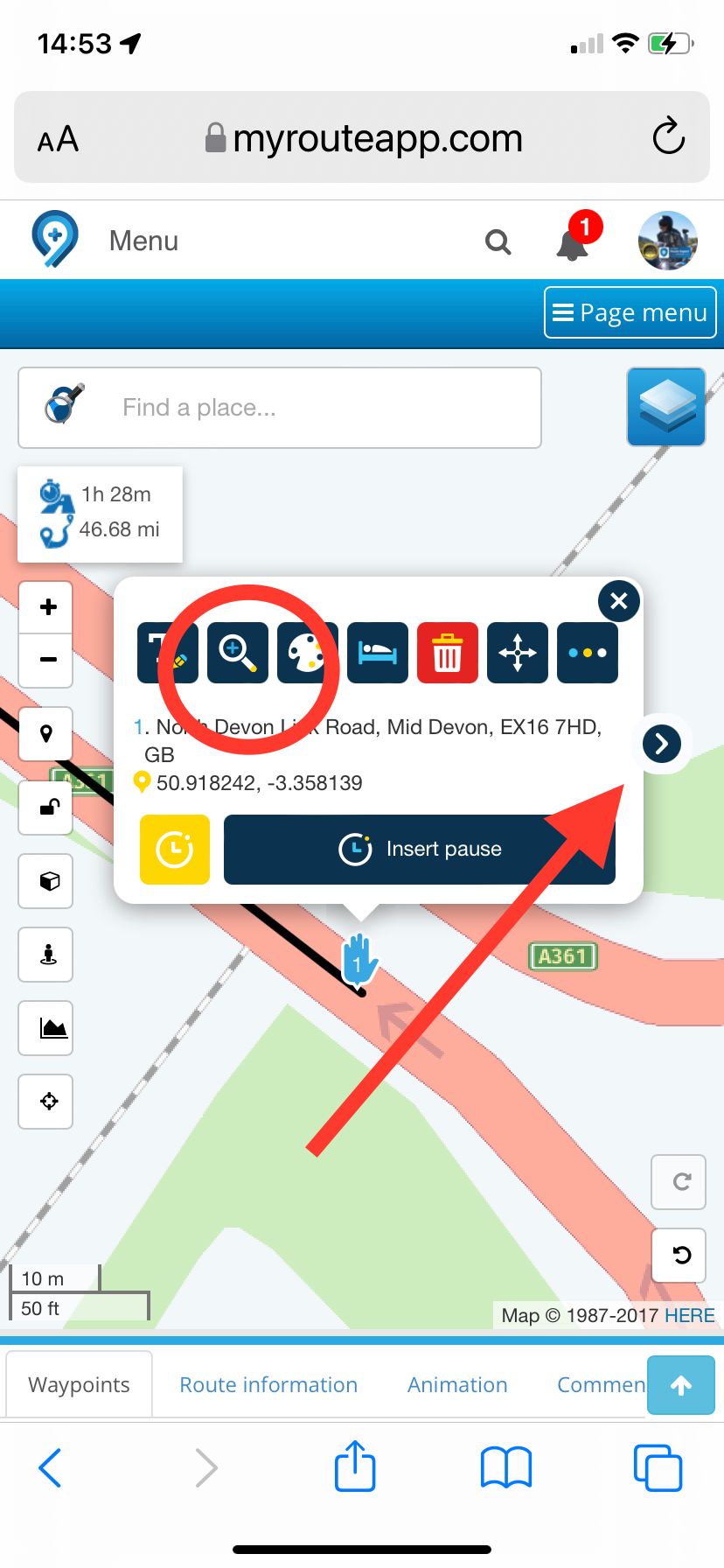
                  @steve-2k Another thing to check to ensure that you are not directed back to a route point is to make sure that ALL route points are positioned accurately on the route line and away from junctions, roundabouts and viaducts. This is to allow for any discrepancies in satellite signal accuracy. To check each route point, fully zoom in to the first route point by using the magnifying glass and adjust if needed, then use the right arrow to move to the next. Do this for all route points. It’s quick and easy to do, I can check and adjust 50 route points in one minute. 8A8B4056-2445-4CEB-BA79-3D203F28E023.jpeg
                  Always willing to help if I can.
                  Triumph Tiger 1200 XRT called Tina.
                  MRA Navigation Next and SilverFox BJ8

                  1 Reply Last reply
                  0
                  • steve 2k steve 2k

                    Hi Guys,

                    I am planning a route but want to delete the waypoints apart from the start and finish.
                    How do I do this without the route changing and sticking to my planned route?

                    TA Steve

                    Dolomiti Offline
                    Dolomiti Offline
                    Dolomiti
                    wrote on last edited by
                    #13

                    @steve-2k export as track, load back in as track πŸ˜‰

                    Dave J 0 Madden Jorge 0 2 Replies Last reply
                    1
                    • Dolomiti Dolomiti

                      @steve-2k export as track, load back in as track πŸ˜‰

                      Dave J 0 Offline
                      Dave J 0 Offline
                      Dave J 0
                      Valued contributor
                      wrote on last edited by Dave J 0
                      #14

                      @steve-2k I agree with @Dolomiti in that I think what you are wanting to see is the track and not the route. Serge at MRA has done some great webinars on this and I would suggest having a look. YouTube or have a look at MRA's Academy page. The Zumo XT will also allow you to show the track (in different colours) in the background as the device navigates the track. ☺

                      Kind Regards. Help where I can.
                      Ducati Multistrada V4 Rally
                      iPhone 15 Pro
                      CHIGEE AIO-6 LTE
                      Google Pixel 6 Pro - mounted on SP Connect Plus
                      Ex Garmin XT2 and XT1 as well as Ex TomTom Rider User

                      1 Reply Last reply
                      0
                      • Karl Marx 0 Offline
                        Karl Marx 0 Offline
                        Karl Marx 0
                        wrote on last edited by
                        #15

                        @herko-ter-horst links shared you has worked for me especially this one https://support.myrouteapp.com/support/solutions/articles/12000075572-manual-waypoints-

                        Thanks for sharing.

                        Karl Marx 0 1 Reply Last reply
                        0
                        • Dolomiti Dolomiti

                          @steve-2k export as track, load back in as track πŸ˜‰

                          Madden Jorge 0 Offline
                          Madden Jorge 0 Offline
                          Madden Jorge 0
                          wrote on last edited by
                          #16
                          This post is deleted!
                          1 Reply Last reply
                          0
                          • Karl Marx 0 Karl Marx 0

                            @herko-ter-horst links shared you has worked for me especially this one https://support.myrouteapp.com/support/solutions/articles/12000075572-manual-waypoints-

                            Thanks for sharing.

                            Karl Marx 0 Offline
                            Karl Marx 0 Offline
                            Karl Marx 0
                            wrote on last edited by
                            #17

                            @Karl-Marx-0 said in Delete waypoints:

                            @herko-ter-horst links shared you has worked for me especially this one https://support.myrouteapp.com/support/solutions/articles/12000075572-manual-waypoints-

                            Thanks for sharing.

                            Yes this worked.

                            1 Reply Last reply
                            0

                            Hello! It looks like you're interested in this conversation, but you don't have an account yet.

                            Getting fed up of having to scroll through the same posts each visit? When you register for an account, you'll always come back to exactly where you were before, and choose to be notified of new replies (either via email, or push notification). You'll also be able to save bookmarks and upvote posts to show your appreciation to other community members.

                            With your input, this post could be even better πŸ’—

                            Register Login
                            Reply
                            • Reply as topic
                            Log in to reply
                            • Oldest to Newest
                            • Newest to Oldest
                            • Most Votes


                            ACTIVE USERS
                            Nick Carthew
                            Nick Carthew
                            Dave J 0
                            Dave J 0
                            Stefan Hummelink
                            Stefan Hummelink
                            Herko ter Horst
                            Herko ter Horst
                            steve 2k
                            steve 2k
                            Karl Marx 0
                            Karl Marx 0
                            Madden Jorge 0
                            Madden Jorge 0
                            Dolomiti
                            Dolomiti
                            POPULAR TOPICS
                            • Suggestions regarding traffic information and route changes
                              CD130
                              CD130
                              3
                              11
                              235

                            • Export to BMW CRN
                              Hubert Thoring
                              Hubert Thoring
                              1
                              9
                              490

                            • Rondrit genereren
                              Hubert Thoring
                              Hubert Thoring
                              0
                              5
                              77

                            • NC500 glitch
                              richtea999
                              richtea999
                              0
                              6
                              158

                            • Nieuwe gebruiker uit Groningen
                              superg
                              superg
                              0
                              2
                              40

                            • Hiding home address / waypoint for shared routes
                              Pim van Dongen
                              Pim van Dongen
                              0
                              6
                              313

                            • How to merge two tracks
                              Guzzist
                              Guzzist
                              0
                              14
                              4.7k

                            • MRA V5.2.1 (486) POI - Selection - Winding track - with error message that is not correct
                              Hubert Thoring
                              Hubert Thoring
                              0
                              5
                              38

                            MY GROUPS
                            • Login

                            • Login or register to search.
                            • First post
                              Last post
                            0
                            • Categories
                            • Recent
                            • Popular
                            • Support
                            • MyRoute-app