Waypoint automatic renaming when moved
-

One suggestion would be to disable the automatic renaming of a waypoint if it is moved.
It is annoying to give a waypoint a special name only to have it automatically renamed if that waypoint is moved, say to slightly fine tune a route.
EG. If I create a names waypoint such as "Cumnock" moving it to fine tune a route changes it to "22 Mossmark, Cumnock, KA18 4NF, United Kingdom."As an aside. One thing that I will have to get better at is not allowing waypoints with names like "22 Mossmark, Cumnock, KA18 4NF, United Kingdom" as it comes out in its entirety when the Garmin XT announces it as part of a route.
-
One suggestion would be to disable the automatic renaming of a waypoint if it is moved.
It is annoying to give a waypoint a special name only to have it automatically renamed if that waypoint is moved, say to slightly fine tune a route.
EG. If I create a names waypoint such as "Cumnock" moving it to fine tune a route changes it to "22 Mossmark, Cumnock, KA18 4NF, United Kingdom."As an aside. One thing that I will have to get better at is not allowing waypoints with names like "22 Mossmark, Cumnock, KA18 4NF, United Kingdom" as it comes out in its entirety when the Garmin XT announces it as part of a route.

@Wallace-Shackleton If I'm not wrong, when you've named your waypoint, and you need to move it slightly, when the new name comes up, just press cancel, and your original name stays the same as you put it in, in the first place, well mine does anyway.
-
@Wallace-Shackleton If I'm not wrong, when you've named your waypoint, and you need to move it slightly, when the new name comes up, just press cancel, and your original name stays the same as you put it in, in the first place, well mine does anyway.

@Garry-Davis you are right

-
This only happend when you have the option enabled. I've diabled that option. Then it will be renamed anyway.
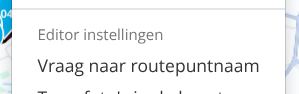
You can find it under "Toolkit" almost at the bottom of the list. -
One suggestion would be to disable the automatic renaming of a waypoint if it is moved.
It is annoying to give a waypoint a special name only to have it automatically renamed if that waypoint is moved, say to slightly fine tune a route.
EG. If I create a names waypoint such as "Cumnock" moving it to fine tune a route changes it to "22 Mossmark, Cumnock, KA18 4NF, United Kingdom."As an aside. One thing that I will have to get better at is not allowing waypoints with names like "22 Mossmark, Cumnock, KA18 4NF, United Kingdom" as it comes out in its entirety when the Garmin XT announces it as part of a route.

@Wallace-Shackleton, Usually the name reflects an address. It is quite logical that the address changes along with the movement of the waypoint. However when you chose to give the waypoint a "sensible" name manually, it would be great if that name could be kept despite any movement.
-
That would be nice, indeed
-
This only happend when you have the option enabled. I've diabled that option. Then it will be renamed anyway.
You can find it under "Toolkit" almost at the bottom of the list.
Removing the tick against "Ask for waypoint Name" does work but it only does that. Moving the waypoint will automatically rename it.
Using Cancel is the best solution thanks for that but it is counter intuitive.
Who would ever think of selecting Cancel to retain the original waypoint name?Thanks for the info but this needs to be addressed by the developers.
-
Removing the tick against "Ask for waypoint Name" does work but it only does that. Moving the waypoint will automatically rename it.
Using Cancel is the best solution thanks for that but it is counter intuitive.
Who would ever think of selecting Cancel to retain the original waypoint name?Thanks for the info but this needs to be addressed by the developers.

@Wallace-Shackleton why? It works exactly as intended and the work around is simple.
-
@Wallace-Shackleton If I'm not wrong, when you've named your waypoint, and you need to move it slightly, when the new name comes up, just press cancel, and your original name stays the same as you put it in, in the first place, well mine does anyway.

@Garry-Davis said in Waypoint automatic renaming when moved:
@Wallace-Shackleton If I'm not wrong, when you've named your waypoint, and you need to move it slightly, when the new name comes up, just press cancel, and your original name stays the same as you put it in, in the first place, well mine does anyway.
This does the trick! Just move the waypoint to a new location and instead of pressing Accept, press Cancel! The waypoint is moved to its new location and you keep the name/description you gave that waypoint.
-
@Wallace-Shackleton why? It works exactly as intended and the work around is simple.
@RetiredWingMan said in Waypoint automatic renaming when moved:
why? It works exactly as intended and the work around is simple.
Because with that workaround ANY movement triggers an extra click. I tend to move waypoints A LOT to find optimum placement. And only a few of the waypoints are interesting enough for a changed name. Having to click on cancel or accept is NOT what I would want. I'd rather copy the name before moving a waypoint to be able to paste it back after moving it, for the few waypoints for which this is a thing....
I am just an enthusiastic MRA user, and hope you will be one too!
Most motorcycle problems are caused by the nut that connects the handlebar to the saddle.
Check out RideSleepRepeat.eu, a biker community for sharing stays across Europe
-
@RetiredWingMan said in Waypoint automatic renaming when moved:
why? It works exactly as intended and the work around is simple.
Because with that workaround ANY movement triggers an extra click. I tend to move waypoints A LOT to find optimum placement. And only a few of the waypoints are interesting enough for a changed name. Having to click on cancel or accept is NOT what I would want. I'd rather copy the name before moving a waypoint to be able to paste it back after moving it, for the few waypoints for which this is a thing....

@Con-Hennekens yes I agrée. For the most shapingpoints it’s no issue at all and for The viapoints I tend to copy the name before moving it
Honda Goldwing GL1500,
Honda Silverwing GL 650
DMD2 T865X 8 inch Android tablet using MRA next for navigation
Garmin XT sold
Samsung S24FE mounted on a Quadlock and using Android Auto in my car -
@Con-Hennekens yes I agrée. For the most shapingpoints it’s no issue at all and for The viapoints I tend to copy the name before moving it
I'd agree with you on that count, I used "road" on more than one occasion while editing a 300 mile route that I'm going to post sometime soon.
MRA is a good program but it has some insider tricks that seldom show up on the webinars and tips like those mentioned above deserve better recognition.
-
@Wallace-Shackleton, Usually the name reflects an address. It is quite logical that the address changes along with the movement of the waypoint. However when you chose to give the waypoint a "sensible" name manually, it would be great if that name could be kept despite any movement.
@Con-Hennekens said in Waypoint automatic renaming when moved:
it would be great if that name could be kept despite any movement.
100% agree. I can't imagine a use case where I want a name automatically changed once I've edited it.
-
@Con-Hennekens said in Waypoint automatic renaming when moved:
it would be great if that name could be kept despite any movement.
100% agree. I can't imagine a use case where I want a name automatically changed once I've edited it.
@Martin-Wilcke said in Waypoint automatic renaming when moved:
...I can't imagine a use case where I want a name automatically changed once I've edited it.
Use case is: if you set a Waypoint in first planning (to estimate distance) in the middle of a village/city. Later, if you know exactly the restaurant/camping/hotel - if you move the Waypoint - it's good to get automatically the new address in name. If not needed, simply click on button [cancel].
I don't understand the long discussion here

-
@Martin-Wilcke said in Waypoint automatic renaming when moved:
...I can't imagine a use case where I want a name automatically changed once I've edited it.
Use case is: if you set a Waypoint in first planning (to estimate distance) in the middle of a village/city. Later, if you know exactly the restaurant/camping/hotel - if you move the Waypoint - it's good to get automatically the new address in name. If not needed, simply click on button [cancel].
I don't understand the long discussion here
@Guzzist said in Waypoint automatic renaming when moved:
I don't understand the long discussion here
The example you mentioned is a different use case: you did not change the name manually.
-
@Martin-Wilcke said in Waypoint automatic renaming when moved:
...I can't imagine a use case where I want a name automatically changed once I've edited it.
Use case is: if you set a Waypoint in first planning (to estimate distance) in the middle of a village/city. Later, if you know exactly the restaurant/camping/hotel - if you move the Waypoint - it's good to get automatically the new address in name. If not needed, simply click on button [cancel].
I don't understand the long discussion here
@Guzzist There are times when the actual address of the waypoint is irrelevant, there are times when the location of the waypoint itself that matters more, say to mark a turn or a point on the route.
To be really objective, the given address for waypoints generated by MRA are at times useless as they do not include the actual name of the Village or Town the waypoint is located in.
For example This waypoint was generated from a route that I am working on
"7 High Main Street, Ayr, KA6 7QN, United Kingdom" The town mentioned here is actually Dalmellington roughly 20 miles or 40 km away from Ayr.
For reference this is the lat/long of a nearby waypoint located in Dalmellington
55.323021, -4.401105 -
@Guzzist There are times when the actual address of the waypoint is irrelevant, there are times when the location of the waypoint itself that matters more, say to mark a turn or a point on the route.
To be really objective, the given address for waypoints generated by MRA are at times useless as they do not include the actual name of the Village or Town the waypoint is located in.
For example This waypoint was generated from a route that I am working on
"7 High Main Street, Ayr, KA6 7QN, United Kingdom" The town mentioned here is actually Dalmellington roughly 20 miles or 40 km away from Ayr.
For reference this is the lat/long of a nearby waypoint located in Dalmellington
55.323021, -4.401105
@Wallace-Shackleton said in Waypoint automatic renaming when moved:
there are times when the location of the waypoint itself that matters more, say to mark a turn or a point on the route.
That's exactly my thoughts. I've never understood what an address as a route point name is good for. I prefer LAT/LON as the default name as it's the most simple, versatile and valuable information.
-
@Martin-Wilcke said in Waypoint automatic renaming when moved:
...I can't imagine a use case where I want a name automatically changed once I've edited it.
Use case is: if you set a Waypoint in first planning (to estimate distance) in the middle of a village/city. Later, if you know exactly the restaurant/camping/hotel - if you move the Waypoint - it's good to get automatically the new address in name. If not needed, simply click on button [cancel].
I don't understand the long discussion here
@Guzzist said in Waypoint automatic renaming when moved:
I don't understand the long discussion here
Me neither, but obviously for different reasons
Hello! It looks like you're interested in this conversation, but you don't have an account yet.
Getting fed up of having to scroll through the same posts each visit? When you register for an account, you'll always come back to exactly where you were before, and choose to be notified of new replies (either via email, or push notification). You'll also be able to save bookmarks and upvote posts to show your appreciation to other community members.
With your input, this post could be even better 💗
Register Login-
 1433705
-
 11851
11851
-
 08133
08133
-
 064
064
-
 0636
0636
-
 7524
7524
-
 0945
0945
-
0411