Panning in Android Auto
-

Hi again

After the nice response about zooming in CarPlay & Android Auto the next question was: how about panning in Android Auto?.
In CarPlay this was possible by simply tapping the button to enable the interface. In Android Auto, this was missing

After a nice morning of work, we discovered it actually wasn't too difficult to implement this nicely in Android Auto.
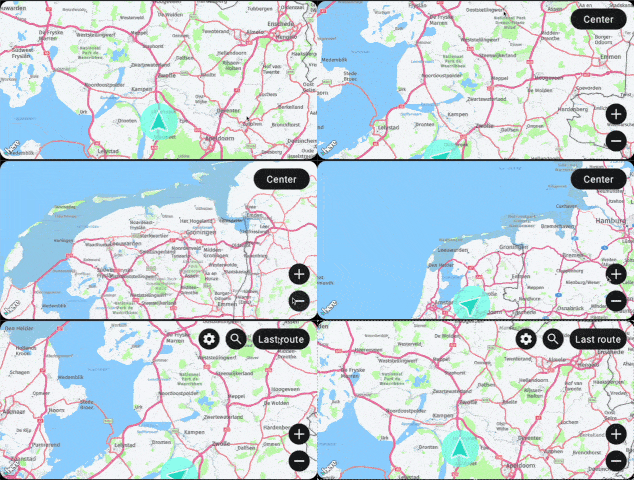
Just drag the map to move the map around
How easy can it be.
Tap "Center" to jump back to the desired view.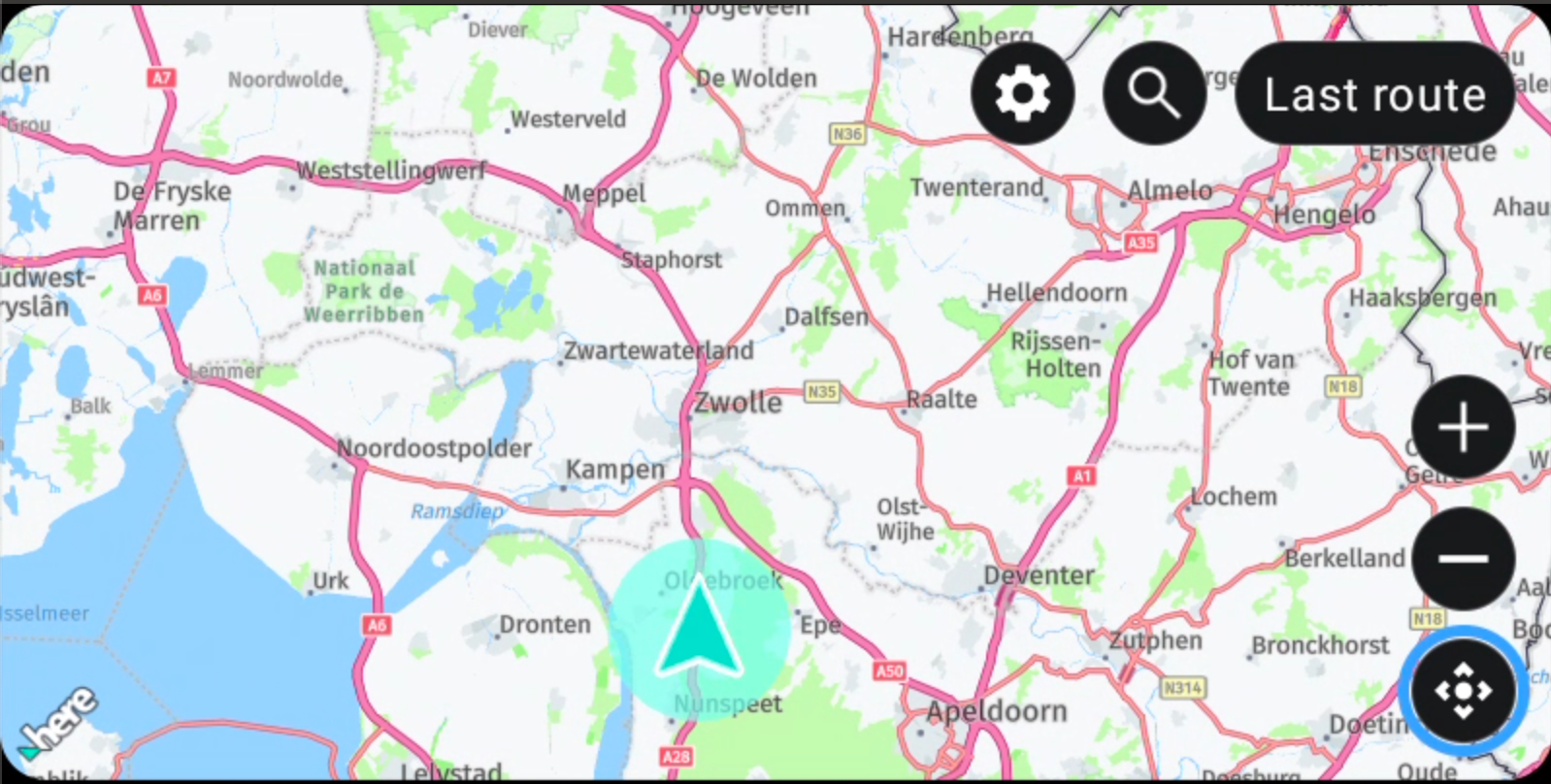
When you don't have a touch screen, a button will be displayed to enable the drag mode

Unfortunately the "drag map to pan" is not supported in CarPlay.
-
Hi again
After the nice response about zooming in CarPlay & Android Auto the next question was: how about panning in Android Auto?.
In CarPlay this was possible by simply tapping the button to enable the interface. In Android Auto, this was missing
After a nice morning of work, we discovered it actually wasn't too difficult to implement this nicely in Android Auto.
Just drag the map to move the map around
How easy can it be.
Tap "Center" to jump back to the desired view.When you don't have a touch screen, a button will be displayed to enable the drag mode
Unfortunately the "drag map to pan" is not supported in CarPlay.
@Corjan-Meijerink mooie verbeteringen die er aankomen, hier was echt behoefte aan, fijn dat het gelukt is. Ik wacht met belangstelling de update af

-
Hi again
After the nice response about zooming in CarPlay & Android Auto the next question was: how about panning in Android Auto?.
In CarPlay this was possible by simply tapping the button to enable the interface. In Android Auto, this was missing
After a nice morning of work, we discovered it actually wasn't too difficult to implement this nicely in Android Auto.
Just drag the map to move the map around
How easy can it be.
Tap "Center" to jump back to the desired view.When you don't have a touch screen, a button will be displayed to enable the drag mode
Unfortunately the "drag map to pan" is not supported in CarPlay.

@Corjan-Meijerink So good!!!!
-

Jullie zijn echt goed bezig! Misschien de invloed van de motorbeurs?
Het was leuk kennis te maken en te zien hoe enthousiast jullie zijn.met een R1250RT met TFT
en BMW Connected Ride App(die dus nog steeds niet voldoet!) ; M.R.A. in combinatie met de Carpuride W702 (voor Android op de Motor!), de Garmin Zumo XT als backup en een Samsung Galaxy S24 -
Jullie zijn echt goed bezig! Misschien de invloed van de motorbeurs?
Het was leuk kennis te maken en te zien hoe enthousiast jullie zijn.
@white-mouse was leuk dat je langs kwam!
Gesprekken op de motorbeurs hebben me zeker doen realiseren hoeveel waarde gebruikers hechten aan Android Auto / CarPlay. Daarom even snel wat tijd vrijgemaakt om hieraan te werken!

-
@white-mouse was leuk dat je langs kwam!
Gesprekken op de motorbeurs hebben me zeker doen realiseren hoeveel waarde gebruikers hechten aan Android Auto / CarPlay. Daarom even snel wat tijd vrijgemaakt om hieraan te werken!
@Corjan-Meijerink said in Panning in Android Auto:
@white-mouse was leuk dat je langs kwam!
Gesprekken op de motorbeurs hebben me zeker doen realiseren hoeveel waarde gebruikers hechten aan Android Auto / CarPlay. Daarom even snel wat tijd vrijgemaakt om hieraan te werken!
Android Auto and CarPlay are gaining a lot of prominence lately thanks to Carpuride or Chigee and the integration that some motorcycle manufacturers are doing. I also think that it is important to continue with the development of MRa without losing sight of the development of the app under these systems and to incorporate the new improvements that are implemented. For example, among other features to be incorporated would be the possibility of being able to change the distance/time display to the next VP, WP and arrival.
-
Hi again
After the nice response about zooming in CarPlay & Android Auto the next question was: how about panning in Android Auto?.
In CarPlay this was possible by simply tapping the button to enable the interface. In Android Auto, this was missing
After a nice morning of work, we discovered it actually wasn't too difficult to implement this nicely in Android Auto.
Just drag the map to move the map around
How easy can it be.
Tap "Center" to jump back to the desired view.When you don't have a touch screen, a button will be displayed to enable the drag mode
Unfortunately the "drag map to pan" is not supported in CarPlay.

@Corjan-Meijerink exzellent job Corjan! And so fast
-
@Corjan-Meijerink said in Panning in Android Auto:
@white-mouse was leuk dat je langs kwam!
Gesprekken op de motorbeurs hebben me zeker doen realiseren hoeveel waarde gebruikers hechten aan Android Auto / CarPlay. Daarom even snel wat tijd vrijgemaakt om hieraan te werken!
Android Auto and CarPlay are gaining a lot of prominence lately thanks to Carpuride or Chigee and the integration that some motorcycle manufacturers are doing. I also think that it is important to continue with the development of MRa without losing sight of the development of the app under these systems and to incorporate the new improvements that are implemented. For example, among other features to be incorporated would be the possibility of being able to change the distance/time display to the next VP, WP and arrival.
-
@bluetuz that is already possible!
Tap settings while navigating and toggle through the ETA setting. -
@bluetuz that is already possible!
Tap settings while navigating and toggle through the ETA setting.
@Corjan-Meijerink Sorry, forgive me, I didn't know that. Thanks
-
@Corjan-Meijerink said in Panning in Android Auto:
@white-mouse was leuk dat je langs kwam!
Gesprekken op de motorbeurs hebben me zeker doen realiseren hoeveel waarde gebruikers hechten aan Android Auto / CarPlay. Daarom even snel wat tijd vrijgemaakt om hieraan te werken!
Android Auto and CarPlay are gaining a lot of prominence lately thanks to Carpuride or Chigee and the integration that some motorcycle manufacturers are doing. I also think that it is important to continue with the development of MRa without losing sight of the development of the app under these systems and to incorporate the new improvements that are implemented. For example, among other features to be incorporated would be the possibility of being able to change the distance/time display to the next VP, WP and arrival.
@bluetuz This can already be done by going into the settings while navigating
-
Hi again
After the nice response about zooming in CarPlay & Android Auto the next question was: how about panning in Android Auto?.
In CarPlay this was possible by simply tapping the button to enable the interface. In Android Auto, this was missing
After a nice morning of work, we discovered it actually wasn't too difficult to implement this nicely in Android Auto.
Just drag the map to move the map around
How easy can it be.
Tap "Center" to jump back to the desired view.When you don't have a touch screen, a button will be displayed to enable the drag mode
Unfortunately the "drag map to pan" is not supported in CarPlay.

@Corjan-Meijerink said in Panning in Android Auto:
Hi again
After the nice response about zooming in CarPlay & Android Auto the next question was: how about panning in Android Auto?.
In CarPlay this was possible by simply tapping the button to enable the interface. In Android Auto, this was missing
After a nice morning of work, we discovered it actually wasn't too difficult to implement this nicely in Android Auto.
Just drag the map to move the map around
How easy can it be.
Tap "Center" to jump back to the desired view.When you don't have a touch screen, a button will be displayed to enable the drag mode
Unfortunately the "drag map to pan" is not supported in CarPlay.
Das ist echt der Gamechanger,
Zoomen und Schwenken/Ziehen unter AA und CP ist das was noch gefehlt hat. Jetzt freue ich mich auf das Update . Wann wird es ausgerollt?
 -
@Corjan-Meijerink said in Panning in Android Auto:
Hi again
After the nice response about zooming in CarPlay & Android Auto the next question was: how about panning in Android Auto?.
In CarPlay this was possible by simply tapping the button to enable the interface. In Android Auto, this was missing
After a nice morning of work, we discovered it actually wasn't too difficult to implement this nicely in Android Auto.
Just drag the map to move the map around
How easy can it be.
Tap "Center" to jump back to the desired view.When you don't have a touch screen, a button will be displayed to enable the drag mode
Unfortunately the "drag map to pan" is not supported in CarPlay.
Das ist echt der Gamechanger,
Zoomen und Schwenken/Ziehen unter AA und CP ist das was noch gefehlt hat. Jetzt freue ich mich auf das Update . Wann wird es ausgerollt?
@Frank-Scheffler Expecting release in two weeks!
-
Corjan Meijerink referenced this topic on
-
Hi again
After the nice response about zooming in CarPlay & Android Auto the next question was: how about panning in Android Auto?.
In CarPlay this was possible by simply tapping the button to enable the interface. In Android Auto, this was missing
After a nice morning of work, we discovered it actually wasn't too difficult to implement this nicely in Android Auto.
Just drag the map to move the map around
How easy can it be.
Tap "Center" to jump back to the desired view.When you don't have a touch screen, a button will be displayed to enable the drag mode
Unfortunately the "drag map to pan" is not supported in CarPlay.

Supermooie verbeteringen Corné.
Een vraag: ik ben overgestapt van iPhone naar Android en kan geen TestFlight in de PlayStore vinden. Hoe kan ik verder gaan als Bètatester op mijn Android?
Ik hoor graag van je.
-
Supermooie verbeteringen Corné.
Een vraag: ik ben overgestapt van iPhone naar Android en kan geen TestFlight in de PlayStore vinden. Hoe kan ik verder gaan als Bètatester op mijn Android?
Ik hoor graag van je.
@Dikke-Wim volgens mij kun je hem gewoon uit de playstore downloaden.
-

@Dikke-Wim @white-mouse
TestFlight is alleen beschikbaar voor IOS-apparaten.
TestFlight is only available for IOS devices.
-
Supermooie verbeteringen Corné.
Een vraag: ik ben overgestapt van iPhone naar Android en kan geen TestFlight in de PlayStore vinden. Hoe kan ik verder gaan als Bètatester op mijn Android?
Ik hoor graag van je.

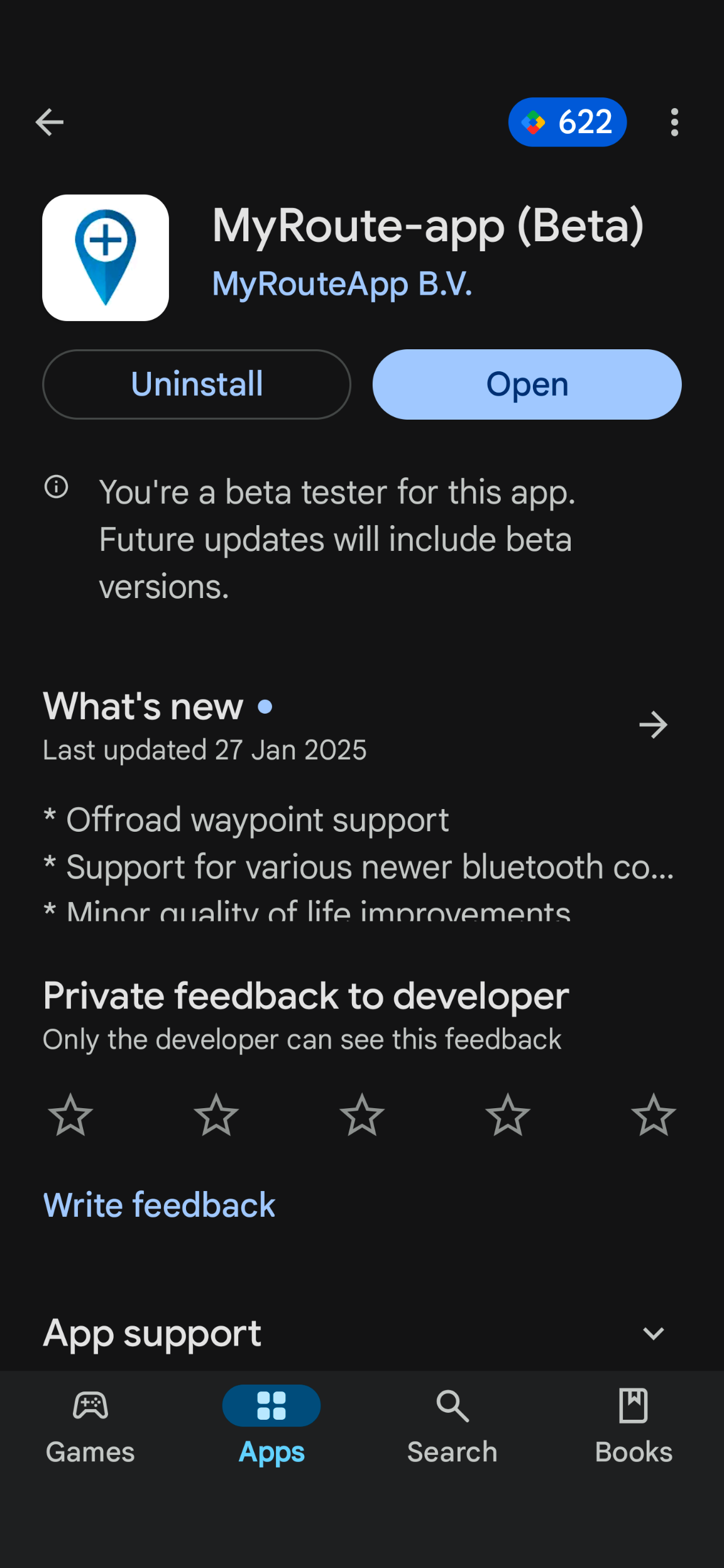
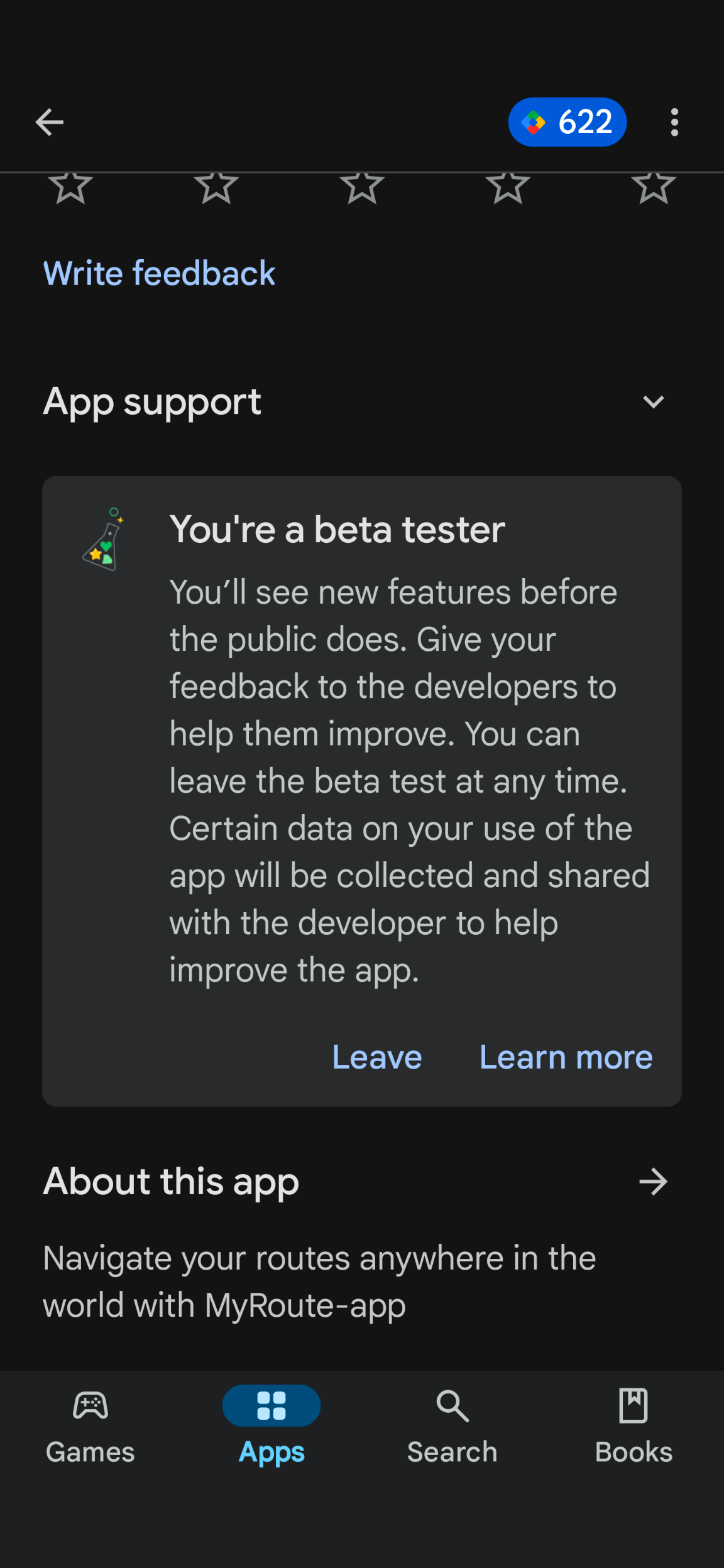
@Dikke-Wim Raise a ticket with Support and ask to have your Play Account email added to the Android Beta test group. Once done, you will see the following and be able to download updates in Google Play as though the app was normal:
Stel een ticket in bij Support en vraag om het e-mailadres van je Play Account toe te voegen aan de Android Beta-testgroep. Als je klaar bent, zie je het volgende en kun je updates downloaden in Google Play alsof de app normaal was:
-
Dave J 0 referenced this topic on
-
Supermooie verbeteringen Corné.
Een vraag: ik ben overgestapt van iPhone naar Android en kan geen TestFlight in de PlayStore vinden. Hoe kan ik verder gaan als Bètatester op mijn Android?
Ik hoor graag van je.
@Dikke-Wim Ik zal het maandag even aan Corné vragen

Maar inderdaad, maak even een support ticket aan. Geef daarin aan wat het mailadres is van je Android telefoon (waarschijnlijk een gmail dus) en dan kan ik je aan de Android test groep toevoegen. -
Corjan Meijerink referenced this topic on
Hello! It looks like you're interested in this conversation, but you don't have an account yet.
Getting fed up of having to scroll through the same posts each visit? When you register for an account, you'll always come back to exactly where you were before, and choose to be notified of new replies (either via email, or push notification). You'll also be able to save bookmarks and upvote posts to show your appreciation to other community members.
With your input, this post could be even better 💗
Register Login-
1554
-
 0527
0527
-
18193
-
138455
-
0321
-
0259
-
03161
-
 713169