Skip to content
  • Categories
  • Recent
  • Popular
  • Support
  • MyRoute-app
Collapse
Brand Logo

MRA Community Forum

  1. Home
  2. The MyRoute-app
  3. [App] Problems, Bugs and other Issues
  4. What's the point of your route planner?

What's the point of your route planner?
Scheduled Pinned Locked Moved [App] Problems, Bugs and other Issues
22 Posts 11 Posters 6.2k Views 7 Watching
  • Oldest to Newest
  • Newest to Oldest
  • Most Votes
Reply
  • Reply as topic
Log in to reply
This topic has been deleted. Only users with topic management privileges can see it.
  • Gordon Lawson Offline
    Gordon Lawson Offline
    Gordon Lawson
    wrote on last edited by
    #13

    @RetiredWingMan said in What's the point of your route planner?:

    @Gordon-Lawson that's what we are trying to tell you. Change the planning map to Here. That way you will be using the same maps and algorithms for planning that the navigation software uses. You should take some time to view some introductory videos and read the user manuals. It will save you a lot of grief.

    I did. Here’s what the manual says:
    IMG_0023.jpeg
    As I don’t have “Gold” I assumed I was stuck with Openstreetmap.

    https://www.myrouteapp.com/route/open/10175395/mobile#52.920647448131;-1.6127693653106492;10/

    This will be slow as I am only allowed to post once per hour!

    Nick Carthew Marinus van Deudekom 2 Replies Last reply
    0
    • Gordon Lawson Gordon Lawson

      @RetiredWingMan said in What's the point of your route planner?:

      @Gordon-Lawson that's what we are trying to tell you. Change the planning map to Here. That way you will be using the same maps and algorithms for planning that the navigation software uses. You should take some time to view some introductory videos and read the user manuals. It will save you a lot of grief.

      I did. Here’s what the manual says:
      IMG_0023.jpeg
      As I don’t have “Gold” I assumed I was stuck with Openstreetmap.

      https://www.myrouteapp.com/route/open/10175395/mobile#52.920647448131;-1.6127693653106492;10/

      This will be slow as I am only allowed to post once per hour!

      Nick Carthew Offline
      Nick Carthew Offline
      Nick Carthew
      RouteXpert
      wrote on last edited by
      #14

      @Gordon-Lawson Your MRA Navigation Next subscription gives you access to the HERE planning map.

      Always willing to help if I can.
      Triumph Tiger 1200 XRT called Tina.
      MRA Navigation Next and SilverFox BJ8

      1 Reply Last reply
      0
      • richtea999 Offline
        richtea999 Offline
        richtea999
        Valued contributor
        wrote on last edited by richtea999
        #15

        Once you've swapped from OpenStreetMap to HERE in the planner (which is the main fix), you get this route, which is pretty much where the app took you:

        Screenshot 2024-10-28 at 20.57.51.png

        The solution is only two steps:

        1. Use HERE if you're using the MRA Nav app or Garmin
        2. Once you've done that, add a couple more waypoints to get the route to go where you really want it to go.

        It's just practice, I promise. Don't be put off!

        1 Reply Last reply
        1
        • Gordon Lawson Gordon Lawson

          @RetiredWingMan said in What's the point of your route planner?:

          @Gordon-Lawson that's what we are trying to tell you. Change the planning map to Here. That way you will be using the same maps and algorithms for planning that the navigation software uses. You should take some time to view some introductory videos and read the user manuals. It will save you a lot of grief.

          I did. Here’s what the manual says:
          IMG_0023.jpeg
          As I don’t have “Gold” I assumed I was stuck with Openstreetmap.

          https://www.myrouteapp.com/route/open/10175395/mobile#52.920647448131;-1.6127693653106492;10/

          This will be slow as I am only allowed to post once per hour!

          Marinus van Deudekom Offline
          Marinus van Deudekom Offline
          Marinus van Deudekom
          RouteXpert
          wrote on last edited by
          #16

          @Gordon-Lawson besides the remarks of the others you've selected the bike profile witch only works in the Here map and TomTom map. Use the car profile insteadScreenshot_20241028_230651.jpg Screenshot_20241028_230735.jpg

          Honda Goldwing GL1500,
          Honda Silverwing GL 650
          DMD2 T865X 8 inch Android tablet using MRA next for navigation
          Garmin XT sold
          Samsung S24FE mounted on a Quadlock and using Android Auto in my car

          1 Reply Last reply
          0
          • Gordon Lawson Offline
            Gordon Lawson Offline
            Gordon Lawson
            wrote on last edited by
            #17

            I'd love to RTFM - where is it? All I can find is a knowledge base with a selection of articles.
            Screenshot 2024-10-29 091010.png
            I never understood what this message meant.

            Now I have set my maps to "Here" as default then maybe I will have more luck. I'll try another route and see what happens before heading for TomTom.

            My original question still remains - why use one mapping system to plan routes then a completely different one for navigation?

            Nick Carthew Con Hennekens 2 Replies Last reply
            0
            • Gordon Lawson Gordon Lawson

              I'd love to RTFM - where is it? All I can find is a knowledge base with a selection of articles.
              Screenshot 2024-10-29 091010.png
              I never understood what this message meant.

              Now I have set my maps to "Here" as default then maybe I will have more luck. I'll try another route and see what happens before heading for TomTom.

              My original question still remains - why use one mapping system to plan routes then a completely different one for navigation?

              Nick Carthew Offline
              Nick Carthew Offline
              Nick Carthew
              RouteXpert
              wrote on last edited by
              #18

              @Gordon-Lawson said in What's the point of your route planner?:

              My original question still remains - why use one mapping system to plan routes then a completely different one for navigation?

              Simple answer, you don’t.
              Plan your route using the HERE map for navigation using MRA Navigation Next.

              If you have a TomTom you would plan your routes using the TomTom planning map.

              Calimoto uses the OpenStreetMap, therefore anyone using this app would plan their routes on the OSM planning map.

              Always willing to help if I can.
              Triumph Tiger 1200 XRT called Tina.
              MRA Navigation Next and SilverFox BJ8

              1 Reply Last reply
              0
              • Gordon Lawson Gordon Lawson

                I'd love to RTFM - where is it? All I can find is a knowledge base with a selection of articles.
                Screenshot 2024-10-29 091010.png
                I never understood what this message meant.

                Now I have set my maps to "Here" as default then maybe I will have more luck. I'll try another route and see what happens before heading for TomTom.

                My original question still remains - why use one mapping system to plan routes then a completely different one for navigation?

                Con Hennekens Offline
                Con Hennekens Offline
                Con Hennekens
                Alpha tester
                wrote on last edited by
                #19

                @Gordon-Lawson said in What's the point of your route planner?:

                My original question still remains - why use one mapping system to plan routes then a completely different one for navigation?

                You choose that yourself...
                You must realise that the MRA planner is not intended solely for use with the MRA Navigation app. It is also intended for users of TomTom, Garmin and other navigation systems.

                I am just an enthusiastic MRA user, and hope you will be one too!

                Most motorcycle problems are caused by the nut that connects the handlebar to the saddle.

                Check out RideSleepRepeat.eu, a biker community for sharing stays across Europe

                1 Reply Last reply
                0
                • Gordon Lawson Gordon Lawson

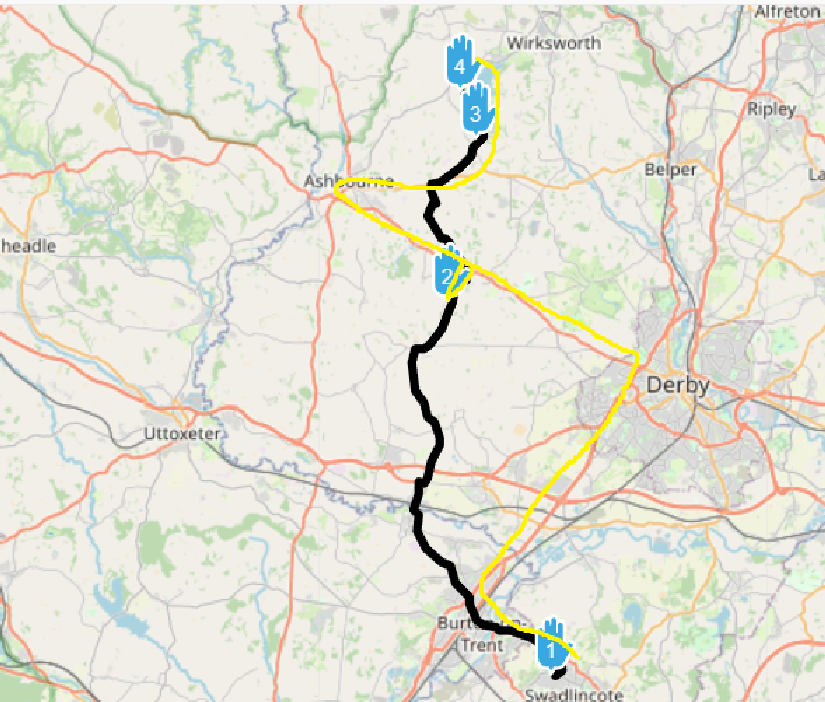
                  Foolishly, after all the issues I encounter using MRA, I decided to give it another go yesterday. I plotted a route then told the app to navigate the route. In the picture below you can see the route plotted, and the yellow line shows the approximate route it took me on. WTF???
                  Stupid route.png

                  I do not understand why plotting a route and navigating the same route are done using different maps with such widely varying results. It makes the combination of your route planner and navigation app absolutely useless!!!! I know there is a warning that it may give different results, but come on..... this is ludicrous! And I also understand that I could use a "track" but then all the waypoint information is lost, so if you need the waypoint info then a track is no good.
                  Before I finally delete this app from my phone (never to be installed again as long as I live), can someone explain to me how I can make this combined app work as I would expect it to work, i.e. plan a route then navigate THAT EXACT ROUTE? Or am I just completely wasting my time with this?
                  Thanks

                  Stephen Rowland Offline
                  Stephen Rowland Offline
                  Stephen Rowland
                  wrote on last edited by
                  #20

                  @Gordon-Lawson Using the HERE map, changing 2 via points (hands) to shaping points and adding one shaping point to make sure you pass through your point No 2 (rather than drive down a branch to get there), you get this....You need to spend a little time learning to use the planner properly before criticising it
                  https://www.myrouteapp.com/route/open/10183131#

                  1 Reply Last reply
                  2
                  • Gordon Lawson Offline
                    Gordon Lawson Offline
                    Gordon Lawson
                    wrote on last edited by
                    #21

                    It now appears that by changing to "Here" maps I have lost the ability to change the type of routing between segments.
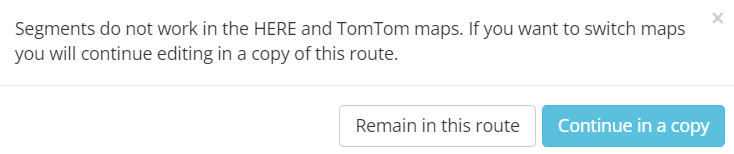
                    Screenshot 2024-10-29 101942.png
                    I thank you all for taking the time to reply on this thread, and your answers (and my subsequent findings) have led me to the conclusion that this is not the planning/navigation system for me.
                    I wish you all the best of luck 👍

                    (Admin - feel free to close this thread if you wish)

                    1 Reply Last reply
                    -1
                    • Makro Offline
                      Makro Offline
                      Makro
                      wrote on last edited by
                      #22

                      This is not just an issue with MRA, it's a generic thing.

                      Back in my Garmin days, I had several encounters where I created a route in Garmin's Basecamp software, then send it to my Garmin Zumo device. When Navigating the route, it was sometimes different than expected.
                      The reason is not just different algorithms used in the planning software and the device, also different parameters.

                      You can memorize it like this: a route you create is just a list of via points. Your device will recalculate a route, from point to point, along with its parameters, like Fastest route, shortest route, avoid gravel roads, avoid blocked roads etc.

                      As someone else said, add more waypoints to your route, then you don't have to pay much attention to parameters.

                      Best regards, Makro

                      1 Reply Last reply
                      0
                      • Corjan Meijerink Corjan Meijerink locked this topic on

                      Hello! It looks like you're interested in this conversation, but you don't have an account yet.

                      Getting fed up of having to scroll through the same posts each visit? When you register for an account, you'll always come back to exactly where you were before, and choose to be notified of new replies (either via email, or push notification). You'll also be able to save bookmarks and upvote posts to show your appreciation to other community members.

                      With your input, this post could be even better 💗

                      Register Login


                      Reply
                      • Reply as topic
                      Log in to reply
                      • Oldest to Newest
                      • Newest to Oldest
                      • Most Votes


                      • 1
                      • 2
                      ACTIVE USERS
                      Corjan Meijerink
                      Corjan Meijerink
                      Hans van de Ven MR.MRA
                      Hans van de Ven MR.MRA
                      Marinus van Deudekom
                      Marinus van Deudekom
                      Con Hennekens
                      Con Hennekens
                      Nick Carthew
                      Nick Carthew
                      RetiredWingMan
                      RetiredWingMan
                      richtea999
                      richtea999
                      Makro
                      Makro
                      Lisi Mayr
                      Lisi Mayr
                      Stephen Rowland
                      Stephen Rowland
                      Gordon Lawson
                      Gordon Lawson
                      POPULAR TOPICS
                      • GPX Versions 1.1 vs 1.2 for Garmin Visually Explained
                        Mzokk
                        Mzokk
                        7
                        174
                        13.8k

                      • The compas direction on the elevation circle is wrong
                        Guzzist
                        Guzzist
                        0
                        30
                        1.1k

                      • Carpuride scherm vast
                        Corjan Meijerink
                        Corjan Meijerink
                        3
                        26
                        1.2k

                      • Camperroutes
                        De Ploey Georges
                        De Ploey Georges
                        0
                        4
                        132

                      • App probleem scenic route niet mogelijk
                        Philip Verbeek
                        Philip Verbeek
                        0
                        3
                        76

                      • HERE maps updates
                        Travellexxie
                        Travellexxie
                        0
                        9
                        293

                      • Latest version of the App?
                        white.mouse
                        white.mouse
                        0
                        3
                        94

                      • Auto skip many waypoints by itself while I was on route. [5.2.0 - 474]
                        paul69
                        paul69
                        0
                        35
                        1.6k

                      MY GROUPS
                      • Login

                      • Login or register to search.
                      • First post
                        Last post
                      0
                      • Categories
                      • Recent
                      • Popular
                      • Support
                      • MyRoute-app