Automatic zoom during navigation
-

I was riding through the Eifel recently. There quite a lot of curves so I zoomed out to see where the road is heading to. But in the small villages there crossings with multiple small streets. So it is necessary that the map zooms in again . With Garmin it automatically zoom in to the max when the voice announces the next turn and zooms out to the previous zoom out level when the turn is passed. You can‘t do it manually with the „-„ and „+“ button on the screen.
I would like to see that feature in MR-A as well, because it is a kind of passive safety feature because you keep your hands at the handlebar. -
I was riding through the Eifel recently. There quite a lot of curves so I zoomed out to see where the road is heading to. But in the small villages there crossings with multiple small streets. So it is necessary that the map zooms in again . With Garmin it automatically zoom in to the max when the voice announces the next turn and zooms out to the previous zoom out level when the turn is passed. You can‘t do it manually with the „-„ and „+“ button on the screen.
I would like to see that feature in MR-A as well, because it is a kind of passive safety feature because you keep your hands at the handlebar.
@Guido-K-1, if you are using the right view, the app will zoom in and out based on speed and distance to the next instruction. In the menu settings - map layer, you will find an option called "automatic zoom correction"
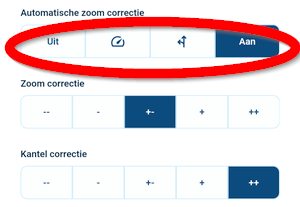
This one enlarges the level of zoom in and out for speed, for instructions or for both.
Hello! It looks like you're interested in this conversation, but you don't have an account yet.
Getting fed up of having to scroll through the same posts each visit? When you register for an account, you'll always come back to exactly where you were before, and choose to be notified of new replies (either via email, or push notification). You'll also be able to save bookmarks and upvote posts to show your appreciation to other community members.
With your input, this post could be even better 💗
Register Login-
 0520
0520
-
 2482
2482
-
 0522
0522
-
 138
138
-
 047
047
-
 0311
0311
-
0312
-
 0746
0746