Skip to content
  • Categories
  • Recent
  • Popular
  • Support
  • MyRoute-app
Collapse
Brand Logo

MRA Community Forum

  1. Home
  2. The MyRoute-app
  3. [App] Suggestions and Discussion
  4. Understand auto zoom

Understand auto zoom

Scheduled Pinned Locked Moved [App] Suggestions and Discussion
14 Posts 6 Posters 4.9k Views 5 Watching
  • Oldest to Newest
  • Newest to Oldest
  • Most Votes
Reply
  • Reply as topic
Log in to reply
This topic has been deleted. Only users with topic management privileges can see it.
  • Makro Offline
    Makro Offline
    Makro
    wrote on last edited by
    #1

    Screenshot_20240530_164219.jpg

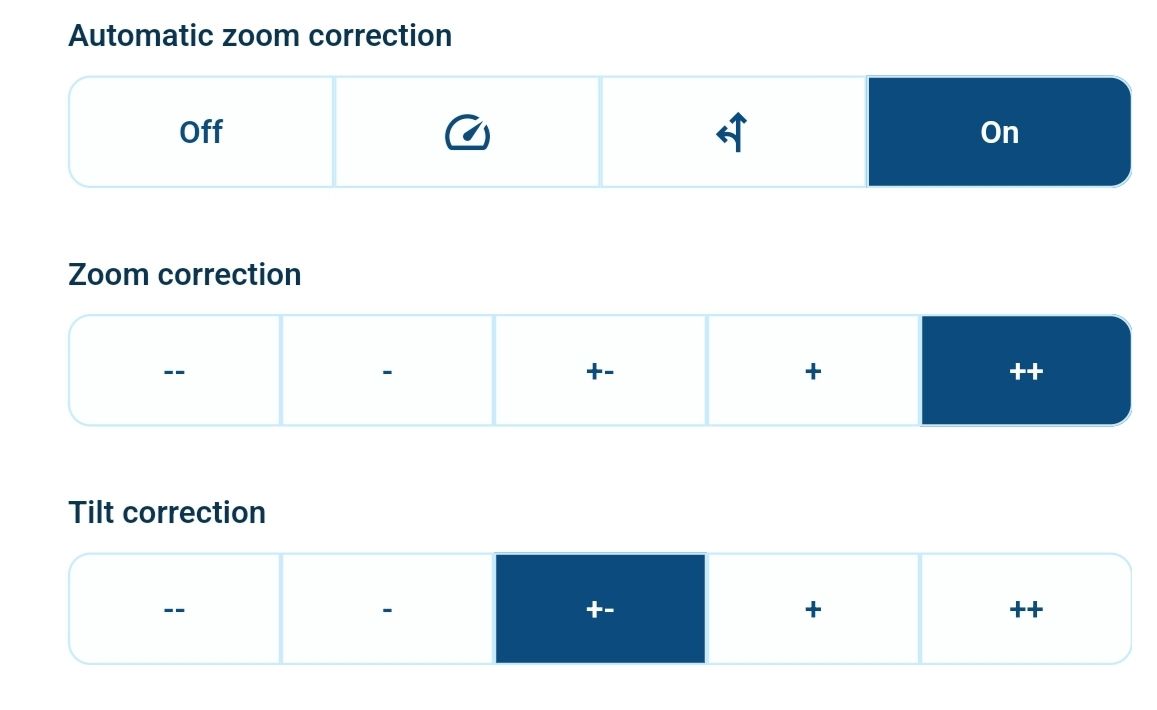
    Today I noticed missing auto zoom at intersections and roundabouts, so I took a look at the settings šŸ¤”

    In Navigation Settings-> Map Layer:

    Zoom Correction seems to be how much the app should zoom at intersections etc , that is, only if the app considers the road to need any zoom. Or what?

    What do the Automatic Zoom Correction icons do?

    Best regards, Makro

    Rob Verhoeff RetiredWingMan 2 Replies Last reply
    0
    • Makro Makro

      Screenshot_20240530_164219.jpg

      Today I noticed missing auto zoom at intersections and roundabouts, so I took a look at the settings šŸ¤”

      In Navigation Settings-> Map Layer:

      Zoom Correction seems to be how much the app should zoom at intersections etc , that is, only if the app considers the road to need any zoom. Or what?

      What do the Automatic Zoom Correction icons do?

      Rob Verhoeff Offline
      Rob Verhoeff Offline
      Rob Verhoeff
      Alpha tester
      wrote on last edited by
      #2

      @Makro
      Off: we do nothing extra
      Speed icon: based on speed slightly less zoom
      Instruction icon : based on next instruction distance less zoom
      On: we use both! This was default like it was

      šŸļø BMW K1600GT-P (2013) | Nolan N100-5 with Sena 30K
      šŸ“± iOS on iPhone 13 & 16 (mounted on Quadlock or AliExpress extention on BMW-cradle)
      šŸš™ Apple CarPlay in VW T-Roc
      šŸ’» Routelab on MacBook Air & iMac (Tahoe & Ventura)

      Con Hennekens Makro 2 Replies Last reply
      0
      • Makro Makro

        Screenshot_20240530_164219.jpg

        Today I noticed missing auto zoom at intersections and roundabouts, so I took a look at the settings šŸ¤”

        In Navigation Settings-> Map Layer:

        Zoom Correction seems to be how much the app should zoom at intersections etc , that is, only if the app considers the road to need any zoom. Or what?

        What do the Automatic Zoom Correction icons do?

        RetiredWingMan Offline
        RetiredWingMan Offline
        RetiredWingMan
        Valued contributor
        wrote on last edited by
        #3

        I would like to see a more detailed explanation of the zoom function and options. For example,
        if I adjust option for zoom correction, does that affect the auto zoom as speed increases / decreases?
        If I manually adjust the map zoom while navigating, does that stop the auto zoom function?
        Thanks

        2010 GL1800 Goldwing using Samsung Galaxy S20 5G Android 13.

        Con Hennekens 1 Reply Last reply
        1
        • Rob Verhoeff Rob Verhoeff

          @Makro
          Off: we do nothing extra
          Speed icon: based on speed slightly less zoom
          Instruction icon : based on next instruction distance less zoom
          On: we use both! This was default like it was

          Con Hennekens Offline
          Con Hennekens Offline
          Con Hennekens
          Alpha tester
          wrote on last edited by
          #4

          @Rob-Verhoeff, I doubt that this is correct Rob, I think it sets auto-zoom completely off, only based on speed, only based on instructions, or both. If not completely off, zoom correction and tilt correction are used at the chosen options.

          I am just an enthusiastic MRA user, and hope you will be one too!

          Most motorcycle problems are caused by the nut that connects the handlebar to the saddle.

          Check out RideSleepRepeat.eu, a biker community for sharing stays across Europe

          Rob Verhoeff 1 Reply Last reply
          0
          • RetiredWingMan RetiredWingMan

            I would like to see a more detailed explanation of the zoom function and options. For example,
            if I adjust option for zoom correction, does that affect the auto zoom as speed increases / decreases?
            If I manually adjust the map zoom while navigating, does that stop the auto zoom function?
            Thanks

            Con Hennekens Offline
            Con Hennekens Offline
            Con Hennekens
            Alpha tester
            wrote on last edited by
            #5

            @RetiredWingMan said in Understand auto zoom:

            if I adjust option for zoom correction, does that affect the auto zoom as speed increases / decreases?

            Yes, but only when the speed icon or ON icon is selected.

            If I manually adjust the map zoom while navigating, does that stop the auto zoom function?

            No, after a few seconds of driving the map will be centered again, and the normal zoom / zoom correction will be active.

            I am just an enthusiastic MRA user, and hope you will be one too!

            Most motorcycle problems are caused by the nut that connects the handlebar to the saddle.

            Check out RideSleepRepeat.eu, a biker community for sharing stays across Europe

            1 Reply Last reply
            0
            • Con Hennekens Con Hennekens

              @Rob-Verhoeff, I doubt that this is correct Rob, I think it sets auto-zoom completely off, only based on speed, only based on instructions, or both. If not completely off, zoom correction and tilt correction are used at the chosen options.

              Rob Verhoeff Offline
              Rob Verhoeff Offline
              Rob Verhoeff
              Alpha tester
              wrote on last edited by
              #6

              @Con-Hennekens Well, then somebody is wrong, but not me šŸ˜‰

              https://forum.myrouteapp.com/topic/6892/new-update-4-1-3/2?page=1

              šŸļø BMW K1600GT-P (2013) | Nolan N100-5 with Sena 30K
              šŸ“± iOS on iPhone 13 & 16 (mounted on Quadlock or AliExpress extention on BMW-cradle)
              šŸš™ Apple CarPlay in VW T-Roc
              šŸ’» Routelab on MacBook Air & iMac (Tahoe & Ventura)

              Con Hennekens 1 Reply Last reply
              1
              • Rob Verhoeff Rob Verhoeff

                @Con-Hennekens Well, then somebody is wrong, but not me šŸ˜‰

                https://forum.myrouteapp.com/topic/6892/new-update-4-1-3/2?page=1

                Con Hennekens Offline
                Con Hennekens Offline
                Con Hennekens
                Alpha tester
                wrote on last edited by Con Hennekens
                #7

                @Rob-Verhoeff, okay okay! I stand corrected! šŸ˜‰
                With the addition though, that "less" can also be "more" in the given example.
                Strange though, I can imagine some people would want auto zoom te be off, but then that seems to be not possible.

                I am just an enthusiastic MRA user, and hope you will be one too!

                Most motorcycle problems are caused by the nut that connects the handlebar to the saddle.

                Check out RideSleepRepeat.eu, a biker community for sharing stays across Europe

                1 Reply Last reply
                0
                • Rob Verhoeff Rob Verhoeff

                  @Makro
                  Off: we do nothing extra
                  Speed icon: based on speed slightly less zoom
                  Instruction icon : based on next instruction distance less zoom
                  On: we use both! This was default like it was

                  Makro Offline
                  Makro Offline
                  Makro
                  wrote on last edited by
                  #8

                  @Rob-Verhoeff said in Understand auto zoom:

                  @Makro
                  Off: we do nothing extra
                  Speed icon: based on speed slightly less zoom
                  Instruction icon : based on next instruction distance less zoom
                  On: we use both! This was default like it was

                  I don't get any autozoom or auto tilt. At least nothing compared to what my old Garmin device was capable of.

                  So, in order to get the most autozoom and tilt in the MRA app, then the 3 settings will have to be like this?

                  • Automatic Zoom Correction=On
                  • Zoom Correction=++
                  • Tilt Correction=++

                  Best regards, Makro

                  RetiredWingMan Con Hennekens 2 Replies Last reply
                  0
                  • Makro Makro

                    @Rob-Verhoeff said in Understand auto zoom:

                    @Makro
                    Off: we do nothing extra
                    Speed icon: based on speed slightly less zoom
                    Instruction icon : based on next instruction distance less zoom
                    On: we use both! This was default like it was

                    I don't get any autozoom or auto tilt. At least nothing compared to what my old Garmin device was capable of.

                    So, in order to get the most autozoom and tilt in the MRA app, then the 3 settings will have to be like this?

                    • Automatic Zoom Correction=On
                    • Zoom Correction=++
                    • Tilt Correction=++
                    RetiredWingMan Offline
                    RetiredWingMan Offline
                    RetiredWingMan
                    Valued contributor
                    wrote on last edited by
                    #9

                    @Makro. I use Zoom correction = - -.
                    Gives me a wider view. Auto zoom in still works.

                    2010 GL1800 Goldwing using Samsung Galaxy S20 5G Android 13.

                    1 Reply Last reply
                    0
                    • Makro Makro

                      @Rob-Verhoeff said in Understand auto zoom:

                      @Makro
                      Off: we do nothing extra
                      Speed icon: based on speed slightly less zoom
                      Instruction icon : based on next instruction distance less zoom
                      On: we use both! This was default like it was

                      I don't get any autozoom or auto tilt. At least nothing compared to what my old Garmin device was capable of.

                      So, in order to get the most autozoom and tilt in the MRA app, then the 3 settings will have to be like this?

                      • Automatic Zoom Correction=On
                      • Zoom Correction=++
                      • Tilt Correction=++
                      Con Hennekens Offline
                      Con Hennekens Offline
                      Con Hennekens
                      Alpha tester
                      wrote on last edited by
                      #10

                      @Makro, With zoom correction on ++ you will always be zoomed in a lot. But the comprehension of the new setting is a bit unintuitive for sure...

                      I am just an enthusiastic MRA user, and hope you will be one too!

                      Most motorcycle problems are caused by the nut that connects the handlebar to the saddle.

                      Check out RideSleepRepeat.eu, a biker community for sharing stays across Europe

                      1 Reply Last reply
                      0
                      • Corjan Meijerink Offline
                        Corjan Meijerink Offline
                        Corjan Meijerink
                        Developer
                        wrote on last edited by
                        #11

                        I do understand the confusion.
                        So the "Automatic zoom correction" was something we did ourselves but did not allow the user to configure. Therefore "on" is the default behavior.

                        The faster you drive, the more the app zooms out.
                        The further away a maneuver is, the more the app zooms out.
                        Those factors add up šŸ˜‰

                        So when driving 130 km/h on a highway while having the instruction to take the exit in 80 km means the app zooms out quite a lot.
                        If you drive fast in the city (70 km/h) but need to take the exit in 1km, the app still zooms out a bit to allow you to anticipate with the speed you are driving.

                        If you only want the app to zoom out based on speed, set it to the speed icon. If you only want to zoom out based on distance to the next instruction, put it on the instruction icon šŸ™‚ By default it is "on" and that does both.

                        The baseline zoom is affected by the zoom correction. The is the normalized zoomlevel upon which all other adjustments are based. So if you want slightly less or more zoom, use that setting. This is always applied.

                        Nick Carthew 1 Reply Last reply
                        0
                        • Corjan Meijerink Corjan Meijerink

                          I do understand the confusion.
                          So the "Automatic zoom correction" was something we did ourselves but did not allow the user to configure. Therefore "on" is the default behavior.

                          The faster you drive, the more the app zooms out.
                          The further away a maneuver is, the more the app zooms out.
                          Those factors add up šŸ˜‰

                          So when driving 130 km/h on a highway while having the instruction to take the exit in 80 km means the app zooms out quite a lot.
                          If you drive fast in the city (70 km/h) but need to take the exit in 1km, the app still zooms out a bit to allow you to anticipate with the speed you are driving.

                          If you only want the app to zoom out based on speed, set it to the speed icon. If you only want to zoom out based on distance to the next instruction, put it on the instruction icon šŸ™‚ By default it is "on" and that does both.

                          The baseline zoom is affected by the zoom correction. The is the normalized zoomlevel upon which all other adjustments are based. So if you want slightly less or more zoom, use that setting. This is always applied.

                          Nick Carthew Online
                          Nick Carthew Online
                          Nick Carthew
                          RouteXpert
                          wrote on last edited by
                          #12

                          @Corjan-Meijerink

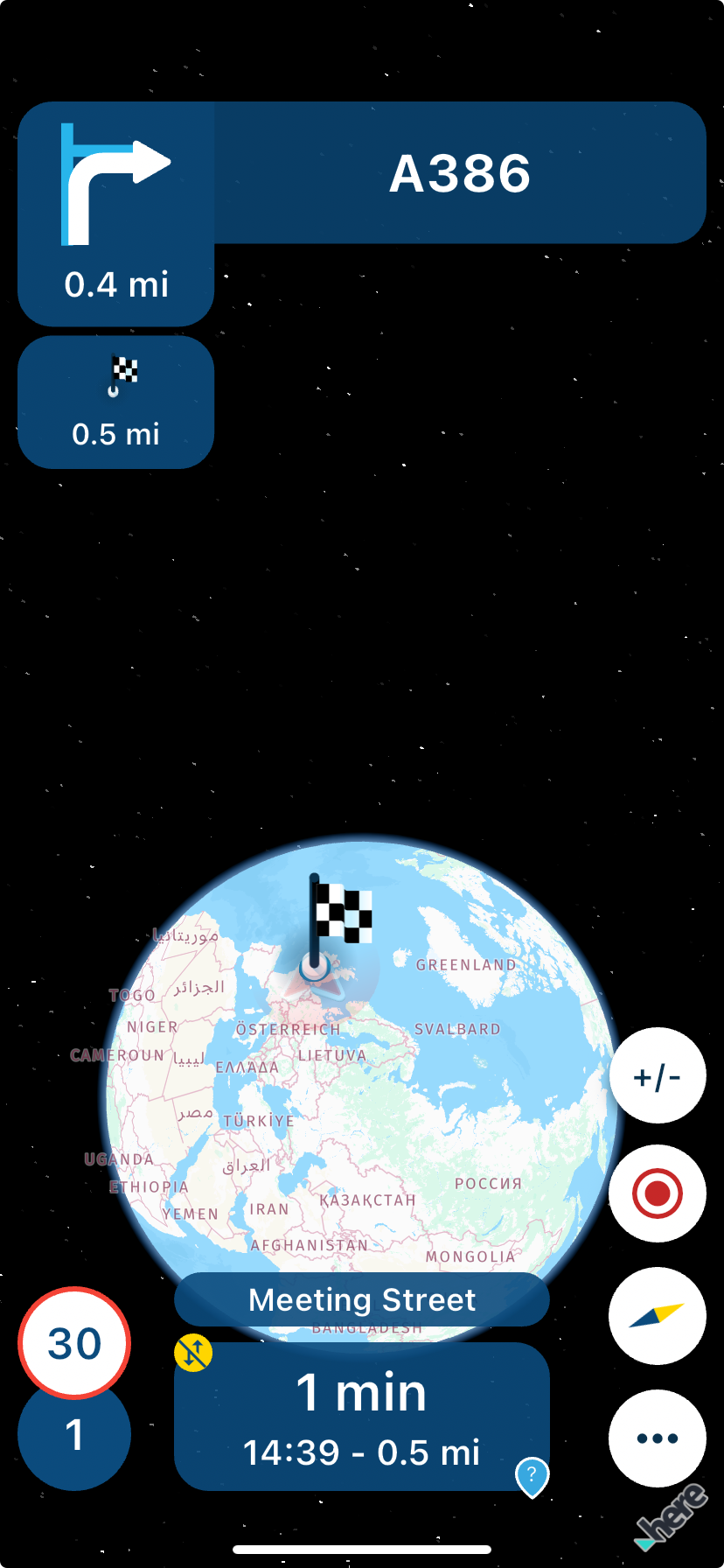
                          I think the auto zoom out is too powerful 😊

                          b3569982-30d7-447a-b485-c9ee54bb9609-image.png

                          Always willing to help if I can.
                          Triumph Tiger 1200 XRT called Tina.
                          MRA Navigation Next and SilverFox BJ8

                          Rob Verhoeff Con Hennekens 2 Replies Last reply
                          3
                          • Nick Carthew Nick Carthew

                            @Corjan-Meijerink

                            I think the auto zoom out is too powerful 😊

                            b3569982-30d7-447a-b485-c9ee54bb9609-image.png

                            Rob Verhoeff Offline
                            Rob Verhoeff Offline
                            Rob Verhoeff
                            Alpha tester
                            wrote on last edited by
                            #13

                            @Nick-Carthew šŸ˜†

                            šŸļø BMW K1600GT-P (2013) | Nolan N100-5 with Sena 30K
                            šŸ“± iOS on iPhone 13 & 16 (mounted on Quadlock or AliExpress extention on BMW-cradle)
                            šŸš™ Apple CarPlay in VW T-Roc
                            šŸ’» Routelab on MacBook Air & iMac (Tahoe & Ventura)

                            1 Reply Last reply
                            0
                            • Nick Carthew Nick Carthew

                              @Corjan-Meijerink

                              I think the auto zoom out is too powerful 😊

                              b3569982-30d7-447a-b485-c9ee54bb9609-image.png

                              Con Hennekens Offline
                              Con Hennekens Offline
                              Con Hennekens
                              Alpha tester
                              wrote on last edited by Con Hennekens
                              #14

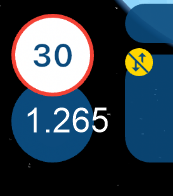
                              @Nick-Carthew, I guess you were just speeding... A LOT... šŸ˜‰
                              c66e843e-02c1-4bc0-bfc9-67ad7a02d918-image.png

                              I am just an enthusiastic MRA user, and hope you will be one too!

                              Most motorcycle problems are caused by the nut that connects the handlebar to the saddle.

                              Check out RideSleepRepeat.eu, a biker community for sharing stays across Europe

                              1 Reply Last reply
                              0

                              Hello! It looks like you're interested in this conversation, but you don't have an account yet.

                              Getting fed up of having to scroll through the same posts each visit? When you register for an account, you'll always come back to exactly where you were before, and choose to be notified of new replies (either via email, or push notification). You'll also be able to save bookmarks and upvote posts to show your appreciation to other community members.

                              With your input, this post could be even better šŸ’—

                              Register Login
                              Reply
                              • Reply as topic
                              Log in to reply
                              • Oldest to Newest
                              • Newest to Oldest
                              • Most Votes


                              ACTIVE USERS
                              Con Hennekens
                              Con Hennekens
                              Nick Carthew
                              Nick Carthew
                              Rob Verhoeff
                              Rob Verhoeff
                              Corjan Meijerink
                              Corjan Meijerink
                              Makro
                              Makro
                              RetiredWingMan
                              RetiredWingMan
                              POPULAR TOPICS
                              • The compas direction on the elevation circle is wrong
                                M. Schrijver
                                M. Schrijver
                                0
                                59
                                2.1k

                              • Er gaat hier iets mis melding
                                white.mouse
                                white.mouse
                                0
                                7
                                102

                              • New update 5.2 - Avoid roadblocks, persistent map items, POI management and share
                                Nick Carthew
                                Nick Carthew
                                28
                                52
                                6.6k

                              • Carpuride scherm vast
                                Marinus van Deudekom
                                Marinus van Deudekom
                                3
                                30
                                1.4k

                              • New update 5.2.1
                                white.mouse
                                white.mouse
                                16
                                24
                                1.2k

                              • Vermijd Wegversperringen
                                0
                                1
                                6

                              • Google maps and Streetview
                                0
                                1
                                36

                              • Blauwe routelijn lijft in Carplay wit
                                0
                                1
                                21

                              MY GROUPS
                              • Login

                              • Login or register to search.
                              • First post
                                Last post
                              0
                              • Categories
                              • Recent
                              • Popular
                              • Support
                              • MyRoute-app