Skip to content
  • Categories
  • Recent
  • Popular
  • Support
  • MyRoute-app
Collapse
Brand Logo

MRA Community Forum

  1. Home
  2. [App-Beta] The MyRoute-app
  3. [App-Beta] Problems, Bugs and other Issues
  4. Incorrect navigation information

Incorrect navigation information

Scheduled Pinned Locked Moved [App-Beta] Problems, Bugs and other Issues
24 Posts 7 Posters 188 Views 2 Watching
  • Oldest to Newest
  • Newest to Oldest
  • Most Votes
Reply
  • Reply as topic
Log in to reply
This topic has been deleted. Only users with topic management privileges can see it.
  • RetiredWingMan RetiredWingMan

    @Corjan-Meijerink since I always have problems taking screen shots, I don't suppose you would consider, (on the Beta app), adding a button or something that would make taking a screen shot quick and easy? Perhaps someone knows of an Android app that would do this.

    Dave J 0
    Dave J 0
    Dave J 0
    Valued contributor
    wrote on last edited by Dave J 0
    #7

    @Doug-Robinson as well as the option suggested by @Lynchy67 you can use the app overview button if you have 3-button navigation enabled as opposed to gesture navigation.
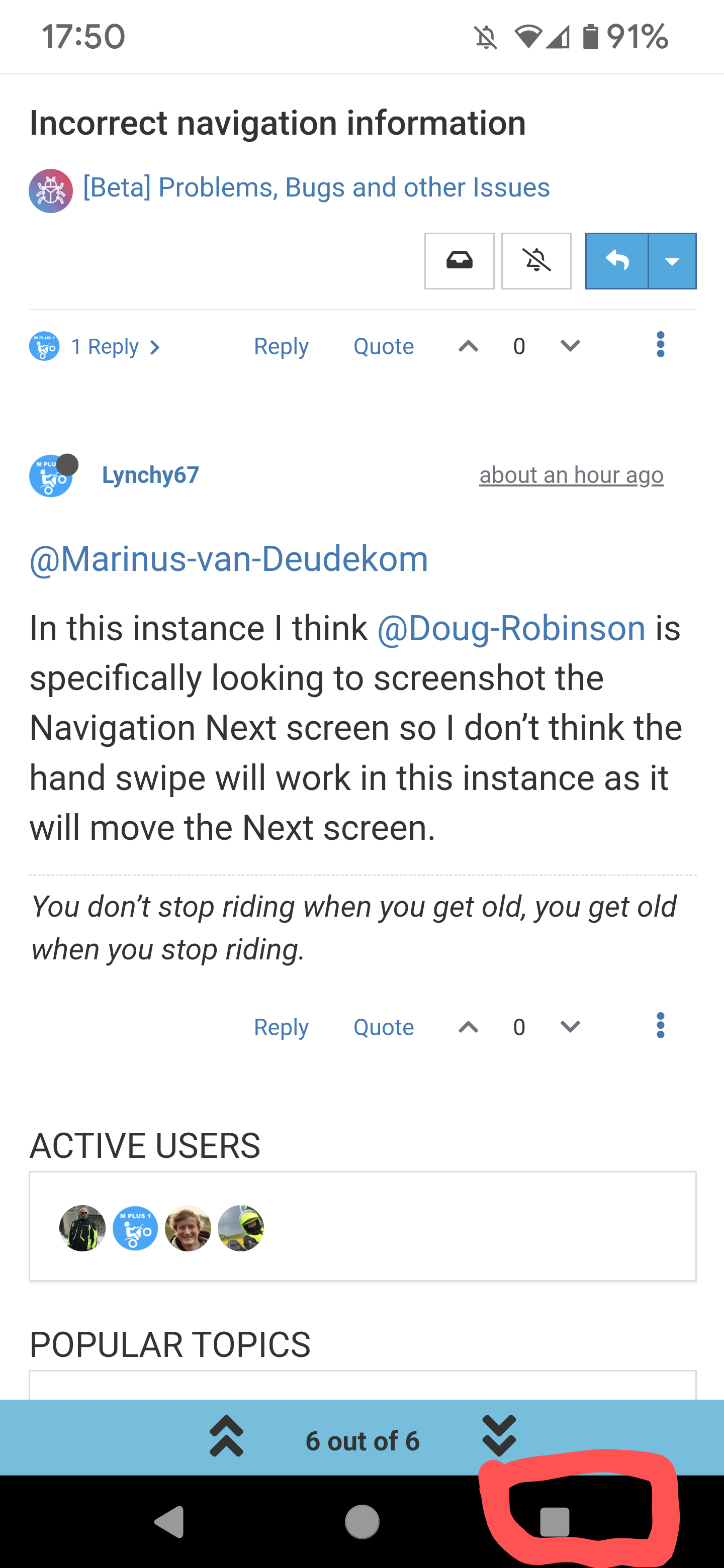
    Screenshot_20230814-175017~2.png
    Then the screenshot option is available:
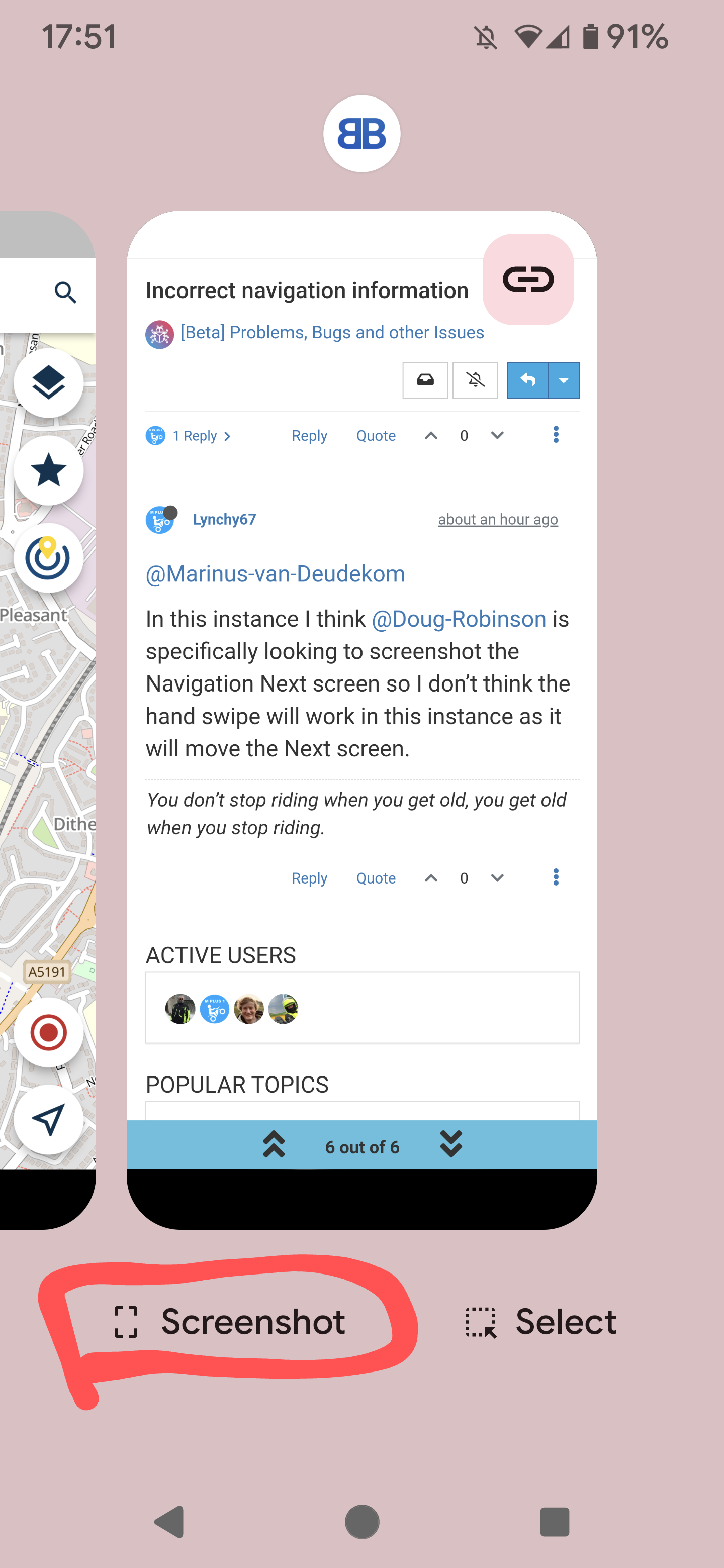
    Screenshot_20230814-175102~2.png
    As I use my Android device predominantly on the bike, button navigation is great with gloves as I have the buttons on the left in landscape.

    Kind Regards. Help where I can.
    Ducati Multistrada V4 Rally
    iPhone 18 Pro
    CHIGEE AIO-6 LTE
    Google Pixel 6 Pro - mounted on SP Connect Plus
    Ex Garmin XT2 and XT1 as well as Ex TomTom Rider User

    RetiredWingMan 1 Reply Last reply
    0
    • Lynchy67 Lynchy67

      @Doug-Robinson

      On my Samsung S21+ a screenshot can be taken by simultaneously pressing the Unlock button and the Volume Down button.

      RetiredWingMan
      RetiredWingMan
      RetiredWingMan
      Valued contributor
      wrote on last edited by
      #8

      @Lynchy67 difficult to do while riding with gloves on.

      2010 GL1800 Goldwing using Samsung Galaxy S20 5G Android 13.

      1 Reply Last reply
      0
      • Marinus van Deudekom Marinus van Deudekom

        @Lynchy67 or Swipe with your hand over the screen from right to left

        RetiredWingMan
        RetiredWingMan
        RetiredWingMan
        Valued contributor
        wrote on last edited by
        #9

        @Marinus-van-Deudekom does not work with gloves on.

        2010 GL1800 Goldwing using Samsung Galaxy S20 5G Android 13.

        1 Reply Last reply
        0
        • Dave J 0 Dave J 0

          @Doug-Robinson as well as the option suggested by @Lynchy67 you can use the app overview button if you have 3-button navigation enabled as opposed to gesture navigation.

          Screenshot_20230814-175017~2.png
          Then the screenshot option is available:

          Screenshot_20230814-175102~2.png
          As I use my Android device predominantly on the bike, button navigation is great with gloves as I have the buttons on the left in landscape.

          RetiredWingMan
          RetiredWingMan
          RetiredWingMan
          Valued contributor
          wrote on last edited by
          #10

          @Dave-J-0 the screen shot above looks interesting. How do you get the screenshot option on the bottom of the screen?

          2010 GL1800 Goldwing using Samsung Galaxy S20 5G Android 13.

          Dave J 0 Marinus van Deudekom 2 Replies Last reply
          0
          • RetiredWingMan RetiredWingMan

            @Dave-J-0 the screen shot above looks interesting. How do you get the screenshot option on the bottom of the screen?

            Dave J 0
            Dave J 0
            Dave J 0
            Valued contributor
            wrote on last edited by Dave J 0
            #11

            @Doug-Robinson select the square button (app overview). I can do this with gloves on as well. You should be able to enable 3 button option in settings. Search for button navigation.

            Kind Regards. Help where I can.
            Ducati Multistrada V4 Rally
            iPhone 18 Pro
            CHIGEE AIO-6 LTE
            Google Pixel 6 Pro - mounted on SP Connect Plus
            Ex Garmin XT2 and XT1 as well as Ex TomTom Rider User

            RetiredWingMan 1 Reply Last reply
            0
            • RetiredWingMan RetiredWingMan

              @Dave-J-0 the screen shot above looks interesting. How do you get the screenshot option on the bottom of the screen?

              Marinus van Deudekom
              Marinus van Deudekom
              Marinus van Deudekom
              RouteXpert
              wrote on last edited by
              #12

              @Doug-Robinson

              63085f89-0620-469a-adde-bb9eeeeeea58-image.png
              Example from a Swipe from my Samsung S20FE

              Honda Goldwing GL1500,
              Honda Silverwing GL 650
              DMD2 T865X 8 inch Android tablet using MRA next for navigation
              Garmin XT sold
              Samsung S24FE mounted on a Quadlock and using Android Auto in my car

              RetiredWingMan 1 Reply Last reply
              0
              • Dave J 0 Dave J 0

                @Doug-Robinson select the square button (app overview). I can do this with gloves on as well. You should be able to enable 3 button option in settings. Search for button navigation.

                RetiredWingMan
                RetiredWingMan
                RetiredWingMan
                Valued contributor
                wrote on last edited by
                #13

                @Dave-J-0 I do have 3 button turned on . But how do you get the screenshot option to show up?
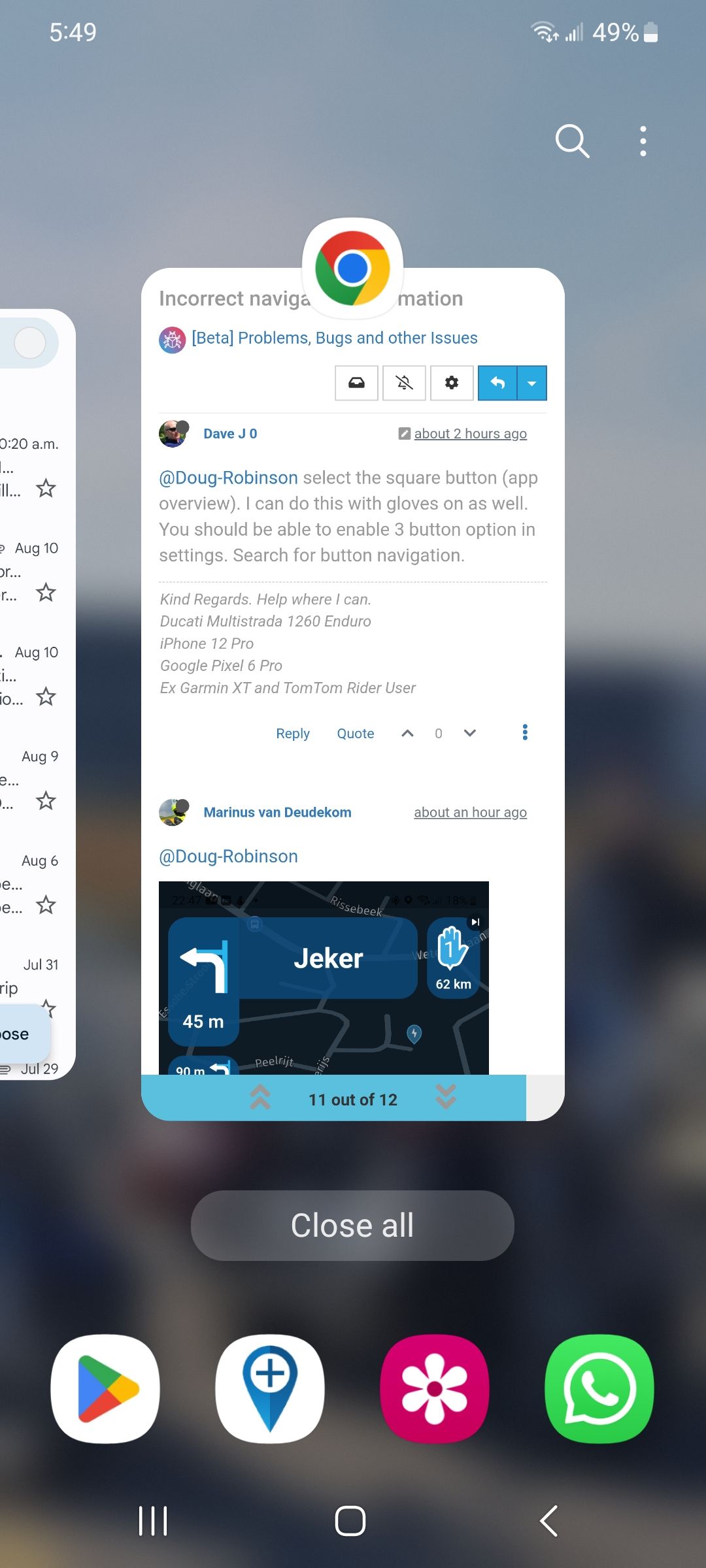
                Screenshot_20230814_174955_One UI Home.jpg

                2010 GL1800 Goldwing using Samsung Galaxy S20 5G Android 13.

                Dave J 0 1 Reply Last reply
                0
                • Marinus van Deudekom Marinus van Deudekom

                  @Doug-Robinson

                  63085f89-0620-469a-adde-bb9eeeeeea58-image.png
                  Example from a Swipe from my Samsung S20FE

                  RetiredWingMan
                  RetiredWingMan
                  RetiredWingMan
                  Valued contributor
                  wrote on last edited by
                  #14

                  @Marinus-van-Deudekom yes, I enabled the swipe for screenshot but it does not work with gloves on.

                  2010 GL1800 Goldwing using Samsung Galaxy S20 5G Android 13.

                  1 Reply Last reply
                  0
                  • RetiredWingMan RetiredWingMan

                    @Dave-J-0 I do have 3 button turned on . But how do you get the screenshot option to show up?
                    Screenshot_20230814_174955_One UI Home.jpg

                    Dave J 0
                    Dave J 0
                    Dave J 0
                    Valued contributor
                    wrote on last edited by Dave J 0
                    #15

                    @Doug-Robinson my phone is a Google Pixel 6 Pro and there must be a difference with the screenshot option. I believe the option was reinstated with Android 12. Have a look here: https://support.google.com/assistant/answer/9402361?hl=en&co=GENIE.Platform%3DAndroid#zippy=%2Cother-android-phones

                    There is this also: https://youtu.be/l6Aj2K5MkrU

                    This is my first Android phone so still learning.

                    Kind Regards. Help where I can.
                    Ducati Multistrada V4 Rally
                    iPhone 18 Pro
                    CHIGEE AIO-6 LTE
                    Google Pixel 6 Pro - mounted on SP Connect Plus
                    Ex Garmin XT2 and XT1 as well as Ex TomTom Rider User

                    1 Reply Last reply
                    0
                    • Corjan Meijerink Corjan Meijerink

                      @Doug-Robinson great you love it! Thanks for sharing 🙂

                      RetiredWingMan
                      RetiredWingMan
                      RetiredWingMan
                      Valued contributor
                      wrote on last edited by
                      #16

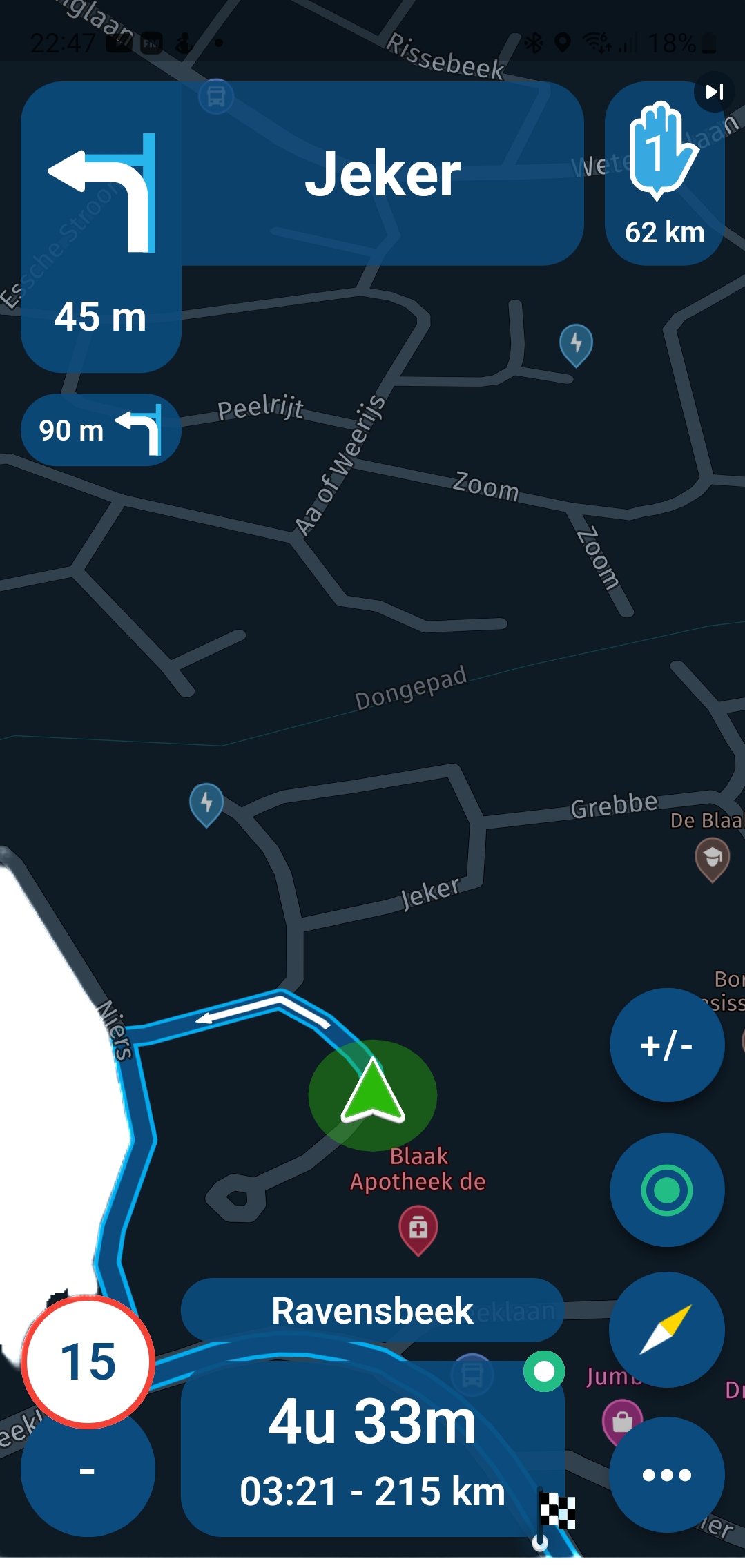
                      @Corjan-Meijerink had another occurrence of the issue with the second nav instruction. I pulled over and got a screenshot. You can see the second nav instruction is closer than the next nav. The distance is the save as the next waypoint. Once the distance had counted down to zero the app reset and everything was fine.
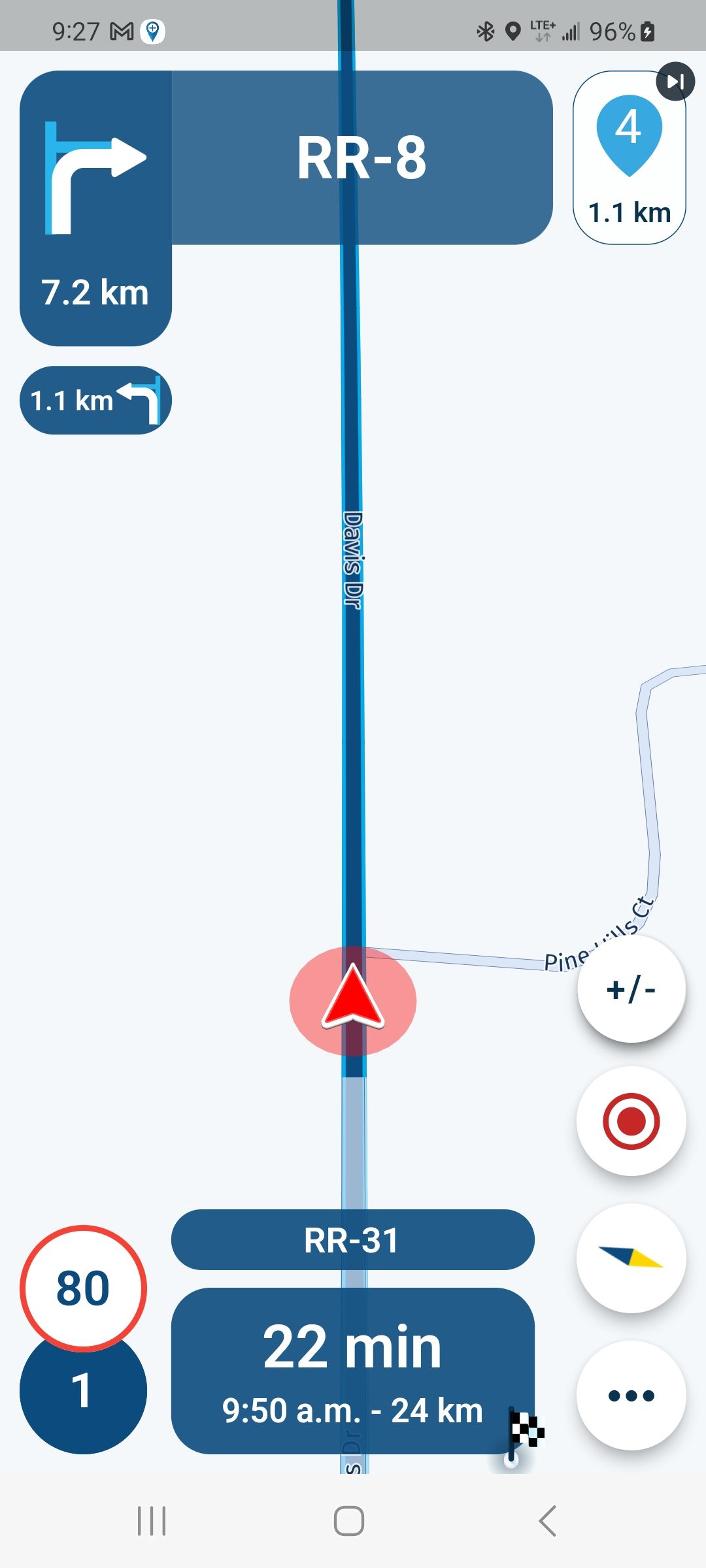
                      Screenshot_20230816_092750.jpg

                      2010 GL1800 Goldwing using Samsung Galaxy S20 5G Android 13.

                      Dave J 0 Nick Carthew 2 Replies Last reply
                      0
                      • RetiredWingMan RetiredWingMan

                        @Corjan-Meijerink had another occurrence of the issue with the second nav instruction. I pulled over and got a screenshot. You can see the second nav instruction is closer than the next nav. The distance is the save as the next waypoint. Once the distance had counted down to zero the app reset and everything was fine.
                        Screenshot_20230816_092750.jpg

                        Dave J 0
                        Dave J 0
                        Dave J 0
                        Valued contributor
                        wrote on last edited by
                        #17

                        @Doug-Robinson not sure I understand. The second turn distance is 1.1km after the first turn distance. Go 7 2km turn then 1.1km then turn. Thi is working as it is meant to from what I can see. 😄

                        Kind Regards. Help where I can.
                        Ducati Multistrada V4 Rally
                        iPhone 18 Pro
                        CHIGEE AIO-6 LTE
                        Google Pixel 6 Pro - mounted on SP Connect Plus
                        Ex Garmin XT2 and XT1 as well as Ex TomTom Rider User

                        Con Hennekens 1 Reply Last reply
                        0
                        • RetiredWingMan RetiredWingMan

                          @Corjan-Meijerink had another occurrence of the issue with the second nav instruction. I pulled over and got a screenshot. You can see the second nav instruction is closer than the next nav. The distance is the save as the next waypoint. Once the distance had counted down to zero the app reset and everything was fine.

                          Screenshot_20230816_092750.jpg

                          Nick Carthew
                          Nick Carthew
                          Nick Carthew
                          RouteXpert
                          wrote on last edited by
                          #18

                          @Doug-Robinson I agree with @Dave-J-0 Your next shaping point is in 1.1 km, your next turn is in 7.2 km and the turn after that is 1.1 km. Just a coincidence that the shaping point and second turn are the same distance.
                          It’s all working as it should.

                          Always willing to help if I can.
                          Triumph Tiger 1200 XRT called Tina.
                          MRA Navigation Next and SilverFox BJ8

                          1 Reply Last reply
                          0
                          • Dave J 0 Dave J 0

                            @Doug-Robinson not sure I understand. The second turn distance is 1.1km after the first turn distance. Go 7 2km turn then 1.1km then turn. Thi is working as it is meant to from what I can see. 😄

                            Con Hennekens
                            Con Hennekens
                            Con Hennekens
                            Alpha tester
                            wrote on last edited by Con Hennekens
                            #19

                            @Dave-J-0 said in Incorrect navigation information:

                            The second turn distance is 1.1km after the first turn distance.

                            I am not so sure it works that way. I think it was established earlier on the forum that both numbers are counting down, so they are both measured from the current position. To be honest, I don't pay much attention to the second turn, I rather keep my eyes on the road more.

                            @Nick-Carthew said in Incorrect navigation information:

                            Just a coincidence that the shaping point and second turn are the same distance.

                            Yes that's a coïncidence, and not what is meant here by @Doug-Robinson I think.

                            I am just an enthusiastic MRA user, and hope you will be one too!

                            Most motorcycle problems are caused by the nut that connects the handlebar to the saddle.

                            Check out RideSleepRepeat.eu, a biker community for sharing stays across Europe

                            Nick Carthew 1 Reply Last reply
                            0
                            • Con Hennekens Con Hennekens

                              @Dave-J-0 said in Incorrect navigation information:

                              The second turn distance is 1.1km after the first turn distance.

                              I am not so sure it works that way. I think it was established earlier on the forum that both numbers are counting down, so they are both measured from the current position. To be honest, I don't pay much attention to the second turn, I rather keep my eyes on the road more.

                              @Nick-Carthew said in Incorrect navigation information:

                              Just a coincidence that the shaping point and second turn are the same distance.

                              Yes that's a coïncidence, and not what is meant here by @Doug-Robinson I think.

                              Nick Carthew
                              Nick Carthew
                              Nick Carthew
                              RouteXpert
                              wrote on last edited by
                              #20

                              @Con-Hennekens said in Incorrect navigation information:

                              I am not so sure it works that way. I think it was established earlier on the forum that both numbers are counting down, so they are both measured from the current position. To be honest, I don't pay much attention to the second turn, I rather keep my eyes on the road more.

                              The distance to the second turn is measured from after the first turn. The most sensible distance to show in my opinion.
                              I’m hoping that when I get my new varifocal glasses next week I’ll be able to read it a little easier 🤓

                              Always willing to help if I can.
                              Triumph Tiger 1200 XRT called Tina.
                              MRA Navigation Next and SilverFox BJ8

                              Con Hennekens 1 Reply Last reply
                              0
                              • Nick Carthew Nick Carthew

                                @Con-Hennekens said in Incorrect navigation information:

                                I am not so sure it works that way. I think it was established earlier on the forum that both numbers are counting down, so they are both measured from the current position. To be honest, I don't pay much attention to the second turn, I rather keep my eyes on the road more.

                                The distance to the second turn is measured from after the first turn. The most sensible distance to show in my opinion.
                                I’m hoping that when I get my new varifocal glasses next week I’ll be able to read it a little easier 🤓

                                Con Hennekens
                                Con Hennekens
                                Con Hennekens
                                Alpha tester
                                wrote on last edited by
                                #21

                                @Nick-Carthew said in Incorrect navigation information:

                                I’m hoping that when I get my new varifocal glasses next week I’ll be able to read it a little easier

                                🤣 🤣
                                I can read it good enough, but have never paid attention to it. I'll try to think of looking at it. I might have misunderstood earlier.

                                I am just an enthusiastic MRA user, and hope you will be one too!

                                Most motorcycle problems are caused by the nut that connects the handlebar to the saddle.

                                Check out RideSleepRepeat.eu, a biker community for sharing stays across Europe

                                Dave J 0 1 Reply Last reply
                                1
                                • Con Hennekens Con Hennekens

                                  @Nick-Carthew said in Incorrect navigation information:

                                  I’m hoping that when I get my new varifocal glasses next week I’ll be able to read it a little easier

                                  🤣 🤣
                                  I can read it good enough, but have never paid attention to it. I'll try to think of looking at it. I might have misunderstood earlier.

                                  Dave J 0
                                  Dave J 0
                                  Dave J 0
                                  Valued contributor
                                  wrote on last edited by Dave J 0
                                  #22

                                  @Con-Hennekens I am inclined to agree with @Nick-Carthew in that I would have thought the second turn would indicate distance from the last turn. Nonetheless, they both do indeed count down. Must admit I had not noticed this as I tend to just have a quick look as I come up to the first turn. 😄. Quick video to show the countdown.

                                  Kind Regards. Help where I can.
                                  Ducati Multistrada V4 Rally
                                  iPhone 18 Pro
                                  CHIGEE AIO-6 LTE
                                  Google Pixel 6 Pro - mounted on SP Connect Plus
                                  Ex Garmin XT2 and XT1 as well as Ex TomTom Rider User

                                  Con Hennekens 1 Reply Last reply
                                  0
                                  • Dave J 0 Dave J 0

                                    @Con-Hennekens I am inclined to agree with @Nick-Carthew in that I would have thought the second turn would indicate distance from the last turn. Nonetheless, they both do indeed count down. Must admit I had not noticed this as I tend to just have a quick look as I come up to the first turn. 😄. Quick video to show the countdown.

                                    Con Hennekens
                                    Con Hennekens
                                    Con Hennekens
                                    Alpha tester
                                    wrote on last edited by
                                    #23

                                    @Dave-J-0, Thanks for the vid. I knew it! I have a habit of remembering trivial things, while forgetting a lot of important stuff 😉
                                    Well, I think we agree it makes no sense to countdown on a fixed distance.

                                    I am just an enthusiastic MRA user, and hope you will be one too!

                                    Most motorcycle problems are caused by the nut that connects the handlebar to the saddle.

                                    Check out RideSleepRepeat.eu, a biker community for sharing stays across Europe

                                    RetiredWingMan 1 Reply Last reply
                                    0
                                    • Con Hennekens Con Hennekens

                                      @Dave-J-0, Thanks for the vid. I knew it! I have a habit of remembering trivial things, while forgetting a lot of important stuff 😉
                                      Well, I think we agree it makes no sense to countdown on a fixed distance.

                                      RetiredWingMan
                                      RetiredWingMan
                                      RetiredWingMan
                                      Valued contributor
                                      wrote on last edited by
                                      #24

                                      @Con-Hennekens just to be clear the second turn shows the distance from the current position. That is why it counts down. I hope they don't change this as I think it would then be confusing to people. I've only seen this happen a few times. Each time the distance was the same as the next waypoint. Not a huge deal but confusing when I first noticed it.
                                      2010 GL1800 Goldwing using Samsung Galaxy S20 5G Android 13.

                                      1 Reply Last reply
                                      0

                                      Hello! It looks like you're interested in this conversation, but you don't have an account yet.

                                      Getting fed up of having to scroll through the same posts each visit? When you register for an account, you'll always come back to exactly where you were before, and choose to be notified of new replies (either via email, or push notification). You'll also be able to save bookmarks and upvote posts to show your appreciation to other community members.

                                      With your input, this post could be even better 💗

                                      Register Login
                                      Reply
                                      • Reply as topic
                                      Log in to reply
                                      • Oldest to Newest
                                      • Newest to Oldest
                                      • Most Votes


                                      • 1
                                      • 2
                                      ACTIVE USERS
                                      Corjan Meijerink
                                      Corjan Meijerink
                                      Con Hennekens
                                      Con Hennekens
                                      Nick Carthew
                                      Nick Carthew
                                      Dave J 0
                                      Dave J 0
                                      Marinus van Deudekom
                                      Marinus van Deudekom
                                      RetiredWingMan
                                      RetiredWingMan
                                      Lynchy67
                                      Lynchy67
                                      POPULAR TOPICS
                                      • Strange translation
                                        Stefan Hummelink
                                        Stefan Hummelink
                                        0
                                        15
                                        43

                                      • [EN] MyRoute-app Routeplanner Next (Beta)
                                        martin-phogel.de
                                        martin-phogel.de
                                        9
                                        114
                                        11.0k

                                      • Add delete route button to library
                                        Corjan Meijerink
                                        Corjan Meijerink
                                        0
                                        9
                                        26

                                      • Undo/Redo tool is hidden
                                        b0hd1
                                        b0hd1
                                        0
                                        7
                                        14

                                      • LAN004 - Route Import filetypes
                                        Lluis Arasanz
                                        Lluis Arasanz
                                        0
                                        6
                                        12

                                      • A07 Shared Route Collaboration – Change Log?
                                        Corjan Meijerink
                                        Corjan Meijerink
                                        0
                                        6
                                        21

                                      • Shared toggle switch
                                        LennyO
                                        LennyO
                                        0
                                        7
                                        31

                                      • Crazy routing
                                        Hubert Thoring
                                        Hubert Thoring
                                        0
                                        7
                                        26

                                      MY GROUPS
                                      • Login

                                      • Login or register to search.
                                      • First post
                                        Last post
                                      0
                                      • Categories
                                      • Recent
                                      • Popular
                                      • Support
                                      • MyRoute-app