MRA Routeplanner Improvement: suppress viapoints
-

We plan routes for members of our MC and hand them some documentation regarding the route: places where you can shorten the route etc. I know this can be done by adding info to the via-points, but not all gps devices do understand this format and some even give a failure at import.
It would be handy to have a clean overview of the route, but the route in editmode shows al the shaping- and via-points which makes it less readable.
Suggested improvent: Add a possibility to suppres the shaping-points (only these, not the vai-points!) to get a clean view of all the important point on the map.
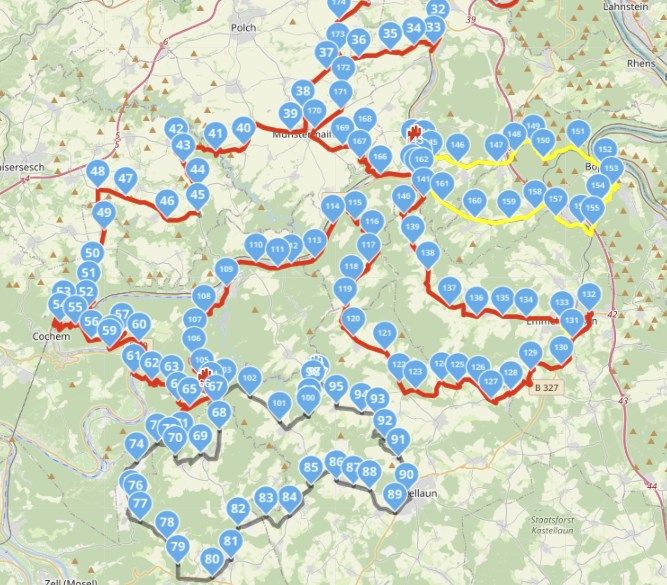
In the picture are two via-points in red which are hardly visible.
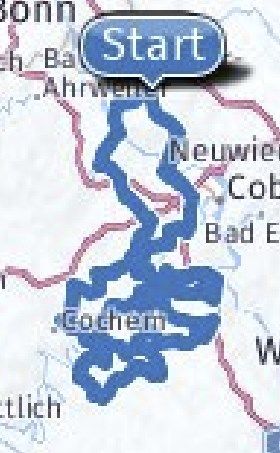
Tip: In the pdf export a picture is created which only shows Start and Finish point, so there seems to be a bit code available, but taht is low-res and not showing the via-points (hard-points)
-
We plan routes for members of our MC and hand them some documentation regarding the route: places where you can shorten the route etc. I know this can be done by adding info to the via-points, but not all gps devices do understand this format and some even give a failure at import.
It would be handy to have a clean overview of the route, but the route in editmode shows al the shaping- and via-points which makes it less readable.
Suggested improvent: Add a possibility to suppres the shaping-points (only these, not the vai-points!) to get a clean view of all the important point on the map.
In the picture are two via-points in red which are hardly visible.
Tip: In the pdf export a picture is created which only shows Start and Finish point, so there seems to be a bit code available, but taht is low-res and not showing the via-points (hard-points)

@Gerard-Wullink Why do you need so many route points?
Always willing to help if I can.
Triumph Tiger 1200 XRT called Tina.
MRA Navigation Next and SilverFox BJ8 -
@Gerard-Wullink Why do you need so many route points?

@Nick-Carthew said in MRA Routeplanner Improvement: suppress viapoints:
@Gerard-Wullink Why do you need so many route points?
That was also my first question. A third or less will do it.
But I agree to the idea to switch off waypoints just to make the route more or better visible.
Hardware
iPhone 12 pro (iOS 26.2.1)
iPad (7.Gen.) 18.7.3
Oukitel RT3 Pro (Andr. 14)
Wireless CarPlay mit (Elebest C650)
Wired CarPlay (SEAT Arona - 2021)
MRA Workshops in Deutsch sind hier zu finden -
@Nick-Carthew said in MRA Routeplanner Improvement: suppress viapoints:
@Gerard-Wullink Why do you need so many route points?
That was also my first question. A third or less will do it.
But I agree to the idea to switch off waypoints just to make the route more or better visible.
@Jörgen said in MRA Routeplanner Improvement: suppress viapoints:
But I agree to the idea to switch off waypoints just to make the route more or better visible
Similar to a conversation in another post on yellow track line vs visibility of the blue route line, the via points should always be shown on top of the shaping points, and not be hidden under them.
-
We plan routes for members of our MC and hand them some documentation regarding the route: places where you can shorten the route etc. I know this can be done by adding info to the via-points, but not all gps devices do understand this format and some even give a failure at import.
It would be handy to have a clean overview of the route, but the route in editmode shows al the shaping- and via-points which makes it less readable.
Suggested improvent: Add a possibility to suppres the shaping-points (only these, not the vai-points!) to get a clean view of all the important point on the map.
In the picture are two via-points in red which are hardly visible.
Tip: In the pdf export a picture is created which only shows Start and Finish point, so there seems to be a bit code available, but taht is low-res and not showing the via-points (hard-points)

@Gerard-Wullink Maybe it would help you to make a track of the route? This will give you a better overview of the route.
-
@Gerard-Wullink Maybe it would help you to make a track of the route? This will give you a better overview of the route.

@Bart-DM but you can't edit it and that's what this is about
-
@Bart-DM but you can't edit it and that's what this is about
@Jack-van-Tilburg yes I know, it was just a suggestion to get a better overall view of the route
 .
. -
 Corjan Meijerink moved this topic from General Discussion on
-
@Gerard-Wullink Maybe it would help you to make a track of the route? This will give you a better overview of the route.
@Bart-DM We mostly start by genarting a gpx-track which we import (from a magazine, a track genarator (MRA, Kurviger, TomTom etc).
This is than converted to a route on OSM. We check the route against HERE and TomTom and add points to make the route 100% same for all systems. Now you
In this example I used the function Increase points to test that. It is a bit much, I agree.
But it may be oldschool, but after every turn we place a viapoint to make sure that even someone who has selected something else as fastest of shortest as his favorite routecalculation, go the way we planned. That requires some more points to be on the safe side.
TomTom has the behaviour to cut corners in villages (riding through living area's) whereas Garmin uses the crossing in center-village to make the turn.
We had compliments from users that the routes are not different anymore. So that works.
Exporting the track would mean I have to import it again. A track does not show the must-visit/hard points or does it?
-
@Bart-DM We mostly start by genarting a gpx-track which we import (from a magazine, a track genarator (MRA, Kurviger, TomTom etc).
This is than converted to a route on OSM. We check the route against HERE and TomTom and add points to make the route 100% same for all systems. Now you
In this example I used the function Increase points to test that. It is a bit much, I agree.
But it may be oldschool, but after every turn we place a viapoint to make sure that even someone who has selected something else as fastest of shortest as his favorite routecalculation, go the way we planned. That requires some more points to be on the safe side.
TomTom has the behaviour to cut corners in villages (riding through living area's) whereas Garmin uses the crossing in center-village to make the turn.
We had compliments from users that the routes are not different anymore. So that works.
Exporting the track would mean I have to import it again. A track does not show the must-visit/hard points or does it?
@Gerard-Wullink said in MRA Routeplanner Improvement: suppress viapoints:
But it may be oldschool
I'm old school! And fully understand your working method. Especially if you share the routes with several participants.
At the same time, you can use the "Compare" function (and you do) to see whether there are unnecessary routepoints in your route.
Less is okay, but too little is not .
.And I fully sympathize with your proposal to a possibility to suppress the shaping-points.
Kudos to you! -
@Gerard-Wullink said in MRA Routeplanner Improvement: suppress viapoints:
But it may be oldschool
I'm old school! And fully understand your working method. Especially if you share the routes with several participants.
At the same time, you can use the "Compare" function (and you do) to see whether there are unnecessary routepoints in your route.
Less is okay, but too little is not .And I fully sympathize with your proposal to a possibility to suppress the shaping-points.
Kudos to you!
@Jack-van-Tilburg Thanx! I will try to use less points, there is a good reason for that.
Hello! It looks like you're interested in this conversation, but you don't have an account yet.
Getting fed up of having to scroll through the same posts each visit? When you register for an account, you'll always come back to exactly where you were before, and choose to be notified of new replies (either via email, or push notification). You'll also be able to save bookmarks and upvote posts to show your appreciation to other community members.
With your input, this post could be even better 💗
Register Login-
 016280
-
 51078.1k
-
 05149
05149
-
 025
025
-
1334450
-
0236
-
 07342
07342
-
3161.6k