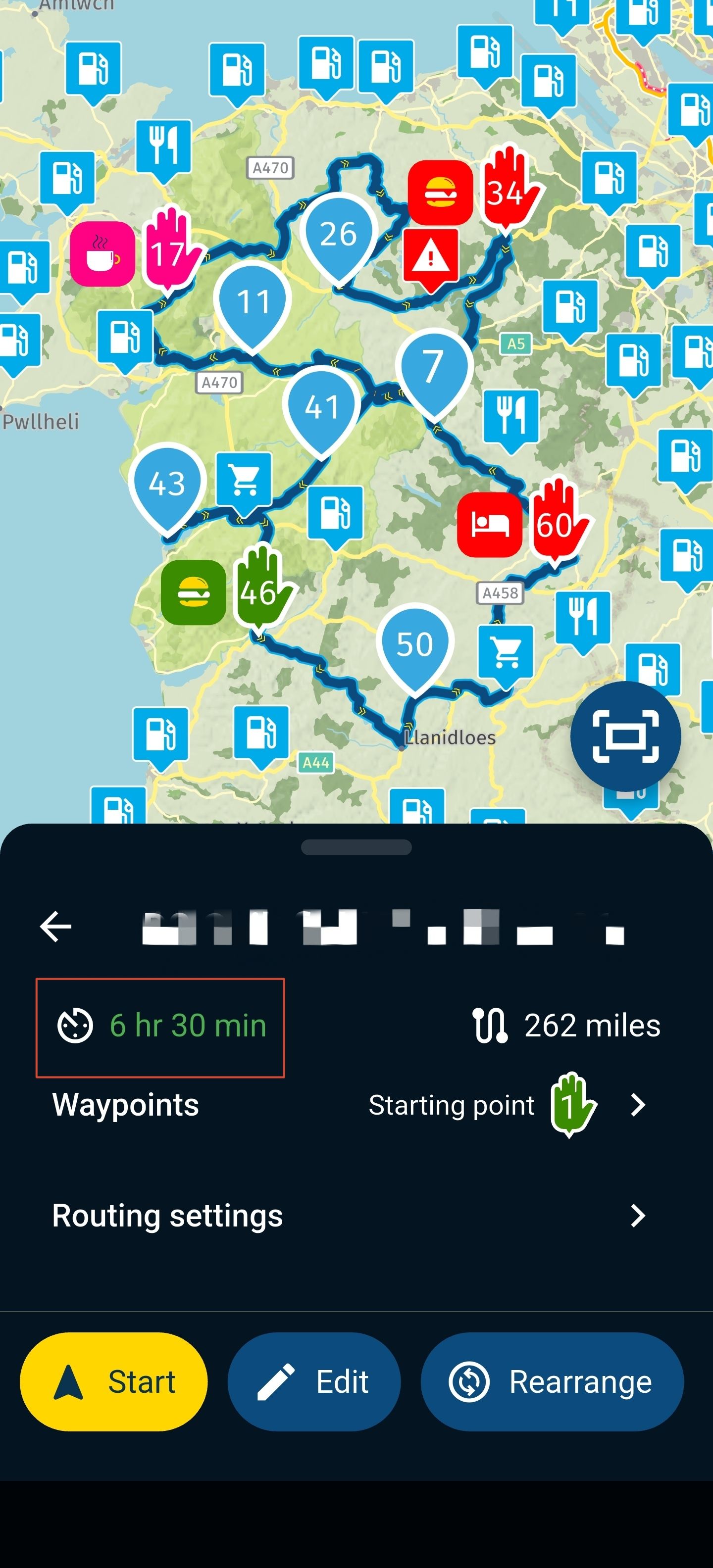
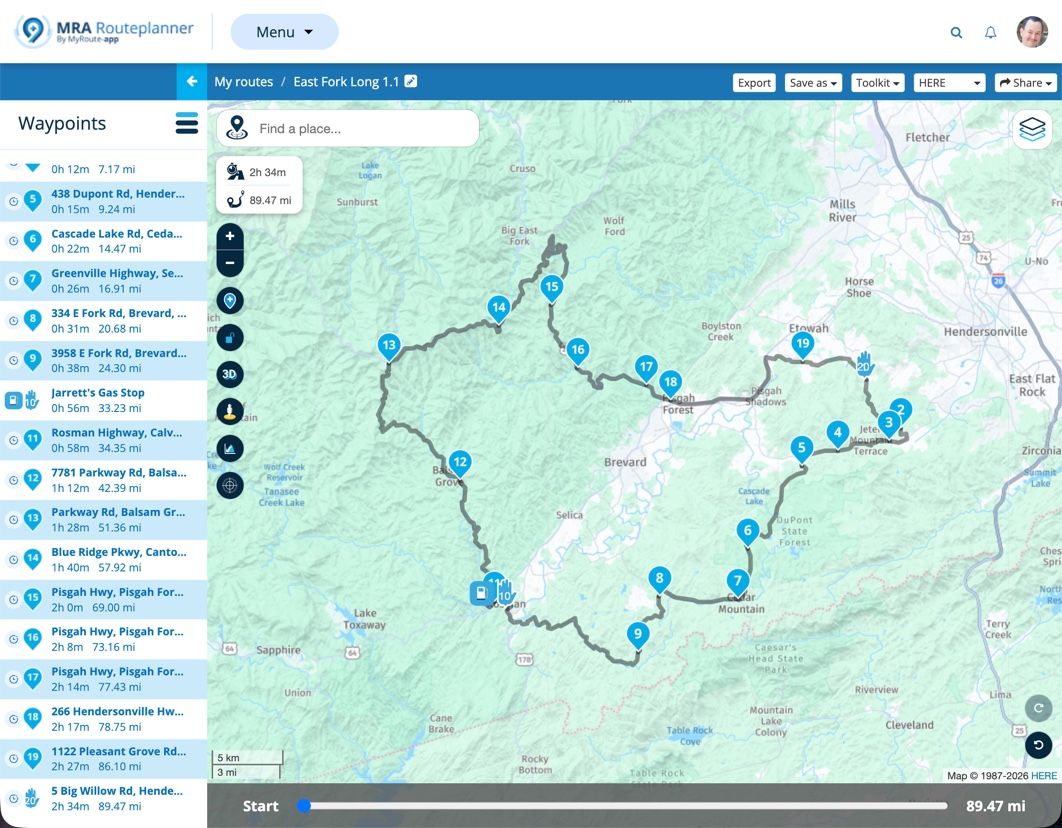
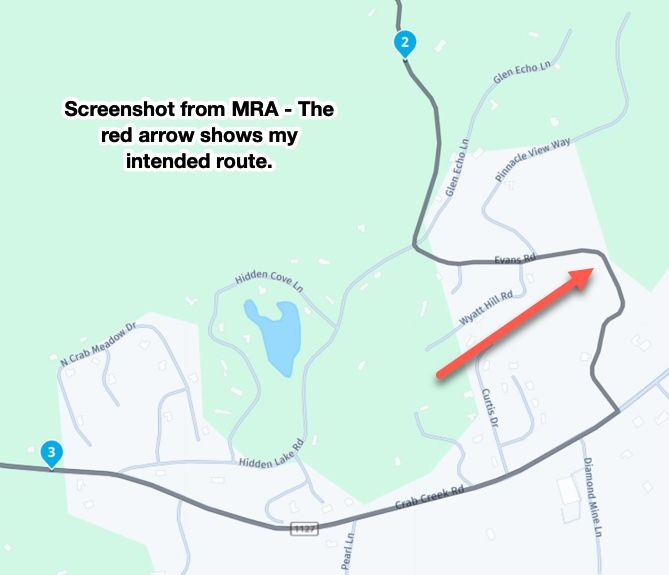
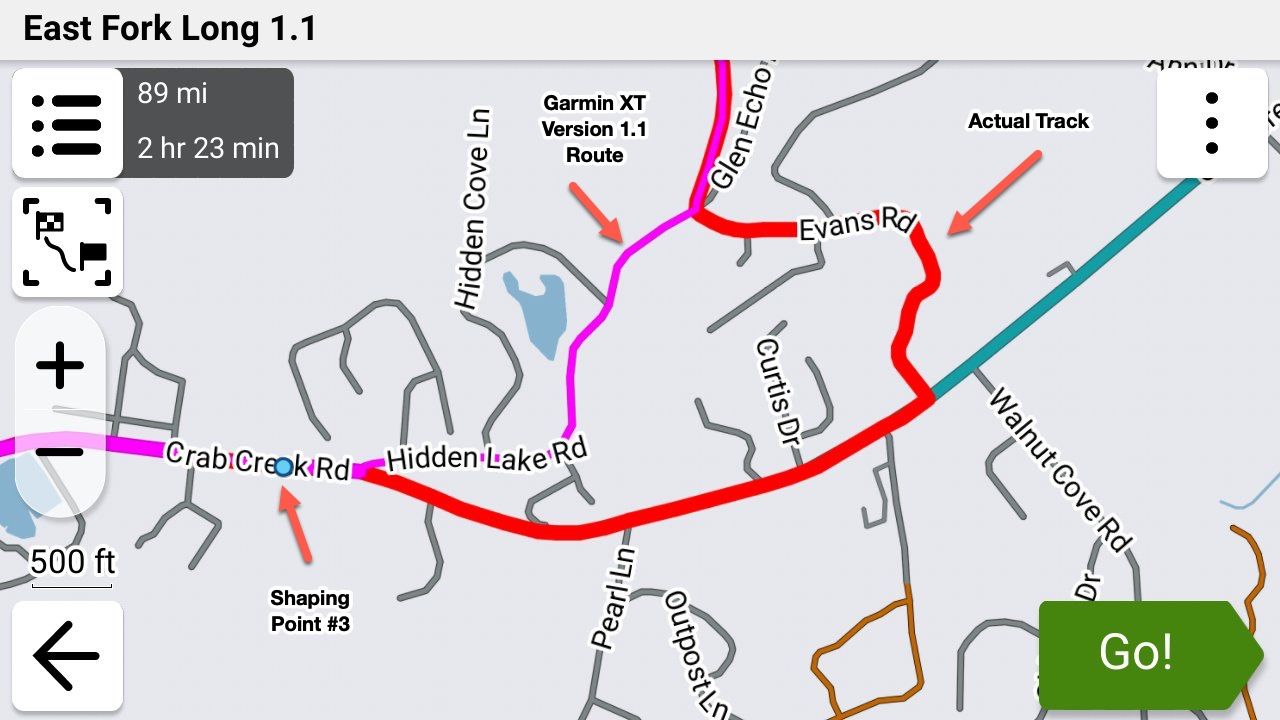
GPX Versions 1.1 vs 1.2 for Garmin Visually Explained
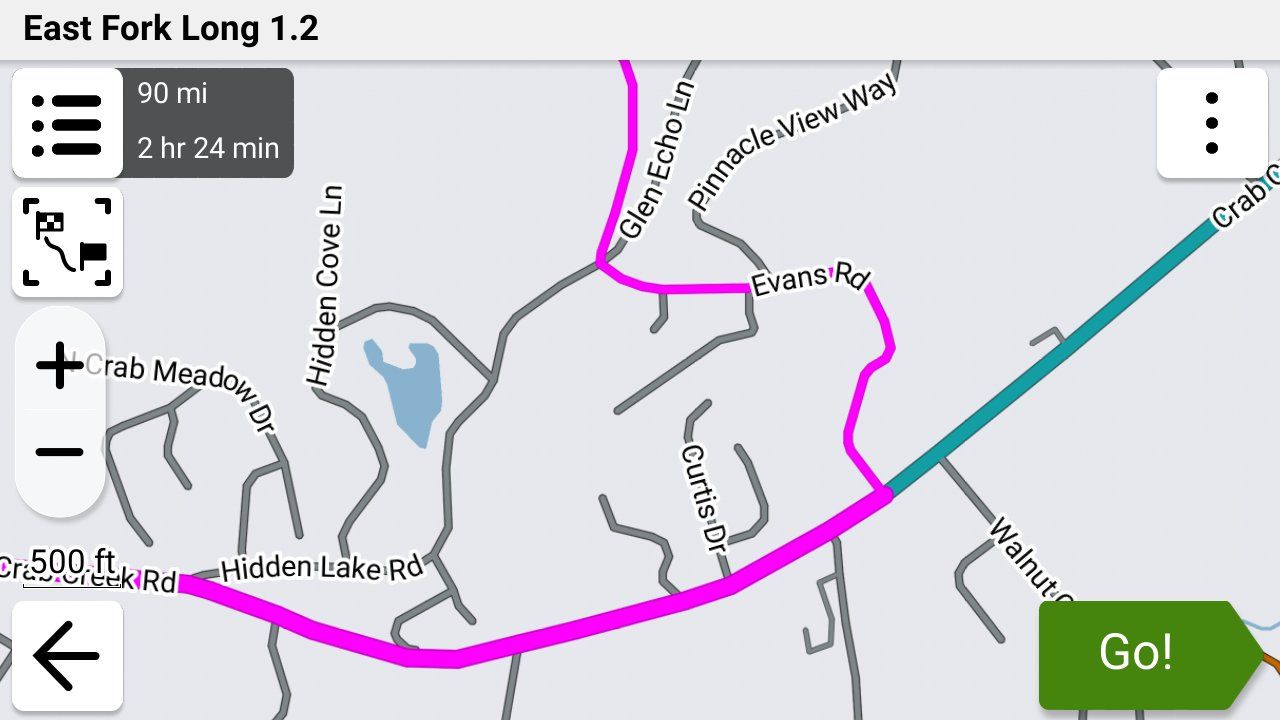
-
That is a cool conclusion @steve-jarrell
Tread didn't mess up the 1.2 (which I always use on my XT1)?
So, could you say, that it will work on the XT2 exactly the same?
@Travellexxie I have no idea of how the Tread app will work with anyone else's X1 or X2 (or X3 for that matter). All that I can relate is what happened to me.
Let me preface this by saying that this was MY experience, and others may have a perfectly good experience with the XT3 and data synching. It is perhaps caused by my refusal to turn over control of my data transfer to the XT3 to any app or cloud service (see my post here on how I transfer and why).
The Tread app provides 3 key features. It provides:
- A data connection from your phone to the XT that enables the realtime traffic and weather reporting on the XT (a REALLY neat feature).
-
A connection to whatever bluetooth headset that you have (a Cardo Edge in my case) already hooked up to your phone so you don't have to hook your headset up to both. (another REALLY neat feature).
-
A data connection to explore.garmin.com that allows data transfer, including .gpx files, to and from explore.garmin.com (This wound up being a TERRIBLE "feature" for me as I'll describe below.)
The Tread app's features 1 and 2 work GREAT and are very useful. Even though I didn't need or want the data / gpx file transfer feature as I use a USB cable, when I was originally setting up my XT3 one of the initial setup prompts was something like "Would you like to back your data up to explore.garmin.com" and I selected "Yes" as I figured what harm could having an online backup do?
Wrong!! That was a REALLY BIG mistake for me! As I added new .gpx files manually via a USB cable connection, and then converted them into routes and tracks, the XT3 tried to synch them to the cloud. It was painfully slow, and every time I'd go online with my web browser and check my Garmin Explore account the files and collections were NEVER synched correctly or completely.
So I figured "No big deal, I'll just go into the Tread app and / or XT3's settings and turn the synching feature off." NOPE! There is simply NO WAY to turn off the data synching feature once you've turned it on, either in the Tread app or in the XT3! I couldn't believe it (if anyone can prove me wrong I'll GLADLY admit my failure!!!).
I searched all over the internet and found several suggestions for how to stop synching such as completely removing the app and its bluetooth settings, and even getting into the "hidden" developer's area of the XT3 and deleting the user database. I'm very computer literate, and I did all of these things multiple times to absolutely no avail. Perhaps they worked for the XT1 and / or the XT2, but I could not "unsynch" the XT3 - Tread - Garmin cloud data connection no matter what I tried.
I FINALLY gave up and totally removed the Tread app (again), removed its bluetooth settings in my phone) again, AND did a total reset on the XT3 (Settings - Device - Reset). Then I reinstall the Tread app and started the XT3 back up, and when I got to the deceptive prompt about backing up to the cloud I said NO!
After that everything worked perfectly and my XT3 no longer tries to synch with Garmin's cloud service. Obviously the setting to synch with Garmin's cloud service is in the XT3's hidden settings, and once you turn it on the only way that you can turn it off is to do a total reset. Not giving the user the ability to turn synching off is absolutely ridiculous and one of the most idiotic things that I've ever seen from Garmin (except for the TERRIBLE user interface on Basecamp).

Sorry for such a long answer to a short question but if it helps even one person avoid the Garmin "backup to the cloud" trap it was worth it!
-
 Nick Carthew moved this topic from [Web] Suggestions and Discussion on
-
Nick Carthew pinned this topic on
-

@steve-jarrell in your current use are you saying that with an XT3 and using Tread app that you can have features 1 & 2 (traffic and Bluetooth headset) WITHOUT having 3 (syncing routes with Garmin cloud)?
-

I can answer about 1.2 and Tread. 1.2 is an MRA invention which I used almost exclusively on my previous, non-XT Zumo and it's very good to easily keep your route the same as your track. Zumos recognise it and plot the routes but Tread doesn't. If you allow Trad to sync with a 1.2 route, it will almost certainly change it to follow its own settings/algorithms.
With any Zumo using a 1.2 route, you must turn off auto-recalculate - otherwise it will! You may well end up with a totally different route between your via points. Also, you will not be redirected back onto your route should you deviate from it.
The XT2 & 3 will accept 1.2 but only via cable transfer. If you have deleted Explore from Tread by resetting, you will not be able to transfer a route wirelessly other than via an SD card.
My answer to all these problems, and I realise others have not had the same success, is to use 1.1 (route, track POI) with plenty of shaping points to pin the Zumo/Tread calculated route to my track. Once I've planned my route on MRA, I export it into Tread to see if the route and track coincide. If not, I can add another shaping point where necessary and look again. Sounds a bit of a faff but it's really quite quick and easy once you've done it a few times.
With 1.1, you can leave auto-recalculate switched on and you will be redirected back to your route if you wander for any reason, including road closures but that's another subject.
I really like being able to plan on MRA when away and transfer to the Zumo so Tread is my preferred option. If in a hurry, just using an MRA track works well too.
A long way of saying Tread and 1.2 don't play together. -
@steve-jarrell in your current use are you saying that with an XT3 and using Tread app that you can have features 1 & 2 (traffic and Bluetooth headset) WITHOUT having 3 (syncing routes with Garmin cloud)?
@Will-Brooks YES, exactly!
If you don't turn on data synching when you first setup the X3 features 1 and 2 still work just fine. These features rely on the bluetooth connection with your phone, not the data synching link with Garmin Explore.
Don't establish a bluetooth connection manually between your phone and the X3. When you pair your Tread app with your X3 it will ask you if you want to establish the bluetooth connection. When you proceed the Tread app will pair your XT with your phone via bluetooth.
In your phone's bluetooth settings you will then see a connection to your X3 just as if you would have manually connected them without the Tread app, however since the Tread app initiated the connection it can send the verbal instructions from the X3 to whatever bluetooth headset that your phone is using, and it can enable your XT3 to get traffic and weather information as well.
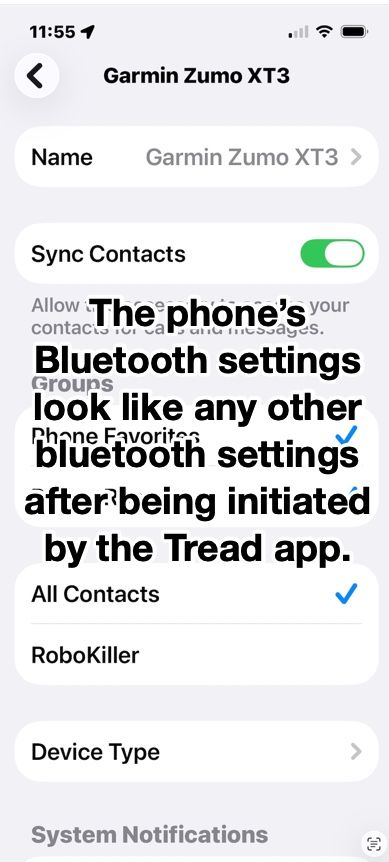
I have a Cardo unit in my helmet connected to my iPhone directly. It is not directly connected to my XT3 and it works just as if it was. I was also pleasantly surprised during testing the if I use my Apple AirPods they work perfectly as well even though they're not paired with my XT3. The ONLY bluetooth connection to my XT from my phone is the one that the Tread app set up.
The bluetooth connection in the phone looks just like any other bluetooth connection, but since it was initiated by the Tread app somehow the app can reroute the XT3's voice output to the phone's connected headset, and also use the phones data for the XT3's weather and traffic. AWESOME FEATURES!
-
Very good read! Thank you all!
I would like to bring another twist into this
It has to do with the Avoidances set in your Garmin.
Let's say your MRA planned route has some Highways you plan to ride, but your Garmin is set to avoid Highways.
If format 1.1 is used to transfer your route from MRA to the Garmin, when you select the route for navigation on the Garmin, it will calculate the route and change it to avoid the Highways.
But when format 1.2 is used, then Garmin will ignore your Highway avoidance preference and will go on the intended Highways just like you planned it.
So, 1.2 format is eliminating another potential discrepancy between MRA planned route and Garmin's calculation.
Please, correct me if I am wrong!
@Lenny-O You are 100% correct.
-
Steve Jarrell referenced this topic on
-
I can answer about 1.2 and Tread. 1.2 is an MRA invention which I used almost exclusively on my previous, non-XT Zumo and it's very good to easily keep your route the same as your track. Zumos recognise it and plot the routes but Tread doesn't. If you allow Trad to sync with a 1.2 route, it will almost certainly change it to follow its own settings/algorithms.
With any Zumo using a 1.2 route, you must turn off auto-recalculate - otherwise it will! You may well end up with a totally different route between your via points. Also, you will not be redirected back onto your route should you deviate from it.
The XT2 & 3 will accept 1.2 but only via cable transfer. If you have deleted Explore from Tread by resetting, you will not be able to transfer a route wirelessly other than via an SD card.
My answer to all these problems, and I realise others have not had the same success, is to use 1.1 (route, track POI) with plenty of shaping points to pin the Zumo/Tread calculated route to my track. Once I've planned my route on MRA, I export it into Tread to see if the route and track coincide. If not, I can add another shaping point where necessary and look again. Sounds a bit of a faff but it's really quite quick and easy once you've done it a few times.
With 1.1, you can leave auto-recalculate switched on and you will be redirected back to your route if you wander for any reason, including road closures but that's another subject.
I really like being able to plan on MRA when away and transfer to the Zumo so Tread is my preferred option. If in a hurry, just using an MRA track works well too.
A long way of saying Tread and 1.2 don't play together. -

Have you read the manual page 47?
https://www8.garmin.com/manuals/webhelp/GUID-7E13E879-D2C7-4B0C-9E63-CD693B2E7042/EN-US/zumo_XT2_OM_EN-US.pdf -
@Carl-Lee
Hi, I have an XT2 and cannot figure out how to turn off auto-recalculate off? Can you let me know how to turn off auto-recalculate, please?
As @reinhard-32 said, this is from page 47 of the XT2 manual. My XT3 is a lttle different, but this is from the .pdf manual downloaded from Garmin's site.
-
Thank you Steve. I did eventually figure this out. I thought there was a different setting used during import of files.
@OkayJim You're very welcome. I'm glad that you figured it out!
-
So, with a Zumo 595, if I export as 1.2, do I import as a track ??
-
So, with a Zumo 595, if I export as 1.2, do I import as a track ??
@Papasmurf2 No. Import it as a route if you want your 595 to create a route from it. You can import both the route and the track if you wish.
The 1.2 .gpx format embeds the track information in the route information of the file. This embedded track information within the route forces the Garmin to create the route exactly like you intended when it imports the 1.2 .gpx file.
The track itself is also included in a separate section of the .gpx file so you can import the track as well as the route.
In other words, the 1.2 .gpx files contains two copies of the track. One is embedded within the route information section, and another copy is in a separate track section. When you use the "Save As" feature from within MRA you'll see that the file contains the route (with embedded track information), the track itself and the POI information.
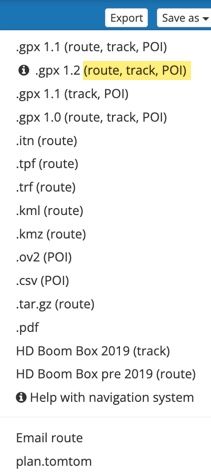
To illustrate this, I created a VERY simple route with just the starting point, one shaping point and the finish point. You can view my route here in MRA.
Here's a copy of that simple route saved as a 1.2 .gpx file. You can download it and then view it with any text editor. I also created a .pdf file to clearly show the various sections that you can view here from the .gpx file.
You'll see in my example .pdf file that the green section is the Header, the yellow section is the actual route with the embedded track which forces the Garmin to follow the exact path that you intended, and the blue section is the actual track that can also be imported.
I hope this helps!
-
I'm confused - I have had an XT2 and an XT3 (free upgrade thanks to Garmin). I only export using GPX 1.1 and have not had any issued at all when using complex route.
It's late at night, but how I'm reading it, is that you're suggesting only using GPX 1.2 with the XT3?
-
If you want to have your route follow EXACTLY what you've planned in MRA you will absolutely have issues using 1.1 unless you put shaping points virtually everywhere along your route.
When the Garmin XT imports your .gpx 1.1 route IT decides the fastest or shortest route, whether to get on the freeway or not, etc. (depending on your settings) and the resulting route may, but probably won't be exactly what you had planned in MRA. 1.2 doesn't have these issues as the actual track is embedded in the route and the Garmin unit is forced to follow EXACTLY what you had planned.
Steve Jarrell
Western North Carolina USLifetime Routeplanner Gold & Navigation Next
2025 BMW R1300GS
2025 Can-Am Spyder
DMD T865-X 8" Tablet
Garmin XT3 -
If you want to have your route follow EXACTLY what you've planned in MRA you will absolutely have issues using 1.1 unless you put shaping points virtually everywhere along your route.
When the Garmin XT imports your .gpx 1.1 route IT decides the fastest or shortest route, whether to get on the freeway or not, etc. (depending on your settings) and the resulting route may, but probably won't be exactly what you had planned in MRA. 1.2 doesn't have these issues as the actual track is embedded in the route and the Garmin unit is forced to follow EXACTLY what you had planned.

@Steve-Jarrell but you have to turn off auto recalculation and navigate yourself back to the magenta line if you are diverted. Otherwise the Garmin will take you to the end of the route using it's own routing logic.
-
That's not accurate. Auto-recalculation will try to get you back on the route as best as it can using it's own logic when you are on a 1.2 .gpx route.
This is an overly simplistic way of thinking about it, but because the 1.2 gpx route has to follow the actual track, it's like having thousands of shaping points in the route section of the .gpx file that forces the Garmin to calculate the route the way that you want it to go.
In a 1.1 .gpx file's route section you have the starting via point, your shaping points and via points, and your ending via point. The Garmin uses it's own logic and your setting to determine how to get between these points.
Read my previous posts in this thread and look at my examples and you'll see what I mean. Even better, take one of your own routes, save it as a 1.1 and a 1.2 route and examine the .gpx files in a text editor for yourself, then import them into your Garmin and see if the route that they create exactly matches what you're seeing in MRA.
A really quick way to check this is to check the route's distance in the Garmin against what's shown in MRA. It should be almost identically the same in both if the route is the same. Another way to quickly check is to show both the route and track in the Garmin simultaneously in different colors and you can easily see where they deviate.
Many times the deviations are small and insignificant. Other times they can be quite substantial. I showed that previously very clearly with a sample route that I created with just a very few shaping points.
-
Have you tried riding gpx1.2 and going off route to see what happens with auto recalculation turned on? In my experience the XT unit routes using it's own logic to the next via/stop waypoint or to the end of you only have shaping points. Hence my suggestion to turn it off. That said I only use the XT as a backup and for tracks and proximity alerted POI's these days. Maybe something has changed? I'll test it again on the road and report back.
-
Yes, actually I have. It was quite annoying as it did keep trying to get me back on the route (magenta line) and I didn't want to go back quite yet.
Let me know what happens in your testing!I normally keep recalculation turned off as if I get off route it's normally on purpose and I prefer to find my own way back.
Steve Jarrell
Western North Carolina USLifetime Routeplanner Gold & Navigation Next
2025 BMW R1300GS
2025 Can-Am Spyder
DMD T865-X 8" Tablet
Garmin XT3 -
Yes, actually I have. It was quite annoying as it did keep trying to get me back on the route (magenta line) and I didn't want to go back quite yet.
Let me know what happens in your testing!I normally keep recalculation turned off as if I get off route it's normally on purpose and I prefer to find my own way back.
@Steve-Jarrell Hi Steve so you have been testing using a Garmin Zumo XT3 and I have been using an XT though no longer for routing. I have no issue with using GPX 1.2 over GPX 1.1 BUT think it is essential with the XT, at least, to turn off auto recalculation, if you use GPX 1.2.
In operation GPX 1.1 in MRA works in a similar way to routes created in Basecamp on the XT. I have 5 old Garmin units a 2004 Streetpilot 2610, a 2011 BMW Nav IV (Zumo 660) and A Zumo 340 and 390, as well as a Zumo XT Purchased in 2022. And started using Garmin Mapsource, and later Basecamp route planning software. I still use Basecamp for handling tracks, and Basecamp/Garmin POI loader for dealing with POI’s and the information contained therein, as basecamp does this, and MRA either doesn’t do it at all (track joining/splitting editing) or does it in a more limited way (POI handling). MyRoute app USP for me was being able to create/edit routes on the fly while on tour without having to carry a Windows device for using Basecamp my phone or an I pad would suffice. As the navigation app has developed this has become my primary navigation tool as its less of a faff quite frankly than using a “modern” Zumo and works well with the AA screen of my Africa Twin Adventure Sport.
For old Garmin units up until the Zumo 340/90 and the 590. The routing logic of Basecamp and the units matched closely meaning that if you had set Basecamp to route “Faster Time”, and had the same settings and avoidances set on the Garmin unit, then what you planned on Basecamp was more or less WYSIWYG with what instructions the unit produced for navigation.
I retired in 2022 and my wife bought me a Zumo XT as an “upgrade” from my beloved Zumo 340 and 390. (I still use these on my 2002 R1150GS). The Zumo XT has a lovely screen but the attendant online software “Explore” is poor and the routing logic drove me nuts until I sussed what was going on. The XT has a number of issues that still might not be fully resolved with the XT2 or XT3?- Routing logic…..Faster time now means faster roads. So, routes that would have been followed if transferred from basecamp to a Zumo 390 aren’t. Yellow track, magenta route.
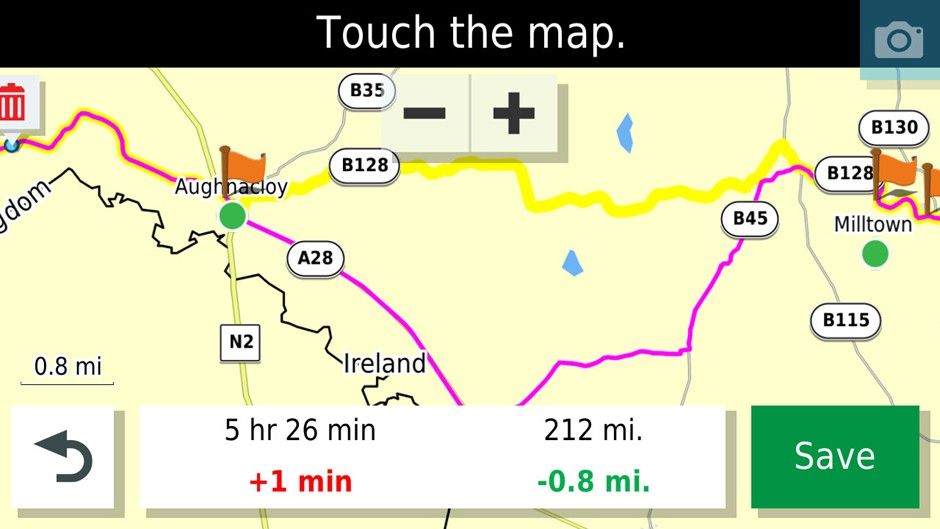
In this case it can be fixed by placing a shaping point on the B128. If using Basecamp or MRA for that matter many more shaping points are required to pin the route to the desired roads compared to the older units. I find this particularly irksome as Ireland is cris crossed by loads of minor roads that are my preferred routes.
-
The problem above makes the Zumo XT pretty useless as an A-B navigation device as it will go out of its way several miles and lots of time to get onto main roads (and traffic) to take you to your destination rather than take a more sensible route that MyRoute app, Google maps or waze would take you on. I live on the outskirts of Belfast and did a comparison of routes of all five of my Garmin devices and Google maps to route from Florence Court House about 100 miles away from where I live to home and only the Zumo XT routed me through Enniskillen and Central Belfast. Even the Streetpilot 2610 produced a better route.
-
The Zumo XT (intermittently) produces repeated U turns in imported routes if you skip a Via point (Flagged waypoint). To ensure that this does not happen you have to make each route you import “Saved” to fix the issue. This can be achieved by saving current route in the unit editing the hex file for the route or using third party software that does it for you.
-
If you are doing a long out and back route with different but close together roads make sure that you have at least a Waypoint at the farthest end of the route. This will stop the unit shortcutting the route if you have to recalculate. In the old units they tried to get you to the next shaping point in the direction of travel...if another shaping point is closer to the XT it will just cut off a big lump of the route if you recalculate. For example, in this route if you recalculated just before where the 1 is on the map it would cut off the rest of the route and take you to Hillsborough if it was all shaping points and no way points which have to be gone through.
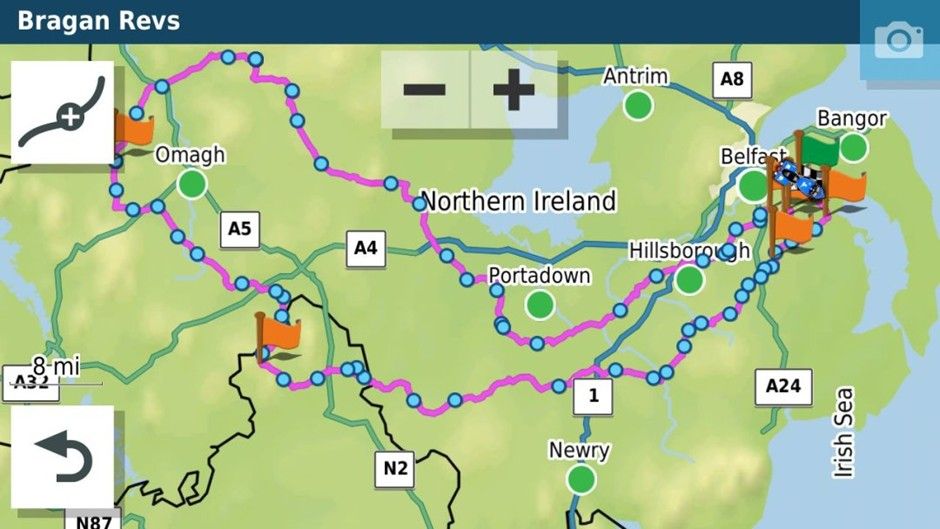
Anyhow enough of the history how did the XT get on with GPX 1.2. I have tried this previously and it had for me one big advantage, I could be lazy with my route planning and the XT would still follow the desired path. It also had a disadvantage that I had to set my recalculation as off or as prompted as any deviation from the route would mean that the points that shaped the route would be missed and it would take me to the next flagged waypoint or the end if the route was composed of shaping points.
<iframe style="border:none;overflow:hidden" width="600" height="286" scrolling="no" frameborder="0" src="https://www.myrouteapp.com/embed/route/8385023?lang=en"></iframe>
I use this route a lot for testing it zig zags down lots of minor roads and across some more major ones hence the number of (shaping) waypoints. I think I may have used the route to test the expand function.
This is what it looked like as a GPX 1.2 on a Zumo XT. Track in yellow underneath.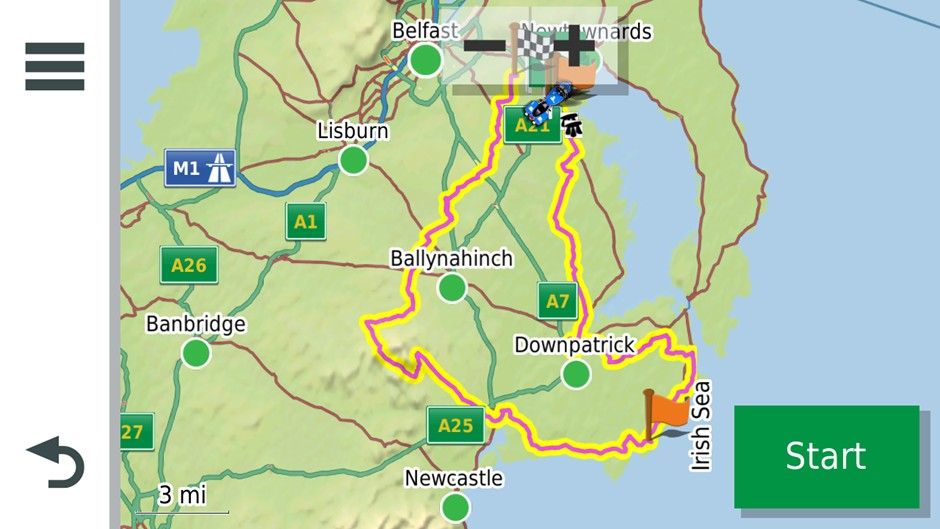
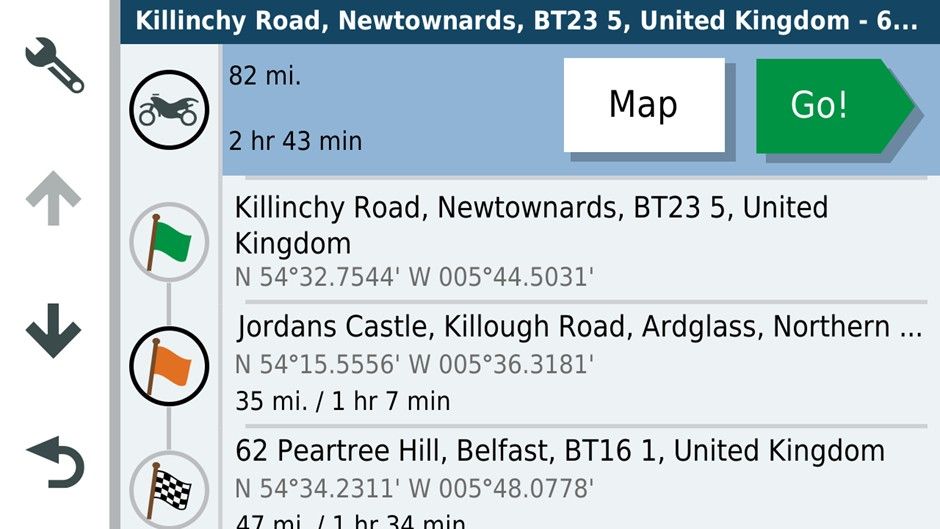
And what it would have looked like as a GPX1.1 with all the shaping points.
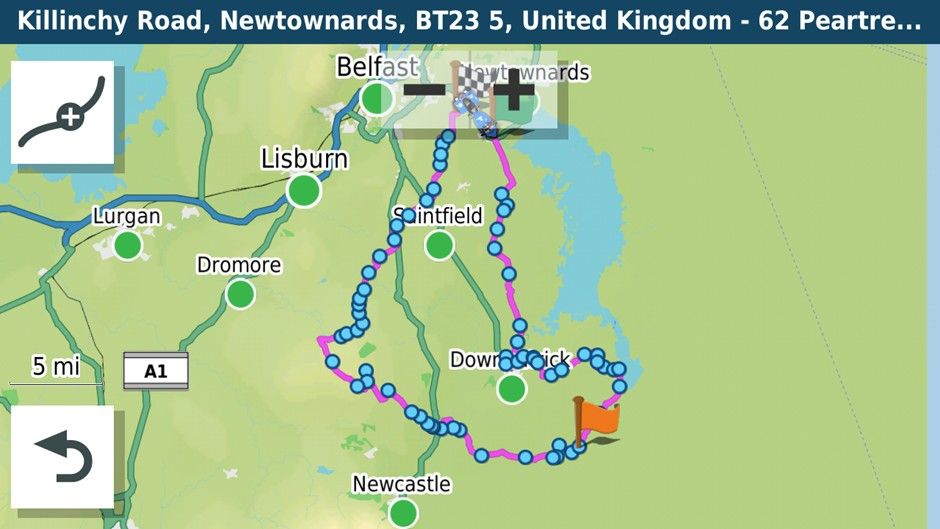
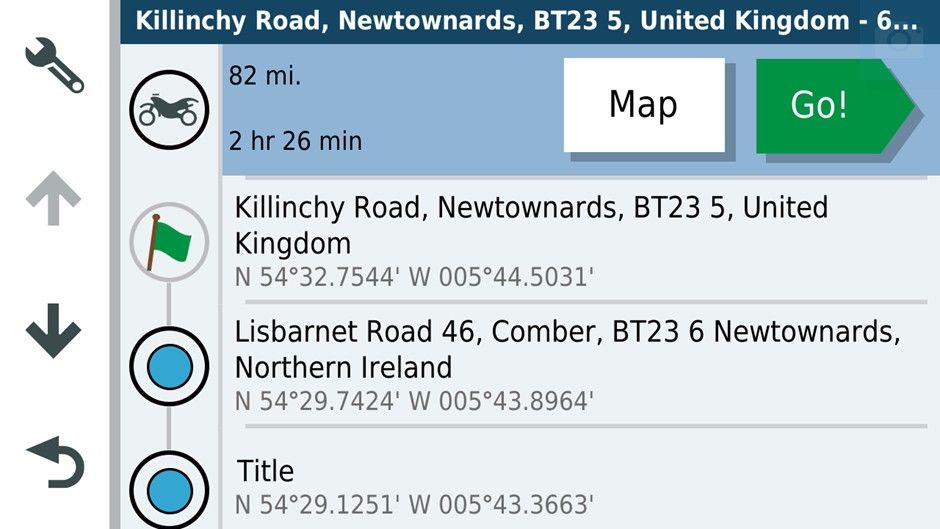
Oddly the GPX 1.1 format is showing a shorter Journey time.
I used the GPX 1.2 format. The only avoidance was unpaved roads.
Setting up on the road. As you can see both are saying 84 miles and I’m about 2 miles from the start of the route.
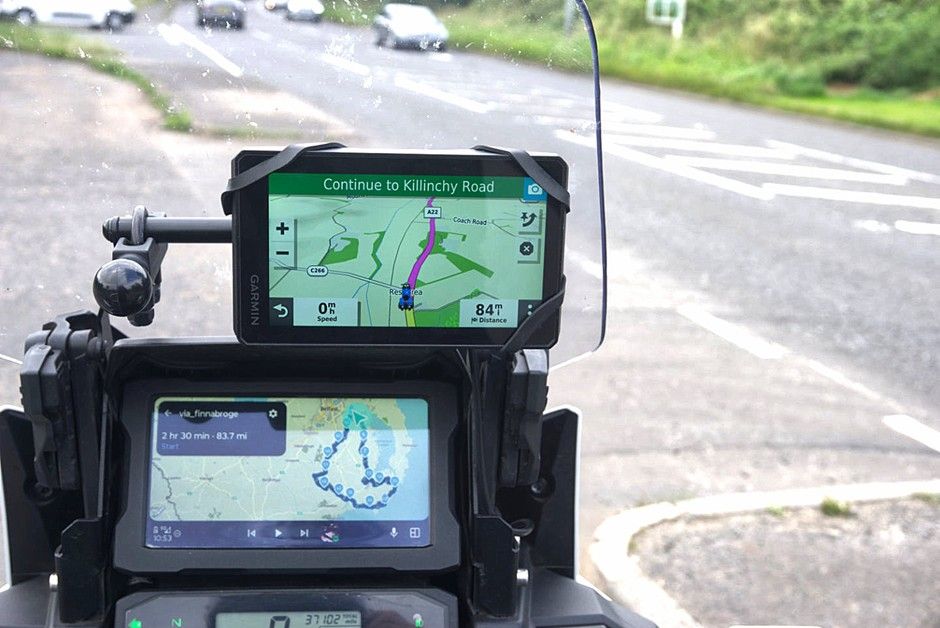
Passing the start point.
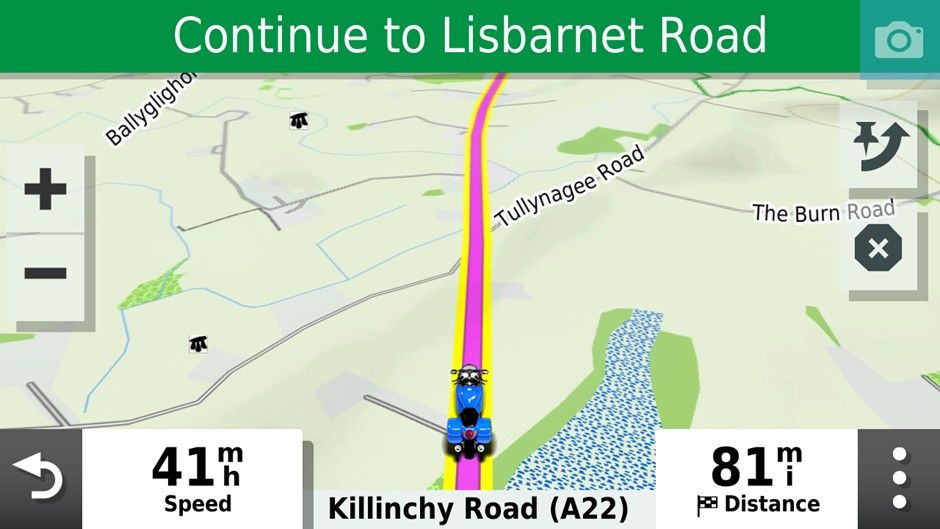
After I missed the first turn off on the route.
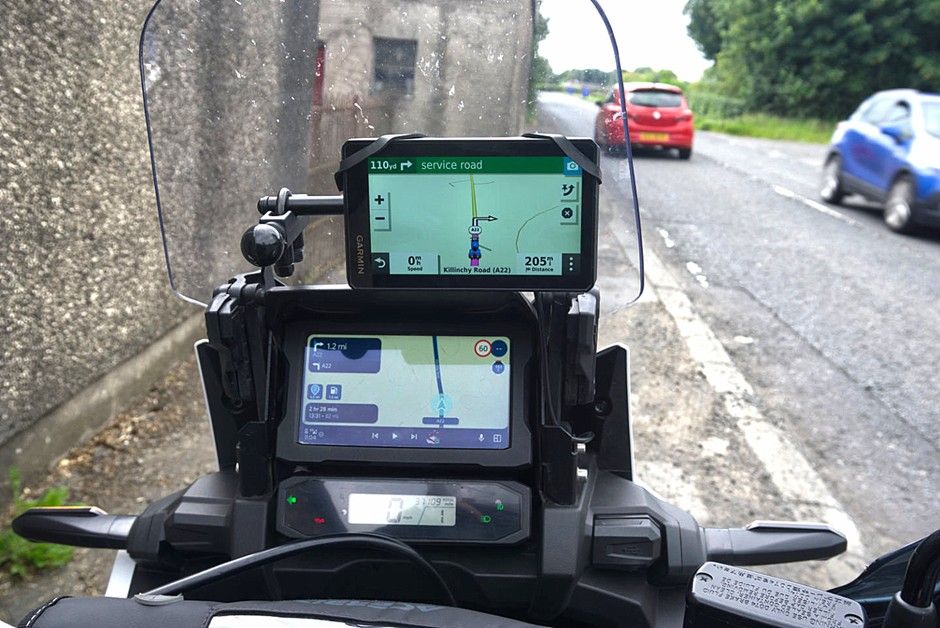
As you can see the route running on the AA screen is showing 82 miles and a left turn further up the road. The XT wants me to U turn and has recalculated the route at 205miles!! If I had loaded GPX1.1 I expect it would have behaved similarly to the routing app re-directing to the nearest shaping point.
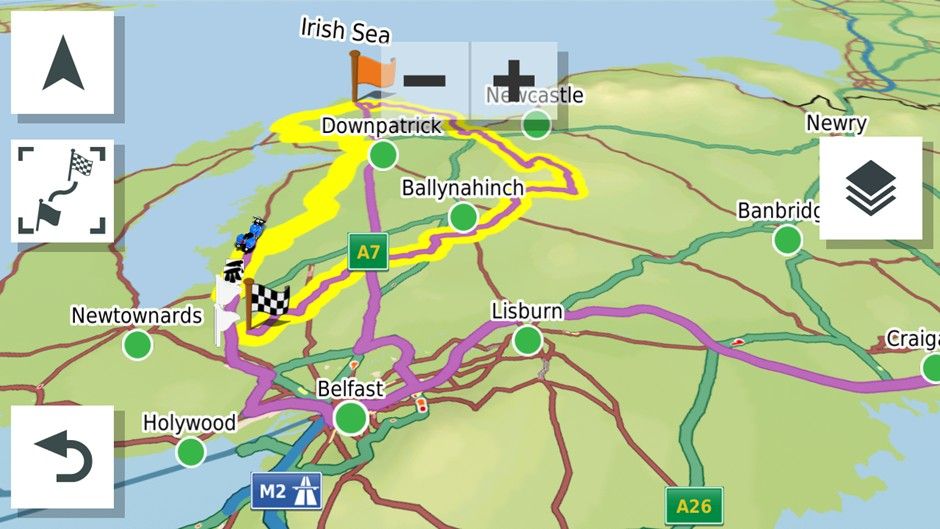
Inspecting the route at this point it had re-routed through the centre of Belfast and out west on the motorway then returning via the motorway through Saintfield and Downpatrick to the coffee stop at Ardglass then the rest of the GPX 1.2 route would nave been navigated as normal as long as you didn’t go off route and recalculate presumably.
I U turned as requested by the XT. Instead of following its directions I rejoined the Yellow Track line and the GPX 1.2 route on the XT then went down to 69 miles heading for the Flagged waypoint on the main roads while MRA rejoined the route and showed 79 miles. I thought I’d captured this but hadn’t
Anyhow I went off route again on a minor road as you might if it were blocked. Again 205 miles vs 74 with the reroute.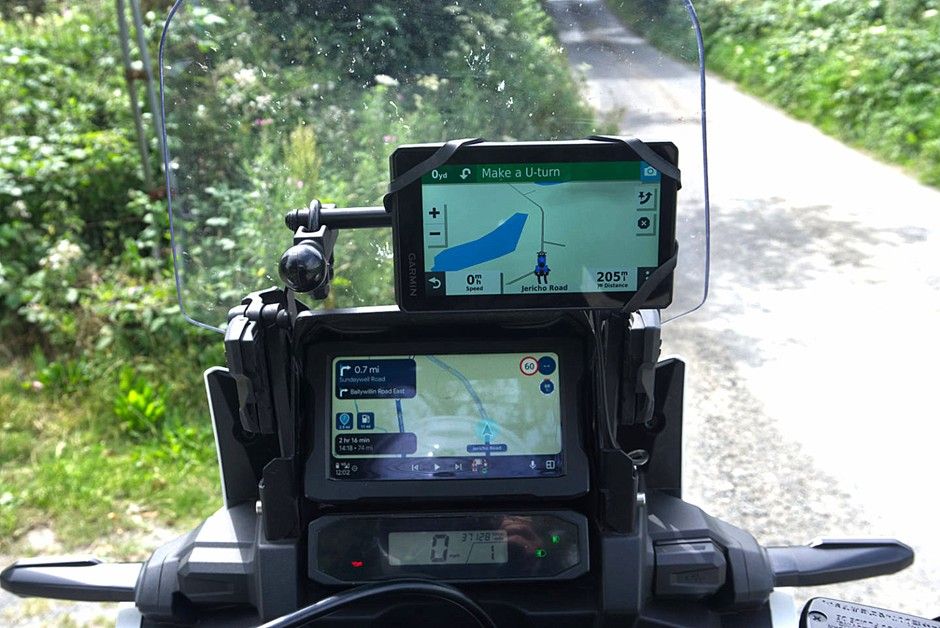
I U-Turned back toward the yellow track.
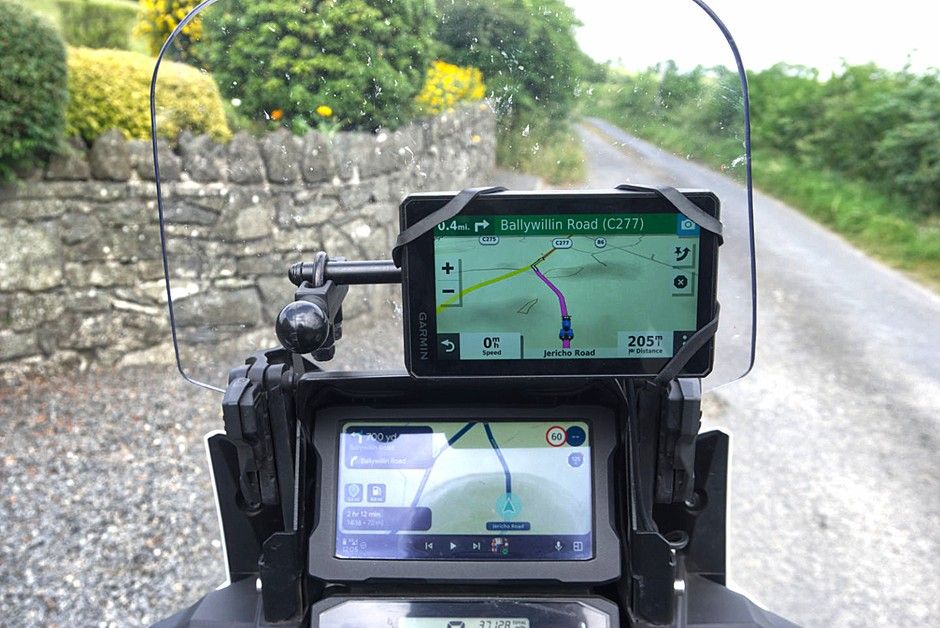
The correct route taken by MRA was the left turn. The GPX 1.2 file wanted to take me on a flight of fancy. Something I’ve always encountered with the Zumo XT and GPX 1.2. When I turned left the Zumo XT wanted to take me straight to the first waypoint via the fastest roads.
The conclusion for me is that a properly designed route downloaded as GPX 1.1 means that if you have to use auto recalculate you will get back to the planned route more easily than with GPX1.2. This was a bit of fun for me on roads I know. I wouldn’t have been so happy If I was on rural French or Spanish roads and had allowed the Zumo XT to recalculate with 5 or six riders relying on my navigation.
The other advantage of a carefully designed GPX1.1 route is of course that it is more easily shared with folks with a mix of navigation devices without the potential to create mayhem
It was interesting to revisit GPX 1.2
-
Here's what I personally do....
- I never turn auto-recalculation on. I'd much rather find my own way back to my route as typically when I create a route in MRA I want to follow it exactly, and if I do have to deviate from it I want to decide how to get back on it.
If I want the gps to automatically calculate my route I prefer just to use Waze or Google Maps. That's fine most of the time in my car, but on the R1300GS or Spyder I almost always want the gps to follow my predetermined route.
-
As I mentioned I do use 1.2 .gpx format almost exclusively as it follows my intended route as it's forced to follow the track which is what I want.
-
I don't use Basecamp, Explore, etc. etc. or any of the other Garmin apps with the XT*. I find them to be unnecessary and frustrating. And yes.... I have spent many hours learning their strengths, weaknesses and quirks. I'd rather have direct control over downloading my routes and tracks to the XTs and deleting the old files out of the gpx folder when they're no longer necessary. For me, this method is very straightforward, foolproof and easy for me to understand.
-
If I'm sharing a route with a variety of other riders who may or may not have Garmin units that can properly import 1.2 files I simply share the track file. Virtually all gps units can create a route from a track that will follow the intended path.
The bottom line is for me what I see on my computer screen when I'm creating a route in MRA is what I expect to see and follow on my Garmin XT3, and the easiest way for me to accomplish that is to save the route in 1.2 .gpx format, manually transfer it to my gps and turn off automatic recalculation.
I always double check the distance of my route in MRA with what my Garmin shows after import and if they don't match VERY closely after import I investigate to see why they don't by showing both the track and route in the Garmin, then fix the issue in MRA and reimport the route.

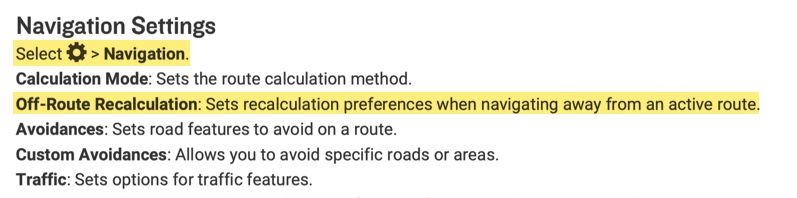
Hello! It looks like you're interested in this conversation, but you don't have an account yet.
Getting fed up of having to scroll through the same posts each visit? When you register for an account, you'll always come back to exactly where you were before, and choose to be notified of new replies (either via email, or push notification). You'll also be able to save bookmarks and upvote posts to show your appreciation to other community members.
With your input, this post could be even better 💗
Register Login




-
 06101
06101
-
0367
-
 110348
-
 05102
05102
-
04123
-
 117714