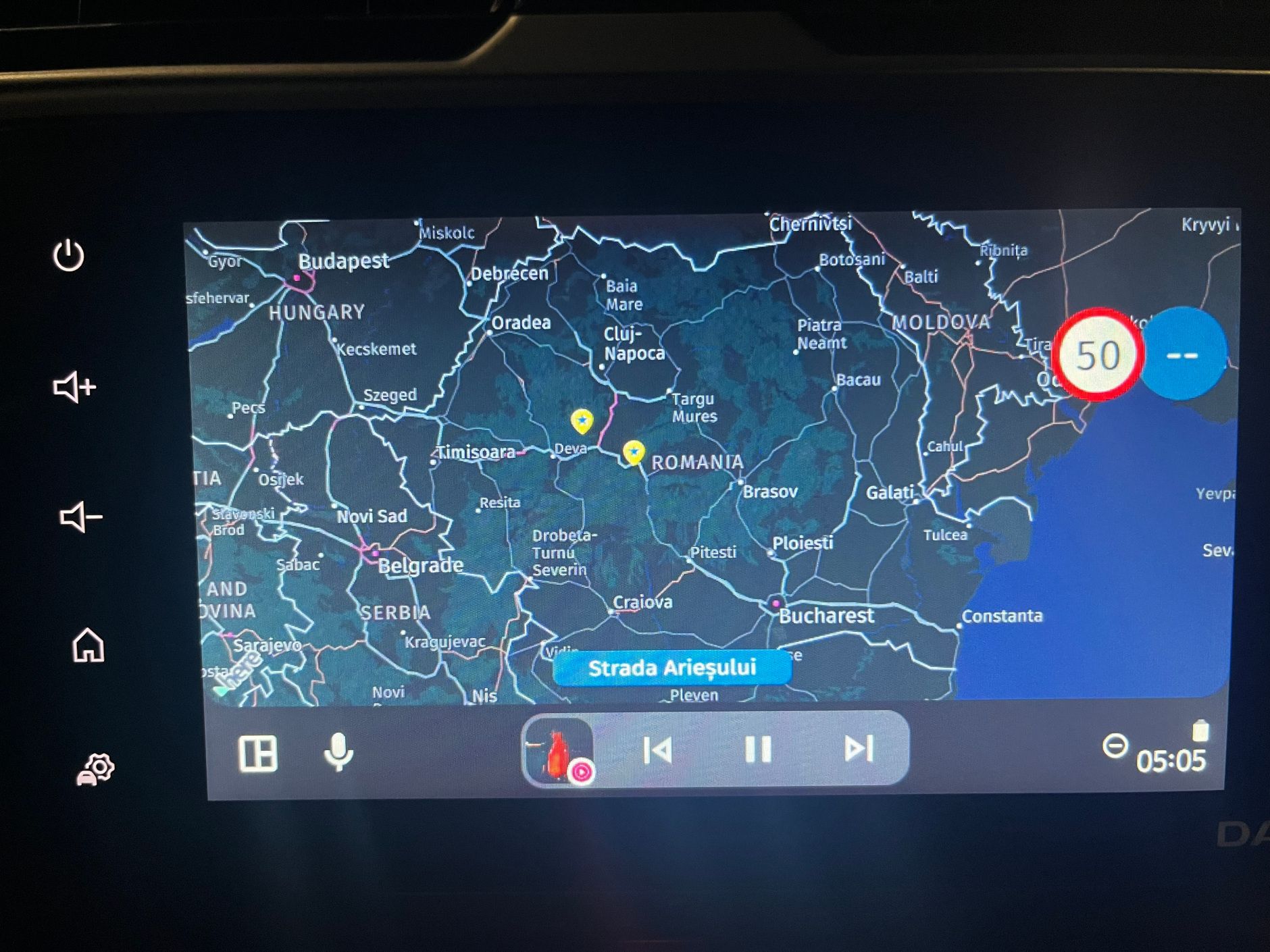
Proposal for an algorithm to guide around unexpected road closures
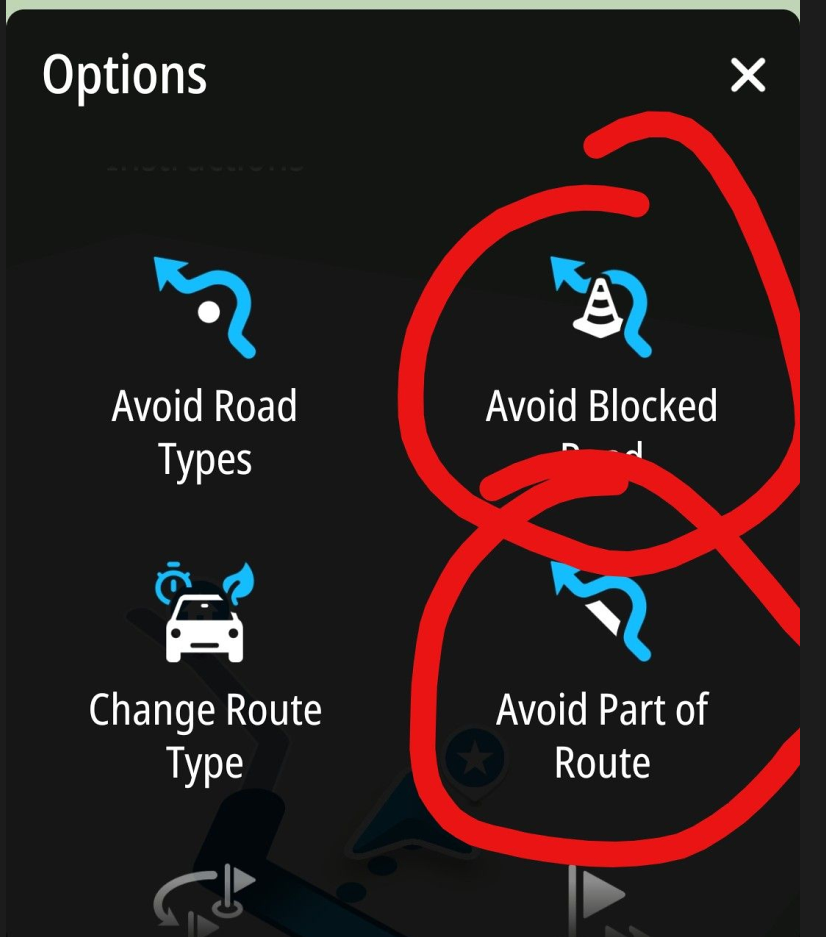
-
In my opinion, this function would be very useful also in such cases:
- The HERE map is not up to date and the selected road is not accessible for motorbikes in reality (often in cities, mountains, etc.), so I have to find a quick detour.
- The road is not blocked, but the surface condition is not acceptable to me (there is some sand or mud, for example), so I decide to turn back.
-
All very valid, but the common denominator is that you usually do not know in advance for how long you need to block the road. Maybe a more sensible idea is to be able to tap on the map where you want to try to rejoin the route, avoiding the route until that point is reached. Much like already exist while navigating tracks. You can already choose your own point to skip to by long-pressing any point on the track. You just cannot avoid the track being part of the detour.
I am just an enthusiastic MRA user, and hope you will be one too!
Most motorcycle problems are caused by the nut that connects the handlebar to the saddle.
Check out RideSleepRepeat.eu, a biker community for sharing stays across Europe
-
All very valid, but the common denominator is that you usually do not know in advance for how long you need to block the road. Maybe a more sensible idea is to be able to tap on the map where you want to try to rejoin the route, avoiding the route until that point is reached. Much like already exist while navigating tracks. You can already choose your own point to skip to by long-pressing any point on the track. You just cannot avoid the track being part of the detour.
Hi Con,
Thanks for your post.
Actually, I didn’t want to write anything more on this topic. But now, just a quick note.
Of course, you don’t know how long the road closure ahead of you will be in advance. Now there are two scenarios.
1: The estimated length of the closure (e.g., 10 km) is sufficient. Then the biker reaches the originally planned route and can continue toward the destination.
2: The estimated length of the closure is too short and insufficient. In that case, the biker ends up facing the closed route again and must repeat the detour process. This may continue until he reaches the open originally planned route.
Therefore the uncertainty of the estimation of the length of a closure is no problem in practice.
In any case, skipping via-points on the detoured planned route must be taken into account. Shaping-points can be skipped automatically.
By the way: adding new shaping points by klicking and holding a point on the map during navigation doesn't work on my mobile phone. I tried this several times. Probably I'm doing something wrong.
BMW R 1200 RT
Tourenorientiert
MRA lifetime member -
Hi Con,
Thanks for your post.
Actually, I didn’t want to write anything more on this topic. But now, just a quick note.
Of course, you don’t know how long the road closure ahead of you will be in advance. Now there are two scenarios.
1: The estimated length of the closure (e.g., 10 km) is sufficient. Then the biker reaches the originally planned route and can continue toward the destination.
2: The estimated length of the closure is too short and insufficient. In that case, the biker ends up facing the closed route again and must repeat the detour process. This may continue until he reaches the open originally planned route.
Therefore the uncertainty of the estimation of the length of a closure is no problem in practice.
In any case, skipping via-points on the detoured planned route must be taken into account. Shaping-points can be skipped automatically.
By the way: adding new shaping points by klicking and holding a point on the map during navigation doesn't work on my mobile phone. I tried this several times. Probably I'm doing something wrong.
@Axel-Härtl said in Proposal for an algorithm to guide around unexpected road closures:
In any case, skipping via-points on the detoured planned route must be taken into account. Shaping-points can be skipped automatically.
Yes, that exactly why I mention my oher view on the matter. If you choose your own point of re-entry, VIA points are no longer an issue, since you can choose a point behind it.
I think what you and I propose is quite similar, but instead of giving a number for the distance in kilometers, of which you cannot see where that ends, you can choose a logical point of re-entry yourself, using an already existing feature. Only thing that needs a change is being able to avoid the use of the originally calculated route (white line) until that point.
@Axel-Härtl said in Proposal for an algorithm to guide around unexpected road closures:
By the way: adding new shaping points by klicking and holding a point on the map during navigation doesn't work on my mobile phone. I tried this several times. Probably I'm doing something wrong.
I don't think you are doing anything wrong, I think you are navigating a track (or route-as-track feature enabled). When you navigate a common route, you can add route points, you cannot add route points to a track.
I am just an enthusiastic MRA user, and hope you will be one too!
Most motorcycle problems are caused by the nut that connects the handlebar to the saddle.
Check out RideSleepRepeat.eu, a biker community for sharing stays across Europe
-
@Axel-Härtl said in Proposal for an algorithm to guide around unexpected road closures:
In any case, skipping via-points on the detoured planned route must be taken into account. Shaping-points can be skipped automatically.
Yes, that exactly why I mention my oher view on the matter. If you choose your own point of re-entry, VIA points are no longer an issue, since you can choose a point behind it.
I think what you and I propose is quite similar, but instead of giving a number for the distance in kilometers, of which you cannot see where that ends, you can choose a logical point of re-entry yourself, using an already existing feature. Only thing that needs a change is being able to avoid the use of the originally calculated route (white line) until that point.
@Axel-Härtl said in Proposal for an algorithm to guide around unexpected road closures:
By the way: adding new shaping points by klicking and holding a point on the map during navigation doesn't work on my mobile phone. I tried this several times. Probably I'm doing something wrong.
I don't think you are doing anything wrong, I think you are navigating a track (or route-as-track feature enabled). When you navigate a common route, you can add route points, you cannot add route points to a track.
Hi Con,
Thanks for your message.
Question: If I select an entry point beyond a via-point - does MRA skip that via-point automatically? I always thought, that in contrary to a shaping-point, a via-point is forced to be reached or to manually skip it.
I navigate using routes, not tracks. Being a long-time MRA fellow, I'm aware of the difference.


While navigating, the screen doesn’t respond when I tap and hold a point on the map. I have to stop the navigation (or at least pause it). Only then can I add more points to the route. Is that the correct and intended process?
Best, Axel
BMW R 1200 RT
Tourenorientiert
MRA lifetime member -
Hi Con,
Thanks for your message.
Question: If I select an entry point beyond a via-point - does MRA skip that via-point automatically? I always thought, that in contrary to a shaping-point, a via-point is forced to be reached or to manually skip it.
I navigate using routes, not tracks. Being a long-time MRA fellow, I'm aware of the difference.
While navigating, the screen doesn’t respond when I tap and hold a point on the map. I have to stop the navigation (or at least pause it). Only then can I add more points to the route. Is that the correct and intended process?
Best, Axel
@Axel-Härtl said in Proposal for an algorithm to guide around unexpected road closures:
I always thought, that in contrary to a shaping-point, a via-point is forced to be reached or to manually skip it.
Sure, but choosing a point beyond it equals manually skipping it. Same as in a route, when you are at say RP 10, and you manually set 15 as skip to route point. The VIAs in between are also skipped.
@Axel-Härtl said in Proposal for an algorithm to guide around unexpected road closures:
have to stop the navigation (or at least pause it). Only then can I add more points to the route. Is that the correct and intended process?
Hmm, I tried this to be sure, but my Android lets me press and hold for extra route points while navigating a (real) route. Just when you press exactly on the route line, it does not do anything. No need to place a route point there, since it is already going there I guess.
I am just an enthusiastic MRA user, and hope you will be one too!
Most motorcycle problems are caused by the nut that connects the handlebar to the saddle.
Check out RideSleepRepeat.eu, a biker community for sharing stays across Europe
-
@Axel-Härtl said in Proposal for an algorithm to guide around unexpected road closures:
I always thought, that in contrary to a shaping-point, a via-point is forced to be reached or to manually skip it.
Sure, but choosing a point beyond it equals manually skipping it. Same as in a route, when you are at say RP 10, and you manually set 15 as skip to route point. The VIAs in between are also skipped.
@Axel-Härtl said in Proposal for an algorithm to guide around unexpected road closures:
have to stop the navigation (or at least pause it). Only then can I add more points to the route. Is that the correct and intended process?
Hmm, I tried this to be sure, but my Android lets me press and hold for extra route points while navigating a (real) route. Just when you press exactly on the route line, it does not do anything. No need to place a route point there, since it is already going there I guess.
-
I’m trying to understand the suggested solution by tapping a point beyond the road closure.
Wouldn’t the algorithm still try to guide me to the new route point via the closed exit, as that would be the quickest way there?
Furthermore, I do not consider this practical, as you are not allowed to stop at the closed motorway exit just to set a new route point on the small display.
In my opinion, there should be a prominent button that tells the algorithm that the exit you have just passed cannot be used and that a route to the planned destination beyond the closure must be found.
-
I’m trying to understand the suggested solution by tapping a point beyond the road closure.
Wouldn’t the algorithm still try to guide me to the new route point via the closed exit, as that would be the quickest way there?
Furthermore, I do not consider this practical, as you are not allowed to stop at the closed motorway exit just to set a new route point on the small display.
In my opinion, there should be a prominent button that tells the algorithm that the exit you have just passed cannot be used and that a route to the planned destination beyond the closure must be found.
Exactly my opinion.
-
I’m trying to understand the suggested solution by tapping a point beyond the road closure.
Wouldn’t the algorithm still try to guide me to the new route point via the closed exit, as that would be the quickest way there?
Furthermore, I do not consider this practical, as you are not allowed to stop at the closed motorway exit just to set a new route point on the small display.
In my opinion, there should be a prominent button that tells the algorithm that the exit you have just passed cannot be used and that a route to the planned destination beyond the closure must be found.
@BMWBiker58, And it should guess which point that is I suppose?
-
I’m trying to understand the suggested solution by tapping a point beyond the road closure.
Wouldn’t the algorithm still try to guide me to the new route point via the closed exit, as that would be the quickest way there?
Furthermore, I do not consider this practical, as you are not allowed to stop at the closed motorway exit just to set a new route point on the small display.
In my opinion, there should be a prominent button that tells the algorithm that the exit you have just passed cannot be used and that a route to the planned destination beyond the closure must be found.
@BMWBiker58 said in Proposal for an algorithm to guide around unexpected road closures:
Wouldn’t the algorithm still try to guide me to the new route point via the closed exit, as that would be the quickest way there?
Let’s say the exit is closed and you can’t take that exit; you’ll have no choice but to carry on driving......
The system would then immediately guide you to the point you selected beyond the closure and then continue along the route as standard.
If, by chance, a point has been set on the exit, this is irrelevant, because by manually selecting a point beyond the closure, you have skipped all the previous ones.Your point that you can’t stop on the motorway is correct… so just carry on driving and take the next exit (there you can stop if necessary and start the process to skip the waypoint).
You don’t need to set a new point on the map either; simply select an existing one after the road closure.
Either press and hold the next expected waypoint in the top right-hand corner of the display; this will take you to the next waypoint, and you can repeat this several times.
Alternatively, in the waypoint list, tap a point on the route after the roadworks, and it will navigate you there.
Option 3: Select a existing point on the route on the map after the road closure, and it will navigate you there.
In all 3 cases, the preceding points are skipped.
Personally, I’ve treated myself to the SilverFox C1 Bluetooth controller, which allows me to zoom, skip waypoints and do much more without having to stop.
Find out more on the MRA support page -
Thank you for explaining the options.
My concern (or lack of knowledge), however, is that the algorithm will try again to reach the newly selected next route point via the closed exit. Simply because the route through the closure is the shortest/quickest.
In that case, it would be pointless whether you chose the first, second, third, etc. route point beyond the closure.
In my opinion, there ought to be a way to block the closed exit with a single tap, so that the system doesn’t keep trying to reach the next route points via that exit.
-
@BMWBiker58, And it should guess which point that is I suppose?
@Con-Hennekens The app could simply head for the next waypoint after the roadblock. However, it must not do so via the blocked exit, but must find its own route.
If the next waypoint after the roadblock is also inaccessible, it would simply have to take the one after that. -
Thank you for explaining the options.
My concern (or lack of knowledge), however, is that the algorithm will try again to reach the newly selected next route point via the closed exit. Simply because the route through the closure is the shortest/quickest.
In that case, it would be pointless whether you chose the first, second, third, etc. route point beyond the closure.
In my opinion, there ought to be a way to block the closed exit with a single tap, so that the system doesn’t keep trying to reach the next route points via that exit.
@BMWBiker58 Provided your route doesn’t wind its way around the closed motorway exit like a snail, I don’t see any danger here.
As already described, the app will guide you to the selected waypoint, and it doesn’t matter whether that’s a shaping or a Via point.
In your example, you couldn’t leave the motorway at the closed exit... as soon as you selected the next exit and left the motorway, you’ll be guided to the new selected point, possibly just outside the motorway, passing close to your closed exit, but of course only if your destination is near the closed exit.
If your destination is not next to the closed exit, you will not be guided there.
To be absolutely sure that you are not guided back, please skip one or two more waypoints than might be necessary.
The app will definitely not navigate you to the closed exit...
It is understandable that you would want to inform the app that this exit is closed, but it is absolutely not necessary.
BMW R 1250 GS
MRA Navigation & SilverFox C1 Controller
DMD-NOR7E 7"
SPC Universal mount
Motorola Edge 40 "offline"
Sena SLR 3
Sena 50 R -
@BMWBiker58 Provided your route doesn’t wind its way around the closed motorway exit like a snail, I don’t see any danger here.
As already described, the app will guide you to the selected waypoint, and it doesn’t matter whether that’s a shaping or a Via point.
In your example, you couldn’t leave the motorway at the closed exit... as soon as you selected the next exit and left the motorway, you’ll be guided to the new selected point, possibly just outside the motorway, passing close to your closed exit, but of course only if your destination is near the closed exit.
If your destination is not next to the closed exit, you will not be guided there.
To be absolutely sure that you are not guided back, please skip one or two more waypoints than might be necessary.
The app will definitely not navigate you to the closed exit...
It is understandable that you would want to inform the app that this exit is closed, but it is absolutely not necessary.
As part of this discussion, I’d like to share a real-life example—one that’s both amusing and frustrating.
This week, I went on a motorcycle ride that I had planned to be about 130 km long.
During the ride, I encountered about 10 road closures (It's spring time and everybody is working on new roads.). And here’s the big thing:
- Not a single one of these closures was marked on the Here map.
- Only about half of the closures even had detour signs. There were simply closures with no detour instructions.
But the best is yet to come.
In one town, there were several construction zones whose detours were obviously not coordinated.
-
Act 1: Road closure with detour number 1. I followed these signs.
-
Act 2: Before detour number 1 had even ended, I came across the next road closure, number 6, which I then took.
-
Act 3: Before detour number 6 was even over, there was another roadblock on that detour route, this time with detour signs that had no number. I took that route and was directed by the detour signs back to roadblock number 1. Bingo.
-
Act 4: Please skip to Act 1.
I then switched from MRA to Google Maps. In MRA’s defense, it should be noted that Google Maps couldn’t handle this chaos either.
So I fell back on my tried-and-true navigation method from 50 years ago: an analog watch and the position of the sun.
After a long ride, I finally arrived where I had originally intended to go. 185 km — but on a motorcycle, the journey is the destination.
That's the hard reality.

BMW R 1200 RT
Tourenorientiert
MRA lifetime member -
As part of this discussion, I’d like to share a real-life example—one that’s both amusing and frustrating.
This week, I went on a motorcycle ride that I had planned to be about 130 km long.
During the ride, I encountered about 10 road closures (It's spring time and everybody is working on new roads.). And here’s the big thing:
- Not a single one of these closures was marked on the Here map.
- Only about half of the closures even had detour signs. There were simply closures with no detour instructions.
But the best is yet to come.
In one town, there were several construction zones whose detours were obviously not coordinated.
-
Act 1: Road closure with detour number 1. I followed these signs.
-
Act 2: Before detour number 1 had even ended, I came across the next road closure, number 6, which I then took.
-
Act 3: Before detour number 6 was even over, there was another roadblock on that detour route, this time with detour signs that had no number. I took that route and was directed by the detour signs back to roadblock number 1. Bingo.
-
Act 4: Please skip to Act 1.
I then switched from MRA to Google Maps. In MRA’s defense, it should be noted that Google Maps couldn’t handle this chaos either.
So I fell back on my tried-and-true navigation method from 50 years ago: an analog watch and the position of the sun.
After a long ride, I finally arrived where I had originally intended to go. 185 km — but on a motorcycle, the journey is the destination.
That's the hard reality.
@Axel-Härtl said in Proposal for an algorithm to guide around unexpected road closures:
on a motorcycle, the journey is the destination.
If we all keep this in mind, problems will be much less a problem

I don't envy your experience, but must also admit that in my journeys I never experienced it so bad. Lucky you! -
I have now promised to look into it

https://forum.myrouteapp.com/topic/10830/new-beta-5.1-457Edit: I know only beta testers can read that post. No, people cannot sign up for beta anymore. Will become a public announcement within 2 weeks max.
-
Sounds great, @Corjan-Meijerink
Of course my recent post was meant to be a funny story. Although there were some serious points.
Best, Axel
-
 Corjan Meijerink referenced this topic on




Hello! It looks like you're interested in this conversation, but you don't have an account yet.
Getting fed up of having to scroll through the same posts each visit? When you register for an account, you'll always come back to exactly where you were before, and choose to be notified of new replies (either via email, or push notification). You'll also be able to save bookmarks and upvote posts to show your appreciation to other community members.
With your input, this post could be even better 💗
Register Login




-
 030479
-
 021346
-
09198
-
 3445
3445
-
011266
-
94449
-
 -1121.0k
-
 0228
0228