Unable to stop navigation
-
Since Version 5.x of MyRouteApp Navigation Next, I have been having difficulty ending navigation:
If I'm going to stop a navigation, there comes a first popup with question: "Stop navigation" with button "comfirm". This is in top area of the screen, and I can press button "confirm" also with gloves.
After confirming, the main screen appears, with a second popup question: "Resume navigation?" with buttons "no" and "navigate".
- Why question twice?
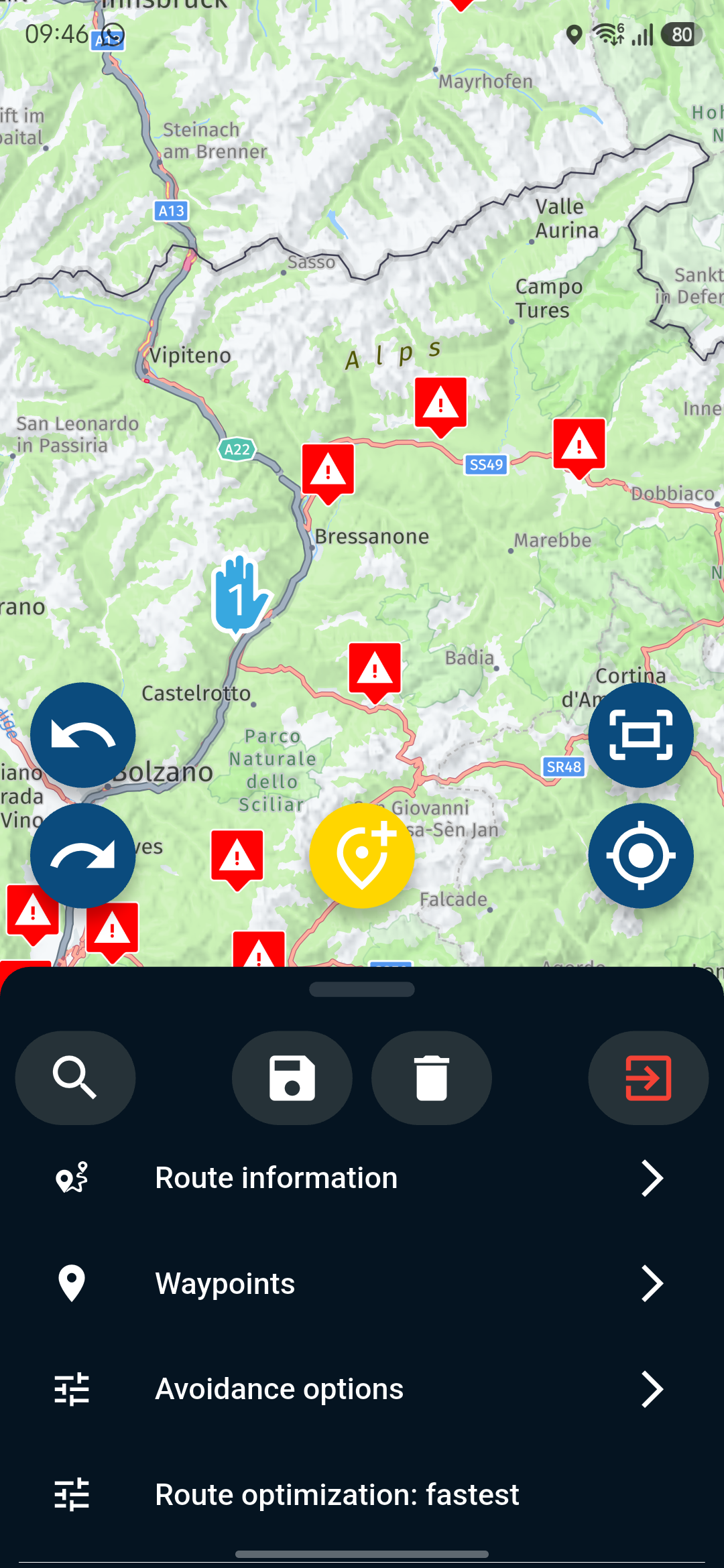
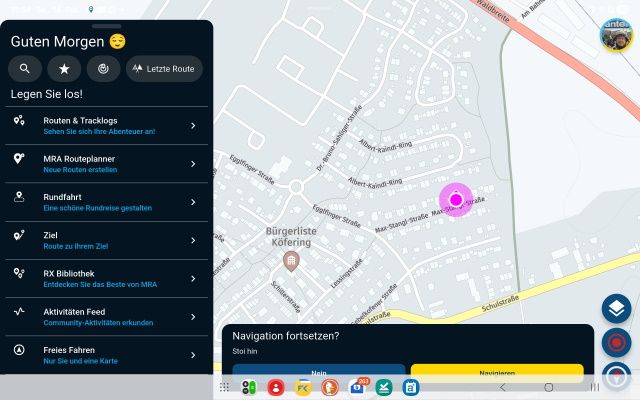
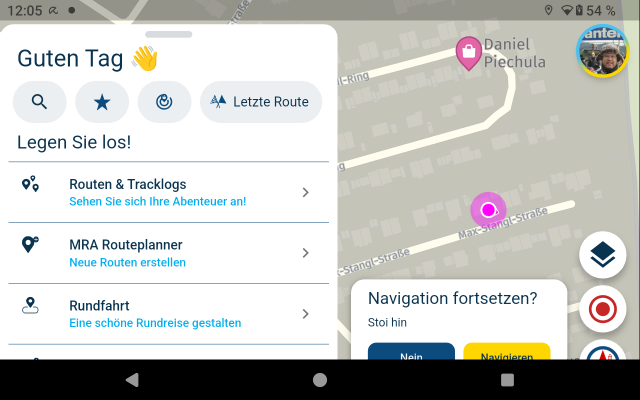
- Regardless, of whether you have used full-screen moder in settings, or not - the second qestion "Resume navigation" with buttons will be covered by device bottom menue:
Check with Samsung Galaxy Tab S8 (Android 16) in landscape format:
Check with DMD T865-X (Android 14) in landscape format:
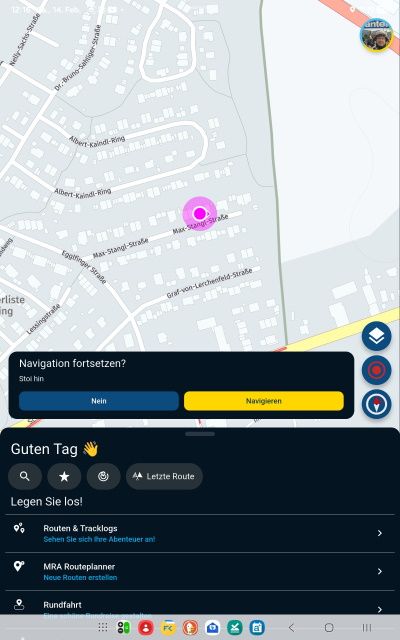
For both devices, if they are used in portrait format - ther is no issue:
Please move question boxes up, so, the device bottom menue will not cover it, and users can hit the buttons securely, also with gloves.
-
Since Version 5.x of MyRouteApp Navigation Next, I have been having difficulty ending navigation:
If I'm going to stop a navigation, there comes a first popup with question: "Stop navigation" with button "comfirm". This is in top area of the screen, and I can press button "confirm" also with gloves.
After confirming, the main screen appears, with a second popup question: "Resume navigation?" with buttons "no" and "navigate".
- Why question twice?
- Regardless, of whether you have used full-screen moder in settings, or not - the second qestion "Resume navigation" with buttons will be covered by device bottom menue:
Check with Samsung Galaxy Tab S8 (Android 16) in landscape format:
Check with DMD T865-X (Android 14) in landscape format:
For both devices, if they are used in portrait format - ther is no issue:
Please move question boxes up, so, the device bottom menue will not cover it, and users can hit the buttons securely, also with gloves.
@Guzzist The second query to end does not bother me; on the contrary, I actually find it beneficial, as during a brief stop to refuel or take a short break, I immediately have the option to continue navigation.
The issue with the overlay either in landscape or portrait mode during the second query does not occur on the Pixel 9 (Android 16) or the Motorola Edge 40 (Android 14).
-
Since Version 5.x of MyRouteApp Navigation Next, I have been having difficulty ending navigation:
If I'm going to stop a navigation, there comes a first popup with question: "Stop navigation" with button "comfirm". This is in top area of the screen, and I can press button "confirm" also with gloves.
After confirming, the main screen appears, with a second popup question: "Resume navigation?" with buttons "no" and "navigate".
- Why question twice?
- Regardless, of whether you have used full-screen moder in settings, or not - the second qestion "Resume navigation" with buttons will be covered by device bottom menue:
Check with Samsung Galaxy Tab S8 (Android 16) in landscape format:
Check with DMD T865-X (Android 14) in landscape format:
For both devices, if they are used in portrait format - ther is no issue:
Please move question boxes up, so, the device bottom menue will not cover it, and users can hit the buttons securely, also with gloves.
@Guzzist you have a specific Android setting enabled which causes this.
I don’t know which one it is but if you tell me, I will most likely be able to fix it

As @Peter-Zehentreiter shows it’a not a generic issue. Haven’t seen it myself either on one of our many Android test devices. The joyful world of Android

-
@Guzzist you have a specific Android setting enabled which causes this.
I don’t know which one it is but if you tell me, I will most likely be able to fix it
As @Peter-Zehentreiter shows it’a not a generic issue. Haven’t seen it myself either on one of our many Android test devices. The joyful world of Android
@Corjan-Meijerink said in Unable to stop navigation:
@Guzzist you have a specific Android setting enabled which causes this.
...hmmm - I'm not aware, I did some specific Android settings. I wonder about same effect at different Android versions.
On the DMD device (my navigation device), I set text font a bit greater.
On the Tablet (my planning device), the text font is at standard. -
@Corjan-Meijerink said in Unable to stop navigation:
@Guzzist you have a specific Android setting enabled which causes this.
...hmmm - I'm not aware, I did some specific Android settings. I wonder about same effect at different Android versions.
On the DMD device (my navigation device), I set text font a bit greater.
On the Tablet (my planning device), the text font is at standard.@Guzzist in my T865X I’ve selected to not use the full screen mode for MRA. Then the buttons are acceseble
-
Hi, I tried on my Oukitel the settings with full screen and without. And on both, the buttons are accessible.
-
@Guzzist you have a specific Android setting enabled which causes this.
I don’t know which one it is but if you tell me, I will most likely be able to fix it
As @Peter-Zehentreiter shows it’a not a generic issue. Haven’t seen it myself either on one of our many Android test devices. The joyful world of Android
@Corjan-Meijerink said in Unable to stop navigation:
@Guzzist you have a specific Android setting enabled which causes this.
found it: it's about the display size and font size in the system.
Because I'm a bit more then 20 Years old, I purchased the DMD T865-X because of the bigger screen. Unfortunatelly, the technic nerds of developer paired the bigger screen with higher resolution. So, my hope for bigger text (more easy to read during a ride) remained unfulfilled.
The only solution for me was then, to increase text size in system.Now, I need to play arround to find a balance between font size and uncovered buttons by system base menue line.


But there are dynamic behaviors in the app:
-
unfortunatelly, if I don't use full screen view, the text box "Resume navigation?" with buttons "no" and "navigate" will still be covered by device bottom menue!
But if I dont answer this question (I could not answer because of covering), but escape, close the app and restart the app - the last screen with unanswered question about "Resume navigation" appears immediately after the app starts - but *now this textbox with question is above the device bottom menue and uncovered!
-
If I have used "Full screen mode" in the app settings, I get the full screen. But if I stop the navigation, just then the full screen is no longer visible - now the system button bar is visible. And this covers the question box "Resume navigation?" with buttons "no" and "navigate" again!
Edit: No font size or display size setting made it possible to see the text field with the question box "Resume navigation?" without it being covered.
-
-
So the system text size screws things up?
Interesting (because our app does not support different text size). Seems like the (custom?) Android does something different than expected.About the full screen setting in MRA, this only applies while navigating
-
This post is deleted!
-
Since Version 5.x of MyRouteApp Navigation Next, I have been having difficulty ending navigation:
If I'm going to stop a navigation, there comes a first popup with question: "Stop navigation" with button "comfirm". This is in top area of the screen, and I can press button "confirm" also with gloves.
After confirming, the main screen appears, with a second popup question: "Resume navigation?" with buttons "no" and "navigate".
- Why question twice?
- Regardless, of whether you have used full-screen moder in settings, or not - the second qestion "Resume navigation" with buttons will be covered by device bottom menue:
Check with Samsung Galaxy Tab S8 (Android 16) in landscape format:
Check with DMD T865-X (Android 14) in landscape format:
For both devices, if they are used in portrait format - ther is no issue:
Please move question boxes up, so, the device bottom menue will not cover it, and users can hit the buttons securely, also with gloves.
@Guzzist said in Unable to stop navigation:
Why question twice?
There is a good reason for that
The first question is merely "Stop navigation (for now)". Resume let's your "resume" your navigation from the point where you left it. If you did not stop navigation, there would be no specific point to resume it. Once you answer no to resume, you cannot "resume" the route from the specific point where you left it. From that point on you can only restart the route and manually select the route point from where to start, OR make use of the "start from nearest route point" feature. That will not always be the same. -
So the system text size screws things up?
Interesting (because our app does not support different text size). Seems like the (custom?) Android does something different than expected.About the full screen setting in MRA, this only applies while navigating
@Corjan-Meijerink said in Unable to stop navigation:
So the system text size screws things up?
About the full screen setting in MRA, this only applies while navigating
Yeep - several apps reacts on text size in system settings: if you increase text size in system setting off an per example 7 inch tablet - view on screen changes to behaviour of 6 inch phone!
Not only on bumpy roads, a bigger text on screen is really helpful - therefore a tablet device for navigation. Because MyRoute-App doesn't offer text scaling, I use system own text scaling.Ok for me, if MyRoute-App uses full screen mode only during navigation. But as long as I don't have confirmed both questions about to stop the navigation - I'm IN navigation!
-
@Guzzist said in Unable to stop navigation:
Why question twice?
There is a good reason for that
The first question is merely "Stop navigation (for now)". Resume let's your "resume" your navigation from the point where you left it. If you did not stop navigation, there would be no specific point to resume it. Once you answer no to resume, you cannot "resume" the route from the specific point where you left it. From that point on you can only restart the route and manually select the route point from where to start, OR make use of the "start from nearest route point" feature. That will not always be the same.@Con-Hennekens said in Unable to stop navigation:
@Guzzist said in Unable to stop navigation:
Why question twice?
There is a good reason for that...
hmmm as usually you may are right. I'm thinking, where the benefit is...
-
@Con-Hennekens said in Unable to stop navigation:
@Guzzist said in Unable to stop navigation:
Why question twice?
There is a good reason for that...
hmmm as usually you may are right. I'm thinking, where the benefit is...
@Guzzist, You don't think being able to pause (stop) a route and to continue where you left off is a benefit?
I am just an enthusiastic MRA user, and hope you will be one too!
Most motorcycle problems are caused by the nut that connects the handlebar to the saddle.
Check out RideSleepRepeat.eu, a biker community for sharing stays across Europe
-
@Guzzist, You don't think being able to pause (stop) a route and to continue where you left off is a benefit?
@Con-Hennekens ...so this double confirmation to end ongoing navigation is a kind of "pause navigation"? Until now, I had never thought of pausing navigation. Not when refuelling, not during a toilet break, not even during lunch.
I'll try using it next time...
-
@Con-Hennekens ...so this double confirmation to end ongoing navigation is a kind of "pause navigation"? Until now, I had never thought of pausing navigation. Not when refuelling, not during a toilet break, not even during lunch.
I'll try using it next time... -
Yesterday I was readymade show Corjan the problem realy time but as always. When I tried the problem was gone. I guess it’s the magic of our Devs
Honda Goldwing GL1500,
Honda Silverwing GL 650
DMD2 T865X 8 inch Android tablet using MRA next for navigation
Garmin XT sold
Samsung S24FE mounted on a Quadlock and using Android Auto in my car -
Yesterday I was readymade show Corjan the problem realy time but as always. When I tried the problem was gone. I guess it’s the magic of our Devs
-
@Con-Hennekens ...so this double confirmation to end ongoing navigation is a kind of "pause navigation"? Until now, I had never thought of pausing navigation. Not when refuelling, not during a toilet break, not even during lunch.
I'll try using it next time...@Guzzist said in Unable to stop navigation:
so this double confirmation to end ongoing navigation is a kind of "pause navigation"?
Yes it is
and to be able to quickly resume from where you paused / stopped.
In the past often the app tried multiple recalculations while refueling (the bike or the body, whichever) causing some waypoints to be skipped. Although that does not occur much anymore, because of some other improvements, it is still a sensible feature -
i find the double confirmation annoying and haven't seen it in other apps.
Wouldn't be one dialog (with the buttons Resume and Stop) be enough?
Another solution could be to have it work like the Lock: it could bring up a navigate and dtop icon on the screen. -
i find the double confirmation annoying and haven't seen it in other apps.
Wouldn't be one dialog (with the buttons Resume and Stop) be enough?
Another solution could be to have it work like the Lock: it could bring up a navigate and dtop icon on the screen.@Herman-Veldhuizen How often do you press stop because you find it annoying?
Con has already mentioned all the advantages. If it bothers you, you can let the navigation run during a break, and the double confirmation at the end of the route shouldn't be considered annoying.
Referring to other apps that do things differently... I think it's good that there are different apps that work in different ways and have different features, so everyone can choose the app that suits them best.
BMW R 1250 GS
MRA Navigation & SilverFox C1 Controller
DMD-NOR7E 7"
SPC Universal mount
Motorola Edge 40 "offline"
Sena SLR 3
Sena 50 R





Hello! It looks like you're interested in this conversation, but you don't have an account yet.
Getting fed up of having to scroll through the same posts each visit? When you register for an account, you'll always come back to exactly where you were before, and choose to be notified of new replies (either via email, or push notification). You'll also be able to save bookmarks and upvote posts to show your appreciation to other community members.
With your input, this post could be even better 💗
Register Login
-
 312217
-
 112341
-
 09320
09320
-
0362
-
0383
-
 04128
04128
-
 09190
09190