Updated beta! 5.0.3 (449)
-

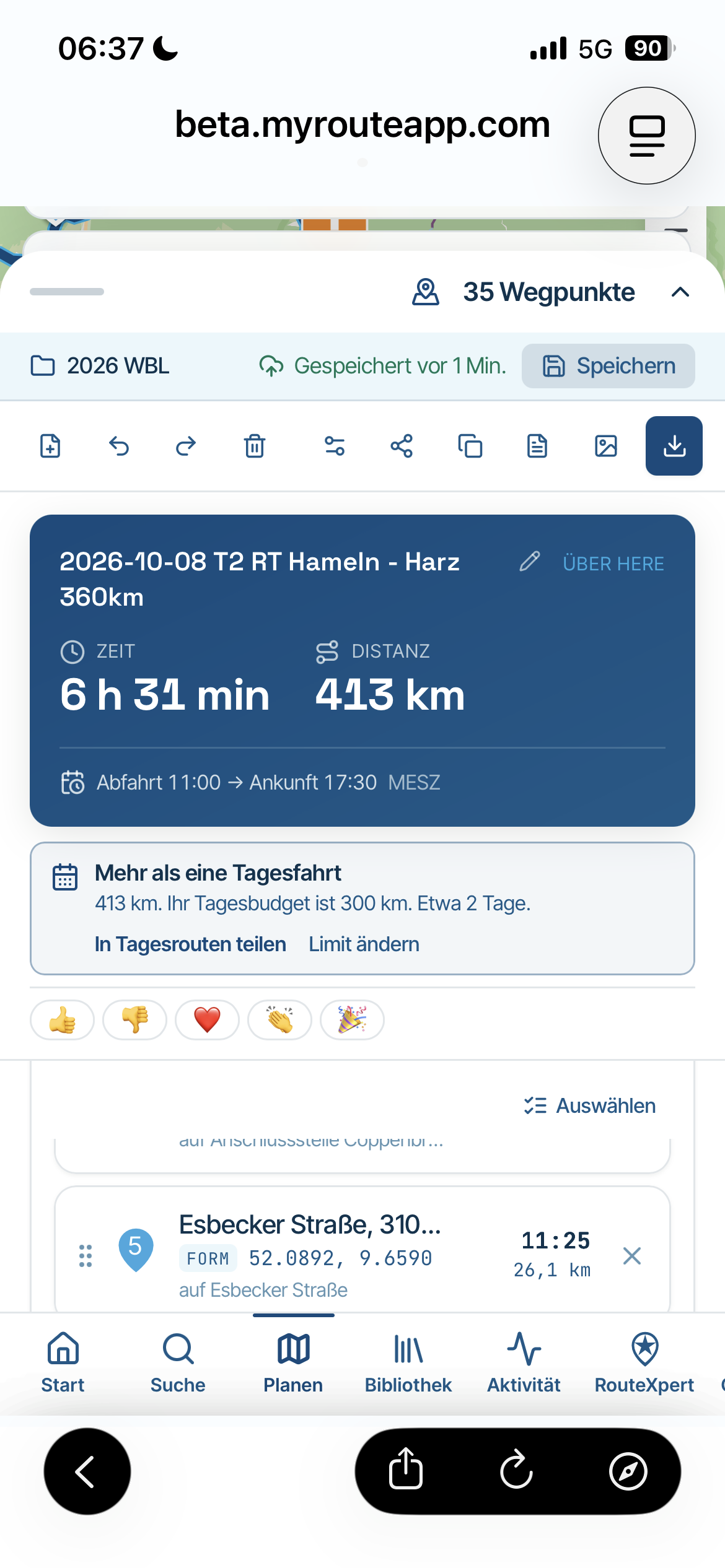
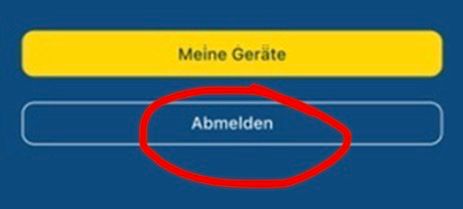
Guys, the red button takes a device out of the device list, zo you can continue. It does not unsubscribe, it does not long off, it just makes room for your device in a list that may contain 2 devices. You do not need to login on the other devices, nothing bad happens...
@Hubert-Thoring, those who have acquired their license correctly are unlikely to run into this.
-
@Corjan-Meijerink Gisteren gebeurde er iets bijzonders na het installeren van deze beta op mijn iPad en iPhone:
iPhone: via de nieuwe instellingen pagina logde ik mijn iPad uit. (rode knop)
iPad: app bleef werkend terwijl online op wifi, daarop geforceerd afgesloten en opnieuw gestart. Zonder ook maar ergens op te hoeven drukken was ik weer ingelogd.
iPhone: Bij mijn apparaten bleef alleen mijn iPhone zichtbaar. Hierop geforceerd afgesloten en app opnieuw gestart. iPhone was vervolgens uitgelogd. Moest daarbij ook de app herstarten omdat er iets was aangepast aan mijn abonnement gaaf die aan. (die melding kwam laatst ook ergens op het forum voorbij.)
iPad: Gaf vervolgens de melding dat ik teveel apparaten actief had.
iPhone: Gaf een melding dat rond de 50 routes (mijn bibliotheek is veel groter) werden gesynchroniseerd.
iPhone: Zag de iPad daarna ook weer gewoon ingelogd... en alles werkte weer...Hierop gestopt met rommelen en ben ik gaan mopperen tegen Rob
 Van Rob begreep ik dat die rode knop geen uitlog knop is. Wat het dan wel is snap ik ook niet helemaal, maar nu geef jij aan dat dit wel een knop is om uit te loggen. Snap het niet meer
Hopelijk heb je iets aan bovenstaande.
@Corjan-Meijerink Yesterday something unusual happened after installing this beta on my iPad and iPhone:
iPhone: via the new settings page, I logged out of my iPad (red button)
iPad: the app kept working while online on Wi-Fi, then I force-closed it and restarted. Without having to press anything, I was logged in again.
iPhone: Under my devices, only my iPhone remained visible. I force-closed it and restarted the app. The iPhone was then logged out. I also had to restart the app because something had been changed with my subscription (that notification recently came up somewhere on the forum as well).
iPad: Then it displayed a message that I had too many active devices.
iPhone: Showed a message that around 50 routes (my library is much larger) were being synchronized.
iPhone: Afterwards, I saw the iPad logged in again… and everything worked again.At that point, I stopped messing around and started complaining to Rob
From Rob, I understood that the red button is not a logout button. What it actually is, I don’t quite understand either, but now you’re saying it is a logout button. I don’t get it anymore Hopefully the above is helpful.

@CD130 sounds like it works exactly as expected.
It does not log out your account but it unlists the device as active. When using the other device it is automatically activated again
-
In Dutch I would say “afmelden” rather than “uitloggen” but I don’t know if English has this specific contextual distinguish

@nick-carthew help?

-
In Dutch I would say “afmelden” rather than “uitloggen” but I don’t know if English has this specific contextual distinguish
@nick-carthew help?

@Corjan-Meijerink Delist or Exclude would both work as would Deregister and Unlist.
Always willing to help if I can.
Triumph Tiger 1200 XRT called Tina.
MRA Navigation Next and SilverFox BJ8 -
@Corjan-Meijerink Delist or Exclude would both work as would Deregister and Unlist.
@Nick-Carthew amen. Then that’s the better term
-
I don’t like the chosen red button because for me it means something like exporting or sharing data. Why not chosen for the delete (trash bin) button?
@Arno-0 said in Updated beta! 5.0.3 (449):
I don’t like the chosen red button because for me it means something like exporting or sharing data. Why not chosen for the delete (trash bin) button?
I am not certain putting something in the bin really gives me a better feeling...
-
In Dutch I would say “afmelden” rather than “uitloggen” but I don’t know if English has this specific contextual distinguish
@nick-carthew help?

@Corjan-Meijerink said in Updated beta! 5.0.3 (449):
In Dutch I would say “afmelden” rather than “uitloggen” but I don’t know if English has this specific contextual distinguish
@nick-carthew help?
In German, I would say "Gerät abmelden" to make it more clear. So it is not related to the account and with loggin/ loggout etc. Could work also in other languages.
-

Sorry, I have to ask again because I don't understand the reason

Why are the device - "Log out" also deleted all synchronized routes in this affected device .
VG

VG Hubert
Beta Test "Next App" dazu die Hardware .
iPad 9. Gen iOS 26.7.1/ iPhone 16e iOS 26.7.1/ Navi iPhone Xr iOS 18.7.10 / PC mit MS Win11 /❗️MyRoute-App im Cradel und Remotek-One❗️ Info zu MRA & Remotek One -
Sorry, I have to ask again because I don't understand the reason
Why are the device - "Log out" also deleted all synchronized routes in this affected device .
VG
@Hubert-Thoring because that button is actually “abmelden” as it says
We were referring to the red icon to unlist a device.
-

449 in available in the Google store
-
@Hubert-Thoring because that button is actually “abmelden” as it says
We were referring to the red icon to unlist a device.
@Corjan-Meijerink said in Updated beta! 5.0.3 (449):
@Hubert-Thoring because that button is actually “abmelden” as it says
We were referring to the red icon to unlist a device.
@Corjan-Meijerink , I knew that, ...

But my question was about what exactly happens when "loging out" in the background in relation to the MRA app installation on the mobile phone?
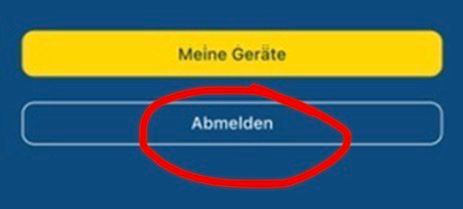
This means that when "logging out" all synchronized routes are deleted, and what else, all offline maps etc. are also deleted so that the app becomes neutral and is only synchronized again with the account the next time you log in to the device.
It remains unclear at the moment what exactly is deleted when "unsubscribing" and what is not, because the offline cards are probably not deleted during this deregistration.
VG Hubert
Beta Test "Next App" dazu die Hardware .
iPad 9. Gen iOS 26.7.1/ iPhone 16e iOS 26.7.1/ Navi iPhone Xr iOS 18.7.10 / PC mit MS Win11 /❗️MyRoute-App im Cradel und Remotek-One❗️ Info zu MRA & Remotek One -
@Corjan-Meijerink said in Updated beta! 5.0.3 (449):
@Hubert-Thoring because that button is actually “abmelden” as it says
We were referring to the red icon to unlist a device.
@Corjan-Meijerink , I knew that, ...
But my question was about what exactly happens when "loging out" in the background in relation to the MRA app installation on the mobile phone?
This means that when "logging out" all synchronized routes are deleted, and what else, all offline maps etc. are also deleted so that the app becomes neutral and is only synchronized again with the account the next time you log in to the device.
It remains unclear at the moment what exactly is deleted when "unsubscribing" and what is not, because the offline cards are probably not deleted during this deregistration.
@Hubert-Thoring only local cached data related to your account are removed when logging off. Which is no issue at all because it’s in the cloud anyway
Let’s not treat logging off as a weird new feature because it’s there since day one in the app
-
 This post is deleted!
 -
still one question. all is only online. i use a offline phone and tablet for navigation and i have always a backup phone also without sim. i do understand it correct that switching between is only online. not on all places where i stay has internet by wifi or 4g on my real phone. if i would have to switch i need to find internet to switch to other to make it active.
-
Yesterday dus à test drive with version 449. 2 things
1 the position marker is a bit behind, approximative. 20 meters
2 the spinning of the map while Cummings to a complete stop has improved but is still there. Not in all situations but sometimes, when omving SouthA suggestion for the future
A had both my AA device and Phone visible. If I arrive bear a speedcamera and my speed is aboie the max, the warming on my phone turns red but the one on AA stays Blue. It’s a super handy feature and I would like it to be available on AA as wellHonda Goldwing GL1500,
Honda Silverwing GL 650
DMD2 T865X 8 inch Android tablet using MRA next for navigation
Garmin XT sold
Samsung S24FE mounted on a Quadlock and using Android Auto in my car -
Yesterday dus à test drive with version 449. 2 things
1 the position marker is a bit behind, approximative. 20 meters
2 the spinning of the map while Cummings to a complete stop has improved but is still there. Not in all situations but sometimes, when omving SouthA suggestion for the future
A had both my AA device and Phone visible. If I arrive bear a speedcamera and my speed is aboie the max, the warming on my phone turns red but the one on AA stays Blue. It’s a super handy feature and I would like it to be available on AA as well
@Marinus-van-Deudekom I think you drank too many beers last night

-
still one question. all is only online. i use a offline phone and tablet for navigation and i have always a backup phone also without sim. i do understand it correct that switching between is only online. not on all places where i stay has internet by wifi or 4g on my real phone. if i would have to switch i need to find internet to switch to other to make it active.
@Bouke-Ent, If you do not log off, nothing will be lost. If you need to unlist a device, you do that from the device you are going to use, after pressing My Devices.
-

Thanks @Corjan-Meijerink, works great!

Hello! It looks like you're interested in this conversation, but you don't have an account yet.
Getting fed up of having to scroll through the same posts each visit? When you register for an account, you'll always come back to exactly where you were before, and choose to be notified of new replies (either via email, or push notification). You'll also be able to save bookmarks and upvote posts to show your appreciation to other community members.
With your input, this post could be even better 💗
Register Login

-
0717
-
0522
-
0516
-
058
-
08206
-
0418
-
 0492
0492
-
 1846
1846