Skip to content
  • Categories
  • Recent
  • Popular
  • Support
  • MyRoute-app
Collapse
Brand Logo

MRA Community Forum

  1. Home
  2. The MyRoute-app
  3. [App] Suggestions and Discussion
  4. MENU OBSTRUCTING THE MAP

MENU OBSTRUCTING THE MAP
Scheduled Pinned Locked Moved [App] Suggestions and Discussion
8 Posts 6 Posters 215 Views 3 Watching
  • Oldest to Newest
  • Newest to Oldest
  • Most Votes
Reply
  • Reply as topic
Log in to reply
This topic has been deleted. Only users with topic management privileges can see it.
  • Michael Wilkinsonundefined Offline
    Michael Wilkinsonundefined Offline
    Michael Wilkinson
    wrote last edited by
    #1

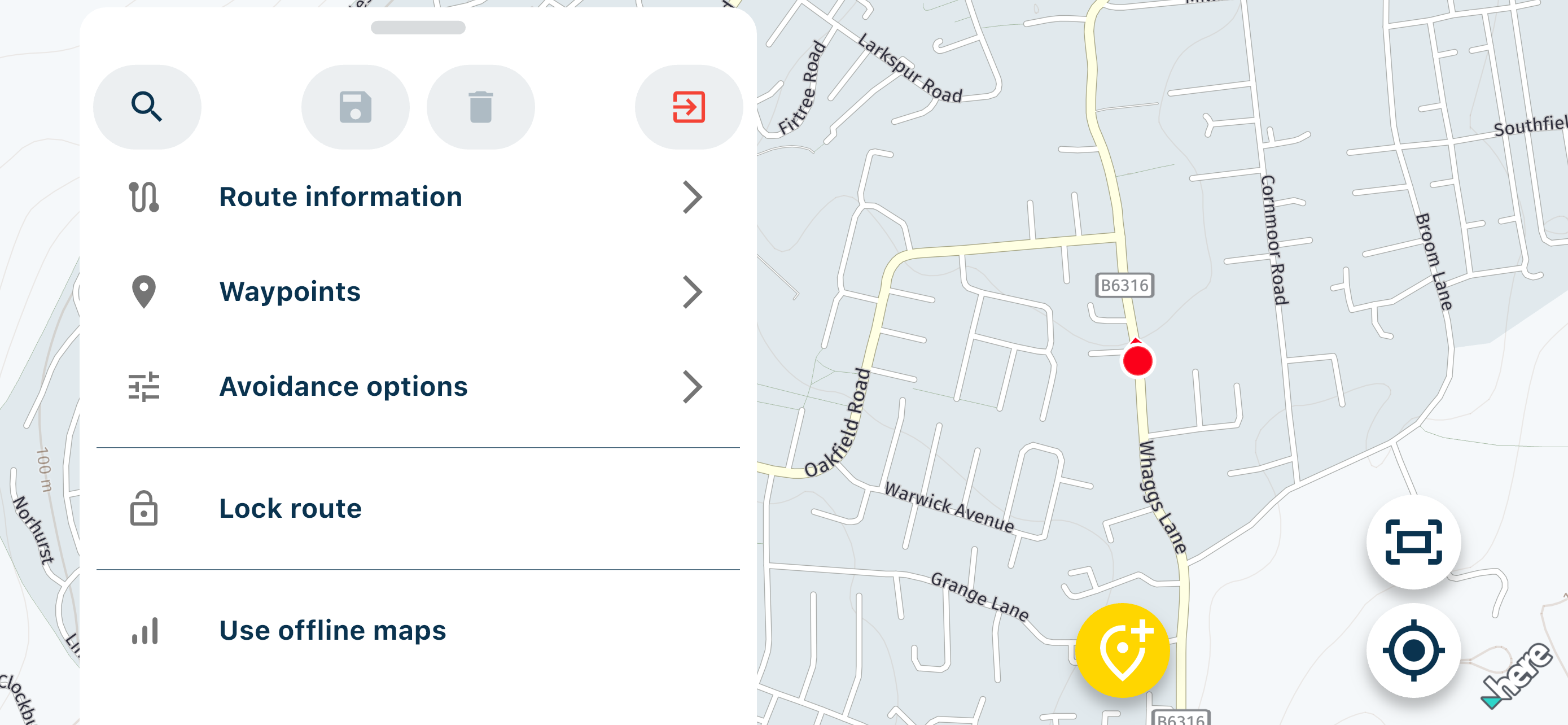
    Why is it that when I use MRA Routeplanner on either my IPhone or IPad, a large part of the map seems to be permanently obstructed by the menu displayed at the left hand side, or bottom of the screen in portrait. Is there a way to make the menu reduce or disappear to allow a wider view of map?
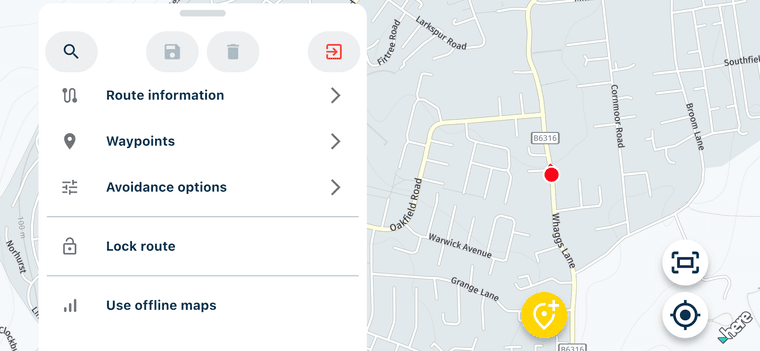
    IMG_2184.png IMG_2183.png IMG_0192.png )

    Marinus van Deudekomundefined 1 Reply Last reply
    0
    • Michael Wilkinsonundefined Michael Wilkinson

      Why is it that when I use MRA Routeplanner on either my IPhone or IPad, a large part of the map seems to be permanently obstructed by the menu displayed at the left hand side, or bottom of the screen in portrait. Is there a way to make the menu reduce or disappear to allow a wider view of map?
      IMG_2184.png IMG_2183.png IMG_0192.png )

      Marinus van Deudekomundefined Offline
      Marinus van Deudekomundefined Offline
      Marinus van Deudekom
      RouteXpert
      wrote last edited by
      #2

      @Michael-Wilkinson it's already been said a few times. But here it is one more time
      In landscape mode the menu is like this by design. In portrait mode you can take it down.
      Corjan said that in end december of January it will be taken care of because that a free rider will be possible

      Honda Goldwing GL1500,
      Honda Silverwing GL 650
      DMD2 T865X 8 inch Android tablet using MRA next for navigation
      Garmin XT sold
      Samsung S24FE mounted on a Quadlock and using Android Auto in my car

      1 Reply Last reply
      0
      • Corjan Meijerinkundefined Offline
        Corjan Meijerinkundefined Offline
        Corjan Meijerink
        Developer
        wrote last edited by
        #3

        With free ride becoming a feature, nothing will change regarding this.

        It’s a design choice 🙂 Landscape is more for tablets anyways and then you definitely have more than enough space next to the menu.

        Marcel Tasnerundefined 1 Reply Last reply
        2
        • Nick Carthewundefined Nick Carthew moved this topic from [Web] Problems, Bugs and other Issues
        • Hubert Thoringundefined Offline
          Hubert Thoringundefined Offline
          Hubert Thoring
          Valued contributor
          wrote last edited by
          #4

          @Corjan-Meijerink
          Super good and thank you that there will soon be the free ride as an additional function again.

          I had contact with some friends over the past week who have just tested the V5.0.1, everyone misses this function too.

          So thank you very much for that 👋

          VG Hubert
          Info Beta Test "Next App" dazu die Hardware .
          iPad 9. Gen iOS 26.1 / iPhone 16e iOS 26.1 / iPhone Xr iOS 18.7.2 / PC mit MS Win11 /❗️MyRoute-App im Cradel und Remotek-One❗️ Info zu MRA & Remotek One

          1 Reply Last reply
          1
          • Corjan Meijerinkundefined Corjan Meijerink

            With free ride becoming a feature, nothing will change regarding this.

            It’s a design choice 🙂 Landscape is more for tablets anyways and then you definitely have more than enough space next to the menu.

            Marcel Tasnerundefined Offline
            Marcel Tasnerundefined Offline
            Marcel Tasner
            wrote last edited by
            #5

            @Corjan-Meijerink Hi! Well, this is not good news 😞 if for free ride this menu will stay on the screen even in landscape mode. My preffered way is landscape mode on motorcycle and I assume that for lot of people also. For free ride I wish clean screen regardless of portrait or landscape.

            Con Hennekensundefined 1 Reply Last reply
            2
            • Marcel Tasnerundefined Marcel Tasner

              @Corjan-Meijerink Hi! Well, this is not good news 😞 if for free ride this menu will stay on the screen even in landscape mode. My preffered way is landscape mode on motorcycle and I assume that for lot of people also. For free ride I wish clean screen regardless of portrait or landscape.

              Con Hennekensundefined Offline
              Con Hennekensundefined Offline
              Con Hennekens
              Alpha tester
              wrote last edited by
              #6

              @Marcel-Tasner, I think you did not understand what Corjan said... The next public update WILL contain a free-drive mode, including full-screen map view, current speed and allowed speed.

              I am just an enthusiastic MRA user, and hope you will be one too!

              Most motorcycle problems are caused by the nut that connects the handlebar to the saddle.

              Streetpilot 2610 / Zumo 660 / Zumo 395 / Motorola Thinkphone + MRA app

              Marcel Tasnerundefined 1 Reply Last reply
              1
              • Con Hennekensundefined Con Hennekens

                @Marcel-Tasner, I think you did not understand what Corjan said... The next public update WILL contain a free-drive mode, including full-screen map view, current speed and allowed speed.

                Marcel Tasnerundefined Offline
                Marcel Tasnerundefined Offline
                Marcel Tasner
                wrote last edited by
                #7

                @Con-Hennekens Lets hope I misunderstud it 🙂

                1 Reply Last reply
                0
                • Corjan Meijerinkundefined Offline
                  Corjan Meijerinkundefined Offline
                  Corjan Meijerink
                  Developer
                  wrote last edited by
                  #8

                  Can confirm free-ride will be a fullscreen view without any menu's.
                  The planner however - as being the topic of this thread - is not changed 😉

                  1 Reply Last reply
                  1
                  Reply
                  • Reply as topic
                  Log in to reply
                  • Oldest to Newest
                  • Newest to Oldest
                  • Most Votes


                  ACTIVE USERS
                  Con Hennekensundefined
                  Con Hennekens
                  Hubert Thoringundefined
                  Hubert Thoring
                  Corjan Meijerinkundefined
                  Corjan Meijerink
                  Marinus van Deudekomundefined
                  Marinus van Deudekom
                  Marcel Tasnerundefined
                  Marcel Tasner
                  Michael Wilkinsonundefined
                  Michael Wilkinson
                  POPULAR TOPICS
                  • using GPS coordinates for planning not always correct
                    Robert Laudensackundefined
                    Robert Laudensack
                    0
                    13
                    203

                  • MRA 5.0.1 - 433 Datei (Route) teilen an MRA
                    Hubert Thoringundefined
                    Hubert Thoring
                    0
                    5
                    19

                  • How to bring an external .GPX file into my route App for navigation
                    Con Hennekensundefined
                    Con Hennekens
                    0
                    8
                    124

                  • I don't need AA to run the app on a phone, right?
                    Con Hennekensundefined
                    Con Hennekens
                    0
                    6
                    140

                  • Does waypoint have to be on Route Line?
                    Nick Carthewundefined
                    Nick Carthew
                    0
                    2
                    15

                  • Close menu with Barbutton/Keyboard not working
                    Stanisławundefined
                    Stanisław
                    0
                    9
                    83

                  • iPad - Changing Text for an Waypoint closes the Waypoints list.
                    Corjan Meijerinkundefined
                    Corjan Meijerink
                    0
                    3
                    124

                  • Android Auto issues
                    gp.fiorentinoundefined
                    gp.fiorentino
                    0
                    3
                    88
                  MY GROUPS
                  • Login

                  • Login or register to search.
                  • First post
                    Last post
                  0
                  • Categories
                  • Recent
                  • Popular
                  • Support
                  • MyRoute-app