Tracklog correction
-

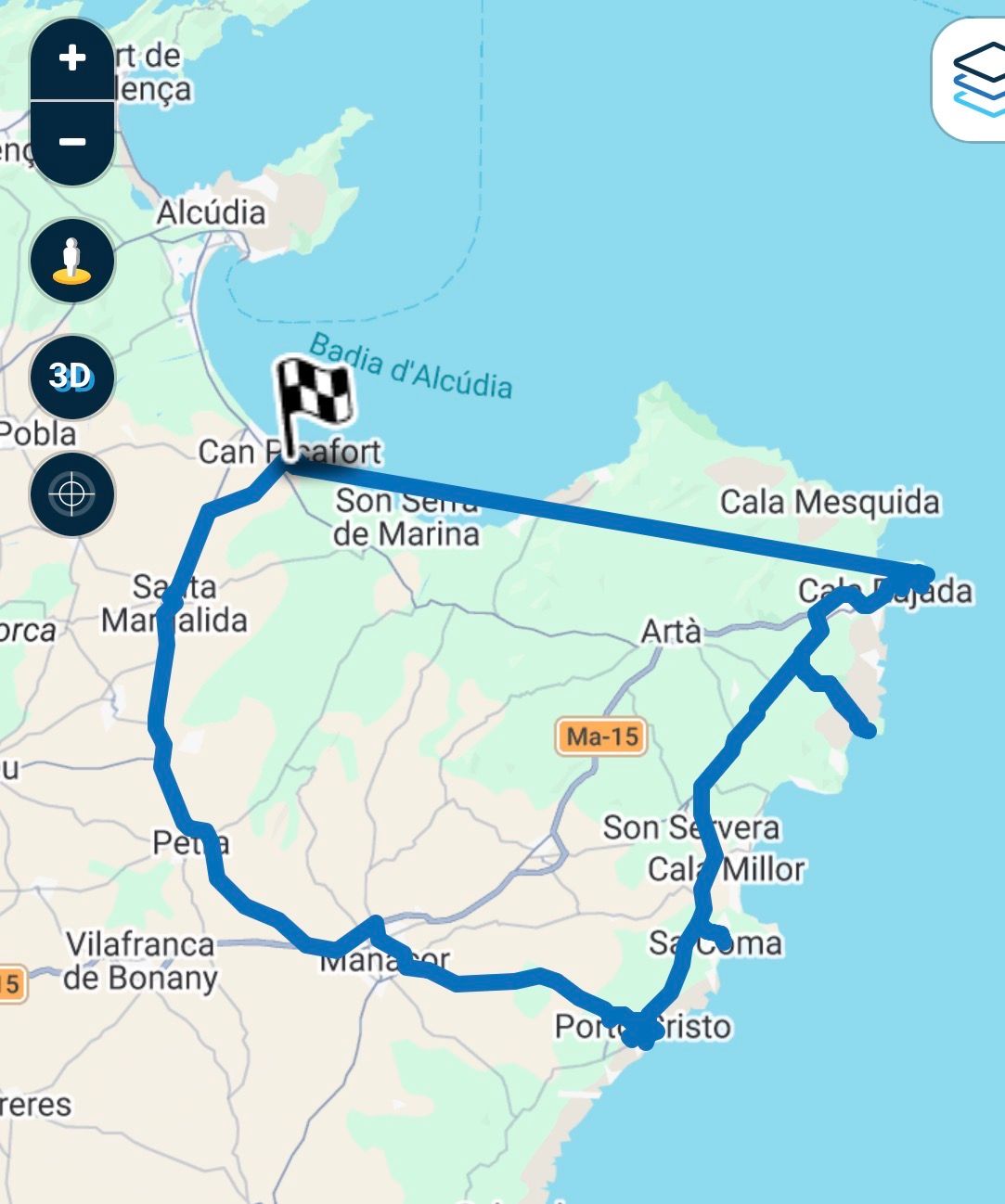
I have a tracklog of a ride I have done. Unfortunately the first part of this tour is missing. Is there a way to edit an existing tracklog in order to get a correct tracklog of my tour?
The part where you see a straight line was not tracked properly. This is the part I would like to edit.
-
I have a tracklog of a ride I have done. Unfortunately the first part of this tour is missing. Is there a way to edit an existing tracklog in order to get a correct tracklog of my tour?
The part where you see a straight line was not tracked properly. This is the part I would like to edit.

@Christian-Feurstein have you checked the track Log files
If its not there you can't get it back -
What exactly do you mean by checking tracklog files? After the ride I safed the tracklog and it was successfully uploaded. When looking into the stored tracklogs I found the showed tracklog with the first part missing. Where else do I find tracklog files?
-

This indeed cannot be corrected unfortunately.
-

There is a possibility outside MRA. With a GPX editor, a .gpx file with the missing part and some manual work. Is it worth doing?
-
What exactly do you mean by checking tracklog files? After the ride I safed the tracklog and it was successfully uploaded. When looking into the stored tracklogs I found the showed tracklog with the first part missing. Where else do I find tracklog files?

@Christian-Feurstein next Idea to edit your tracklog:
- open it by MRA Routeplanner
- select in Menue: use it as route
- delete unnecessary route points (or move some)
- save as gpx track
- upload saved gpx file again in your folder Tracklogs as track
By this, you don't need an external gpx tool
-
@Christian-Feurstein next Idea to edit your tracklog:
- open it by MRA Routeplanner
- select in Menue: use it as route
- delete unnecessary route points (or move some)
- save as gpx track
- upload saved gpx file again in your folder Tracklogs as track
By this, you don't need an external gpx tool
@Christian-Feurstein next Idea to edit your tracklog:
- open it by MRA Routeplanner
- select in Menue: use it as route
- delete unnecessary route points (or move some)
- save as gpx track
- upload saved gpx file again in your folder Tracklogs as track
By this, you don't need an external gpx tool
What about the missing part?
Hardware
iPhone 12 pro (iOS 26.2.1)
iPad (7.Gen.) 18.7.3
Oukitel RT3 Pro (Andr. 14)
Wireless CarPlay mit (Elebest C650)
Wired CarPlay (SEAT Arona - 2021)
MRA Workshops in Deutsch sind hier zu finden -
@Christian-Feurstein next Idea to edit your tracklog:
- open it by MRA Routeplanner
- select in Menue: use it as route
- delete unnecessary route points (or move some)
- save as gpx track
- upload saved gpx file again in your folder Tracklogs as track
By this, you don't need an external gpx tool
@Guzzist
Thanks … I will try this once I am back at home!

-
@Christian-Feurstein next Idea to edit your tracklog:
- open it by MRA Routeplanner
- select in Menue: use it as route
- delete unnecessary route points (or move some)
- save as gpx track
- upload saved gpx file again in your folder Tracklogs as track
By this, you don't need an external gpx tool
What about the missing part?
@Christian-Feurstein next Idea to edit your tracklog:
- open it by MRA Routeplanner
- select in Menue: use it as route
- delete unnecessary route points (or move some)
- save as gpx track
- upload saved gpx file again in your folder Tracklogs as track
By this, you don't need an external gpx tool
What about the missing part?
...that's the weak point: you need to be able to remember the route you’ve taken. Then, once you’ve turned the track into a route, you can add the relevant waypoints. And then, as mentioned, save it as a track again.
Hello! It looks like you're interested in this conversation, but you don't have an account yet.
Getting fed up of having to scroll through the same posts each visit? When you register for an account, you'll always come back to exactly where you were before, and choose to be notified of new replies (either via email, or push notification). You'll also be able to save bookmarks and upvote posts to show your appreciation to other community members.
With your input, this post could be even better 💗
Register Login-
 01847
01847
-
07138
-
 06130
06130
-
 01042
01042
-
 1327343
-
058
-
0521
-
0519