GPX Versions 1.1 vs 1.2 for Garmin Visually Explained
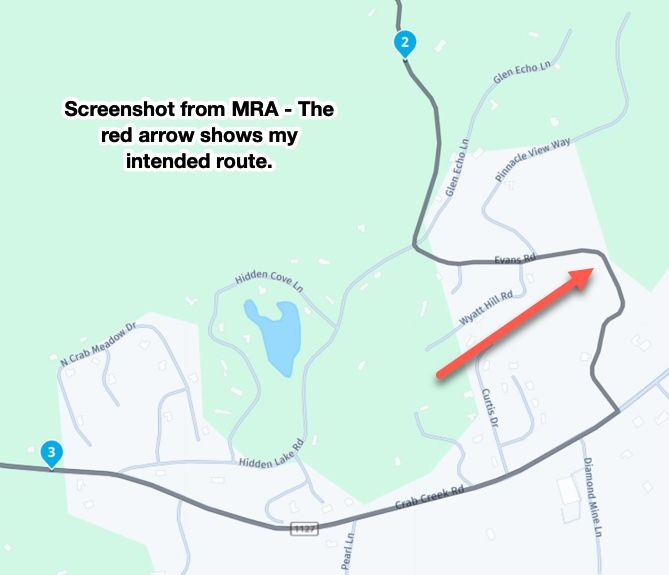
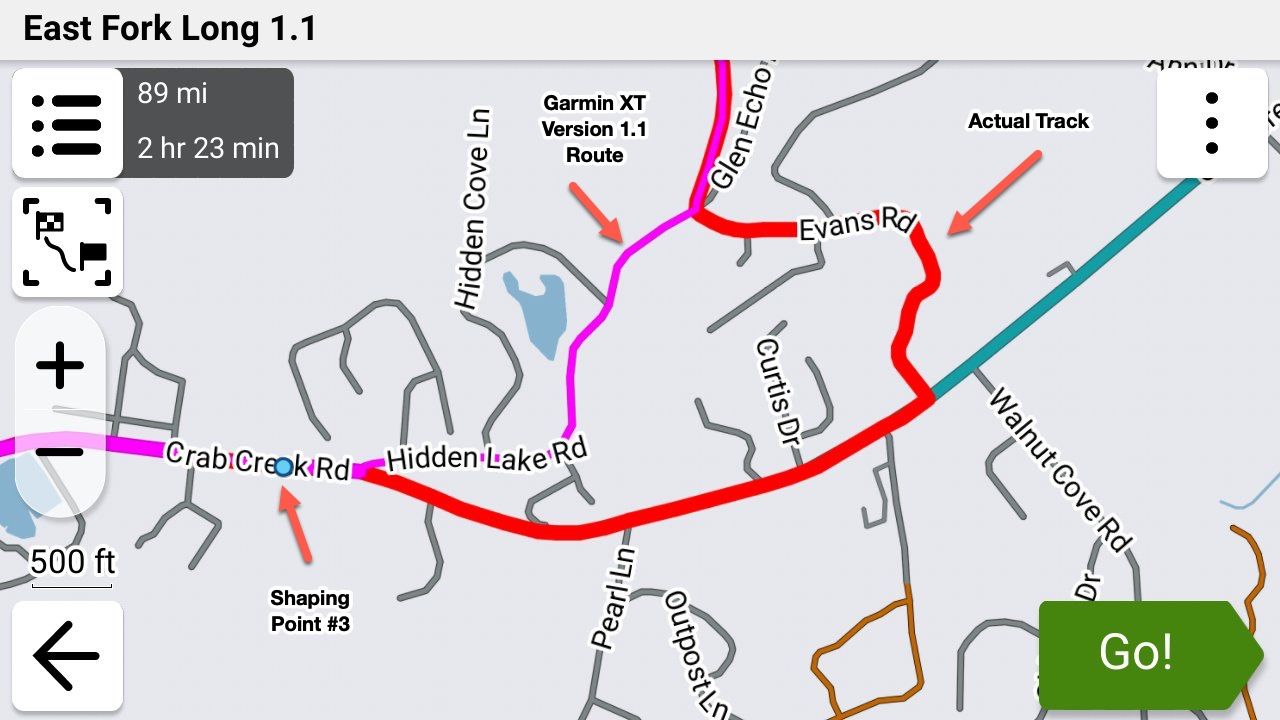
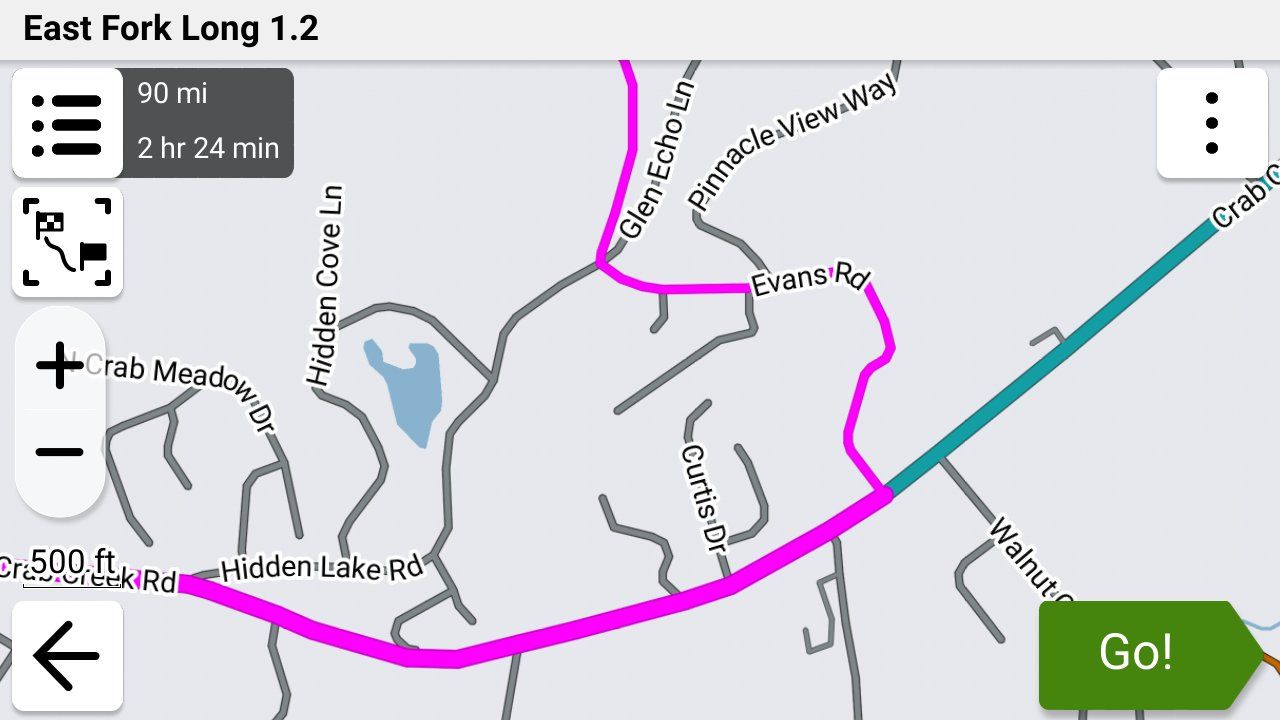
-

Has anyone tried the trip repair tool by FrankB
Here is the link
https://www.javawa.nl/triprepair.html -
Just to summarize what I have learned.
Make a route in MRA with Here map using shape points.
Making sure to have the first point when leaving a bit further down the road to make sure that the route starts.
Widen the and colour the track with the garmin settings.
Save as 1.2
Question: When using shaping points and I place one next to a petrol station and name it Petrol and add a symbol of a petrol station, will it appear and can I select it when navigating or do I have to make a via point?
@Simon-James-Hancock You would have to make it a via point. Shaping points simply shape the route. There are no shaping points in the route section of a 1.2 .gpx file. There are just gpx lat/lon coordinates.
-
As I understand it if I make it a via point I will have to stop there otherwise will be rerouted back.
I just want to add the location of petrol stations for referance when I might need them along the route. -
Has anyone tried the trip repair tool by FrankB
Here is the link
https://www.javawa.nl/triprepair.html
Trip Manager by FrankB is brilliant. Too much to go into detail here. Best bet is to go to https://zumouserforums.co.uk/viewtopic.php?t=3150 which has a full discussion on the features, functions, links, documentation etc. for Trip Manager.
-
Just to summarize what I have learned.
Make a route in MRA with Here map using shape points.
Making sure to have the first point when leaving a bit further down the road to make sure that the route starts.
Widen the and colour the track with the garmin settings.
Save as 1.2
Question: When using shaping points and I place one next to a petrol station and name it Petrol and add a symbol of a petrol station, will it appear and can I select it when navigating or do I have to make a via point?
Just to summarize what I have learned.
Make a route in MRA with Here map using shape points.
Making sure to have the first point when leaving a bit further down the road to make sure that the route starts.
Widen the and colour the track with the garmin settings.
Save as 1.2
Question: When using shaping points and I place one next to a petrol station and name it Petrol and add a symbol of a petrol station, will it appear and can I select it when navigating or do I have to make a via point?There is no specific need for using HERE as the base map when creating a GPX. It doesn't matter at all for 1.2, and if you have enough shaping points, it shouldn't make a difference using 1.1.
HERE can be troublesome unless you actually need it for the NN app, where it's required. I've been using OSM exclusively for some time now, and it's a solid choice.
-
Just to summarize what I have learned.
Make a route in MRA with Here map using shape points.
Making sure to have the first point when leaving a bit further down the road to make sure that the route starts.
Widen the and colour the track with the garmin settings.
Save as 1.2
Question: When using shaping points and I place one next to a petrol station and name it Petrol and add a symbol of a petrol station, will it appear and can I select it when navigating or do I have to make a via point?There is no specific need for using HERE as the base map when creating a GPX. It doesn't matter at all for 1.2, and if you have enough shaping points, it shouldn't make a difference using 1.1.
HERE can be troublesome unless you actually need it for the NN app, where it's required. I've been using OSM exclusively for some time now, and it's a solid choice.

There is no specific need for using HERE as the base map when creating a GPX. It doesn't matter at all for 1.2, and if you have enough shaping points, it shouldn't make a difference using 1.1.
That's not true. If you want to use the 1.2 file Here map is mandatory.
Since there is quite a difference between Here and TomTom you will certainly have a bad route using OSM of TomTom for you planning.
On top of that all Garmin systems are Here basedHonda Goldwing GL1500,
Honda Silverwing GL 650
DMD2 T865X 8 inch Android tablet using MRA next for navigation
Garmin XT sold
Samsung S24FE mounted on a Quadlock and using Android Auto in my car -
There is no specific need for using HERE as the base map when creating a GPX. It doesn't matter at all for 1.2, and if you have enough shaping points, it shouldn't make a difference using 1.1.
That's not true. If you want to use the 1.2 file Here map is mandatory.
Since there is quite a difference between Here and TomTom you will certainly have a bad route using OSM of TomTom for you planning.
On top of that all Garmin systems are Here based
@Marinus-van-Deudekom Interesting. Here is an OSM route I just put together:
https://www.myrouteapp.com/route/open/14123994
I exported this GPX in 1.2 format. I then Imported the 1.2 route into my Garmin XT3. No problems. I verified that the route in the XT3 exactly mirrored the original MRA Routplanner route in every way. To no surprise, an exact match.
Finally, I started the route on my XT3. No issues whasoever.
The only difference between base maps how they calculate in their respective environments. If you have enough shaping points defined, any map can be imported into a Garmin device and recalculate as you into intend.
Please explain how you came to your conclusions.
-
As I understand it if I make it a via point I will have to stop there otherwise will be rerouted back.
I just want to add the location of petrol stations for referance when I might need them along the route.
@Simon-James-Hancock Good question. When you add a via point your don't have to stop there, you just have to go past that position.
If you add the petrol stations along your route where you may want to stop and you just ride past them you'll be fine. If you do get off of your route the Garmin will try to route you back to them, and as we've discussed, when you skip the via point then the Garmin recalculates your route based on it's own logic and not your shaping points.
If you want to follow your original route, your only option at that point is stop the route, restart it and select "Closest Entry Point" and it will put you back on your route past the petrol station via point that you bypassed and it will preserve your original route.
I typically only put via points for petrol (gas over here) stations in my route if they're going to be scarce where I'm going to be so I rarely skip them. Otherwise for me they're more hassle than what they're worth.
There are other workarounds using Points of Interest but frankly they're way more trouble than what they're worth. The MRA app doesn't have this (or other) limitation but that an entirely different conversation!

-
As I understand it if I make it a via point I will have to stop there otherwise will be rerouted back.
I just want to add the location of petrol stations for referance when I might need them along the route.
@Simon-James-Hancock said:
I just want to add the location of petrol stations for referance when I might need them along the route.As I previously mentioned, try placing a POI on MRA. You can give it a petrol pump symbol and call it Fuel. No need for a via point if you don't need to be prompted and it will display on your Zumo.
Edit: I've just read your post @steve-jarrell - I use MRA POIs regularly and find them really useful. Easy to place and a visual reminder on the Zumo map. And yes you're right, so long as you ride through them, a via point will not turn you back.@john-s-parry @marinus-van-deudekom I've found 1.2 to be way more forgiving of route point placement when calculating. And I would have it the other way round - HERE is probably more necessary using 1.1 when poor route point placement often results in "cannot calculate the route".
My experience anyway.
-
@Simon-James-Hancock said:
I just want to add the location of petrol stations for referance when I might need them along the route.As I previously mentioned, try placing a POI on MRA. You can give it a petrol pump symbol and call it Fuel. No need for a via point if you don't need to be prompted and it will display on your Zumo.
Edit: I've just read your post @steve-jarrell - I use MRA POIs regularly and find them really useful. Easy to place and a visual reminder on the Zumo map. And yes you're right, so long as you ride through them, a via point will not turn you back.@john-s-parry @marinus-van-deudekom I've found 1.2 to be way more forgiving of route point placement when calculating. And I would have it the other way round - HERE is probably more necessary using 1.1 when poor route point placement often results in "cannot calculate the route".
My experience anyway.
I've found 1.2 to be way more forgiving of route point placement when calculating. And I would have it the other way round - HERE is probably more necessary using 1.1 when poor route point placement often results in "cannot calculate the route".
@carl-lee Im not sure I understand the above. Why is HERE any more necessary than OSM or TomTom when using 1.1 ??
Poor route point placement is going to be a problem regardless of underlying base map. Again, I want to understand why HERE in particular is being inserted into the discussion.
-
I've found 1.2 to be way more forgiving of route point placement when calculating. And I would have it the other way round - HERE is probably more necessary using 1.1 when poor route point placement often results in "cannot calculate the route".
@carl-lee Im not sure I understand the above. Why is HERE any more necessary than OSM or TomTom when using 1.1 ??
Poor route point placement is going to be a problem regardless of underlying base map. Again, I want to understand why HERE in particular is being inserted into the discussion.
@John-S-Parry The general consensus is for the most compatibility between MRA and Garmin devices you should use the HERE maps when you're saving your .gpx files from MRA to be used by the Garmin. This is discussed in a number of threads including this one.
A search in this forum for Here Maps should turn up a lot of information.
Steve Jarrell
Western North Carolina USLifetime Routeplanner Gold & Navigation Next
2025 BMW R1300GS
2025 Can-Am Spyder
DMD T865-X 8" Tablet
Garmin XT3 -
@John-S-Parry The general consensus is for the most compatibility between MRA and Garmin devices you should use the HERE maps when you're saving your .gpx files from MRA to be used by the Garmin. This is discussed in a number of threads including this one.
A search in this forum for Here Maps should turn up a lot of information.
@John-S-Parry The general consensus is for the most compatibility between MRA and Garmin devices you should use the HERE maps when you're saving your .gpx files from MRA to be used by the Garmin. This is discussed in a number of threads including this one.
Many moons ago withe the earlier Garmin GPS devices, there was a more-or-less a direct compatibly between Basecamp and the GPS units. With the XTs, that HERE route calculation Equivalency has slowly degraded. In the years I used the XT, it wasn’t unusual to find my route to recalculate slightly different from what I developed in BC. It happened enough where I had to always double check after route transfer, and then adjust shaping points to get the platforms in sync.
The fact is that MRA HERE and Garmin HERE are not identical, and suffer the same occasional calculation differences. It’s not a debatable point. I can show you several routes I’ve developed in Routeplanner HERE that needed required additional shaping points to calculate correctly on the XT side.
So, you can argue that MRA HERE is closer, but this isn’t horseshoes or hand grenades. The development platform (MRA Routeplanner) either calculates 100% the same as the GPS device, or it doesn’t.
The forum is littered with endless problems associated with HERE. If you like the search function, check that out yourself.
With route creation, it comes down to taking responsibility for overloading shaping points so that the calculation routines have no choice but to calculate the way you want. I think you understand that from what I read in your posts. In Routeplanner, I have found OSM to be a terrific base map for route creation. Dozens of complex routes successfully created and executed tells me so. Overload with shaping points, and it simply works without the drama that sometimes gets inserted by MRA HERE.
I hope this explains where I’m coming from.
-
@John-S-Parry The general consensus is for the most compatibility between MRA and Garmin devices you should use the HERE maps when you're saving your .gpx files from MRA to be used by the Garmin. This is discussed in a number of threads including this one.
Many moons ago withe the earlier Garmin GPS devices, there was a more-or-less a direct compatibly between Basecamp and the GPS units. With the XTs, that HERE route calculation Equivalency has slowly degraded. In the years I used the XT, it wasn’t unusual to find my route to recalculate slightly different from what I developed in BC. It happened enough where I had to always double check after route transfer, and then adjust shaping points to get the platforms in sync.
The fact is that MRA HERE and Garmin HERE are not identical, and suffer the same occasional calculation differences. It’s not a debatable point. I can show you several routes I’ve developed in Routeplanner HERE that needed required additional shaping points to calculate correctly on the XT side.
So, you can argue that MRA HERE is closer, but this isn’t horseshoes or hand grenades. The development platform (MRA Routeplanner) either calculates 100% the same as the GPS device, or it doesn’t.
The forum is littered with endless problems associated with HERE. If you like the search function, check that out yourself.
With route creation, it comes down to taking responsibility for overloading shaping points so that the calculation routines have no choice but to calculate the way you want. I think you understand that from what I read in your posts. In Routeplanner, I have found OSM to be a terrific base map for route creation. Dozens of complex routes successfully created and executed tells me so. Overload with shaping points, and it simply works without the drama that sometimes gets inserted by MRA HERE.
I hope this explains where I’m coming from.
@John-S-Parry I totally understand and I mostly agree. I've used both the OSM and HERE maps extensively in MRA.
However I do believe that the "lowest common denominator" between MRA and Garmin are the HERE maps, and my best chance of seeing my exact route that I planned in MRA on my Garmin device is using the HERE map in MRA. I think that this belief is echoed by many of the top MRA experts on this forum (which I AM NOT!).
Is it perfect using HERE maps on both MRA and Garmin? NO, absolutely not!
Is it better than using the OSM map in MRA, then saving the route as a .gpx file and importing it into a Garmin which uses the HERE maps as its base maps and not the OSM maps? Based on my experience.... YES.
I really like the OSM maps.... don't get me wrong. My goal when I create a route in MRA and transfer it to my Garmin is to follow the route EXACTLY as I planned it in MRA.
In MY experience, MY very best chance of accomplishing that goal is to:
- Plan the route in the online version of MRA using the HERE map, and put via points where I definitely want to stop or at least pass by (petrol/gas stations, overlooks, monuments, restaurants, or whatever)
- Put enough shaping points in MRA to shape the route exactly like I want to ride it. This is where MRA excels and makes creating exactly the route that I want easier than any other application that I have ever used.
- Save the route using the .gpx 1.2 format
- Import the .gpx 1.2 route into the Garmin and place it into a collection along with the track so that I can see both of them simultaneously (this is for the XT2 and XT3.... previous models don't use collections so there are other methods for showing routes and tracks simultaneously)
- Avoid skipping via points as much as possible, and if I must then I just restart the route and enter at the closest entry point.
I think that we all realize that EVERYTHING we do between MRA and GARMIN involves compromises. If there is a "perfect" solution I most certainly don't know what it is, nor have I ever heard of anyone who does.
I believe that the best we can do is weigh all of the variables and do what we think is best for our application. There are really no right or wrong definitive answers!
The key is understanding the options and limitations so that you can make an intelligent choice, and I'm very thankful for all of the expertise and thoughtful input everyone has provided here. I have learned a lot!
-
@john-s-parry Base maps and their specifics is not a lecture I feel qualified to give. What I have observed is that the mapping is more akin to the XT2 and that each of them have their own routing logic which you can see with the 'Compare' function. Likewise, I've been led to believe by people more expert than me that it's the informed choice.
I do swap between layers when planning with the HERE base map and I find OSM useful to see where certain roads lead and their travel direction (if one-way etc.). When doing this, my black route line is often not on the OSM road and sometimes way off. I get round this by placing my route point on the black line then checking back on the HERE overlay to make sure it's on the road. Route points not on the road (or line) have resulted in calculating errors on my XT2. I hope that explains better what I was trying to say.
What I will stand by is that GPX1.2 is way more forgiving of MRA planning errors than GPX1.1. A very quickly put together MRA route planned (with or without via points) on HERE and transferred with 1.2 always seems to calculate and run whereas 1.1 needs a lot more attention to detail. And like I said, just my experience but I'm always open to new ideas.
I won't argue that planning with the OSM base map and 'overloading' shaping points will work and I'll certainly try it.
-
I've found 1.2 to be way more forgiving of route point placement when calculating. And I would have it the other way round - HERE is probably more necessary using 1.1 when poor route point placement often results in "cannot calculate the route".
@carl-lee Im not sure I understand the above. Why is HERE any more necessary than OSM or TomTom when using 1.1 ??
Poor route point placement is going to be a problem regardless of underlying base map. Again, I want to understand why HERE in particular is being inserted into the discussion.
@John-S-Parry Although the 1.2 export doesn't show the shaping points on your Garmin. The track that is the base of your 1.2 export consist of thousands of invisible shaping points. Of the original shaping points in MRA are off the route the result will be accordingly thus giving Garmin the possibility to mess up your day
-
@John-S-Parry I totally understand and I mostly agree. I've used both the OSM and HERE maps extensively in MRA.
However I do believe that the "lowest common denominator" between MRA and Garmin are the HERE maps, and my best chance of seeing my exact route that I planned in MRA on my Garmin device is using the HERE map in MRA. I think that this belief is echoed by many of the top MRA experts on this forum (which I AM NOT!).
Is it perfect using HERE maps on both MRA and Garmin? NO, absolutely not!
Is it better than using the OSM map in MRA, then saving the route as a .gpx file and importing it into a Garmin which uses the HERE maps as its base maps and not the OSM maps? Based on my experience.... YES.
I really like the OSM maps.... don't get me wrong. My goal when I create a route in MRA and transfer it to my Garmin is to follow the route EXACTLY as I planned it in MRA.
In MY experience, MY very best chance of accomplishing that goal is to:
- Plan the route in the online version of MRA using the HERE map, and put via points where I definitely want to stop or at least pass by (petrol/gas stations, overlooks, monuments, restaurants, or whatever)
- Put enough shaping points in MRA to shape the route exactly like I want to ride it. This is where MRA excels and makes creating exactly the route that I want easier than any other application that I have ever used.
- Save the route using the .gpx 1.2 format
- Import the .gpx 1.2 route into the Garmin and place it into a collection along with the track so that I can see both of them simultaneously (this is for the XT2 and XT3.... previous models don't use collections so there are other methods for showing routes and tracks simultaneously)
- Avoid skipping via points as much as possible, and if I must then I just restart the route and enter at the closest entry point.
I think that we all realize that EVERYTHING we do between MRA and GARMIN involves compromises. If there is a "perfect" solution I most certainly don't know what it is, nor have I ever heard of anyone who does.
I believe that the best we can do is weigh all of the variables and do what we think is best for our application. There are really no right or wrong definitive answers!
The key is understanding the options and limitations so that you can make an intelligent choice, and I'm very thankful for all of the expertise and thoughtful input everyone has provided here. I have learned a lot!
@Steve-Jarrell @carl-lee @marinus-van-deudekom First, thanks for the conversation. I get passionate about this stuff, so sometimes I hit back harder than I should. In my defense, this is my hobby. I love studying maps and their relative behaviors. With due respect, sometimes things are said/implied by "experts" that have no basis in reality and are simply accepted as the gospel by many. In my experience, the value of using "HERE" as a base map for import to Garmin devices is one of them.
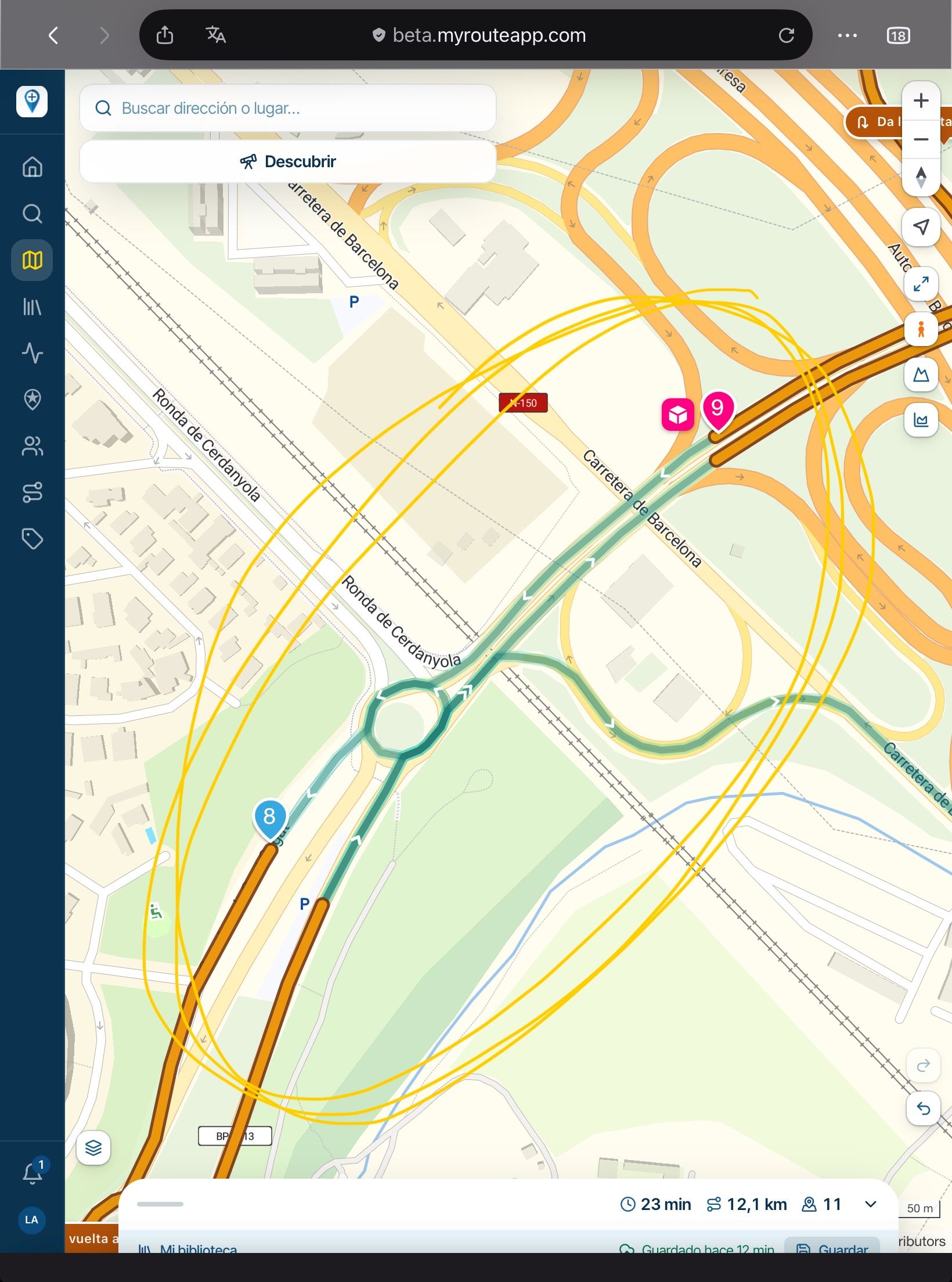
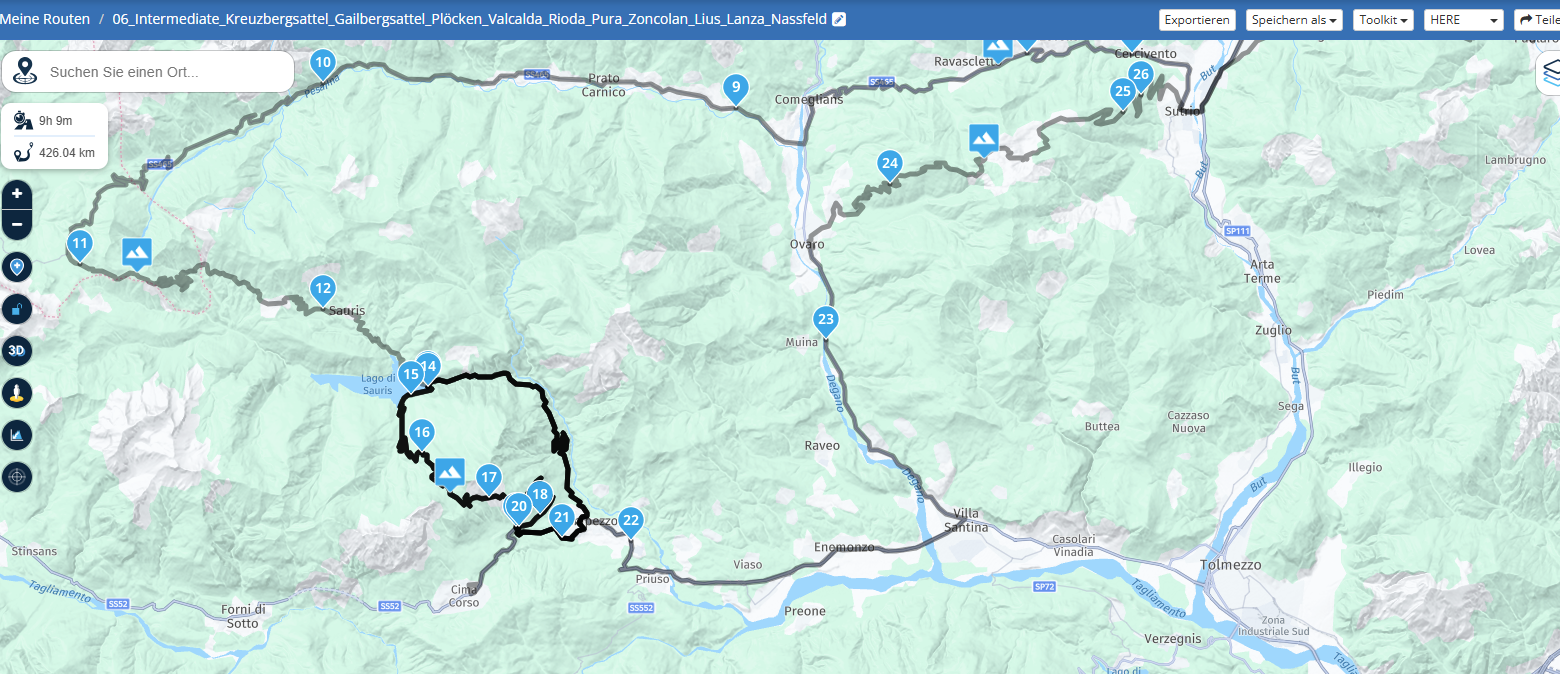
The route below is a very recent example:
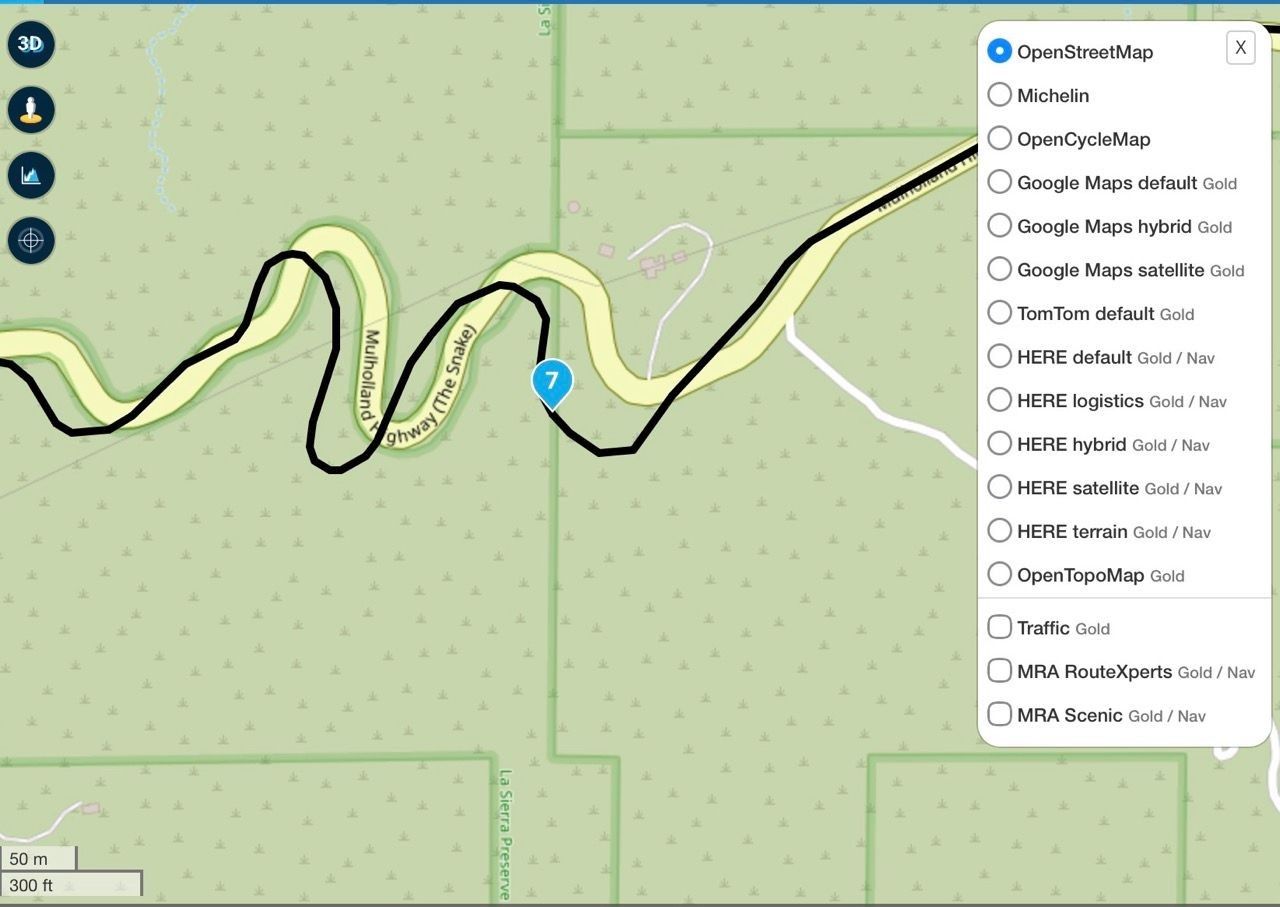
The black line shows the HERE map route line. You can clearly see with an OSM overlay that the route section around WP#7 is significantly off from where the physical road actually exists. In other words, it's a HERE cartography error that really screwed up running the HERE version of the route. I'd like to say this is the first time I have encountered this kind of HERE error, but I can't. In any case, if you're interested in the details, you can review the topic:
https://forum.myrouteapp.com/topic/11297/another-erratic-routing-incident?page=1
I won't rehash much of what I've already said. But in short, HERE (to me) has too many deficiencies to trust as a base map for Routeplanner development. There is a laundry list of other serious HERE problems I could list but won't do here.
I'll finish by emphasizing that there is too much fear of non-HERE route development. In addition to using OSM in Routeplanner, I also develop routes using a Mac Desktop planner called inRoute, which is completely Apple Maps based. I can export a GPX from inRoute, import it into a Garmin GPS, and have 100% confidence that everything is OK. Again, proven over years of development using that platform. It comes down to having the right mix of shaping points for an accurate recalculation on the Gamin side.
From a cartography and GPS coordinates point of view, I'll take OSM or Apple based maps every time over HERE. This is all from personal experience and not conjecture. As always, I want to learn and if there is something I'm missing here, I'm all ears.
-
This whole topic is about getting routes into Garmin devices. Garmin uses Here as road map. Its a known and multiple proved fact that routes created with OSM or TomTom cause problems on those Garmin devices.
Im certainly not stating that the Here map is perfect. Far from that BUT it's the map Garmin uses.
If you want to use OSM be my guest.
By the way my Garmin devices are all sold
Im a MRA RouteXpert so yes I'm promoting MRA. Is it perfect no but pretty damn near close and as far as I'm concerned the number 1 app to navigate with. -
@john-s-parry ok, I can see from your link that you've had a very similar conversation before.
I've just had a little play with the base maps and overlays and it's as you say; a route point placed on the road and on the route line in OSM is not necessarily on the route line when you change the base map to HERE even if it appears that way on the OSM/HERE layer. I hope that makes sense - it does to me.
This is probably something I gleaned some time ago and forgot but it leads me to conclude that I'm probably better off sticking to the HERE base map and utilising the OSM layer as a planning aid. I navigate with an XT2.
Route points not placed directly on the HERE roads have given me grief in the past. Don't worry about hitting back, so long as we can all get something out of it all is good.
I'm still working out what my way of going forward is with GPX files for a tour. At the moment I'm favouring GPX1.1 on the SD card as a backup then a quick check to see if it will calculate through Tread too. If it's taking ages, transfer through Tread as GPX1.2 which seems to be much quicker.
Anyway, Road Closures. Any idea if one will promulgate a full route recalculation? I think that's my only major unknown re GPX1.2 and why you may have to disable Traffic.
-
This whole topic is about getting routes into Garmin devices. Garmin uses Here as road map. Its a known and multiple proved fact that routes created with OSM or TomTom cause problems on those Garmin devices.
Im certainly not stating that the Here map is perfect. Far from that BUT it's the map Garmin uses.
If you want to use OSM be my guest.
By the way my Garmin devices are all sold
Im a MRA RouteXpert so yes I'm promoting MRA. Is it perfect no but pretty damn near close and as far as I'm concerned the number 1 app to navigate with.
@Marinus-van-Deudekom Your assertion that Garmin devices use HERE maps is only true if you choose not to load other maps, which is very easy to do. I exclusively use OSM maps on my Garmin devices and have done so in North, Central and South America, New Zealand, Europe including most of Scandinavia and the Baltics and lastly North Africa. I'm currently planning a trip to Australia and will continue to use MRA planner for planning but use my Garmin for navigation. There are currently just too many issues with the Next app for me.
I do not have issues in creating routes in planners that use OSM maps that I can then easily load and use on my Garmin devices.
I'm also currently evaluating the beta version of DMD2 Next and frankly it knocks the spots off MRA.
I currently recommend MRA planner to anyone that asks but actively dissuade people from using MRA Next.
Before anyone replies, please remember that my experiences, views and recommendations are just as valid as yours. I've seen how dismissive MRA jihadists can be of anyone who doesn't fully share their love for anything MRA.
-
@john-s-parry Base maps and their specifics is not a lecture I feel qualified to give. What I have observed is that the mapping is more akin to the XT2 and that each of them have their own routing logic which you can see with the 'Compare' function. Likewise, I've been led to believe by people more expert than me that it's the informed choice.
I do swap between layers when planning with the HERE base map and I find OSM useful to see where certain roads lead and their travel direction (if one-way etc.). When doing this, my black route line is often not on the OSM road and sometimes way off. I get round this by placing my route point on the black line then checking back on the HERE overlay to make sure it's on the road. Route points not on the road (or line) have resulted in calculating errors on my XT2. I hope that explains better what I was trying to say.
What I will stand by is that GPX1.2 is way more forgiving of MRA planning errors than GPX1.1. A very quickly put together MRA route planned (with or without via points) on HERE and transferred with 1.2 always seems to calculate and run whereas 1.1 needs a lot more attention to detail. And like I said, just my experience but I'm always open to new ideas.
I won't argue that planning with the OSM base map and 'overloading' shaping points will work and I'll certainly try it.
@Carl-Lee "What I will stand by is that GPX1.2 is way more forgiving of MRA planning errors than GPX1.1. A very quickly put together MRA route planned (with or without via points) on HERE and transferred with 1.2 always seems to calculate and run whereas 1.1 needs a lot more attention to detail. And like I said, just my experience but I'm always open to new ideas."
You are 100% correct. It's a fact that a route created in the Garmin using the 1.2 format is FAR more likely to follow the route that's shown in MRA than one created with the 1.1 format unless you use a LOT of shaping points.
But why would you? I gave a couple of very clear examples of this at the beginning of this post.
Using the 1.1 vs. the 1.2 format to create the exact route that you planned in MRA in the Garmin, regardless of the map layer, is very tedious and requires that you send the route to the Garmin, let it create the route, then double check it against the track to ensure that it's what you planned in MRA.
I used 1.1 and did it this way many times until I understood exactly what the 1.2 format was how it works. The 1.2 format was created specifically to address this issue and allow you to create a route with far fewer shaping points while ensuring that the route precisely follows the track that you intended.
Here's another interesting fact that I learned just today. My Garmin XT3 actually uses HERE AND OSM mapping data. I have no idea when it uses either one, but it doesn't really concern me as I just want my route to follow my intended track as closely as possible, that the 1.2 format does that the best for me.
Hello! It looks like you're interested in this conversation, but you don't have an account yet.
Getting fed up of having to scroll through the same posts each visit? When you register for an account, you'll always come back to exactly where you were before, and choose to be notified of new replies (either via email, or push notification). You'll also be able to save bookmarks and upvote posts to show your appreciation to other community members.
With your input, this post could be even better 💗
Register Login









-
 912412.0k
-
 01038
01038
-
 01336
01336
-
0621
-
 0516
0516
-
 0517
0517
-
 05137
05137
-
1420