New beta! 5.0.3 (447)
-

Hi,
so what I read, I am not affected. iPhone, iPad and Android tablet should work seamless. The old Samsung I use sometimes for testing is outdated anyway.
And what I understand, web access is not affected anyway. -

@Jörgen : You also use a CarPlay or Android Auto Display, then two MyRouteApp devices are enough ....

-

A limit of two devices feels slightly restrictive when you have both a routing licence AND a navigation app licence. It leaves no flexibility beyond normal usage. Occasionally depending on which bike/which trip (and what weather!) I use one of two phones for the navigation - obviously not at the same time.
Just checking - can I log out of one phone, and then log in with the other phone and continue? (The other device is a laptop for planning, that won't change for months/years.)
-
A limit of two devices feels slightly restrictive when you have both a routing licence AND a navigation app licence. It leaves no flexibility beyond normal usage. Occasionally depending on which bike/which trip (and what weather!) I use one of two phones for the navigation - obviously not at the same time.
Just checking - can I log out of one phone, and then log in with the other phone and continue? (The other device is a laptop for planning, that won't change for months/years.)

@richtea999 that is exactly as intended.
You can swap phones continuously and simultaneously. All allowed! -

I prefectly understand the idea behind the device management. I would like to see this more refinied. I think, it would be more fair, if that could be more like other license systems working for various software. This means, you can manage by your own the device slots and for example, you can only add once a month or something like that a new device and if maximum is reached, you need to remove one, as you already implemented. I don't like the idea, that after "too many" phone switches, you could loose your account. I also think, that two devices are not enough, a good compromis would be three devices. Im my example, that would mean my daily phone used in car, one rugged on motorbike and a test device.
-
This post is deleted!
-
@richtea999 that is exactly as intended.
You can swap phones continuously and simultaneously. All allowed!
@Corjan-Meijerink said in New beta! 5.0.3 (447):
@richtea999 that is exactly as intended.
You can swap phones continuously and simultaneously. All allowed!Perfect. Thank you. Good work, as ever!
-
I prefectly understand the idea behind the device management. I would like to see this more refinied. I think, it would be more fair, if that could be more like other license systems working for various software. This means, you can manage by your own the device slots and for example, you can only add once a month or something like that a new device and if maximum is reached, you need to remove one, as you already implemented. I don't like the idea, that after "too many" phone switches, you could loose your account. I also think, that two devices are not enough, a good compromis would be three devices. Im my example, that would mean my daily phone used in car, one rugged on motorbike and a test device.
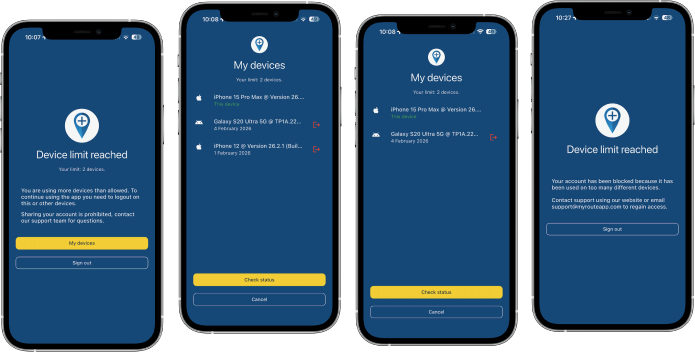
@ConiKost thanks for sharing your thoughts! 3 devices is also allowed but not stimulated so then you indeed need to logoff one using the presented interface.
-
@ConiKost thanks for sharing your thoughts! 3 devices is also allowed but not stimulated so then you indeed need to logoff one using the presented interface.
@Corjan-Meijerink said in New beta! 5.0.3 (447):
@ConiKost thanks for sharing your thoughts! 3 devices is also allowed but not stimulated so then you indeed need to logoff one using the presented interface.
But from what I understood, If I would do that more often with a test device, woudn't I risk again my account due device-chance? Or does that mean, once I logged in on a device, its fingerprint is added to my account device list and I am save? Only to be allowed to login at the same time on two devices would be fine for me.
-
Question about the device assignment: Maybe something like that works, with a view to the users who are on the road:
-
3 devices pure mobile phone users = 2H+1T
-
2 devices for the CP - AA users = 1H+1T
Perhaps it is also technically possible that you would simply allow Max 2H (mobile phones) + 1T (iPad/tablet) without the user having to choose between 2 of 3 !?!?️
Might be an idea, I just don't know if that would work technically in the app.
-
-
@Corjan-Meijerink said in New beta! 5.0.3 (447):
@ConiKost thanks for sharing your thoughts! 3 devices is also allowed but not stimulated so then you indeed need to logoff one using the presented interface.
But from what I understood, If I would do that more often with a test device, woudn't I risk again my account due device-chance? Or does that mean, once I logged in on a device, its fingerprint is added to my account device list and I am save? Only to be allowed to login at the same time on two devices would be fine for me.
@ConiKost fully correct! (the last and positive part)
-

Hi @Corjan, Only for identify scenarios...
License limit of 2 devices, affects also Web Planner on computer?
I understand that this limit is for mobile devices which are user for navigation (Next license), even that in a mobile device affects also Integrated MRA RoutePlanner.Best Regards!!
Lluis Arasanz
- BMW F750GS
MotoMediaLink HW Interface for BMW's WonderWheel device - Samsung A14 with Beta MyRoute-App (primary bike use)
Tasker and MMLink SW for Android App Control - iPhone 14 with Beta MyRoute-App (personal and primary CP use)
- BMW F750GS
-
Hi @Corjan, Only for identify scenarios...
License limit of 2 devices, affects also Web Planner on computer?
I understand that this limit is for mobile devices which are user for navigation (Next license), even that in a mobile device affects also Integrated MRA RoutePlanner.Best Regards!!

@Lluis-Arasanz, web planner in a browser is excluded from the restrictions. The restrictions are for the complete MRA app, so it includes also the in-app planner.
I am just an enthusiastic MRA user, and hope you will be one too!
Most motorcycle problems are caused by the nut that connects the handlebar to the saddle.
Check out RideSleepRepeat.eu, a biker community for sharing stays across Europe
-
@Lluis-Arasanz, web planner in a browser is excluded from the restrictions. The restrictions are for the complete MRA app, so it includes also the in-app planner.
@Con-Hennekens good...
This is what I suppose, and how license must be applied. My post is only to clarify others that thinks web planner on Computer is also affected.
Regards
Lluis Arasanz
- BMW F750GS
MotoMediaLink HW Interface for BMW's WonderWheel device - Samsung A14 with Beta MyRoute-App (primary bike use)
Tasker and MMLink SW for Android App Control - iPhone 14 with Beta MyRoute-App (personal and primary CP use)
- BMW F750GS
-
@Con-Hennekens good...
This is what I suppose, and how license must be applied. My post is only to clarify others that thinks web planner on Computer is also affected.
Regards
@Lluis-Arasanz, exactly. And also web-logins from a tablet are not affecting the device management.
-

Is a device which is logged in but switched off (like my tablet or navigation phone). Also count as a logged in device?
Why the question. I installed the app on 3 devices but only my daily phone is always switched on.(I use MRA Next only on Android Auto. Every comment, suggestion, etc will be based on my usage with Android Auto)
-
Is a device which is logged in but switched off (like my tablet or navigation phone). Also count as a logged in device?
Why the question. I installed the app on 3 devices but only my daily phone is always switched on.
@M.-Schrijver, having a device switched on or off does not influence the fact that you are using it with the MRA app. But of course you can remove any switched off device from the list on the phone you are trying to use when the message about device management appears.
-
Hi,
so what I read, I am not affected. iPhone, iPad and Android tablet should work seamless. The old Samsung I use sometimes for testing is outdated anyway.
And what I understand, web access is not affected anyway.
This post is deleted! -
Hi,
so what I read, I am not affected. iPhone, iPad and Android tablet should work seamless. The old Samsung I use sometimes for testing is outdated anyway.
And what I understand, web access is not affected anyway.
said in New beta! 5.0.3 (447):
Hi,
so what I read, I am not affected. iPhone, iPad and Android tablet should work seamless. The old Samsung I use sometimes for testing is outdated anyway.
And what I understand, web access is not affected anyway.Sorry to ask again, after reading three pages, it is still not clear. Are my guess right?
-
said in New beta! 5.0.3 (447):
Hi,
so what I read, I am not affected. iPhone, iPad and Android tablet should work seamless. The old Samsung I use sometimes for testing is outdated anyway.
And what I understand, web access is not affected anyway.Sorry to ask again, after reading three pages, it is still not clear. Are my guess right?
@Jörgen, yes, however the third device your are starting the app on, will show the list of devices in which you can decide to remove one. The removal has no real impact, the removed device will be added to the list again when you start the app on it, if then it is the third device again, you can remove one of the others. If you put a fourth device in the mix, things will become a problem. You have the beta, just try it, to get comfortable with it. Just don't press "abmelden", then you will need to resync all your routes.
Hello! It looks like you're interested in this conversation, but you don't have an account yet.
Getting fed up of having to scroll through the same posts each visit? When you register for an account, you'll always come back to exactly where you were before, and choose to be notified of new replies (either via email, or push notification). You'll also be able to save bookmarks and upvote posts to show your appreciation to other community members.
With your input, this post could be even better 💗
Register Login









-
 01327
01327
-
 06110
06110
-
1528
-
0519
-
0510
-
0422
-
08213
-
0314