using GPS coordinates for planning not always correct
-
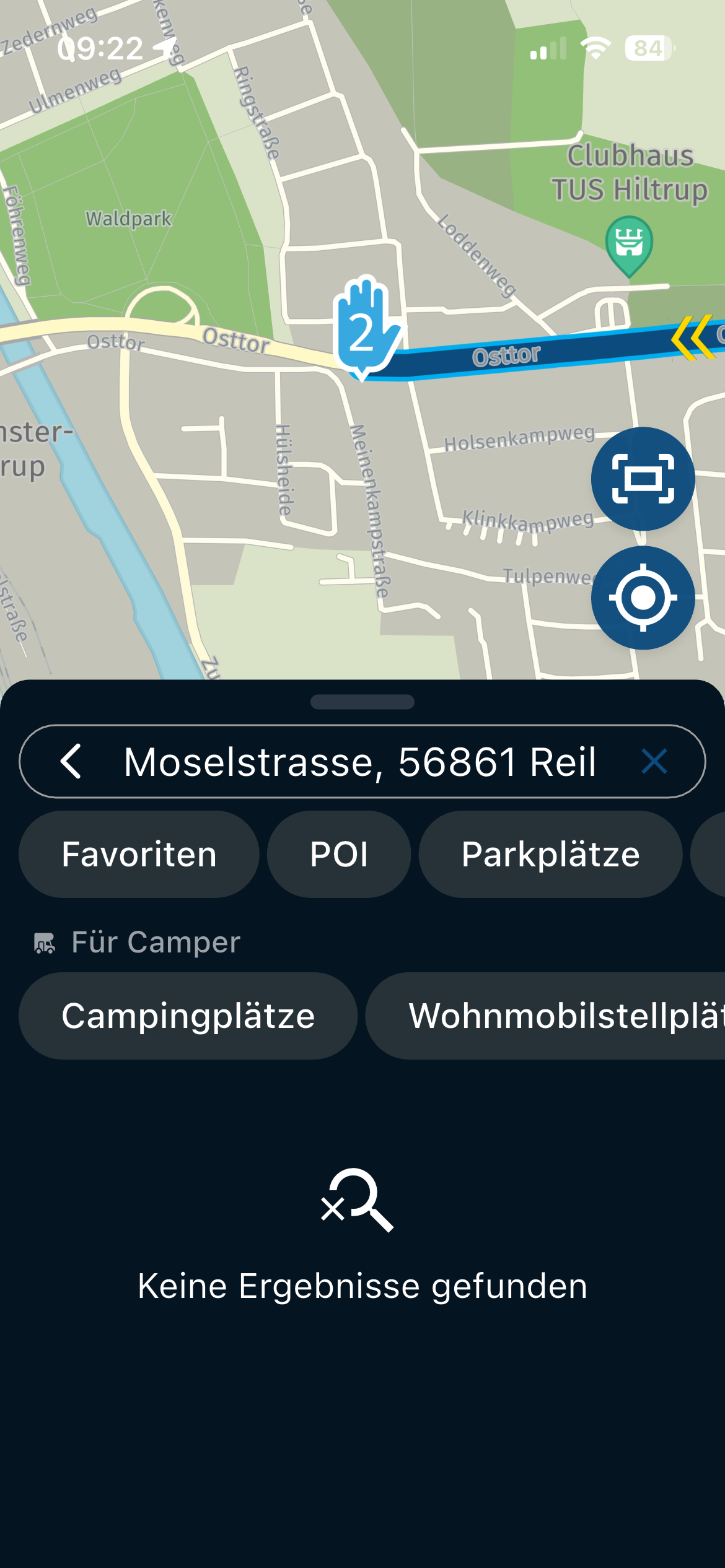
thanks for your answers, but somehow you are ignoring my point: Why is are the GPS Coordinates not offered as the first search result?
The search option is much more prominent than this tiny little pin (which I only noted recently).
It would be a much better UX
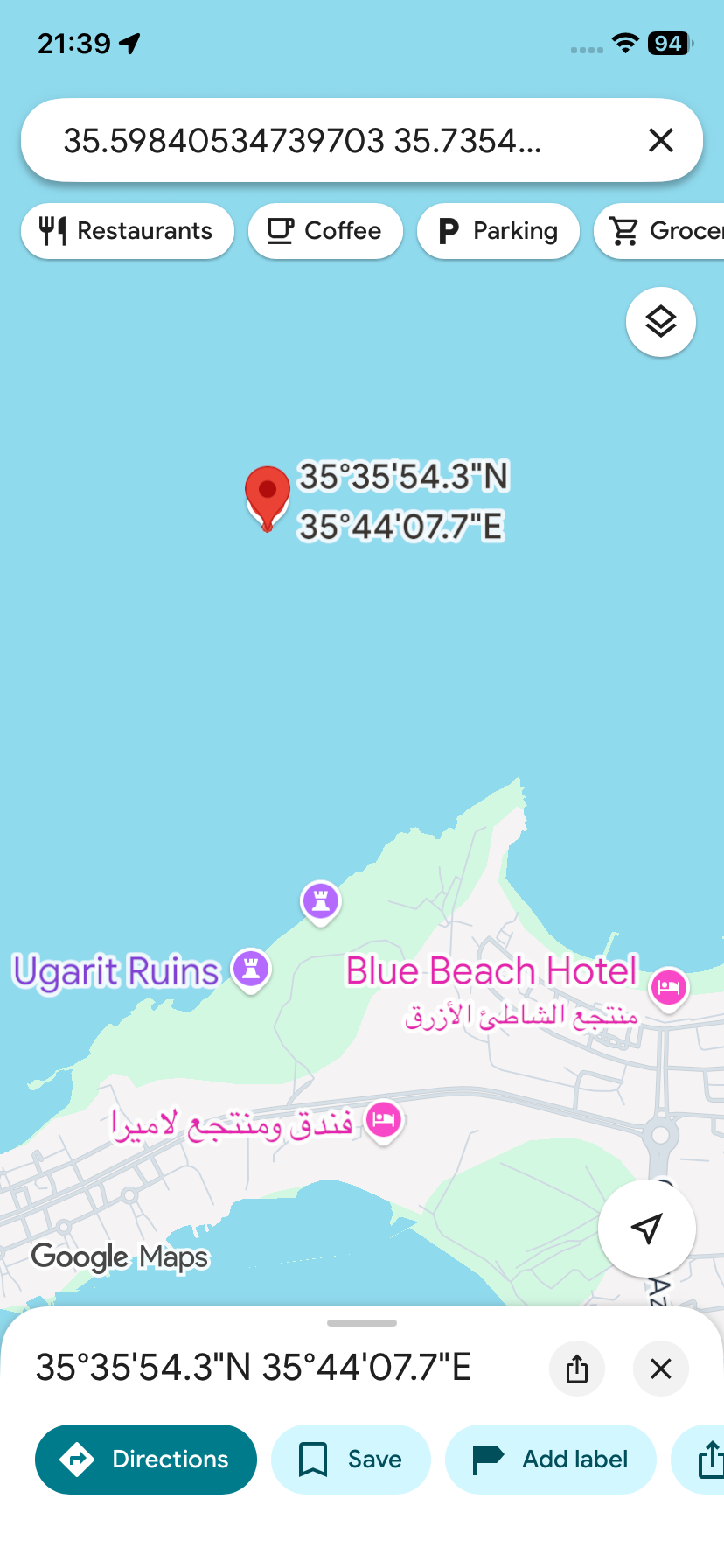
@Robert-Laudensack When I enter your coordinates into Google Maps it also shows a position in the Mediterranean Sea.
https://maps.app.goo.gl/MJ741TETbzk75xzA7?g_st=ic
-
@Brian-McG Sorry, but they are not, they are in the "correct order" as Goggle shows them. it depends a bit where exactly you click
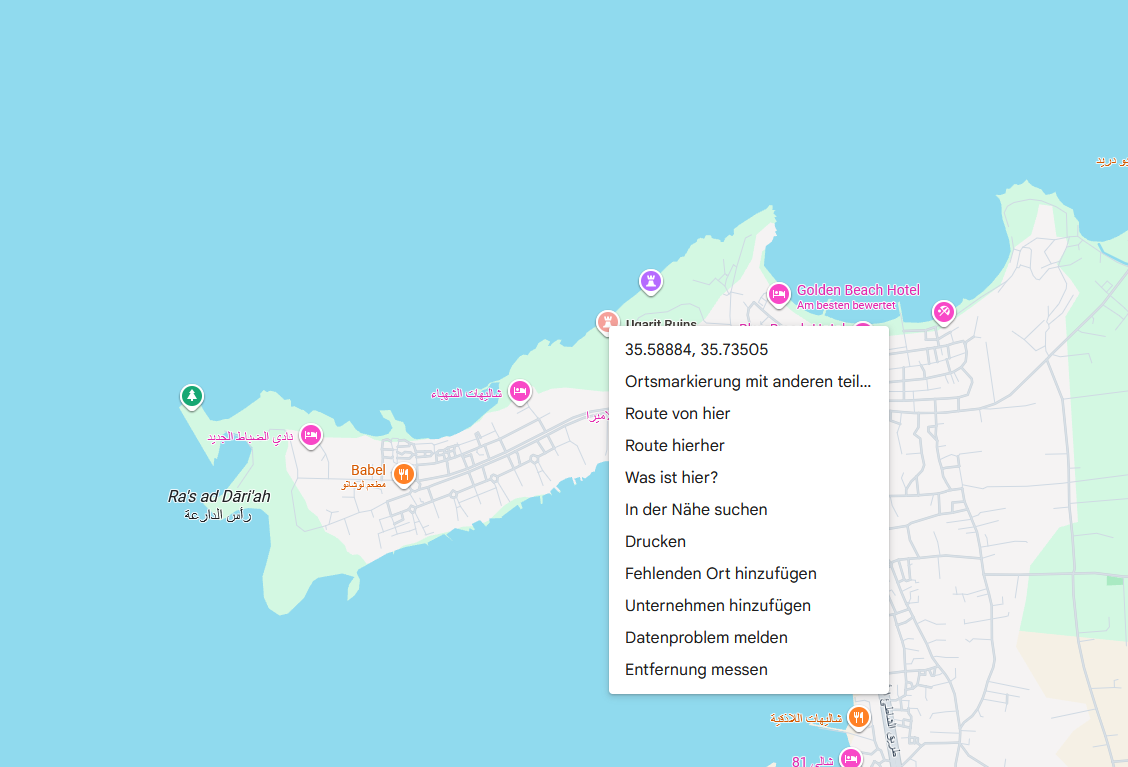
BTW why in the world would I go through the effort swapping them ....
@Robert-Laudensack said in using GPS coordinates for planning not always correct:
BTW why in the world would I go through the effort swapping them ....
There are tools that unintentionally do that. But that is not the case here.
I see no problem at all. It is just that your coordinates are wrong
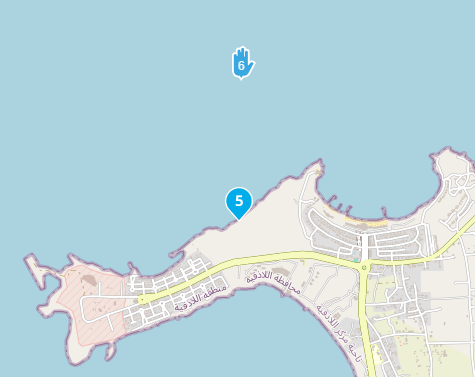
WP5 are your coordinates
WP6 is the ruines @ 35.58846318787982, 35.735021769743966
(coordinates from Google)I am just an enthusiastic MRA user, and hope you will be one too!
Most motorcycle problems are caused by the nut that connects the handlebar to the saddle.
Check out RideSleepRepeat.eu, a biker community for sharing stays across Europe
-
@Robert-Laudensack said in using GPS coordinates for planning not always correct:
BTW why in the world would I go through the effort swapping them ....
There are tools that unintentionally do that. But that is not the case here.
I see no problem at all. It is just that your coordinates are wrongWP5 are your coordinates
WP6 is the ruines @ 35.58846318787982, 35.735021769743966
(coordinates from Google)
said in using GPS coordinates for planning not always correct:
WP5 are your coordinates
WP6 is the ruines @ 35.58846318787982, 35.735021769743966Excuse me, I got them mixed up. Of course it is the other way around.
-
@Robert-Laudensack When I enter your coordinates into Google Maps it also shows a position in the Mediterranean Sea.
https://maps.app.goo.gl/MJ741TETbzk75xzA7?g_st=ic

@Nick-Carthew you are right ... its a particularity with goggle maps which i did not fully understand:
I moused-over the name "Ugarit Ruins" and then right clicked to get the coordinates, however I got the Coordinates of the mouse pointer .... I should have used the "share" option.However i ended up still in the proximity. And not hundred of km away because MRA does not find anything in the proximity of the Coordinates and I can't read arabic ....
-
@Nick-Carthew you are right ... its a particularity with goggle maps which i did not fully understand:
I moused-over the name "Ugarit Ruins" and then right clicked to get the coordinates, however I got the Coordinates of the mouse pointer .... I should have used the "share" option.However i ended up still in the proximity. And not hundred of km away because MRA does not find anything in the proximity of the Coordinates and I can't read arabic ....
@Robert-Laudensack Have you tried using the Google overlay map in MyRoute-app?
There would be no need to copy and paste coordinates then.
And if you do use coordinates, use the coordinates button that I have arrow Ed to add them rather than the search box.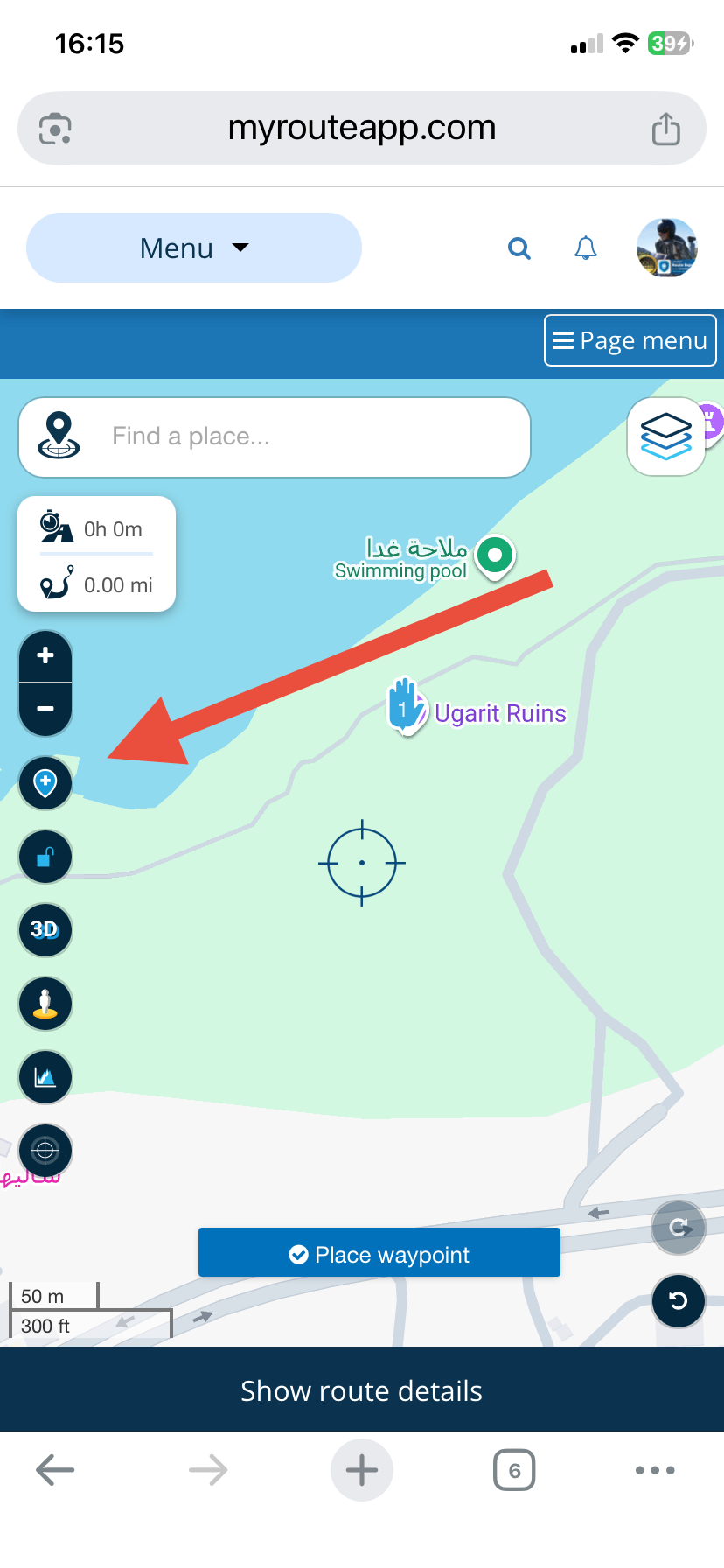
-
OK, I played a bit more around with with Goggle.maps to write my response and its rather hard to get the exact GPS locations from a landmark: with right click it takes the GPS Coordinates of the mouse pointer and not the the ones of the POI selected, which then leads into getting the wrong position on MRA and the mislead discussion before .....
You all have been ignoring my point that this happens when the results are shown in arab or any other alphabet we typically can't read, because for Waypoints in NL you can read the description and understand if it is the point you wanted or not.Suggestions
a) show the GPS coordinates or "GPS" behind the search result or mark it in a special way so its clear (1)
b) try to prefer Western text in search results (1 and 2)
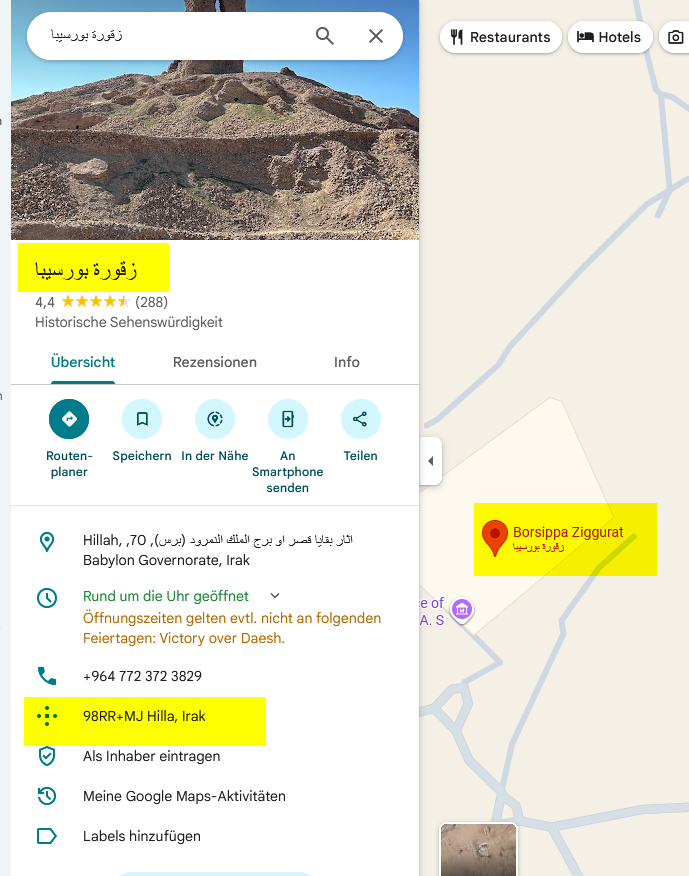
c) can you accept "Plus Code" Coordinates from Goggle, as they are always shown with PoI's and I hope they point to the right GPS in the end. ("98RR+MJ Hilla, Irak" for this point)here another example (Borsippa Ziggurat approx 32.391690,44.341590)
- is the search result - I can't read that
- I had put a pin on that GPS coordinates before and the Text looks again different
- that is the text "Borsippa Ziggurat" I would prefer to see in the search results (1) and in the Waypoint text (2) - unfortunately I noted that the PoI's are not consistently labeled Roman/Arabic, but also the other way around ...
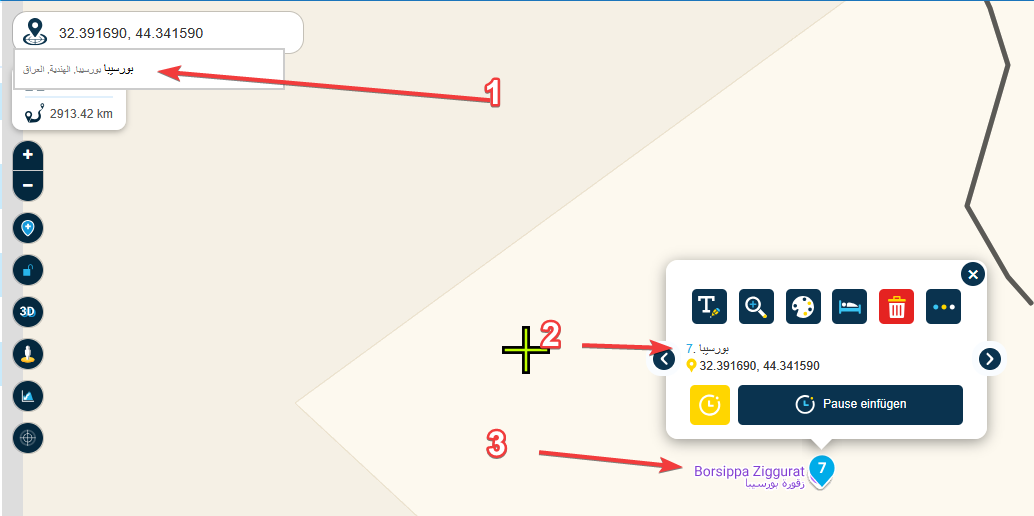
Unfortunately I could not reproduce the cases where I had multiple results for a GPS search - but I'll keep my eyes open for that.
Oh and you can't always search for like "Borsippa Ziggurat" because names are often written completely different or even the name in MRA might be a different one. I switched to GPS coordinate because of this in the first place....
-
@Robert-Laudensack Have you tried using the Google overlay map in MyRoute-app?
There would be no need to copy and paste coordinates then.
And if you do use coordinates, use the coordinates button that I have arrow Ed to add them rather than the search box.
@Nick-Carthew thanks - I had "discovered" the coordinate button while writing this thread, but it is actually not the solution as the problem is a different one (than what I had suspected initially), yes I used slightly off GPS coordinates, but the issue is the Arabic texts in the end - see my other reply.
-

First of all you need to know what coordinate system google is using. Then you can use a tool on Javawa (https://www.javawa.nl/coordcalc_en.html) which you can use to get the right coordinates to use.
-
@Nick-Carthew thanks - I had "discovered" the coordinate button while writing this thread, but it is actually not the solution as the problem is a different one (than what I had suspected initially), yes I used slightly off GPS coordinates, but the issue is the Arabic texts in the end - see my other reply.
@Robert-Laudensack, I think it actually IS a solution. It takes the guesswork out of using the search function. For a coordinate you do not have to read Arabic. Being able to interpret the strange Google way of coordinating would be just fine, but I would rather have Google presenting meaningful coordinates to be honest...
-
I just opened maps.google op my pc and searched for Ugarit ruins. Right clicked on the red droplet and copied the coordinates to the clipbord. Opened a new route in the web routeplanner and copied the coordinates in the search box. In all the mapsets the coordinates were correct.
But looking at the picture you posted, the coordinates showed are N and E notation (h ddd° mm' ss.s"). If you can not change the "degrees, minutes, seconds" notation into decimal on your phone, you have to convert them: N 35° 35' 19.2"E 035° 44' 05.9" or 35° 35' 19.2" N and 035° 44' 05.9" E.
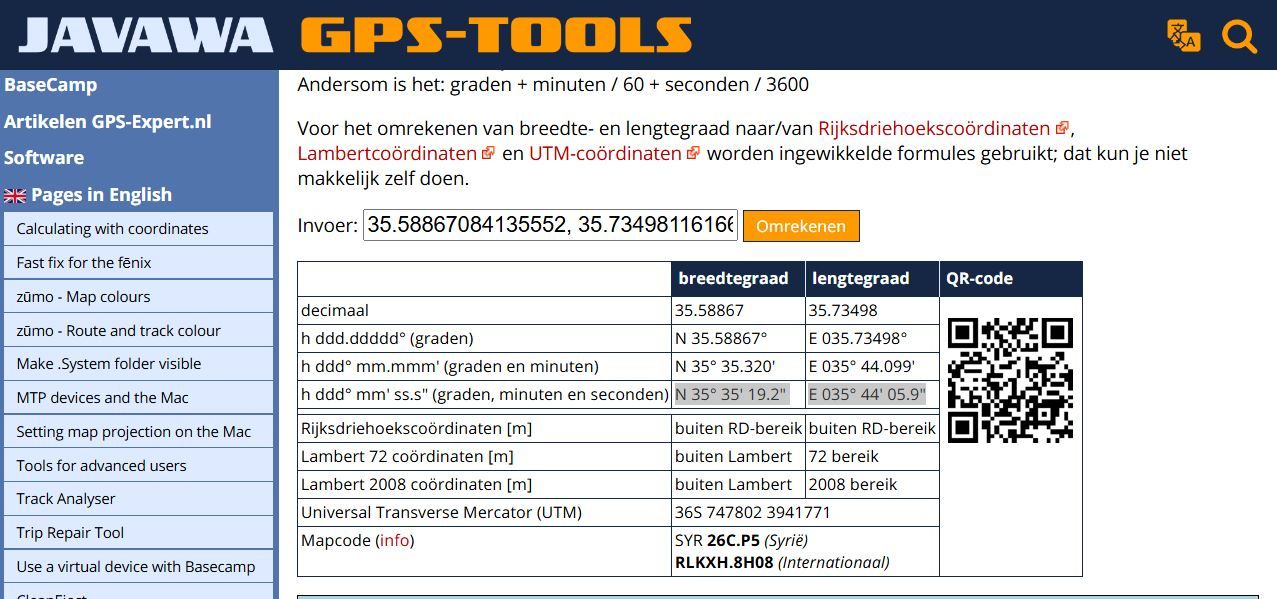
Only in Dutch
https://www.javawa.nl/coords.html
Hello! It looks like you're interested in this conversation, but you don't have an account yet.
Getting fed up of having to scroll through the same posts each visit? When you register for an account, you'll always come back to exactly where you were before, and choose to be notified of new replies (either via email, or push notification). You'll also be able to save bookmarks and upvote posts to show your appreciation to other community members.
With your input, this post could be even better 💗
Register Login
-
 9912.1k
-
5821.9k
-
019693
-
 0597
0597
-
0386
-
 1332383
-
 284010.4k
-
 1235
1235