Skip to content
  • Categories
  • Recent
  • Popular
  • Support
  • MyRoute-app
Collapse
Brand Logo

MRA Community Forum

  1. Home
  2. MyRoute-app Routeplanner
  3. [Web] Suggestions and Discussion
  4. POI

POI

Scheduled Pinned Locked Moved [Web] Suggestions and Discussion
16 Posts 9 Posters 5.5k Views 3 Watching
  • Oldest to Newest
  • Newest to Oldest
  • Most Votes
Reply
  • Reply as topic
Log in to reply
This topic has been deleted. Only users with topic management privileges can see it.
  • Mr Richard Kitchen Mr Richard Kitchen

    Is there a way to have selected POI open automatically when creating a new route?

    Guzzist Offline
    Guzzist Offline
    Guzzist
    Valued contributor
    wrote on last edited by
    #2

    @Mr-Richard-Kitchen please what do you mean with "selected POI"? And what do you mean with "open automatically" in detail?

    Nothing is impossible ;-)
    In past: GARMIN Zumo 210->GARMIN Zumo 395->GARMIN XT=> now: DMD T865-X + MyRoute-App, LocusMaps, OsmAnd.
    In past: GARMIN MapSource ->GARMIN BaseCamp->Tyre->Kurviger->Calimoto=> now: MRA-Routplanner.

    1 Reply Last reply
    0
    • Mr Richard Kitchen Mr Richard Kitchen

      Is there a way to have selected POI open automatically when creating a new route?

      Nick Carthew Offline
      Nick Carthew Offline
      Nick Carthew
      RouteXpert
      wrote on last edited by
      #3

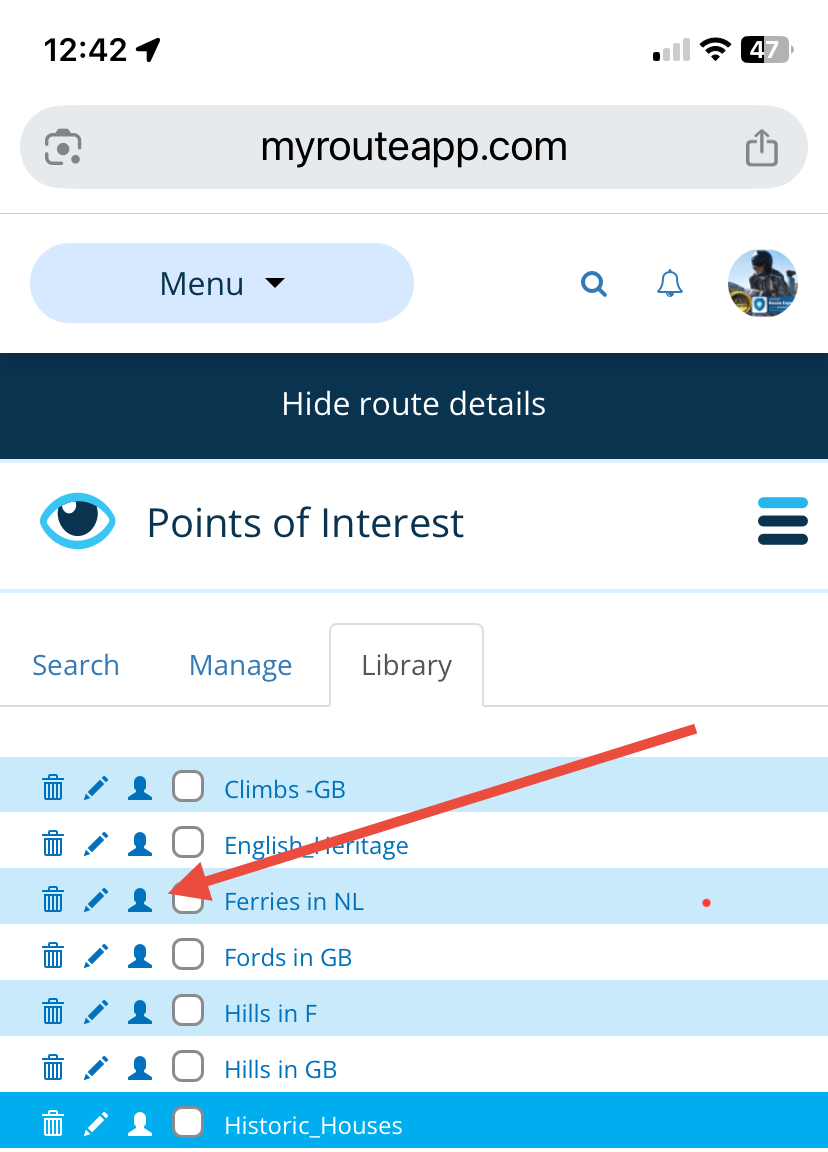
      @Mr-Richard-Kitchen Not from the MRA POI library. But if you have added a list of POIs to MRA then you can choose to have these visible in all routes and also in MRA Navigation Next.
      In your Personal POI library click the Personal (head) icon and that POI list will show in all new routes and while using MRS Navigation Next.
      33d8a94b-66a6-4157-a9d1-e0196b5a4602-image.png

      Always willing to help if I can.
      Triumph Tiger 1200 XRT called Tina.
      MRA Navigation Next and SilverFox BJ8

      1 Reply Last reply
      1
      • Martin Garand Offline
        Martin Garand Offline
        Martin Garand
        wrote on last edited by
        #4

        I'M looking also for that.

        Is there any way to do it ?

        Con Hennekens 1 Reply Last reply
        0
        • Martin Garand Martin Garand

          I'M looking also for that.

          Is there any way to do it ?

          Con Hennekens Offline
          Con Hennekens Offline
          Con Hennekens
          Alpha tester
          wrote on last edited by
          #5

          @Martin-Garand, look one message up... 😉

          I am just an enthusiastic MRA user, and hope you will be one too!

          Most motorcycle problems are caused by the nut that connects the handlebar to the saddle.

          Check out RideSleepRepeat.eu, a biker community for sharing stays across Europe

          Martin Garand 1 Reply Last reply
          0
          • Con Hennekens Con Hennekens

            @Martin-Garand, look one message up... 😉

            Martin Garand Offline
            Martin Garand Offline
            Martin Garand
            wrote on last edited by
            #6

            @Con-Hennekens I tried that. But when using POI that way, I cannot see those POI unless i'm zoomed in really close.

            If I'm zoomed out for a better overview, those POI don't show.

            But if my POI are in the Manage section, I can see them even at an overview zoom. But to be able to have POI in Manage section, you have to have created them in that route.

            Maybe I'm missing somtehing or don't understand how to use those POI...

            Nick Carthew 1 Reply Last reply
            0
            • Martin Garand Martin Garand

              @Con-Hennekens I tried that. But when using POI that way, I cannot see those POI unless i'm zoomed in really close.

              If I'm zoomed out for a better overview, those POI don't show.

              But if my POI are in the Manage section, I can see them even at an overview zoom. But to be able to have POI in Manage section, you have to have created them in that route.

              Maybe I'm missing somtehing or don't understand how to use those POI...

              Nick Carthew Offline
              Nick Carthew Offline
              Nick Carthew
              RouteXpert
              wrote on last edited by
              #7

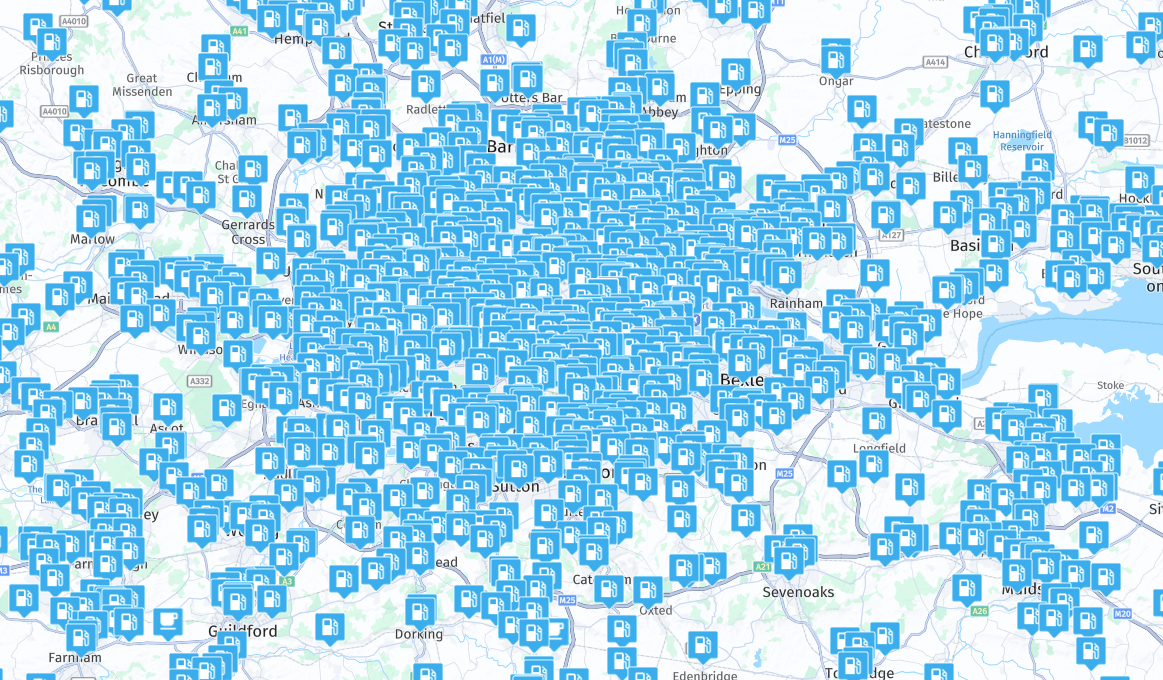
              @Martin-Garand There is a very good reason why POIs are not visible when you are zoomed out, some POIs would block the map!
              6be7a68f-a581-4a7b-ab51-4e1daa00f680-image.png

              Always willing to help if I can.
              Triumph Tiger 1200 XRT called Tina.
              MRA Navigation Next and SilverFox BJ8

              Martin Garand 1 Reply Last reply
              1
              • Travellexxie Offline
                Travellexxie Offline
                Travellexxie
                Valued contributor
                wrote on last edited by
                #8

                You need petrol Nick? 🤣

                Met andere apps maak je een route, met MRA componeer je een route!

                Ducati Monster 1200 met Garmin Zümo XT
                Fiat 124 Spider/Camper Dethleffs met Navigation-App op Samsung Tab Active4 Pro
                MRA Lifetime Gold

                Nick Carthew 1 Reply Last reply
                1
                • Travellexxie Travellexxie

                  You need petrol Nick? 🤣

                  Nick Carthew Offline
                  Nick Carthew Offline
                  Nick Carthew
                  RouteXpert
                  wrote on last edited by
                  #9

                  @Lex.Kloet.RX 😂

                  Always willing to help if I can.
                  Triumph Tiger 1200 XRT called Tina.
                  MRA Navigation Next and SilverFox BJ8

                  1 Reply Last reply
                  0
                  • Nick Carthew Nick Carthew

                    @Martin-Garand There is a very good reason why POIs are not visible when you are zoomed out, some POIs would block the map!

                    6be7a68f-a581-4a7b-ab51-4e1daa00f680-image.png

                    Martin Garand Offline
                    Martin Garand Offline
                    Martin Garand
                    wrote on last edited by
                    #10

                    @Nick-Carthew I understand that.

                    But, maybe with explanation of what I'm trying to do it will be more clear.

                    I'm planning a 3 weeks trip and I made a POI list of all the place I want to go.

                    If the POI are created in the route I'm planning (Manage section), I can always see them.

                    But if I export the POI and reuse them within the Library, I can't see them unless I'm zoomed in really close.

                    So I can't share my POI Library unless I always reuse the first route in which I Managed all the POI.

                    Is there another way to do it ?

                    Brett Bartick 1 Reply Last reply
                    0
                    • Con Hennekens Offline
                      Con Hennekens Offline
                      Con Hennekens
                      Alpha tester
                      wrote on last edited by
                      #11

                      I am afraid not, at least not in the current web-planner.

                      I am just an enthusiastic MRA user, and hope you will be one too!

                      Most motorcycle problems are caused by the nut that connects the handlebar to the saddle.

                      Check out RideSleepRepeat.eu, a biker community for sharing stays across Europe

                      1 Reply Last reply
                      0
                      • GEORGIOS PANTELIDIS 0 Offline
                        GEORGIOS PANTELIDIS 0 Offline
                        GEORGIOS PANTELIDIS 0
                        wrote on last edited by
                        #12

                        It would be perfect if we could choose at which zoom level the POIs are visible. For example, when I want to search for campsites, I have to zoom in a lot, which isn’t helpful because I want to look around my route. If I zoom in too much, I might miss a campsite that’s there but not visible due to the zoom level.

                        Alex reds 1 Reply Last reply
                        1
                        • GEORGIOS PANTELIDIS 0 GEORGIOS PANTELIDIS 0

                          It would be perfect if we could choose at which zoom level the POIs are visible. For example, when I want to search for campsites, I have to zoom in a lot, which isn’t helpful because I want to look around my route. If I zoom in too much, I might miss a campsite that’s there but not visible due to the zoom level.

                          Alex reds Offline
                          Alex reds Offline
                          Alex reds
                          wrote on last edited by
                          #13

                          @GEORGIOS-PANTELIDIS-0
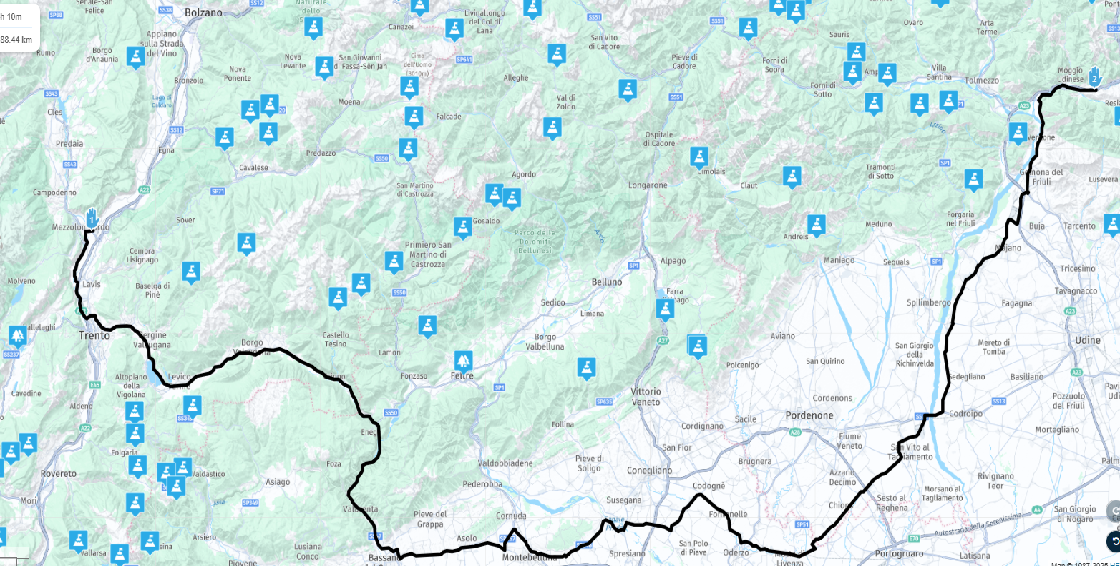
                          I did a test by adding the POIs for the mountain passes in Trentino and Veneto, Italy.
                          They’re already visible at this zoom level, which I think is enough to see most of a route.

                          The marked road is 288 km long, while the straight-line distance between the two points is 155 km — in my opinion, that’s sufficient to get a clear overview of a good portion of the route.mappa.png

                          GEORGIOS PANTELIDIS 0 1 Reply Last reply
                          0
                          • Travellexxie Offline
                            Travellexxie Offline
                            Travellexxie
                            Valued contributor
                            wrote on last edited by
                            #14

                            I have good memories of Mezzolombardo. I used to fill up at the Shell gas station there. 🙂

                            Met andere apps maak je een route, met MRA componeer je een route!

                            Ducati Monster 1200 met Garmin Zümo XT
                            Fiat 124 Spider/Camper Dethleffs met Navigation-App op Samsung Tab Active4 Pro
                            MRA Lifetime Gold

                            1 Reply Last reply
                            0
                            • Alex reds Alex reds

                              @GEORGIOS-PANTELIDIS-0
                              I did a test by adding the POIs for the mountain passes in Trentino and Veneto, Italy.
                              They’re already visible at this zoom level, which I think is enough to see most of a route.

                              The marked road is 288 km long, while the straight-line distance between the two points is 155 km — in my opinion, that’s sufficient to get a clear overview of a good portion of the route.mappa.png

                              GEORGIOS PANTELIDIS 0 Offline
                              GEORGIOS PANTELIDIS 0 Offline
                              GEORGIOS PANTELIDIS 0
                              wrote on last edited by
                              #15

                              @Alex-reds said in POI:

                              @GEORGIOS-PANTELIDIS-0
                              I did a test by adding the POIs for the mountain passes in Trentino and Veneto, Italy.
                              They’re already visible at this zoom level, which I think is enough to see most of a route.

                              The marked road is 288 km long, while the straight-line distance between the two points is 155 km — in my opinion, that’s sufficient to get a clear overview of a good portion of the route.mappa.png

                              It’s different for POIs that you import yourself and different for the points of interest that the MyRoute Planner website provides. In the first case, it’s as you described, but in the second one, you have to zoom in quite a lot to see them. I don’t know why this happens.

                              1 Reply Last reply
                              0
                              • Martin Garand Martin Garand

                                @Nick-Carthew I understand that.

                                But, maybe with explanation of what I'm trying to do it will be more clear.

                                I'm planning a 3 weeks trip and I made a POI list of all the place I want to go.

                                If the POI are created in the route I'm planning (Manage section), I can always see them.

                                But if I export the POI and reuse them within the Library, I can't see them unless I'm zoomed in really close.

                                So I can't share my POI Library unless I always reuse the first route in which I Managed all the POI.

                                Is there another way to do it ?

                                Brett Bartick Offline
                                Brett Bartick Offline
                                Brett Bartick
                                wrote on last edited by
                                #16

                                @Martin-Garand said in POI:

                                @Nick-Carthew I understand that.

                                But, maybe with explanation of what I'm trying to do it will be more clear.

                                I'm planning a 3 weeks trip and I made a POI list of all the place I want to go.

                                If the POI are created in the route I'm planning (Manage section), I can always see them.

                                But if I export the POI and reuse them within the Library, I can't see them unless I'm zoomed in really close.

                                So I can't share my POI Library unless I always reuse the first route in which I Managed all the POI.

                                Is there another way to do it ?

                                I understand exactly the issue you are having. Library POIs are only visible from a zoom level of 5 miles (10 km) or closer. If you are zoomed out to get a macro view of your route, you can't see the Library POIs.

                                You need to do what I do. Create a POI folder and in that POI folder create empty routes that only contain "Managed" POIs, which you manually add to the empty route.
                                Now, when you want to create a new route, just "copy" your POI route file and work from that. Now you will be able to see your managed POIs at any zoom level. Any POIs that seem to be cluttering up your route, can be quickly deleted. Going forward, always start your route creation by copy one of your empty route POI files.

                                1 Reply Last reply
                                0

                                Hello! It looks like you're interested in this conversation, but you don't have an account yet.

                                Getting fed up of having to scroll through the same posts each visit? When you register for an account, you'll always come back to exactly where you were before, and choose to be notified of new replies (either via email, or push notification). You'll also be able to save bookmarks and upvote posts to show your appreciation to other community members.

                                With your input, this post could be even better 💗

                                Register Login
                                Reply
                                • Reply as topic
                                Log in to reply
                                • Oldest to Newest
                                • Newest to Oldest
                                • Most Votes


                                ACTIVE USERS
                                Travellexxie
                                Travellexxie
                                Nick Carthew
                                Nick Carthew
                                Martin Garand
                                Martin Garand
                                Guzzist
                                Guzzist
                                Con Hennekens
                                Con Hennekens
                                Alex reds
                                Alex reds
                                Brett Bartick
                                Brett Bartick
                                GEORGIOS PANTELIDIS 0
                                GEORGIOS PANTELIDIS 0
                                Mr Richard Kitchen
                                Mr Richard Kitchen
                                POPULAR TOPICS
                                • Is there a way to put a Home button in the program
                                  Marinus van Deudekom
                                  Marinus van Deudekom
                                  0
                                  7
                                  82

                                • MRA 5.2.2 (489) Route time is calculated incorrectly /// Strecken Zeit wird falsch berechnet
                                  Nick Carthew
                                  Nick Carthew
                                  0
                                  4
                                  30

                                • It was not possible to find a correct route to Wheels Through Time
                                  Nick Carthew
                                  Nick Carthew
                                  0
                                  16
                                  262

                                • Google maps and Streetview
                                  Stevedo 6 0
                                  Stevedo 6 0
                                  1
                                  13
                                  596

                                • routepunten overslaan gebeurd niet zoals verwacht
                                  Marinus van Deudekom
                                  Marinus van Deudekom
                                  1
                                  22
                                  654

                                • Is there a way to re-order the routes in your routes folder?
                                  superg
                                  superg
                                  0
                                  3
                                  54

                                • Route doesn’t recalculate to my destination
                                  Peter Zehentreiter
                                  Peter Zehentreiter
                                  0
                                  7
                                  275

                                • MRA In the BMW - Cradel vertically and horizontally /// MRA im BMW - Cradel senkrecht und waagerecht nutzen
                                  Hubert Thoring
                                  Hubert Thoring
                                  0
                                  2
                                  46

                                MY GROUPS
                                • Login

                                • Login or register to search.
                                • First post
                                  Last post
                                0
                                • Categories
                                • Recent
                                • Popular
                                • Support
                                • MyRoute-app