Skip to content
  • Categories
  • Recent
  • Popular
  • Support
  • MyRoute-app
Collapse
Brand Logo

MRA Community Forum

  1. Home
  2. The MyRoute-app
  3. [App] Suggestions and Discussion
  4. Navigate to closest waypoint

Navigate to closest waypoint

Scheduled Pinned Locked Moved [App] Suggestions and Discussion
11 Posts 6 Posters 3.2k Views 4 Watching
  • Oldest to Newest
  • Newest to Oldest
  • Most Votes
Reply
  • Reply as topic
Log in to reply
This topic has been deleted. Only users with topic management privileges can see it.
  • Paul Steinberg Paul Steinberg

    Greetings from Toronto.

    I’m pretty new to MRA but right away I noticed the need for a “ navigate to closest waypoint” option when starting or restarting a route.

    Currently if I stop navigation and restart it, MRA by default starts navigating to the first waypoint of the route. I have to skip ahead until it catches up with my current position.

    Nick Carthew Online
    Nick Carthew Online
    Nick Carthew
    RouteXpert
    wrote on last edited by
    #2

    @Paul-Steinberg
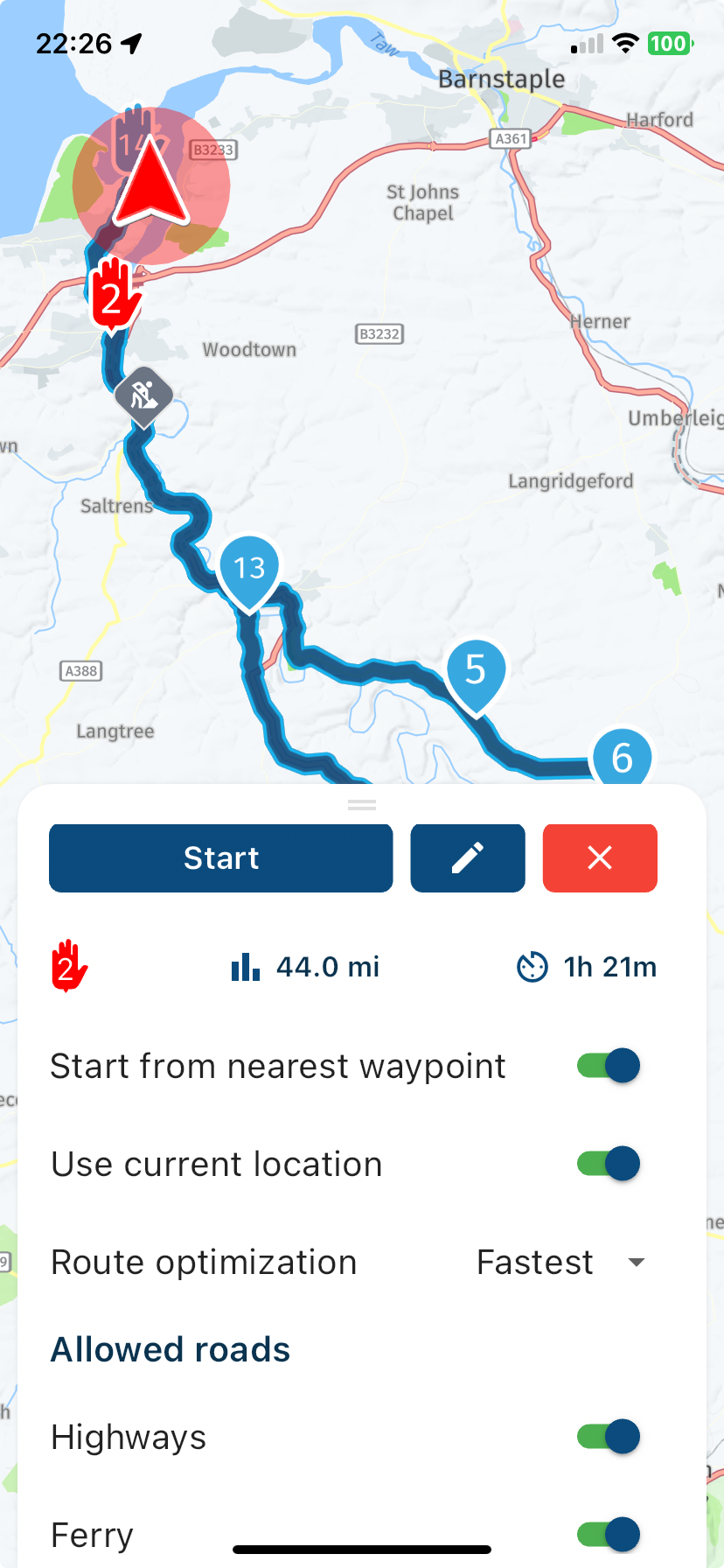
    Before tapping the start button, drag the menu up.
    0cc6cb42-8b4b-4cfe-823d-c25bc18b735b-image.png

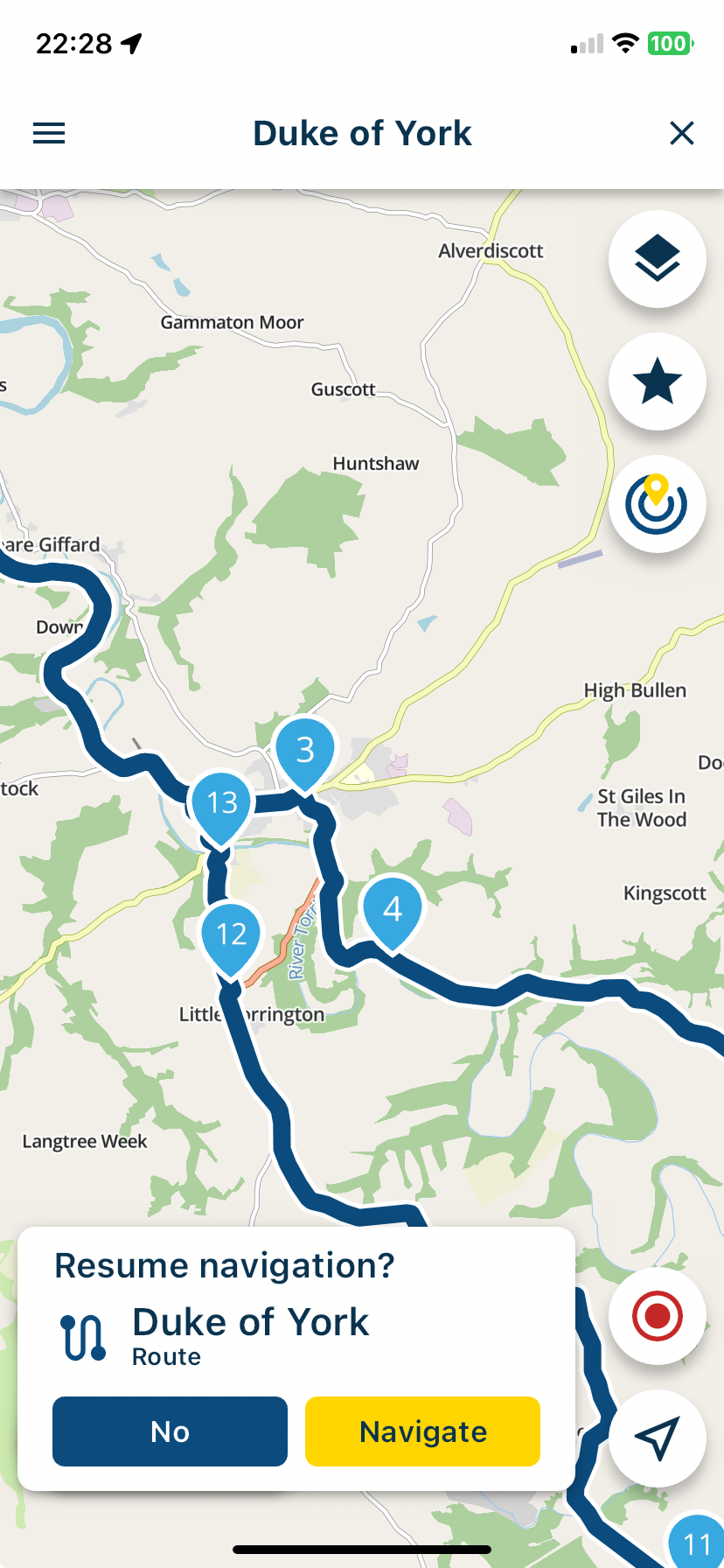
    Also; when you stop navigation for a coffee or lunch stop, you can leave the navigation in a pause mode, from this screen the navigation is effectively off, you can even close the app and when you open it again, it will open on this screen, tap the yellow Navigate button to resume navigation from where you stopped.
    a8d0c03c-1d4f-4ee8-bfd8-795823833f70-image.png

    You can also open a route and long press on any waypoint, this will skip all previous waypoints and start navigation from your chosen waypoint.
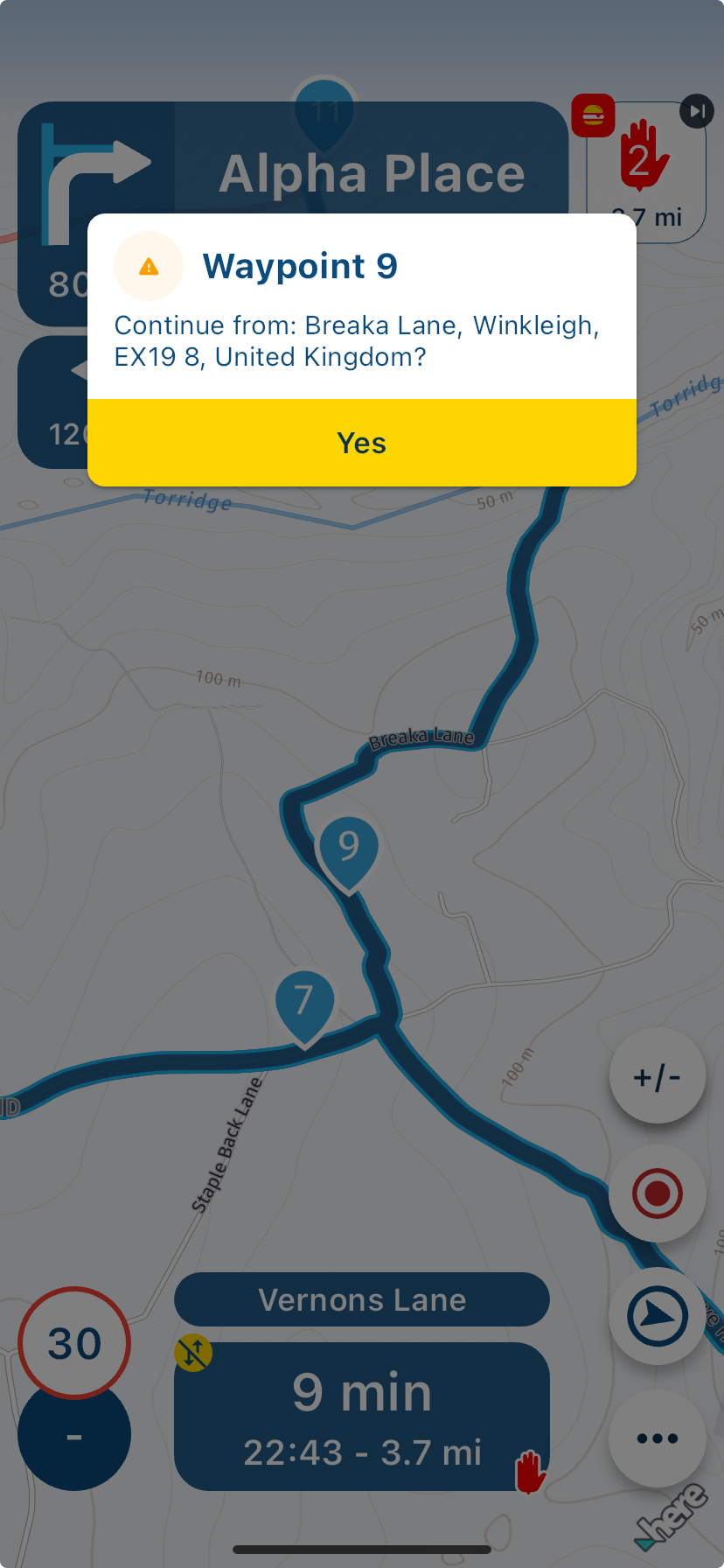
    f9424a12-af35-468f-878d-4c4054e76ec0-image.png

    Always willing to help if I can.
    Triumph Tiger 1200 XRT called Tina.
    MRA Navigation Next and SilverFox BJ8

    1 Reply Last reply
    2
    • Paul Steinberg Offline
      Paul Steinberg Offline
      Paul Steinberg
      wrote on last edited by
      #3

      Hey thanks @Nick-Carthew ! I'll test this out this weekend.

      2022 R1250GS
      Google Pixel 10XL
      Android Auto
      Chigee AIO6

      1 Reply Last reply
      0
      • Paul Steinberg Offline
        Paul Steinberg Offline
        Paul Steinberg
        wrote on last edited by
        #4

        So the issue is that the additional options when starting a route are not offered on the Android Auto screen. You have to open the phone to get those options. I find the same issue when picking up a route in the middle, the AA screen gets stuck and I have to stop and open the phone to get it back on track.

        Can the Dev's match the functionality from the Android phone screen to the Android Auto experience? I'm planning on leaving my phone in a saddle bag, connected to a battery brick to deal with the battery drain from the MRA app, having to pull over and take my gloves off to use the phone is making it an unreliable navigation tool.

        2022 R1250GS
        Google Pixel 10XL
        Android Auto
        Chigee AIO6

        1 Reply Last reply
        1
        • Corjan Meijerink Offline
          Corjan Meijerink Offline
          Corjan Meijerink
          Developer
          wrote on last edited by
          #5

          If you’ve selected the option to start from nearest waypoint, Android Auto will also do that.
          The setting persists across all routes.

          We hope to add those settings later on too for CP / AA

          Jon Hye-Knudsen Paul Steinberg 2 Replies Last reply
          2
          • Stanisław Offline
            Stanisław Offline
            Stanisław
            Valued contributor
            wrote on last edited by
            #6

            The simplest way for me it simply to kill the app in case of a stop. After restarting it I have an option to continue the trip. Not sure what will be on CP/AA.

            --
            Regards
            Staszek

            1 Reply Last reply
            0
            • Corjan Meijerink Corjan Meijerink

              If you’ve selected the option to start from nearest waypoint, Android Auto will also do that.
              The setting persists across all routes.

              We hope to add those settings later on too for CP / AA

              Jon Hye-Knudsen Offline
              Jon Hye-Knudsen Offline
              Jon Hye-Knudsen
              wrote on last edited by
              #7

              @Corjan-Meijerink
              I just looked in settings and could not find that option. I’m not really sure where to find that option. Is it when I start navigating or where is it?

              Nick Carthew 1 Reply Last reply
              0
              • M. Schrijver Offline
                M. Schrijver Offline
                M. Schrijver
                Valued contributor
                wrote on last edited by
                #8

                Personally i have a problem how it works. It can be much more easier for the user.
                If you select this option. The selection is saved with the route. The next time you start the route (i.e after the lunch or some problems) you must check what the setting is. If you don't, it is possible you will be send back to the start of the route.
                While it is also possible MRA makes a choice for you and if MRA cannot make a choice it will ask.

                When i look at my current navigation app. After i selected a route i see the option "Drive". If i press this button i get the question what to do; Go to startpoint or Goto nearest point.
                If if don't press the button "Drive" and just start riding, it detects that i'm driving an makes a decission for me. 99% of the time it makes the correct decission.

                (I use MRA Next only on Android Auto. Every comment, suggestion, etc will be based on my usage with Android Auto)

                1 Reply Last reply
                0
                • Jon Hye-Knudsen Jon Hye-Knudsen

                  @Corjan-Meijerink
                  I just looked in settings and could not find that option. I’m not really sure where to find that option. Is it when I start navigating or where is it?

                  Nick Carthew Online
                  Nick Carthew Online
                  Nick Carthew
                  RouteXpert
                  wrote on last edited by
                  #9

                  @Jon-Hye-Knudsen said in Navigate to closest waypoint:

                  @Corjan-Meijerink
                  I just looked in settings and could not find that option. I’m not really sure where to find that option. Is it when I start navigating or where is it?

                  See my answer above. Drag the menu up before tapping the start button.

                  Always willing to help if I can.
                  Triumph Tiger 1200 XRT called Tina.
                  MRA Navigation Next and SilverFox BJ8

                  1 Reply Last reply
                  1
                  • Jon Hye-Knudsen Offline
                    Jon Hye-Knudsen Offline
                    Jon Hye-Knudsen
                    wrote on last edited by
                    #10

                    @Nick-Carthew
                    Thanks! 👍🏻

                    1 Reply Last reply
                    0
                    • Corjan Meijerink Corjan Meijerink

                      If you’ve selected the option to start from nearest waypoint, Android Auto will also do that.
                      The setting persists across all routes.

                      We hope to add those settings later on too for CP / AA

                      Paul Steinberg Offline
                      Paul Steinberg Offline
                      Paul Steinberg
                      wrote on last edited by
                      #11

                      @Corjan-Meijerink that’s great news.

                      I’m using the Garmin experience as a baseline where I can start/stop , change routes and route options all from the device screen. I purchased lifetime subscription to both MRP and MRA so I’m in-it-to-win-it. The current MRA build requires too much interaction with the phone but has been stable in testing with my Ford F150 and wideband Bluetooth AA.

                      Looking forward to the updates.

                      2022 R1250GS
                      Google Pixel 10XL
                      Android Auto
                      Chigee AIO6

                      1 Reply Last reply
                      0

                      Hello! It looks like you're interested in this conversation, but you don't have an account yet.

                      Getting fed up of having to scroll through the same posts each visit? When you register for an account, you'll always come back to exactly where you were before, and choose to be notified of new replies (either via email, or push notification). You'll also be able to save bookmarks and upvote posts to show your appreciation to other community members.

                      With your input, this post could be even better 💗

                      Register Login
                      Reply
                      • Reply as topic
                      Log in to reply
                      • Oldest to Newest
                      • Newest to Oldest
                      • Most Votes


                      ACTIVE USERS
                      M. Schrijver
                      M. Schrijver
                      Corjan Meijerink
                      Corjan Meijerink
                      Nick Carthew
                      Nick Carthew
                      Stanisław
                      Stanisław
                      Jon Hye-Knudsen
                      Jon Hye-Knudsen
                      Paul Steinberg
                      Paul Steinberg
                      POPULAR TOPICS
                      • How to share route with another member.
                        BertM
                        BertM
                        0
                        6
                        95

                      • Routes en verblijf Zwitserland
                        Con Hennekens
                        Con Hennekens
                        0
                        23
                        711

                      • Route doesn’t recalculate to my destination
                        Aggelos Minoudis
                        Aggelos Minoudis
                        0
                        3
                        57

                      • The most important rule: all content is to be posted in English 🇬🇧 unless the post is made in the language specific area in the Self Support forum.
                        BertM
                        BertM
                        2
                        14
                        410

                      • No navigation instructions
                        superg
                        superg
                        0
                        2
                        45

                      • App probleem scenic route niet mogelijk
                        Philip Verbeek
                        Philip Verbeek
                        1
                        14
                        380

                      • Ideetje voor kaartthema van Google Maps
                        0
                        1
                        30

                      • Skipping waypoints for no reason
                        richtea999
                        richtea999
                        0
                        7
                        511

                      MY GROUPS
                      • Login

                      • Login or register to search.
                      • First post
                        Last post
                      0
                      • Categories
                      • Recent
                      • Popular
                      • Support
                      • MyRoute-app