Skip to content
  • Categories
  • Recent
  • Popular
  • Support
  • MyRoute-app
Collapse
Brand Logo

MRA Community Forum

  1. Home
  2. The MyRoute-app
  3. [App] Suggestions and Discussion
  4. How to insert fuel stops coffee stops and places of interest when planning a route

How to insert fuel stops coffee stops and places of interest when planning a route

Scheduled Pinned Locked Moved [App] Suggestions and Discussion
9 Posts 5 Posters 2.3k Views 1 Watching
  • Oldest to Newest
  • Newest to Oldest
  • Most Votes
Reply
  • Reply as topic
Log in to reply
This topic has been deleted. Only users with topic management privileges can see it.
  • roland reay Offline
    roland reay Offline
    roland reay
    wrote on last edited by
    #1

    Good afternoon ladies and gentlemen,ime after some information regarding how to set coffees stops fuel stops and points of interest when planning a route.When I plan a route and try to insert a coffee stop etc when I ride the route nothing is in place,no instructions showing on the route.If some one could instruct how to rectify this I would appreciate it thankyou

    BertM richard 3v 2 Replies Last reply
    0
    • roland reay roland reay

      Good afternoon ladies and gentlemen,ime after some information regarding how to set coffees stops fuel stops and points of interest when planning a route.When I plan a route and try to insert a coffee stop etc when I ride the route nothing is in place,no instructions showing on the route.If some one could instruct how to rectify this I would appreciate it thankyou

      BertM Offline
      BertM Offline
      BertM
      wrote on last edited by
      #2

      @roland-reay
      tap on the button left from the route point
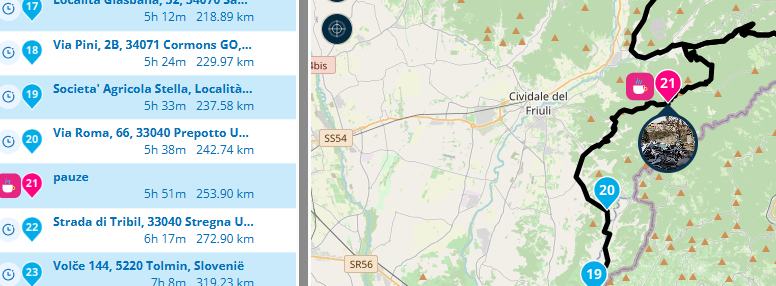
      2be68c7a-852c-4a3b-a22d-d87f8872d872-image.png
      or
      tap the yellow button on the pop-up. Pauze time can be edited on the black button
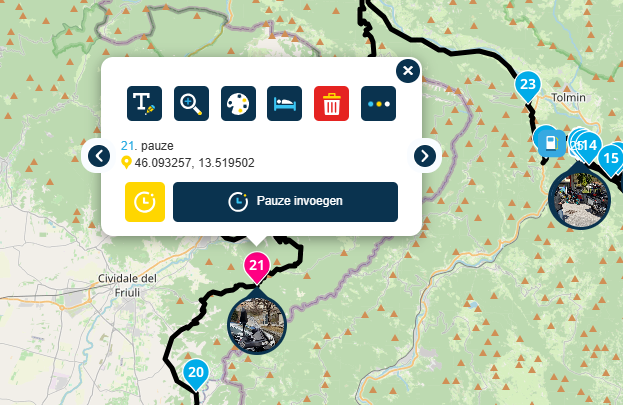
      080d950f-2e68-4311-b457-53adfb931289-image.png

      1 Reply Last reply
      0
      • roland reay roland reay

        Good afternoon ladies and gentlemen,ime after some information regarding how to set coffees stops fuel stops and points of interest when planning a route.When I plan a route and try to insert a coffee stop etc when I ride the route nothing is in place,no instructions showing on the route.If some one could instruct how to rectify this I would appreciate it thankyou

        richard 3v Offline
        richard 3v Offline
        richard 3v
        wrote on last edited by
        #3

        @roland-reay

        My solution would be to make these Via points instead of merely Shaping points. These will then be announced.

        Con Hennekens 1 Reply Last reply
        0
        • richard 3v richard 3v

          @roland-reay

          My solution would be to make these Via points instead of merely Shaping points. These will then be announced.

          Con Hennekens Offline
          Con Hennekens Offline
          Con Hennekens
          Alpha tester
          wrote on last edited by
          #4

          @richard-3v, shapingpoints can also be announced.

          I am just an enthusiastic MRA user, and hope you will be one too!

          Most motorcycle problems are caused by the nut that connects the handlebar to the saddle.

          Check out RideSleepRepeat.eu, a biker community for sharing stays across Europe

          richard 3v 1 Reply Last reply
          0
          • Con Hennekens Con Hennekens

            @richard-3v, shapingpoints can also be announced.

            richard 3v Offline
            richard 3v Offline
            richard 3v
            wrote on last edited by
            #5

            @Con-Hennekens
            Hi, yes I know shaping points can also be announced, but MY personnal settings are only Via points are announced. Hence my reponse.

            Con Hennekens 1 Reply Last reply
            0
            • richard 3v richard 3v

              @Con-Hennekens
              Hi, yes I know shaping points can also be announced, but MY personnal settings are only Via points are announced. Hence my reponse.

              Con Hennekens Offline
              Con Hennekens Offline
              Con Hennekens
              Alpha tester
              wrote on last edited by
              #6

              @richard-3v, Sure, but the ONLY purpose of VIA points is that they will not be skipped by the autoskip algorithm. There is no harm in shaping points being announced. Addresses (anything with numeric numbers in it) will not be spoken. I'd rather not give up normal functioning of the skipping algorithm in order for a waypoint name to be spoken. I'd hate seeing people asking help here for their waypoint not being autoskipped when there is name to be spoken. 😉

              I am just an enthusiastic MRA user, and hope you will be one too!

              Most motorcycle problems are caused by the nut that connects the handlebar to the saddle.

              Check out RideSleepRepeat.eu, a biker community for sharing stays across Europe

              1 Reply Last reply
              1
              • paul69 Offline
                paul69 Offline
                paul69
                wrote on last edited by paul69
                #7

                hi @roland-reay

                perhaps i am mistaken, but i think you require certain points to be changed to a viapoint, if this is the case then that action can be taken by clicking the 3 dots which will expand the info box, and there on the bottom row, is the icon to swap between via and shaping.
                hope this helps
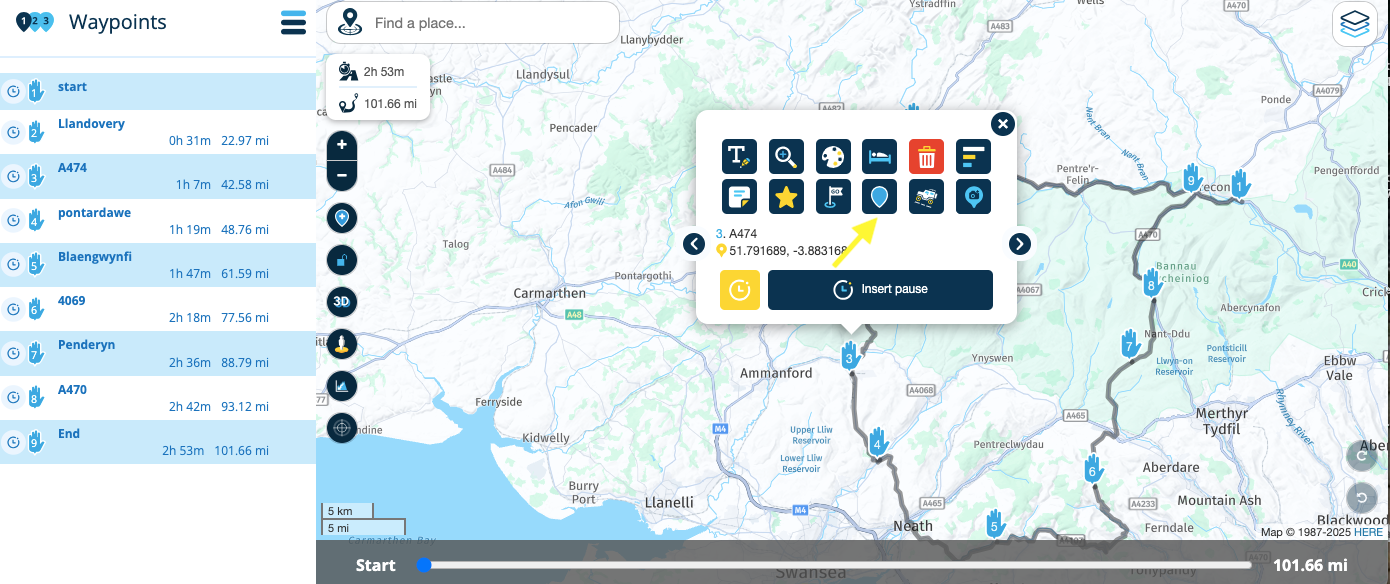
                Screenshot 2025-04-18 at 08.35.44.png

                quick amendment, once swapped to via points, this can then be changed in the app settings menu to only announce via points,

                to achieve, we must first attempt ✌️
                K1600 GTL
                Oukitel RT3
                iPhone 13 Pro, carpuride 702b

                BertM 1 Reply Last reply
                0
                • paul69 paul69

                  hi @roland-reay

                  perhaps i am mistaken, but i think you require certain points to be changed to a viapoint, if this is the case then that action can be taken by clicking the 3 dots which will expand the info box, and there on the bottom row, is the icon to swap between via and shaping.
                  hope this helps

                  Screenshot 2025-04-18 at 08.35.44.png

                  quick amendment, once swapped to via points, this can then be changed in the app settings menu to only announce via points,

                  BertM Offline
                  BertM Offline
                  BertM
                  wrote on last edited by
                  #8

                  I do not understand why someone would only use Via points.
                  This means I always have to adress and "Hit" the Via point.
                  If it is mandantory I understand, but if it for example it is a viewpoint I would use a shaping point, as sometimes I do not want to stop at all the points of interest in a route.

                  paul69 1 Reply Last reply
                  1
                  • BertM BertM

                    I do not understand why someone would only use Via points.
                    This means I always have to adress and "Hit" the Via point.
                    If it is mandantory I understand, but if it for example it is a viewpoint I would use a shaping point, as sometimes I do not want to stop at all the points of interest in a route.

                    paul69 Offline
                    paul69 Offline
                    paul69
                    wrote on last edited by
                    #9

                    @BertM said in How to insert fuel stops coffee stops and places of interest when planning a route:

                    I do not understand why someone would only use Via points.

                    hi @BertM

                    if you are referring to that small route of mine, i understand your confusion. i know the route above shows all via's but this was not finished i was merely using it as an example for the OP.

                    when i make a route i do not us via points at all, save for start and finish obviously.

                    personally, i find via points a pain in the a*%e, hence why I never use them, however, it is nice to have the option, for those who do use them, which is a major plus point for MRA.

                    to achieve, we must first attempt ✌️
                    K1600 GTL
                    Oukitel RT3
                    iPhone 13 Pro, carpuride 702b

                    1 Reply Last reply
                    0

                    Hello! It looks like you're interested in this conversation, but you don't have an account yet.

                    Getting fed up of having to scroll through the same posts each visit? When you register for an account, you'll always come back to exactly where you were before, and choose to be notified of new replies (either via email, or push notification). You'll also be able to save bookmarks and upvote posts to show your appreciation to other community members.

                    With your input, this post could be even better 💗

                    Register Login
                    Reply
                    • Reply as topic
                    Log in to reply
                    • Oldest to Newest
                    • Newest to Oldest
                    • Most Votes


                    ACTIVE USERS
                    paul69
                    paul69
                    Con Hennekens
                    Con Hennekens
                    BertM
                    BertM
                    richard 3v
                    richard 3v
                    roland reay
                    roland reay
                    POPULAR TOPICS
                    • The compas direction on the elevation circle is wrong
                      Nick Carthew
                      Nick Carthew
                      0
                      47
                      1.6k

                    • GPX Versions 1.1 vs 1.2 for Garmin Visually Explained
                      John S Parry
                      John S Parry
                      7
                      186
                      15.8k

                    • HERE maps updates
                      Marinus van Deudekom
                      Marinus van Deudekom
                      2
                      15
                      576

                    • bundel purchase
                      Travellexxie
                      Travellexxie
                      0
                      3
                      85

                    • MRA V5.2.1 (488) Kompass fest einstellbar auf „Dynamische Kamera“
                      Jörgen
                      Jörgen
                      0
                      2
                      15

                    • Complimenten
                      Corjan Meijerink
                      Corjan Meijerink
                      4
                      2
                      28

                    • Wegwerkzaamheden / Road works
                      veghelvan 0
                      veghelvan 0
                      0
                      7
                      168

                    • Modify a scenic route in the Navigation Naxt app
                      Peter Zehentreiter
                      Peter Zehentreiter
                      3
                      12
                      560

                    MY GROUPS
                    • Login

                    • Login or register to search.
                    • First post
                      Last post
                    0
                    • Categories
                    • Recent
                    • Popular
                    • Support
                    • MyRoute-app