How to get spoken instructions
-

I was a long time bussi to get spoken instructions, but when I set the Speak instructions on (off) then I get spoken instructions. There is a important bug there! My son in law has the same problem, now solved.
-
I was a long time bussi to get spoken instructions, but when I set the Speak instructions on (off) then I get spoken instructions. There is a important bug there! My son in law has the same problem, now solved.

@David-3j said in How to get spoken instructions:
but when I set the Speak instructions on (off)
I'm trying to understand what you mean here but I can't.
Can you clarify your experience? -
 Nick Carthew moved this topic from New Users' corner on
-
@David-3j said in How to get spoken instructions:
but when I set the Speak instructions on (off)
I'm trying to understand what you mean here but I can't.
Can you clarify your experience?
@Jack-van-Tilburg
Ik had problemen met het krijgen van gesproken instructies via mijn helmcommunicatie. Als je het menu in de app opent waar je dit kan instellen dan zie je links het teken en rechts de tekst. Nu staat er in de tekst "Spraakinstructies uit" met het tekentje zonder streep erdoor. Dan staat spraakinstructies dus aan. Zal wel zo horen, maar ik vind het verwarrend dat de tekst op "spraakinstructies uit" staat terwijl het "aan" staat, zal wel aan mij liggen. Tijden zitten kloten om dit goed te krijgen. Verder werkt het goed. -
@Jack-van-Tilburg
Ik had problemen met het krijgen van gesproken instructies via mijn helmcommunicatie. Als je het menu in de app opent waar je dit kan instellen dan zie je links het teken en rechts de tekst. Nu staat er in de tekst "Spraakinstructies uit" met het tekentje zonder streep erdoor. Dan staat spraakinstructies dus aan. Zal wel zo horen, maar ik vind het verwarrend dat de tekst op "spraakinstructies uit" staat terwijl het "aan" staat, zal wel aan mij liggen. Tijden zitten kloten om dit goed te krijgen. Verder werkt het goed.
@David-3j
Yep, ik snap wat je bedoeld. En het kan verwarring opleveren.
Het poppetje is de status en de tekst de optie.
(maar die had je al begrijp ik )
)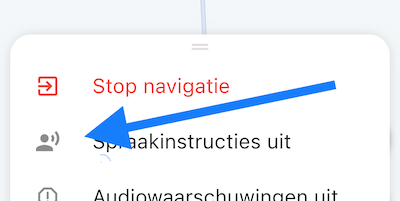
I had trouble getting spoken instructions through my helmet communication. If you open the menu in the app where you can set this, you will see the sign on the left and the text on the right. Now the text says "Voice instructions off" with the unlined sign through it. Then voice instructions are on. It sounds like it, but I find it confusing that the text is on "voice instructions off" when it is "on", must be just me. Times suck to get this right. Other than that it works well.
Yep, I get what you mean. And it can cause confusion.
The doll is the status and the text is the option.
Hello! It looks like you're interested in this conversation, but you don't have an account yet.
Getting fed up of having to scroll through the same posts each visit? When you register for an account, you'll always come back to exactly where you were before, and choose to be notified of new replies (either via email, or push notification). You'll also be able to save bookmarks and upvote posts to show your appreciation to other community members.
With your input, this post could be even better 💗
Register Login-
 01331
01331
-
 08114
08114
-
09233
-
 0512
0512
-
 0421
0421
-
 0323
0323
-
 0384
0384
-
 1530
1530