Skip to content
  • Categories
  • Recent
  • Popular
  • Support
  • MyRoute-app
Collapse
Brand Logo

MRA Community Forum

  1. Home
  2. [Beta] The MyRoute-app
  3. [Beta] Suggestions and Discussions
  4. Manuell placing of target

Manuell placing of target

Scheduled Pinned Locked Moved [Beta] Suggestions and Discussions
17 Posts 5 Posters 99 Views 1 Watching
  • Oldest to Newest
  • Newest to Oldest
  • Most Votes
Reply
  • Reply as topic
Log in to reply
This topic has been deleted. Only users with topic management privileges can see it.
  • Corjan Meijerink Corjan Meijerink

    @Jörgen Thanks for your faith in the app! 🙂 It really makes me happy knowing that the Beta is going well.

    As I'm so curious about your opinions, I'm quite active today 😉

    Stanisław Offline
    Stanisław Offline
    Stanisław
    Valued contributor
    wrote on last edited by
    #5

    @Corjan-Meijerink Thank you for the beta, seems very good! Is it possible to start navigation directly, not from planned route, and put there destination addresse by hand or MRA planner is needed in all cases?

    --
    Regards
    Staszek

    Corjan Meijerink 1 Reply Last reply
    0
    • Stanisław Stanisław

      @Corjan-Meijerink Thank you for the beta, seems very good! Is it possible to start navigation directly, not from planned route, and put there destination addresse by hand or MRA planner is needed in all cases?

      Corjan Meijerink Offline
      Corjan Meijerink Offline
      Corjan Meijerink
      Developer
      wrote on last edited by
      #6

      @Stanisław You don't need to create a route 🙂

      If you search for an address using the search bar (top right magnifying glass on the map screen as shown when the app boots), simply select the destination and you can generate a route to the selected destination.

      When generating a route, make sure the right "tab" selected. The other one stays within the Mobile app and doesn't use Navigation Next.

      Stanisław Bouke Ent 3 Replies Last reply
      0
      • Corjan Meijerink Corjan Meijerink

        @Stanisław You don't need to create a route 🙂

        If you search for an address using the search bar (top right magnifying glass on the map screen as shown when the app boots), simply select the destination and you can generate a route to the selected destination.

        When generating a route, make sure the right "tab" selected. The other one stays within the Mobile app and doesn't use Navigation Next.

        Stanisław Offline
        Stanisław Offline
        Stanisław
        Valued contributor
        wrote on last edited by
        #7

        @Corjan-Meijerink Very simple - thanks!

        --
        Regards
        Staszek

        1 Reply Last reply
        2
        • Corjan Meijerink Corjan Meijerink

          @Stanisław You don't need to create a route 🙂

          If you search for an address using the search bar (top right magnifying glass on the map screen as shown when the app boots), simply select the destination and you can generate a route to the selected destination.

          When generating a route, make sure the right "tab" selected. The other one stays within the Mobile app and doesn't use Navigation Next.

          Bouke Ent Offline
          Bouke Ent Offline
          Bouke Ent
          wrote on last edited by
          #8

          @Corjan-Meijerink is there a way when you generate a trip to select the road type. now it looks like it take fast and highway. will there be options like no highway, no boat, etc.

          Bouke

          Nick Carthew 1 Reply Last reply
          0
          • Bouke Ent Bouke Ent

            @Corjan-Meijerink is there a way when you generate a trip to select the road type. now it looks like it take fast and highway. will there be options like no highway, no boat, etc.

            Bouke

            Nick Carthew Offline
            Nick Carthew Offline
            Nick Carthew
            RouteXpert
            wrote on last edited by
            #9

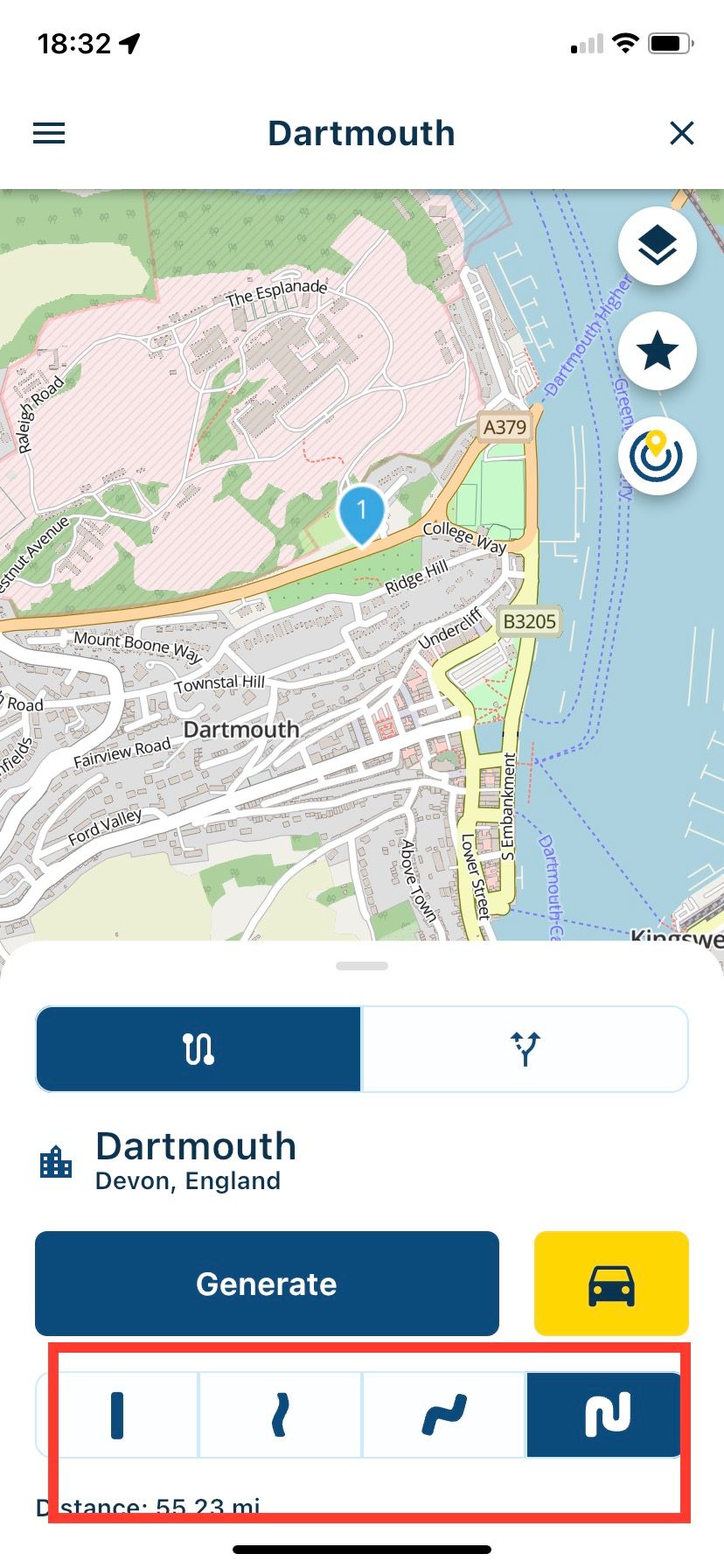
            @Bouke-Ent Choose how twisty the road is by clicking on one of the options at the bottom.
            A0FBA44D-CA7D-4AD3-B24B-8186DA73A26E.jpeg

            Always willing to help if I can.
            Triumph Tiger 1200 XRT called Tina.
            MRA Navigation Next and SilverFox BJ8

            Bouke Ent 1 Reply Last reply
            0
            • Nick Carthew Nick Carthew

              @Bouke-Ent Choose how twisty the road is by clicking on one of the options at the bottom.

              A0FBA44D-CA7D-4AD3-B24B-8186DA73A26E.jpeg

              Bouke Ent Offline
              Bouke Ent Offline
              Bouke Ent
              wrote on last edited by
              #10

              @Nick-Carthew that is in mobile, left tab. i mean in next, right tab. then there is only 1 option and that is generate.
              Bouke

              Nick Carthew 1 Reply Last reply
              0
              • Bouke Ent Bouke Ent

                @Nick-Carthew that is in mobile, left tab. i mean in next, right tab. then there is only 1 option and that is generate.
                Bouke

                Nick Carthew Offline
                Nick Carthew Offline
                Nick Carthew
                RouteXpert
                wrote on last edited by
                #11

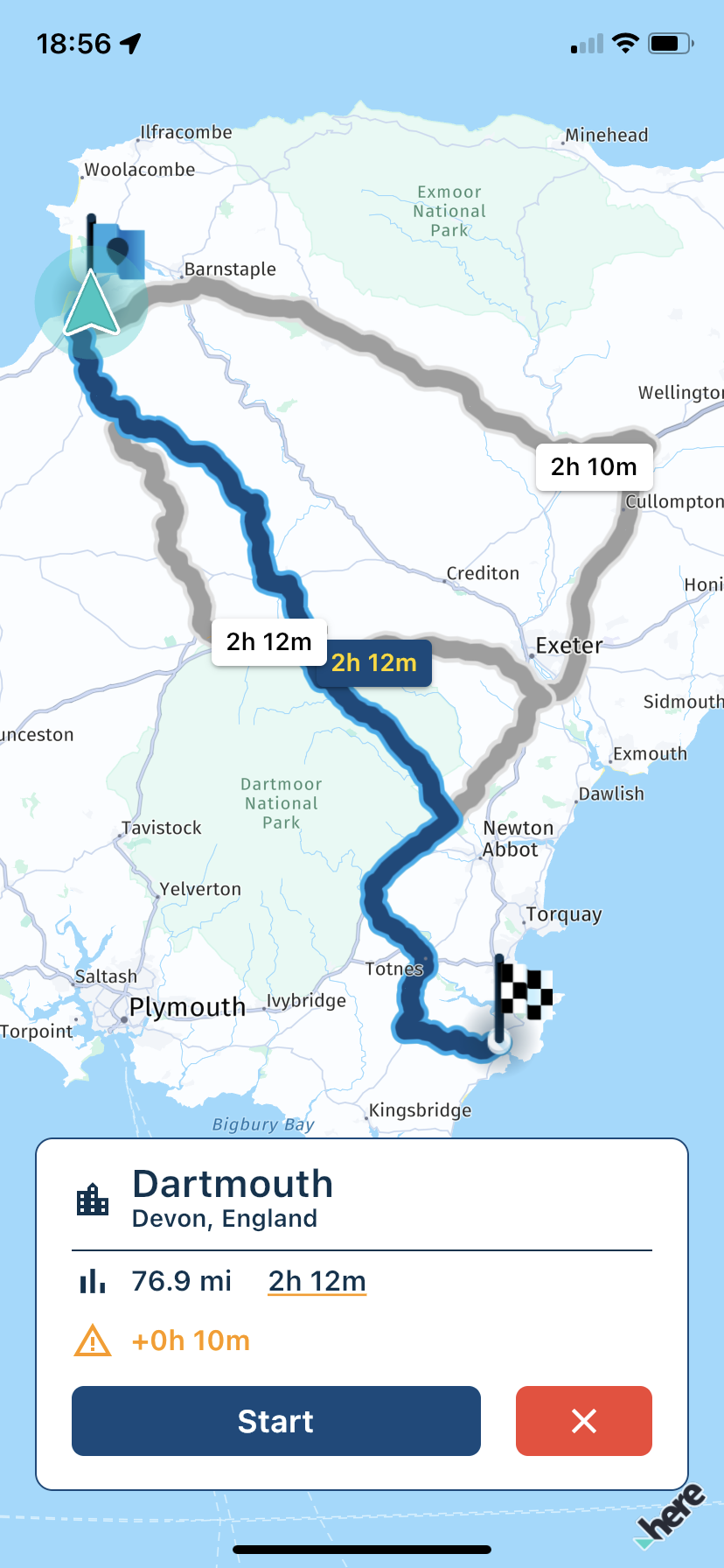
                @Bouke-Ent Right tab should give you 3 route options.
                C7E742A2-988B-48CF-90EF-98AC55D612D5.png

                Always willing to help if I can.
                Triumph Tiger 1200 XRT called Tina.
                MRA Navigation Next and SilverFox BJ8

                Bouke Ent 1 Reply Last reply
                0
                • Corjan Meijerink Corjan Meijerink

                  @Stanisław You don't need to create a route 🙂

                  If you search for an address using the search bar (top right magnifying glass on the map screen as shown when the app boots), simply select the destination and you can generate a route to the selected destination.

                  When generating a route, make sure the right "tab" selected. The other one stays within the Mobile app and doesn't use Navigation Next.

                  Bouke Ent Offline
                  Bouke Ent Offline
                  Bouke Ent
                  wrote on last edited by
                  #12

                  @Corjan-Meijerink said in Manuell placing of target:

                  If you search for an address using the search bar (top right magnifying glass on the map screen as shown when the app boots), simply select the destination and you can generate a route to the selected destination.
                  When generating a route, make sure the right "tab" selected. The other one stays within the Mobile app and doesn't use Navigation Next.

                  this i did now test and it seem te work well. even city, street number or street, number, city all work and also adres in other country.

                  bouke

                  1 Reply Last reply
                  0
                  • Nick Carthew Nick Carthew

                    @Bouke-Ent Right tab should give you 3 route options.

                    C7E742A2-988B-48CF-90EF-98AC55D612D5.png

                    Bouke Ent Offline
                    Bouke Ent Offline
                    Bouke Ent
                    wrote on last edited by
                    #13

                    @Nick-Carthew said in Manuell placing of target:

                    @Bouke-Ent Right tab should give you 3 route options.

                    C7E742A2-988B-48CF-90EF-98AC55D612D5.png

                    that is not what i mean. options you can not select like no highway, no ferry, no toll road, etc before generate. you get a few alternatieves and that is nice.

                    Bouke

                    Nick Carthew 1 Reply Last reply
                    0
                    • Bouke Ent Bouke Ent

                      @Nick-Carthew said in Manuell placing of target:

                      @Bouke-Ent Right tab should give you 3 route options.

                      C7E742A2-988B-48CF-90EF-98AC55D612D5.png

                      that is not what i mean. options you can not select like no highway, no ferry, no toll road, etc before generate. you get a few alternatieves and that is nice.

                      Bouke

                      Nick Carthew Offline
                      Nick Carthew Offline
                      Nick Carthew
                      RouteXpert
                      wrote on last edited by
                      #14

                      @Bouke-Ent Those options might come in an update when beta testing is over.
                      You have to remember that this is an early beta release of MRA Navigation Next and it is not the finished product.

                      Always willing to help if I can.
                      Triumph Tiger 1200 XRT called Tina.
                      MRA Navigation Next and SilverFox BJ8

                      Bouke Ent 1 Reply Last reply
                      0
                      • Bouke Ent Offline
                        Bouke Ent Offline
                        Bouke Ent
                        wrote on last edited by
                        #15

                        when you select a place that is out of calculation limit, let say i select new york or sardine, then you do not get a message destination can not be calculated. result i get only the map with my location. when i select london from NL i get a highway route via traintunnel.

                        1 Reply Last reply
                        0
                        • Nick Carthew Nick Carthew

                          @Bouke-Ent Those options might come in an update when beta testing is over.
                          You have to remember that this is an early beta release of MRA Navigation Next and it is not the finished product.

                          Bouke Ent Offline
                          Bouke Ent Offline
                          Bouke Ent
                          wrote on last edited by
                          #16

                          @Nick-Carthew said in Manuell placing of target:

                          @Bouke-Ent Those options might come in an update when beta testing is over.
                          You have to remember that this is an early beta release of MRA Navigation Next and it is not the finished product.

                          that is why i am testing it. maybe corjan says yes that is for next release.

                          Bouke

                          1 Reply Last reply
                          0
                          • Corjan Meijerink Offline
                            Corjan Meijerink Offline
                            Corjan Meijerink
                            Developer
                            wrote on last edited by
                            #17

                            @Bouke-Ent @Nick-Carthew This is something developed in a later stage! For now the Navigation route is simply the fasted one. The alternatives shown (max total of 3) are variants of the fastest route, similar to Google Maps A-B routing.

                            Generating alternative routes with HERE is quite complex with regards to curviness. That’s why segments also aren’t working yet on the website for HERE.

                            On a sidenote, please try to respect the thread topic. Now it becomes harder to find this discussion 😉

                            1 Reply Last reply
                            1
                            • MyRoute-app community MyRoute-app community moved this topic from [Beta] The MyRoute-app on
                            • Corjan Meijerink Corjan Meijerink referenced this topic on

                            Hello! It looks like you're interested in this conversation, but you don't have an account yet.

                            Getting fed up of having to scroll through the same posts each visit? When you register for an account, you'll always come back to exactly where you were before, and choose to be notified of new replies (either via email, or push notification). You'll also be able to save bookmarks and upvote posts to show your appreciation to other community members.

                            With your input, this post could be even better 💗

                            Register Login

                            Reply
                            • Reply as topic
                            Log in to reply
                            • Oldest to Newest
                            • Newest to Oldest
                            • Most Votes


                            ACTIVE USERS
                            Corjan Meijerink
                            Corjan Meijerink
                            Nick Carthew
                            Nick Carthew
                            Bouke Ent
                            Bouke Ent
                            Jörgen
                            Jörgen
                            Stanisław
                            Stanisław
                            POPULAR TOPICS
                            • Paar onduidelijkheden.
                              Travellexxie
                              Travellexxie
                              1
                              16
                              163

                            • Giving folders its own color
                              Brian McG
                              Brian McG
                              0
                              9
                              201

                            • Er gaat hier iets mis melding
                              Travellexxie
                              Travellexxie
                              0
                              14
                              293

                            • Wegwerkzaamheden worden niet goed toegepast
                              Con Hennekens
                              Con Hennekens
                              0
                              7
                              115

                            • Route app reageert niet
                              Erik Schouten
                              Erik Schouten
                              0
                              4
                              46

                            • Vormingspunt, viapunt en Eindpunt op Carplay
                              Huibertus
                              Huibertus
                              0
                              3
                              30

                            • Blauwe routelijn lijft in Carplay wit
                              Corjan Meijerink
                              Corjan Meijerink
                              0
                              4
                              66

                            • New update 5.2 - Avoid roadblocks, persistent map items, POI management and share
                              M. Schrijver
                              M. Schrijver
                              28
                              61
                              7.0k

                            MY GROUPS
                            • Login

                            • Login or register to search.
                            • First post
                              Last post
                            0
                            • Categories
                            • Recent
                            • Popular
                            • Support
                            • MyRoute-app