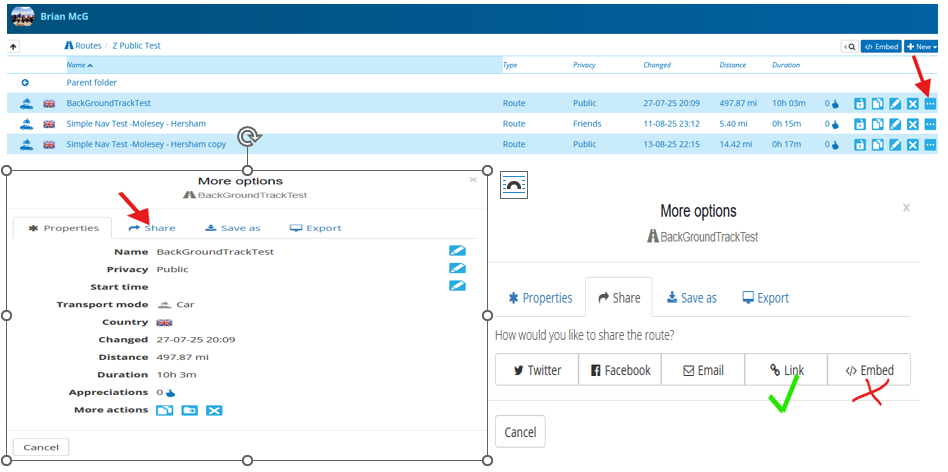
Here Maps not Recognizing Road is now Open
-

One of the great motorcycle roads in the mountains outside of Los Angeles (CA-2) is now open after 4+ years of being closed due to storm damage. I'm trying to build a route including CA-2, but MRA won't let me because HERE thinks there is a section that is closed.
MRA (to my knowledge) doesn't have an option for ignoring closed roads. I suspect the answer will be "we can't override HERE", but I don't have a problem in Garmin Basecamp (also completely HERE based). With climate change and the increasing occurrences of natural disasters, road availability can change in a moment. There needs to be an option for ignoring closed roads when it's known that a road is actually open or will be soon for the purposes of planning.
This is a showstopper for me. Please advise.
-
One of the great motorcycle roads in the mountains outside of Los Angeles (CA-2) is now open after 4+ years of being closed due to storm damage. I'm trying to build a route including CA-2, but MRA won't let me because HERE thinks there is a section that is closed.
MRA (to my knowledge) doesn't have an option for ignoring closed roads. I suspect the answer will be "we can't override HERE", but I don't have a problem in Garmin Basecamp (also completely HERE based). With climate change and the increasing occurrences of natural disasters, road availability can change in a moment. There needs to be an option for ignoring closed roads when it's known that a road is actually open or will be soon for the purposes of planning.
This is a showstopper for me. Please advise.

@John-S-Parry try enabling "Disable Seasonal Closures"
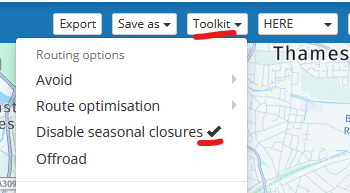
there is a bit of a discusion about the functionality here -
I have the disable seasonal closure checked. The problem is that it’s marked as a closed road, which is a different category that seasonally closed.
In short, it doesn’t apply.
-
@John-S-Parry try enabling "Disable Seasonal Closures"
there is a bit of a discusion about the functionality here
Sorry @John-S-Parry I am guessing the part of CA-2 your referring to is between Cedar Springs & Big Pines
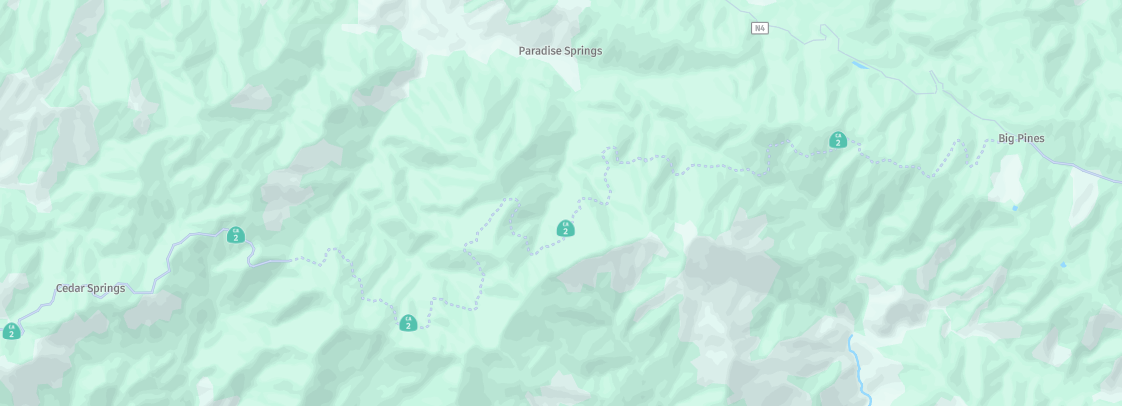
The "Disable Seasonal Closure" does not seem to work for this closure, probably because rather than a closure Here have designated that route as under construction going by the dashed line on the map, so it really is a Here issue & the correct resolution is for Here to update their mapMy only other sugestion would be to plan it with the OpenStreetMap or TomTom routing as these seem to route okay
If Here dont update the map before your trip you can try navigating the route as a Track with MRA
You would probably need to do this in Offline mode to prevent any recalculations deviating you off the track & stopping you from riding the road under construction, you would loose acces to traffic updates
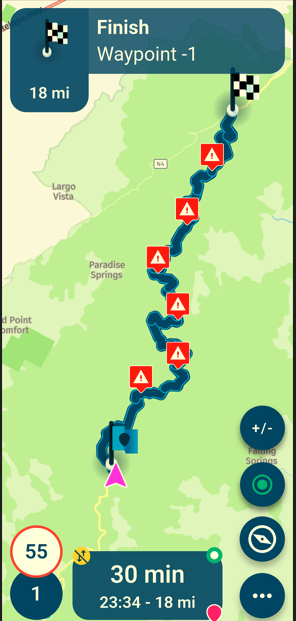
It is a work around but if the Here base map does not allow you to route through an area there is not a lot MRA can do, the "override" is to use a different routing map
-
Thanks Brian. I appreciate your input.
Yes, you got the section of CA-2 that had been closed absolutely correct:
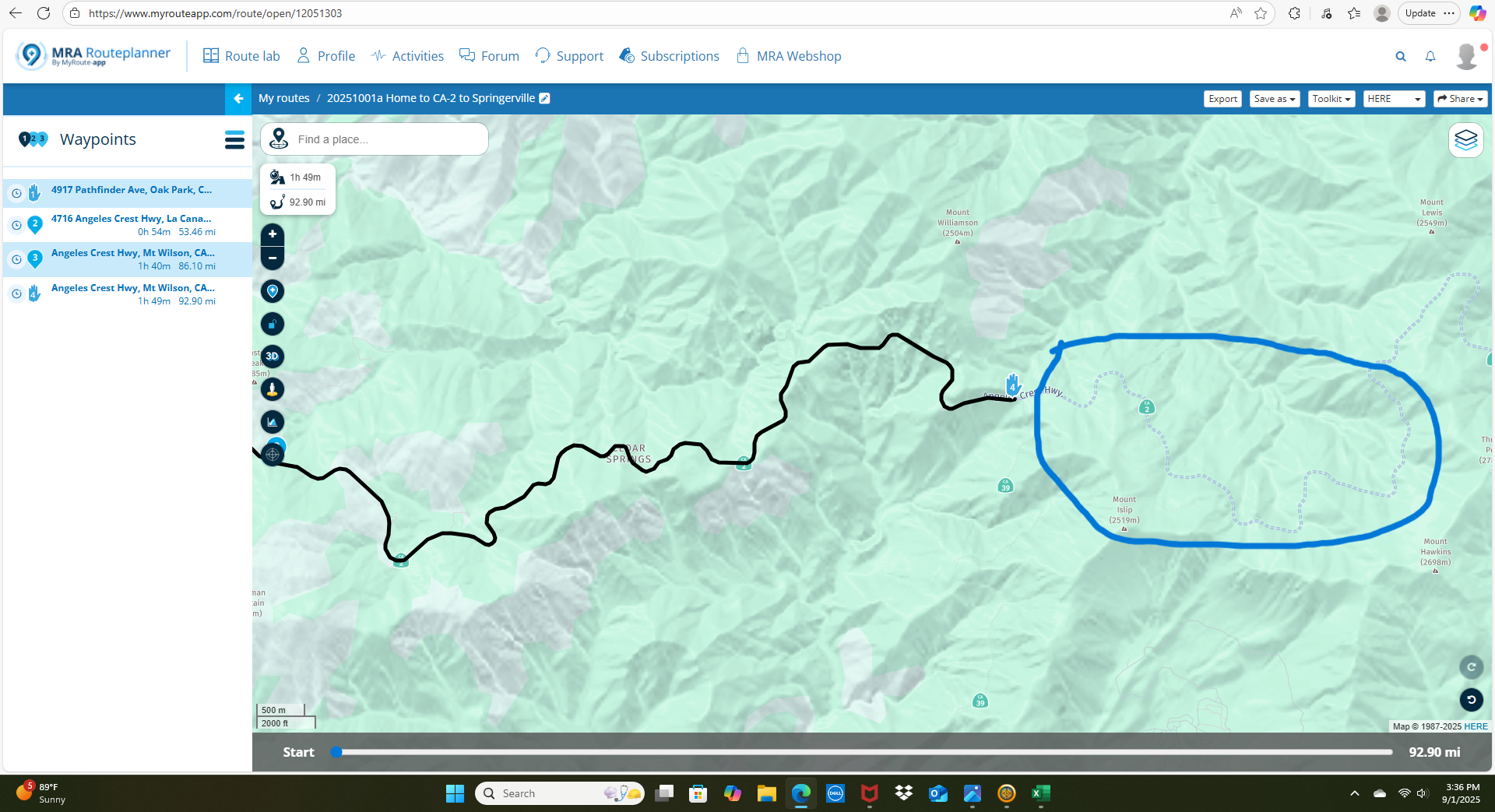
It's a been a long-term closure due to difficult road repairs. That's why it shows as closed in HERE. Well, it's open now. With the track record of HERE, it could be weeks before they update their map to a "road open" status. It's easy just to blame HERE, but how does Basecamp (which is also HERE based) allow routing closed roads? I also use an Apple based navigation planner called inRoute, and they have an explicit setting option called "Ignore Closed Roads", allowing you to route through them for whatever reason you have. Of course it's a buyer beware kind of setting, but the reality is that Google Maps is the gold standard and your best friend for up-to-date road status into, which is why I use it for final validation regardless of route planner I'm using.
If nothing changes, my options are to either use Basecamp or inRoute as an alternative to create the route I need. I'd rather not play gymnastics with MRA and have to work around it. If this is simply a wart we have to live with, I'd just like to know.
On Edit: I tried both TomTom and OpenStreetMap views as a workaround. I can place a waypoint in the closed section, but MRA won't create a route line to it.
-
You can put a request an here if the road is open.
https://mapfeedback.here.com/#/report -

In the meantime you can use this workaround: Change the section between WP 3 and 4 to offroad.
Here the route:
https://www.myrouteapp.com/en/social/route/12044754?mode=shareKindly regards
ReinhardMontana 700i and Mac
-
In the meantime you can use this workaround: Change the section between WP 3 and 4 to offroad.
Here the route:
https://www.myrouteapp.com/en/social/route/12044754?mode=share
@Reinhard-32 Thanks. I appreciate the effort you put into this.
I did a search and was able to find how to use the technique. I'm not sure how this would look after import into a Garmin GPS, especially if the skip section has intended route deviations within it. It's clearly a workaround as opposed to a clean solution, but....
Regardless, I'll play with it.
-
@Reinhard-32 Thanks. I appreciate the effort you put into this.
I did a search and was able to find how to use the technique. I'm not sure how this would look after import into a Garmin GPS, especially if the skip section has intended route deviations within it. It's clearly a workaround as opposed to a clean solution, but....
Regardless, I'll play with it.

@John-S-Parry I think the best option is to report it to HERE using the website that @ErikMatthezing shared above. The more often it is reported the more chance there is of a map update. He who shouts loudest

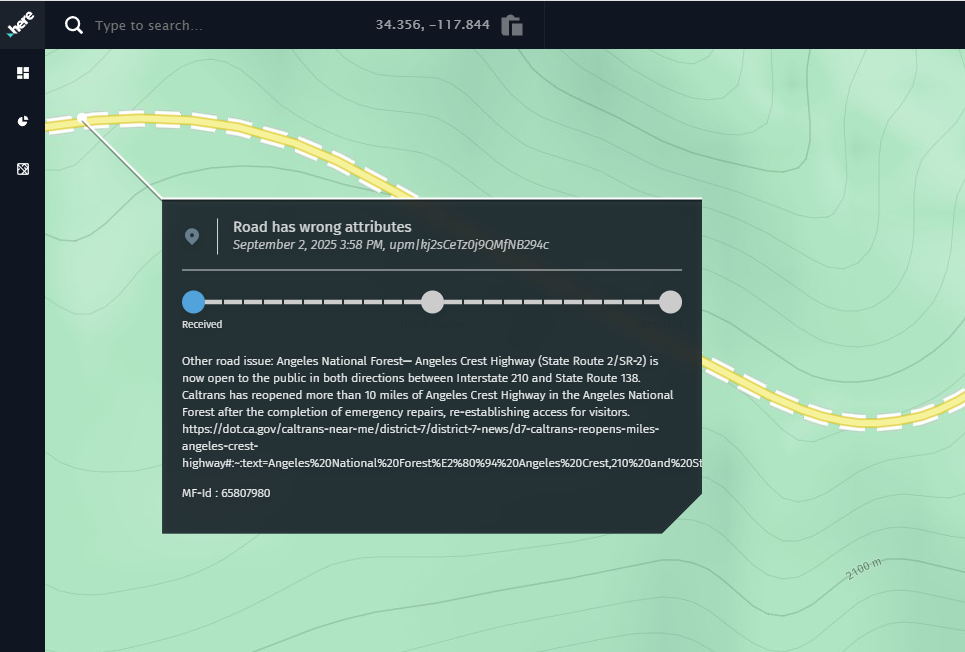
I have just reported the re-opening of The Angels Crest Highway.
-
@John-S-Parry I think the best option is to report it to HERE using the website that @ErikMatthezing shared above. The more often it is reported the more chance there is of a map update. He who shouts loudest
I have just reported the re-opening of The Angels Crest Highway.
@Nick-Carthew Thanks for making the report.
 I'll be monitoring, and it will be interesting to see how long it takes HERE to bring their map to current reality.
I created this thread understanding that I could report the updated road status to HERE and wait until it's convenient for them to make the correction. What I was looking for was an MRA side solution that allows for clean route creation in situations where a road is marked closed, when in fact it isn't. Again, Garmin is tethered to HERE as much as MRA is, yet Basecamp and their respective GPS devices allow creating routes on roads that HERE marks as closed. I also mentioned that inRoute provides an advanced setting called "Ignore Closed Roads", recognizing the need/versatility that functionality provides.
I often lead rides and sometimes need to create routes for distribution quickly. It's good to know the skip function is available, but it's not a 100% solution if you need to create shaping points for secondary roads in a skipped area. I understand that's probably rare, but I don't like limitations that seem to bite me at the worst times.

I think I understand what my MRA options are at this point. Thanks to all who reached out to help.
-
Thanks Brian. I appreciate your input.
Yes, you got the section of CA-2 that had been closed absolutely correct:
It's a been a long-term closure due to difficult road repairs. That's why it shows as closed in HERE. Well, it's open now. With the track record of HERE, it could be weeks before they update their map to a "road open" status. It's easy just to blame HERE, but how does Basecamp (which is also HERE based) allow routing closed roads? I also use an Apple based navigation planner called inRoute, and they have an explicit setting option called "Ignore Closed Roads", allowing you to route through them for whatever reason you have. Of course it's a buyer beware kind of setting, but the reality is that Google Maps is the gold standard and your best friend for up-to-date road status into, which is why I use it for final validation regardless of route planner I'm using.
If nothing changes, my options are to either use Basecamp or inRoute as an alternative to create the route I need. I'd rather not play gymnastics with MRA and have to work around it. If this is simply a wart we have to live with, I'd just like to know.
On Edit: I tried both TomTom and OpenStreetMap views as a workaround. I can place a waypoint in the closed section, but MRA won't create a route line to it.
Hi @John-S-Parry said in Here Maps not Recognizing Road is now Open:
On Edit: I tried both TomTom and OpenStreetMap views as a workaround. I can place a waypoint in the closed section, but MRA won't create a route line to it.
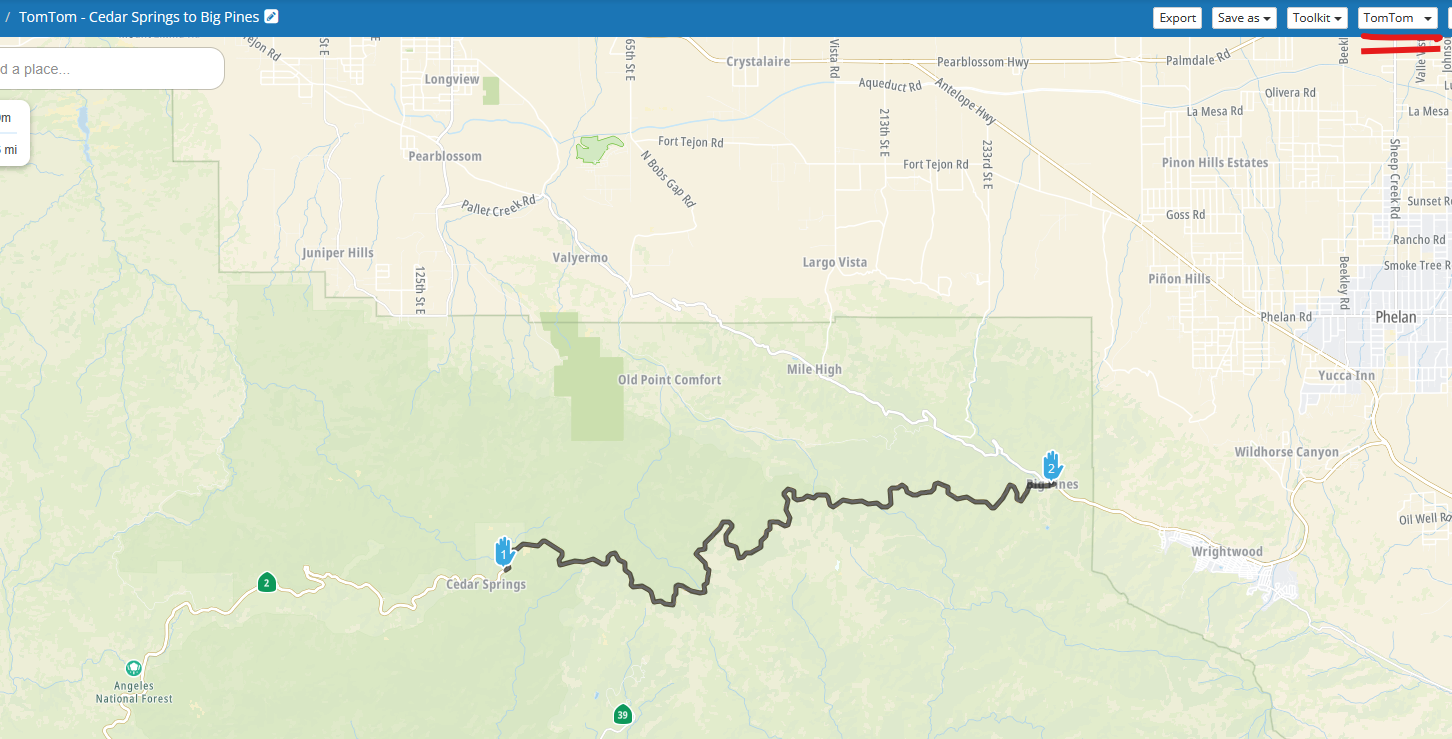
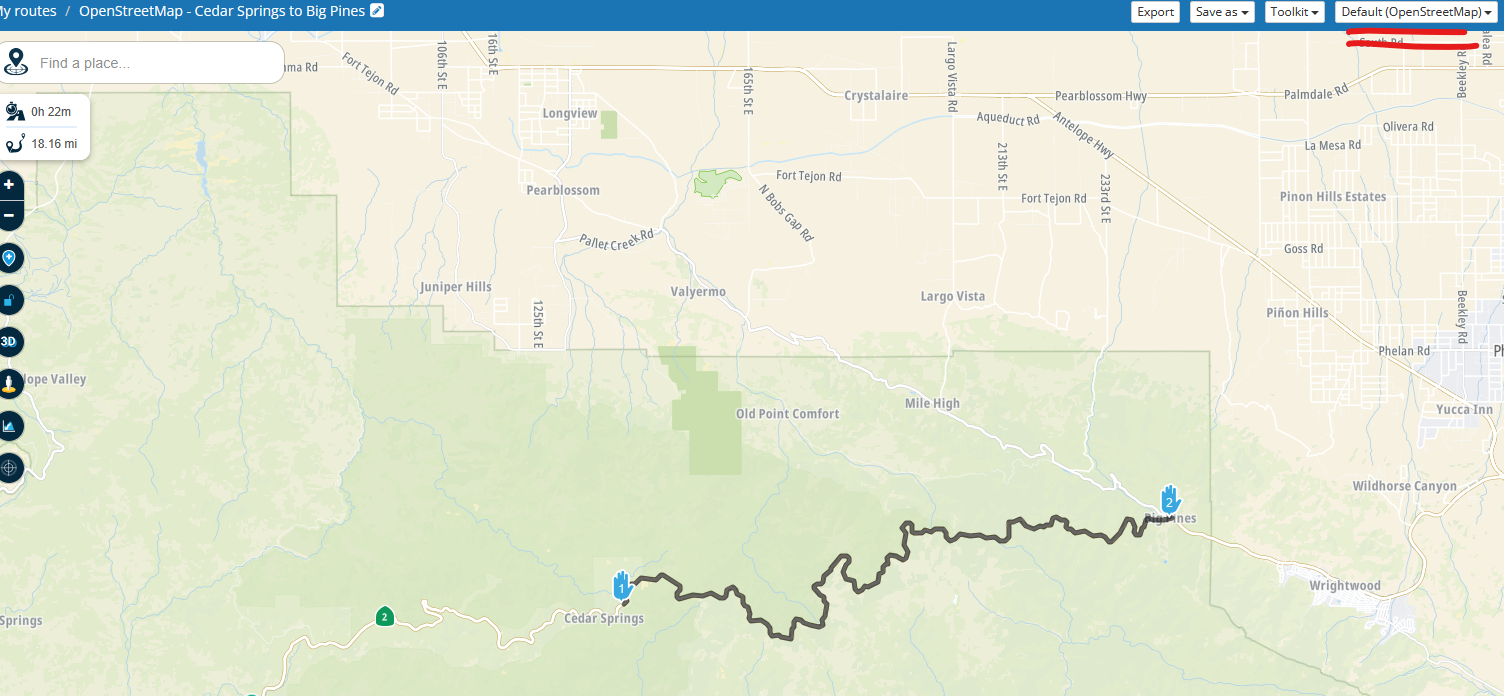
Sorry but I have to say it is possible to route along the CA-2 between Cedar Springs & Big Pines with both OpenStreetMap & TomTom selected as the routing options
TomTom - https://www.myrouteapp.com/en/social/route/12058866?mode=share
OpenStreetMap - https://www.myrouteapp.com/en/social/route/12053492?mode=share
The Here option obviously does not route - https://www.myrouteapp.com/en/social/route/12058878?mode=share
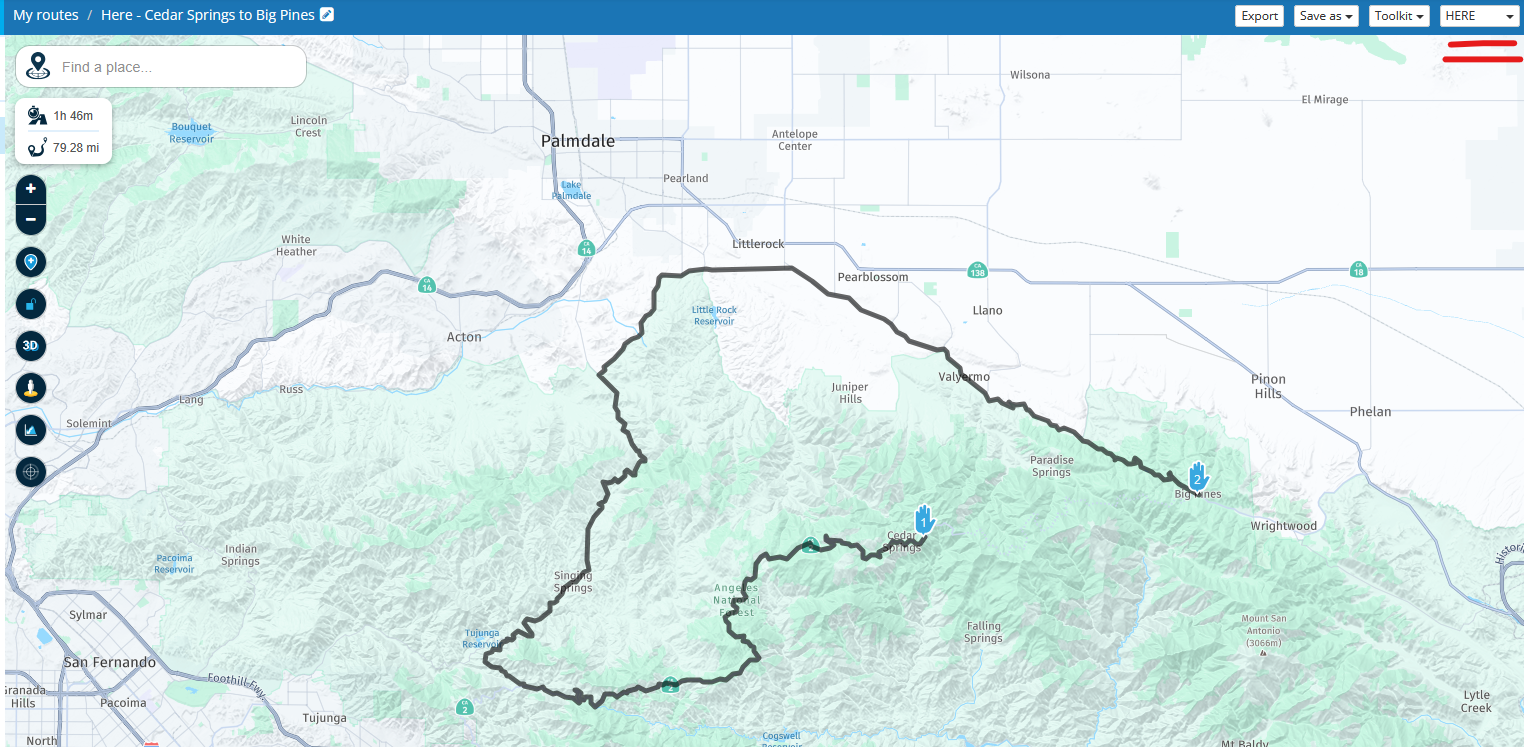
I am very confident that the idea in my first post, using OpenStreetMap or TomTom in offline mode works, as the second image in that post is actually MRA navigating along the CA-2 just outside Cedar Springs & heading towards Big Pines.
All the red warning triangles are advising that the road in the Here map is not passableIt is possible you may have another setting MRA that is preventing the routing in your account, if you share your route it may be possible to see why you cannot route along the CA-2
-
@John-S-Parry I think the best option is to report it to HERE using the website that @ErikMatthezing shared above. The more often it is reported the more chance there is of a map update. He who shouts loudest
I have just reported the re-opening of The Angels Crest Highway.

@Nick-Carthew said in Here Maps not Recognizing Road is now Open:
The more often it is reported the more chance there is of a map update. He who shouts loudest
That’s why I prefer OpenStreetMap: you can correct the map yourself without having to report issues and wait. With the next map update, your corrections are already included.
With HERE, I reported an issue more than one year ago, and nothing changed ...Best regards,
Adrian📱Samsung S24 Ultra with MyRoute-APP (GOLD Lifetime)
🏍️Honda NC750X (2021) with AA/CarPlay by CHIGEE Aio-5
🚙Renault Duster with onboard AA/CarPlay Unit -
@Nick-Carthew said in Here Maps not Recognizing Road is now Open:
The more often it is reported the more chance there is of a map update. He who shouts loudest
That’s why I prefer OpenStreetMap: you can correct the map yourself without having to report issues and wait. With the next map update, your corrections are already included.
With HERE, I reported an issue more than one year ago, and nothing changed ...
@Adrian-Avram you can also edit & correct the Here map at https://mapcreator.here.com
unlike OpenStreetMap where the edit is accepted almost immedialltey on trust, with Here each edit is reviewed before acceptance
I find simple edits & changes with Here can take a few days to a couple of weeks OR they are not accepted
if nothing has changed a year after your report then it has probably not been accepted -
Hi @John-S-Parry said in Here Maps not Recognizing Road is now Open:
On Edit: I tried both TomTom and OpenStreetMap views as a workaround. I can place a waypoint in the closed section, but MRA won't create a route line to it.
Sorry but I have to say it is possible to route along the CA-2 between Cedar Springs & Big Pines with both OpenStreetMap & TomTom selected as the routing options
TomTom - https://www.myrouteapp.com/en/social/route/12058866?mode=share
OpenStreetMap - https://www.myrouteapp.com/en/social/route/12053492?mode=share
The Here option obviously does not route - https://www.myrouteapp.com/en/social/route/12058878?mode=share
I am very confident that the idea in my first post, using OpenStreetMap or TomTom in offline mode works, as the second image in that post is actually MRA navigating along the CA-2 just outside Cedar Springs & heading towards Big Pines.
All the red warning triangles are advising that the road in the Here map is not passableIt is possible you may have another setting MRA that is preventing the routing in your account, if you share your route it may be possible to see why you cannot route along the CA-2
@Brian-McG said in Here Maps not Recognizing Road is now Open:
I am very confident that the idea in my first post, using OpenStreetMap or TomTom in offline mode works
I think the above is where some of the confusion is. I don't use offline mode for route planning. I do almost all my route creation in the online Web Routeplanner. I then save routes as GPX 1.1 files for import into my Zumo XT for actual navigation. So, I still maintain it's not possible to use TomTom or OSM (while online) to route on a closed road. If I'm incorrect, I'm all ears for learning something more.
I think the skip function mostly works. It's not perfect, but workable.
-
@Brian-McG said in Here Maps not Recognizing Road is now Open:
I am very confident that the idea in my first post, using OpenStreetMap or TomTom in offline mode works
I think the above is where some of the confusion is. I don't use offline mode for route planning. I do almost all my route creation in the online Web Routeplanner. I then save routes as GPX 1.1 files for import into my Zumo XT for actual navigation. So, I still maintain it's not possible to use TomTom or OSM (while online) to route on a closed road. If I'm incorrect, I'm all ears for learning something more.
I think the skip function mostly works. It's not perfect, but workable.
@John-S-Parry "Offline" mode refers to navigating with the MRA mobile app so it does not apply to your use case
In my previous post you can see that using TomTom & OpenStreetMap as the routing options they clearly route along the road between Cedar Springs & Big Pines
If I export those routes as GPX1.1 they will be GPX files containing those routes & tracks following that pathWhen you import them into the Zumo & depending on your settings it may re-calculate the route so it detours away from the CA-2 but if you selcect the track it should follow the path from Cedar Springs to Big Pines
-
I tested @Brian-McG's suggestion of exporting the track using the OSM map and he's correct, as can be seen here:
https://www.gpsvisualizer.com/display/map/20250902125300-05119-map.htmlThe red line is the track, the blue line is the route (or rather routing points) that have been exported. Using the Track, the XT should calculate the correct route on its own.
This however does NOT work if you set one of the shaping points to off-road.
When exporting, it appears that in the background the route is calculated, ignoring the 'Skip' setting of the waypoint. If I set the 4th shaping point to skip, it draws a straight line in the routing, but when I export it using the OSM-maps, I still get a nicely routed track (which in some cases is not what you cant) -
@Brian-McG Garmin GPS devices always recalculate when imported. Always. There is no way to turn that off. I intentionally turn off all GPS avoidance settings so that the Garmin calculation algorithms won't be influenced beyond my waypoints.
I don't know what we're doing different. If I create a new named route to start and immediately go into the OSM and/or TomTom layer, I can't create a route anywhere along the closure. The web MRA Routeplanner simply won't don't it.
I normally don't deal with tracks in my routing. I create routes with an abundance of waypoints to ensure directional behavior. In the case of using the MRA skip function, the track created along the closed section gets recalculated into the rest of the route.
How you're getting OSM to route the closed section is still a mystery to me.
-
@Brian-McG Garmin GPS devices always recalculate when imported. Always. There is no way to turn that off. I intentionally turn off all GPS avoidance settings so that the Garmin calculation algorithms won't be influenced beyond my waypoints.
I don't know what we're doing different. If I create a new named route to start and immediately go into the OSM and/or TomTom layer, I can't create a route anywhere along the closure. The web MRA Routeplanner simply won't don't it.
I normally don't deal with tracks in my routing. I create routes with an abundance of waypoints to ensure directional behavior. In the case of using the MRA skip function, the track created along the closed section gets recalculated into the rest of the route.
How you're getting OSM to route the closed section is still a mystery to me.
@John-S-Parry the routing calculations in MRA are controlled in this drop down
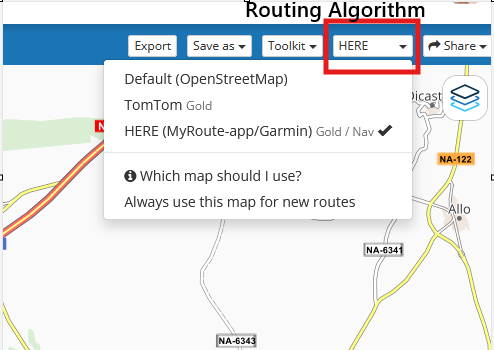
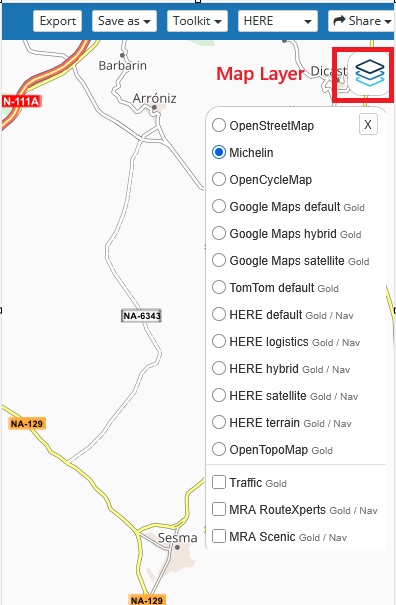
The map layers are just graphic overlays they just show you where the roads are, they are not responsible for calculating the routing, it is irrelavant what Map Layer you use, they just make the screen look nice
-
@Brian-McG We have a block between each other that I don't know how to reconcile. The "skip" function works for my purposes. I'm OK at this point.

Hello! It looks like you're interested in this conversation, but you don't have an account yet.
Getting fed up of having to scroll through the same posts each visit? When you register for an account, you'll always come back to exactly where you were before, and choose to be notified of new replies (either via email, or push notification). You'll also be able to save bookmarks and upvote posts to show your appreciation to other community members.
With your input, this post could be even better 💗
Register Login-
 9912.3k
-
5842.2k
-
 021710
-
 05103
05103
-
0428
-
 0479
0479
-
0395
-
0226