Skip to content
  • Categories
  • Recent
  • Popular
  • Support
  • MyRoute-app
Collapse
Brand Logo

MRA Community Forum

  1. Home
  2. The MyRoute-app
  3. [App] Problems, Bugs and other Issues
  4. Shaping point ignored by app

Shaping point ignored by app

Scheduled Pinned Locked Moved [App] Problems, Bugs and other Issues
16 Posts 5 Posters 3.8k Views 2 Watching
  • Oldest to Newest
  • Newest to Oldest
  • Most Votes
Reply
  • Reply as topic
Log in to reply
This topic has been deleted. Only users with topic management privileges can see it.
  • Steve Jarrell
    Steve Jarrell
    Steve Jarrell
    Valued contributor
    wrote on last edited by Steve Jarrell
    #1

    Can anyone explain to me why my shaping point #22 that was created in the online route editor was ignored by the app? I specifically put this shaping point into my route to take me to the end of town so that I would stop at a restaurant first (via point #23), then the gas station (via point #24), then continue on. Here's a link to the route.

    Thanks!

    Steve

    Online planner:
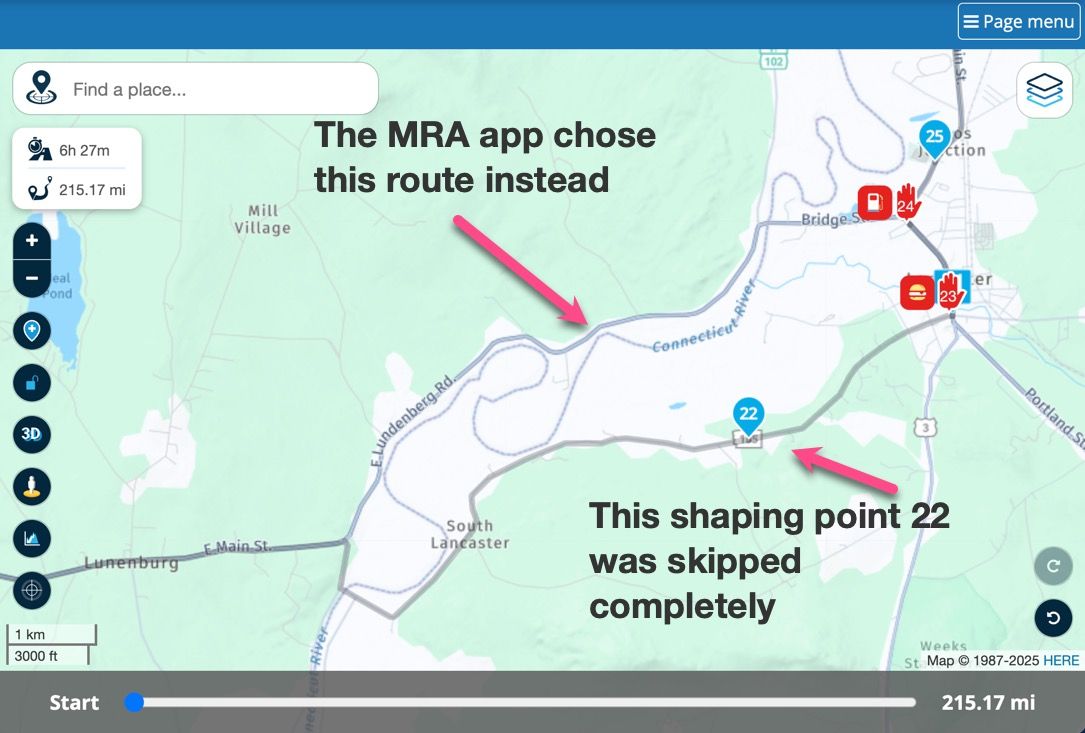
    Skipped shaping point.jpg

    Screenshot from DMD T865X when shaping point was skipped
    Skipped shaping point screenshot.jpg

    Steve Jarrell
    Western North Carolina US

    Lifetime Routeplanner Gold & Navigation Next
    2025 BMW R1300GS
    2025 Can-Am Spyder
    DMD T865-X 8" Tablet
    Garmin XT3

    Adrian Avram MyZ51 2 Replies Last reply
    0
    • RetiredWingMan
      RetiredWingMan
      RetiredWingMan
      Valued contributor
      wrote on last edited by
      #2

      Share a link to the route and make it public and we will try to find the issue.

      2010 GL1800 Goldwing using Samsung Galaxy S20 5G Android 13.

      Steve Jarrell 1 Reply Last reply
      0
      • RetiredWingMan RetiredWingMan

        Share a link to the route and make it public and we will try to find the issue.

        Steve Jarrell
        Steve Jarrell
        Steve Jarrell
        Valued contributor
        wrote on last edited by
        #3

        @RetiredWingMan I did.... click the "Here's a link" in my original post.

        Thanks!

        Steve Jarrell
        Western North Carolina US

        Lifetime Routeplanner Gold & Navigation Next
        2025 BMW R1300GS
        2025 Can-Am Spyder
        DMD T865-X 8" Tablet
        Garmin XT3

        1 Reply Last reply
        0
        • Steve Jarrell Steve Jarrell

          Can anyone explain to me why my shaping point #22 that was created in the online route editor was ignored by the app? I specifically put this shaping point into my route to take me to the end of town so that I would stop at a restaurant first (via point #23), then the gas station (via point #24), then continue on. Here's a link to the route.

          Thanks!

          Steve

          Online planner:
          Skipped shaping point.jpg

          Screenshot from DMD T865X when shaping point was skipped
          Skipped shaping point screenshot.jpg

          Adrian Avram
          Adrian Avram
          Adrian Avram
          wrote on last edited by Adrian Avram
          #4

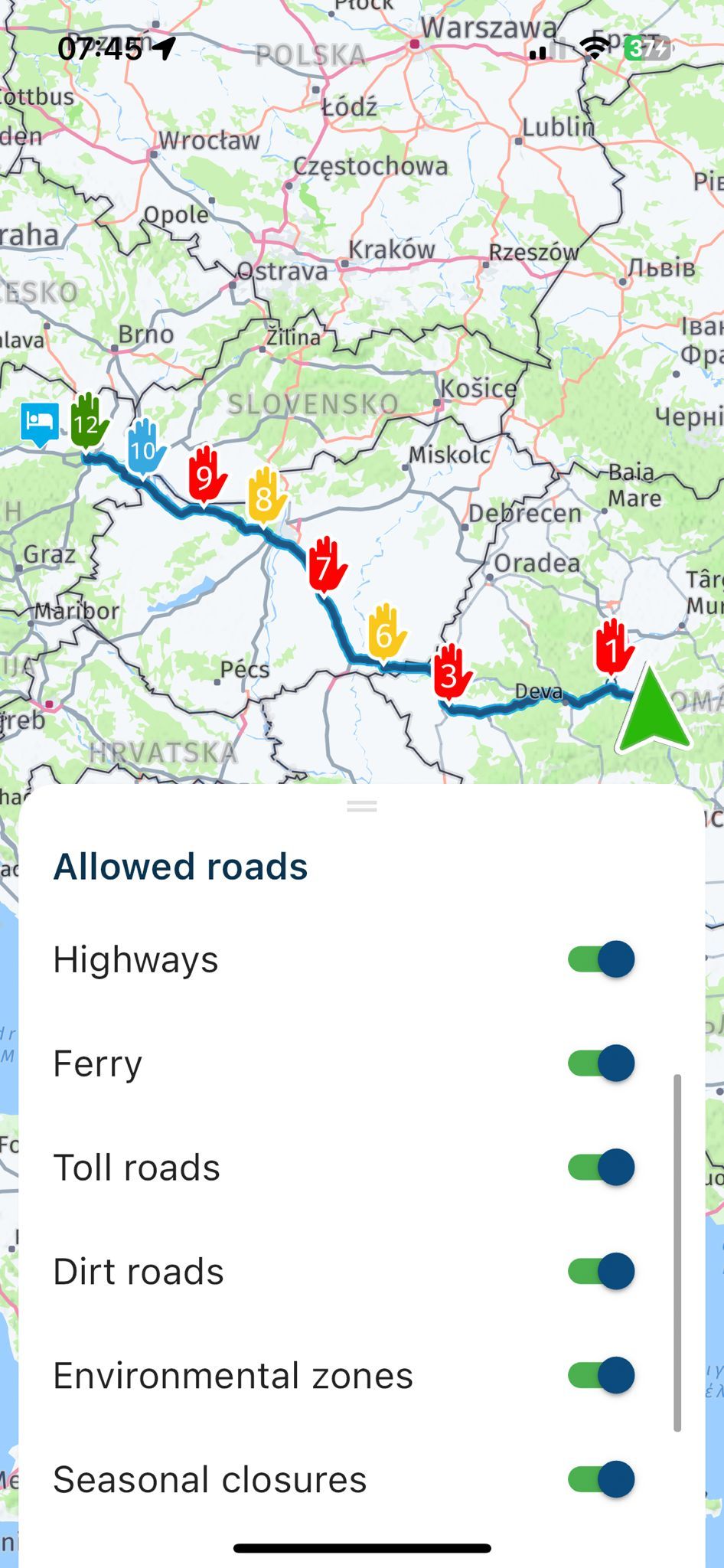
          @Steve-Jarrell are your settings the same as they are in the planner ? I am talking about allowed roads ? When you hit navigate on the phone, drag the bottom bar and check what you have allowed or not allowed there. I think only these settings can modify route while navigating.
          Also you can try navigating "Route as a track", it can be enabled from settings !
          WhatsApp Image 2025-05-23 at 07.46.04_e2ad5f8c.jpg

          Best regards,
          Adrian

          šŸ“±Samsung S24 Ultra with MyRoute-APP (GOLD Lifetime)
          šŸļøHonda NC750X (2021) with AA/CarPlay by CHIGEE Aio-5
          šŸš™Renault Duster with onboard AA/CarPlay Unit

          Con Hennekens Steve Jarrell 2 Replies Last reply
          0
          • Adrian Avram Adrian Avram

            @Steve-Jarrell are your settings the same as they are in the planner ? I am talking about allowed roads ? When you hit navigate on the phone, drag the bottom bar and check what you have allowed or not allowed there. I think only these settings can modify route while navigating.
            Also you can try navigating "Route as a track", it can be enabled from settings !

            WhatsApp Image 2025-05-23 at 07.46.04_e2ad5f8c.jpg

            Con Hennekens
            Con Hennekens
            Con Hennekens
            Alpha tester
            wrote on last edited by
            #5

            @Adrian-Avram said in Shaping point ignored by app:

            are your settings the same as they are in the planner ? I am talking about allowed roads ?

            They always are, since the allowed roads in Navigation pass over from the planner to MRA Navigation. Great platform, isn't it? šŸ˜‰

            I am just an enthusiastic MRA user, and hope you will be one too!

            Most motorcycle problems are caused by the nut that connects the handlebar to the saddle.

            Check out RideSleepRepeat.eu, a biker community for sharing stays across Europe

            Adrian Avram 1 Reply Last reply
            0
            • Con Hennekens Con Hennekens

              @Adrian-Avram said in Shaping point ignored by app:

              are your settings the same as they are in the planner ? I am talking about allowed roads ?

              They always are, since the allowed roads in Navigation pass over from the planner to MRA Navigation. Great platform, isn't it? šŸ˜‰

              Adrian Avram
              Adrian Avram
              Adrian Avram
              wrote on last edited by Adrian Avram
              #6

              @Con-Hennekens said in Shaping point ignored by app:

              They always are

              No they are not ! Because in the planner I could select for example to use Highways and in the app to disable that, and it changes the route !
              I already tried it ...

              Best regards,
              Adrian

              šŸ“±Samsung S24 Ultra with MyRoute-APP (GOLD Lifetime)
              šŸļøHonda NC750X (2021) with AA/CarPlay by CHIGEE Aio-5
              šŸš™Renault Duster with onboard AA/CarPlay Unit

              Con Hennekens 1 Reply Last reply
              0
              • Adrian Avram Adrian Avram

                @Con-Hennekens said in Shaping point ignored by app:

                They always are

                No they are not ! Because in the planner I could select for example to use Highways and in the app to disable that, and it changes the route !
                I already tried it ...

                Con Hennekens
                Con Hennekens
                Con Hennekens
                Alpha tester
                wrote on last edited by
                #7

                @Adrian-Avram, yes of course you can change it manually, but then it would be no surprise if the route changes. If you don't change it manually in the app, the allowed roads setting will follow the ones used in the planner (if you use the correct map).

                The real surprise in this case is that the blue route line refuses to go to the shaping point, one way or the other. Something I cannot reproduce by the way. The route in my app seems to follow the desired road without problem.

                I am just an enthusiastic MRA user, and hope you will be one too!

                Most motorcycle problems are caused by the nut that connects the handlebar to the saddle.

                Check out RideSleepRepeat.eu, a biker community for sharing stays across Europe

                Steve Jarrell 2 Replies Last reply
                1
                • RetiredWingMan
                  RetiredWingMan
                  RetiredWingMan
                  Valued contributor
                  wrote on last edited by
                  #8

                  I loaded your route. I tried everything I could think of, changed options, used motorcycle and car. Nothing I did caused Navigator to skip wp 22. Is it possible that there was s blockage on the road when you looked at it.

                  2010 GL1800 Goldwing using Samsung Galaxy S20 5G Android 13.

                  1 Reply Last reply
                  0
                  • Steve Jarrell
                    Steve Jarrell
                    Steve Jarrell
                    Valued contributor
                    wrote on last edited by
                    #9

                    Thanks. Nothing that I know of. I had all avoidances turned off in the app. That's why I was surprised when it ignored my shaping point. I appreciate you looking!

                    Steve Jarrell
                    Western North Carolina US

                    Lifetime Routeplanner Gold & Navigation Next
                    2025 BMW R1300GS
                    2025 Can-Am Spyder
                    DMD T865-X 8" Tablet
                    Garmin XT3

                    1 Reply Last reply
                    0
                    • Adrian Avram Adrian Avram

                      @Steve-Jarrell are your settings the same as they are in the planner ? I am talking about allowed roads ? When you hit navigate on the phone, drag the bottom bar and check what you have allowed or not allowed there. I think only these settings can modify route while navigating.
                      Also you can try navigating "Route as a track", it can be enabled from settings !

                      WhatsApp Image 2025-05-23 at 07.46.04_e2ad5f8c.jpg

                      Steve Jarrell
                      Steve Jarrell
                      Steve Jarrell
                      Valued contributor
                      wrote on last edited by
                      #10

                      @Adrian-Avram Thanks Adrian. I will double check but I'm almost sure that my settings are correct. There wasn't anything unusual about that road as far as I could tell (i.e it wasn't a dirt road, seasonal closure, etc.)

                      Thanks!

                      Steve

                      Steve Jarrell
                      Western North Carolina US

                      Lifetime Routeplanner Gold & Navigation Next
                      2025 BMW R1300GS
                      2025 Can-Am Spyder
                      DMD T865-X 8" Tablet
                      Garmin XT3

                      1 Reply Last reply
                      1
                      • Con Hennekens Con Hennekens

                        @Adrian-Avram, yes of course you can change it manually, but then it would be no surprise if the route changes. If you don't change it manually in the app, the allowed roads setting will follow the ones used in the planner (if you use the correct map).

                        The real surprise in this case is that the blue route line refuses to go to the shaping point, one way or the other. Something I cannot reproduce by the way. The route in my app seems to follow the desired road without problem.

                        Steve Jarrell
                        Steve Jarrell
                        Steve Jarrell
                        Valued contributor
                        wrote on last edited by
                        #11

                        @Con-Hennekens That one has me scratching my head for sure. In this case I decided to skip both of the via points as I decided not to make the stops 23 and 24, and this worked just fine and the rest of the route worked flawlessly.

                        Thanks for your input.

                        Steve

                        Steve Jarrell
                        Western North Carolina US

                        Lifetime Routeplanner Gold & Navigation Next
                        2025 BMW R1300GS
                        2025 Can-Am Spyder
                        DMD T865-X 8" Tablet
                        Garmin XT3

                        1 Reply Last reply
                        0
                        • Con Hennekens Con Hennekens

                          @Adrian-Avram, yes of course you can change it manually, but then it would be no surprise if the route changes. If you don't change it manually in the app, the allowed roads setting will follow the ones used in the planner (if you use the correct map).

                          The real surprise in this case is that the blue route line refuses to go to the shaping point, one way or the other. Something I cannot reproduce by the way. The route in my app seems to follow the desired road without problem.

                          Steve Jarrell
                          Steve Jarrell
                          Steve Jarrell
                          Valued contributor
                          wrote on last edited by
                          #12

                          @Con-Hennekens The one other possibility is that I am using the offline mode with the offline HERE maps, and perhaps there's a slight difference between using the online maps with the app for testing and actually navigating using the online ones.

                          I thought at first the perhaps I accidentally passed by the road that the shaping point was on, but looking back at the screenshot there was no symbol in the upper left corner indicating that a shaping point was being bypassed.

                          Steve

                          Steve Jarrell
                          Western North Carolina US

                          Lifetime Routeplanner Gold & Navigation Next
                          2025 BMW R1300GS
                          2025 Can-Am Spyder
                          DMD T865-X 8" Tablet
                          Garmin XT3

                          Con Hennekens 1 Reply Last reply
                          0
                          • Steve Jarrell Steve Jarrell

                            @Con-Hennekens The one other possibility is that I am using the offline mode with the offline HERE maps, and perhaps there's a slight difference between using the online maps with the app for testing and actually navigating using the online ones.

                            I thought at first the perhaps I accidentally passed by the road that the shaping point was on, but looking back at the screenshot there was no symbol in the upper left corner indicating that a shaping point was being bypassed.

                            Steve

                            Con Hennekens
                            Con Hennekens
                            Con Hennekens
                            Alpha tester
                            wrote on last edited by
                            #13

                            @Steve-Jarrell, yesterday I was planning an entirely different route when I saw something that looked quite similar... There was NO road going to my waypoint on the basemap, but there was on the overlay map. I don't know if this could apply to your case, but thought I would drop it here šŸ˜‰ .

                            I am just an enthusiastic MRA user, and hope you will be one too!

                            Most motorcycle problems are caused by the nut that connects the handlebar to the saddle.

                            Check out RideSleepRepeat.eu, a biker community for sharing stays across Europe

                            Steve Jarrell 1 Reply Last reply
                            0
                            • Con Hennekens Con Hennekens

                              @Steve-Jarrell, yesterday I was planning an entirely different route when I saw something that looked quite similar... There was NO road going to my waypoint on the basemap, but there was on the overlay map. I don't know if this could apply to your case, but thought I would drop it here šŸ˜‰ .

                              Steve Jarrell
                              Steve Jarrell
                              Steve Jarrell
                              Valued contributor
                              wrote on last edited by
                              #14

                              @Con-Hennekens Thanks! I'm betting there was something in the offline HERE map that caused the anamoly. I'll watch it closely for a while and see if it happens again.

                              I appreciate your input!

                              Steve

                              Steve Jarrell
                              Western North Carolina US

                              Lifetime Routeplanner Gold & Navigation Next
                              2025 BMW R1300GS
                              2025 Can-Am Spyder
                              DMD T865-X 8" Tablet
                              Garmin XT3

                              1 Reply Last reply
                              0
                              • Steve Jarrell Steve Jarrell

                                Can anyone explain to me why my shaping point #22 that was created in the online route editor was ignored by the app? I specifically put this shaping point into my route to take me to the end of town so that I would stop at a restaurant first (via point #23), then the gas station (via point #24), then continue on. Here's a link to the route.

                                Thanks!

                                Steve

                                Online planner:
                                Skipped shaping point.jpg

                                Screenshot from DMD T865X when shaping point was skipped

                                Skipped shaping point screenshot.jpg

                                MyZ51
                                MyZ51
                                MyZ51
                                wrote on last edited by
                                #15

                                @Steve-Jarrell J ran the animation and it followed timeouts as designed. I suppose if one had deliberately turned and took the unplanned route ther’d have been ā€˜revert’ options come up.

                                I always figured that if you designed it on the desktop and emailed the route or QR, the recipient’s app would follow your shaped route, thus overriding any settings they have in their device setup.

                                Con Hennekens 1 Reply Last reply
                                0
                                • MyZ51 MyZ51

                                  @Steve-Jarrell J ran the animation and it followed timeouts as designed. I suppose if one had deliberately turned and took the unplanned route ther’d have been ā€˜revert’ options come up.

                                  I always figured that if you designed it on the desktop and emailed the route or QR, the recipient’s app would follow your shaped route, thus overriding any settings they have in their device setup.

                                  Con Hennekens
                                  Con Hennekens
                                  Con Hennekens
                                  Alpha tester
                                  wrote on last edited by
                                  #16

                                  @MyZ51 said in Shaping point ignored by app:

                                  I always figured that if you designed it on the desktop and emailed the route or QR, the recipient’s app would follow your shaped route, thus overriding any settings they have in their device setup.

                                  You figured correctly, except for that not device settings are honored, but planner settings are. And of course only within the MRA ecosystem. An exported GPX does not contain any planner settings.

                                  I am just an enthusiastic MRA user, and hope you will be one too!

                                  Most motorcycle problems are caused by the nut that connects the handlebar to the saddle.

                                  Check out RideSleepRepeat.eu, a biker community for sharing stays across Europe

                                  1 Reply Last reply
                                  0

                                  Hello! It looks like you're interested in this conversation, but you don't have an account yet.

                                  Getting fed up of having to scroll through the same posts each visit? When you register for an account, you'll always come back to exactly where you were before, and choose to be notified of new replies (either via email, or push notification). You'll also be able to save bookmarks and upvote posts to show your appreciation to other community members.

                                  With your input, this post could be even better šŸ’—

                                  Register Login
                                  Reply
                                  • Reply as topic
                                  Log in to reply
                                  • Oldest to Newest
                                  • Newest to Oldest
                                  • Most Votes


                                  ACTIVE USERS
                                  Adrian Avram
                                  Adrian Avram
                                  Con Hennekens
                                  Con Hennekens
                                  RetiredWingMan
                                  RetiredWingMan
                                  Steve Jarrell
                                  Steve Jarrell
                                  MyZ51
                                  MyZ51
                                  POPULAR TOPICS
                                  • New Zealand Routes
                                    Marinus van Deudekom
                                    Marinus van Deudekom
                                    1
                                    22
                                    440

                                  • Getal in begin logo
                                    Marinus van Deudekom
                                    Marinus van Deudekom
                                    0
                                    10
                                    125

                                  • Insert Pause removed from navigation
                                    Brian McG
                                    Brian McG
                                    0
                                    8
                                    190

                                  • Via punt overslaanwerkt niet
                                    kevinsfanclub
                                    kevinsfanclub
                                    0
                                    3
                                    15

                                  • Naar vorig routepunt
                                    Marinus van Deudekom
                                    Marinus van Deudekom
                                    0
                                    5
                                    95

                                  • Opknippen route in etappes
                                    Hans777
                                    Hans777
                                    0
                                    3
                                    39

                                  • best format to download
                                    a white mouse on the motorbike
                                    a white mouse on the motorbike
                                    0
                                    3
                                    59

                                  • Vraag over grensoverschreidend gebruik..
                                    Rob Verhoeff
                                    Rob Verhoeff
                                    0
                                    2
                                    11

                                  MY GROUPS
                                  • Login

                                  • Login or register to search.
                                  • First post
                                    Last post
                                  0
                                  • Categories
                                  • Recent
                                  • Popular
                                  • Support
                                  • MyRoute-app