Skip to content
  • Categories
  • Recent
  • Popular
  • Support
  • MyRoute-app
Collapse
Brand Logo

MRA Community Forum

  1. Home
  2. The MyRoute-app
  3. [App] Problems, Bugs and other Issues
  4. Route on phone different from Laptop

Route on phone different from Laptop

Scheduled Pinned Locked Moved [App] Problems, Bugs and other Issues
7 Posts 3 Posters 1.0k Views 3 Watching
  • Oldest to Newest
  • Newest to Oldest
  • Most Votes
Reply
  • Reply as topic
Log in to reply
This topic has been deleted. Only users with topic management privileges can see it.
  • Brian Sprottundefined Offline
    Brian Sprottundefined Offline
    Brian Sprott
    wrote on last edited by
    #1

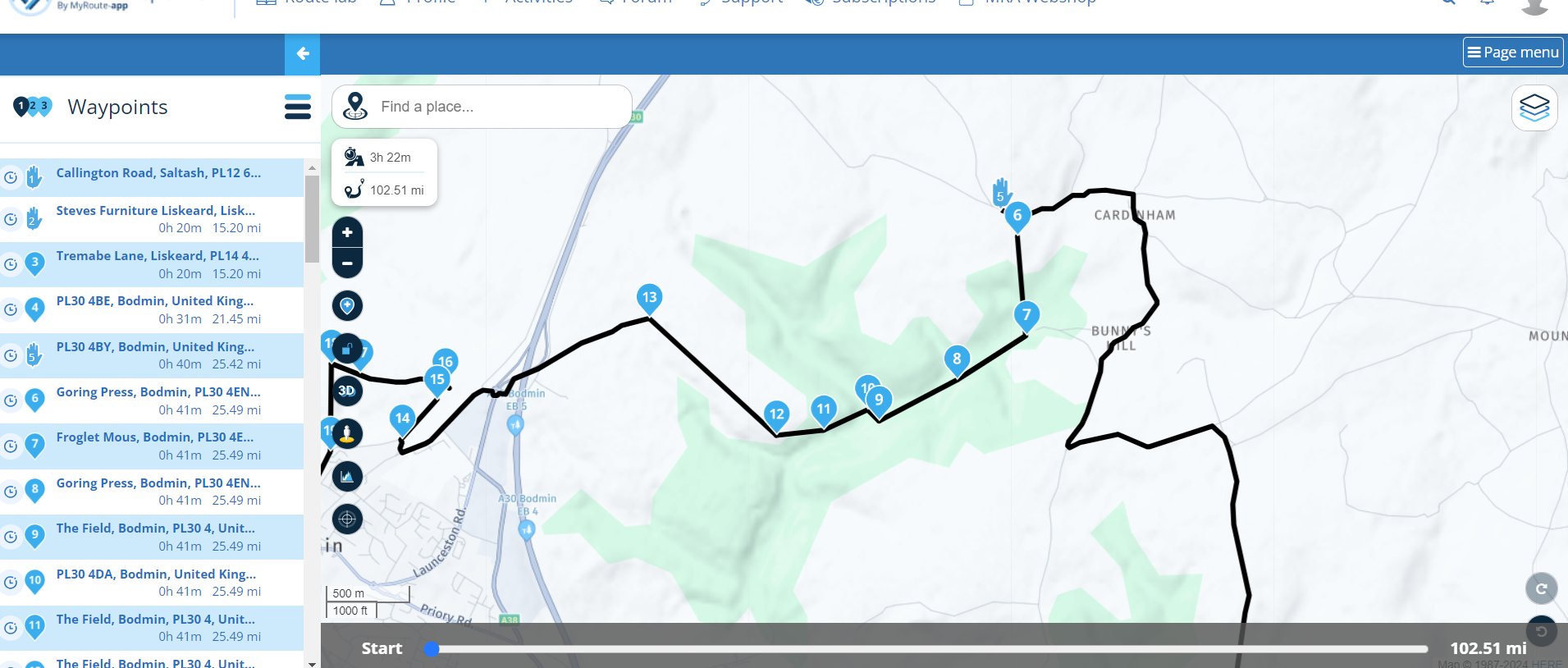
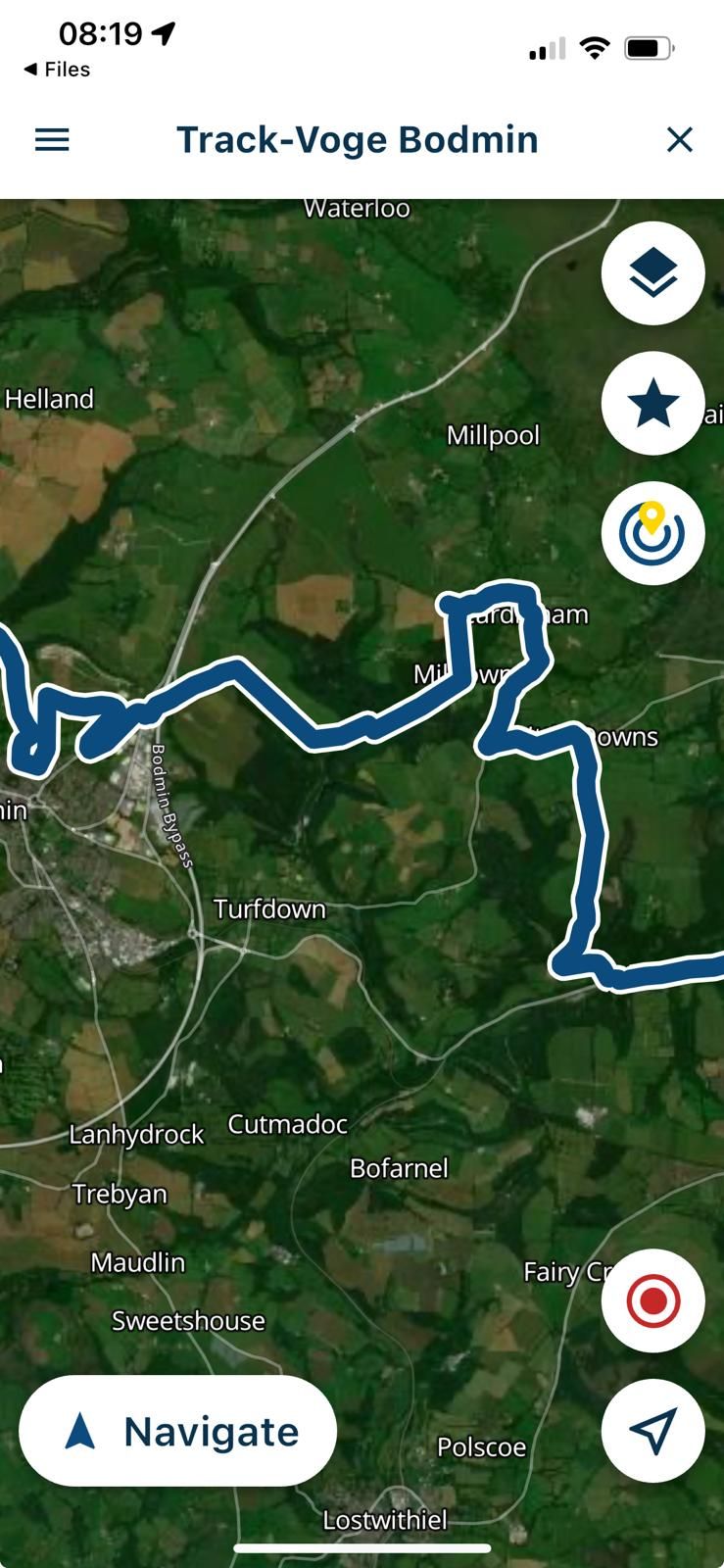
    Since sync has been introduced I cannot just view the exact same route or track on my iphone. I have a mixture of routes plus some lanes where I instruct the map to skip waypoint as they are classed as green lanes. Before the update the iphone map just showed exaclty as per my laptop. I am then using Carpuride so it was simple to view what was on my phone. Where am I going wrong please? I am using the HERE default.
    Laptop view
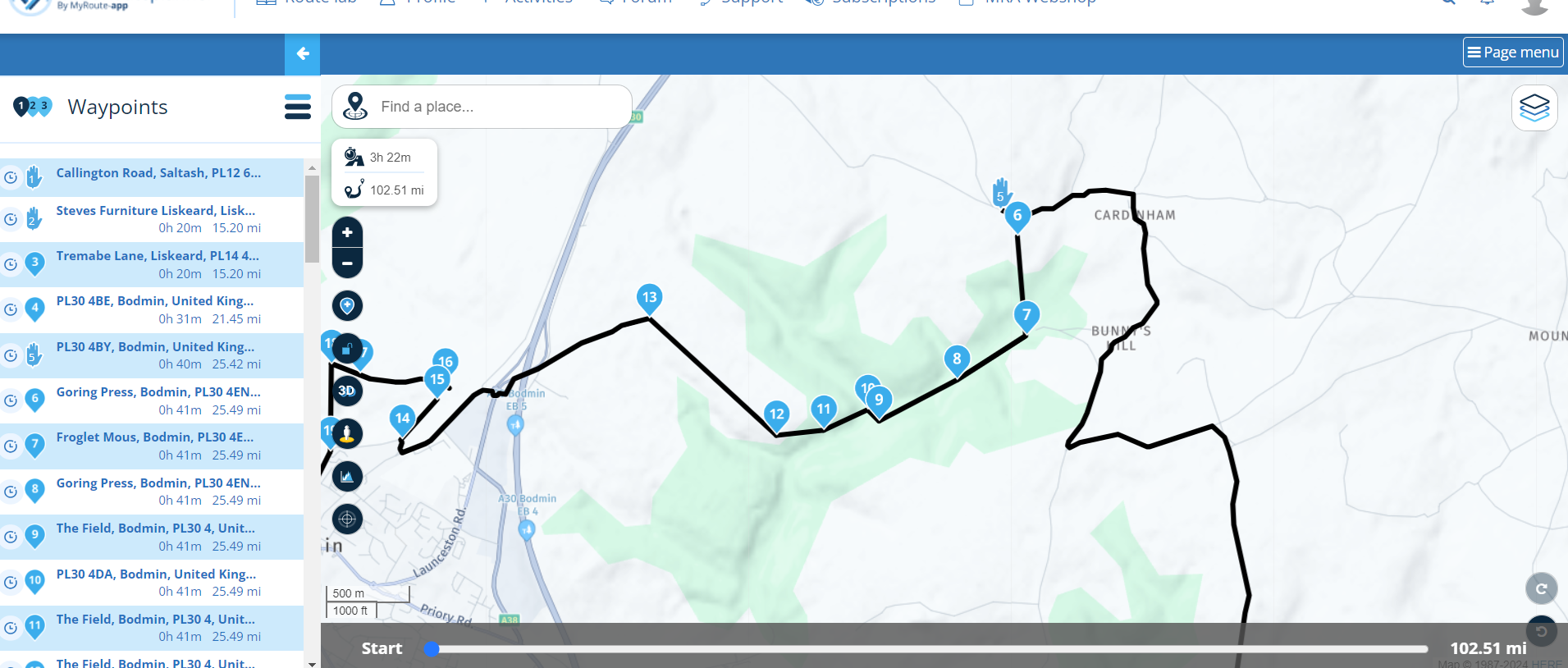
    Screenshot (24).png

    Iphone view

    WhatsApp Image 2024-09-16 at 14.27.07_de66584c.jpg

    Marinus van Deudekomundefined 1 Reply Last reply
    0
    • Brian Sprottundefined Brian Sprott

      Since sync has been introduced I cannot just view the exact same route or track on my iphone. I have a mixture of routes plus some lanes where I instruct the map to skip waypoint as they are classed as green lanes. Before the update the iphone map just showed exaclty as per my laptop. I am then using Carpuride so it was simple to view what was on my phone. Where am I going wrong please? I am using the HERE default.
      Laptop view

      Screenshot (24).png

      Iphone view

      WhatsApp Image 2024-09-16 at 14.27.07_de66584c.jpg

      Marinus van Deudekomundefined Offline
      Marinus van Deudekomundefined Offline
      Marinus van Deudekom
      RouteXpert
      wrote on last edited by
      #2

      @Brian-Sprott If sync is on what you see on your laptop is exactly what you see on your phone, however, if you've made some changes make shure that your phone is online starting MRA. Then you'll see that the the files are beeing synced.
      Share such a rout here and make sure it's set to public so we can help you

      Honda Goldwing GL1500,
      Honda Silverwing GL 650
      DMD2 T865X 8 inch Android tablet using MRA next for navigation
      Garmin XT sold
      Samsung S24FE mounted on a Quadlock and using Android Auto in my car

      Brian Sprottundefined 1 Reply Last reply
      0
      • Corjan Meijerinkundefined Offline
        Corjan Meijerinkundefined Offline
        Corjan Meijerink
        Developer
        wrote on last edited by
        #3

        Sync indeed has nothing to do with this.
        It appears that the amount of waypoints needed to route through that section forces something in the website that works but in theory shouldn't 😉

        You could try playing with the seasonal closures setting!

        1 Reply Last reply
        0
        • Marinus van Deudekomundefined Marinus van Deudekom

          @Brian-Sprott If sync is on what you see on your laptop is exactly what you see on your phone, however, if you've made some changes make shure that your phone is online starting MRA. Then you'll see that the the files are beeing synced.
          Share such a rout here and make sure it's set to public so we can help you

          Brian Sprottundefined Offline
          Brian Sprottundefined Offline
          Brian Sprott
          wrote on last edited by Brian Sprott
          #4

          @Marinus-van-Deudekom Many thanks for the reply. Here is a link to the route.

          https://www.myrouteapp.com/en/social/route/9782732?mode=share
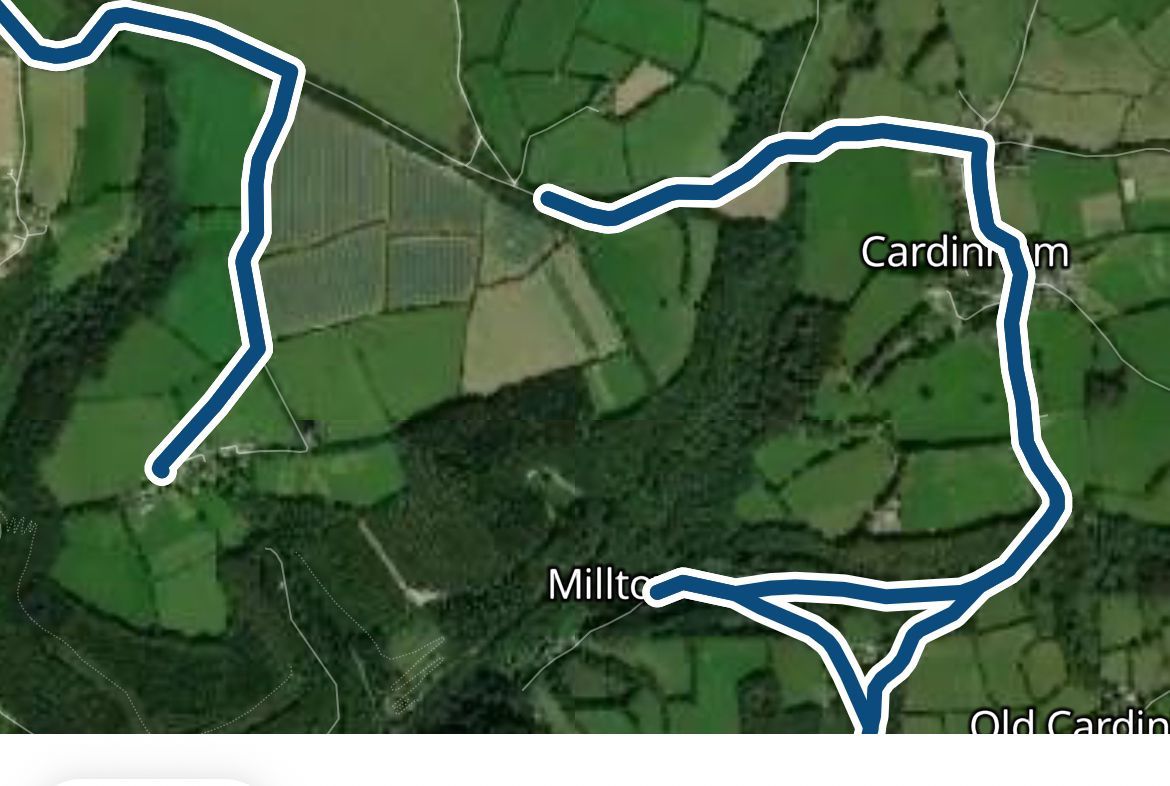
          Waypoints 6-13 are an official green lane. In order to get the route to link up I have to mark the waypoint as "skip waypoint" which has always been the case. However as you can see from the original post the map that shows on the screen completely misses this out and reroutes by road leaving a gap where the 6-13 waypoints were.

          This is the screen area on the laptop

          Screenshot (24).png

          And once I press navigate on the iphone app then this is the same area
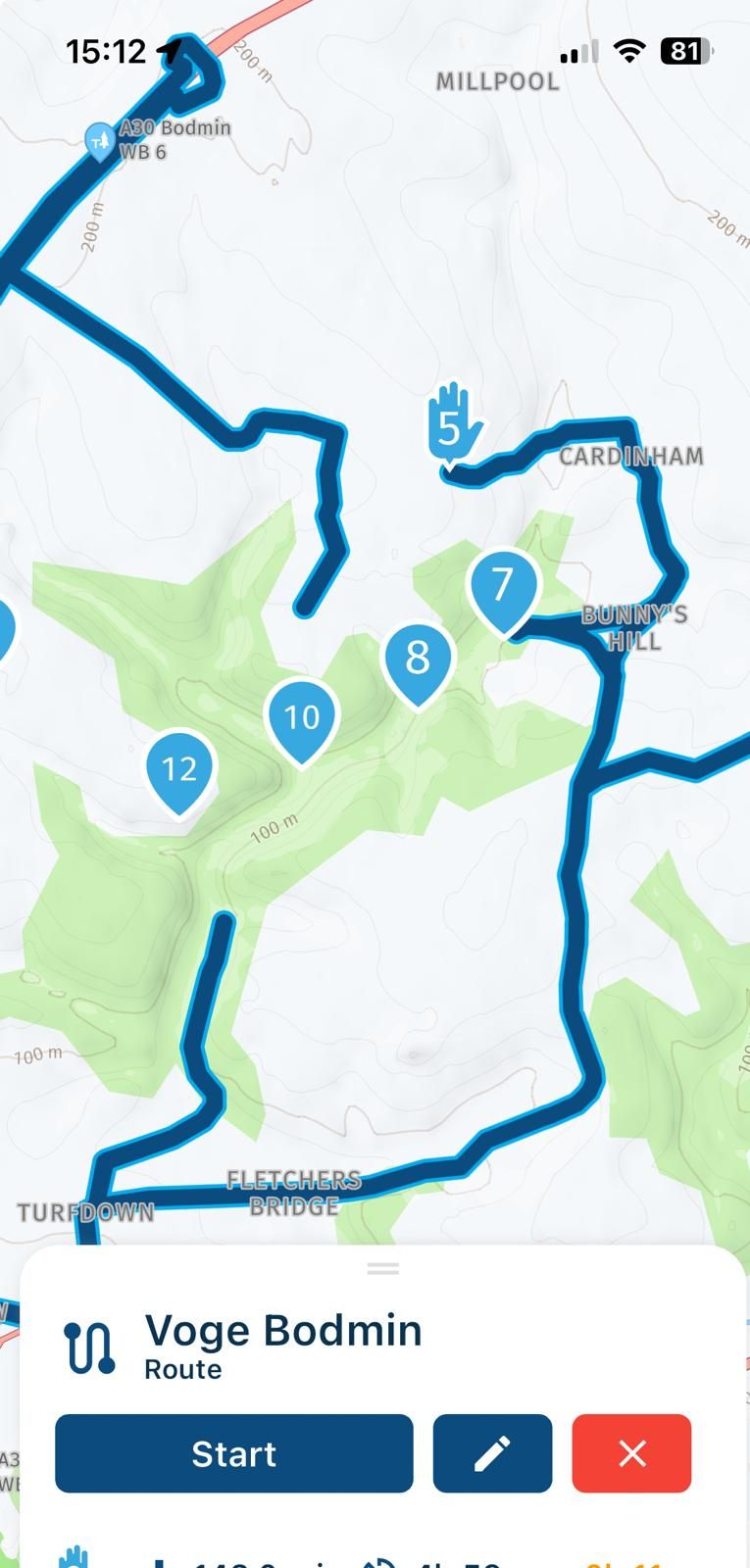
          WhatsApp Image 2024-09-16 at 15.13.19_8a409997.jpg

          The distance changes from 102.51 miles on the laptop to 143 miles on the phone

          Corjan Meijerinkundefined 1 Reply Last reply
          0
          • Brian Sprottundefined Brian Sprott

            @Marinus-van-Deudekom Many thanks for the reply. Here is a link to the route.

            https://www.myrouteapp.com/en/social/route/9782732?mode=share
            Waypoints 6-13 are an official green lane. In order to get the route to link up I have to mark the waypoint as "skip waypoint" which has always been the case. However as you can see from the original post the map that shows on the screen completely misses this out and reroutes by road leaving a gap where the 6-13 waypoints were.

            This is the screen area on the laptop

            Screenshot (24).png

            And once I press navigate on the iphone app then this is the same area
            WhatsApp Image 2024-09-16 at 15.13.19_8a409997.jpg

            The distance changes from 102.51 miles on the laptop to 143 miles on the phone

            Corjan Meijerinkundefined Offline
            Corjan Meijerinkundefined Offline
            Corjan Meijerink
            Developer
            wrote on last edited by
            #5

            @Brian-Sprott Ah yes, the skip waypoint is something that works for the planner but navigation has no clue what to do with it 🙂
            It's something we dearly wish to add but is very complicated.

            Brian Sprottundefined 1 Reply Last reply
            0
            • Corjan Meijerinkundefined Corjan Meijerink

              @Brian-Sprott Ah yes, the skip waypoint is something that works for the planner but navigation has no clue what to do with it 🙂
              It's something we dearly wish to add but is very complicated.

              Brian Sprottundefined Offline
              Brian Sprottundefined Offline
              Brian Sprott
              wrote on last edited by
              #6

              @Corjan-Meijerink AH. Ok. Thanks Corjan. It seemed to work fine when we had the "make available offline" feature in the download. I was more than happy but now I think I will have to use another app for my lane planning.
              I thought it was all to easy using the carpuride system

              1 Reply Last reply
              0
              • Brian Sprottundefined Offline
                Brian Sprottundefined Offline
                Brian Sprott
                wrote on last edited by
                #7

                I have found a solution for this if anyone else is having the same issue. I downloaded my route to my iphone (GPX 1.1)and then opened it with MRA on the phone and the skipped waypoints remained in place. It seems if you use the sync option it does not recognise skipped waypoints.WhatsApp Image 2024-09-23 at 08.20.04_83243d72.jpg

                1 Reply Last reply
                0

                Hello! It looks like you're interested in this conversation, but you don't have an account yet.

                Getting fed up of having to scroll through the same posts each visit? When you register for an account, you'll always come back to exactly where you were before, and choose to be notified of new replies (either via email, or push notification). You'll also be able to save bookmarks and upvote posts to show your appreciation to other community members.

                With your input, this post could be even better 💗

                Register Login
                Reply
                • Reply as topic
                Log in to reply
                • Oldest to Newest
                • Newest to Oldest
                • Most Votes


                ACTIVE USERS
                Corjan Meijerinkundefined
                Corjan Meijerink
                Marinus van Deudekomundefined
                Marinus van Deudekom
                Brian Sprottundefined
                Brian Sprott
                POPULAR TOPICS
                • Navigation stopped working during Tour
                  Thomas Neumeyerundefined
                  Thomas Neumeyer
                  1
                  65
                  4.2k

                • New enlarge fuelstation icon gone to soon or not?
                  Bouke Entundefined
                  Bouke Ent
                  0
                  7
                  214

                • How to find hotels in the desktop app?
                  Peter Zehentreiterundefined
                  Peter Zehentreiter
                  0
                  3
                  69

                • Update 5.1.0
                  Eric Colón 3 0undefined
                  Eric Colón 3 0
                  0
                  3
                  188

                • No altitude on Android Auto screen
                  Léon Hassingundefined
                  Léon Hassing
                  0
                  9
                  205

                • Vreemde BUG in de bèta versie én de gewone versie
                  Bart 9a 0undefined
                  Bart 9a 0
                  1
                  5
                  148

                • Altitude does not match
                  Corjan Meijerinkundefined
                  Corjan Meijerink
                  0
                  11
                  117

                • V5.1.0 - 462 New altitude/heading shows incorrect Data
                  Jörgenundefined
                  Jörgen
                  0
                  24
                  641

                MY GROUPS
                • Login

                • Login or register to search.
                • First post
                  Last post
                0
                • Categories
                • Recent
                • Popular
                • Support
                • MyRoute-app