Remotek-one firmware 2.0.0
-
Hello, I have just got my remotek-one and I am testing it with my devices (both apple and android). There is a new firmware released recently, 2.0.0, with common profile for both systems. I'm afraid it doesn't work properly with MRA, with android device there is only panning and zooming functionality. IOS crashes after going into the MRA main menu but maybe it needs some changes in the phone configuration. Anyway, after downgrading to the firmware 1.1.2, on Android it works much better, there are actions for menu opening, map centering and ETA definition changing. The only thing that does not work is right doubleclick for next waypoint skipping, as this function is reserved for configured applications switching (for example MRA <> Google maps). Probably some changes are needed for the 2.0.0 firmware, could you please analyze this? Maybe next waypoint skipping would be possible by some other action? For now I can make it by opening menu and selecting delete next waypoint action, so this is not a big problem.
Regards
Staszek -
Hello, I have just got my remotek-one and I am testing it with my devices (both apple and android). There is a new firmware released recently, 2.0.0, with common profile for both systems. I'm afraid it doesn't work properly with MRA, with android device there is only panning and zooming functionality. IOS crashes after going into the MRA main menu but maybe it needs some changes in the phone configuration. Anyway, after downgrading to the firmware 1.1.2, on Android it works much better, there are actions for menu opening, map centering and ETA definition changing. The only thing that does not work is right doubleclick for next waypoint skipping, as this function is reserved for configured applications switching (for example MRA <> Google maps). Probably some changes are needed for the 2.0.0 firmware, could you please analyze this? Maybe next waypoint skipping would be possible by some other action? For now I can make it by opening menu and selecting delete next waypoint action, so this is not a big problem.
Regards
Staszek@Stanisław : Hey da ich nur iOS nutze ist das meine Lösung noch ohne Update. Mir Reicht das Zoomen.
Schau mal da...
Hey, since I only use iOS, this is my solution without an update. Zooming is enough for me.
Take a look... Klick -->
VG
VG Hubert
Beta Test "Next App" dazu die Hardware .
iPad 9. Gen iOS 26.6/ iPhone 16e iOS 26.6/ Navi iPhone Xr iOS 18.7.10 / PC mit MS Win11 /❗️MyRoute-App im Cradel und Remotek-One❗️ Info zu MRA & Remotek One -
@Stanisław : Hey da ich nur iOS nutze ist das meine Lösung noch ohne Update. Mir Reicht das Zoomen.
Schau mal da...
Hey, since I only use iOS, this is my solution without an update. Zooming is enough for me.
Take a look... Klick -->
VG
@Hubert-Thoring Thank you, I saw it but for me skipping a waypoint is very useful as I have switched automatic skipping off. I am planing to stay on Android, will see...
I like the floating icons mechanism, lacking on IOS.--
Regards
Staszek -
@Hubert-Thoring Thank you, I saw it but for me skipping a waypoint is very useful as I have switched automatic skipping off. I am planing to stay on Android, will see...
I like the floating icons mechanism, lacking on IOS.Hi @Stanisław I also just received a remotek & have issues with firmware v2.0
All is good in Google & Osmand but not Osmand+
With v2.0 I get no zoom or centering in Osmand+
With firmware 1.1.2 all is good in Google & Osmand & Osmand+My biggest problem though is I get no response with MRA
Is there some setting I need to allow the remotek to work with mra, using an android phone?BlackView BV7100, Android 12
Navigate "Routes as Tracks" in Offline mode with Offline Maps
No Wifi, no internet, no interruptions, works well -
Hi @Stanisław I also just received a remotek & have issues with firmware v2.0
All is good in Google & Osmand but not Osmand+
With v2.0 I get no zoom or centering in Osmand+
With firmware 1.1.2 all is good in Google & Osmand & Osmand+My biggest problem though is I get no response with MRA
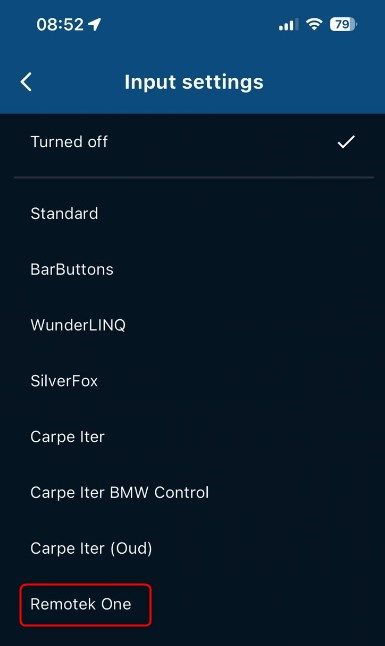
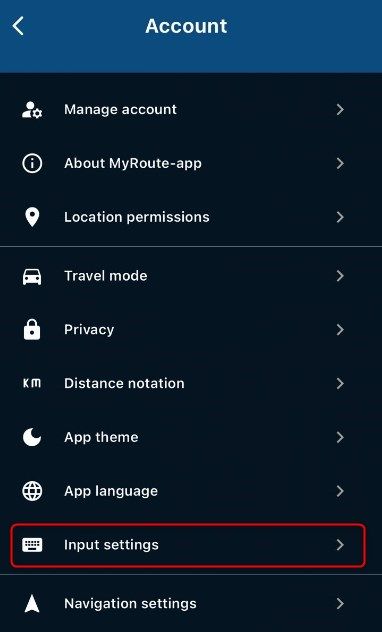
Is there some setting I need to allow the remotek to work with mra, using an android phone?@Brian-McG Do you have the input setting switched to Remotek One?
-
Hello, I have just got my remotek-one and I am testing it with my devices (both apple and android). There is a new firmware released recently, 2.0.0, with common profile for both systems. I'm afraid it doesn't work properly with MRA, with android device there is only panning and zooming functionality. IOS crashes after going into the MRA main menu but maybe it needs some changes in the phone configuration. Anyway, after downgrading to the firmware 1.1.2, on Android it works much better, there are actions for menu opening, map centering and ETA definition changing. The only thing that does not work is right doubleclick for next waypoint skipping, as this function is reserved for configured applications switching (for example MRA <> Google maps). Probably some changes are needed for the 2.0.0 firmware, could you please analyze this? Maybe next waypoint skipping would be possible by some other action? For now I can make it by opening menu and selecting delete next waypoint action, so this is not a big problem.
Regards
StaszekHi @Stanisław, brilliant thank, you were 100% correct I did not have the input setting set, its simple when you know !
Can now pan, zoom, recentre & cycle between apps with firmware 1.1.2@Stanisław said in Remotek-one firmware 2.0.0:
Anyway, after downgrading to the firmware 1.1.2, on Android it works much better, there are actions for menu opening, map centering and ETA definition changing.
Have figured out by trial & error how to do the menu open (DC up arrow) & eta change (DC down arrow). Do you have of a list of other shortcut key presses for other functions or does everything have to be done via the menu open?
Many thanks
BlackView BV7100, Android 12
Navigate "Routes as Tracks" in Offline mode with Offline Maps
No Wifi, no internet, no interruptions, works well -
Hi @Stanisław, brilliant thank, you were 100% correct I did not have the input setting set, its simple when you know !
Can now pan, zoom, recentre & cycle between apps with firmware 1.1.2@Stanisław said in Remotek-one firmware 2.0.0:
Anyway, after downgrading to the firmware 1.1.2, on Android it works much better, there are actions for menu opening, map centering and ETA definition changing.
Have figured out by trial & error how to do the menu open (DC up arrow) & eta change (DC down arrow). Do you have of a list of other shortcut key presses for other functions or does everything have to be done via the menu open?
Many thanks
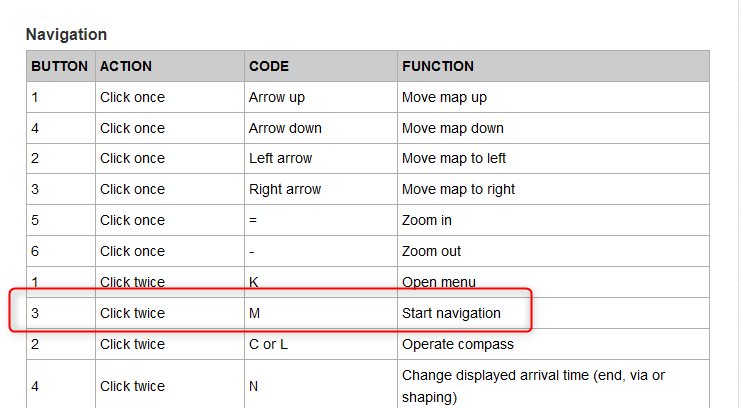
@Brian-McG it wasscribed by @Corjan-Meijerink in some topic, I remeber only this and left DC to go to the current position on the map and right DC to skip next waypoint but the last one doesn't work for me as it is covered by the applications switching.
-
@Corjan-Meijerink Thank you, I didn't know about this site.
Maybe it needs a correction because in the navigation mode Left DC does open the menu as navigation is already started.
-
thanks @Corjan-Meijerink & @Stanisław
the knowledge is often there, the trick is in finding it
BlackView BV7100, Android 12
Navigate "Routes as Tracks" in Offline mode with Offline Maps
No Wifi, no internet, no interruptions, works well -
thanks @Corjan-Meijerink & @Stanisław
the knowledge is often there, the trick is in finding it& with a little knowledge comes great danger ..... or at least a lot of more questions
- In the "Input Settings" section of MRA settings there is the option "Standard"
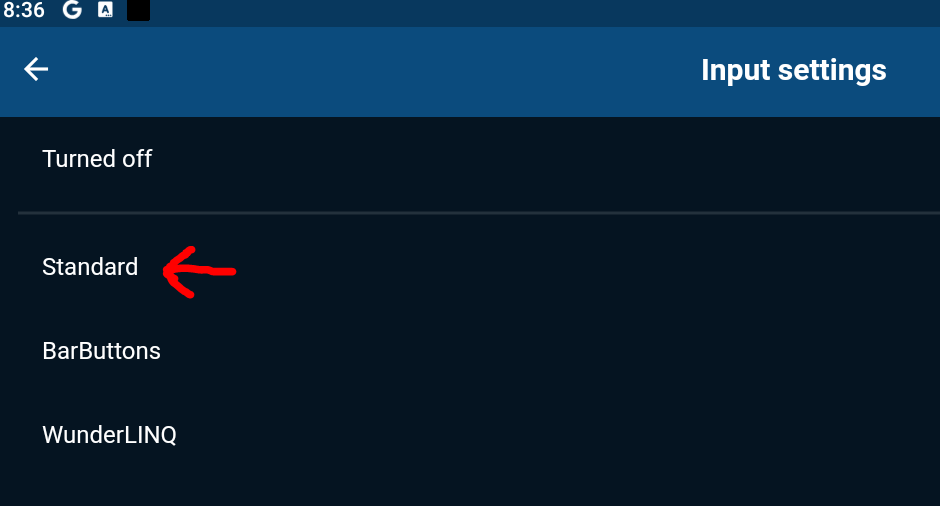
The url "Bluetooth Controllers" does not mention anything about what "Standard" means.
I understand it is difficult to relate a key press number as in the other controller tables when just describing a generic controller but is there a Standard Code = Function table?-
The Remotek controller works pretty much exactly as described in the table except for as @Stanisław says double click right arrow (3) is reserved by the controller to toggle between navigation apps selected in the Remotek app.
This is quite a nice idea as it means it is possible to switch quickly & easily between MRA & Osmand, so it might work that you could be navigating with dual apps & switch between them with a simple click. So the documentation here for the Remotek controller is not correct. -
& this is the real reason for posting ...... there seems to be no input key mapped in the MRA Remotek setting for the function Skip Waypoint.
Other controllers seem to be using a key code D for this function.
Could MRA's Remotek Input settings table be configured to accept a key input, possibly a LongPress down arrow (4) to generate a code D so that it was possible to Skip Points ?
(or is there skip point key code already?) -
I think something should be possible as I have used the KeyMapper app to set long press down arrow (4) to generate a code D & much to my surprise this allows me to Skip Points when I have the Input Setting set to "Standard"
So Standard maybe almost a more useful setting to use when navigating with a Remotek
Some other functions are different in Standard, the menu button seems to be double click down (4), hence my question 1
For me option 3 where the MRA input setting table is modified to include a Skip Waypoint code for the Remotek controller would be the best solution
-
@Corjan-Meijerink
I have just tested it with the 2.0 Remotek firmware and MRA 382 version. The doubleclick action still does not seem to work. With the 1.xx firmware doubleclick up opens the MRA menu, doubleclik down changes ETA selection. Should it work with 2.0 firmware as well? -
Hello everyone,
I've been using the Remotek One with an iPhone Xr for a while, and it still has version 1.x.x.With the new MRA version from V4.3.6 it works very well now, and skipping WP now works with my solution.
Important: Under Settings on the iPhone!!
- Under: Accessibility \ Keyboards & text input \ set the keyboard control to "Off". Otherwise I have the problem that the MRA crashes outside of navigation. But with the setting selected here to "Off" it always works very well.
With the MRA input setting, then as a Remotek One, the following works very well, but you have to make sure that the BT Remotek One keyboard is set to iOS, i.e. press the two arrow keys at the top and bottom together and wait to see if it flashes red and green for iOS. If it's green and green you have to repeat it again and then the red and green flashes briefly. "red, green stands for BT button as iOS" because "green, green stands for BT button as Android.
Result of my application in the MRA navigation under iOS:
- Arrows "left, right, up, down," pan over the map.
- Arrow "+" / "-" corresponds to zooming
- Arrow DC right, click twice quickly then release, = skip WP.
- and other functions which I will describe separately....
The correctly selected basic settings are important, if the above does not work, the BT keyboard must be reset once by pressing "arrow up, and + and -" at the same time for more than 5 seconds until it flashes red. Then delete the pairing under BT in the iPhone and pair it again on the iPhone. Then set it up for iOS as described above, etc.
Good luck, I am very happy with my iOS solution.
Best wishes from MünsterHallo zusammen,
ich hab ja schon länger das Remotek One mit einem iPhone Xr im Einsatz, dieses immer noch mit der Version 1.x.x.Mit der neuen MRA Version ab V4.3.6 geht es jetzt sehr gut, auch das WP überspringen geht jetzt mit meiner Lösung.
Wichtig: Unter Einstellungen am iPhone !!
- Unter : Bedienhilfen \ Tastaturen & Texteingabe \ die Tastatursteuerung auf "Aus" zu stellen. Ich habe sonst das Problem das die MRA außerhalb der Navigation abstürzt. Mit der aber hier gewählten Einstellung auf "Aus" geht es immer sehr gut.
Bei der MRA Eingabeeinstellung, dann als Remotek One geht folgendes sehr gut, dabei ist aber darauf zu achten das die BT Remotek One Tastatur auf iOS steht heißt, die zwei Pfeiltaste oben unten zusammen drücken und warten ob es kurz rot, grün für iOS blinkt, bei grün, grün muss man es noch einmal wiederholen dann kommt das kurz rot, grün blinken. "rot, grün steht für BT Taste als iOS" denn "grün, grün steht für BT Taste als Android.
Ergebnis bei meiner Anwendung in der MRA Navigation unter iOS:
- Pfeile "links, rechts, oben, unter," über die Karte schwenken.
- Pfeil "+" / "-" entspricht dem Zoomen
- Pfeil DC rechts, zwei mal kurz klick dann loslassen, = WP überspringen.
- und weitere Funktionen die beschreibe ich aber separat....
Wichtig sind die richtig gewählten Grundeinstellungen, wenn das oben beschriebene nicht gehen sollte muss die BT Tastatur einmal resettet werden indem man "Pfeil oben, und + und - " gleichzeitig für mehr als 5sek. drückt, bis es rot blinkt. Danach auch die Kopplung unter BT im iPhone löschen und neu am iPhone koppeln. Danach dann wie oben beschrieben für iOS einstellen usw.
Viel Erfolg, ich bin für meine iOS Lösung damit sehr zufrieden.
VG aus MünsterVG Hubert
Beta Test "Next App" dazu die Hardware .
iPad 9. Gen iOS 26.6/ iPhone 16e iOS 26.6/ Navi iPhone Xr iOS 18.7.10 / PC mit MS Win11 /❗️MyRoute-App im Cradel und Remotek-One❗️ Info zu MRA & Remotek One -
Hello everyone,
I've been using the Remotek One with an iPhone Xr for a while, and it still has version 1.x.x.With the new MRA version from V4.3.6 it works very well now, and skipping WP now works with my solution.
Important: Under Settings on the iPhone!!
- Under: Accessibility \ Keyboards & text input \ set the keyboard control to "Off". Otherwise I have the problem that the MRA crashes outside of navigation. But with the setting selected here to "Off" it always works very well.
With the MRA input setting, then as a Remotek One, the following works very well, but you have to make sure that the BT Remotek One keyboard is set to iOS, i.e. press the two arrow keys at the top and bottom together and wait to see if it flashes red and green for iOS. If it's green and green you have to repeat it again and then the red and green flashes briefly. "red, green stands for BT button as iOS" because "green, green stands for BT button as Android.
Result of my application in the MRA navigation under iOS:
- Arrows "left, right, up, down," pan over the map.
- Arrow "+" / "-" corresponds to zooming
- Arrow DC right, click twice quickly then release, = skip WP.
- and other functions which I will describe separately....
The correctly selected basic settings are important, if the above does not work, the BT keyboard must be reset once by pressing "arrow up, and + and -" at the same time for more than 5 seconds until it flashes red. Then delete the pairing under BT in the iPhone and pair it again on the iPhone. Then set it up for iOS as described above, etc.
Good luck, I am very happy with my iOS solution.
Best wishes from MünsterHallo zusammen,
ich hab ja schon länger das Remotek One mit einem iPhone Xr im Einsatz, dieses immer noch mit der Version 1.x.x.Mit der neuen MRA Version ab V4.3.6 geht es jetzt sehr gut, auch das WP überspringen geht jetzt mit meiner Lösung.
Wichtig: Unter Einstellungen am iPhone !!
- Unter : Bedienhilfen \ Tastaturen & Texteingabe \ die Tastatursteuerung auf "Aus" zu stellen. Ich habe sonst das Problem das die MRA außerhalb der Navigation abstürzt. Mit der aber hier gewählten Einstellung auf "Aus" geht es immer sehr gut.
Bei der MRA Eingabeeinstellung, dann als Remotek One geht folgendes sehr gut, dabei ist aber darauf zu achten das die BT Remotek One Tastatur auf iOS steht heißt, die zwei Pfeiltaste oben unten zusammen drücken und warten ob es kurz rot, grün für iOS blinkt, bei grün, grün muss man es noch einmal wiederholen dann kommt das kurz rot, grün blinken. "rot, grün steht für BT Taste als iOS" denn "grün, grün steht für BT Taste als Android.
Ergebnis bei meiner Anwendung in der MRA Navigation unter iOS:
- Pfeile "links, rechts, oben, unter," über die Karte schwenken.
- Pfeil "+" / "-" entspricht dem Zoomen
- Pfeil DC rechts, zwei mal kurz klick dann loslassen, = WP überspringen.
- und weitere Funktionen die beschreibe ich aber separat....
Wichtig sind die richtig gewählten Grundeinstellungen, wenn das oben beschriebene nicht gehen sollte muss die BT Tastatur einmal resettet werden indem man "Pfeil oben, und + und - " gleichzeitig für mehr als 5sek. drückt, bis es rot blinkt. Danach auch die Kopplung unter BT im iPhone löschen und neu am iPhone koppeln. Danach dann wie oben beschrieben für iOS einstellen usw.
Viel Erfolg, ich bin für meine iOS Lösung damit sehr zufrieden.
VG aus Münster@Hubert-Thoring thank you for the info, I will test it with my backup phone which is an old Iphone. Currently my main solution for MRA is an Android phone and it works fine with 1.xx firmware. My question was triggered by the info that 2.xx is now supported by MRA, I wanted to check it.
--
Regards
Staszek -
@Hubert-Thoring thank you for the info, I will test it with my backup phone which is an old Iphone. Currently my main solution for MRA is an Android phone and it works fine with 1.xx firmware. My question was triggered by the info that 2.xx is now supported by MRA, I wanted to check it.
@Stanisław There is a Remotek Firmware 2.1 in beta at the moment and the DC functionality works correctly as previously stated in the MRA Support Area.
Kind Regards. Help where I can.
Ducati Multistrada V4 Rally
iPhone 15 Pro
CHIGEE AIO-6 LTE
Google Pixel 6 Pro - mounted on SP Connect Plus
Ex Garmin XT2 and XT1 as well as Ex TomTom Rider User -
@Stanisław There is a Remotek Firmware 2.1 in beta at the moment and the DC functionality works correctly as previously stated in the MRA Support Area.
@Dave-J-0 Where is it accessible? I can see nothing more then 2.0 in the remotek application nor on www.remotek.no website.
--
Regards
Staszek -
@Dave-J-0 Where is it accessible? I can see nothing more then 2.0 in the remotek application nor on www.remotek.no website.
@Stanisław There was a mention recently on Remotek Facebook saying about the new firmware and about gaining access to the new firmware beta if you wanted to test. The link to the post: https://m.facebook.com/story.php?story_fbid=pfbid0ty4HfaUsQSxyq8XoawKJHG37ztswACjNVP4aX76QXccD3AFBajqnYiw5NYoGkc3Bl&id=100086173189244
Kind Regards. Help where I can.
Ducati Multistrada V4 Rally
iPhone 15 Pro
CHIGEE AIO-6 LTE
Google Pixel 6 Pro - mounted on SP Connect Plus
Ex Garmin XT2 and XT1 as well as Ex TomTom Rider User -
@Stanisław There was a mention recently on Remotek Facebook saying about the new firmware and about gaining access to the new firmware beta if you wanted to test. The link to the post: https://m.facebook.com/story.php?story_fbid=pfbid0ty4HfaUsQSxyq8XoawKJHG37ztswACjNVP4aX76QXccD3AFBajqnYiw5NYoGkc3Bl&id=100086173189244
-
@Stanisław
@Dave-J-0
@Brian-McG
@Corjan-MeijerinkFor your information:
This now works as described in the appendix, after the new MRA update V 4.3.6 with the Remotek One V 1.1.2.Thanks for this @Corjan-Meijerink , a translation into English will be provided later.
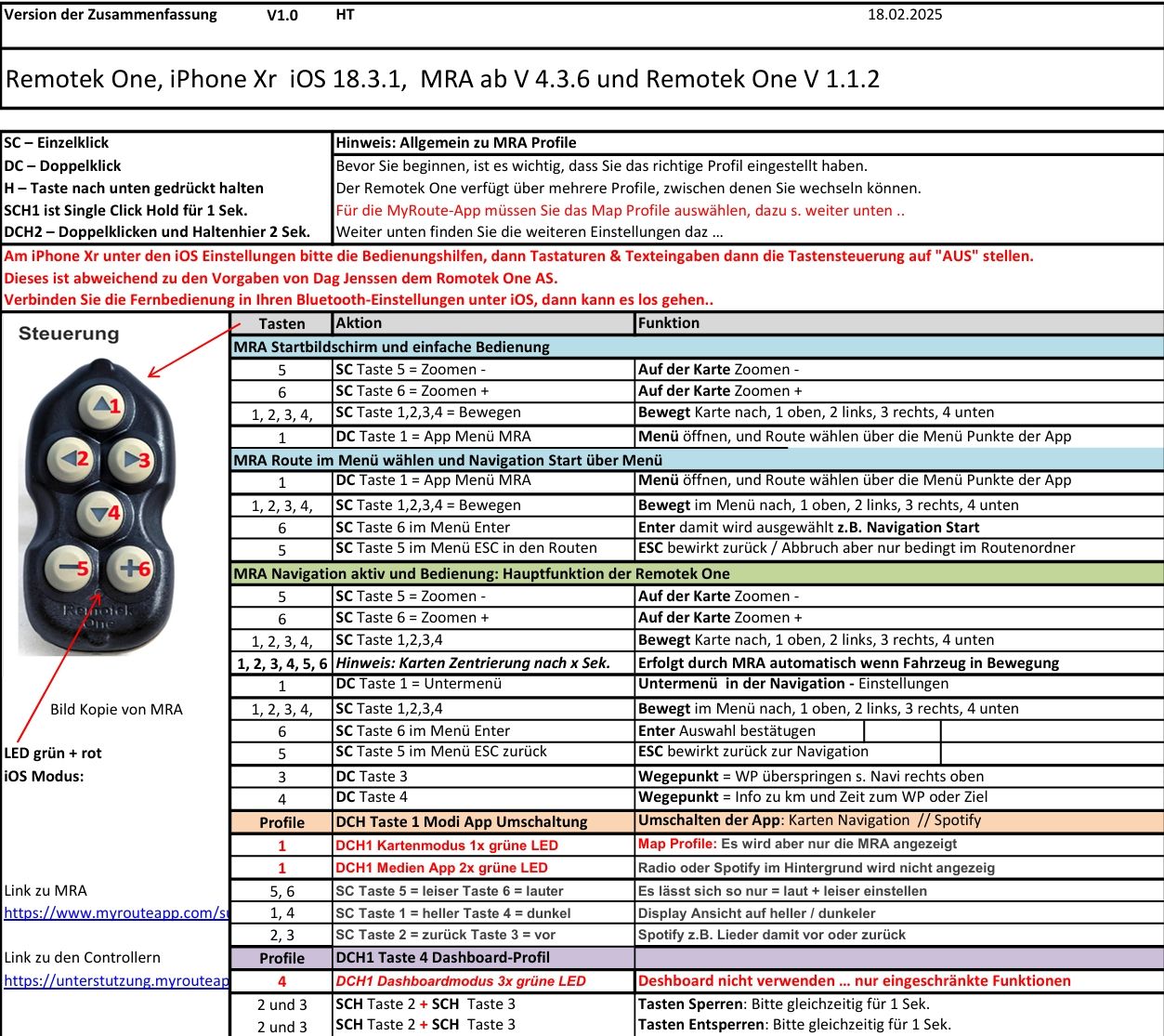
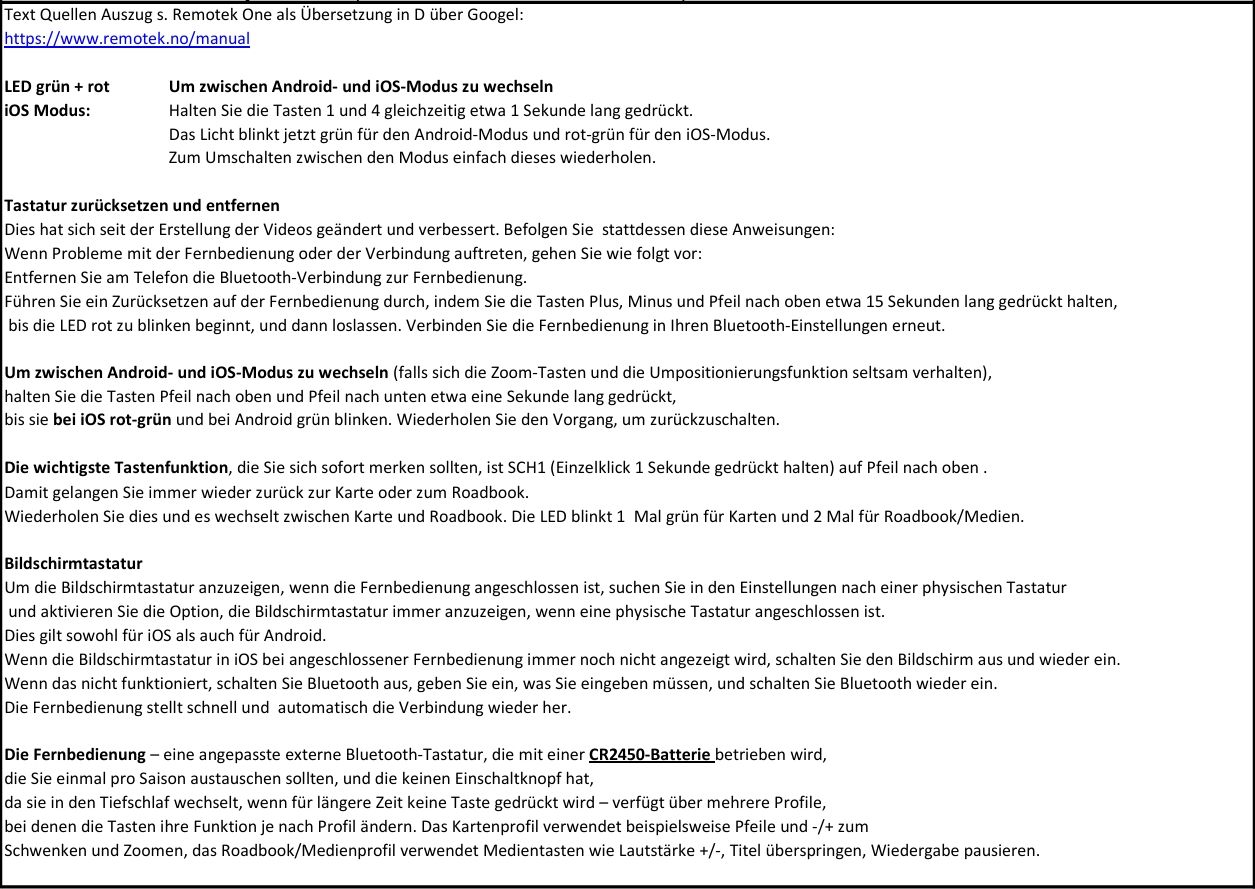
VG Hubert
Beta Test "Next App" dazu die Hardware .
iPad 9. Gen iOS 26.6/ iPhone 16e iOS 26.6/ Navi iPhone Xr iOS 18.7.10 / PC mit MS Win11 /❗️MyRoute-App im Cradel und Remotek-One❗️ Info zu MRA & Remotek One -
@Stanisław
@Dave-J-0
@Brian-McG
@Corjan-MeijerinkFor your information:
This now works as described in the appendix, after the new MRA update V 4.3.6 with the Remotek One V 1.1.2.Thanks for this @Corjan-Meijerink , a translation into English will be provided later.
@Corjan-Meijerink :
How can I upload a file as a PDF here?VG Hubert
Beta Test "Next App" dazu die Hardware .
iPad 9. Gen iOS 26.6/ iPhone 16e iOS 26.6/ Navi iPhone Xr iOS 18.7.10 / PC mit MS Win11 /❗️MyRoute-App im Cradel und Remotek-One❗️ Info zu MRA & Remotek One




Hello! It looks like you're interested in this conversation, but you don't have an account yet.
Getting fed up of having to scroll through the same posts each visit? When you register for an account, you'll always come back to exactly where you were before, and choose to be notified of new replies (either via email, or push notification). You'll also be able to save bookmarks and upvote posts to show your appreciation to other community members.
With your input, this post could be even better 💗
Register Login


-
 010136
-
 0591
0591
-
 010529
-
0371
-
 023738
-
09227