Skip to content
  • Categories
  • Recent
  • Popular
  • Support
  • MyRoute-app
Collapse
Brand Logo

MRA Community Forum

  1. Home
  2. General Discussion
  3. Import route-track GPX 1.2 differs from original route

Import route-track GPX 1.2 differs from original route

Scheduled Pinned Locked Moved General Discussion
7 Posts 2 Posters 1.3k Views 1 Watching
  • Oldest to Newest
  • Newest to Oldest
  • Most Votes
Reply
  • Reply as topic
Log in to reply
This topic has been deleted. Only users with topic management privileges can see it.
  • Richard van Erp 1 Offline
    Richard van Erp 1 Offline
    Richard van Erp 1
    wrote on last edited by
    #1

    Hi,

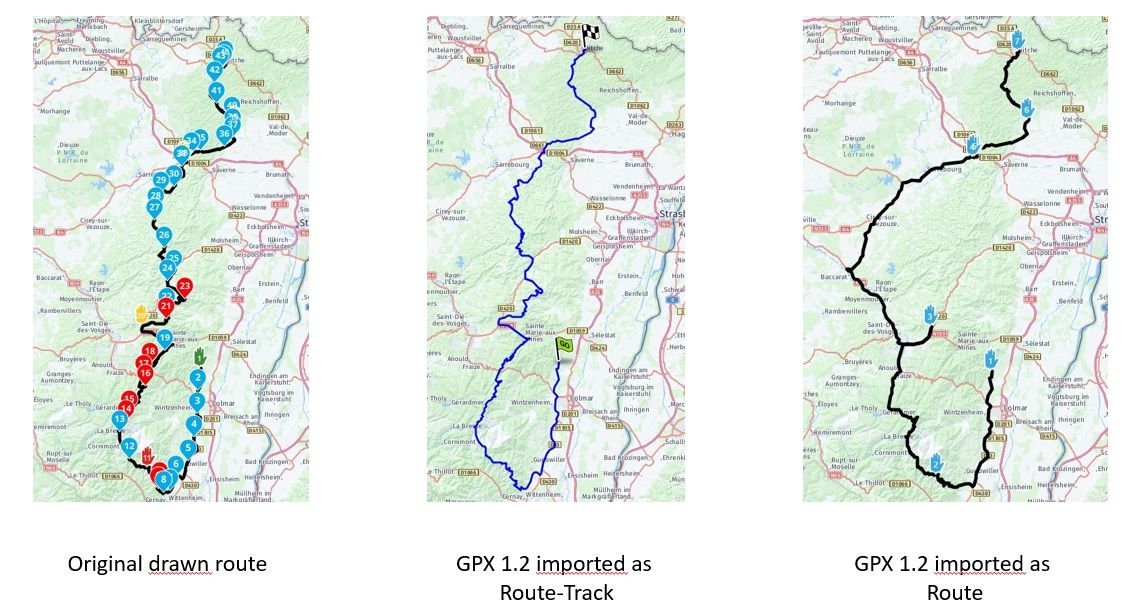
    For display reasons only I want to hide the shapingpoints and see the via points only. Knowing that it is not possible to hide shapingpoints I did the following: Save as GPX 1.2 (Route, Track, POI) and import as route-track. When I look at the route it has many deviations to the original route. When I import as track the track is exactly equal to the original route. It only doesný the display the via points (obviously) but that is what I'm aiming at. what could be the reason that the import as a route gives so many deviations and as a route-track it is exactly the same as the original drawn route? I would like to use the route-import because what is displaed is exactly what I'm aiming at.

    Greetings,

    RichardRoute-vergelijking.jpg

    Hans van de Ven MR.MRA 2 Replies Last reply
    0
    • Nick Carthew Nick Carthew moved this topic from [Web] Problems, Bugs and other Issues on
    • Richard van Erp 1 Richard van Erp 1

      Hi,

      For display reasons only I want to hide the shapingpoints and see the via points only. Knowing that it is not possible to hide shapingpoints I did the following: Save as GPX 1.2 (Route, Track, POI) and import as route-track. When I look at the route it has many deviations to the original route. When I import as track the track is exactly equal to the original route. It only doesný the display the via points (obviously) but that is what I'm aiming at. what could be the reason that the import as a route gives so many deviations and as a route-track it is exactly the same as the original drawn route? I would like to use the route-import because what is displaed is exactly what I'm aiming at.

      Greetings,

      RichardRoute-vergelijking.jpg

      Hans van de Ven MR.MRA Offline
      Hans van de Ven MR.MRA Offline
      Hans van de Ven MR.MRA
      Valued contributor
      wrote on last edited by
      #2

      @Richard-van-Erp-1

      Hi @Richard-van-Erp-1 please share the url from the route here, so we can have a look. Make sure it is set to public

      Garmin Zumo XT3/XT2/XT/BMW Connected Ride Navigator/Tourstart/ MyRouteapp (The App)/...
      Een dag niet gelachen is een dag niet geleefd / Een route is net zo goed als deze uitgezet is.

      Richard van Erp 1 1 Reply Last reply
      0
      • Richard van Erp 1 Richard van Erp 1

        Hi,

        For display reasons only I want to hide the shapingpoints and see the via points only. Knowing that it is not possible to hide shapingpoints I did the following: Save as GPX 1.2 (Route, Track, POI) and import as route-track. When I look at the route it has many deviations to the original route. When I import as track the track is exactly equal to the original route. It only doesný the display the via points (obviously) but that is what I'm aiming at. what could be the reason that the import as a route gives so many deviations and as a route-track it is exactly the same as the original drawn route? I would like to use the route-import because what is displaed is exactly what I'm aiming at.

        Greetings,

        RichardRoute-vergelijking.jpg

        Hans van de Ven MR.MRA Offline
        Hans van de Ven MR.MRA Offline
        Hans van de Ven MR.MRA
        Valued contributor
        wrote on last edited by
        #3

        @Richard-van-Erp-1

        If you save a route as gpx 1.2 you save a route track with via points.
        If you then import it again and convert it to a route, you do indeed have a chance of deviations.
        If you transfer your route as gpx 1.2 to your Zumo (the newer versions), you will only have the via points on your route. Then turn off the recalculation.

        Garmin Zumo XT3/XT2/XT/BMW Connected Ride Navigator/Tourstart/ MyRouteapp (The App)/...
        Een dag niet gelachen is een dag niet geleefd / Een route is net zo goed als deze uitgezet is.

        1 Reply Last reply
        0
        • Hans van de Ven MR.MRA Hans van de Ven MR.MRA

          @Richard-van-Erp-1

          Hi @Richard-van-Erp-1 please share the url from the route here, so we can have a look. Make sure it is set to public

          Richard van Erp 1 Offline
          Richard van Erp 1 Offline
          Richard van Erp 1
          wrote on last edited by
          #4

          @Hans-van-de-Ven-MRA-Master
          Hi Hans,

          The URL to the original drawn route is ;

          https://www.myrouteapp.com/nl/social/route/8053718?mode=share

          I did not any conversion, only import the as GPX 1.2 saved route as a route. Or do you mean that importing as route that the conversion take place automatically?

          Greetings,
          Richard

          P.S.
          I used one of your routes as inspiration for this route...;-)

          Hans van de Ven MR.MRA 1 Reply Last reply
          0
          • Richard van Erp 1 Richard van Erp 1

            @Hans-van-de-Ven-MRA-Master
            Hi Hans,

            The URL to the original drawn route is ;

            https://www.myrouteapp.com/nl/social/route/8053718?mode=share

            I did not any conversion, only import the as GPX 1.2 saved route as a route. Or do you mean that importing as route that the conversion take place automatically?

            Greetings,
            Richard

            P.S.
            I used one of your routes as inspiration for this route...;-)

            Hans van de Ven MR.MRA Offline
            Hans van de Ven MR.MRA Offline
            Hans van de Ven MR.MRA
            Valued contributor
            wrote on last edited by
            #5

            @Richard-van-Erp-1

            Thanks for using one of my routes as an example 👍
            The imported route is calculated, based on the formation and waypoints included in the route. Since there are no formation points in the gpx 1.2 route, the route is calculated based on the via points and that's what you see

            Garmin Zumo XT3/XT2/XT/BMW Connected Ride Navigator/Tourstart/ MyRouteapp (The App)/...
            Een dag niet gelachen is een dag niet geleefd / Een route is net zo goed als deze uitgezet is.

            Richard van Erp 1 1 Reply Last reply
            0
            • Hans van de Ven MR.MRA Hans van de Ven MR.MRA

              @Richard-van-Erp-1

              Thanks for using one of my routes as an example 👍
              The imported route is calculated, based on the formation and waypoints included in the route. Since there are no formation points in the gpx 1.2 route, the route is calculated based on the via points and that's what you see

              Richard van Erp 1 Offline
              Richard van Erp 1 Offline
              Richard van Erp 1
              wrote on last edited by
              #6

              @Hans-van-de-Ven-MRA-Master
              Thanks Hans. Your explanation makes good sense.

              I originally thought that saving a route als GPX 1.2 was a track with via points, zo that when you again import it it is still a track with the via points shown. But it appears to be a calculated route with the via points.

              Hans van de Ven MR.MRA 1 Reply Last reply
              0
              • Richard van Erp 1 Richard van Erp 1

                @Hans-van-de-Ven-MRA-Master
                Thanks Hans. Your explanation makes good sense.

                I originally thought that saving a route als GPX 1.2 was a track with via points, zo that when you again import it it is still a track with the via points shown. But it appears to be a calculated route with the via points.

                Hans van de Ven MR.MRA Offline
                Hans van de Ven MR.MRA Offline
                Hans van de Ven MR.MRA
                Valued contributor
                wrote on last edited by
                #7

                @Richard-van-Erp-1

                If you import the gpx 1.2 in your Zumo then you only see the viapoints

                Garmin Zumo XT3/XT2/XT/BMW Connected Ride Navigator/Tourstart/ MyRouteapp (The App)/...
                Een dag niet gelachen is een dag niet geleefd / Een route is net zo goed als deze uitgezet is.

                1 Reply Last reply
                0

                Hello! It looks like you're interested in this conversation, but you don't have an account yet.

                Getting fed up of having to scroll through the same posts each visit? When you register for an account, you'll always come back to exactly where you were before, and choose to be notified of new replies (either via email, or push notification). You'll also be able to save bookmarks and upvote posts to show your appreciation to other community members.

                With your input, this post could be even better 💗

                Register Login
                Reply
                • Reply as topic
                Log in to reply
                • Oldest to Newest
                • Newest to Oldest
                • Most Votes


                ACTIVE USERS
                Hans van de Ven MR.MRA
                Hans van de Ven MR.MRA
                Richard van Erp 1
                Richard van Erp 1
                POPULAR TOPICS
                • Carpuride scherm vast
                  De Ploey Georges
                  De Ploey Georges
                  3
                  28
                  1.2k

                • How can I change the verbal navigation directions from male to female?
                  Brian McG
                  Brian McG
                  0
                  5
                  34

                • GPX Versions 1.1 vs 1.2 for Garmin Visually Explained
                  Carl Lee
                  Carl Lee
                  7
                  175
                  14.1k

                • Apple Carplay - navigatie instructies zichtbaar, maar kaart niet??
                  Nick Carthew
                  Nick Carthew
                  0
                  3
                  25

                • Camperroutes
                  De Ploey Georges
                  De Ploey Georges
                  0
                  4
                  170

                • Linker in MRA kleurt blauw (alles geselecteerd)
                  Rob Verhoeff
                  Rob Verhoeff
                  0
                  12
                  340

                • Not a great route choice
                  Marinus van Deudekom
                  Marinus van Deudekom
                  0
                  2
                  40

                • (Android Auto) Zoom/Steuerung blendet aus und lässt sich nicht per Lenkerschalter reaktivieren.
                  0
                  1
                  10

                MY GROUPS
                • Login

                • Login or register to search.
                • First post
                  Last post
                0
                • Categories
                • Recent
                • Popular
                • Support
                • MyRoute-app