Skip to content
  • Categories
  • Recent
  • Popular
  • Support
  • MyRoute-app
Collapse
Brand Logo

MRA Community Forum

  1. Home
  2. General Discussion
  3. buttons on the left

buttons on the left

Scheduled Pinned Locked Moved General Discussion
4 Posts 3 Posters 637 Views 2 Watching
  • Oldest to Newest
  • Newest to Oldest
  • Most Votes
Reply
  • Reply as topic
Log in to reply
This topic has been deleted. Only users with topic management privileges can see it.
  • Ronniundefined Offline
    Ronniundefined Offline
    Ronni
    wrote on last edited by Ronni
    #1

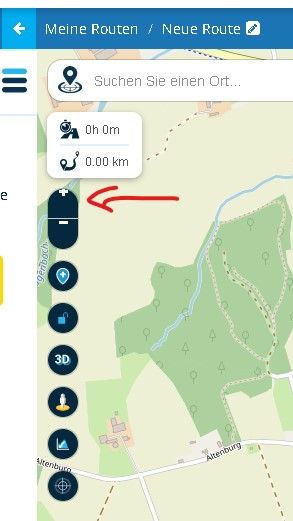
    1 - Windows: Sometimes + / - are on the top of the button and not in the center
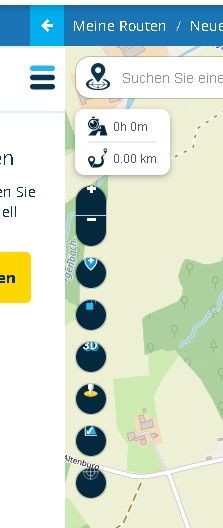
    2 - Windows and Android: Sometimes none of the buttons is in the center position.
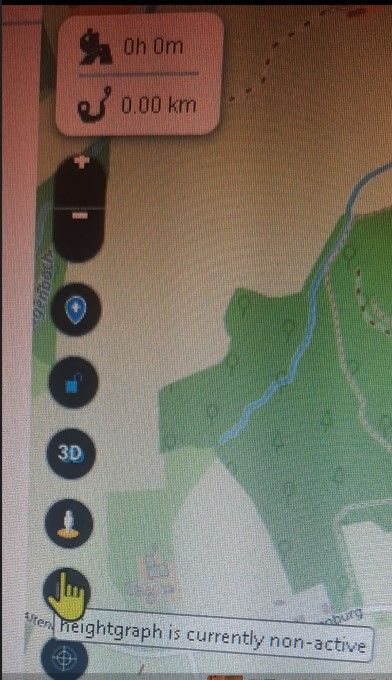
    3 - Windows: Some of the buttons have descriptions when you move the cursor over the button. Could this be done for all buttons? It would help Newbies a lot when they first come into contact with Next.

    Greetings
    Ronni

    1 info buttons.jpg
    2 no center.jpg
    3 descr.jpg

    Samsung Galaxy A56 5G
    Android 16
    One UI Vers. 8.0
    Carpuride w712d
    Silverfox BT Cntroller H

    Steve Lynchundefined 1 Reply Last reply
    0
    • Ronniundefined Ronni

      1 - Windows: Sometimes + / - are on the top of the button and not in the center
      2 - Windows and Android: Sometimes none of the buttons is in the center position.
      3 - Windows: Some of the buttons have descriptions when you move the cursor over the button. Could this be done for all buttons? It would help Newbies a lot when they first come into contact with Next.

      Greetings
      Ronni

      1 info buttons.jpg
      2 no center.jpg
      3 descr.jpg

      Steve Lynchundefined Offline
      Steve Lynchundefined Offline
      Steve Lynch
      Valued contributor
      wrote on last edited by
      #2

      @Ronni
      Try changing the scale in the Browser settings.

      You don’t stop riding when you get old, you get old when you stop riding.

      Ronniundefined 1 Reply Last reply
      0
      • Steve Lynchundefined Steve Lynch

        @Ronni
        Try changing the scale in the Browser settings.

        Ronniundefined Offline
        Ronniundefined Offline
        Ronni
        wrote on last edited by
        #3

        @Steve-Lynch
        I checked the scale in my browser (100%), i changed to 80% and 120 % the error persists, no change/improvement.
        I checked the scale of windows, everything is shown as "recommended".

        BUT, I can reproduce the error!
        Creating a new route, "HERE(MRA Navigation/Garmin) Gold Nav" is the default map. When opening a route based on this map, I've got the bug with the "not centered" buttons. After that I tried each of the 12 maps and the error disappears when using each of the 3 Google Maps --> all buttons centered.
        After that, no bugs when checking the 12 maps again.
        Using each of the 3 maps in the options [(standard) open street map, TOMTOM gold and HERE] reproduces the bug, using each of the 3 Google maps heals the bug.

        Also clicking the "edit name" button when using a map with bug, makes the bug go away.
        Thats it, I hope i could help.

        Greetings
        Ronni

        Samsung Galaxy A56 5G
        Android 16
        One UI Vers. 8.0
        Carpuride w712d
        Silverfox BT Cntroller H

        Hans van de Ven MR.MRAundefined 1 Reply Last reply
        0
        • Ronniundefined Ronni

          @Steve-Lynch
          I checked the scale in my browser (100%), i changed to 80% and 120 % the error persists, no change/improvement.
          I checked the scale of windows, everything is shown as "recommended".

          BUT, I can reproduce the error!
          Creating a new route, "HERE(MRA Navigation/Garmin) Gold Nav" is the default map. When opening a route based on this map, I've got the bug with the "not centered" buttons. After that I tried each of the 12 maps and the error disappears when using each of the 3 Google Maps --> all buttons centered.
          After that, no bugs when checking the 12 maps again.
          Using each of the 3 maps in the options [(standard) open street map, TOMTOM gold and HERE] reproduces the bug, using each of the 3 Google maps heals the bug.

          Also clicking the "edit name" button when using a map with bug, makes the bug go away.
          Thats it, I hope i could help.

          Greetings
          Ronni

          Hans van de Ven MR.MRAundefined Offline
          Hans van de Ven MR.MRAundefined Offline
          Hans van de Ven MR.MRA
          Valued contributor
          wrote on last edited by
          #4

          @Ronni
          Good morning @Ronnie, that's right, this has already been reported to the developers, Google Chrome is fine. This will be addressed during a maintenance round.
          I will close this ticket now.

          Garmin Zumo XT3/XT2/XT/BMW Connected Ride Navigator/MyRouteapp (The App)/...
          Een dag niet gelachen is een dag niet geleefd / Een route is net zo goed als deze uitgezet is.

          1 Reply Last reply
          0
          • Hans van de Ven MR.MRAundefined Hans van de Ven MR.MRA locked this topic on

          Hello! It looks like you're interested in this conversation, but you don't have an account yet.

          Getting fed up of having to scroll through the same posts each visit? When you register for an account, you'll always come back to exactly where you were before, and choose to be notified of new replies (either via email, or push notification). You'll also be able to save bookmarks and upvote posts to show your appreciation to other community members.

          With your input, this post could be even better 💗

          Register Login
          Reply
          • Reply as topic
          Log in to reply
          • Oldest to Newest
          • Newest to Oldest
          • Most Votes


          ACTIVE USERS
          Hans van de Ven MR.MRAundefined
          Hans van de Ven MR.MRA
          Ronniundefined
          Ronni
          Steve Lynchundefined
          Steve Lynch
          POPULAR TOPICS
          • Android beta 5.1
            richtea999undefined
            richtea999
            3
            7
            52

          • Android app voor het forum
            Bouke Entundefined
            Bouke Ent
            0
            7
            56

          • Android app voor het forum deel 2
            nomkoundefined
            nomko
            0
            4
            20

          • Managing POIs and Favorites - Do POIs show up in other routes?
            Nick Carthewundefined
            Nick Carthew
            0
            4
            85

          • Abonement?
            Arend.iwemaundefined
            Arend.iwema
            0
            3
            26

          • Hulp gevraagd bij instellingen
            Guido Rulofundefined
            Guido Rulof
            0
            7
            295

          • Here's some good news for a change; MRA is fantastic
            Bouke Entundefined
            Bouke Ent
            0
            2
            41

          • Exporteren vanuit MRA naar Garmin XT lukt niet.
            Hans van de Ven MR.MRAundefined
            Hans van de Ven MR.MRA
            0
            5
            130

          MY GROUPS
          • Login

          • Login or register to search.
          • First post
            Last post
          0
          • Categories
          • Recent
          • Popular
          • Support
          • MyRoute-app