No location in Android Auto ! App unusable !
-

Since this morning, I’ve been unable to use the mobile app through Android Auto. The app works normally on the phone, but on Android Auto, I have no location. I also tried loading a route, but there is no cursor navigating along the route.
I even reinstalled the app, but unfortunately, I’m getting the same result.
I opened a support ticket, but for now, the app is unusable for me ....
Had anyone else encountered this kind of issues before ?
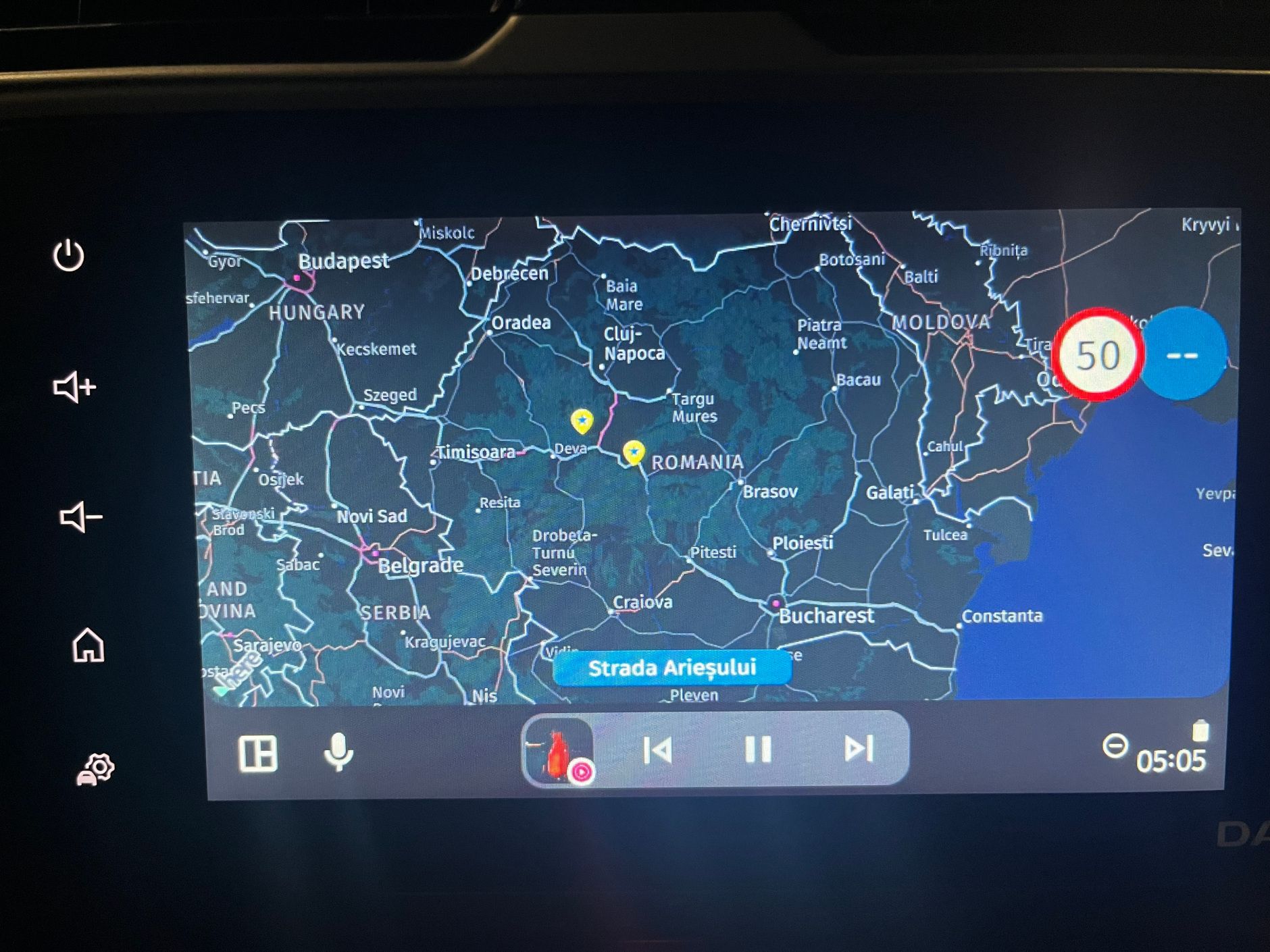
After loading the route ...
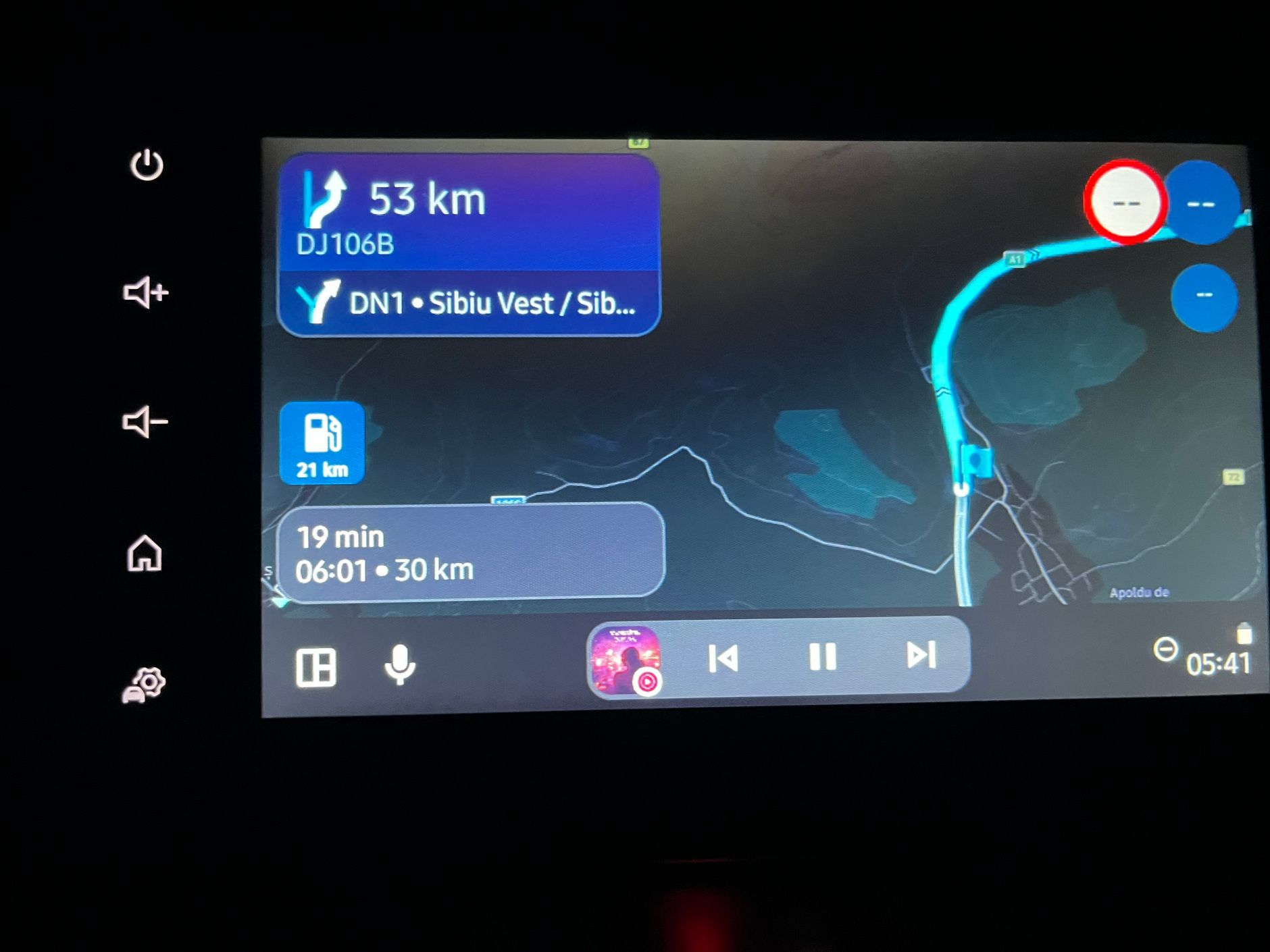
-

Have you set "Auto" on Day/Night Mode?
If so, try to select only "Day" and restart app and Carplay connection.There is a "bug" on Auto setting that makes Carpaly freeze in night mode.
-
Since this morning, I’ve been unable to use the mobile app through Android Auto. The app works normally on the phone, but on Android Auto, I have no location. I also tried loading a route, but there is no cursor navigating along the route.
I even reinstalled the app, but unfortunately, I’m getting the same result.
I opened a support ticket, but for now, the app is unusable for me ....
Had anyone else encountered this kind of issues before ?
After loading the route ...

@Adrian-Avram, Hmmm, did you not have a similar problem earlier, for which you denied the Android Auto app access to location services? When you connect your phone to AA the GPS of the AA device will be used (if it has one). By denying the AA app on your phone access to location services, you force the MRA app to use the phones GPS system instead. Since your pictures suggest a non-fix or defect of the GPS, this might be worth a try.
-

I'm having a similar problem and just finished submitting a service ticket. My AA display keeps freezing, but this morning I started a route on the phone and it looks like I had the same thing happen as you - it was showing some of the directions, but the map display itself as not right (just the default startup location wherever that is).
I think it may have started at the same time the last update rolled out at the beginning of the month (I first noticed problems during a ride on Aug 01), but not sure whether AA or Google may have been updated in that same timeframe.
-
Have you set "Auto" on Day/Night Mode?
If so, try to select only "Day" and restart app and Carplay connection.There is a "bug" on Auto setting that makes Carpaly freeze in night mode.
Have you set "Auto" on Day/Night Mode?
If so, try to select only "Day" and restart app and Carplay connection.There is a "bug" on Auto setting that makes Carpaly freeze in night mode.
Hi @lluis-arasanz ,I tried but its still the same.
And regarding the modes, I found another error. If the map is set to Automatic, and I enter a tunnel, it goes to Night mode instantly, and after I leave the tunnel it does not return to day mode anymore .... -
@Adrian-Avram, Hmmm, did you not have a similar problem earlier, for which you denied the Android Auto app access to location services? When you connect your phone to AA the GPS of the AA device will be used (if it has one). By denying the AA app on your phone access to location services, you force the MRA app to use the phones GPS system instead. Since your pictures suggest a non-fix or defect of the GPS, this might be worth a try.
Hi @Con-Hennekens !
I did about 11,000 km with version 5.2.0, with location turned off in AA, and it worked perfectly.
With this error, I even tried enabling location again in AA and reinstalling the app, but location is still unavailable.
This has never happened before with any of the older versions.
I’ve sent the log, so hopefully the developers can find the issue and patch it soon. -
Have you set "Auto" on Day/Night Mode?
If so, try to select only "Day" and restart app and Carplay connection.There is a "bug" on Auto setting that makes Carpaly freeze in night mode.
If so, try to select only "Day" and restart app and Carplay connection.
Hi @lluis-arasanz ,I tried this today, and it worked. Corjan also confirmed in the ticket I opened that there is a bug in this new version.
Best regards,
Adrian📱Samsung S24 Ultra with MyRoute-APP (GOLD Lifetime)
🏍️Honda NC750X (2021) with AA/CarPlay by CHIGEE Aio-5
🚙Renault Duster with onboard AA/CarPlay Unit -
If so, try to select only "Day" and restart app and Carplay connection.
Hi @lluis-arasanz ,I tried this today, and it worked. Corjan also confirmed in the ticket I opened that there is a bug in this new version.
@Adrian-Avram
Glad to help.
This happens also to me... App works "fine" while day mode but freezes on night.
As someone tolds once... "La noche le confunde" (The night confuses MyRoute)Regards!!
-

Nice how long summer nights influenced normal testing procedures

Over the past months I just never drove when the sun was down.
Hello! It looks like you're interested in this conversation, but you don't have an account yet.
Getting fed up of having to scroll through the same posts each visit? When you register for an account, you'll always come back to exactly where you were before, and choose to be notified of new replies (either via email, or push notification). You'll also be able to save bookmarks and upvote posts to show your appreciation to other community members.
With your input, this post could be even better 💗
Register Login-
 01331
01331
-
 08125
08125
-
09239
-
0512
-
0423
-
032
-
0314
-
 0326
0326