Manual 'Compare Route calculation'
-

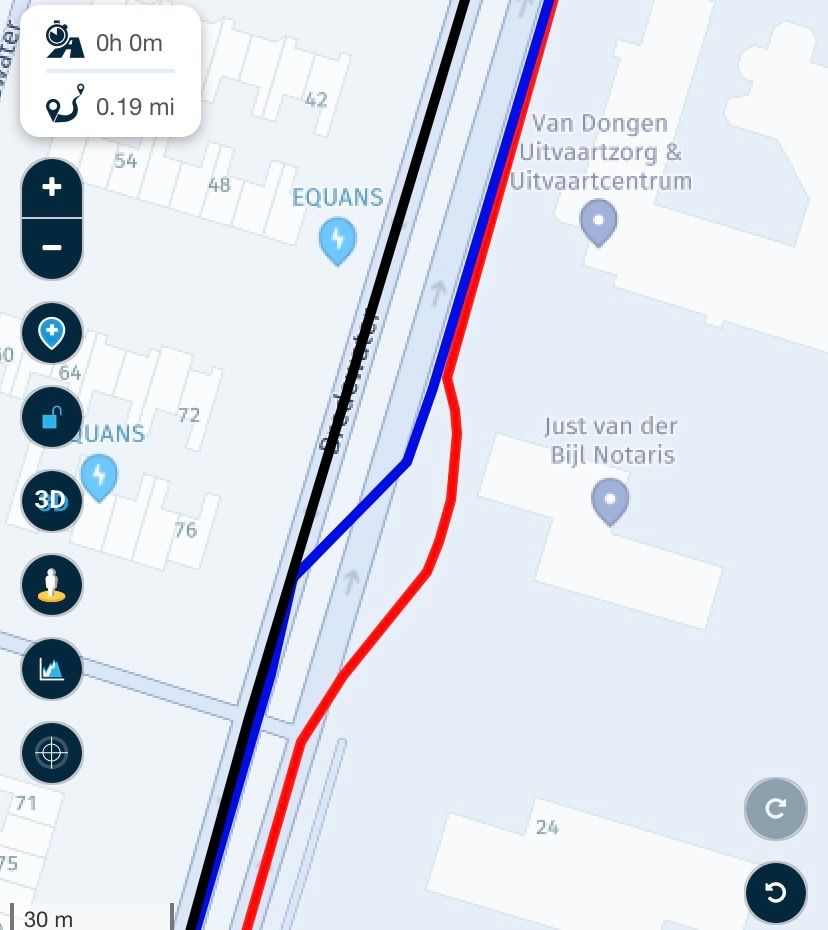
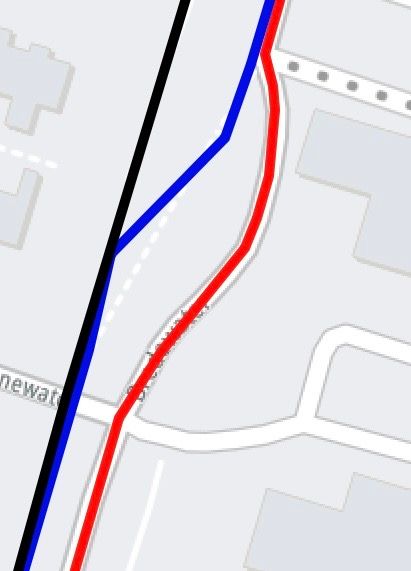
Reading the online support for "Manual 'Compare Route calculation'", there is a graphic provided that shows the three different routes for HERE, TomTom and OSM. The black line represents how the HERE map runs the route. Why is the black line running straight? I'm not seeing any road the black line is following?

For all those on a ride, I salute you!
2011 FLHTCU
1993 FLSTF
2014 Aspen Sentry
2001 Bushtec Turbo-II -
Reading the online support for "Manual 'Compare Route calculation'", there is a graphic provided that shows the three different routes for HERE, TomTom and OSM. The black line represents how the HERE map runs the route. Why is the black line running straight? I'm not seeing any road the black line is following?

@Brett-Bartick The example shows the overlay map from OpenStreetMap. You’ll notice that the red TomTom route line is also taking a different line. If the HERE overlay map was used the road on the map would look different and the black HERE line would follow it, the same as if the TomTom overlay map was used. This clearly shows the difference between all three maps.
-
Nick Carthew moved this topic from [Web] Problems, Bugs and other Issues on
-
@Brett-Bartick The example shows the overlay map from OpenStreetMap. You’ll notice that the red TomTom route line is also taking a different line. If the HERE overlay map was used the road on the map would look different and the black HERE line would follow it, the same as if the TomTom overlay map was used. This clearly shows the difference between all three maps.
The same piece of road still using the HERE planning map but this time using the HERE overlay map. Note the black HERE line follows the road exactly.
Always willing to help if I can.
Triumph Tiger 1200 XRT called Tina.
MRA Navigation Next and SilverFox BJ8 -
The same piece of road still using the HERE planning map but this time using the HERE overlay map. Note the black HERE line follows the road exactly.
And again but this time using the TomTom overlay map. I’ve zoomed in closer to make it easier to see that now the red TomTom route line is following the road.
-
It is important to use the correct planning map for your navigation device.
Each planning map comes with its own set of algorithms embedded within the map data to calculate which roads to use.
The algorithms are unique to each planning map.
So if you use MRA Navigation Next you should use the HERE planning map.
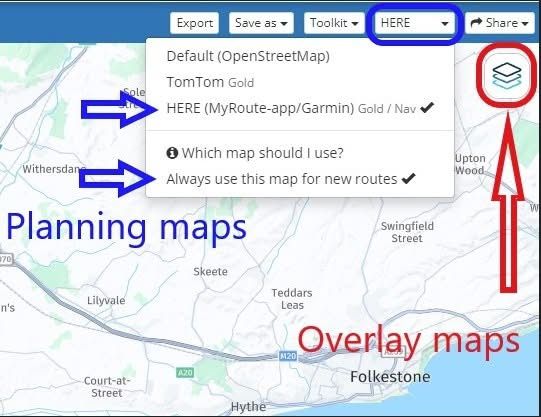
After choosing the HERE planning map you can also click Always use this map for new routes to set the HERE map as your default planning map.
From now on all new routes will be created using the HERE planning map.
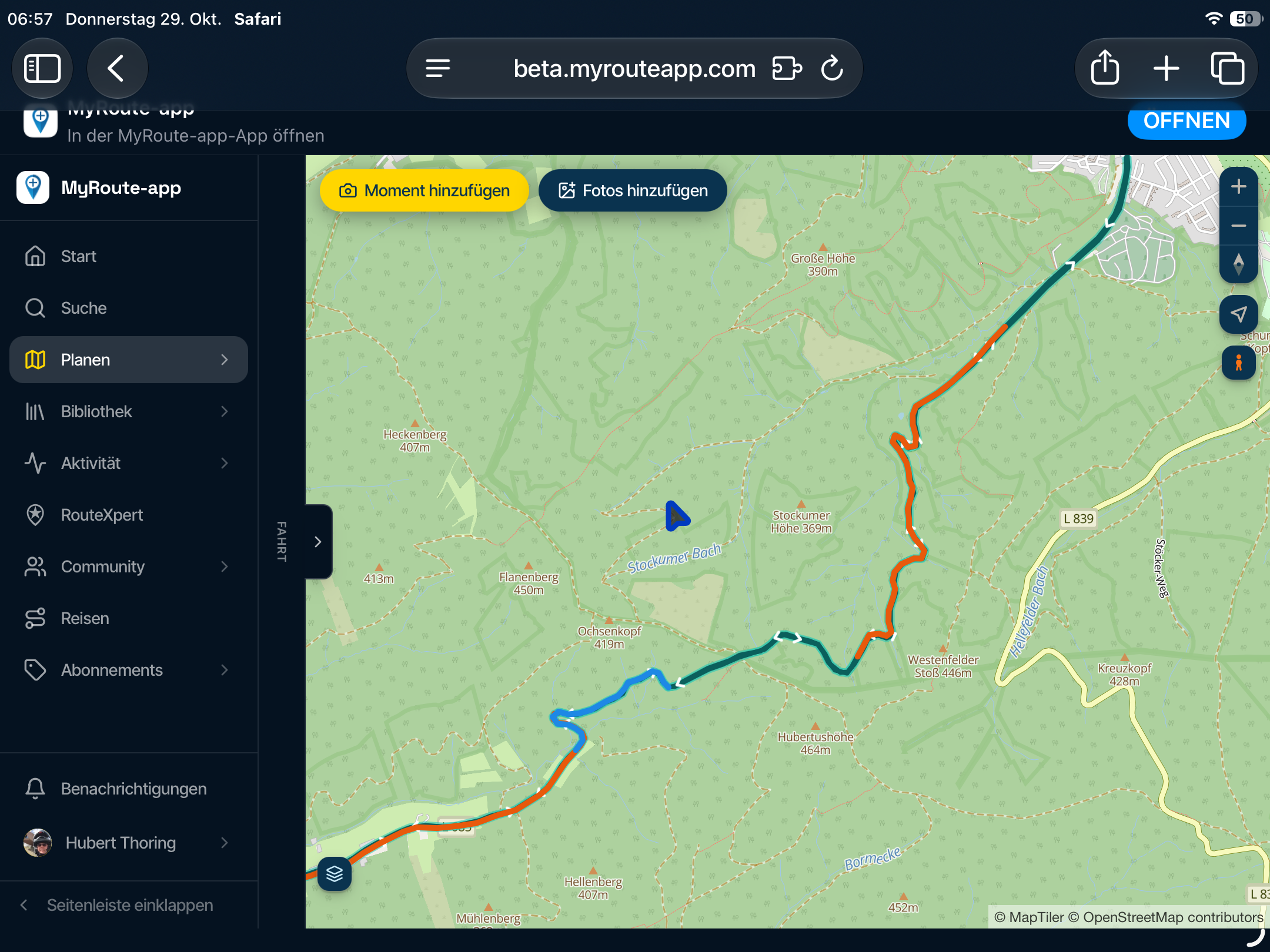
My screenshot below shows the planning map from HERE is selected and also the option to Always use this map for new routes.
The overlay maps are separate to the planning maps and have no effect on route calculations.
Think of them as clear sheets with extra information that you place over the top of the planning map.
The planning map underneath does all of the route calculations.
So with the HERE planning map selected you can then use any of the overlay maps.
If you do not see the same blue menu bar with the planning maps that is shown in my screenshot, click Page menu first and then all of the same options will be available to you.
-
@Brett-Bartick The example shows the overlay map from OpenStreetMap. You’ll notice that the red TomTom route line is also taking a different line. If the HERE overlay map was used the road on the map would look different and the black HERE line would follow it, the same as if the TomTom overlay map was used. This clearly shows the difference between all three maps.
@Brett-Bartick The example shows the overlay map from OpenStreetMap.
I appreciate all the detailed information you provided! Thank you.
How would one know from reading/looking at the example provided that the overlay map was from OpenStreetMap (OSM)? Based on what I read on the support page, I just assumed the overlay map was the HERE map. I don't see anywhere in the documentation page that says the picture is using the OSM overlay map.For all those on a ride, I salute you!
2011 FLHTCU
1993 FLSTF
2014 Aspen Sentry
2001 Bushtec Turbo-II -
@Brett-Bartick The example shows the overlay map from OpenStreetMap.
I appreciate all the detailed information you provided! Thank you.
How would one know from reading/looking at the example provided that the overlay map was from OpenStreetMap (OSM)? Based on what I read on the support page, I just assumed the overlay map was the HERE map. I don't see anywhere in the documentation page that says the picture is using the OSM overlay map.
@Brett-Bartick The fact that the blue route line from OpenStreetMap follows the road precisely is the biggest clue, plus my experience recognises the look of the map. The OSM overlay map has been used as it provides a clear demonstration of the difference between all maps.
Always willing to help if I can.
Triumph Tiger 1200 XRT called Tina.
MRA Navigation Next and SilverFox BJ8 -
@Brett-Bartick The fact that the blue route line from OpenStreetMap follows the road precisely is the biggest clue, plus my experience recognises the look of the map. The OSM overlay map has been used as it provides a clear demonstration of the difference between all maps.
@Brett-Bartick The fact that the blue route line from OpenStreetMap follows the road precisely is the biggest clue, plus my experience recognises the look of the map. The OSM overlay map has been used as it provides a clear demonstration of the difference between all maps.
Thank you once again for the clear explanation! The information you provided should be part of the online manual. I guess you need to know the details of the application before you can understand the manual.

What's confusing to me and doesn't make sense is the following:
If we are using the HERE map, and we want to ensure that the OSM and TomTom maps route in the same fashion as the HERE map, why would you want or need to use an overlay map? I would have thought you use the HERE overlay (with HERE routing) and make sure the red (TomTom) and blue (OSM) lines follow the black line. If they don't. add shapping points to the route. Why would I need to look at a different overlay if all I am after is making sure the TomTom and OSM routes are the same as the HERE route?For all those on a ride, I salute you!
2011 FLHTCU
1993 FLSTF
2014 Aspen Sentry
2001 Bushtec Turbo-II -
@Brett-Bartick The fact that the blue route line from OpenStreetMap follows the road precisely is the biggest clue, plus my experience recognises the look of the map. The OSM overlay map has been used as it provides a clear demonstration of the difference between all maps.
Thank you once again for the clear explanation! The information you provided should be part of the online manual. I guess you need to know the details of the application before you can understand the manual.
What's confusing to me and doesn't make sense is the following:
If we are using the HERE map, and we want to ensure that the OSM and TomTom maps route in the same fashion as the HERE map, why would you want or need to use an overlay map? I would have thought you use the HERE overlay (with HERE routing) and make sure the red (TomTom) and blue (OSM) lines follow the black line. If they don't. add shapping points to the route. Why would I need to look at a different overlay if all I am after is making sure the TomTom and OSM routes are the same as the HERE route?
@Brett-Bartick I refer you back to this section from above:
The overlay maps are separate to the planning maps and have no effect on route calculations.
Think of them as clear sheets with extra information that you place over the top of the planning map.
The planning map underneath does all of the route calculations.Each overlay map contains different information. For instance, the OSM overlay shows footpaths and if you zoom in tight there is an incredible level of detail, from post boxes and public toilets to individual trees planted in a city. The Michelin map is famous for its green roads, a road with a green line alongside it indicates a scenic section. Motorway networks are also clearly seen. Google maps are good for showing shops and restaurants. The HERE logistical map is useful for anyone using oversized vehicles as weight and size limits are visible as are environmental zones.
The overlay maps are just additional tools to use while planning your routes.
Hello! It looks like you're interested in this conversation, but you don't have an account yet.
Getting fed up of having to scroll through the same posts each visit? When you register for an account, you'll always come back to exactly where you were before, and choose to be notified of new replies (either via email, or push notification). You'll also be able to save bookmarks and upvote posts to show your appreciation to other community members.
With your input, this post could be even better 💗
Register Login-
 0822
0822
-
011215
-
 115122
-
0517
-
0749
-
 0483
0483
-
 0669
0669
-
 18405
18405