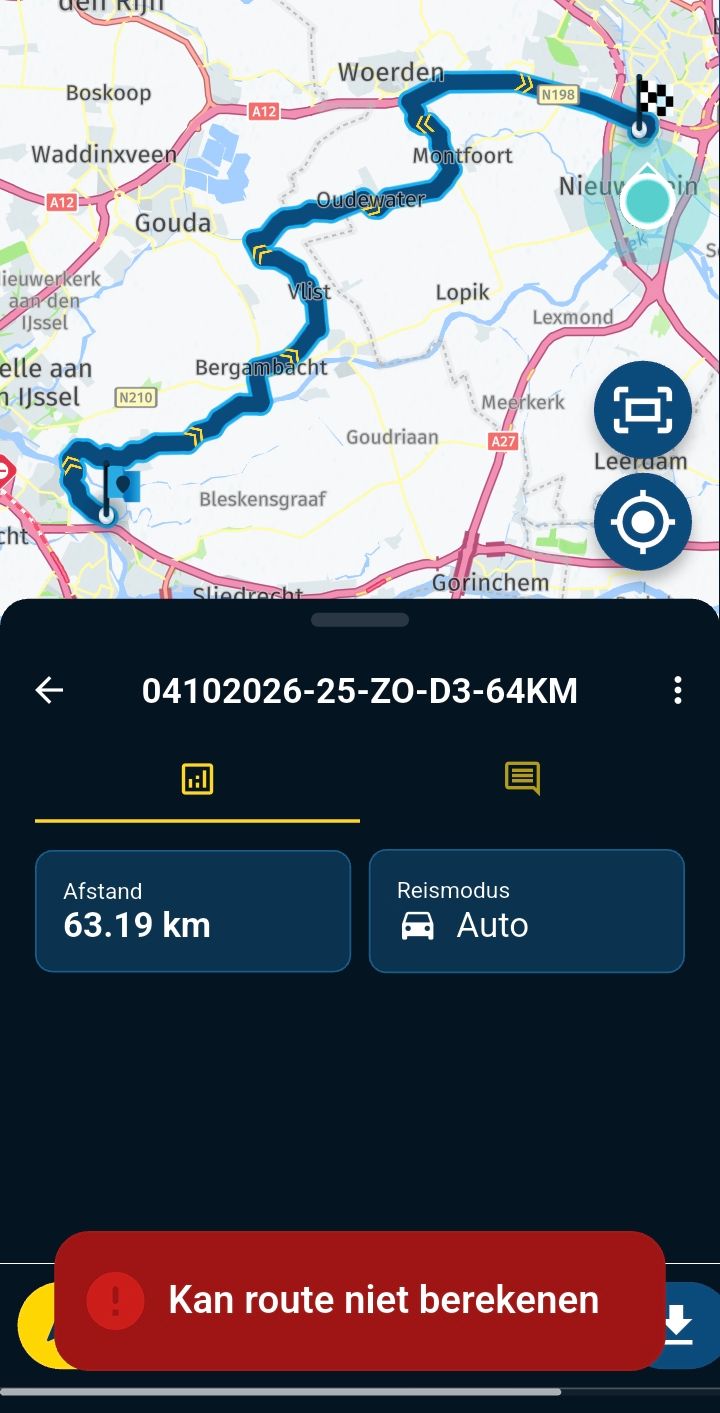
Account blocking issue
-

When an account is blocked due to an excessive number of devices, it would be very useful to be able to independently manage the number of devices associated with an account, as this isn't always done intentionally. Keeping the account blocked until the responsible staff unlocks it can take hours, causing significant disruption. Instead of blocking the account completely, the proposal, which would also save MyRouteApp staff time, is to allow access to the account, but without making it operational. Access would only be permitted to manage the devices independently and delete the files necessary to reactivate the account.
Regards
-

@antonio-1e
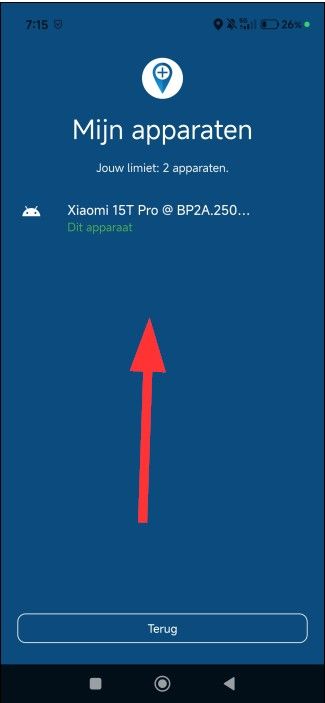
I understand your issue and frustration. But there is also a user's responsibility to check if they are not crossing the max limit of devices logged in into MRA.You can check it for yourself:
-
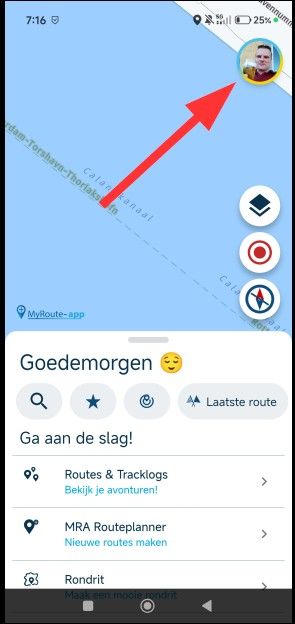
In the MRA Next app tap on your profile photo/picture top right.
-
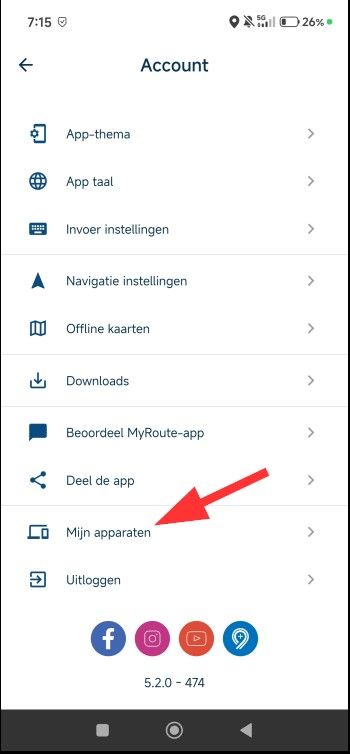
In the settingsmenu that appears, scroll down to the bottom and look for a line saying "My devices"
-
Check the amount of devices and disconnect those who are no longer needed/required
-
-
@antonio-1e
I understand your issue and frustration. But there is also a user's responsibility to check if they are not crossing the max limit of devices logged in into MRA.You can check it for yourself:
-
In the MRA Next app tap on your profile photo/picture top right.
-
In the settingsmenu that appears, scroll down to the bottom and look for a line saying "My devices"
-
Check the amount of devices and disconnect those who are no longer needed/required

Antonio is not speaking about not notification limit, only about managing personal devices to be under license limit.
As I see, when you logout a existing device to configure a new one, the "old device" is still listed (yes logged out, bus is a "existing device")
Sop, If you has "three devices listed" and only logged in in one of them, you are below license limit use... But if you add a ne device to replace one of those logged out, your account is blocked.
Logged out devices are removed on monthly basis (as I read somewhere in this forum), so users can't do the work of "retire" old devices to allow new ones to be in "line".
@antonio-1e ask for a "user action" to remove those devices, so he can do manual actions to change old devices.
Of course, is staff decide to limit number of changes in a month, it could be also a good way to avoid unlimited changes.
Is only a proposal, and developers can take (or not) suggestions into account.
Regards,
-
-
When an account is blocked due to an excessive number of devices, it would be very useful to be able to independently manage the number of devices associated with an account, as this isn't always done intentionally. Keeping the account blocked until the responsible staff unlocks it can take hours, causing significant disruption. Instead of blocking the account completely, the proposal, which would also save MyRouteApp staff time, is to allow access to the account, but without making it operational. Access would only be permitted to manage the devices independently and delete the files necessary to reactivate the account.
Regards

@Antonio-1e I completely agree. It's similar to what I requested in this message:
https://forum.myrouteapp.com/topic/11170/autonomous-smartphone-management
-

This kind of self-maintenance would enable the excessive use of devices. The limit is there to prevent that. In general a license gives you two devices. A third one will never block your account, it will merely make you delist another one. So enrolling a new device is no problem.
I am just an enthusiastic MRA user, and hope you will be one too!
Most motorcycle problems are caused by the nut that connects the handlebar to the saddle.
Check out RideSleepRepeat.eu, a biker community for sharing stays across Europe
-
This kind of self-maintenance would enable the excessive use of devices. The limit is there to prevent that. In general a license gives you two devices. A third one will never block your account, it will merely make you delist another one. So enrolling a new device is no problem.

Can sort of see the merit on both sides of this discussion
I think it is generous of MRA to allow x2 devices per licence when I believe Here are charging per device,
this does reduces MRA's margins, allowing x3 devices to get around the odd "error" is IMO very generousThe device limit had not been an issue for me as I had managed to juggle between 3 devices without getting blocked
Unfortunately today I updated x2 devices & they have registered as new devices with MRA & I am now blocked
As suggested it would be nice to be able to resolve this personally but it is understandable why MRA want to control the number of registered devices & costsI can only navigate with one device at a time but it is very useful to be able to have a backup so am grateful for the x2 device limit
For me the current limit is a generous compromise that means I don't have to licence & pay for every deviceBlackView BV7100, Android 12
Navigate "Routes as Tracks" in Offline mode with Offline Maps
No Wifi, no internet, no interruptions, works well -
Can sort of see the merit on both sides of this discussion
I think it is generous of MRA to allow x2 devices per licence when I believe Here are charging per device,
this does reduces MRA's margins, allowing x3 devices to get around the odd "error" is IMO very generousThe device limit had not been an issue for me as I had managed to juggle between 3 devices without getting blocked
Unfortunately today I updated x2 devices & they have registered as new devices with MRA & I am now blocked
As suggested it would be nice to be able to resolve this personally but it is understandable why MRA want to control the number of registered devices & costsI can only navigate with one device at a time but it is very useful to be able to have a backup so am grateful for the x2 device limit
For me the current limit is a generous compromise that means I don't have to licence & pay for every device
@Brian-McG, that's a fair view on it! Do I understand correctly that your Android devices were seen as new devices after a Android version update? That might be something worth investigating. Just want to add, that only the excessive devices get blocked, not those that were within the limit. These Android version updates might throw things off...
-
@Brian-McG, that's a fair view on it! Do I understand correctly that your Android devices were seen as new devices after a Android version update? That might be something worth investigating. Just want to add, that only the excessive devices get blocked, not those that were within the limit. These Android version updates might throw things off...

@Con-Hennekens I've updated my Android phone last week but lucky for me the phone wasn't seen as a new device. So I agree with @con-hennekens that that's certainly worth investigation that
-
@Brian-McG, that's a fair view on it! Do I understand correctly that your Android devices were seen as new devices after a Android version update? That might be something worth investigating. Just want to add, that only the excessive devices get blocked, not those that were within the limit. These Android version updates might throw things off...
Is not true, the block is for whole account, so "old" and "new" devices remains blocked. In case you gets blocked, you can't use MyRoute-app on any device.
To have in mind, we're speaking on 2 thinks, that could be good:
- User is allowed to "delist" old devices with a montly limit (maybe 2) of changes in a month. This helps user to change devices, but remains under control how many times can be done in a month. In any case, license cat be "more" than 2, so limits apply on same bases than now.
- User can "forget" manually an old device to be inside 3 devices limit and 2 of them online. License is still under limit, and in case MRA wants to limit devices change, could be also a 2 devices remove limit in a month.
In any case, we're not speaking in neither make a higher license limit nor increase devices for a user. Simply, alloy user to "self manage" which devices are ok and which not.
Regards
-
Is not true, the block is for whole account, so "old" and "new" devices remains blocked. In case you gets blocked, you can't use MyRoute-app on any device.
To have in mind, we're speaking on 2 thinks, that could be good:
- User is allowed to "delist" old devices with a montly limit (maybe 2) of changes in a month. This helps user to change devices, but remains under control how many times can be done in a month. In any case, license cat be "more" than 2, so limits apply on same bases than now.
- User can "forget" manually an old device to be inside 3 devices limit and 2 of them online. License is still under limit, and in case MRA wants to limit devices change, could be also a 2 devices remove limit in a month.
In any case, we're not speaking in neither make a higher license limit nor increase devices for a user. Simply, alloy user to "self manage" which devices are ok and which not.
Regards
Is not true, the block is for whole account, so "old" and "new" devices remains blocked. In case you gets blocked, you can't use MyRoute-app on any device.
Your statement contradicts the official one:
https://forum.myrouteapp.com/post/74368
which says:The change we made is that if you are blocked because of too many device, we only block your new devices. Meaning the original 2 devices you used will still be accessible.
It's just in this case from @brian-mcg, where an OS system update is done and the designation of the phone seemingly changes, the old and the new one actually are the same, so they get blocked. That's worth investigating of course.
-
Is not true, the block is for whole account, so "old" and "new" devices remains blocked. In case you gets blocked, you can't use MyRoute-app on any device.
To have in mind, we're speaking on 2 thinks, that could be good:
- User is allowed to "delist" old devices with a montly limit (maybe 2) of changes in a month. This helps user to change devices, but remains under control how many times can be done in a month. In any case, license cat be "more" than 2, so limits apply on same bases than now.
- User can "forget" manually an old device to be inside 3 devices limit and 2 of them online. License is still under limit, and in case MRA wants to limit devices change, could be also a 2 devices remove limit in a month.
In any case, we're not speaking in neither make a higher license limit nor increase devices for a user. Simply, alloy user to "self manage" which devices are ok and which not.
Regards
@Lluis-Arasanz sorry Luis but I think your suggestion could increase the costs for MRA
at the moment they allow 2 devices to be logged in & a 3rd device to be registered
in your scenario it would still be also possible to have 2 logged in,
but within one month you would allow a total of 4 registered devices, the 2 new + the 2 oldWe have to remember it is Here that are dictating the issue of licences per device & I do not know what the Here terms are for the licence, if it is devices per month or devices per year
If the licence is registered devices per month with your scenario of de-listing 2 devices per month MRA's costs could increase MRAs by 25%
If it is registered devices per year you could be increasing the cost x24 if we all registered 2 new devices per monthI am afraid that with MRA being generous they have dug themselves a bit of a hole, once people experience free the expectation is that more is also free, they are allowing us x3 devices when they should be allowing us x1
@con-hennekens & @marinus-van-deudekom the update issue is an error on my end, nothing to worry about for MRA & android updates
-

i am still in process to find correct setup. iphone or android, tablet or phone. this had effect on my max devices.... not active but max devices. my account was also blocked because of my testing. also i did switch to newer phone.
my solution was to contact support and ask to remove not used devices and give me a quote for 2 extra devices.
I also use 1 android phone just to download gpx and put it in a android app. because i will not be allways online the app is more usefull for me.
so i think current way works. if you have a blocked account contact support and there will be a solution.
because i now know the limits i am extra carefull not to get a block.
when my account was blocked still my first device did work. not the device i did wanted to use but i had a device.
-
I think it's important not to overlook Antonio's initial suggestion, which is the same one I made in another thread.
We're not asking for more licenses or any kind of additional freedom. We're simply asking for self-management.
Just as we can still use the route lab via the web when our account is locked, we should be able to access our account via the web and delete devices we've mistakenly added. That's self-management.
More freedom for the user, less work for the staff. The same connectivity as before.
In any case, this is a proposal that the staff should consider. They will decide if it is viable or possible.Creator and administrator of the largest MRA groups.
- https://t.me/MRa_by_b0hd1
- https://www.myrouteapp.com/group/messages/7007
- YouTube: @demco17
- Ex-routexpert, current beta tester and MRA expert. Creator of tutorials, manuals, and MRA user trainer.
-
I think it's important not to overlook Antonio's initial suggestion, which is the same one I made in another thread.
We're not asking for more licenses or any kind of additional freedom. We're simply asking for self-management.
Just as we can still use the route lab via the web when our account is locked, we should be able to access our account via the web and delete devices we've mistakenly added. That's self-management.
More freedom for the user, less work for the staff. The same connectivity as before.
In any case, this is a proposal that the staff should consider. They will decide if it is viable or possible.
@b0hd1, the problem with that is that it opens the possibility of "self-managing" many devices. @brian-mcg is quite right in his assessment of devices per month...
-
@con-hennekens , In my proposal, I put 2 conditions:
- Self managament of devices with a limit of 2 devices (as now)
- Limit for devices change: Detect more device change than a limit (staff managed) to avoid multidevice self managing change.
In any case, no more than 2 devices allowed to run, no account blocking but user self device deregister.
We do not ask for more licenses, only a flexible way to change devices.
About block, in my case it show that:
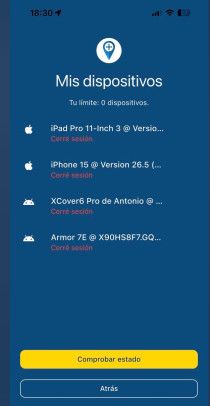
So I can't logout and no use on any device
Regards,
-
The issue is avoiding being locked out and unable to use Next. This might happen while you're traveling—perhaps due to a broken or lost device—and you don't know what to do. In my case, the account was canceled at 4:30 PM on Sunday and reactivated at 7:20 AM on Monday. I'm not trying to provide a solution. I simply want to highlight the problem and hope that those with expertise can find a less critical solution.
-
The issue is avoiding being locked out and unable to use Next. This might happen while you're traveling—perhaps due to a broken or lost device—and you don't know what to do. In my case, the account was canceled at 4:30 PM on Sunday and reactivated at 7:20 AM on Monday. I'm not trying to provide a solution. I simply want to highlight the problem and hope that those with expertise can find a less critical solution.
The issue is avoiding being locked out and unable to use Next. This might happen while you're traveling—perhaps due to a broken or lost device—and you don't know what to do. In my case, the account was canceled at 4:30 PM on Sunday and reactivated at 7:20 AM on Monday. I'm not trying to provide a solution. I simply want to highlight the problem and hope that those with expertise can find a less critical solution.
same here but i was happy that my first phone still worked. if that was not the case i also had to wait for support.
i was also on a travel and i did not realize hard way its way. i could on ios not stop active.... at the end is was not active but max devices.
for me it was not clear max active and max devices.... last i still do not know when or how it will reset.
phone that was still working i will not use but is still in list.
i did pay for 2 extra and i do hope it is activated soon before vacation.
i never did give away or borrowed my account to others.
but in short there was a problem.
i support MRA.
If like me you want use more then 2 then ask for extra devices. ok it cost money but then MRA can work also with more devices.
-
The issue is avoiding being locked out and unable to use Next. This might happen while you're traveling—perhaps due to a broken or lost device—and you don't know what to do. In my case, the account was canceled at 4:30 PM on Sunday and reactivated at 7:20 AM on Monday. I'm not trying to provide a solution. I simply want to highlight the problem and hope that those with expertise can find a less critical solution.
same here but i was happy that my first phone still worked. if that was not the case i also had to wait for support.
i was also on a travel and i did not realize hard way its way. i could on ios not stop active.... at the end is was not active but max devices.
for me it was not clear max active and max devices.... last i still do not know when or how it will reset.
phone that was still working i will not use but is still in list.
i did pay for 2 extra and i do hope it is activated soon before vacation.
i never did give away or borrowed my account to others.
but in short there was a problem.
i support MRA.
If like me you want use more then 2 then ask for extra devices. ok it cost money but then MRA can work also with more devices.
for me it was not clear max active and max devices.... last i still do not know when or how it will reset.
Did you put in a ticket. Then you will get an answer
Honda Goldwing GL1500,
Honda Silverwing GL 650
DMD2 T865X 8 inch Android tablet using MRA next for navigation
Garmin XT sold
Samsung S24FE mounted on a Quadlock and using Android Auto in my car -
for me it was not clear max active and max devices.... last i still do not know when or how it will reset.
Did you put in a ticket. Then you will get an answer
for me it was not clear max active and max devices.... last i still do not know when or how it will reset.
Did you put in a ticket. Then you will get an answer
if you read all, you read i had contact with support and it was reset but i never got info about max devices and how it would be reset.
for now i am in proces to get 2 extra devices on my account and i watch out until then that i will change to much.
but if there is a problem just contact support and then will solve it.
-
So contact support again
Hello! It looks like you're interested in this conversation, but you don't have an account yet.
Getting fed up of having to scroll through the same posts each visit? When you register for an account, you'll always come back to exactly where you were before, and choose to be notified of new replies (either via email, or push notification). You'll also be able to save bookmarks and upvote posts to show your appreciation to other community members.
With your input, this post could be even better 💗
Register Login
-
4241.8k
-
015471
-
 91057.8k
-
 0615
0615
-
016605
-
020422
-
 1412
1412
-
0439