New beta! 5.0.3 (447)
-
A limit of two devices feels slightly restrictive when you have both a routing licence AND a navigation app licence. It leaves no flexibility beyond normal usage. Occasionally depending on which bike/which trip (and what weather!) I use one of two phones for the navigation - obviously not at the same time.
Just checking - can I log out of one phone, and then log in with the other phone and continue? (The other device is a laptop for planning, that won't change for months/years.)
-
A limit of two devices feels slightly restrictive when you have both a routing licence AND a navigation app licence. It leaves no flexibility beyond normal usage. Occasionally depending on which bike/which trip (and what weather!) I use one of two phones for the navigation - obviously not at the same time.
Just checking - can I log out of one phone, and then log in with the other phone and continue? (The other device is a laptop for planning, that won't change for months/years.)
@richtea999 that is exactly as intended.
You can swap phones continuously and simultaneously. All allowed! -
I prefectly understand the idea behind the device management. I would like to see this more refinied. I think, it would be more fair, if that could be more like other license systems working for various software. This means, you can manage by your own the device slots and for example, you can only add once a month or something like that a new device and if maximum is reached, you need to remove one, as you already implemented. I don't like the idea, that after "too many" phone switches, you could loose your account. I also think, that two devices are not enough, a good compromis would be three devices. Im my example, that would mean my daily phone used in car, one rugged on motorbike and a test device.
-
This post is deleted!
-
@richtea999 that is exactly as intended.
You can swap phones continuously and simultaneously. All allowed!@Corjan-Meijerink said in New beta! 5.0.3 (447):
@richtea999 that is exactly as intended.
You can swap phones continuously and simultaneously. All allowed!Perfect. Thank you. Good work, as ever!
-
I prefectly understand the idea behind the device management. I would like to see this more refinied. I think, it would be more fair, if that could be more like other license systems working for various software. This means, you can manage by your own the device slots and for example, you can only add once a month or something like that a new device and if maximum is reached, you need to remove one, as you already implemented. I don't like the idea, that after "too many" phone switches, you could loose your account. I also think, that two devices are not enough, a good compromis would be three devices. Im my example, that would mean my daily phone used in car, one rugged on motorbike and a test device.
-
@ConiKost thanks for sharing your thoughts! 3 devices is also allowed but not stimulated so then you indeed need to logoff one using the presented interface.
@Corjan-Meijerink said in New beta! 5.0.3 (447):
@ConiKost thanks for sharing your thoughts! 3 devices is also allowed but not stimulated so then you indeed need to logoff one using the presented interface.
But from what I understood, If I would do that more often with a test device, woudn't I risk again my account due device-chance? Or does that mean, once I logged in on a device, its fingerprint is added to my account device list and I am save? Only to be allowed to login at the same time on two devices would be fine for me.
-
Question about the device assignment: Maybe something like that works, with a view to the users who are on the road:
-
3 devices pure mobile phone users = 2H+1T
-
2 devices for the CP - AA users = 1H+1T
Perhaps it is also technically possible that you would simply allow Max 2H (mobile phones) + 1T (iPad/tablet) without the user having to choose between 2 of 3 !?!?️
Might be an idea, I just don't know if that would work technically in the app.
-
-
@Corjan-Meijerink said in New beta! 5.0.3 (447):
@ConiKost thanks for sharing your thoughts! 3 devices is also allowed but not stimulated so then you indeed need to logoff one using the presented interface.
But from what I understood, If I would do that more often with a test device, woudn't I risk again my account due device-chance? Or does that mean, once I logged in on a device, its fingerprint is added to my account device list and I am save? Only to be allowed to login at the same time on two devices would be fine for me.
-
Hi @Corjan, Only for identify scenarios...
License limit of 2 devices, affects also Web Planner on computer?
I understand that this limit is for mobile devices which are user for navigation (Next license), even that in a mobile device affects also Integrated MRA RoutePlanner.Best Regards!!
Lluis Arasanz
- BMW F750GS
MotoMediaLink HW Interface for BMW's WonderWheel device - Samsung A14 with Beta MyRoute-App (primary bike use)
Tasker and MMLink SW for Android App Control - iPhone 14 with Beta MyRoute-App (personal and primary CP use)
- BMW F750GS
-
Hi @Corjan, Only for identify scenarios...
License limit of 2 devices, affects also Web Planner on computer?
I understand that this limit is for mobile devices which are user for navigation (Next license), even that in a mobile device affects also Integrated MRA RoutePlanner.Best Regards!!
@Lluis-Arasanz, web planner in a browser is excluded from the restrictions. The restrictions are for the complete MRA app, so it includes also the in-app planner.
I am just an enthusiastic MRA user, and hope you will be one too!
Most motorcycle problems are caused by the nut that connects the handlebar to the saddle.
Check out RideSleepRepeat.eu, a biker community for sharing stays across Europe
-
@Lluis-Arasanz, web planner in a browser is excluded from the restrictions. The restrictions are for the complete MRA app, so it includes also the in-app planner.
@Con-Hennekens good...
This is what I suppose, and how license must be applied. My post is only to clarify others that thinks web planner on Computer is also affected.
Regards
Lluis Arasanz
- BMW F750GS
MotoMediaLink HW Interface for BMW's WonderWheel device - Samsung A14 with Beta MyRoute-App (primary bike use)
Tasker and MMLink SW for Android App Control - iPhone 14 with Beta MyRoute-App (personal and primary CP use)
- BMW F750GS
-
@Con-Hennekens good...
This is what I suppose, and how license must be applied. My post is only to clarify others that thinks web planner on Computer is also affected.
Regards
@Lluis-Arasanz, exactly. And also web-logins from a tablet are not affecting the device management.
-
Is a device which is logged in but switched off (like my tablet or navigation phone). Also count as a logged in device?
Why the question. I installed the app on 3 devices but only my daily phone is always switched on.(I use MRA Next only on Android Auto. Every comment, suggestion, etc will be based on my usage with Android Auto)
-
Is a device which is logged in but switched off (like my tablet or navigation phone). Also count as a logged in device?
Why the question. I installed the app on 3 devices but only my daily phone is always switched on.@M.-Schrijver, having a device switched on or off does not influence the fact that you are using it with the MRA app. But of course you can remove any switched off device from the list on the phone you are trying to use when the message about device management appears.
-
Hi,
so what I read, I am not affected. iPhone, iPad and Android tablet should work seamless. The old Samsung I use sometimes for testing is outdated anyway.
And what I understand, web access is not affected anyway.This post is deleted! -
Hi,
so what I read, I am not affected. iPhone, iPad and Android tablet should work seamless. The old Samsung I use sometimes for testing is outdated anyway.
And what I understand, web access is not affected anyway.said in New beta! 5.0.3 (447):
Hi,
so what I read, I am not affected. iPhone, iPad and Android tablet should work seamless. The old Samsung I use sometimes for testing is outdated anyway.
And what I understand, web access is not affected anyway.Sorry to ask again, after reading three pages, it is still not clear. Are my guess right?
-
said in New beta! 5.0.3 (447):
Hi,
so what I read, I am not affected. iPhone, iPad and Android tablet should work seamless. The old Samsung I use sometimes for testing is outdated anyway.
And what I understand, web access is not affected anyway.Sorry to ask again, after reading three pages, it is still not clear. Are my guess right?
@Jörgen, yes, however the third device your are starting the app on, will show the list of devices in which you can decide to remove one. The removal has no real impact, the removed device will be added to the list again when you start the app on it, if then it is the third device again, you can remove one of the others. If you put a fourth device in the mix, things will become a problem. You have the beta, just try it, to get comfortable with it. Just don't press "abmelden", then you will need to resync all your routes.
-
hopelijk krijg ik nu niet tig meldingen. op een aantal tablets geinstalleerd zowel ios als android en op aantal telefoons ios en android. hopelijk word bij upgrade van app status gelijk offline gemaakt zodat ik alleen met 2 items kan inloggen op app. we gaan het ervaren. op android trouwens beta en op ios gewoon.
-
Hi everyone!

It is time for a lovely new beta.
Not the most exciting update for you but definitely for us
Device management
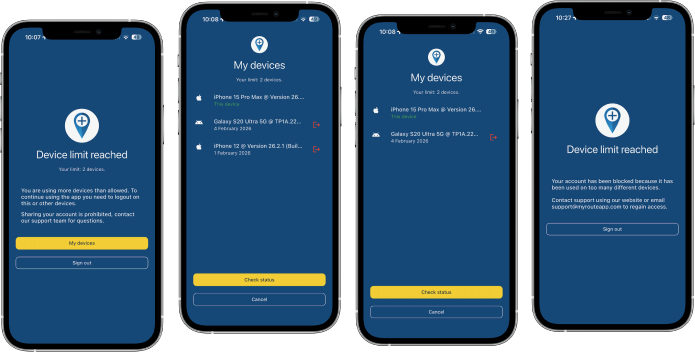
This is the core aspect of this update.
Unfortunately we are seeing a massive amount of account sharing going on.
At MyRoute-app we try our hardest every single day to be customer oriented and keeping our prices low. As of this year our base prices for subscriptions had to be increased (for the first time since 2021) and because of new contracts with our suppliers we also have to implement a device limit per subscription.As we now pay per active phone we cannot (ignorantly) allow users to use our app on an unlimited amount of phones. As of this update we allow a maximum of 2 devices to be used at the same time. When exceeding this limit (3 devices) you will be presented a beautiful interface in which you can logoff another device. After doing so, you can use your current phone again

Some important notes:
- Excessively switching between multiple phones will lead to an automatic warning
- Attempts to use way too many devices (4) at once will lead to an automatic block
Our terms & conditions will be updated appropriately.
Simply put: times of sharing your account with big groups of friends or your club are over, sharing with your partner / personal use on a few devices is still allowed.Note for beta testers: being a beta testers does not mean you are allowed to share your account but if for (proven) testing you wish to use more devices, simply contact our support department.
SSO fixed
Signing into the app using a SSO authentication method (such as Apple or Google) was broken. Luckily this has now been fixed!

Link and file opening
Opening links and files with the app has always been possible.
In this update the stability of these features has been improved to ensure it works as expected when the app is in any state (such as terminated / in the background / opened).Minor fixes and stability improvements
Many small issues that are not relevant to mention here have been fixed.
Also we fixed a few errors that would result in route calculations failing.
Finally a few critical CarPlay / Android Auto errors have been solved and we added a bit more logging to investigate some persistent issues a few users have.What's next
Slowly but surely we are transitioning to a more focused dedication on the website.
In the next update 5.1 we will:- Aim for solving all stability issues CarPlay and Android Auto
- Add highly requested features to CarPlay and Android Auto
- Major technical internal updates
Cheers,
Corjan@Corjan-Meijerink Did Some testing of the new Beta.
I saw that the spinning map issue is not yet solved. In both navigating a route and the free drive mode there’s still a problem. When I comes to a complete stop the map turns in the north direction and the position marker moves direction north. If I was on a road with separated lanes the position marker will move to the lane that is heading north. The north direction of the dynamic mode camera view will then turn witch will be actually not north. I haven’t seen that in the previous versions. So the spin of the map is actually turning the map facing north.Another thing that I’ve noticed was when the notification of a speed camera pops up and your speed is over the Max speed the pop-up turns red, great feature. Maybe it was already like this but I haven’t noticed it before






Hello! It looks like you're interested in this conversation, but you don't have an account yet.
Getting fed up of having to scroll through the same posts each visit? When you register for an account, you'll always come back to exactly where you were before, and choose to be notified of new replies (either via email, or push notification). You'll also be able to save bookmarks and upvote posts to show your appreciation to other community members.
With your input, this post could be even better 💗
Register Login






-
 0142.5k
-
 07115
07115
-
 07187
07187
-
 0476
0476
-
09711
-
 02130
02130
-
 08102
08102
-
010292