Audio cuttet via Bluetooth
-
Hello MRA User,
I have the Problem, that Audio commands via bluetooth a cuttet at beginning. When I use Audio Output via the iPhone speaker, everything works fine.
For sure it has to do with Delay to the Bluetooth device.
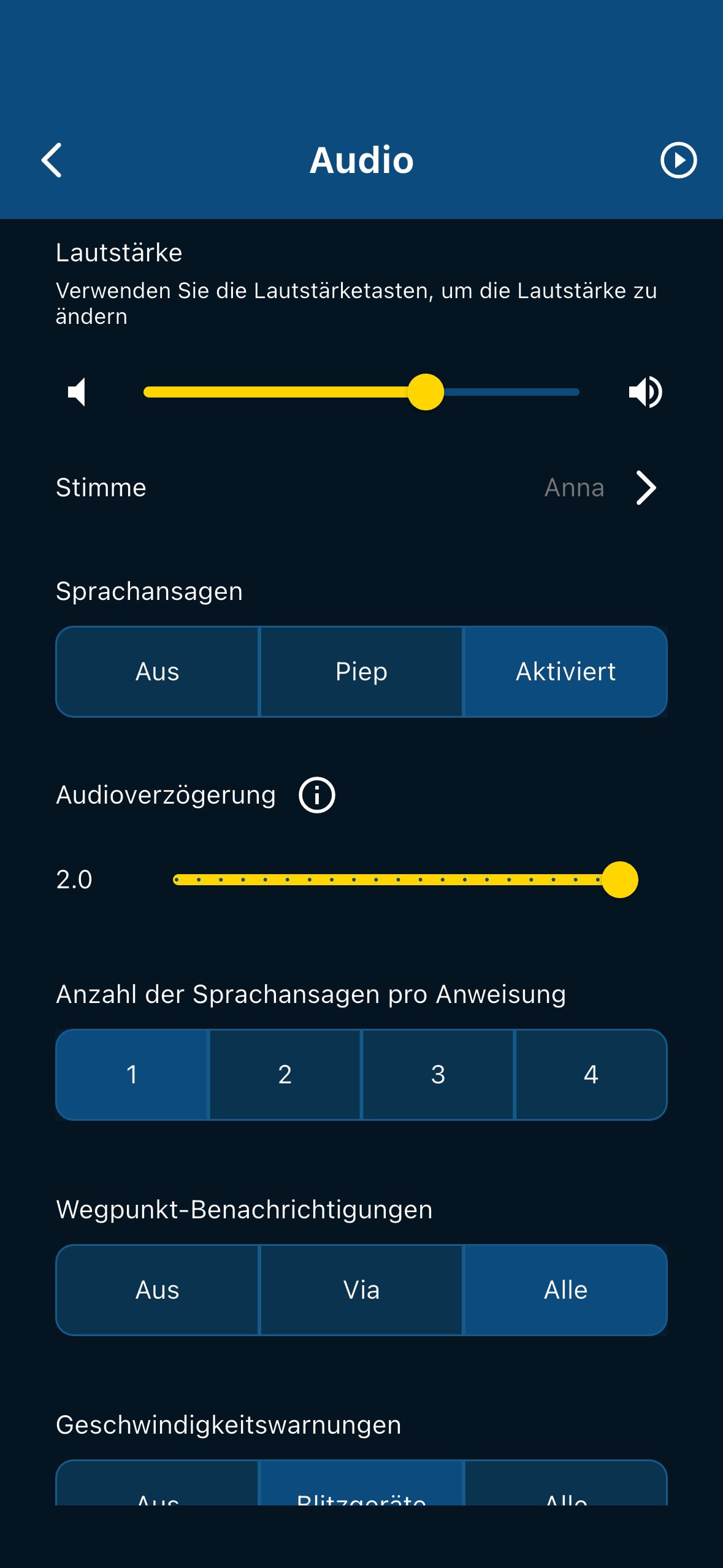
On other Apps you can set up a Delay for Bluetooth Audio.
Anybody Else with this Problem?
Thanks
Günter
@Haug Yes I also noticed cut voice prompts. It starts saying something, but the cuts of in the middle of it
-
I set now a delay of 2 sec but the beginning of the speech is still cuttet.

@Haug, can you please check the version of the app?
Main screen, tap the account icon top right, scroll completely down.
What's the number there?I am just an enthusiastic MRA user, and hope you will be one too!
Most motorcycle problems are caused by the nut that connects the handlebar to the saddle.
Check out RideSleepRepeat.eu, a biker community for sharing stays across Europe
-
@Haug, can you please check the version of the app?
Main screen, tap the account icon top right, scroll completely down.
What's the number there?
@Con-Hennekens We all know what number it says

This setting has only been available since the last update!@Haug If the delay does not work could you share the following info?
- What phone are you using?
- What version of the above?
- Does the delay setting actually add a delay (disregard that you still have the issue but is there a noticeable different between 0 and 2 seconds)
-
@Corjan-Meijerink, yes of course, but I wanted him to find out for himself

The pre-public beta had this setting already without the wanted effect, didn't it? -
@Con-Hennekens We all know what number it says
This setting has only been available since the last update!@Haug If the delay does not work could you share the following info?
- What phone are you using?
- What version of the above?
- Does the delay setting actually add a delay (disregard that you still have the issue but is there a noticeable different between 0 and 2 seconds)

@Corjan-Meijerink
Good evening,App version is 5.0.1 - 433
I use iPhone 15 with iOS 26.1There is a delay but even at 2 sec it’s not enough
-
@Corjan-Meijerink
Good evening,App version is 5.0.1 - 433
I use iPhone 15 with iOS 26.1There is a delay but even at 2 sec it’s not enough
-
Hello Corjan,
Today I did some Tests in the car, connected via Bluetooth to my Autoradio. It doesn’t matter, what delay you adjust, the cut at the beginning is always the same length.
So I assume,the slider is just fake.
Regards
Günter
@Haug Thanks for your reply!
I can guarantee you, the slider isn't fake
Your audio system not respecting it, is another thing.I haven't yet seen any iOS device with these issues.
It's always Android to be honestI'll test some different configurations to see if I can reproduce this.
Just to be sure, you are not using CarPlay but simply the car radio as bluetooth audio device? -
@Haug Thanks for your reply!
I can guarantee you, the slider isn't fake
Your audio system not respecting it, is another thing.I haven't yet seen any iOS device with these issues.
It's always Android to be honestI'll test some different configurations to see if I can reproduce this.
Just to be sure, you are not using CarPlay but simply the car radio as bluetooth audio device?
@Corjan-Meijerink
Exactly, my car has no CarPlay.
The same happens, if I just connect a headphone.
Can even try another apple device -
@Corjan-Meijerink
Exactly, my car has no CarPlay.
The same happens, if I just connect a headphone.
Can even try another apple device
Ok, it’s the same on iPhone and iPad. The slider makes no difference if 0 sec or 2 sec.
The length of the cut at the beginning is slightly different on every Bluetooth device. I did the test with headphones and Bluetooth speakers.
I even tried to change to English language.
Every time the same. -
@Corjan-Meijerink
Exactly, my car has no CarPlay.
The same happens, if I just connect a headphone.
Can even try another apple device
@Haug said in Audio cuttet via Bluetooth:
The same happens, if I just connect a headphone.
Wait a minute... Assuming you plug the headphone into your phone: Are you saying this also occurs if audio comes directly from your phone...?
-
@Haug said in Audio cuttet via Bluetooth:
The same happens, if I just connect a headphone.
Wait a minute... Assuming you plug the headphone into your phone: Are you saying this also occurs if audio comes directly from your phone...?
@Con-Hennekens it’s a Bluetooth headset
-
@Haug said in Audio cuttet via Bluetooth:
The same happens, if I just connect a headphone.
Wait a minute... Assuming you plug the headphone into your phone: Are you saying this also occurs if audio comes directly from your phone...?
@Con-Hennekens
Directly via speaker in the phone, there is no problem -
@Con-Hennekens
Directly via speaker in the phone, there is no problem -
Ok, could you reproduce this error?
@Haug, No I cannot reproduce it, because on my devices it does not occur anymore. I bet your headset is one with intercom function active, which is why it needs to do audio ducking for the navigation instructions. It looks like it is doing that purely based on volume monitoring. If you don't use the intercom function, you could try pairing your phone as intercom, it will probably become higher up in the chain of priorities.
-
@Haug, No I cannot reproduce it, because on my devices it does not occur anymore. I bet your headset is one with intercom function active, which is why it needs to do audio ducking for the navigation instructions. It looks like it is doing that purely based on volume monitoring. If you don't use the intercom function, you could try pairing your phone as intercom, it will probably become higher up in the chain of priorities.
@Con-Hennekens said in Audio cuttet via Bluetooth:
If you don't use the intercom function, you could try pairing your phone as intercom, it will probably become higher up in the chain of priorities.
That's an interesting concept !
-
@Haug, No I cannot reproduce it, because on my devices it does not occur anymore. I bet your headset is one with intercom function active, which is why it needs to do audio ducking for the navigation instructions. It looks like it is doing that purely based on volume monitoring. If you don't use the intercom function, you could try pairing your phone as intercom, it will probably become higher up in the chain of priorities.
@Con-Hennekens
I do use Intercom on my bike but I repeat: the same Problem exist with my carradio (Bluetooth Connection) and with a jabra Bluetooth headphone. -

I read on the Apple Facebook pages, that many users with iOS 26 are having problems with CarPlay, that's why I haven't updated yet and I stayed on iOS 18, but the behavior is strange that it also happens with the intercom connected directly to the CP, I also use the same configuration, I think it's useless to interpose an additional device when the audio source still comes from the iPhone, it goes through CP and then goes to the intercom...
-

@Aiello-antonino
I would switch to iOS 26.2..
Hello! It looks like you're interested in this conversation, but you don't have an account yet.
Getting fed up of having to scroll through the same posts each visit? When you register for an account, you'll always come back to exactly where you were before, and choose to be notified of new replies (either via email, or push notification). You'll also be able to save bookmarks and upvote posts to show your appreciation to other community members.
With your input, this post could be even better 💗
Register Login




-
 0443.6k
-
 026206
-
 010221
-
 0347
0347
-
16347
-
0254
-
0235
-
09213