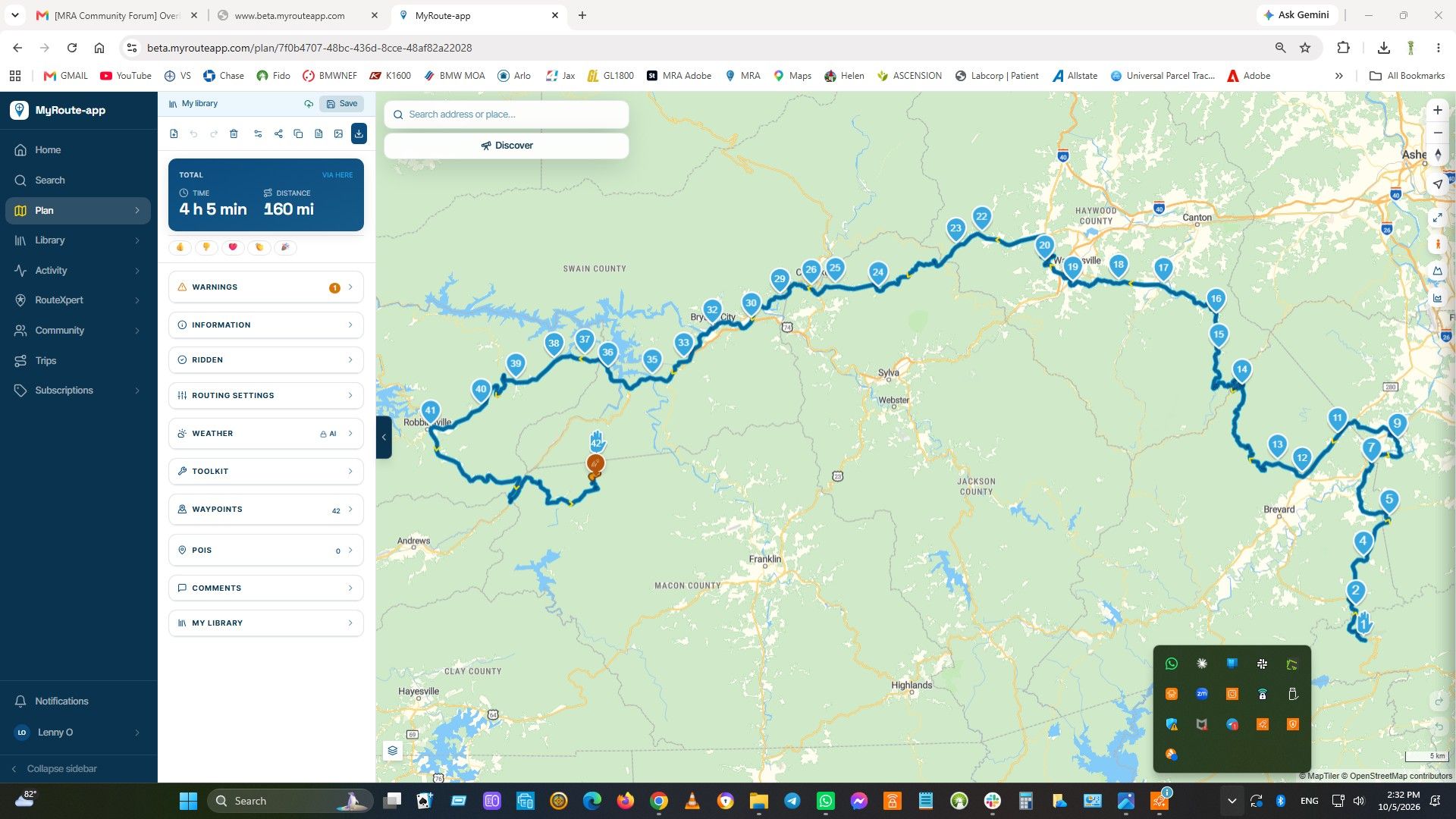
After coffee, MRA does not continue from where we left off.
-

When going for a coffe and powering the bike (and my 7"RiderNav R7M) down, MRA is kept alive on my phone,but when starting up the bike the navigation does not continue by joining the nearest point on the route, but it tries to send me back to where the biginning of the track was.
I need to change any MRA setting on my phone, or what?
Regards,
Frank Koster -
When going for a coffe and powering the bike (and my 7"RiderNav R7M) down, MRA is kept alive on my phone,but when starting up the bike the navigation does not continue by joining the nearest point on the route, but it tries to send me back to where the biginning of the track was.
I need to change any MRA setting on my phone, or what?
Regards,
Frank Koster
@Frank-Hosper The simplest solution is to check the next point before starting the route, and if it tries to send you back to the previous point, skip it manually. It's simple, practical, and fast. Sometimes algorithms can be a bit unpredictable.
Regards
-

The simple solution is to when you leave your bike and your AA connection with the phone is lost, just close down AA. When you will continue your ride just start AA again. In my case this did the trick!
The problem is de lost connection. It will not connect in the right way when you return to your bike.
Another solution will be to leave your phone at your bike. Than the connection does not get lost! -
-
what do you mean by AA connection?

@Frank-Hosper AndroidAuto
-
Hi Mzokk. Your fix does not work for me, because AA is connected via a switched positive lead to the BMW canbus. With other words, when stopping the running engine and going off contact, the AA will also power down.
-
Well I found out that disconnecting Android Auto for me the best solution was.
And yes, sometimes forgetting to disconnect, it also worked! But not allways.
After closing Android Auto and a fresh restart and then resume navigation, it always went good!met een R1250RT met TFT
en BMW Connected Ride App(die dus nog steeds niet voldoet!) ; M.R.A. in combinatie met de Carpuride W702 (voor Android op de Motor!), de Garmin Zumo XT als backup en een Samsung Galaxy S24 -
Well I found out that disconnecting Android Auto for me the best solution was.
And yes, sometimes forgetting to disconnect, it also worked! But not allways.
After closing Android Auto and a fresh restart and then resume navigation, it always went good!
Hi White.Mouse
I am not sure how I am supposed to disconnect Android Auto. For this to happen I do not have to take any action (as I see it). When I stop the bike the TFT screen goes black and the AA screen also powers down after some 6- 7 seconds. I.e. the canbus switched all of the bike electrics off. So physical disconnection of AA is already a fact. So I lso cannot as you mention "forget to disconnect the AA", since this is already an automatic process aided by the Canbus.
So after locking my bike I walk away for a coffee with my handphone in my pocket, while leaving the AA (powered down) in the BMW navigation cradle on the bike.
The "fresh restart"you talk of is, I imagine, achieved by pushing the start button (or turning the start switch) whereby the TFT screen comes alive, and shortly thereafter automatically followed by the AA screen (since the AA trigger wire observed the canbus coming "alive"). At that moment accepting the command "Resume Navigation" did not allow me to continue my intended route from.
The above is a bit of an elaborate write-up, but I was afraid my initial write-up was maybe not clear.
If anybody got a work-around, than please be specific in the actions to be taken. Rather than use generic statements. I am new to this and may need "baby speak" instructions.
If this ios a known bug, is anybody than at least trying to resolve this?
Regards
Frank -

I have a samsung phone and they've got i made a routine in the setup under routines. That if bluetooth dive turns on and the aa in use to start the mra app and set volume to max. And one routine that if bluetooth device turns of to automaticly tirm of the mra app en turn volume bach to normal. Now if i turn on the beemer my android turn on an mare start and ask if i want te navigate further with my route...... And it works fine until now. And i don't need to take out my phone.


Hello! It looks like you're interested in this conversation, but you don't have an account yet.
Getting fed up of having to scroll through the same posts each visit? When you register for an account, you'll always come back to exactly where you were before, and choose to be notified of new replies (either via email, or push notification). You'll also be able to save bookmarks and upvote posts to show your appreciation to other community members.
With your input, this post could be even better 💗
Register Login-
 4251.8k
-
 0922
0922
-
015483
-
018634
-
 91057.9k
-
1518
-
0441
-
0359