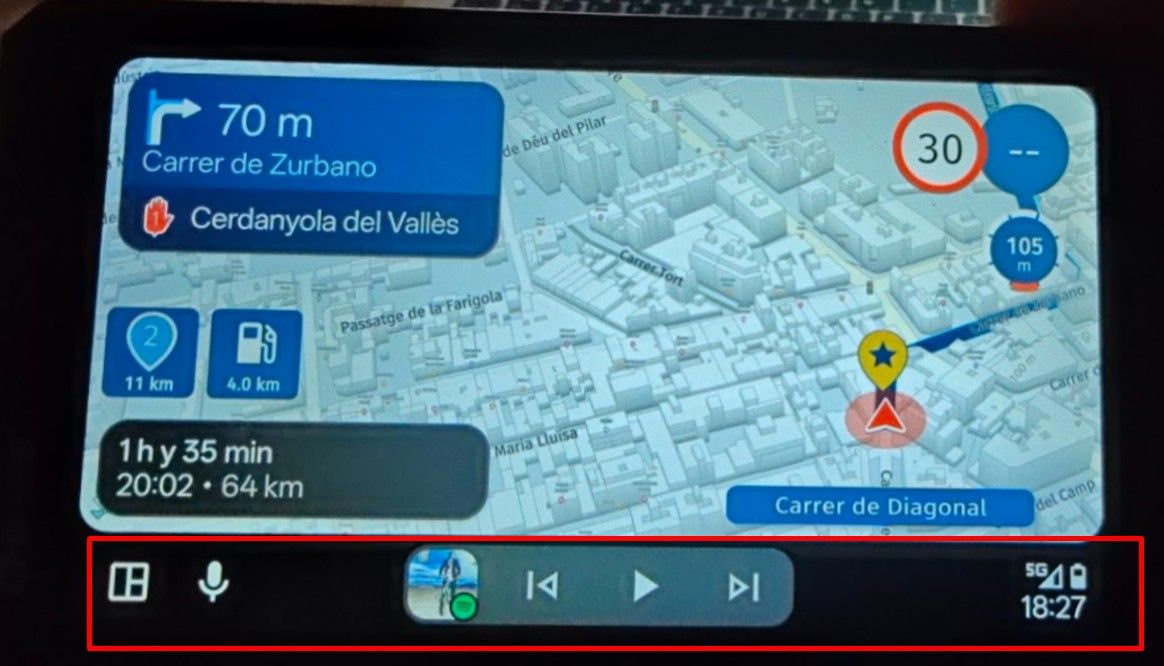
MRA running on DMD
-

Yes you can add experiences and MRA related problems here.
-
Is it a forum/group where experiences -succsses and problems, is discussed here on the community.
Tony

@Tony-q if you have spécifique problems with MRA running on the DMD tablets, I’m here to help
-
I would be interested in to use MRA with a DMD device in combination with the BMW Sync Box. Is it possible to use the WW with MRA, especially to zoom, move the map etc?
If you think everything is under control you are driving to slow!
-
I would be interested in to use MRA with a DMD device in combination with the BMW Sync Box. Is it possible to use the WW with MRA, especially to zoom, move the map etc?
@silberfuchs67 as far as I know that s possible
-
Hi All.
I don't really have a problem with the MRA App, it works very well.
I'm more curious about how many people here use DMD HW and are there any who make the route in MRA and navigate with DMD.Can't those of you who use MRA on DMD give a vote so we can get an insight into how many of us there are
I've tried importing an MRA.gpx into DMD and it's with mixed enthusiasm.., it prefers its own roads and a route with more than 99 points it can't import - then it becomes a track.
-
Hi All.
I don't really have a problem with the MRA App, it works very well.
I'm more curious about how many people here use DMD HW and are there any who make the route in MRA and navigate with DMD.Can't those of you who use MRA on DMD give a vote so we can get an insight into how many of us there are
I've tried importing an MRA.gpx into DMD and it's with mixed enthusiasm.., it prefers its own roads and a route with more than 99 points it can't import - then it becomes a track.
@Tony-q there are limitations to what a DMD can do with an MRA exported file. For starters the DMD app uses OSM while MRA uses Here.
If you have an gold abo you can compare the 2 maps in MRA and make shure they are the same
While DMD is great for off road Navigating MRA is absolutely king while Navigating on road.
That's why I prefere using MRA on my DMD tablet. It works perfect on the tab -
Hi All.
I don't really have a problem with the MRA App, it works very well.
I'm more curious about how many people here use DMD HW and are there any who make the route in MRA and navigate with DMD.Can't those of you who use MRA on DMD give a vote so we can get an insight into how many of us there are
I've tried importing an MRA.gpx into DMD and it's with mixed enthusiasm.., it prefers its own roads and a route with more than 99 points it can't import - then it becomes a track.
If you're talking about DMD as hardware, the tablet(s), yes, they are second to none as navigation devices for bikes, even better than Carpe Iter. And MRA runs flawlessly on it, since it's an Android device.
If you're talking about DMD as software, the app, yep, it's an excellent piece of software - not as good as MRA for on-road navigation (routes), but better than MRA for off-road (tracks).
If you want to combine both apps, planning with MRA and navigating with DMD, you need to know what you're doing; otherwise, it will lead to frustration. It's always good advice to use both planning and navigating apps from the same ecosystem, since they're designed to work together perfectly.
-
@Tony-q there are limitations to what a DMD can do with an MRA exported file. For starters the DMD app uses OSM while MRA uses Here.
If you have an gold abo you can compare the 2 maps in MRA and make shure they are the same
While DMD is great for off road Navigating MRA is absolutely king while Navigating on road.
That's why I prefere using MRA on my DMD tablet. It works perfect on the tab
@Marinus-van-Deudekom said in MRA running on DMD:
there are limitations to what a DMD can do with an MRA exported file. For starters the DMD app uses OSM while MRA uses Here.
That's definitely not the main issue.
I've been on the DMD forum (Discord server) for quite a while now and see many postings like "I created a route with MRA, but it doesn't work well with DMD, so the devs have to investigate and fix it".
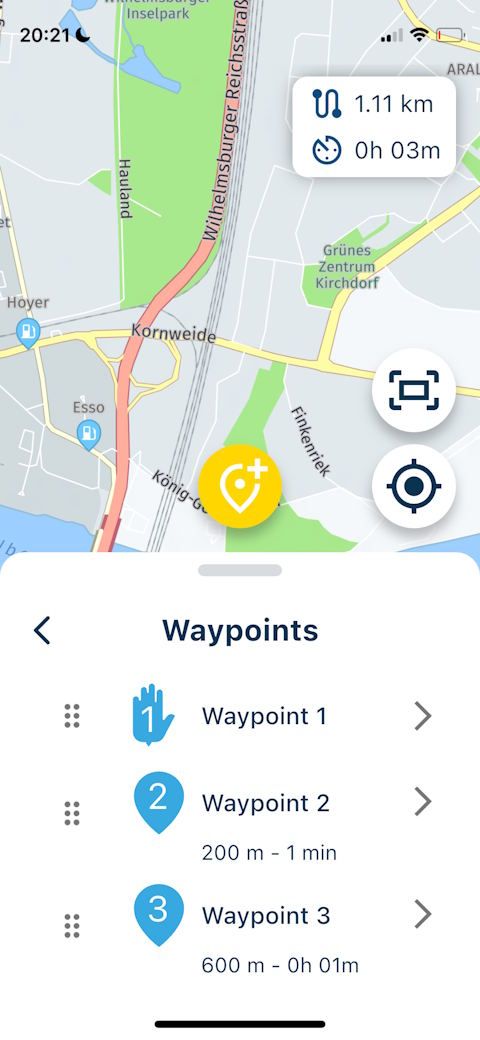
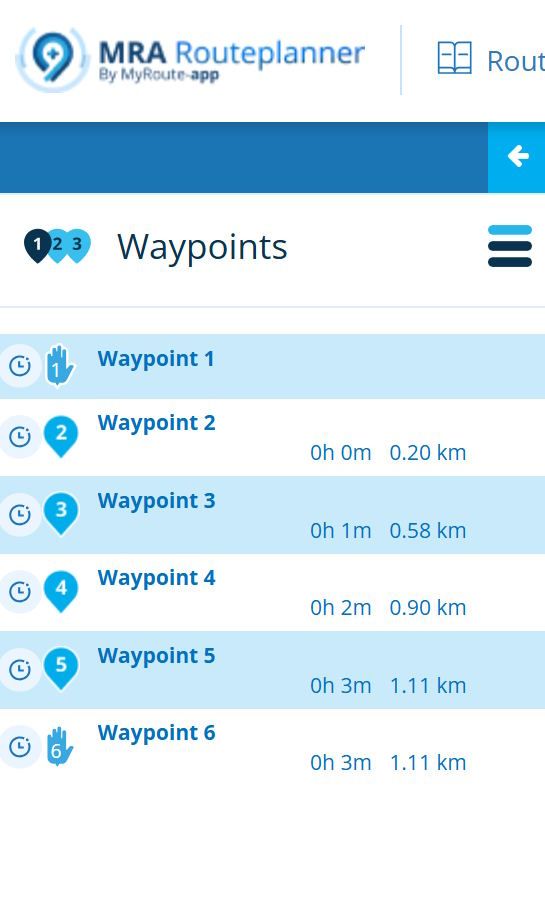
If you take a closer look, it's most often about misunderstanding different concepts and terms.I had a long and exhausting debate here on this forum, and I will never crawl into this rabbit hole again, but 99% of these misunderstandings come from the different usage of "waypoint" in MRA versus DMD/GPX.
-
@Tony-q there are limitations to what a DMD can do with an MRA exported file. For starters the DMD app uses OSM while MRA uses Here.
If you have an gold abo you can compare the 2 maps in MRA and make shure they are the same
While DMD is great for off road Navigating MRA is absolutely king while Navigating on road.
That's why I prefere using MRA on my DMD tablet. It works perfect on the tab
@Marinus-van-Deudekom , I have used MRA/Garmin until now and only road. Since I should change to a new app I have tested a little MRA and DMD and agree for road and me it will be MRA.
-
@Marinus-van-Deudekom said in MRA running on DMD:
there are limitations to what a DMD can do with an MRA exported file. For starters the DMD app uses OSM while MRA uses Here.
That's definitely not the main issue.
I've been on the DMD forum (Discord server) for quite a while now and see many postings like "I created a route with MRA, but it doesn't work well with DMD, so the devs have to investigate and fix it".
If you take a closer look, it's most often about misunderstanding different concepts and terms.I had a long and exhausting debate here on this forum, and I will never crawl into this rabbit hole again, but 99% of these misunderstandings come from the different usage of "waypoint" in MRA versus DMD/GPX.
@Martin-Wilcke you're absolutely wright there. That's why we don't use the therm waypoint and talk about Viapoints and shaping points. Waypoint is something from Garmin. I think the confusion in the DMD app comes from the fact that they don't use the proper export format to import a gpx file in the DMD app. And almost certain that they don't compare the route with Here and OSM. We all know that the two maps use a different cart and a different algorithm to plan the route. Like that mistakes are easily made and lead to user faults witch they don't want to admid
Have fun with MRA on the great DMD tabletHonda Goldwing GL1500,
Honda Silverwing GL 650
DMD2 T865X 8 inch Android tablet using MRA next for navigation
Garmin XT sold
Samsung S24FE mounted on a Quadlock and using Android Auto in my car -
@Martin-Wilcke you're absolutely wright there. That's why we don't use the therm waypoint and talk about Viapoints and shaping points. Waypoint is something from Garmin. I think the confusion in the DMD app comes from the fact that they don't use the proper export format to import a gpx file in the DMD app. And almost certain that they don't compare the route with Here and OSM. We all know that the two maps use a different cart and a different algorithm to plan the route. Like that mistakes are easily made and lead to user faults witch they don't want to admid
Have fun with MRA on the great DMD tablet
@Marinus-van-Deudekom said in MRA running on DMD:
you're absolutely wright there. That's why we don't use the therm waypoint and talk about Viapoints and shaping points.
Looks like we're using different apps - and btw., what does "wright" mean, a combination of "wrong" and "right"?

-

Folks, I have been using MRA and DMD2 app in parallel on a DMD T865-X device for several years now and have gained some experience:
-
DMD hardware is excellent manufactured for hard use in offroad terrain. DMD2 app ist developed to support offroad driver in best way - following TRACKS. And the included maps contains colour coded offroad pathes, to suggest if it's easy to drive or hard stuff.
-
The developer is going to add more and more ROUTE capabilities for navigation onroad.
-
MRA and MyRoute-App are the best apps I know to support navigation in onroad terrain, plan round tours by 2 clicks and support long distance traverlers. With the function to convert a route into track and vice versa - and navigate with instructions by both - that's grat stuff and unique!
But for offroading, it's not at the same level as DMD2 app. Fine for me - I use for each approach the best tool... -
Because DMD hardware is based on Android, this was the reason to decide for, and to use both apps (DMD2 and MyRoute-App) parallel on the same device.
Onroad to the entry point of the funny offroad stuff - navigated by MyRoute-App.
Then, switched the app to DMD2 for the pure offroad.
Funny thing: you can run both parallel, feeded by same gpx file - and switch to what do the best job in the moment. -
If you plan a route in MRA and transfer to any other navigation device/-app, then the rout may not the same - based on used maps and differnet algorithm. This can't be changed.
-
all navigation device/-app (in meantime also TomTom and Calimoto) deal with GPX files, because a file with such a data structure (founded by company Topografix) became standard. That files are readable by human and each text editor, because its a simple XML format. But such a file must be in a dedicated structure!
Easy said: -
it can contain a track with several trackpoints, defined in the file by <trk> and <trkpt>.
Check it by yourself - it's easy -
- each device/app will use it as it is (no interpretation nor calculation) and will draw a line over a map.
-
Such a file can contain a route with several routepoints, defined in the file by <rte> and <rtept>.
-
- each device/app will use it, will calculate a route from one point to the next point, by using allowed streets, and will then draw a line over a map.
That's the reason why same route differs from one to another device/app!
- each device/app will use it, will calculate a route from one point to the next point, by using allowed streets, and will then draw a line over a map.
-
And such a file can contain Points of Interest (POI), defined in the file by <wpt> (called waypoint).
-
A route planned in MRA must contain min. 2 route points (start and end); can contain more; can contain shaping points and via points.
Different devices/apps may have not the same point type and may have different names for it -
A route planned in MRA can contain POI (Hotels, Gas stations, Supermarkets). But they are only visible on the map - they are not route points!
If you save such a route in MRA as a gpx file - p.e. gpx 1.1 (track, route, POI), then: -
- tracks, trackpoints will be entered by MRA into this file as <trk>,<trkp> TRACK, TRACKPOINT
-
- routes, routepoints will be entered by MRA into this file as <rte>, >rtept> ROUTE, ROUTEPOINT
-
- POI will be entered by MRA into this file as <wpt> WAYPOINT
-
- that's the irritation - but it's GPX-Standard conform!
If you then import such an MRA generated gpx file into DMD2 app, you will see differences:
-
DMD2 app was originally designed as app, to display TRACKS. Means: only a track line will be drawn on the map. And the rider must follow this line by themself!
In meantime, DMD2 app can guide you (by symbol and speach) also based on a track (like MyRoute-App too). -
By this import routine, it's also possible to load routes. But (like as for tracks), route points will not be displayed (only used to calculate the route).
-
If there are (coming from MRA) POI in the gpx file, then DMD2 app will interpret them as Waypoints <wpt> - strictly following the GPX-Standard!
-
If you place in MRA clever POI along your route - and export as gpx file. The DMD2 app displays them also on the map. It's not the same as in MyRoute-App...
DMD developers ae currently working, to enhance the DMD2 app for better operating with routes.
And they are going to develop a web based routeplanner (like MRA). So the disadvantages for onroad/routes will be eliminated next time! -
-

Nice overview @Guzzist!
I’d be really happy if DMD became available on iOS as well. Unfortunately, at the moment it’s only available for Android.
-
@Marinus-van-Deudekom said in MRA running on DMD:
there are limitations to what a DMD can do with an MRA exported file. For starters the DMD app uses OSM while MRA uses Here.
That's definitely not the main issue.
I've been on the DMD forum (Discord server) for quite a while now and see many postings like "I created a route with MRA, but it doesn't work well with DMD, so the devs have to investigate and fix it".
If you take a closer look, it's most often about misunderstanding different concepts and terms.I had a long and exhausting debate here on this forum, and I will never crawl into this rabbit hole again, but 99% of these misunderstandings come from the different usage of "waypoint" in MRA versus DMD/GPX.

@Martin-Wilcke said in MRA running on DMD:
99% of these misunderstandings come from the different usage of "waypoint" in MRA versus DMD/GPX.
Do you care to explain this difference? What does a waypoint do different in DMD than what it does in MRA? In the end they just shape a route. I think most difference are (just like with any native device) caused by routing settings not being equal between the planner and the device (or DMD software in this case). The beauty of MRA is (amongst others) that a native MRA route applies the planner settings on the navigation app.
-
Folks, I have been using MRA and DMD2 app in parallel on a DMD T865-X device for several years now and have gained some experience:
-
DMD hardware is excellent manufactured for hard use in offroad terrain. DMD2 app ist developed to support offroad driver in best way - following TRACKS. And the included maps contains colour coded offroad pathes, to suggest if it's easy to drive or hard stuff.
-
The developer is going to add more and more ROUTE capabilities for navigation onroad.
-
MRA and MyRoute-App are the best apps I know to support navigation in onroad terrain, plan round tours by 2 clicks and support long distance traverlers. With the function to convert a route into track and vice versa - and navigate with instructions by both - that's grat stuff and unique!
But for offroading, it's not at the same level as DMD2 app. Fine for me - I use for each approach the best tool... -
Because DMD hardware is based on Android, this was the reason to decide for, and to use both apps (DMD2 and MyRoute-App) parallel on the same device.
Onroad to the entry point of the funny offroad stuff - navigated by MyRoute-App.
Then, switched the app to DMD2 for the pure offroad.
Funny thing: you can run both parallel, feeded by same gpx file - and switch to what do the best job in the moment. -
If you plan a route in MRA and transfer to any other navigation device/-app, then the rout may not the same - based on used maps and differnet algorithm. This can't be changed.
-
all navigation device/-app (in meantime also TomTom and Calimoto) deal with GPX files, because a file with such a data structure (founded by company Topografix) became standard. That files are readable by human and each text editor, because its a simple XML format. But such a file must be in a dedicated structure!
Easy said: -
it can contain a track with several trackpoints, defined in the file by <trk> and <trkpt>.
Check it by yourself - it's easy -
- each device/app will use it as it is (no interpretation nor calculation) and will draw a line over a map.
-
Such a file can contain a route with several routepoints, defined in the file by <rte> and <rtept>.
-
- each device/app will use it, will calculate a route from one point to the next point, by using allowed streets, and will then draw a line over a map.
That's the reason why same route differs from one to another device/app!
- each device/app will use it, will calculate a route from one point to the next point, by using allowed streets, and will then draw a line over a map.
-
And such a file can contain Points of Interest (POI), defined in the file by <wpt> (called waypoint).
-
A route planned in MRA must contain min. 2 route points (start and end); can contain more; can contain shaping points and via points.
Different devices/apps may have not the same point type and may have different names for it -
A route planned in MRA can contain POI (Hotels, Gas stations, Supermarkets). But they are only visible on the map - they are not route points!
If you save such a route in MRA as a gpx file - p.e. gpx 1.1 (track, route, POI), then: -
- tracks, trackpoints will be entered by MRA into this file as <trk>,<trkp> TRACK, TRACKPOINT
-
- routes, routepoints will be entered by MRA into this file as <rte>, >rtept> ROUTE, ROUTEPOINT
-
- POI will be entered by MRA into this file as <wpt> WAYPOINT
-
- that's the irritation - but it's GPX-Standard conform!
If you then import such an MRA generated gpx file into DMD2 app, you will see differences:
-
DMD2 app was originally designed as app, to display TRACKS. Means: only a track line will be drawn on the map. And the rider must follow this line by themself!
In meantime, DMD2 app can guide you (by symbol and speach) also based on a track (like MyRoute-App too). -
By this import routine, it's also possible to load routes. But (like as for tracks), route points will not be displayed (only used to calculate the route).
-
If there are (coming from MRA) POI in the gpx file, then DMD2 app will interpret them as Waypoints <wpt> - strictly following the GPX-Standard!
-
If you place in MRA clever POI along your route - and export as gpx file. The DMD2 app displays them also on the map. It's not the same as in MyRoute-App...
DMD developers ae currently working, to enhance the DMD2 app for better operating with routes.
And they are going to develop a web based routeplanner (like MRA). So the disadvantages for onroad/routes will be eliminated next time!
@Guzzist said in MRA running on DMD:
Funny thing: you can run both parallel, feeded by same gpx file - and switch to what do the best job in the moment.
I have been wondering if this was possible, just maid a small test on it an that without problems -not mutch driving in DK this time of year.. ️
️
I have sendt an request to Johny Pear if it was possible to make a setting so the planner will be disablet and only Dashboard/homepage was active, then only on nav system was loading the system and all other good stuff was active, OBD, Tire Press, apps .....
Regarding shaping points -Johny wrote to me ..
"Sorry but we will never support shaping points, as I said, I do not agree with that use case. If you need/want shaping points then use GPX Tracks and not routes" -
-
Folks, I have been using MRA and DMD2 app in parallel on a DMD T865-X device for several years now and have gained some experience:
-
DMD hardware is excellent manufactured for hard use in offroad terrain. DMD2 app ist developed to support offroad driver in best way - following TRACKS. And the included maps contains colour coded offroad pathes, to suggest if it's easy to drive or hard stuff.
-
The developer is going to add more and more ROUTE capabilities for navigation onroad.
-
MRA and MyRoute-App are the best apps I know to support navigation in onroad terrain, plan round tours by 2 clicks and support long distance traverlers. With the function to convert a route into track and vice versa - and navigate with instructions by both - that's grat stuff and unique!
But for offroading, it's not at the same level as DMD2 app. Fine for me - I use for each approach the best tool... -
Because DMD hardware is based on Android, this was the reason to decide for, and to use both apps (DMD2 and MyRoute-App) parallel on the same device.
Onroad to the entry point of the funny offroad stuff - navigated by MyRoute-App.
Then, switched the app to DMD2 for the pure offroad.
Funny thing: you can run both parallel, feeded by same gpx file - and switch to what do the best job in the moment. -
If you plan a route in MRA and transfer to any other navigation device/-app, then the rout may not the same - based on used maps and differnet algorithm. This can't be changed.
-
all navigation device/-app (in meantime also TomTom and Calimoto) deal with GPX files, because a file with such a data structure (founded by company Topografix) became standard. That files are readable by human and each text editor, because its a simple XML format. But such a file must be in a dedicated structure!
Easy said: -
it can contain a track with several trackpoints, defined in the file by <trk> and <trkpt>.
Check it by yourself - it's easy -
- each device/app will use it as it is (no interpretation nor calculation) and will draw a line over a map.
-
Such a file can contain a route with several routepoints, defined in the file by <rte> and <rtept>.
-
- each device/app will use it, will calculate a route from one point to the next point, by using allowed streets, and will then draw a line over a map.
That's the reason why same route differs from one to another device/app!
- each device/app will use it, will calculate a route from one point to the next point, by using allowed streets, and will then draw a line over a map.
-
And such a file can contain Points of Interest (POI), defined in the file by <wpt> (called waypoint).
-
A route planned in MRA must contain min. 2 route points (start and end); can contain more; can contain shaping points and via points.
Different devices/apps may have not the same point type and may have different names for it -
A route planned in MRA can contain POI (Hotels, Gas stations, Supermarkets). But they are only visible on the map - they are not route points!
If you save such a route in MRA as a gpx file - p.e. gpx 1.1 (track, route, POI), then: -
- tracks, trackpoints will be entered by MRA into this file as <trk>,<trkp> TRACK, TRACKPOINT
-
- routes, routepoints will be entered by MRA into this file as <rte>, >rtept> ROUTE, ROUTEPOINT
-
- POI will be entered by MRA into this file as <wpt> WAYPOINT
-
- that's the irritation - but it's GPX-Standard conform!
If you then import such an MRA generated gpx file into DMD2 app, you will see differences:
-
DMD2 app was originally designed as app, to display TRACKS. Means: only a track line will be drawn on the map. And the rider must follow this line by themself!
In meantime, DMD2 app can guide you (by symbol and speach) also based on a track (like MyRoute-App too). -
By this import routine, it's also possible to load routes. But (like as for tracks), route points will not be displayed (only used to calculate the route).
-
If there are (coming from MRA) POI in the gpx file, then DMD2 app will interpret them as Waypoints <wpt> - strictly following the GPX-Standard!
-
If you place in MRA clever POI along your route - and export as gpx file. The DMD2 app displays them also on the map. It's not the same as in MyRoute-App...
DMD developers ae currently working, to enhance the DMD2 app for better operating with routes.
And they are going to develop a web based routeplanner (like MRA). So the disadvantages for onroad/routes will be eliminated next time!
Excellent summary!
I agree with you 100%, both in terms of the facts and your assessments.
I want to add something about POIs, as they can also easily be confused with DMD2.
In the MRA POI area, we see three tabs, and it is essential to understand that these POIs have different contexts.
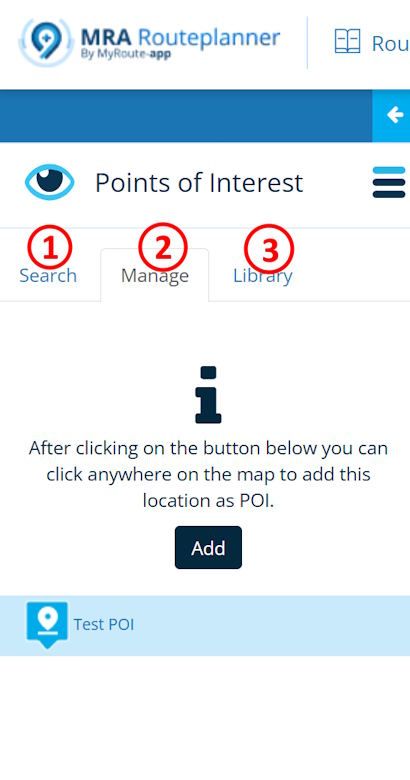
#1 and #3 are like libraries; #1 "search" contains the POIs from the map, and #3 "library" is a private library. These POIs are not directly related to the route but are, so to speak, above it. These libraries also exist in DMD2, one via "search" for the map POIs, and the other via "myLocations" for the private library.
#2 "manage," on the other hand, contains the POIs that are actually assigned to the route, and only these are included in the GPX file as <wpt> when exported.
So if you want to transfer MRA POIs to DMD2 (where they are called waypoints), you have to insert them in tab #3.
-
-
@Martin-Wilcke said in MRA running on DMD:
99% of these misunderstandings come from the different usage of "waypoint" in MRA versus DMD/GPX.
Do you care to explain this difference? What does a waypoint do different in DMD than what it does in MRA? In the end they just shape a route. I think most difference are (just like with any native device) caused by routing settings not being equal between the planner and the device (or DMD software in this case). The beauty of MRA is (amongst others) that a native MRA route applies the planner settings on the navigation app.
@Con-Hennekens said in MRA running on DMD:
Do you care to explain this difference?
Sorry mate, no. We had a long debate on this topic, which I don't want to start over again.
Please take a look at @Guzzist 's excellent summary, where he explains in detail why the term “waypoint” has different meanings in MRA and DMD2/GPX.
-
@Con-Hennekens said in MRA running on DMD:
Do you care to explain this difference?
Sorry mate, no. We had a long debate on this topic, which I don't want to start over again.
Please take a look at @Guzzist 's excellent summary, where he explains in detail why the term “waypoint” has different meanings in MRA and DMD2/GPX.
@Martin-Wilcke, Haha, I did not want to start a flamewar
 I was under the impression that you were referring to technical difference of how waypoints work in each software, but now I understand that it is about a symantec difference. No need for further discussion, I had a few of those on this forum as well...
 I am just an enthusiastic MRA user, and hope you will be one too!
Most motorcycle problems are caused by the nut that connects the handlebar to the saddle.
Check out RideSleepRepeat.eu, a biker community for sharing stays across Europe
-
@Martin-Wilcke, Haha, I did not want to start a flamewar
I was under the impression that you were referring to technical difference of how waypoints work in each software, but now I understand that it is about a symantec difference. No need for further discussion, I had a few of those on this forum as well...
Yep - it’s all about semantics!
„Waypoint“ is a false friend here and that’s what the confusion is about.
Hello! It looks like you're interested in this conversation, but you don't have an account yet.
Getting fed up of having to scroll through the same posts each visit? When you register for an account, you'll always come back to exactly where you were before, and choose to be notified of new replies (either via email, or push notification). You'll also be able to save bookmarks and upvote posts to show your appreciation to other community members.
With your input, this post could be even better 💗
Register Login-
 02040
02040
-
013195
-
 0731
0731
-
 011715
-
 15127
15127
-
 08316
08316
-
 0521
0521
-
 04117
04117