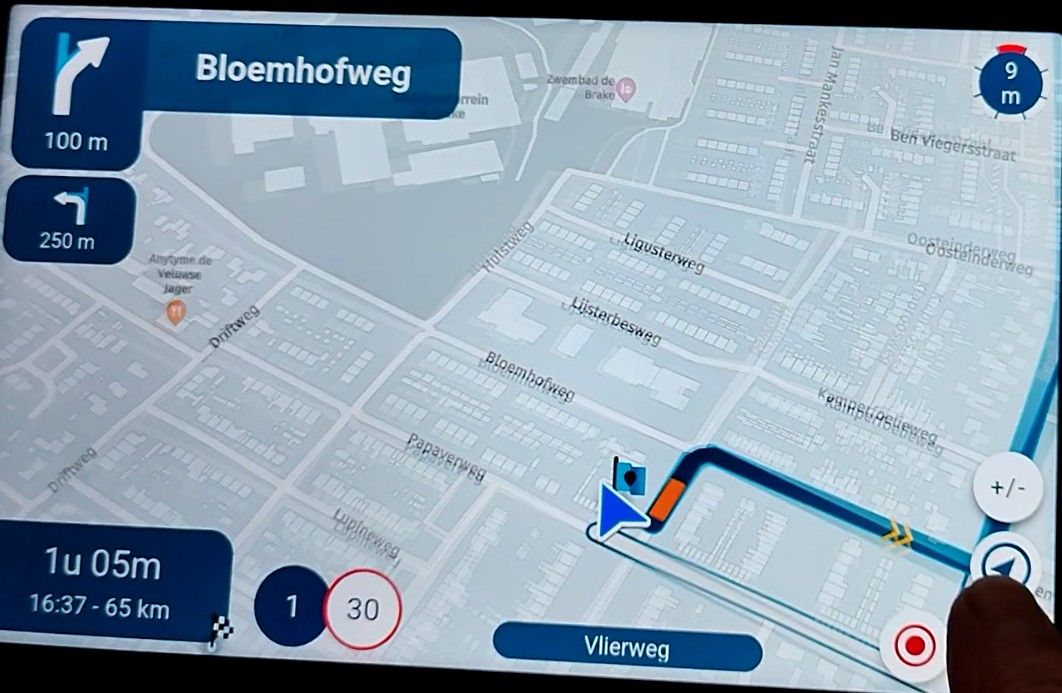
Map "spinning" when standing still
-
said in Map "spinning" when standing still:
@Corjan-Meijerink I use two android devices to navigate with MRA. One a Samsung S25+ and the other is the T865 from ThorkRacing. Both devices are only having a spinning map at a stand still, not while driving.
Don't know if this information is useful, i didn't read this in this topic so thought the problem was a spinning map while driving. This never happend to my devices only at a complete stand still.
Yesterday i drove a route A2B and the only time the "spinned" was at a complete stand still. The map turnend about 180 degrees, the minute i started moving the map turned in the correct position. This kept on happening everytime i stopped for a turn or trafficlight.

@Erik-Plaggenborg when the 441 update was rekeased I did a test with the T865X and for me the map didn’t spin at a complete stop. Are you using the T865 or like me the T865X. As fas as I know the difference those twi is the better screen and more interval memory
Honda Goldwing GL1500,
Honda Silverwing GL 650
DMD2 T865X 8 inch Android tablet using MRA next for navigation
Garmin XT sold
Samsung S24FE mounted on a Quadlock and using Android Auto in my car -
@Erik-Plaggenborg when the 441 update was rekeased I did a test with the T865X and for me the map didn’t spin at a complete stop. Are you using the T865 or like me the T865X. As fas as I know the difference those twi is the better screen and more interval memory

The thread (at least how I meant it) is about the spinning when at a standstill; for me, there is no problem while moving. Unfortunately, the difficulties also occur on my phone (Samsung S22 Ultra) alone, without any Android Auto device involved, and they keep occurring with 5.02 as well. It happens at practically every stop, and almost every time the map then turns 180 degrees (facing the direction from where I came), causing the navigation to recalculate. Something must have changed compared to earlier versions-be it the app, the phone, or hardware conditions-because I did not have the problem this massively in the past. It drastically reduces the usefulness of the app, and it is not good news that seemingly not much can be done to solve this.
 I do, however, appreciate the attempts to fix it, and I am hopeful that a new solution can be found and designed over time. I like the app a lot; it's been my everyday navigation app (and especially now, with free drive, even more so)-I believe in the team's ability to eventually find a fix for the phenomenon.

-

I’ll definitely spend some more time!
-
The thread (at least how I meant it) is about the spinning when at a standstill; for me, there is no problem while moving. Unfortunately, the difficulties also occur on my phone (Samsung S22 Ultra) alone, without any Android Auto device involved, and they keep occurring with 5.02 as well. It happens at practically every stop, and almost every time the map then turns 180 degrees (facing the direction from where I came), causing the navigation to recalculate. Something must have changed compared to earlier versions-be it the app, the phone, or hardware conditions-because I did not have the problem this massively in the past. It drastically reduces the usefulness of the app, and it is not good news that seemingly not much can be done to solve this.
I do, however, appreciate the attempts to fix it, and I am hopeful that a new solution can be found and designed over time. I like the app a lot; it's been my everyday navigation app (and especially now, with free drive, even more so)-I believe in the team's ability to eventually find a fix for the phenomenon. 
@peha said in Map "spinning" when standing still:
It happens at practically every stop, and almost every time the map then turns 180 degrees (facing the direction from where I came), causing the navigation to recalculate.
That in itself already is a strange phenomenon, since at speeds under a certain level, no recalculation should be triggered at all (because it is considered a stand still).
-
The thread (at least how I meant it) is about the spinning when at a standstill; for me, there is no problem while moving. Unfortunately, the difficulties also occur on my phone (Samsung S22 Ultra) alone, without any Android Auto device involved, and they keep occurring with 5.02 as well. It happens at practically every stop, and almost every time the map then turns 180 degrees (facing the direction from where I came), causing the navigation to recalculate. Something must have changed compared to earlier versions-be it the app, the phone, or hardware conditions-because I did not have the problem this massively in the past. It drastically reduces the usefulness of the app, and it is not good news that seemingly not much can be done to solve this.
I do, however, appreciate the attempts to fix it, and I am hopeful that a new solution can be found and designed over time. I like the app a lot; it's been my everyday navigation app (and especially now, with free drive, even more so)-I believe in the team's ability to eventually find a fix for the phenomenon. 
@peha For me, the problem already existed with previous versions.
-
@peha said in Map "spinning" when standing still:
It happens at practically every stop, and almost every time the map then turns 180 degrees (facing the direction from where I came), causing the navigation to recalculate.
That in itself already is a strange phenomenon, since at speeds under a certain level, no recalculation should be triggered at all (because it is considered a stand still).
@Con-Hennekens yesterday I noticed that in both Freedrive and A2B route when I came to a complete stop the position marker turend. Most of the time 90degrees Right. It did not recalculante. I’ve never s’en it before. I was out with just my phone
-

Same for me (with the latest update!)
Had no problem last time on my bike but yesterday as well on my phone as on the AA screen in my car! -

+1 same issue - every time I stop (at traffic lights, etc.) the map spins 180 degrees as if I'm facing the other way. Once I'm underway again it spins back and the navigation continues correctly.
Samsung S24 Ultra, fully patched and up to date.
No such issues with Google Maps or other nav programs.
-

In my opinion this has nothing to do with MRA or other nav tooling.
I found this article.
Sorry but I cant test it, perhaps there is a solution for you in it.
If you don't try, you'll never know. Fingers crossed. Good luck.The Samsung Galaxy S24 Ultra is a fantastic device, but precisely because it is so large and packed with sensors, it can sometimes be extra sensitive to magnetic interference.
Here are some specific steps and tips for your S24 Ultra to stop that "spinning":
- Calibrating via the hidden menu
You can test and reset your Samsung's sensors directly:
Open the Phone app and dial: #0#
Tap the Sensor tile.
Look for Magnetic Sensor. You will see a small circle with a line (the compass).
If the line is red and shows a "0", it is not calibrated.
Move your phone in a figure-8 motion until the line turns blue and a "3" appears. This indicates it is perfectly calibrated.
Tap the 'Back' button a few times to exit the menu.
- Check your case (MagSafe accessories?)
The S24 Ultra is often used with cases that contain magnets (such as MagSafe-compatible rings or wallet flaps).
The culprit: Magnets in your case directly interfere with your S24 Ultra’s magnetometer.
Test it: Take your phone out of the case and see if the map in Google Maps stays still. If it works correctly without the case, you’ll know the magnets in the case are causing the interference.
- Google Maps "Live View" calibration
Sometimes the magnetic field in a city (due to trams, pipes, or reinforced concrete) is too unstable for a compass.
In Google Maps, tap the blue dot (your location).
Choose the option Calibrate with Live View.
Use your camera to scan the buildings and street signs around you. The S24 Ultra then uses image recognition to lock in your direction, which is much more stable than the compass.
- Specific S24 settings
Ensure your phone's "assistance" features are enabled:
Go to Settings > Location > Location Services.
Make sure Google Location Accuracy is turned on.
Also, turn on Wi-Fi scanning and Bluetooth scanning. This helps your phone determine your position based on nearby routers, which results in less "drift" than using GPS alone.
Do you happen to have a case with a magnet or a card holder on the back of your S24 Ultra?
- Calibrating via the hidden menu
-

I also have had the issue navigating with an older Kyocera E7110 on the phone screen without Android Auto. 180 degree turns, usually settling on the opposite way to the direction I was traveling. Functionally, it's mostly a problem for me on a roads I don't know just after I've made a turn and have to stop for traffic or a red light. Under those conditions, it's easy for me to get confused about whether I'm going in the right direction.
-

Same issue here on my iPhone Air. Managed to work around it with an automation in the shortcuts app.
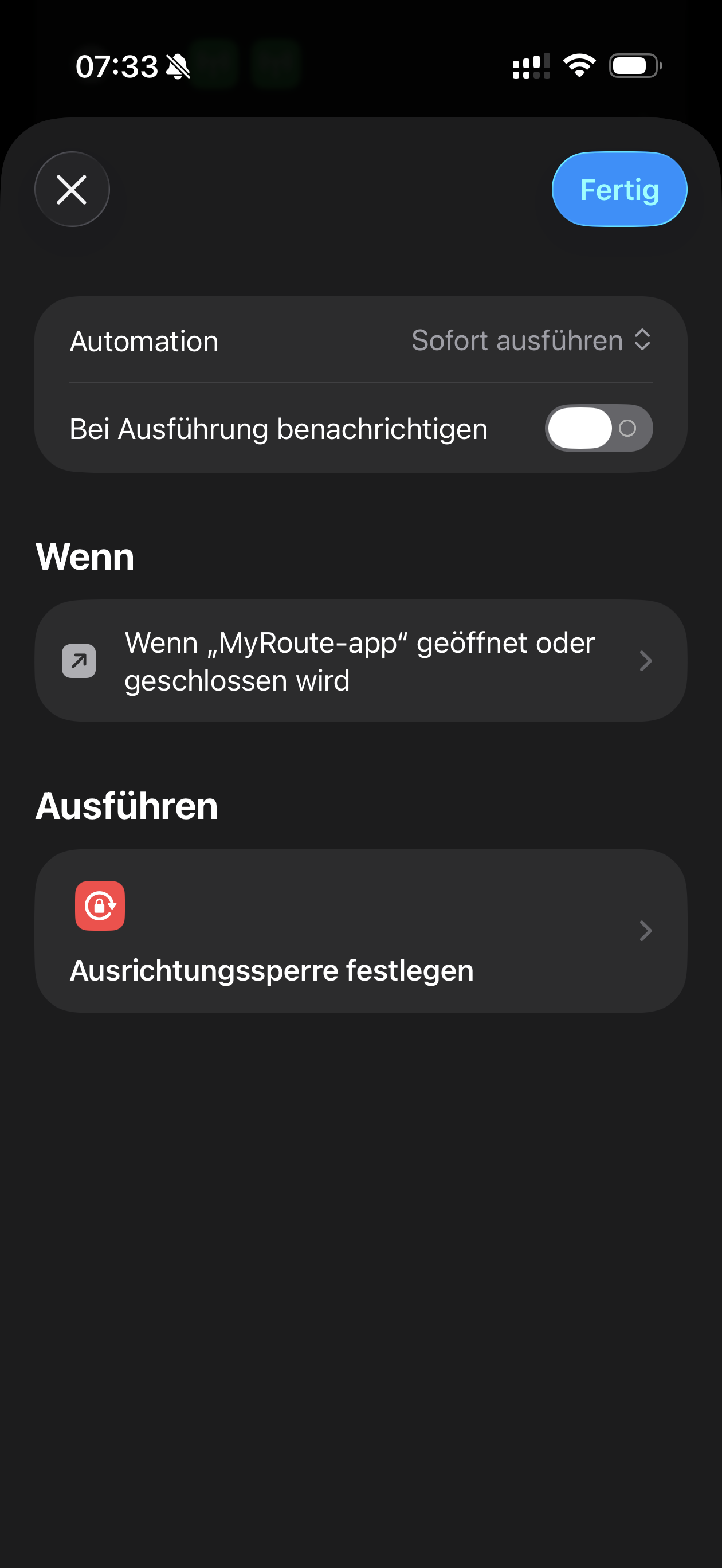
-
I’ll definitely spend some more time!
@Corjan-Meijerink Is there anything on the horizon, regarding potential updates, if/when a fix or workaround might be found? It seems, since the last update the app waits longer (i.e., there's a delay of several seconds) before the map spinning starts, but it's still there, unfortunately, and not a good experience, as already described ad nauseum in this thread.
 I understand there's no such thing as a definite date or promise of any kind, but may I ask if the problem is being investigated further - is this being worked on still? Thanks!
 -
 This post is deleted!
 -
Had to delete the text because the translation welcome was wrong .. Sorry

Will write it again later ..
-
I noticed the same on my tablet.
@Jörgen said in Map "spinning" when standing still:
I noticed the same on my tablet.
ik ook. Met de laatste versie. Helemaal draaierig wordt ik er van
-
@Corjan-Meijerink I'm bumping this; is this issue being actively worked on?
-

I can say that is a little annoying when on an stop, it rotates 180 degrees and hides all route .
I’m trying to understand why and how… and my impression is about. Compass tries to to be on pointing north, or if not possible, gets northern street direction.
I’ll continue to look for a pattern, but sometimes I’ say bad words under my helmet.
Please take a look on it
Regards
-
I’ll definitely spend some more time!
@Corjan-Meijerin hello Corjan what news about this problem merci
Hello! It looks like you're interested in this conversation, but you don't have an account yet.
Getting fed up of having to scroll through the same posts each visit? When you register for an account, you'll always come back to exactly where you were before, and choose to be notified of new replies (either via email, or push notification). You'll also be able to save bookmarks and upvote posts to show your appreciation to other community members.
With your input, this post could be even better 💗
Register Login









-
 0443.6k
-
 026206
-
 010221
-
 0347
0347
-
16347
-
0254
-
0235
-
09213