Skip to content
  • Categories
  • Recent
  • Popular
  • Support
  • MyRoute-app
Collapse
Brand Logo

MRA Community Forum

  1. Home
  2. General Discussion
  3. Broken road (in map only)

Broken road (in map only)

Scheduled Pinned Locked Moved General Discussion
9 Posts 6 Posters 178 Views 3 Watching
  • Oldest to Newest
  • Newest to Oldest
  • Most Votes
Reply
  • Reply as topic
Log in to reply
This topic has been deleted. Only users with topic management privileges can see it.
  • Juan Carlos Garcia Ojedaundefined Offline
    Juan Carlos Garcia Ojedaundefined Offline
    Juan Carlos Garcia Ojeda
    wrote last edited by
    #1

    Hi,

    I dont know if this was posted yet. I searched for it but couldn't find it.

    I have a route where a road appears incomplete on the map (HERE), and the planner makes me backtrack many kilometers to go to the same place and continue the route. If I try it with another map, it works fine, but when I transfer it to the Garmin XT2, since it has the same map, it recalculates and makes the same error. Is there any way to "cross" that point in a straight line?
    I've attached an image.
    Captura de pantalla 2025-12-02 140210.png
    Thank you very much.

    Rob Verhoeffundefined 1 Reply Last reply
    0
    • LE DIZES Freddyundefined Offline
      LE DIZES Freddyundefined Offline
      LE DIZES Freddy
      wrote last edited by
      #2

      Bonsoir
      vous cliquez sur le WP4 la féntre s'ouvre , vous cliquez sur les 3 points à droite (plus d'option)
      une deuxième ligne apparait vous cliquez sur le deuxième icone en partant de la droite ( voiture 4X4) et ça forcera la route vers le point 3

      1 Reply Last reply
      0
      • Juan Carlos Garcia Ojedaundefined Juan Carlos Garcia Ojeda

        Hi,

        I dont know if this was posted yet. I searched for it but couldn't find it.

        I have a route where a road appears incomplete on the map (HERE), and the planner makes me backtrack many kilometers to go to the same place and continue the route. If I try it with another map, it works fine, but when I transfer it to the Garmin XT2, since it has the same map, it recalculates and makes the same error. Is there any way to "cross" that point in a straight line?
        I've attached an image.
        Captura de pantalla 2025-12-02 140210.png
        Thank you very much.

        Rob Verhoeffundefined Offline
        Rob Verhoeffundefined Offline
        Rob Verhoeff
        Alpha tester
        wrote last edited by
        #3

        @Juan-Carlos-Garcia-Ojeda Open the shapingpoint context-menu for point 4. Klick the Landrover-button (blue circle) and a strait line wil connect the points 3 and 4.

        Scherm­afbeelding 2025-12-02 om 22.10.41.png

        BMW K1600GT-P (2013) with BMW Navigator | Nolan N100-5 with Sena 30K
        iOS on iPhone 13 & 16 (mounted on Quadlock)
        Apple CarPlay in VW T-Roc (wired)
        Routelab on MacBook Air & iMac (Tahoe & Ventura)

        1 Reply Last reply
        0
        • Juan Carlos Garcia Ojedaundefined Offline
          Juan Carlos Garcia Ojedaundefined Offline
          Juan Carlos Garcia Ojeda
          wrote last edited by
          #4

          Thank you so much for your reply.
          I already did this and it works in the route planner, but when I import it into the GPS, it does the same thing again and looks for another route (150km) to get to point four.
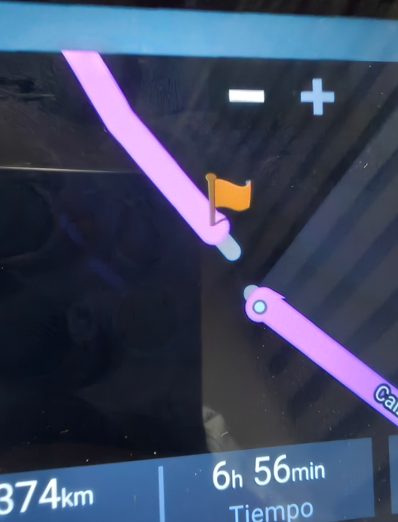
          Captura de pantalla 2025-12-02 162944.png

          Marinus van Deudekomundefined Rob Verhoeffundefined Mzokkundefined 3 Replies Last reply
          0
          • Juan Carlos Garcia Ojedaundefined Juan Carlos Garcia Ojeda

            Thank you so much for your reply.
            I already did this and it works in the route planner, but when I import it into the GPS, it does the same thing again and looks for another route (150km) to get to point four.

            Captura de pantalla 2025-12-02 162944.png

            Marinus van Deudekomundefined Offline
            Marinus van Deudekomundefined Offline
            Marinus van Deudekom
            RouteXpert
            wrote last edited by
            #5

            @Juan-Carlos-Garcia-Ojeda if it’s a map error, report it to Here. Like that it will be a solution for both MRA and your XT

            Honda Goldwing GL1500,
            Honda Silverwing GL 650
            DMD2 T865X 8 inch Android tablet using MRA next for navigation
            Garmin XT sold
            Samsung S24FE mounted on a Quadlock and using Android Auto in my car

            1 Reply Last reply
            0
            • Juan Carlos Garcia Ojedaundefined Offline
              Juan Carlos Garcia Ojedaundefined Offline
              Juan Carlos Garcia Ojeda
              wrote last edited by
              #6

              Yes, I'll have to report it. I think it would be a good idea to be able to connect the points on the GPS as well.
              Thanks

              Con Hennekensundefined 1 Reply Last reply
              0
              • Juan Carlos Garcia Ojedaundefined Juan Carlos Garcia Ojeda

                Thank you so much for your reply.
                I already did this and it works in the route planner, but when I import it into the GPS, it does the same thing again and looks for another route (150km) to get to point four.

                Captura de pantalla 2025-12-02 162944.png

                Rob Verhoeffundefined Offline
                Rob Verhoeffundefined Offline
                Rob Verhoeff
                Alpha tester
                wrote last edited by
                #7

                @Juan-Carlos-Garcia-Ojeda That’s a bit dumb… 🫣 that’s what you get for only half-reading the text. Of course my solution doesn’t work if you export to another device. Better read more carefully next time…😉

                BMW K1600GT-P (2013) with BMW Navigator | Nolan N100-5 with Sena 30K
                iOS on iPhone 13 & 16 (mounted on Quadlock)
                Apple CarPlay in VW T-Roc (wired)
                Routelab on MacBook Air & iMac (Tahoe & Ventura)

                1 Reply Last reply
                0
                • Juan Carlos Garcia Ojedaundefined Juan Carlos Garcia Ojeda

                  Yes, I'll have to report it. I think it would be a good idea to be able to connect the points on the GPS as well.
                  Thanks

                  Con Hennekensundefined Offline
                  Con Hennekensundefined Offline
                  Con Hennekens
                  Alpha tester
                  wrote last edited by
                  #8

                  @Juan-Carlos-Garcia-Ojeda, it would, but that's up to Garmin I suppose

                  I am just an enthusiastic MRA user, and hope you will be one too!

                  Most motorcycle problems are caused by the nut that connects the handlebar to the saddle.

                  Streetpilot 2610 / Zumo 660 / Zumo 395 / Motorola Thinkphone + MRA app

                  1 Reply Last reply
                  0
                  • Juan Carlos Garcia Ojedaundefined Juan Carlos Garcia Ojeda

                    Thank you so much for your reply.
                    I already did this and it works in the route planner, but when I import it into the GPS, it does the same thing again and looks for another route (150km) to get to point four.
                    Captura de pantalla 2025-12-02 162944.png

                    Mzokkundefined Offline
                    Mzokkundefined Offline
                    Mzokk
                    wrote last edited by
                    #9

                    @Juan-Carlos-Garcia-Ojeda I've had this before on here maps in Spain (Picos)
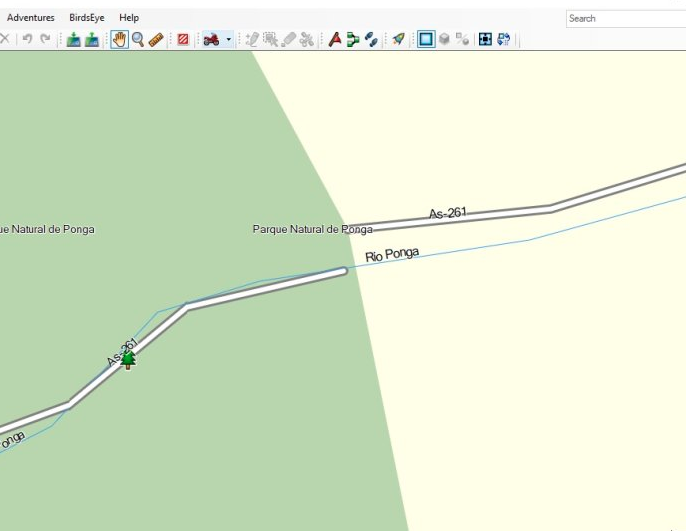
                    b7049d76-bb7c-470c-bed4-c5b07762a12f-image.png

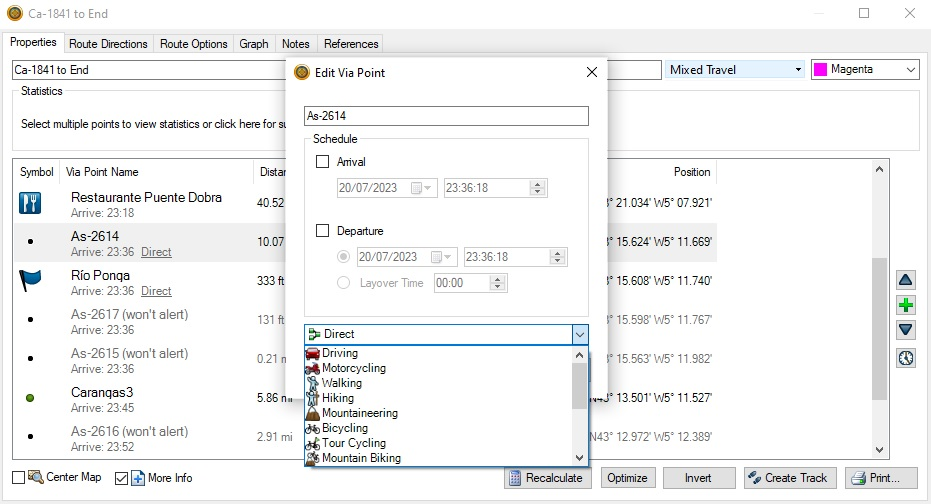
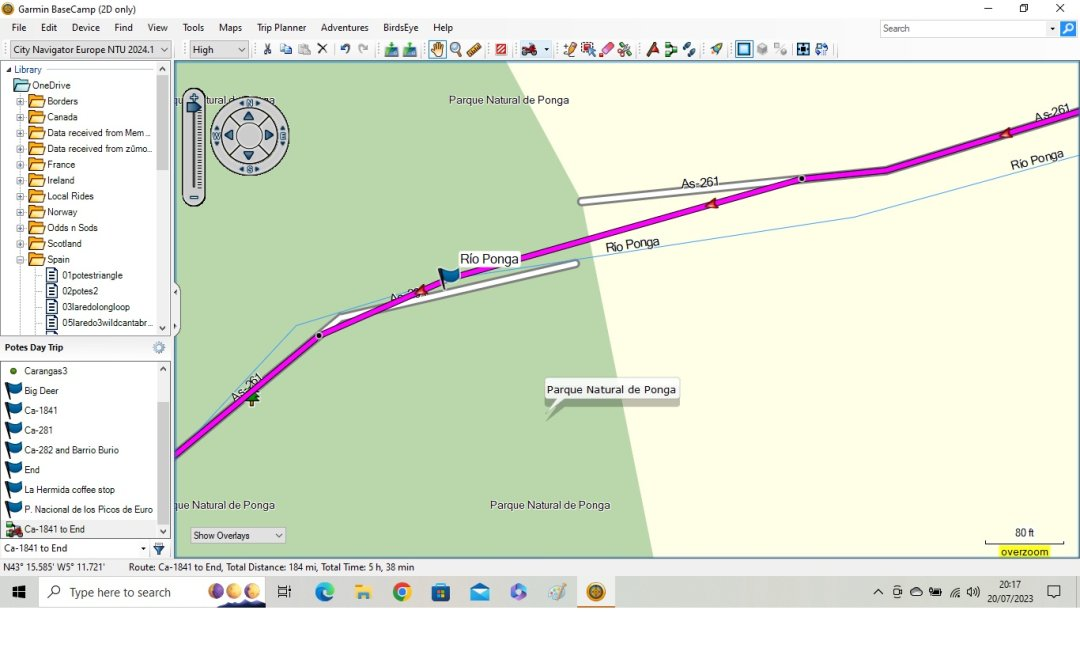
                    You can fix it in Basecamp by designating two waypoints as "Direct" across the gap.
                    db049a1f-b035-410a-8a0c-9af07395eec8-image.png

                    487c19ee-13a7-4488-8948-8f9f70b59355-image.png

                    Change the point type to direct and calculate the route. Keep the rest with the motorcycling profile. I've tried this out and the route executes. If you make the points "don't alert" you don't notice the route has a patch/repair. Hopefully this is useful.

                    1 Reply Last reply
                    0
                    Reply
                    • Reply as topic
                    Log in to reply
                    • Oldest to Newest
                    • Newest to Oldest
                    • Most Votes


                    ACTIVE USERS
                    Mzokkundefined
                    Mzokk
                    Con Hennekensundefined
                    Con Hennekens
                    Rob Verhoeffundefined
                    Rob Verhoeff
                    Juan Carlos Garcia Ojedaundefined
                    Juan Carlos Garcia Ojeda
                    Marinus van Deudekomundefined
                    Marinus van Deudekom
                    LE DIZES Freddyundefined
                    LE DIZES Freddy
                    POPULAR TOPICS
                    • Route maken samen met vrienden
                      Adrian Avramundefined
                      Adrian Avram
                      0
                      7
                      78

                    • Broken road (in map only)
                      Mzokkundefined
                      Mzokk
                      0
                      9
                      178

                    • Zoom + / zoom - from external keyboard not working anymore with release 5.0.1 ?
                      Andre Trudeauundefined
                      Andre Trudeau
                      0
                      2
                      75

                    • Waypoints in CarPlay
                      bluetuzundefined
                      bluetuz
                      0
                      3
                      50

                    • Opzoek naar mooie offroadroutes in Umbrie in Italie.
                      Frank Marissinkundefined
                      Frank Marissink
                      0
                      5
                      163

                    • Routing Settings only partially visible.
                      Corjan Meijerinkundefined
                      Corjan Meijerink
                      0
                      2
                      45
                    MY GROUPS
                    • Login

                    • Login or register to search.
                    • First post
                      Last post
                    0
                    • Categories
                    • Recent
                    • Popular
                    • Support
                    • MyRoute-app