Skip to content
  • Categories
  • Recent
  • Popular
  • Support
  • MyRoute-app
Collapse
Brand Logo

MRA Community Forum

  1. Home
  2. The MyRoute-app
  3. [App] Problems, Bugs and other Issues
  4. Inconsistent terminology to get to the same screen

Inconsistent terminology to get to the same screen

Scheduled Pinned Locked Moved [App] Problems, Bugs and other Issues
4 Posts 2 Posters 797 Views 2 Watching
  • Oldest to Newest
  • Newest to Oldest
  • Most Votes
Reply
  • Reply as topic
Log in to reply
This topic has been deleted. Only users with topic management privileges can see it.
  • Andy Wundefined Offline
    Andy Wundefined Offline
    Andy W
    wrote on last edited by
    #1

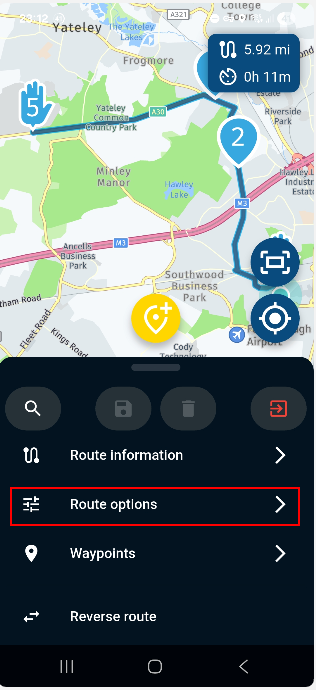
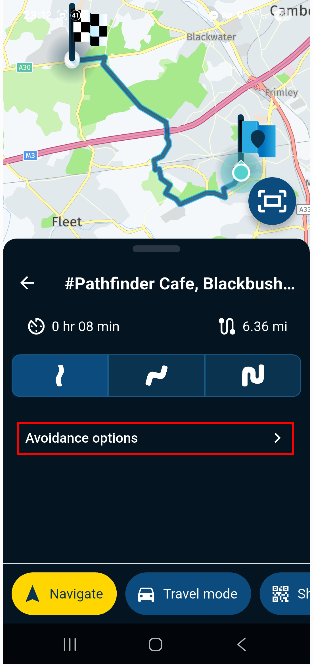
    When I use a saved route I see the term 'Route Options'. However, if I pick a destination from my Favourites and create a route to that, I see the term 'Avoidance Options'. Both of these terms lead to the same set of options so I think the terminology should be the same. I think it should be 'Route Options' in both cases otherwise you get a screen that is titled 'Avoidance options' followed by an 'Allowed roads' list.
    8af0f5d2-ef66-455f-83f8-e38b8d66a14b-image.png

    ee664132-744c-470a-a347-9211c6727e83-image.png

    705760dc-5193-4583-b159-b4baa54cb98b-image.png

    Regards
    Andy

    Andy Wundefined 2 Replies Last reply
    2
    • Andy Wundefined Andy W

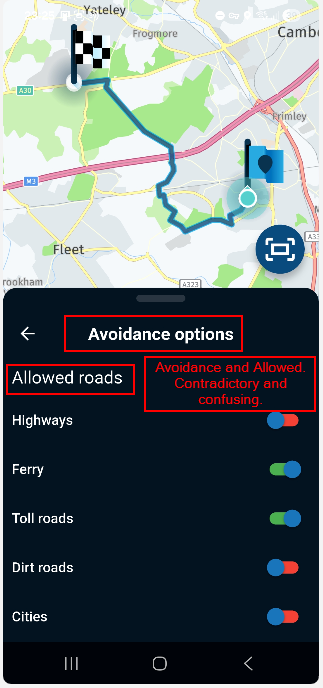
      When I use a saved route I see the term 'Route Options'. However, if I pick a destination from my Favourites and create a route to that, I see the term 'Avoidance Options'. Both of these terms lead to the same set of options so I think the terminology should be the same. I think it should be 'Route Options' in both cases otherwise you get a screen that is titled 'Avoidance options' followed by an 'Allowed roads' list.
      8af0f5d2-ef66-455f-83f8-e38b8d66a14b-image.png

      ee664132-744c-470a-a347-9211c6727e83-image.png

      705760dc-5193-4583-b159-b4baa54cb98b-image.png

      Regards
      Andy

      Andy Wundefined Offline
      Andy Wundefined Offline
      Andy W
      wrote on last edited by
      #2

      I should add that all the Toolkit menus on the website use 'Avoid' with a list of items to select (turn on). Perhaps the app should use 'Route options' and then 'Avoid' instead of 'Allowed roads'. This would mean reversing the meaning of the red/green selectors in this case but the overall use would be the same between the website and app.
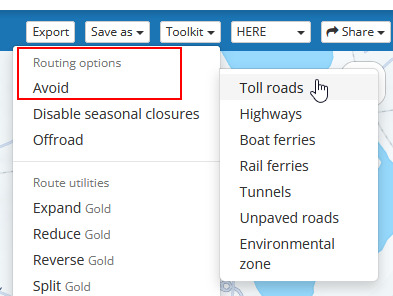
      image.png

      Regards
      Andy

      1 Reply Last reply
      1
      • Andy Wundefined Andy W

        When I use a saved route I see the term 'Route Options'. However, if I pick a destination from my Favourites and create a route to that, I see the term 'Avoidance Options'. Both of these terms lead to the same set of options so I think the terminology should be the same. I think it should be 'Route Options' in both cases otherwise you get a screen that is titled 'Avoidance options' followed by an 'Allowed roads' list.

        8af0f5d2-ef66-455f-83f8-e38b8d66a14b-image.png

        ee664132-744c-470a-a347-9211c6727e83-image.png

        705760dc-5193-4583-b159-b4baa54cb98b-image.png

        Regards
        Andy

        Andy Wundefined Offline
        Andy Wundefined Offline
        Andy W
        wrote on last edited by
        #3

        I found yet another variation in the app! Steps to reproduce are:

        • Open the app
        • Search for and select a favourite location
        • Select Navigate
        • Select 'Avoidance options'

        The next screen is titled 'Avoidance options' but there is no 'Allowed roads' sub-heading like the example above making it seem as through the different road type selectors work the opposite way.
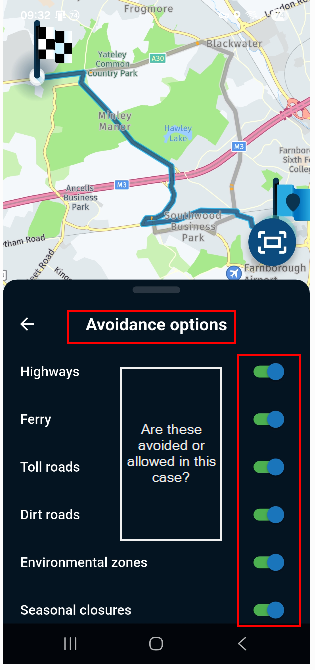
        6c435806-9c23-453f-a5e2-e982ecc56387-image.png

        Regards
        Andy

        1 Reply Last reply
        0
        • Corjan Meijerinkundefined Offline
          Corjan Meijerinkundefined Offline
          Corjan Meijerink
          Developer
          wrote on last edited by
          #4

          I've made some adjustment in the next update (as no critical issues discovered yet, no expected release date):

          • Planner aligned with rest of the app regarding avoidance settings
          • Moved planner route optimisation to main menu (that's why it was called "Route options" in the first place as it could contain one other setting that isn't an avoid options)
          • Added the "Allowed roads" header to all places to indicate you select what is allowed
          • Kept the menu item to be called "avoidance options" as that's clear to all

          That said: green is always the allowed option and red is forbidden (hence avoided)

          1 Reply Last reply
          5

          Hello! It looks like you're interested in this conversation, but you don't have an account yet.

          Getting fed up of having to scroll through the same posts each visit? When you register for an account, you'll always come back to exactly where you were before, and choose to be notified of new replies (either via email, or push notification). You'll also be able to save bookmarks and upvote posts to show your appreciation to other community members.

          With your input, this post could be even better 💗

          Register Login
          Reply
          • Reply as topic
          Log in to reply
          • Oldest to Newest
          • Newest to Oldest
          • Most Votes


          ACTIVE USERS
          Corjan Meijerinkundefined
          Corjan Meijerink
          Andy Wundefined
          Andy W
          POPULAR TOPICS
          • Tussenstop/routepunt toevoegen tijdens navigeren
            Leike Lodiersundefined
            Leike Lodiers
            0
            13
            124

          • Gas Stations not displaying
            Lenny Oundefined
            Lenny O
            0
            7
            81

          • Layout My Routes
            Alida Veenstraundefined
            Alida Veenstra
            0
            11
            320

          • Font for the distance to the next turn to smal
            Marinus van Deudekomundefined
            Marinus van Deudekom
            1
            8
            206

          • Geen routelijn
            Nick Carthewundefined
            Nick Carthew
            0
            6
            190

          • Statement on map spinning
            Hubert Thoringundefined
            Hubert Thoring
            14
            5
            136

          • 'Toon route' optie eenvoudiger beschikbaar maken
            Marinus van Deudekomundefined
            Marinus van Deudekom
            0
            4
            54

          • Routekleur
            white.mouseundefined
            white.mouse
            0
            4
            127

          MY GROUPS
          • Login

          • Login or register to search.
          • First post
            Last post
          0
          • Categories
          • Recent
          • Popular
          • Support
          • MyRoute-app