Skip to content
  • Categories
  • Recent
  • Popular
  • Support
  • MyRoute-app
Collapse
Brand Logo

MRA Community Forum

  1. Home
  2. The MyRoute-app
  3. [App] Problems, Bugs and other Issues
  4. MyRoute app is consuming loads of phone battery in background

MyRoute app is consuming loads of phone battery in background

Scheduled Pinned Locked Moved [App] Problems, Bugs and other Issues
19 Posts 8 Posters 7.1k Views 5 Watching
  • Oldest to Newest
  • Newest to Oldest
  • Most Votes
Reply
  • Reply as topic
Log in to reply
This topic has been deleted. Only users with topic management privileges can see it.
  • CD130 CD130

    Oh! I see that a public version has already been launched!!

    https://forum.myrouteapp.com/topic/9882/new-update-4.4.1

    Thomas Scharrer Offline
    Thomas Scharrer Offline
    Thomas Scharrer
    wrote on last edited by
    #7

    @CD130 thanks a lot, will test it

    1 Reply Last reply
    0
    • Corjan Meijerink Offline
      Corjan Meijerink Offline
      Corjan Meijerink
      Developer
      wrote on last edited by
      #8

      The update with battery improvements was mainly 4.4.0.
      I do not expect a lot of difference with 4.4.1 😉

      1 Reply Last reply
      0
      • Thomas Scharrer Thomas Scharrer

        Hi,

        I noticed that the MyRoute app is consuming loads of phone battery in background even when the app is not in use.
        On average MyRoute app is using about 30% of my phone battery per day and I am not even using it, this is rather extreme in my opinion and exceeds by far all other apps I have on my phone.

        Do others have the same experience and what can be done about this expect deleting the app?

        Regards,
        Thomas

        Bart De Medts Offline
        Bart De Medts Offline
        Bart De Medts
        Alpha tester
        wrote on last edited by
        #9

        @Thomas-Scharrer Is your location set to “Always”? Just change it to “While using the app.” This doesn’t affect the user experience, only battery usage.

        🏍️ Tiger: DMD Nor7e + SilverFox controller
        🏍️ Bobber: iPhone 15 Pro + Quad Lock mount
        🚗 Car: iPhone 15 Pro with wireless Apple CarPlay

        1 Reply Last reply
        -1
        • Corjan Meijerink Offline
          Corjan Meijerink Offline
          Corjan Meijerink
          Developer
          wrote on last edited by Corjan Meijerink
          #10

          @Bart-De-Medts That's definitely not true.
          When location is not required (you aren't tracking or navigating) the location should not be used. The permission therefore does not impact battery usage at all.

          Edit: changing from "Always" to "While using the app" does influence the experience as location won't work when the app is in the background. As soon as you lock your screen or view another app, the tracking / navigation won't work.

          Bart De Medts 1 Reply Last reply
          1
          • Corjan Meijerink Corjan Meijerink

            @Bart-De-Medts That's definitely not true.
            When location is not required (you aren't tracking or navigating) the location should not be used. The permission therefore does not impact battery usage at all.

            Edit: changing from "Always" to "While using the app" does influence the experience as location won't work when the app is in the background. As soon as you lock your screen or view another app, the tracking / navigation won't work.

            Bart De Medts Offline
            Bart De Medts Offline
            Bart De Medts
            Alpha tester
            wrote on last edited by
            #11

            @Thomas-Scharrer My message was based on personal user experience. If @Corjan-Meijerink contradicts my claim, then my message should be considered false. Who would know better than the man who programmed the app? 😉 Personally, I’ll keep experimenting with location set to “Always” or “While using the app” and see what works best.

            🏍️ Tiger: DMD Nor7e + SilverFox controller
            🏍️ Bobber: iPhone 15 Pro + Quad Lock mount
            🚗 Car: iPhone 15 Pro with wireless Apple CarPlay

            Thomas Scharrer 1 Reply Last reply
            0
            • Bart De Medts Bart De Medts

              @Thomas-Scharrer My message was based on personal user experience. If @Corjan-Meijerink contradicts my claim, then my message should be considered false. Who would know better than the man who programmed the app? 😉 Personally, I’ll keep experimenting with location set to “Always” or “While using the app” and see what works best.

              Thomas Scharrer Offline
              Thomas Scharrer Offline
              Thomas Scharrer
              wrote on last edited by
              #12

              @Bart-De-Medts I have also noticed earlier that navigation is not working propery when always on is not enabeled

              CD130 1 Reply Last reply
              1
              • Thomas Scharrer Thomas Scharrer

                @Bart-De-Medts I have also noticed earlier that navigation is not working propery when always on is not enabeled

                CD130 Offline
                CD130 Offline
                CD130
                Valued contributor
                wrote on last edited by
                #13

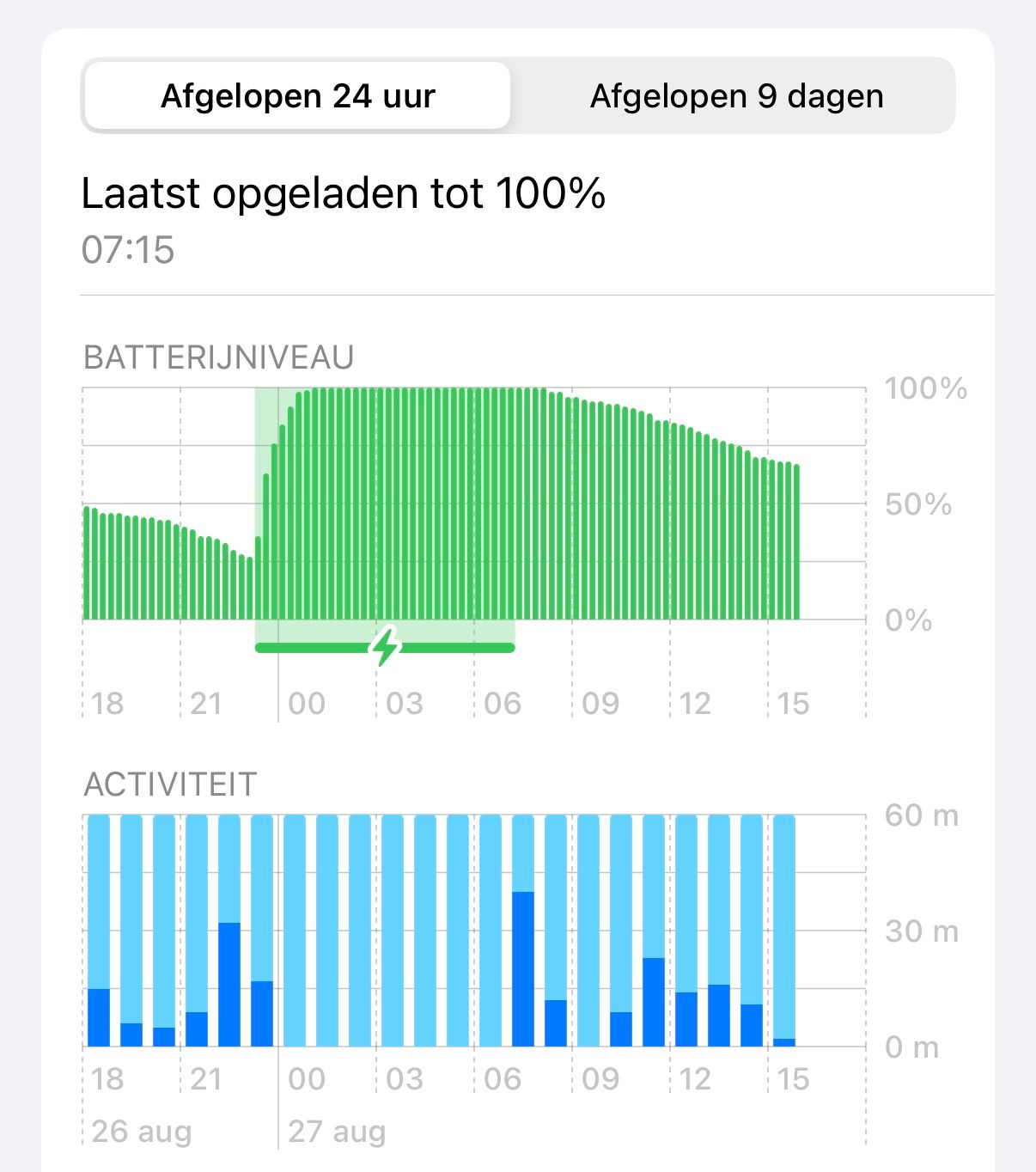
                @Thomas-Scharrer You noticed it in this battery settings menu, right?
                IMG_0047.jpeg

                The adventure starts where the plans end | READY TO >> RACE 🧡

                Corjan Meijerink Thomas Scharrer 2 Replies Last reply
                0
                • CD130 CD130

                  @Thomas-Scharrer You noticed it in this battery settings menu, right?
                  IMG_0047.jpeg

                  Corjan Meijerink Offline
                  Corjan Meijerink Offline
                  Corjan Meijerink
                  Developer
                  wrote on last edited by
                  #14

                  @CD130 if that happens there is an issue. It definitely is not normal or expected behavior.

                  Please create a support ticket if it happens including the logs and indicate if you were navigating / tracking / using CarPlay. If the last applies, share what you did once you arrived at the destination / stopped the navigation.

                  1 Reply Last reply
                  0
                  • CD130 CD130

                    @Thomas-Scharrer You noticed it in this battery settings menu, right?
                    IMG_0047.jpeg

                    Thomas Scharrer Offline
                    Thomas Scharrer Offline
                    Thomas Scharrer
                    wrote on last edited by
                    #15

                    @CD130 correct

                    1 Reply Last reply
                    0
                    • Bart De Medts Offline
                      Bart De Medts Offline
                      Bart De Medts
                      Alpha tester
                      wrote on last edited by
                      #16

                      Following this post, I’ve set my location back to “Always” and the background battery usage over the past 24 hours turns out to be negligible.

                      🏍️ Tiger: DMD Nor7e + SilverFox controller
                      🏍️ Bobber: iPhone 15 Pro + Quad Lock mount
                      🚗 Car: iPhone 15 Pro with wireless Apple CarPlay

                      1 Reply Last reply
                      0
                      • CD130 Offline
                        CD130 Offline
                        CD130
                        Valued contributor
                        wrote on last edited by
                        #17

                        Since the latest version, I haven’t really experienced it anymore. With the previous version, it happened constantly. I only had to start the app and move it to the background, and it would already go wrong.

                        The adventure starts where the plans end | READY TO >> RACE 🧡

                        1 Reply Last reply
                        0
                        • M. Schrijver Offline
                          M. Schrijver Offline
                          M. Schrijver
                          Valued contributor
                          wrote on last edited by
                          #18

                          Just an idea. Something i noticed.
                          When Auto Tracklog is ENABLED, MRA will use more power in the background. It is pretty obvious because the GPS is still active.

                          I had a few times were my phones did run pretty warm while i didn't use MRA.
                          I started a route for navigation (testing) and stopped the navigation but i didn't stop the tracklog.

                          But when i stop navigation AND manual stop the tracklog, MRA's power use was just as normal as other apps when it is in the background

                          Also.
                          There is also a difference in power use between Offline and Online navigation.
                          Offline navigation uses less power.
                          TomTom GO is my reference. In my situation TomTom Go is pretty efficient for a navigation app. It can only be used with Offline maps. TomTom Go holds my battery easy at 100%. When playing music with Spotify while navigating it can still hold the battery pretty much always at 100%.

                          MRA with Offline navigation holds the battery on 100%. Playing music with spotify at the same. It drains the battery slowly. Down to 90% after a day riding.

                          MRA with Online navigation. Doesn't hold battery at 100%. It drains it slowly. After a day somewhere around 85-90%. Playing Music with Spotify at the same time. This is more difficult. After a day somewhere around 50%-60%.

                          These are my observations on my setup.

                          (I use MRA Next only on Android Auto. Every comment, suggestion, etc will be based on my usage with Android Auto)

                          1 Reply Last reply
                          0
                          • Jon Hye-Knudsen Offline
                            Jon Hye-Knudsen Offline
                            Jon Hye-Knudsen
                            wrote on last edited by
                            #19

                            I’ve noticed after installing iOS 26, that MyRouteApp is suddenly using a lot of battery, even when not having been on (actively closed the app). I’m even considering uninstalling it because it will literally drain my battery in a matter of hours.
                            Just now (early morning) half an hour after having taken the phone off the charger the iOS settings app battery drain report says that myrouteapp has used 3% of my battery and it wasn’t even on.
                            Any ideas? Is there in fact an iOS 26 issue with this app?

                            1 Reply Last reply
                            0

                            Hello! It looks like you're interested in this conversation, but you don't have an account yet.

                            Getting fed up of having to scroll through the same posts each visit? When you register for an account, you'll always come back to exactly where you were before, and choose to be notified of new replies (either via email, or push notification). You'll also be able to save bookmarks and upvote posts to show your appreciation to other community members.

                            With your input, this post could be even better 💗

                            Register Login

                            Reply
                            • Reply as topic
                            Log in to reply
                            • Oldest to Newest
                            • Newest to Oldest
                            • Most Votes


                            ACTIVE USERS
                            Marinus van Deudekom
                            Marinus van Deudekom
                            Corjan Meijerink
                            Corjan Meijerink
                            M. Schrijver
                            M. Schrijver
                            nomko
                            nomko
                            CD130
                            CD130
                            Jon Hye-Knudsen
                            Jon Hye-Knudsen
                            Bart De Medts
                            Bart De Medts
                            Thomas Scharrer
                            Thomas Scharrer
                            POPULAR TOPICS
                            • The compas direction on the elevation circle is wrong
                              Guzzist
                              Guzzist
                              0
                              30
                              1.1k

                            • Carpuride scherm vast
                              Corjan Meijerink
                              Corjan Meijerink
                              3
                              26
                              1.2k

                            • GPX Versions 1.1 vs 1.2 for Garmin Visually Explained
                              Mzokk
                              Mzokk
                              7
                              174
                              13.9k

                            • How can I change the verbal navigation directions from male to female?
                              Marinus van Deudekom
                              Marinus van Deudekom
                              0
                              3
                              6

                            • Camperroutes
                              De Ploey Georges
                              De Ploey Georges
                              0
                              4
                              154

                            • Latest version of the App?
                              white.mouse
                              white.mouse
                              0
                              3
                              96

                            • App probleem scenic route niet mogelijk
                              Philip Verbeek
                              Philip Verbeek
                              0
                              3
                              78

                            • HERE maps updates
                              Travellexxie
                              Travellexxie
                              0
                              10
                              300

                            MY GROUPS
                            • Login

                            • Login or register to search.
                            • First post
                              Last post
                            0
                            • Categories
                            • Recent
                            • Popular
                            • Support
                            • MyRoute-app