Skip to content
  • Categories
  • Recent
  • Popular
  • Support
  • MyRoute-app
Collapse
Brand Logo

MRA Community Forum

  1. Home
  2. MyRoute-app Routeplanner
  3. [Web] Suggestions and Discussion
  4. Trip Planning - Overlay Mark Up

Trip Planning - Overlay Mark Up

Scheduled Pinned Locked Moved [Web] Suggestions and Discussion
12 Posts 6 Posters 3.7k Views 3 Watching
  • Oldest to Newest
  • Newest to Oldest
  • Most Votes
Reply
  • Reply as topic
Log in to reply
This topic has been deleted. Only users with topic management privileges can see it.
  • Leike Lodiers Offline
    Leike Lodiers Offline
    Leike Lodiers
    wrote on last edited by Leike Lodiers
    #2

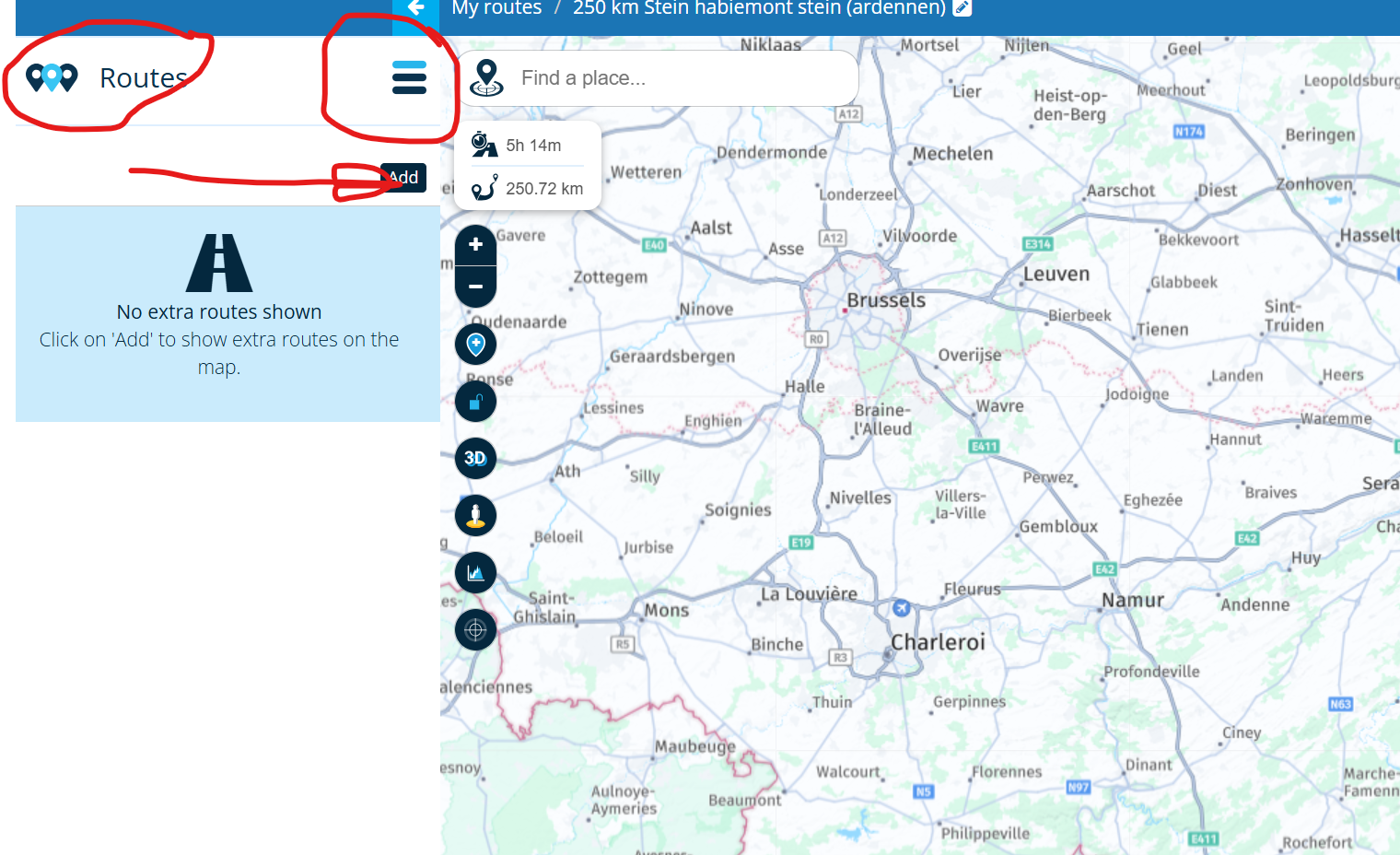
    When you open one of the route you made klick on the hamburger menu on the left side and klick on routes en you can add the other routes to you're open route!
    6f709c08-9f72-41c2-8dee-d60264991aed-image.png

    R1250GS. Started with a Zumo 550, BMW nav IV, Carpe-iter and now Chigee met MRA app.

    1 Reply Last reply
    0
    • Steve James Steve James

      Hi,

      When I'm trip planning for multi-way trips I will generally create an overall route and then later break up into individual days.

      In that initial stage, it would be really useful if I could annotate the map with lines, text and area fills. I realise I can do this on Google Maps, but it would be really helpful to be able to do this in the route planner. The annotations would be an overlay only and not part of the routing or the export of the route.

      Do you have any plans to implement such an option or have I missed the feature?

      Thanks

      Steve

      Brian McG Offline
      Brian McG Offline
      Brian McG
      wrote on last edited by
      #3

      Hi @Steve-James I don't believe you have missed anything & as far as I know such a feature is not on the radar for the near future, maybe on some distant plan / wish list

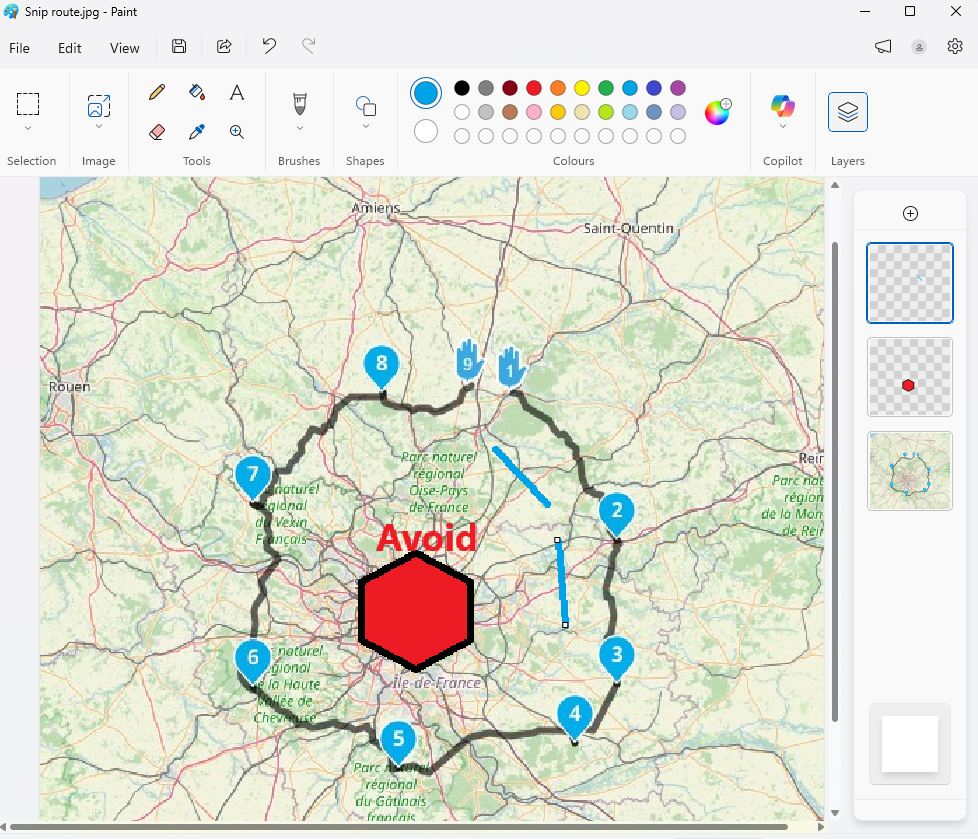
      My suggestion to achieve sort of what you are after, all be it not within MRA, would be to use the windows Snip tool to clip a picture of your route.
      Open this picture in MS Paint & then use the Layers function to add each individual set of lines, areas or text.

      Use Layers so you can update the base route map when it changes & remove stuff thats out of date or errors
      3df3a848-e773-4d9a-af4b-a5fc8e053153-image.png

      BlackView BV7100, Android 12
      Navigate "Routes as Tracks" in Offline mode with Offline Maps
      No Wifi, no internet, no interruptions, works well

      1 Reply Last reply
      0
      • Steve James Offline
        Steve James Offline
        Steve James
        wrote on last edited by
        #4

        Hi, Leike and Brian,

        Thanks for your suggestions.

        I'm typically looking at routes that take about a week, so circa 2,000 miles.

        I do use the overlay routes function, but that has a different purpose, although to some extent it could be used by creating 'non routes' that are in reality annotation.

        The MS Paint option isn't directly open to me as I use a Mac, but It's possible to do similar things with Google Earth etc. and you are on the right lines. I'll have to mark up a Google Earth image with something similar. I was just thinking that it would be much better within the app as the information is there whilst you are planning.

        Thanks again,

        Steve

        1 Reply Last reply
        0
        • Jörgen Offline
          Jörgen Offline
          Jörgen
          Valued contributor
          wrote on last edited by
          #5

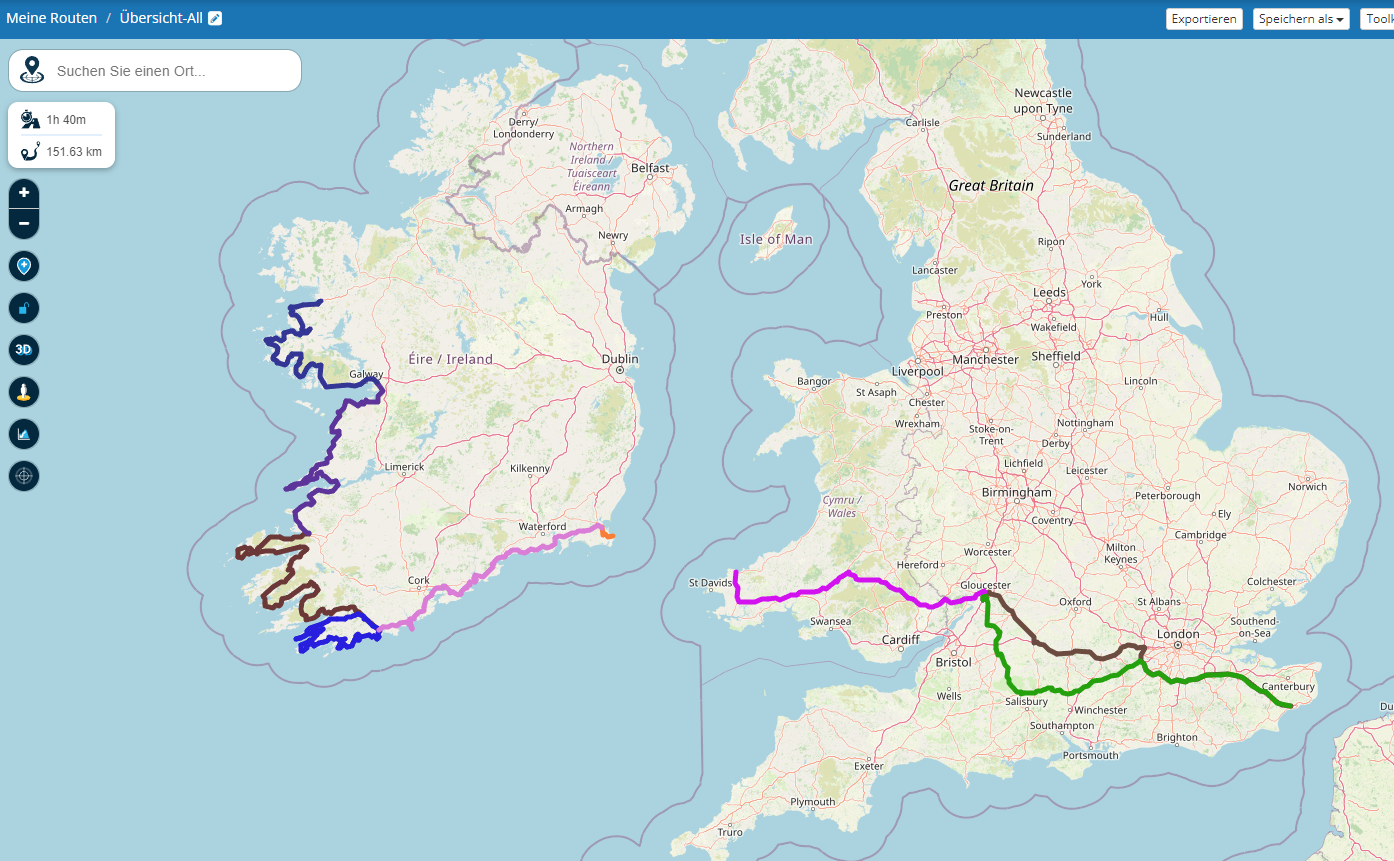
          As explained above, it is possible.

          image.png

          Hardware
          iPhone 12 pro (iOS 26.2.1)
          iPad (7.Gen.) 18.7.3
          Oukitel RT3 Pro (Andr. 14)
          Wireless CarPlay mit (Elebest C650)
          Wired CarPlay (SEAT Arona - 2021)
          MRA Workshops in Deutsch sind hier zu finden

          Steve James 1 Reply Last reply
          0
          • Jörgen Offline
            Jörgen Offline
            Jörgen
            Valued contributor
            wrote on last edited by
            #6

            Each color is a day tour.

            Hardware
            iPhone 12 pro (iOS 26.2.1)
            iPad (7.Gen.) 18.7.3
            Oukitel RT3 Pro (Andr. 14)
            Wireless CarPlay mit (Elebest C650)
            Wired CarPlay (SEAT Arona - 2021)
            MRA Workshops in Deutsch sind hier zu finden

            Peter Zehentreiter 1 Reply Last reply
            0
            • Jörgen Jörgen

              Each color is a day tour.

              Peter Zehentreiter Offline
              Peter Zehentreiter Offline
              Peter Zehentreiter
              wrote on last edited by
              #7

              @Jörgen Hallo Jörgen,
              Ich hab dazu eine Frage...
              Ich kenne die Funktion Routen hinzufügen...
              Allerdings habe ich immer das Problem dass ich bei der ersten Route welche ich als Ausgangspunkt nehme immer die gesetzen Wegpunkte noch sehe, bei den hinzugefügten Routen erscheint dann der Track(ohne Wegpunkte)
              Wie schaffst Du es immer nur den Track zu sehen?

              Danke vorab.
              Gruß
              Peter

              BMW R 1250 GS
              MRA Navigation & SilverFox C1 Controller
              DMD-NOR7E 7"
              SPC Universal mount
              Motorola Edge 40 "offline"
              Sena SLR 3
              Sena 50 R

              Travellexxie Jörgen 2 Replies Last reply
              0
              • Peter Zehentreiter Peter Zehentreiter

                @Jörgen Hallo Jörgen,
                Ich hab dazu eine Frage...
                Ich kenne die Funktion Routen hinzufügen...
                Allerdings habe ich immer das Problem dass ich bei der ersten Route welche ich als Ausgangspunkt nehme immer die gesetzen Wegpunkte noch sehe, bei den hinzugefügten Routen erscheint dann der Track(ohne Wegpunkte)
                Wie schaffst Du es immer nur den Track zu sehen?

                Danke vorab.
                Gruß
                Peter

                Travellexxie Offline
                Travellexxie Offline
                Travellexxie
                Valued contributor
                wrote on last edited by
                #8

                @Peter-Zehentreiter starte eine neue Route, mit nur 1 Waypoint, meinetwegen in Australien. Dann kannst du danach die Routen hinzufügen und siehst weiterhin keine detaillierte Route 😉

                Met andere apps maak je een route, met MRA componeer je een route!

                Ducati Monster 1200 met Garmin Zümo XT
                Fiat 124 Spider/Camper Dethleffs met Navigation-App op Samsung Tab Active4 Pro
                MRA Lifetime Gold

                Peter Zehentreiter 1 Reply Last reply
                0
                • Peter Zehentreiter Peter Zehentreiter

                  @Jörgen Hallo Jörgen,
                  Ich hab dazu eine Frage...
                  Ich kenne die Funktion Routen hinzufügen...
                  Allerdings habe ich immer das Problem dass ich bei der ersten Route welche ich als Ausgangspunkt nehme immer die gesetzen Wegpunkte noch sehe, bei den hinzugefügten Routen erscheint dann der Track(ohne Wegpunkte)
                  Wie schaffst Du es immer nur den Track zu sehen?

                  Danke vorab.
                  Gruß
                  Peter

                  Jörgen Offline
                  Jörgen Offline
                  Jörgen
                  Valued contributor
                  wrote on last edited by
                  #9

                  @Peter-Zehentreiter said in Trip Planning - Overlay Mark Up:

                  @Jörgen Hallo Jörgen,
                  Ich hab dazu eine Frage...
                  Ich kenne die Funktion Routen hinzufügen...
                  Allerdings habe ich immer das Problem dass ich bei der ersten Route welche ich als Ausgangspunkt nehme immer die gesetzen Wegpunkte noch sehe, bei den hinzugefügten Routen erscheint dann der Track(ohne Wegpunkte)
                  Wie schaffst Du es immer nur den Track zu sehen?

                  Danke vorab.
                  Gruß
                  Peter

                  Eine Neue leere Route erstellen, z.B. "Alle Tage der Tour XYZ".
                  Dann in dieser nur die einzelnen Tage (Routen) über "Routen hinzufügen" hinzufügen.
                  Wenn man möchte, kann man in der Routen Information und Beschreibung noch was zu den Farben usw. sagen.

                  Hardware
                  iPhone 12 pro (iOS 26.2.1)
                  iPad (7.Gen.) 18.7.3
                  Oukitel RT3 Pro (Andr. 14)
                  Wireless CarPlay mit (Elebest C650)
                  Wired CarPlay (SEAT Arona - 2021)
                  MRA Workshops in Deutsch sind hier zu finden

                  1 Reply Last reply
                  0
                  • Travellexxie Travellexxie

                    @Peter-Zehentreiter starte eine neue Route, mit nur 1 Waypoint, meinetwegen in Australien. Dann kannst du danach die Routen hinzufügen und siehst weiterhin keine detaillierte Route 😉

                    Peter Zehentreiter Offline
                    Peter Zehentreiter Offline
                    Peter Zehentreiter
                    wrote on last edited by
                    #10

                    @Lex.Kloet.RX @Jörgen
                    Hallo Ihr zwei,
                    herzlichen Dank für den Tip, so einfach… und doch wäre ich da nicht drauf gekommen.

                    BMW R 1250 GS
                    MRA Navigation & SilverFox C1 Controller
                    DMD-NOR7E 7"
                    SPC Universal mount
                    Motorola Edge 40 "offline"
                    Sena SLR 3
                    Sena 50 R

                    1 Reply Last reply
                    0
                    • Jörgen Jörgen

                      As explained above, it is possible.

                      image.png

                      Steve James Offline
                      Steve James Offline
                      Steve James
                      wrote on last edited by
                      #11

                      @Jörgen
                      Hi,
                      Thanks for responding. I already do what you have suggested. It is more the broader scale, a bit like Brian McG suggests but think for marking up thoughts for a planned route say from UK to Spain, tour around and then back. Putting some areas to include, marking towns to visit and adding notes. That sort of thing.

                      Steve

                      1 Reply Last reply
                      0
                      • Steve James Offline
                        Steve James Offline
                        Steve James
                        wrote on last edited by
                        #12

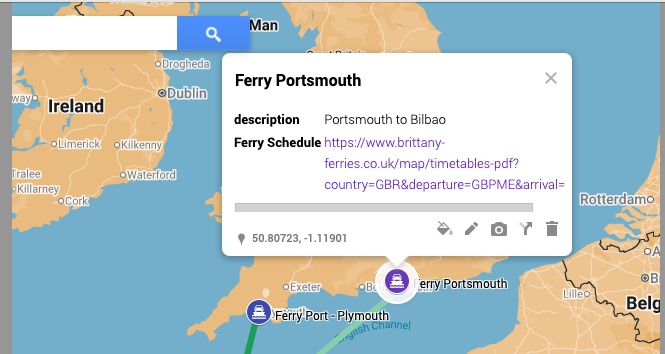
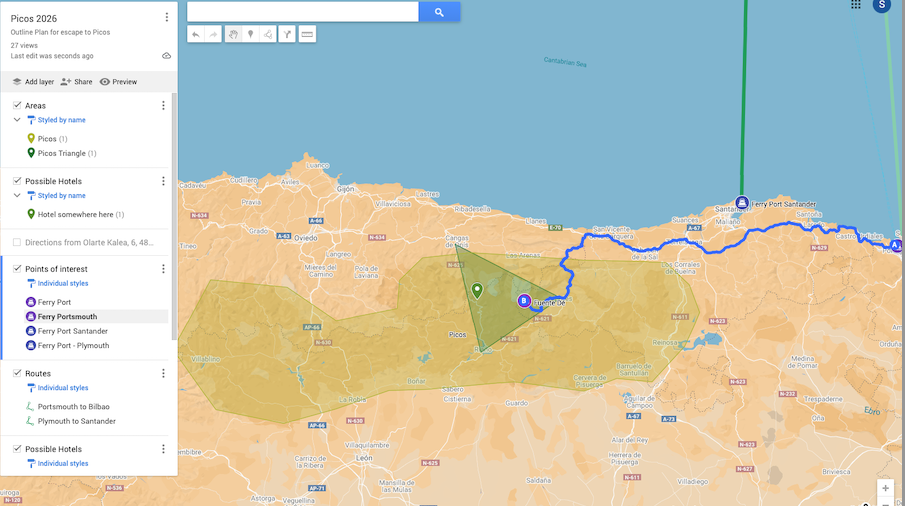
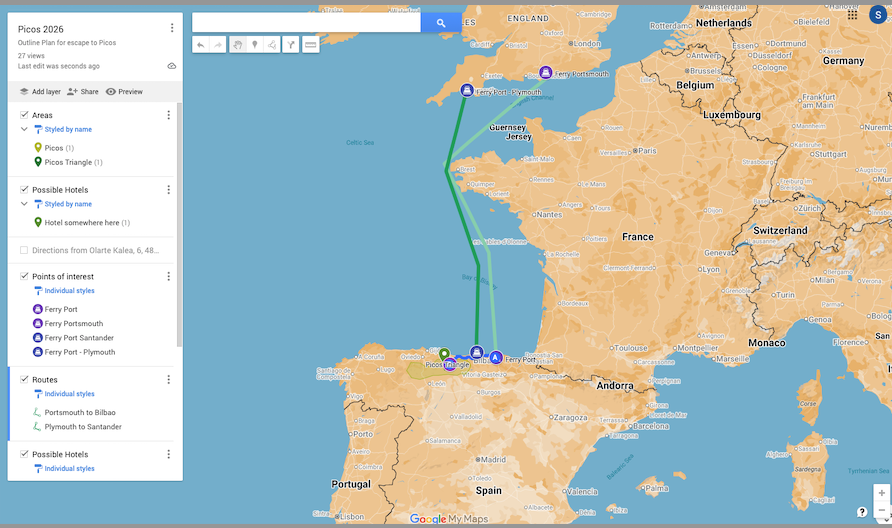
                        Just incase anyone is interested, my latest work around is to use Google's mymaps, to overlay annotation on a google maps background with goolemaps functionality. You can share the overlay with others.

                        I've added a screenshot of the overall, plus a couple of 'zoom ins'. Note you can add information to the points, if you look at the ferry port icon that I added, I have been able to link to the ferry sailings schedule. All useful stuff in the early stages of planning, especially if sharing.

                        It's a shame that I can't select the overlay to be visible when planning on myrouteapp.

                        To do it this way would make implementation easier.
                        Screenshot 2025-08-04 at 13.32.19.png

                        Screenshot 2025-08-04 at 13.32.47.png

                        Screenshot 2025-08-04 at 13.33.11.png

                        Steve

                        1 Reply Last reply
                        0

                        Hello! It looks like you're interested in this conversation, but you don't have an account yet.

                        Getting fed up of having to scroll through the same posts each visit? When you register for an account, you'll always come back to exactly where you were before, and choose to be notified of new replies (either via email, or push notification). You'll also be able to save bookmarks and upvote posts to show your appreciation to other community members.

                        With your input, this post could be even better 💗

                        Register Login
                        Reply
                        • Reply as topic
                        Log in to reply
                        • Oldest to Newest
                        • Newest to Oldest
                        • Most Votes


                        ACTIVE USERS
                        Brian McG
                        Brian McG
                        Peter Zehentreiter
                        Peter Zehentreiter
                        Travellexxie
                        Travellexxie
                        Jörgen
                        Jörgen
                        Leike Lodiers
                        Leike Lodiers
                        Steve James
                        Steve James
                        POPULAR TOPICS
                        • Is there a way to put a Home button in the program
                          Marinus van Deudekom
                          Marinus van Deudekom
                          0
                          7
                          84

                        • Google maps and Streetview
                          Stevedo 6 0
                          Stevedo 6 0
                          1
                          13
                          604

                        • routepunten overslaan gebeurd niet zoals verwacht
                          Marinus van Deudekom
                          Marinus van Deudekom
                          1
                          22
                          656

                        • Is there a way to re-order the routes in your routes folder?
                          superg
                          superg
                          0
                          3
                          54

                        • MRA 5.2.2 (489) Route time is calculated incorrectly /// Strecken Zeit wird falsch berechnet
                          Nick Carthew
                          Nick Carthew
                          0
                          4
                          30

                        • It was not possible to find a correct route to Wheels Through Time
                          Nick Carthew
                          Nick Carthew
                          0
                          16
                          269

                        • Route doesn’t recalculate to my destination
                          Peter Zehentreiter
                          Peter Zehentreiter
                          0
                          7
                          278

                        • MRA In the BMW - Cradel vertically and horizontally /// MRA im BMW - Cradel senkrecht und waagerecht nutzen
                          Hubert Thoring
                          Hubert Thoring
                          0
                          2
                          47

                        MY GROUPS
                        • Login

                        • Login or register to search.
                        • First post
                          Last post
                        0
                        • Categories
                        • Recent
                        • Popular
                        • Support
                        • MyRoute-app