Skip to content
  • Categories
  • Recent
  • Popular
  • Support
  • MyRoute-app
Collapse
Brand Logo

MRA Community Forum

  1. Home
  2. MyRoute-app Routeplanner
  3. [Web] Suggestions and Discussion
  4. When uploading routes….

When uploading routes….
Scheduled Pinned Locked Moved [Web] Suggestions and Discussion
3 Posts 3 Posters 749 Views 2 Watching
  • Oldest to Newest
  • Newest to Oldest
  • Most Votes
Reply
  • Reply as topic
Log in to reply
This topic has been deleted. Only users with topic management privileges can see it.
  • Richard 18undefined Offline
    Richard 18undefined Offline
    Richard 18
    wrote on last edited by Richard 18
    #1

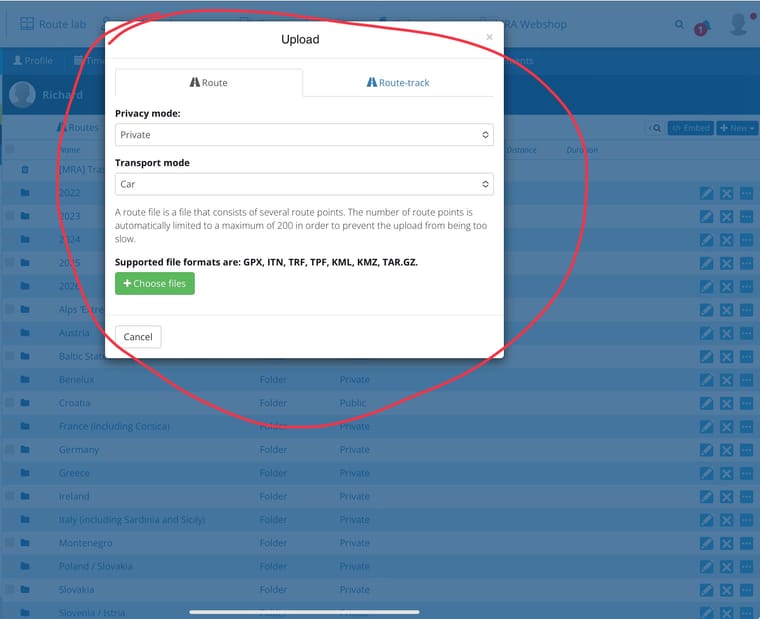
    The default tab is to upload a route.

    More often than not, I prefer to upload a track, particularly when it has come from a third party, not least as I am unlikely to ride the route exactly as the third party did.

    Is there a possibility to give the user the upload option default to ‘track’?

    Thank you.
    IMG_6270.jpeg

    Brian McGundefined 1 Reply Last reply
    0
    • Richard 18undefined Richard 18

      The default tab is to upload a route.

      More often than not, I prefer to upload a track, particularly when it has come from a third party, not least as I am unlikely to ride the route exactly as the third party did.

      Is there a possibility to give the user the upload option default to ‘track’?

      Thank you.

      IMG_6270.jpeg

      Brian McGundefined Offline
      Brian McGundefined Offline
      Brian McG
      wrote on last edited by
      #2

      Hi @Richard-18 I also think the upload dialog window can be a bit of a pain to use.
      Often all I recieve is a gpx file with no clue if it is a route or a track.

      My issue is that the only way I can find out with MRA which it is, route or track, is to go the though the file picker process & then be told the gpx is not a route.
      I then have to close the Upload window & repeat the whole process again selecting Route-Track.

      If it was simply possible within the Upload window to swap/choose between Route or Track after the file picker process it would be a bit easier to use

      It is a small issue but one I have repeated hundreds (thousands) of times hence the pain 🤕

      BlackView BV7100, Android 12
      Normally navigate "Routes as Tracks" in Offline mode with Offline Maps

      Con Hennekensundefined 1 Reply Last reply
      1
      • Brian McGundefined Brian McG

        Hi @Richard-18 I also think the upload dialog window can be a bit of a pain to use.
        Often all I recieve is a gpx file with no clue if it is a route or a track.

        My issue is that the only way I can find out with MRA which it is, route or track, is to go the though the file picker process & then be told the gpx is not a route.
        I then have to close the Upload window & repeat the whole process again selecting Route-Track.

        If it was simply possible within the Upload window to swap/choose between Route or Track after the file picker process it would be a bit easier to use

        It is a small issue but one I have repeated hundreds (thousands) of times hence the pain 🤕

        Con Hennekensundefined Offline
        Con Hennekensundefined Offline
        Con Hennekens
        Alpha tester
        wrote on last edited by
        #3

        @Brian-McG, I agree. Usually I import the route as well as the track so that are 2 uploads where 1 could suffice. I do this so I can confirm the route to the track, and make changes where needed.

        1 - upload file
        2 - windows shows contents of file (route, tracks, POI, can all be multiple, technically)
        3 - select the items to process into MRA (no matter the type)
        4 - press "Process" to get them into MRA

        I am just an enthusiastic MRA user, and hope you will be one too!

        Most motorcycle problems are caused by the nut that connects the handlebar to the saddle.

        Check out RideSleepRepeat.eu, a biker community for sharing stays across Europe

        1 Reply Last reply
        0

        Hello! It looks like you're interested in this conversation, but you don't have an account yet.

        Getting fed up of having to scroll through the same posts each visit? When you register for an account, you'll always come back to exactly where you were before, and choose to be notified of new replies (either via email, or push notification). You'll also be able to save bookmarks and upvote posts to show your appreciation to other community members.

        With your input, this post could be even better 💗

        Register Login
        Reply
        • Reply as topic
        Log in to reply
        • Oldest to Newest
        • Newest to Oldest
        • Most Votes


        ACTIVE USERS
        Brian McGundefined
        Brian McG
        Con Hennekensundefined
        Con Hennekens
        Richard 18undefined
        Richard 18
        POPULAR TOPICS
        • New enlarge fuelstation icon gone to soon or not?
          Bouke Entundefined
          Bouke Ent
          0
          7
          167

        • Best way to set my Garmin Zumo XT to play well with the MRA?
          Travellexxieundefined
          Travellexxie
          0
          16
          427

        • No altitude on Android Auto screen
          Lluis Arasanzundefined
          Lluis Arasanz
          0
          7
          162

        • Altitude does not match
          Corjan Meijerinkundefined
          Corjan Meijerink
          0
          11
          107

        • V5.1.0 - 462 New altitude/heading shows incorrect Data
          Jörgenundefined
          Jörgen
          0
          24
          610

        • Update 5.1 - CarPlay / Android Auto improvements and more!
          Hubert Thoringundefined
          Hubert Thoring
          18
          95
          7.6k

        • Seasonal closures affect not only seasonal road closures (mountain passes and the like) but also closures due to roadworks. This is why the route takes you through the closure even during planning, even though Here is actually aware of it.
          ginoginoundefined
          ginogino
          3
          12
          430

        • 5.1 update lost speed up in the corner
          Corjan Meijerinkundefined
          Corjan Meijerink
          0
          13
          566

        MY GROUPS
        • Login

        • Login or register to search.
        • First post
          Last post
        0
        • Categories
        • Recent
        • Popular
        • Support
        • MyRoute-app