Skip to content
  • Categories
  • Recent
  • Popular
  • Support
  • MyRoute-app
Collapse
Brand Logo

MRA Community Forum

  1. Home
  2. [Beta] The MyRoute-app
  3. [Beta] Suggestions and Discussions
  4. Import Coordinates/Excel data

Import Coordinates/Excel data

Scheduled Pinned Locked Moved [Beta] Suggestions and Discussions
17 Posts 4 Posters 139 Views 2 Watching
  • Oldest to Newest
  • Newest to Oldest
  • Most Votes
Reply
  • Reply as topic
Log in to reply
This topic has been deleted. Only users with topic management privileges can see it.
  • Hans van de Ven MR.MRA Hans van de Ven MR.MRA

    @GT-JWR
    Yes you can. create a csv file with the data like this
    -4.4740426540375,57.522252802735,"The Singleton of Glen Ord Distillery, Visitor Centre & Whisky Shop",""
    Import the file as a POI file.
    GT JWR Offline
    GT JWR Offline
    GT JWR
    Valued contributor
    wrote on last edited by
    #3

    @Hans-van-de-Ven-MR-MRA thanks.

    1 Reply Last reply
    0
    • Hans van de Ven MR.MRA Hans van de Ven MR.MRA

      @GT-JWR
      Yes you can. create a csv file with the data like this
      -4.4740426540375,57.522252802735,"The Singleton of Glen Ord Distillery, Visitor Centre & Whisky Shop",""
      Import the file as a POI file.

      GT JWR Offline
      GT JWR Offline
      GT JWR
      Valued contributor
      wrote on last edited by
      #4

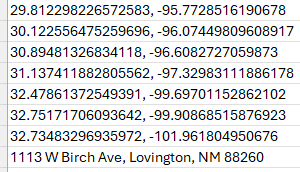
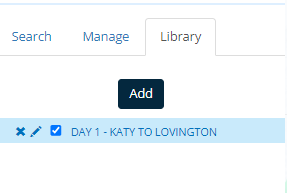
      @Hans-van-de-Ven-MR-MRA I have successfully created and imported a *.csv file into POI.
      c0df7d23-a9e4-4309-bed7-7b62ebca1b7c-image.png

      b5a613e1-1132-4d5d-a154-4498f19ecbf8-image.png

      However, I am not having any success with the coordinates showing up in/along the planned route - what am I missing?

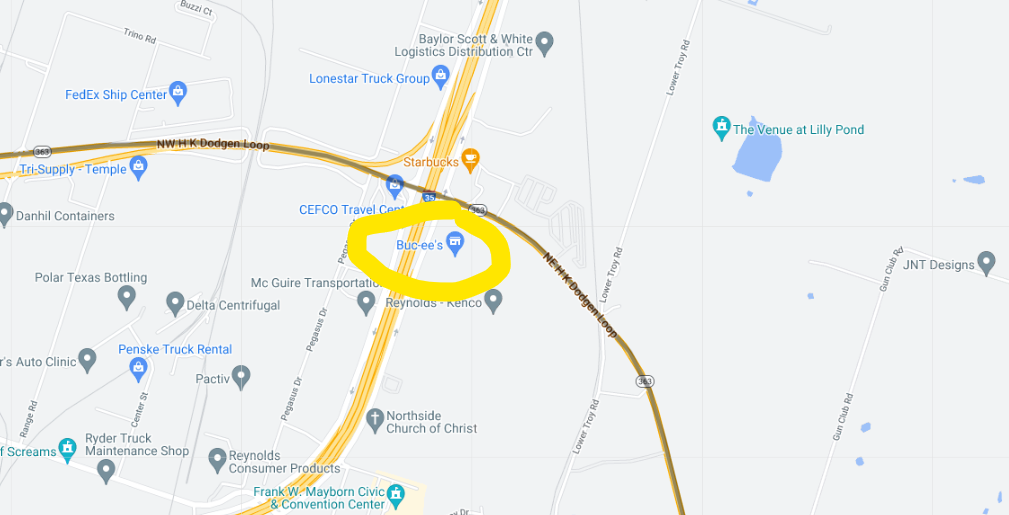
      For example, the 4th set of coordinates should show up where the yellow highlighted circle is...5ccaa81c-3e28-4485-8676-42a7d84f249b-image.png

      Hans van de Ven MR.MRA 1 Reply Last reply
      0
      • GT JWR GT JWR

        @Hans-van-de-Ven-MR-MRA I have successfully created and imported a *.csv file into POI.
        c0df7d23-a9e4-4309-bed7-7b62ebca1b7c-image.png

        b5a613e1-1132-4d5d-a154-4498f19ecbf8-image.png

        However, I am not having any success with the coordinates showing up in/along the planned route - what am I missing?

        For example, the 4th set of coordinates should show up where the yellow highlighted circle is...5ccaa81c-3e28-4485-8676-42a7d84f249b-image.png

        Hans van de Ven MR.MRA Offline
        Hans van de Ven MR.MRA Offline
        Hans van de Ven MR.MRA
        Valued contributor
        wrote on last edited by
        #5

        @GT-JWR
        Add the name like in the example

        Garmin Zumo XT3/XT2/XT/BMW Connected Ride Navigator/Tourstart/ MyRouteapp (The App)/...
        Een dag niet gelachen is een dag niet geleefd / Een route is net zo goed als deze uitgezet is.

        GT JWR 1 Reply Last reply
        0
        • Hans van de Ven MR.MRA Hans van de Ven MR.MRA

          @GT-JWR
          Add the name like in the example

          GT JWR Offline
          GT JWR Offline
          GT JWR
          Valued contributor
          wrote on last edited by
          #6

          @Hans-van-de-Ven-MR-MRA when I click on 'Add', it simply wants me to re-import the file - it does not add it to the route map. 🤷

          RetiredWingMan 1 Reply Last reply
          0
          • GT JWR GT JWR

            @Hans-van-de-Ven-MR-MRA when I click on 'Add', it simply wants me to re-import the file - it does not add it to the route map. 🤷

            RetiredWingMan Offline
            RetiredWingMan Offline
            RetiredWingMan
            Valued contributor
            wrote on last edited by
            #7

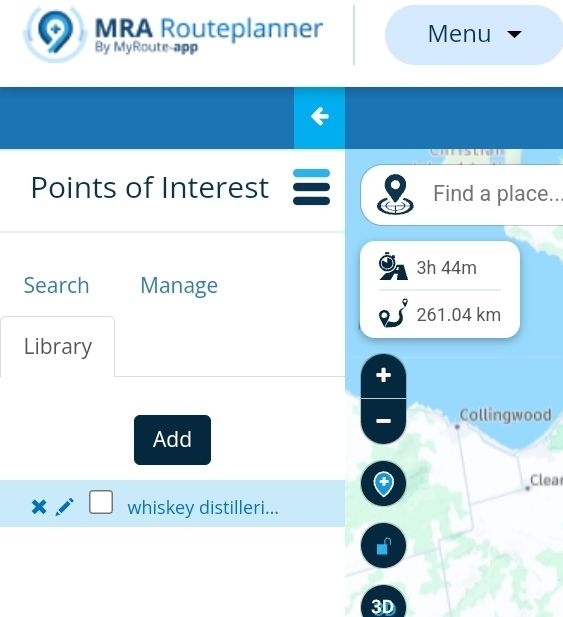
            @GT-JWR use the 3 bar menu (top left side) to display points of interest.
            Screenshot_20240608-230426_Chrome.jpg

            2010 GL1800 Goldwing using Samsung Galaxy S20 5G Android 13.

            GT JWR 1 Reply Last reply
            0
            • RetiredWingMan RetiredWingMan

              @GT-JWR use the 3 bar menu (top left side) to display points of interest.
              Screenshot_20240608-230426_Chrome.jpg

              GT JWR Offline
              GT JWR Offline
              GT JWR
              Valued contributor
              wrote on last edited by GT JWR
              #8

              @RetiredWingMan I did...see this image above. 83b2166f-5fbb-4bcc-b15c-354c4937ef18-image.png
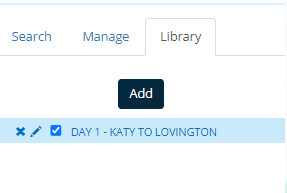
              Clicking on 'Add' does nothing except wanting to re-import the file - absolutely no coordinates from that file get added to the map I am wanting to add them to. 🤷 Something's missing?

              RetiredWingMan 1 Reply Last reply
              0
              • GT JWR GT JWR

                @RetiredWingMan I did...see this image above. 83b2166f-5fbb-4bcc-b15c-354c4937ef18-image.png

                Clicking on 'Add' does nothing except wanting to re-import the file - absolutely no coordinates from that file get added to the map I am wanting to add them to. 🤷 Something's missing?

                RetiredWingMan Offline
                RetiredWingMan Offline
                RetiredWingMan
                Valued contributor
                wrote on last edited by
                #9

                @GT-JWR when you go back to the map your POIs should appear. You may have to zoom in a bit for them to appear.

                2010 GL1800 Goldwing using Samsung Galaxy S20 5G Android 13.

                1 Reply Last reply
                0
                • paul69 Offline
                  paul69 Offline
                  paul69
                  wrote on last edited by
                  #10

                  hi @GT-JWR

                  i have just used the top co-ordinate that you put in the screen shot
                  29.812298226572583, -95.7728516190678

                  and this was the rsult when i added it as a POI, obviously the blue square, i just named it test for a sample.
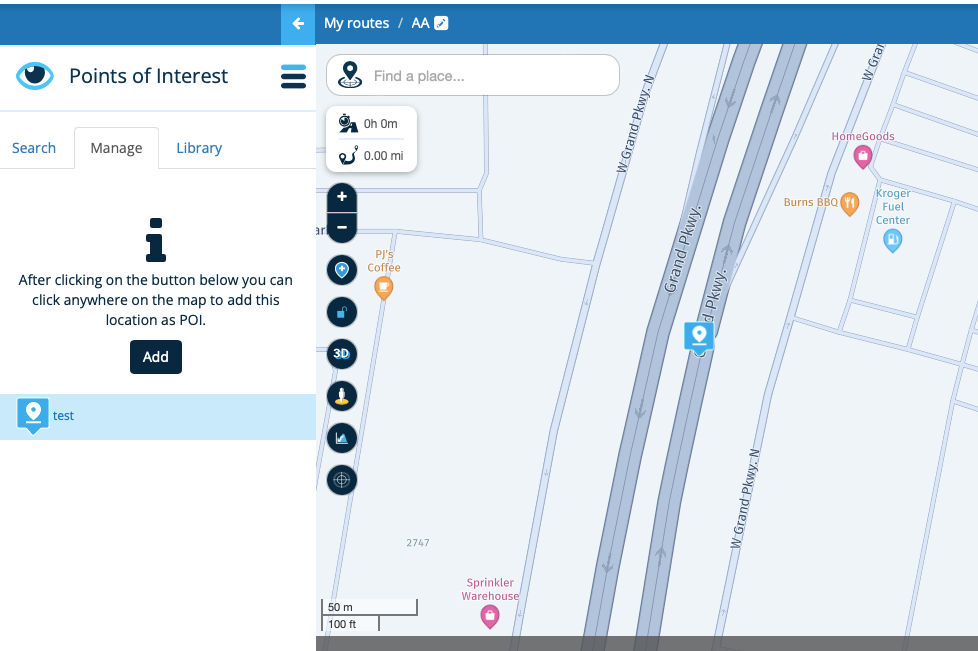
                  Screenshot 2024-06-09 at 17.41.28.png

                  so this seems to work for me.

                  to achieve, we must first attempt ✌️
                  K1600 GTL
                  Oukitel RT3
                  iPhone 13 Pro, carpuride 702b

                  GT JWR 1 Reply Last reply
                  0
                  • paul69 paul69

                    hi @GT-JWR

                    i have just used the top co-ordinate that you put in the screen shot
                    29.812298226572583, -95.7728516190678

                    and this was the rsult when i added it as a POI, obviously the blue square, i just named it test for a sample.

                    Screenshot 2024-06-09 at 17.41.28.png

                    so this seems to work for me.

                    GT JWR Offline
                    GT JWR Offline
                    GT JWR
                    Valued contributor
                    wrote on last edited by
                    #11

                    @paul69 @RetiredWingMan - appreciate the advice.

                    Perhaps I need to clarify, to make sure I understand what takes place vs what is supposed to take place.

                    If I have a *.csv file, that has 20 coordinates it it, for example, what are the steps? My understanding of what should happen:

                    • click on POI, which opens 3 options.... Search, Manage & Library.
                    • go to Library, click on Add...select the *.csv file, and it imports
                    • place a check in the box, and ALL coordinates in that file should now show on the map.

                    Is this correct?

                    None of the coordinates show up, even when zoomed in.

                    According to the Manual in loading POI's, it should work.
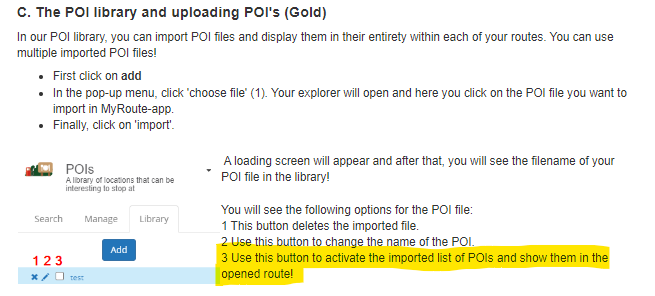
                    80c98639-48f6-4f44-9c73-8350d4800638-image.png

                    RetiredWingMan 1 Reply Last reply
                    0
                    • paul69 Offline
                      paul69 Offline
                      paul69
                      wrote on last edited by
                      #12

                      hi @GT-JWR

                      apologies but I am unable to help any further, I do not normally use this function, I only tried it to see if it worked for me.

                      somebody with a lot more experience than I will be along to help you, of that, I am sure.

                      to achieve, we must first attempt ✌️
                      K1600 GTL
                      Oukitel RT3
                      iPhone 13 Pro, carpuride 702b

                      1 Reply Last reply
                      1
                      • GT JWR GT JWR

                        @paul69 @RetiredWingMan - appreciate the advice.

                        Perhaps I need to clarify, to make sure I understand what takes place vs what is supposed to take place.

                        If I have a *.csv file, that has 20 coordinates it it, for example, what are the steps? My understanding of what should happen:

                        • click on POI, which opens 3 options.... Search, Manage & Library.
                        • go to Library, click on Add...select the *.csv file, and it imports
                        • place a check in the box, and ALL coordinates in that file should now show on the map.

                        Is this correct?

                        None of the coordinates show up, even when zoomed in.

                        According to the Manual in loading POI's, it should work.

                        80c98639-48f6-4f44-9c73-8350d4800638-image.png

                        RetiredWingMan Offline
                        RetiredWingMan Offline
                        RetiredWingMan
                        Valued contributor
                        wrote on last edited by RetiredWingMan
                        #13

                        @GT-JWR as you can see in the screen shot below, I added a POI list of distilleries in Scotland. When I zoom in sufficiently, they appear on the planning map. The only thing I can think of is that your file of POIs does not include all of the data required to properly create the POIs. You did not replicate the example in June of the first responses. Your missing a name for the POI as well as a trailing text field.

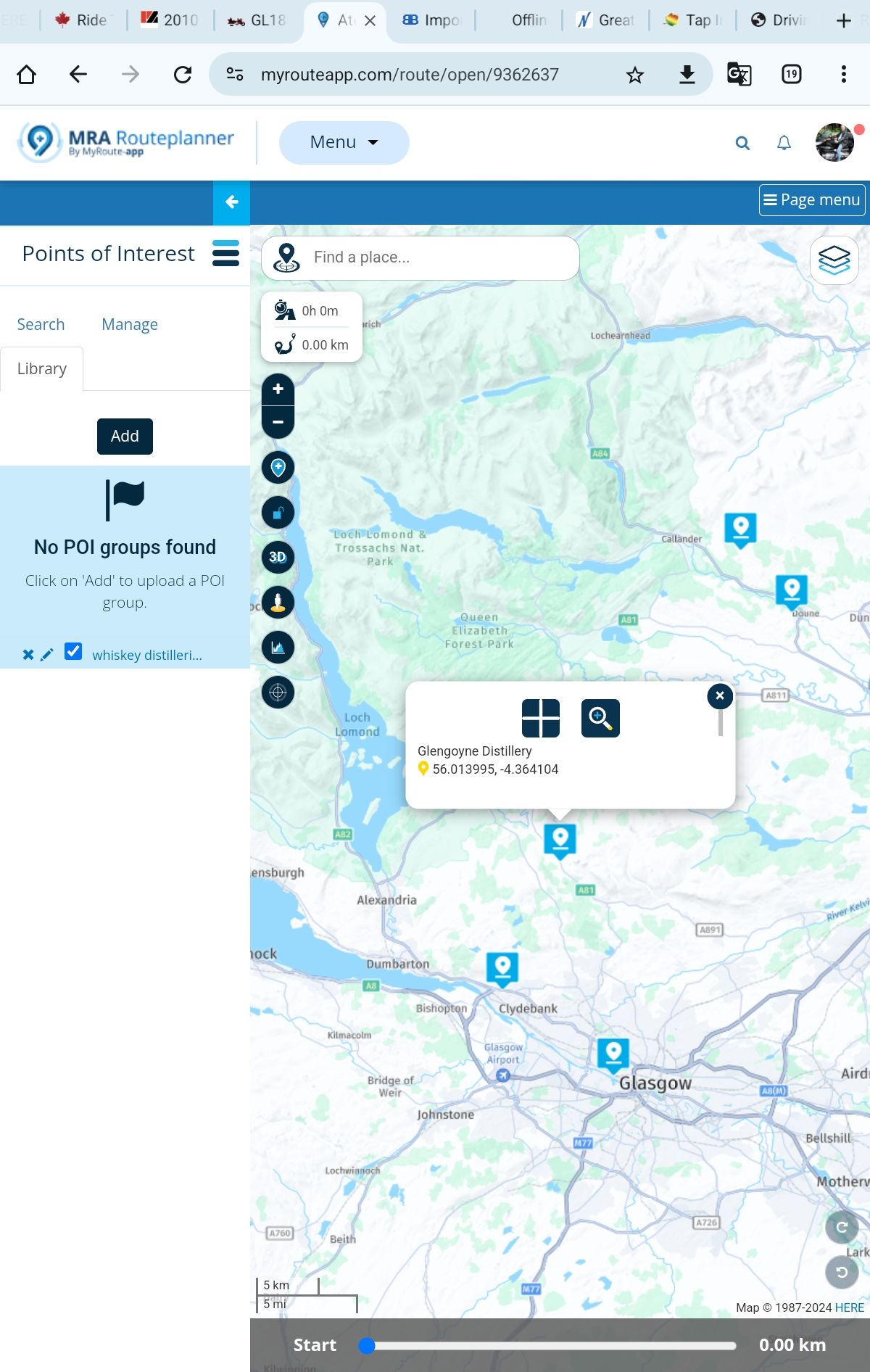
                        Screenshot_20240610-095250_Chrome.jpg

                        Screenshot_20240610-094748_Chrome.jpg

                        2010 GL1800 Goldwing using Samsung Galaxy S20 5G Android 13.

                        GT JWR 1 Reply Last reply
                        0
                        • RetiredWingMan RetiredWingMan

                          @GT-JWR as you can see in the screen shot below, I added a POI list of distilleries in Scotland. When I zoom in sufficiently, they appear on the planning map. The only thing I can think of is that your file of POIs does not include all of the data required to properly create the POIs. You did not replicate the example in June of the first responses. Your missing a name for the POI as well as a trailing text field.

                          Screenshot_20240610-095250_Chrome.jpg

                          Screenshot_20240610-094748_Chrome.jpg

                          GT JWR Offline
                          GT JWR Offline
                          GT JWR
                          Valued contributor
                          wrote on last edited by
                          #14

                          @RetiredWingMan I will input names and see if that brings me success! Thanks.

                          Hans van de Ven MR.MRA 1 Reply Last reply
                          0
                          • GT JWR GT JWR

                            @RetiredWingMan I will input names and see if that brings me success! Thanks.

                            Hans van de Ven MR.MRA Offline
                            Hans van de Ven MR.MRA Offline
                            Hans van de Ven MR.MRA
                            Valued contributor
                            wrote on last edited by
                            #15

                            @GT-JWR

                            Download this file as: POI.csv
                            https://www.facebook.com/share/p/BPkBZXz1GWxdUjU1/

                            And then upload it as POi

                            Garmin Zumo XT3/XT2/XT/BMW Connected Ride Navigator/Tourstart/ MyRouteapp (The App)/...
                            Een dag niet gelachen is een dag niet geleefd / Een route is net zo goed als deze uitgezet is.

                            GT JWR 1 Reply Last reply
                            0
                            • Hans van de Ven MR.MRA Hans van de Ven MR.MRA

                              @GT-JWR

                              Download this file as: POI.csv
                              https://www.facebook.com/share/p/BPkBZXz1GWxdUjU1/

                              And then upload it as POi

                              GT JWR Offline
                              GT JWR Offline
                              GT JWR
                              Valued contributor
                              wrote on last edited by
                              #16

                              @Hans-van-de-Ven-MR-MRA I did that - the link opens MRA directly, and all POI's are there.

                              So then out of curiousity, I went to the 'Files' on that FB page, found this file, Afsluitingen_NLD_20220118.csv, and when saving to my PC, noticed it was a 'CSV UTF-8' file. Thinking this might have something to do with the issue I'm having, I also saved it as a simple '*,CSV' file.

                              Then added both to my POI list, both opened up and showed as expected.

                              Perhaps I have something wrong with the file I am trying to load?

                              ...tried to copy file here, saying I don't have enough privelages...will try to copy in a 2nd reply.

                              GT JWR 1 Reply Last reply
                              0
                              • GT JWR GT JWR

                                @Hans-van-de-Ven-MR-MRA I did that - the link opens MRA directly, and all POI's are there.

                                So then out of curiousity, I went to the 'Files' on that FB page, found this file, Afsluitingen_NLD_20220118.csv, and when saving to my PC, noticed it was a 'CSV UTF-8' file. Thinking this might have something to do with the issue I'm having, I also saved it as a simple '*,CSV' file.

                                Then added both to my POI list, both opened up and showed as expected.

                                Perhaps I have something wrong with the file I am trying to load?

                                ...tried to copy file here, saying I don't have enough privelages...will try to copy in a 2nd reply.

                                GT JWR Offline
                                GT JWR Offline
                                GT JWR
                                Valued contributor
                                wrote on last edited by
                                #17

                                @Hans-van-de-Ven-MR-MRA ...well, appears I cannot attach the file... 😞

                                1 Reply Last reply
                                0

                                Hello! It looks like you're interested in this conversation, but you don't have an account yet.

                                Getting fed up of having to scroll through the same posts each visit? When you register for an account, you'll always come back to exactly where you were before, and choose to be notified of new replies (either via email, or push notification). You'll also be able to save bookmarks and upvote posts to show your appreciation to other community members.

                                With your input, this post could be even better 💗

                                Register Login
                                Reply
                                • Reply as topic
                                Log in to reply
                                • Oldest to Newest
                                • Newest to Oldest
                                • Most Votes


                                ACTIVE USERS
                                paul69
                                paul69
                                Hans van de Ven MR.MRA
                                Hans van de Ven MR.MRA
                                RetiredWingMan
                                RetiredWingMan
                                GT JWR
                                GT JWR
                                POPULAR TOPICS
                                • Paar onduidelijkheden.
                                  Travellexxie
                                  Travellexxie
                                  1
                                  16
                                  163

                                • Giving folders its own color
                                  Brian McG
                                  Brian McG
                                  0
                                  9
                                  201

                                • Er gaat hier iets mis melding
                                  Travellexxie
                                  Travellexxie
                                  0
                                  14
                                  293

                                • Wegwerkzaamheden worden niet goed toegepast
                                  Con Hennekens
                                  Con Hennekens
                                  0
                                  7
                                  115

                                • Route app reageert niet
                                  Erik Schouten
                                  Erik Schouten
                                  0
                                  4
                                  46

                                • Vormingspunt, viapunt en Eindpunt op Carplay
                                  Huibertus
                                  Huibertus
                                  0
                                  3
                                  30

                                • Blauwe routelijn lijft in Carplay wit
                                  Corjan Meijerink
                                  Corjan Meijerink
                                  0
                                  4
                                  66

                                • New update 5.2 - Avoid roadblocks, persistent map items, POI management and share
                                  M. Schrijver
                                  M. Schrijver
                                  28
                                  61
                                  7.0k

                                MY GROUPS
                                • Login

                                • Login or register to search.
                                • First post
                                  Last post
                                0
                                • Categories
                                • Recent
                                • Popular
                                • Support
                                • MyRoute-app