Skip to content
  • Categories
  • Recent
  • Popular
  • Support
  • MyRoute-app
Collapse
Brand Logo

MRA Community Forum

  1. Home
  2. The MyRoute-app
  3. [App] Problems, Bugs and other Issues
  4. Mapping error

Mapping error

Scheduled Pinned Locked Moved [App] Problems, Bugs and other Issues
10 Posts 4 Posters 2.8k Views 1 Watching
  • Oldest to Newest
  • Newest to Oldest
  • Most Votes
Reply
  • Reply as topic
Log in to reply
This topic has been deleted. Only users with topic management privileges can see it.
  • Roger Needham 0 Offline
    Roger Needham 0 Offline
    Roger Needham 0
    wrote on last edited by
    #1

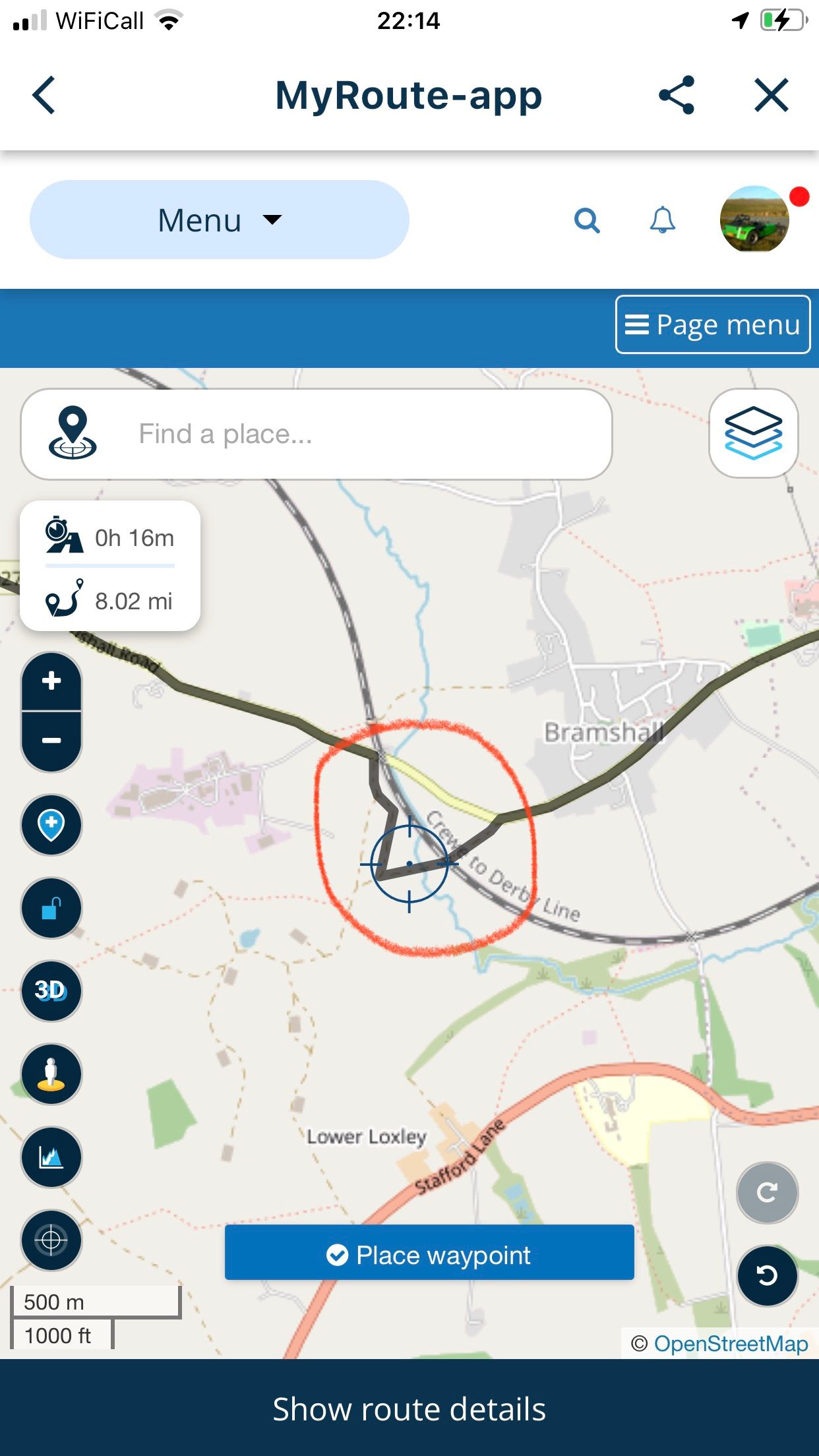
    I created a route between Uttoxeter and Stone on the B5027 (see pic) and part way along the mapping seems to cut out part of the road and tries to send you along footpaths. This stretch of road is fully open to vehicles, so just seems to be a bug
    IMG_3363.jpeg

    Rob Verhoeff 1 Reply Last reply
    0
    • Roger Needham 0 Roger Needham 0

      I created a route between Uttoxeter and Stone on the B5027 (see pic) and part way along the mapping seems to cut out part of the road and tries to send you along footpaths. This stretch of road is fully open to vehicles, so just seems to be a bug

      IMG_3363.jpeg

      Rob Verhoeff Offline
      Rob Verhoeff Offline
      Rob Verhoeff
      Alpha tester
      wrote on last edited by Rob Verhoeff
      #2

      @Roger-Needham-0 is it for a reason that you are planning with the OpenStreetMap? If you use the Here-map (wich is also used when navigating) then you should plan your route in the Here-map. In Here the route leads you over the normal road.

      🏍️ BMW K1600GT-P (2013) | Nolan N100-5 with Sena 30K
      📱 iOS on iPhone 13 & 16 (mounted on Quadlock or AliExpress extention on BMW-cradle)
      🚙 Apple CarPlay in VW T-Roc
      💻 Routelab on MacBook Air & iMac (Tahoe & Ventura)

      Roger Needham 0 1 Reply Last reply
      0
      • Rob Verhoeff Rob Verhoeff

        @Roger-Needham-0 is it for a reason that you are planning with the OpenStreetMap? If you use the Here-map (wich is also used when navigating) then you should plan your route in the Here-map. In Here the route leads you over the normal road.

        Roger Needham 0 Offline
        Roger Needham 0 Offline
        Roger Needham 0
        wrote on last edited by
        #3

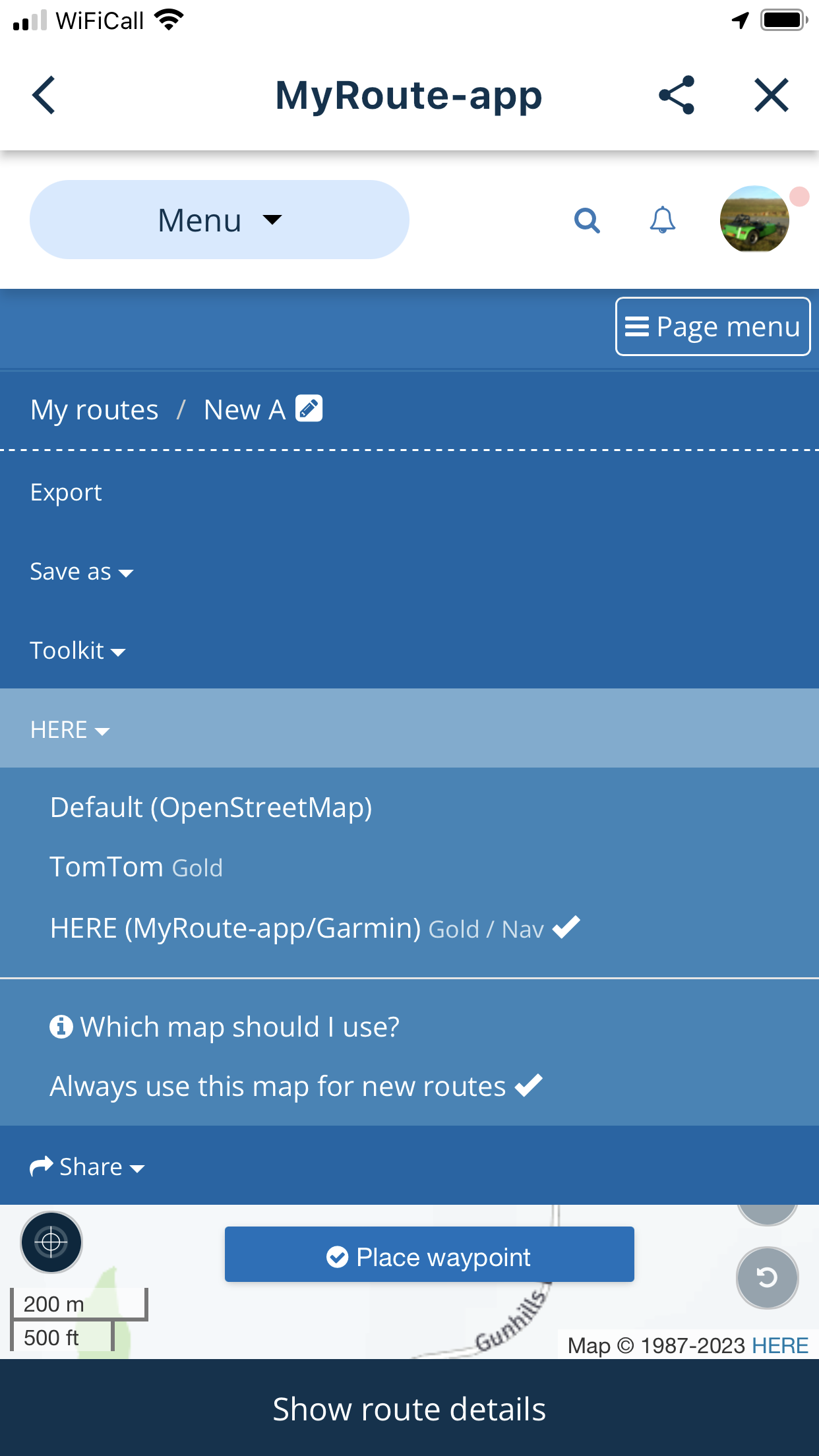
        @Rob-Verhoeff thanks Rob, I have been trying to select ‘Here’ maps as my default mapping option when planning … see below
        IMG_3371.png

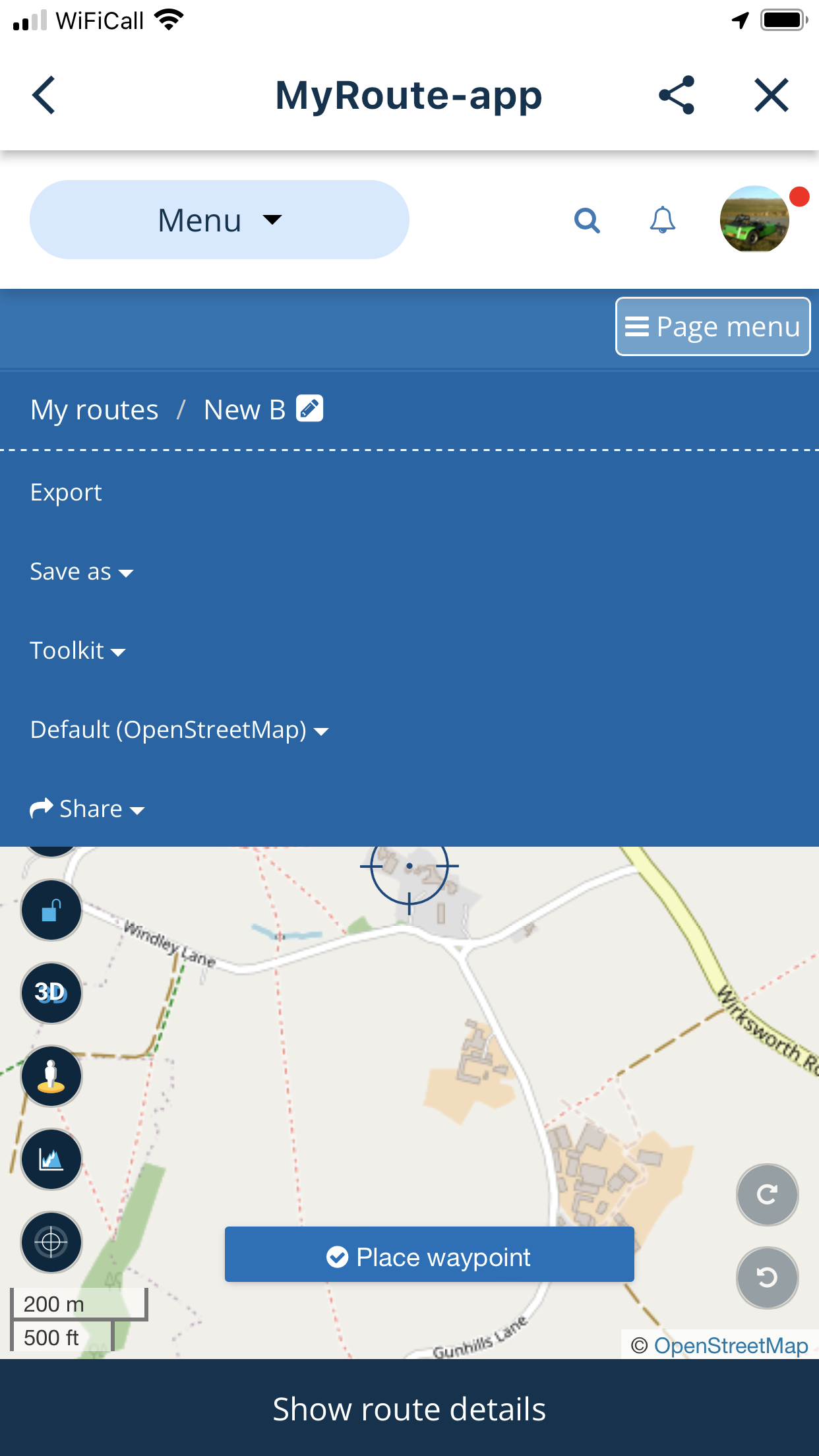
        But each time I go back into create another route the system seems to have ignored my preference and gone back to OpenStreetmap … see below
        IMG_3372.png

        Also if there’s an error in a map, there’s an error so it should be corrected

        Herko ter Horst 1 Reply Last reply
        0
        • Roger Needham 0 Roger Needham 0

          @Rob-Verhoeff thanks Rob, I have been trying to select ‘Here’ maps as my default mapping option when planning … see below
          IMG_3371.png

          But each time I go back into create another route the system seems to have ignored my preference and gone back to OpenStreetmap … see below
          IMG_3372.png

          Also if there’s an error in a map, there’s an error so it should be corrected

          Herko ter Horst Offline
          Herko ter Horst Offline
          Herko ter Horst
          wrote on last edited by Herko ter Horst
          #4

          @Roger-Needham-0 The app ignoring your default map setting is something MRA can potentially do something about. Errors in maps are not. Each map provider (OSM, HERE and TomTom) has its own procedure for reporting errors. You can report issues there and they will trickle down to MRA eventually.

          Just tried to replicate this issue. Using the HERE or TomTom maps, the route looks correct, so this seems to be an issue specific to OSM. However, I don't see anything on the map itself (on https://www.openstreetmap.org/search?query=Bramshall#map=14/52.8967/-1.9192) that would cause this.

          Roger Needham 0 1 Reply Last reply
          0
          • Herko ter Horst Herko ter Horst

            @Roger-Needham-0 The app ignoring your default map setting is something MRA can potentially do something about. Errors in maps are not. Each map provider (OSM, HERE and TomTom) has its own procedure for reporting errors. You can report issues there and they will trickle down to MRA eventually.

            Just tried to replicate this issue. Using the HERE or TomTom maps, the route looks correct, so this seems to be an issue specific to OSM. However, I don't see anything on the map itself (on https://www.openstreetmap.org/search?query=Bramshall#map=14/52.8967/-1.9192) that would cause this.

            Roger Needham 0 Offline
            Roger Needham 0 Offline
            Roger Needham 0
            wrote on last edited by
            #5

            Thanks Herko, is this right forum folder in which to report the Here vs OSM issue to the MRA tech folks?

            Rob Verhoeff 1 Reply Last reply
            0
            • Roger Needham 0 Roger Needham 0

              Thanks Herko, is this right forum folder in which to report the Here vs OSM issue to the MRA tech folks?

              Rob Verhoeff Offline
              Rob Verhoeff Offline
              Rob Verhoeff
              Alpha tester
              wrote on last edited by Rob Verhoeff
              #6

              @Roger-Needham-0 No. You have to report the map issues to OSM directly.

              Strange that your default settings are not being saved. You do have the gold subscription, right? Here- and TomTom maps are gold features. If so, I advise you to open a support ticket.

              🏍️ BMW K1600GT-P (2013) | Nolan N100-5 with Sena 30K
              📱 iOS on iPhone 13 & 16 (mounted on Quadlock or AliExpress extention on BMW-cradle)
              🚙 Apple CarPlay in VW T-Roc
              💻 Routelab on MacBook Air & iMac (Tahoe & Ventura)

              Roger Needham 0 1 Reply Last reply
              0
              • Rob Verhoeff Rob Verhoeff

                @Roger-Needham-0 No. You have to report the map issues to OSM directly.

                Strange that your default settings are not being saved. You do have the gold subscription, right? Here- and TomTom maps are gold features. If so, I advise you to open a support ticket.

                Roger Needham 0 Offline
                Roger Needham 0 Offline
                Roger Needham 0
                wrote on last edited by
                #7

                @Rob-Verhoeff I’m not a Gold member but I have paid the premium to be a Beta tester

                Herko ter Horst 1 Reply Last reply
                0
                • Roger Needham 0 Roger Needham 0

                  @Rob-Verhoeff I’m not a Gold member but I have paid the premium to be a Beta tester

                  Herko ter Horst Offline
                  Herko ter Horst Offline
                  Herko ter Horst
                  wrote on last edited by
                  #8

                  @Roger-Needham-0 I think that means you have a Navigation (lifetime) subscription. That should give you access to the HERE map (but not the TomTom map) in the planner, so setting HERE as the default map should work.

                  Roger Needham 0 1 Reply Last reply
                  0
                  • Herko ter Horst Herko ter Horst

                    @Roger-Needham-0 I think that means you have a Navigation (lifetime) subscription. That should give you access to the HERE map (but not the TomTom map) in the planner, so setting HERE as the default map should work.

                    Roger Needham 0 Offline
                    Roger Needham 0 Offline
                    Roger Needham 0
                    wrote on last edited by
                    #9

                    @Herko-ter-Horst I’ve submitted a support ticket including the above screenshots, so hopefully I’ll get some feedback soon

                    1 Reply Last reply
                    0
                    • richtea999 Offline
                      richtea999 Offline
                      richtea999
                      Valued contributor
                      wrote on last edited by richtea999
                      #10

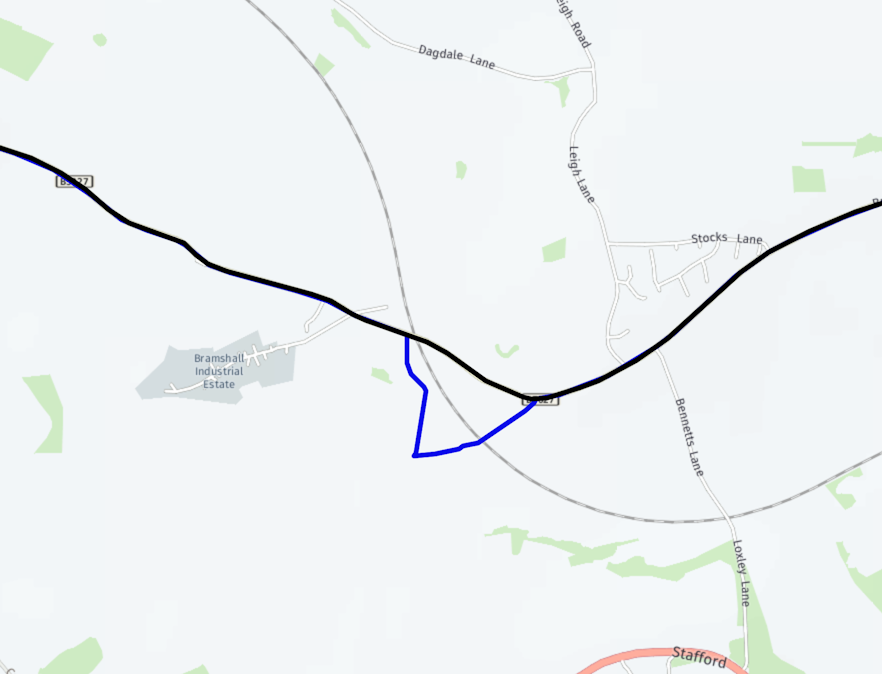
                      It's definitely an OSM problem. Here are the two routes overlaid (which is a 'Gold' feature in the tools, so unfortunately not available to you) with OSM in blue and HERE in black:
                      Screenshot 2023-07-27 at 15.51.04.png

                      I'm not trying to up-sell, but you might want to consider Gold if you're planning do a lot of route work. The 'Compare route with' option is a good way to double-check the route is going to work on all devices, and not slightly iffy!
                      (You can compare with TomTom too.)

                      1 Reply Last reply
                      1

                      Hello! It looks like you're interested in this conversation, but you don't have an account yet.

                      Getting fed up of having to scroll through the same posts each visit? When you register for an account, you'll always come back to exactly where you were before, and choose to be notified of new replies (either via email, or push notification). You'll also be able to save bookmarks and upvote posts to show your appreciation to other community members.

                      With your input, this post could be even better 💗

                      Register Login
                      Reply
                      • Reply as topic
                      Log in to reply
                      • Oldest to Newest
                      • Newest to Oldest
                      • Most Votes


                      ACTIVE USERS
                      Rob Verhoeff
                      Rob Verhoeff
                      Roger Needham 0
                      Roger Needham 0
                      richtea999
                      richtea999
                      Herko ter Horst
                      Herko ter Horst
                      POPULAR TOPICS
                      • HERE maps updates
                        Peter Zehentreiter
                        Peter Zehentreiter
                        0
                        4
                        120

                      • GPX Versions 1.1 vs 1.2 for Garmin Visually Explained
                        Guzzist
                        Guzzist
                        7
                        166
                        11.9k

                      • Linker in MRA kleurt blauw (alles geselecteerd)
                        Alfred Schrittwieser
                        Alfred Schrittwieser
                        0
                        10
                        198

                      • Auto skip many waypoints by itself while I was on route. [5.2.0 - 474]
                        Brian McG
                        Brian McG
                        0
                        34
                        1.3k

                      • Route maken in TomTom kaart en vervolgens met de app navigeren
                        Bruno 7
                        Bruno 7
                        0
                        6
                        136

                      • Straatnamen worden uitgesproken
                        Theo Lammerts
                        Theo Lammerts
                        0
                        5
                        310

                      • The compas direction on the elevation circle is wrong
                        Dave J 0
                        Dave J 0
                        0
                        23
                        632

                      • Useful Speed Camera Information
                        Marinus van Deudekom
                        Marinus van Deudekom
                        3
                        3
                        158

                      MY GROUPS
                      • Login

                      • Login or register to search.
                      • First post
                        Last post
                      0
                      • Categories
                      • Recent
                      • Popular
                      • Support
                      • MyRoute-app