Skip to content
  • Categories
  • Recent
  • Popular
  • Support
  • MyRoute-app
Collapse
Brand Logo

MRA Community Forum

  1. Home
  2. The MyRoute-app
  3. [App] Problems, Bugs and other Issues
  4. GPX route transfer to Zumo XT not working

GPX route transfer to Zumo XT not working

Scheduled Pinned Locked Moved [App] Problems, Bugs and other Issues
27 Posts 6 Posters 14.0k Views 2 Watching
  • Oldest to Newest
  • Newest to Oldest
  • Most Votes
Reply
  • Reply as topic
Log in to reply
This topic has been deleted. Only users with topic management privileges can see it.
  • HABVEN aka MrMRA HABVEN aka MrMRA

    @Don-Stauffer

    When you go to trips on the XT and choose import via the menu?
    Don Stauffer
    Don Stauffer
    Don Stauffer
    wrote on last edited by
    #18

    @Hans-van-de-Ven-MRA-Master The new route does not appear on the list in the 'Trip Planner' on the XT. I see previous routes that I have transferred, but I think the process is failing before that point.

    I'm getting the same failure using two different devices. The same version of the Drive app works for others. Opening the file using the App or the website (is there a difference?) produces the same error. A hard-wire (USB) transfer does work from my Desktop using the MRA website and Connector app. Tracks do transfer properly.

    The only thing I can think of is a hard reset of the Zumo. The software reports as up to date. I can re-import my saved locations using the Garmin Explore website, so it will not be too inconvenient.

    Thanks!

    HABVEN aka MrMRA 1 Reply Last reply
    0
    • Don Stauffer Don Stauffer

      @Hans-van-de-Ven-MRA-Master The new route does not appear on the list in the 'Trip Planner' on the XT. I see previous routes that I have transferred, but I think the process is failing before that point.

      I'm getting the same failure using two different devices. The same version of the Drive app works for others. Opening the file using the App or the website (is there a difference?) produces the same error. A hard-wire (USB) transfer does work from my Desktop using the MRA website and Connector app. Tracks do transfer properly.

      The only thing I can think of is a hard reset of the Zumo. The software reports as up to date. I can re-import my saved locations using the Garmin Explore website, so it will not be too inconvenient.

      Thanks!

      HABVEN aka MrMRA
      HABVEN aka MrMRA
      HABVEN aka MrMRA
      Valued contributor
      wrote on last edited by
      #19

      @Don-Stauffer

      Can you share the url of the route? Make sure it is set public

      BMW BMW Connected Ride Navigator/Garmin Zumo XT3/XT2/XT//Tourstart/ MyRouteapp (The App)/...
      Een dag niet gelachen is een dag niet geleefd / Een route is net zo goed als deze uitgezet is.

      Don Stauffer 1 Reply Last reply
      0
      • HABVEN aka MrMRA HABVEN aka MrMRA

        @Don-Stauffer

        Can you share the url of the route? Make sure it is set public

        Don Stauffer
        Don Stauffer
        Don Stauffer
        wrote on last edited by
        #20

        @Hans-van-de-Ven-MRA-Master Certainly.
        https://www.myrouteapp.com/en/social/route/7863171?mode=share

        Thanks for your time and attention!

        HABVEN aka MrMRA 1 Reply Last reply
        0
        • Don Stauffer Don Stauffer

          @Hans-van-de-Ven-MRA-Master Certainly.
          https://www.myrouteapp.com/en/social/route/7863171?mode=share

          Thanks for your time and attention!

          HABVEN aka MrMRA
          HABVEN aka MrMRA
          HABVEN aka MrMRA
          Valued contributor
          wrote on last edited by
          #21

          @Don-Stauffer

          Hi Don,

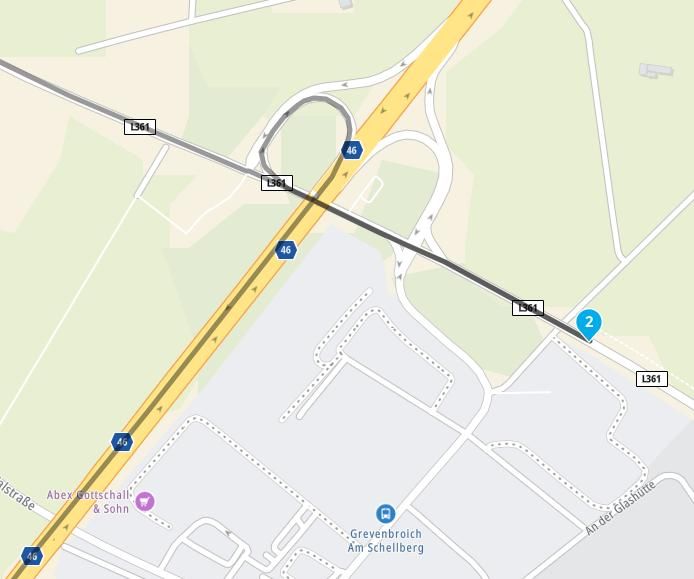
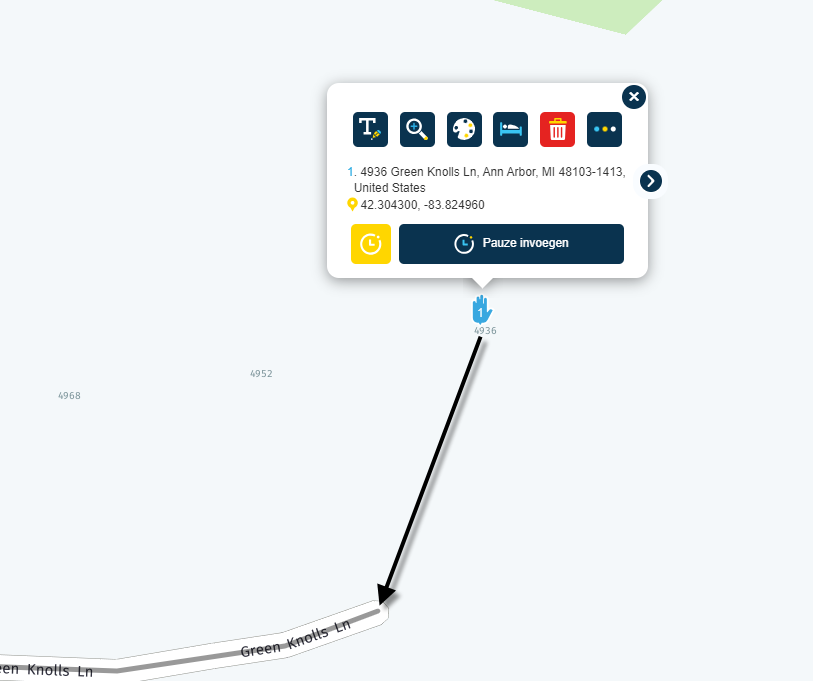
          Always place the waypoints on the route line.
          See also points 6 and 10
          Then try again
          332965df-2092-491f-8d38-07b0f181c2c7-image.png

          BMW BMW Connected Ride Navigator/Garmin Zumo XT3/XT2/XT//Tourstart/ MyRouteapp (The App)/...
          Een dag niet gelachen is een dag niet geleefd / Een route is net zo goed als deze uitgezet is.

          Don Stauffer 1 Reply Last reply
          0
          • HABVEN aka MrMRA HABVEN aka MrMRA

            @Don-Stauffer

            Hi Don,

            Always place the waypoints on the route line.
            See also points 6 and 10
            Then try again
            332965df-2092-491f-8d38-07b0f181c2c7-image.png

            Don Stauffer
            Don Stauffer
            Don Stauffer
            wrote on last edited by
            #22

            @Hans-van-de-Ven-MRA-Master Route has been updated, the start and finish were based on actual street addresses, but I moved them to an on-street location. I fixed the other off-route waypoint as well.

            But still no change in the transfer to the Zumo, the track imported, but the route failed.

            HABVEN aka MrMRA 1 Reply Last reply
            0
            • Don Stauffer Don Stauffer

              @Hans-van-de-Ven-MRA-Master Route has been updated, the start and finish were based on actual street addresses, but I moved them to an on-street location. I fixed the other off-route waypoint as well.

              But still no change in the transfer to the Zumo, the track imported, but the route failed.

              HABVEN aka MrMRA
              HABVEN aka MrMRA
              HABVEN aka MrMRA
              Valued contributor
              wrote on last edited by
              #23

              @Don-Stauffer

              mmm, strange.
              Have you linked Garmin Explore in the app?
              Yes, then uninstall the App, reinstall it and skip the Garmin Explore step.
              If it still doesn't work, then reset the XT to factory settings.

              BMW BMW Connected Ride Navigator/Garmin Zumo XT3/XT2/XT//Tourstart/ MyRouteapp (The App)/...
              Een dag niet gelachen is een dag niet geleefd / Een route is net zo goed als deze uitgezet is.

              Don Stauffer 2 Replies Last reply
              0
              • paul69
                paul69
                paul69
                wrote on last edited by
                #24

                hi @Don-Stauffer

                I had a similar issue a while back.

                try this ir worked for me. Uninstall the drive app from you device.

                after you reinstall the drive app, and start to go through the process, when you get to the page that asks about installing explore click "maybe later"

                this works for me

                to achieve, we must first attempt ✌️
                K1600 GTL
                Oukitel RT3
                iPhone 13 Pro, carpuride 702b

                1 Reply Last reply
                0
                • HABVEN aka MrMRA HABVEN aka MrMRA

                  @Don-Stauffer

                  mmm, strange.
                  Have you linked Garmin Explore in the app?
                  Yes, then uninstall the App, reinstall it and skip the Garmin Explore step.
                  If it still doesn't work, then reset the XT to factory settings.

                  Don Stauffer
                  Don Stauffer
                  Don Stauffer
                  wrote on last edited by
                  #25

                  @Hans-van-de-Ven-MRA-Master Interesting. I uninstalled Explore and Drive. I restarted the phone just on general principles. I then re-installed Drive, logged in using my Garmin account username and password.

                  During the re-install, I was not prompted to install Explore. I do not see that it automatically loaded without asking.

                  Anyway, the end result was the same, tracks transferred, route failed. I repeated the same test with my Samsung tablet, which did have Explore installed. With the same result.

                  For testing, I have been using the route I shared, but the transfer has been failing with every route I have tried in the past couple of months.

                  Thanks to all for suggestions, I'll reset the Garmin Zumo as a next step.

                  1 Reply Last reply
                  0
                  • HABVEN aka MrMRA HABVEN aka MrMRA

                    @Don-Stauffer

                    mmm, strange.
                    Have you linked Garmin Explore in the app?
                    Yes, then uninstall the App, reinstall it and skip the Garmin Explore step.
                    If it still doesn't work, then reset the XT to factory settings.

                    Don Stauffer
                    Don Stauffer
                    Don Stauffer
                    wrote on last edited by
                    #26

                    @Hans-van-de-Ven-MRA-Master Success! I reset the Zumo to factory default settings and cleared all user data. The Route and Track info are now downloading to the Zumo as before using the Garmin Drive app.

                    I re-installed Explore on the phone as a test, and it did not affect my ability to download routes.

                    Many thanks to Hans, and to all who helped me resolve this issue. User support is a great benefit to using MyRoute-App!

                    Best Regards;

                    Don Stauffer

                    HABVEN aka MrMRA 1 Reply Last reply
                    1
                    • Don Stauffer Don Stauffer

                      @Hans-van-de-Ven-MRA-Master Success! I reset the Zumo to factory default settings and cleared all user data. The Route and Track info are now downloading to the Zumo as before using the Garmin Drive app.

                      I re-installed Explore on the phone as a test, and it did not affect my ability to download routes.

                      Many thanks to Hans, and to all who helped me resolve this issue. User support is a great benefit to using MyRoute-App!

                      Best Regards;

                      Don Stauffer

                      HABVEN aka MrMRA
                      HABVEN aka MrMRA
                      HABVEN aka MrMRA
                      Valued contributor
                      wrote on last edited by
                      #27

                      @Don-Stauffer

                      Good to hear that it is solved.
                      I will close this topic now.

                      BMW BMW Connected Ride Navigator/Garmin Zumo XT3/XT2/XT//Tourstart/ MyRouteapp (The App)/...
                      Een dag niet gelachen is een dag niet geleefd / Een route is net zo goed als deze uitgezet is.

                      1 Reply Last reply
                      0
                      • HABVEN aka MrMRA HABVEN aka MrMRA locked this topic on

                      Hello! It looks like you're interested in this conversation, but you don't have an account yet.

                      Getting fed up of having to scroll through the same posts each visit? When you register for an account, you'll always come back to exactly where you were before, and choose to be notified of new replies (either via email, or push notification). You'll also be able to save bookmarks and upvote posts to show your appreciation to other community members.

                      With your input, this post could be even better 💗

                      Register Login

                      Reply
                      • Reply as topic
                      Log in to reply
                      • Oldest to Newest
                      • Newest to Oldest
                      • Most Votes


                      • 1
                      • 2
                      ACTIVE USERS
                      HABVEN aka MrMRA
                      HABVEN aka MrMRA
                      Con Hennekens
                      Con Hennekens
                      Marinus van Deudekom
                      Marinus van Deudekom
                      MTC-Zeilberg
                      MTC-Zeilberg
                      Don Stauffer
                      Don Stauffer
                      paul69
                      paul69
                      POPULAR TOPICS
                      • Animation
                        LennyO
                        LennyO
                        0
                        13
                        31

                      • Help please, new user
                        Bull Tahr
                        Bull Tahr
                        0
                        8
                        98

                      • A04 Menu - Waypoints on the mobile phone
                        Hubert Thoring
                        Hubert Thoring
                        0
                        6
                        28

                      • How to export GPX files to Zumo XT without recalculation
                        John S Parry
                        John S Parry
                        0
                        9
                        217

                      • How to get GROUPS into the new planner?
                        Con Hennekens
                        Con Hennekens
                        0
                        5
                        12

                      • Problem Switching App to Beta RoutePlanner
                        Lluis Arasanz
                        Lluis Arasanz
                        0
                        4
                        19

                      • Route line transparency
                        Jörgen
                        Jörgen
                        1
                        5
                        30

                      • MRA 6.00 (515) - Voice Options with iPhone 18 Pro
                        Dave J 0
                        Dave J 0
                        0
                        3
                        21

                      MY GROUPS
                      • Login

                      • Login or register to search.
                      • First post
                        Last post
                      0
                      • Categories
                      • Recent
                      • Popular
                      • Support
                      • MyRoute-app